

Unclaimed: Are you working at Zoho Meeting?
Zoho Meeting Reviews: 4.5/5 — Highly Rated
Zoho Meeting is the web conferencing platform under the Zoho ecosystem that offers comprehensive features for webinars and online meetings. The platform is completely browser-based, which means users aren’t required to download any application to attend a meeting or webinar. Recognized as one of the most easy-to-use and affordable web conferencing tools, Zoho Meetings can be used to host sales presentations, product launches, feature demonstrations, in addition to online meetings and webinars.
| Company | Zoho Corporation |
|---|---|
| Year founded | 2000 |
| Company size | 10,001+ employees |
| Headquarters | Chennai, Tamil Nadu |
| Social Media |

| Capabilities |
API
|
|---|---|
| Segment |
Small Business
Mid Market
Enterprise
|
| Deployment | Cloud / SaaS / Web-Based, Desktop Chromebook, Desktop Mac, Desktop Windows, Mobile Android, Mobile iPad, Mobile iPhone |
| Support | 24/7 (Live rep), Chat, Email/Help Desk, FAQs/Forum, Knowledge Base, Phone Support |
| Training | Documentation |
| Languages | English |
Zoho Meeting Pros and Cons
- Offers browser-based access
- No-cut off times
- Interactive video conferencing feed
- Comprehensive solutions under one roof
- Limited advanced customizations
- No HD audio, and on-demand webcasting for the webinar feature
- No technical support hotline
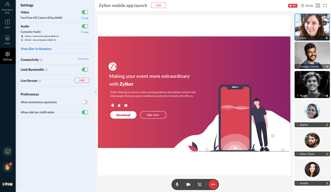
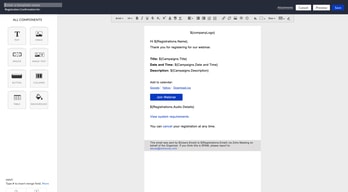
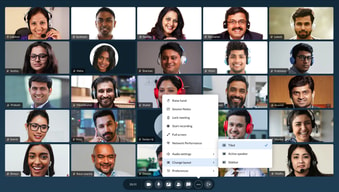
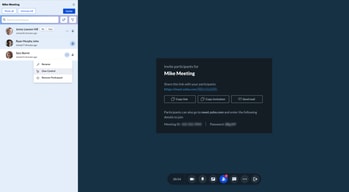






Compare Zoho Meeting with other popular tools in the same category.
the integration with our current mail platform, our interest lays in test the use of zoho meetings for conferences and for remote work. We are interested in explore more about conferences in order to communicate simultaneously with a great number of people, such community organizations.
Initially seems to be kind of uncomfortable to use but with a couple of times becomes quite easy.
quarantine times demands the use of web meetings , for us have been really helpful the chance of work remotely using Zoho meetings. we are under current investigation to expand our uses of zoho to meetings.
I like the ease of use as the software is user-friendly and not convoluted.
The user interface is lack luster. It's doesn't allow you to change the layout of the chat function from being on the left to the right which is an American standard for how we communicate. It feels backwards. Although this software runs in the cloud or browser it presents challenges for end users who don't want to update there computer Operating Systems for whatever reason.
I find the plan options useful for team meetings etc. I think that's a plus to only pay for the amount of people you need to serve verses a one size fits most approach.
comfortable pricing manageable support simple features
restrictions on intra chat options, bandwidth management is poor
internal discussions and group discussions
The Zoho Suit Very simple and affordable
Complex to receive mails when using Zoho Mails
I begin with Zoho Meeting

No Hyperbole, This was the clearest conference call I have ever had. A number of participants said the same. I had to turn down the volume at one point. Something I have never had to do with any of the other services. WOW. The administration controls are also very easy to use and quick working. I like that I am able to see which participant is talking and can quickly mute or remove individuals if need be.
Boring interface. The invitation email is also rather boring. Although, everything works and all of the participants joined the call without issue. Not a big deal in the grand scheme of things. However, it would be nice to be able to edit the look and feel of the meeting invitation
With Covid-19, I have a number of staff working remotely. Zoho Meeting allowed all of us to still gather for our Monday morning meeting just like we were still in the office.
SAME PLATFORM AS MY ZOHO BUSINESS EMAIL AND PERSONAL EMAIL
NEED FOR EASIER ACCESS AND MORE TIMELY SUPPORT
BUSINESS EMAIL IS ZOHO
Stable connections and simple functions.
If it could provide breakout room function, it might be better.
I don't need to think about the device which the person joined from. The action to join is simple- just clicking link from any devices.

before i need to try. trying to login to meeting it asked me to write a review to obtain 20 days free
to not have the choice to try it before so i don't know
i don't know at this moment
We have been using Meet till now. Zoho meetings invite option, overall UI has been great.
Meeting recording is not have video recording yet. Once it is added, then this will be best affordable app.
As mentioned above, affordability and recording feature is something we are looking for as small business. This is where Zoho meeting is helpful, although looking forward for video recording feature.
Very pratical to use and to manage meetings
The support and search for related info about the app could get lots of improvement. Although the app is very easy to use, searching for information is kind fo hard to find.
Due to COVID Zoho meeting can be a useful way do help workers to meet

Its a light aplication, don{t use to much resourses.
When you share your desktop, you can´t sew the other persons.
A meeting place to discuss and share ideas.
Un sistema ágil y eficaz. Controles intuitivos y fácilmente visibles.
Le falta la funcionalidad de levantar la mano y al compartir pantalla, sería mejor poder verla en pantalla completa en la app para android.
Ahorro de dinero respecto a Zoom
All good it is easy to use and the quality is good
nothing. sound's good but you guys have to work on the video quality
I can meet very easly. No sound problems
Zoho meeting can integrate other features of existing customer data base and integrate other Zoho modules
Little New compared with other frequently used meeting platforms such as Zoom meeting etc
Registration process and live streaming at same platform
Quickly schedule in CRM and manage contacts
There wasn't enough time to try all the functions, so cannot accurately say.
Looking for a subsitute for Zoom
No call drop, one can connect in poor network also
Nothing to dislike in it. No other app have this functions
I am a owner of coaching classes. I am conducting classes online.
Integration with CRM to create a fully integrated marketing solution.
Pricing of various Zoho tools can be a bit opaque
Looking to deliver online webinars as part of digital marketing being run from within Zoho CRM
Zoho is an easy to use teleconference system without software installation.
There are noises coming into the system.
I can talk in a video conference and share desktop at the same time.

Ease of interface with Zoho Campaigns was great.
We would like the ability to hide the amount of users online at once. So they cannot see eachother.
This is a great tool for webinars that we use to proliferate information about our products.
The connection with ZOHO Crm, it hepls to manage the clientes
Im having problems with the micro and camera
We want to do webinars and meetings every day
Ease of use and stability, the price is acceptable for the service
Not completely free, I haven't seen all the features yet
Meetings with customers
Usability and integration wirh Zoho mail,
Browser features, I had problems with Chrome
Online meetings with my org.
simplicity, excellent video presentation
background needs to be changed to make it look more exciting
Work from Home objectives, staying on top of things
Simple to create and host a meeting, it is easy to mute every one
Sound quality not very good, easy to get echo and interrupted cut
it is good currently since we are all working from home
Simple, easy to start. Other side can also connect easily. UI is very simple Recording, locking of call available Scheduled meetings go to Outlook directly
Cannot plan for repetitive meetings Cannot edit the meeting subject after the meeting is finished Multi-window video is not possible Over last few days (since 18th March) SERIOUS deterioration of quality - voice breaks, video doesnt work Sync with Outlook NA Auto toggle between Computer and Phone is NA New members joining in the call OR leaving the cal - there is no audio announcement
Remote working Collab working
Zoho Meeting is another application from Zoho Suits. I believe it is very convenient to have all the necessary app in one suits. I had once the opportunity to test the application and the result was convincing.
I haven't yet had the possibility to test the software thouroughlty, so can not yet tell you about the downside.
Zoho Meeting has allowed me to have distant meeting which is really usefull for distant team working.
Integration with other Zoho Products especially CRM.
Experienced a little flakiness unless network connection was robust.
Looking for alternative to Zoom and Goto Meeting.
Lovely tool. No delay when initiating video meetings.
Having to install a plugin for first use ins't the best solution for us for security purposes.
Initiating meetings instantly with little or no effort.
I like that there's no delay when loading meetings. Initiating meetings is a breeze.
Having to install a plugin when using this the first time. As an administrator, this can become very tedious. An extra step that should be avoided personally.
Holding meetings with potential clients using a tool that simply works
Free demo for 14 days (but extendable for another 60 days if you write reviews like this one). Simple features, uncomplicated to use.
Only one video feed at a time means that the screen switches between active speakers, but you cannot see all the participants at the same time. Mobile features are more limited than browser-based features (ex: no chat function in mobile, and cannot schedule meetings through mobile)
We host online meditation sessions with people in different countries and time zones. This has allowed us to have an online community of meditators around the world!