

Unclaimed: Are you working at Figma?
Figma Reviews: 4.7/5 — Highly Rated
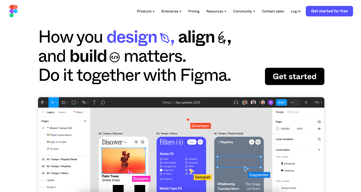
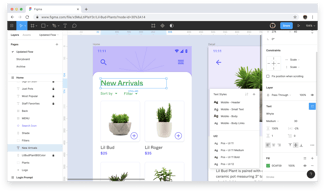
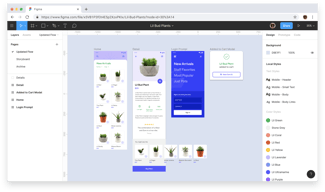
Figma is a feature-loaded design tool with tools designed to help users mockup, edit and design websites. The platform takes a more collaborative, cloud-based approach to design, which means it allows team members to design simultaneously and give each other continuous feedback as they work. This makes collaboration simpler and more effective. A free plan is available on Figma, however, premium plans offer more extensive tools and robust capabilities for web design and development as well as collaboration.
Figma is also often used as Wireframing of choice in UI/UX Design and Product Management tech stacks.

| Capabilities |
API
|
|---|---|
| Segment |
Small Business
Mid Market
Enterprise
|
| Deployment | Cloud / SaaS / Web-Based, Desktop Mac, Desktop Windows, Mobile Android, Mobile iPad, Mobile iPhone |
| Training | Documentation |
| Languages | English |
Figma Pros and Cons
- A free plan is available.
- Premium plans are more affordable than the Creative Suite.
- Collaborative tools allow developers and designers to work together.
- Figma is a feature-rich platform with robust capabilities for mocking up websites.
- Figma only concerns itself with the design aspect; you’ll still need web developers to create and implement the necessary code using other software.



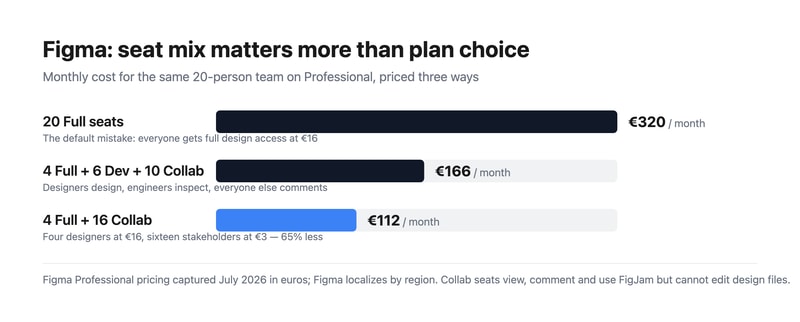
Most teams overpay for Figma by putting everybody on a Full seat. Figma sells three seat types, and the cheapest is a fifth of the price of the most expensive. A twenty-person team where four people actually design pays €320 a month doing it wrong and €112 doing it right — for identical access to the work that matters. Choosing your seat mix is a bigger decision than choosing your plan.
- What it is: The industry-standard collaborative interface design tool, now spanning design, whiteboarding, slides, dev handoff, sites, and motion.
- Best for: Any team doing product or interface design collaboratively, at essentially any size.
- Pricing: Free Starter tier. Professional from €3 to €16 per seat. Organization €5 to €55. Enterprise €5 to €90. Verified July 2026.
- The honest catch: Moving from Professional to Organization takes a Full seat from €16 to €55 — 3.4x — for governance rather than design capability.
What Is Figma?
Figma won interface design by being browser-based and genuinely multiplayer at a time when competitors were desktop applications with file handoff. Multiple designers in the same file simultaneously, a URL instead of an exported PDF, and no version confusion — that combination made it the default in a few years, and it remains the strongest argument for the product.
In 2026 it is considerably more than a design tool. The pricing page lists eight products: Figma Design, Make, Draw, Dev Mode, FigJam, Slides, Motion, Sites, and Buzz. That breadth is why the seat model exists — an engineer needs Dev Mode but not the drawing tools, and a product manager needs FigJam and comment access but not either.
Adobe’s proposed $20 billion acquisition was abandoned in late 2023 after regulatory opposition, and Figma has since gone public. For buyers, the practical consequence is that Figma remains independent rather than folded into Creative Cloud, which most of its users regarded as the better outcome.
How Figma Works
- Three seat types. Full (everything), Dev (Dev Mode, FigJam, Slides, Buzz, plus view and comment on design files), and Collab (FigJam, Slides, Buzz, view and comment with basic inspection).
- Browser-first and multiplayer. Real-time collaboration is the core mechanic, not a feature.
- Dev Mode. Structured handoff to engineers, with specs, measurements, and code snippets.
- FigJam. Whiteboarding for workshops and planning, included even on Collab seats.
- Design systems. Shared component libraries, which is where the Organization tier starts earning its cost.
- AI credits, metered per seat. 3,000 a month on a Professional Full seat, 500 on Dev and Collab, rising to 4,250 on Enterprise Full.
Figma Pricing
Captured from Figma’s pricing page in July 2026, in euros. Figma localizes currency by region, so check your own market. Organization and Enterprise bill annually only.
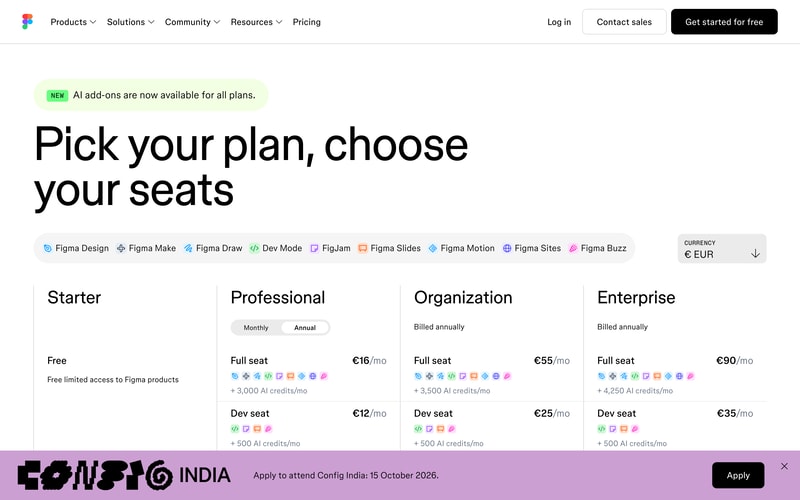
| Plan | Full seat | Dev seat | Collab seat | Billing |
|---|---|---|---|---|
| Starter | Free | — | — | Free, limited access |
| Professional | €16/mo | €12/mo | €3/mo | Monthly or annual |
| Organization | €55/mo | €25/mo | €5/mo | Annual only |
| Enterprise | €90/mo | €35/mo | €5/mo | Annual only |
The seat mix is where the money is:
- Audit who actually edits design files. In most organizations that is the designers and nobody else. Product managers, marketers, founders, and executives need to view and comment — which is a €3 Collab seat, not a €16 Full seat.
- Engineers usually want Dev, not Full. At €12 against €16 the saving is modest on Professional, but on Organization it is €25 against €55, which is substantial across an engineering team.
- The Organization jump is about governance, not design. €16 to €55 per Full seat is 3.4x, and it buys design system management, analytics, branching, and centralized administration. If you do not need those, Professional does the same design work.
- AI credits are now a differentiator between tiers. 3,000 monthly on a Professional Full seat against 4,250 on Enterprise. Heavy users of Figma Make and the AI features should check this allocation rather than assuming it is unlimited.
- The free Starter tier is genuinely useful. Unlimited drafts plus 150 AI credits a day, capped at 500 a month. For a solo designer or someone learning, it is a real product.
- Annual-only above Professional. Organization and Enterprise cannot be bought monthly, so evaluation has to happen on Professional.
Who Should Use Figma
- Product and design teams. The clearest case, and effectively the industry default. Hiring designers who do not know Figma is now the unusual scenario.
- Teams with designers and engineers collaborating. Dev Mode makes handoff structural rather than a document someone emails.
- Distributed teams. Browser-based multiplayer removes the file-sharing problem entirely.
- Organizations with design systems. The Organization tier’s library management is the reason to pay 3.4x, and for a real design system it is worth it.
It fits poorly for solo non-designers making simple graphics, where Canva is faster and cheaper; for print and photo work, which is Adobe Photoshop territory; and for teams wanting to ship a live site directly, where Framer or Webflow go from design to production.
Honest Pros and Cons
Strengths
- Genuine real-time collaboration. Still the best implementation in design software.
- Browser-based. No installation, no file versions, no platform arguments.
- A flexible seat model. Three tiers of access means you do not pay full price for viewers.
- Excellent dev handoff. Dev Mode is a real workflow improvement rather than a spec export.
- A usable free tier. Unlimited drafts, which is more than most competitors offer.
- The industry standard. Hiring, templates, plugins, and tutorials all assume Figma.
Limitations
- The Organization tier is a steep jump. 3.4x per Full seat for governance features many teams will not use.
- Seat sprawl is easy and expensive. The default assumption of Full seats for everyone is the most common overspend.
- Annual-only above Professional. No monthly option for Organization or Enterprise.
- AI credits are metered. A new constraint in 2026 that heavy AI users need to model.
- Performance on very large files. Complex documents can strain the browser.
- Product sprawl. Eight products under one brand makes working out what you are actually buying harder than it should be.
Figma Alternatives and How It Compares
- Canva is far simpler and cheaper for marketing and social design, and not a serious interface design tool.
- Framer designs and publishes a live site, which Figma does not do natively at the same level.
- Webflow is the production-web counterpart for design-led teams shipping real sites.
- Miro competes directly with FigJam for whiteboarding and workshops, with more depth in that specific area.
- Simplified targets fast marketing and ad creative rather than product design.
- Penpot is the open-source, self-hostable alternative, and Sketch remains the macOS-native option for teams who prefer a desktop application.
For related tools, browse our graphic design directory.
The Verdict
Figma is the correct default for interface design, and this is one of the least controversial recommendations in software. Real-time collaboration in the browser solved a genuine problem, Dev Mode made handoff structural rather than ceremonial, and the ecosystem effects — plugins, templates, and a hiring pool that already knows it — compound the advantage. There is no version of this evaluation where Figma is a mistake for a product team.
The decision that actually costs or saves you money is the seat mix, and it is the one most teams get wrong. The instinct is to buy everyone a Full seat, which for a twenty-person company on Professional is €320 a month. But Full seats are for people who edit design files, and in most organizations that is the designers alone. Put four designers on Full and sixteen stakeholders on Collab at €3 and the same team costs €112 — a 65% saving with nobody losing access to anything they were actually using. Audit your seats before you renew, and again after you grow.
The other judgement is when to move to Organization, and the honest framing is that the 3.4x jump per Full seat buys governance rather than design capability. Design system management, branching, analytics, and centralized administration are worth €55 a seat when you genuinely run a design system across multiple teams; they are worth nothing if you are five designers who just need to work together. Stay on Professional until a specific Organization feature is causing you a specific problem — and note that since Organization is annual-only, Professional is also the only tier where you can evaluate monthly.
FAQ
How much does Figma cost?
Captured in July 2026 in euros, Professional is €16 per month for a Full seat, €12 for a Dev seat, and €3 for a Collab seat. Organization is €55, €25, and €5 respectively, and Enterprise €90, €35, and €5, both billed annually only. A free Starter tier includes unlimited drafts and 150 AI credits per day up to 500 monthly. Figma localizes pricing by region, so check your own market.
What is the difference between Full, Dev, and Collab seats?
A Full seat gives complete access to all Figma products including editing design files. A Dev seat covers Dev Mode, FigJam, Slides, and Buzz, with view and comment access to design files — built for engineers implementing designs. A Collab seat covers FigJam, Slides, and Buzz with view, comment, and basic inspection on design files, intended for stakeholders who need visibility but never edit. Matching seats to actual behaviour is the single largest saving available.
Is Figma’s free plan good enough?
For an individual, often yes. The Starter tier includes unlimited drafts, UI kits, templates, and 150 AI credits a day capped at 500 monthly, which is enough for learning, personal projects, and solo freelance work. Team collaboration features, shared libraries, and unlimited version history require Professional, so it stops being sufficient as soon as more than one person needs to work in the same files regularly.
Should I upgrade to the Organization plan?
Only if a specific feature is solving a specific problem. Organization triples the Full seat price from €16 to €55, and what it buys is governance — design system and library management, branching, analytics, and centralized administration — rather than any additional design capability. Teams running a genuine design system across multiple product groups get value from it. Smaller teams generally do not, and should stay on Professional.
What is Figma best for?
Collaborative product and interface design at any team size, particularly where designers and engineers work together and handoff quality matters. It is the industry standard, so it also lowers hiring and onboarding friction. It is a weaker choice for marketing graphics, where Canva is faster, and for teams that want to publish a live website directly from their design, where Framer or Webflow are purpose-built.


Figma is a step in the right direction for UX design because it is cloud based with the ability to share libraries, components and styles (perfect for design systems) and users can work on the same file at the same time or share files. Built-in prototyping and commenting is a huge time saver instead of exporting to invision.
Figma's weakness is how it handles text, still no ability to do simple things like bulleted lists or numbered lists without having to do it manually. Please, please fix figma team!
Better communication and implementation of styles and standards across multiple designers.
Real time collaboration, real time commenting, and exporting
It's super slow, and drains all resources on my computer. I literally have to restart my computer every day cause it gets so slow.
Distributed design team collaboration
Helpful to be able to see designs (as well as previous iterations) in one place with ability to comment.
Hard to get started if you're a collaborator vs. a designer (e.g., main use case is to review designs rather than create them)
Has helped us to continue the conversation for designs in a more concrete way and provide feedback in a more convenient way for our designers
Its free and very intuitove and fast to use, for simple drafting.
No export options, limited prototyping. Only one option for one action.
Designing simple websites and drafting UIs
Bundles everything a designer needs into a single solution that works well with software developers.
Generally it's clunky. It's incredibly slow, there is no native rendering, links don't always link to correct places on the mocks.
Designers replaced Sketch and Zeplin with Figma. Engineering hand-off happens through Figma as well.
I love the way you can have multiple people collaborate in a design from different computers. Also, the ability to create templates with locked layers, that you can share with others so they can use to create the final visual assets that abide to the design rules you define, is a powerful way to give your business users a tool to create design assets on their own, without messing up your brand. It's also pretty easy to learn and use, which makes it a great tool for non professional designers
Some slowness on the collaboration, but nothing too serious.
Besides creating design assets from scratch, I'm using Figma to create templates of assets (like Social sharing images) that my business users can use - this allows us to scale since we are effectively supporting a growing number of business users with the same design team.
I've had a great experience with Figma. It is incredibly good at creating quick mockups. However, its not limited just to layouts. Thanks to its flexibility you can easily use it for simple prints and presentations as well. One of the strongest features is a real-time "multiplayer" collaboration, which makes it very simple to share the work with your peers.
Compared to its competitors, Figma still lacks advanced prototyping features. I often have to export design from Figma to another tool like Principle to create animations in my design.
It made my workflow so much faster, because of the simplicity of this tool. It is also very convenient to have the design in the cloud. I am never afraid of losing it and I have it with me everywhere I go.
I like that you don't have to upload or download anything to the interface. Its all right there on one screen in on application. I find that I may lose things or click out of what I am doing when I need to go back and forth. With Figma I don't have this issue.
It can be little difficult to learn how to use it at first. It would be great to have more or a tutorial of sorts.It seems simple to use when you get to the page the first time but once you are in the system there is a bit of a learning curve.
Being able to get feedback from others quickly. When you are working on something and in "the zone" you really want to go ahead and get feedback quickly so you can know if you are in the right track or not.
The tool is insanely powerful, can do wonders if run efficiently. Easy to export files in your preferred format, size, dimensions etc. makes collaboration really smooth with Figma. On top of it, the designs turn out to be brilliant. I've seen my designers churn out insanely great designs with this thing.
The UI is horrendous, to say the least. Takes a lot of time to get used to, and feels as if basic things are overcomplicated for some reason. It personally took me weeks to get hands-on with the product and feel comfortable to use for the purpose it's supposed to serve. However, designers, and I mean only professionals can use this product with the apparent ease it is supposed to work with.
Ready-to-use design templates for marketing, that's it. Find I better tool, and I'll switch. Nothing against the tool, I still feel it's good enough, just not made for everyone. Would be great if it's made a bit more inclusive like it's competitors.
Figma has given Sketch a run for its money. For instance, it is a free service to use while you must purchase Sketch. Additionally, Figma is accessible to anyone since it's in live time. This is huge, because multiple people can be working simultaneously on the project and it makes the process of designing much faster. Also, figma has a great interface and the user experience is very intuitive. It is also nice having a page dedicated to showing you all the artboards, instead of having them all on a single page.
There are some disadvantages to Figma, like you're only able to access it when you have internet. Also the exporting of files is not as seamless as other programs like Figma. I would like to be able to easily export assets. Overall it needs more compatibility and connection with outside programs and assets.
We're able to have multiple people working on a single project at once. This also allows there to only be one file floating around at a given time, instead of many iterations. The benefits include saving time and having long meetings to discuss change, when changes can be made in real-time.

I used Figma for displaying the website layout design to our clients before implementing the actual design to the website. It is useful to explain to others that how the design will look after making the changes.
One thing I dislike is that it is difficult to learn and difficult to use for someone who are not much familiar with online designing tools. I am a CMS webdesigner but still Figma confuses me a lot.
The major problem that Figma solves for me is wireframing a website design before implementing the design to the original website. It helps to create a replica of a website to get design approval from the clients or the decision makers.

I use Figma because it can easily be integrated into pages on Notion. This has been such a game changer for me, as it allows me to easily access my design files within the context of my Notion workspace. The seamless integration between Figma and Notion has made it so much easier to collaborate with my team on design projects, as we can all access the same files and leave comments and feedback directly in Notion.
Although a powerful design tool, Figma can have a few drawbacks when it comes to its user interface. Some users may find the interface to be clunky, making the manipulation of objects more challenging than desired. Additionally, some may experience glitches within the interface itself, which can further add to frustrations. Despite these challenges, Figma remains a popular choice for many designers due to its versatility and collaborative features, which allow for seamless team collaboration on design projects.
Figma creates easy-to-use, visually appealing base maps and diagrams for ARK: Survival Evolved. Users can easily create and edit maps and diagrams, attach them to Notion pages, and stay organized. Figma streamlines workflows by providing a simple and effective solution for creating and sharing diagrams and maps, saving time.
You can create very clear diagrams and it is great for sharing information. Also a valuable tool for page design.
The learning curve is quite high, because there are limited options on how to manipulate the elements, you almost need to learn how to hack it to do what you want.
It is a simple (maybe too simple) design planning tool used to share information and map out designs.
I like the streamlined and online nature of Figma. There is something amazing about being able to design products through a web browser. I'm amazed at how quickly Figma has become the standard.
I dislike the limited toolsets that Figma offers. I feel like they try to keep the interface minimal, but they end up giving users too few tools and options for designing.
We are making best-in-class sales software. We have found the tool essential in building thoughtful tools and functionality. The sharing is really helpful and useful.
It is a reliable, free wireframing service for User Interface/User Experience (UI/UX) development and planning. It has a sidebar with many standard components used in UI design (shapes, boxes, images, etc.). It also allows for multiple members of a team to work on a shared document.
Making small changes can be difficult, for instance, adding dropdown menus and changing the icon. Also, copy-pasting features from one scene to another was not working as expected and posed some time-consuming issues. The learning curve is steep at first but rewarding to learn.
I solved the design of a web application front end with Figma. I realized the benefit of having multiple views, allowing for quick designing and viewing of multiple different pages or "scenes" in your project design.

It has the best user interface and experience. Full stop. It was definitely made for the critical UI/UX designer who wants to build the best. And app constantly reminds them, this is level you will need to reach. So kudos to the team for that.
It's online, so big images or assets can be a pain, and sometimes bad network could be too.
I've made several UI and design guidelines using figma. The best benefit is that of being cross platform, so collaboration is easy and smooth.
Functionality, easy navigation, interface, community, plugins
Currently, I'm designing a website consisting of a relatively large number of pages compared to my previous projects. However, I've encountered an issue with the latest updates in Figma, the design tool I'm using. After the recent update, Figma started displaying the amount of memory being used, which has exceeded 77 %. Figma recommends deleting unnecessary files to optimise memory usage, but I have already ensured that there are no extra files in the project. It's frustrating to face these performance and memory issues even before completing the site. Consequently, I am compelled to consider alternative design tools since working on this project constantly battles productivity. It's disappointing that Figma is unable to handle the required number of files for a single project, and the proposed solution of splitting the project into multiple files seems impractical. I have been a user of Figma for several years, but the recent influx of new features and updates has significantly hindered the program's performance. This situation prompts me to question whether these improvements were necessary if they ultimately resulted in such a critical deterioration of the program itself.
Building design for commercial projects
I do like that there is functionality that allows for quick team collaboration and that you have the ability to demonstrate the flow for stakeholders and others.
It's not as intuitive as I would like, and you have to download and install plug-ins to perform what I thought would be basic functions like creating a table. And once you have the plug-ins installed, it's not as simple to modify the tables' settings without having to go and adjust things one by one manually.
It allows for frequent collaboration between UX and development team members, and it allows the UX team to create wireframes, and demonstrate the flow.
collaboration. multiple users on the same file editing and moving around at the same time. The comments and dealing with the comments are very handy.
We had paid for multiple users but somehow they ended up with their accounts (not part of the same team account) even though we were working on the same file. We didn't find out until one of our users couldn't edit anymore. Then we found Figma was overcharging us, including for the user that had paid but couldn't edit. Figma acknowledged it was their mistake and it was confusing and misleading but they still refused to fix the problem and didn't refund the fees paid for when the user couldn't edit.
Website design
Great for website mock ups with the ability for the team to extract assets. Good flexibility for Product Owners and design staff to create the vision and allow the development team to easily follow and build the product.
We have had a figma account for since April of 2021. I paid for 2 seats annually. This is a good software, but the way the billing works can lead to you spending thousands of dollars more than you should have. My team uses figma for mock ups for clients and internal projects. Only one employee makes edits and the rest just view the end product. It appears that as my employee has shared projects with people outside of our organization figma is making them full members and charging for a seat. This went on for 14 months before my CPA brought to my attention the high fees we were paying. I am the owner on the account while my employee was just a member the system never thought to ask approval to start charging more for more seats. I get thousands of emails a week so until it was pointed out to me I missed where I was being overcharged. I understand the responsibility is also on the account holder but when you pay the bills for systems you don't use personally things tend to blend together. This company should do a much better job ensuring account owners are being notified and honestly should approve a seat they will be charged for. I have paid over $2000 more than I should have over the past 3 years. The company refunded me a measly $200, which in not good enough for me not to warn others that they need to be careful before they are ripped off.
Ability to better create a visual representation of the software products we are building. Allows team to design without coding which helps with planning system features as we go.
It's very intuitive and easy to use. It allows you to create clickable prototypes that you can demo without needing to write any code. Users can easily collaborate (if you can get the permissions set up right), work on the same document at the same time, and have a conversation in the commetns section.
The permissions structure is terrible. You can set users as "Team Administrator" but they still can't access or change permissions on individual files unless the file owner allows it. So, if you have a file owned by someone, and they leave the company or you are no longer able to contact them, you basically lose the whole file becuase even a "Team Administrator" can't change the permissions. If you use contractors, I would strongly recommend AGAINST using Figma for this reason. Ironically, I was trying to give a user permissions to edit a file, and I got an error "You don't have permission to do that. Contact your team administrator." I am the team administrator. I guess I contact myself? Also, their support is terrible. Absolutely terrible. They offer zero real-time support options, even for users on their highest level paid plans who are paying thousands of dollars a month. Your only option is to go back and forth over email, which wastes a day for each cycle. And their support staff are not very good. The first response you get from them will be asking you questions that you already answered in your original request, and making "speculations" as to what the problem might be, often that are clearly not relevant if they had just read the original request. For the amount of money they charge, they really should offer real-time support by chat, with immediate response. They also need to hire and train their support staff better.
We use Figma to create designs for our user interface so that our developers can easily develop the code in our web applications. Figma is a good tool for this. As mentioned the software is great, but the permissions management is terrible and Figma's support is terrible.

Although this feature (the way Figma has it) isn't used that much in UX/UI in general. The opportunity for collaboration seems great—especially the commenting on prototypes UI. I wish clients didn't prefer sending a PDF for comments. I get their point; version control is critical, and keeping work files separate from comments is ideal. The hand-off to devs is ok. Bur not as good as smooth as Xd or Sketch. Running on a browser is good / Prototypes loading slow (like diel up slow) is bad. It's trying to keep up with Xd's features / Not doing a great job, though. The auto animate is good enough. The auto frame layout fails as soon as you try to do anything more than basic stuff (it's a joke compared to Xd).
Clunky. Unintuitive. Sometimes backwards, at times not, you never know. As of 2021 - Expensive compared to other options. A lot of our clients use it. It's not a complex app to learn, but it is a complex app to remember all the funky quirks; it's just disjointed with inconsistent poor workflow. Example: I'll youtube how to do something simple than something more complex in the same direction (because it's unintuitive and at times impossible to figure out), then I'll spend three weeks building stuff out easy. I'll get pulled on a different project for a week. When I get back to that original one, I'll have to look up how to do that exact thing again each time. It's a bit frustrating to use. I built my first pc when I was 11 and self-taught myself MS-DOS 3d Max and Ps when I was 12; I naturally learn apps very fast. I know this is a step up from what Sketch can do, but this app seems like 50 very different people built it - all pulling in a differnt direction and some contradicting each other.
UI
Lot of flexibility in features and use for designers
Hard to consume mock walk throughs and make changes as a consumption user
The designers do mock ups here and the PMs consume and analyze the behavior and do redline validation with figma