

Unclaimed: Are you working at Figma?
Figma Reviews: 4.7/5 — Highly Rated
Figma is a feature-loaded design tool with tools designed to help users mockup, edit and design websites. The platform takes a more collaborative, cloud-based approach to design, which means it allows team members to design simultaneously and give each other continuous feedback as they work. This makes collaboration simpler and more effective. A free plan is available on Figma, however, premium plans offer more extensive tools and robust capabilities for web design and development as well as collaboration.
Figma is also often used as Wireframing of choice in UI/UX Design and Product Management tech stacks.

| Capabilities |
API
|
|---|---|
| Segment |
Small Business
Mid Market
Enterprise
|
| Deployment | Cloud / SaaS / Web-Based, Desktop Mac, Desktop Windows, Mobile Android, Mobile iPad, Mobile iPhone |
| Training | Documentation |
| Languages | English |
Figma Pros and Cons
- A free plan is available.
- Premium plans are more affordable than the Creative Suite.
- Collaborative tools allow developers and designers to work together.
- Figma is a feature-rich platform with robust capabilities for mocking up websites.
- Figma only concerns itself with the design aspect; you’ll still need web developers to create and implement the necessary code using other software.


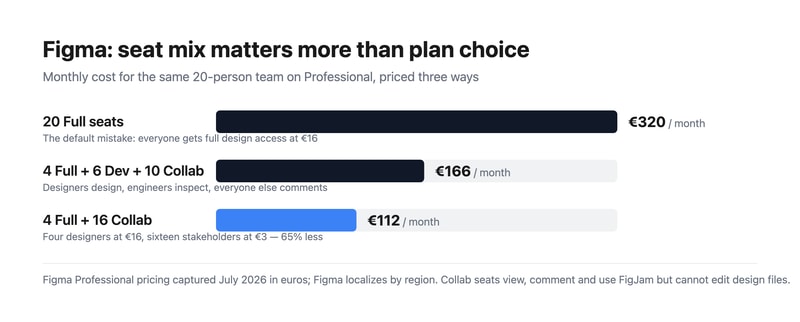
Most teams overpay for Figma by putting everybody on a Full seat. Figma sells three seat types, and the cheapest is a fifth of the price of the most expensive. A twenty-person team where four people actually design pays €320 a month doing it wrong and €112 doing it right — for identical access to the work that matters. Choosing your seat mix is a bigger decision than choosing your plan.
- What it is: The industry-standard collaborative interface design tool, now spanning design, whiteboarding, slides, dev handoff, sites, and motion.
- Best for: Any team doing product or interface design collaboratively, at essentially any size.
- Pricing: Free Starter tier. Professional from €3 to €16 per seat. Organization €5 to €55. Enterprise €5 to €90. Verified July 2026.
- The honest catch: Moving from Professional to Organization takes a Full seat from €16 to €55 — 3.4x — for governance rather than design capability.
What Is Figma?
Figma won interface design by being browser-based and genuinely multiplayer at a time when competitors were desktop applications with file handoff. Multiple designers in the same file simultaneously, a URL instead of an exported PDF, and no version confusion — that combination made it the default in a few years, and it remains the strongest argument for the product.
In 2026 it is considerably more than a design tool. The pricing page lists eight products: Figma Design, Make, Draw, Dev Mode, FigJam, Slides, Motion, Sites, and Buzz. That breadth is why the seat model exists — an engineer needs Dev Mode but not the drawing tools, and a product manager needs FigJam and comment access but not either.
Adobe’s proposed $20 billion acquisition was abandoned in late 2023 after regulatory opposition, and Figma has since gone public. For buyers, the practical consequence is that Figma remains independent rather than folded into Creative Cloud, which most of its users regarded as the better outcome.
How Figma Works
- Three seat types. Full (everything), Dev (Dev Mode, FigJam, Slides, Buzz, plus view and comment on design files), and Collab (FigJam, Slides, Buzz, view and comment with basic inspection).
- Browser-first and multiplayer. Real-time collaboration is the core mechanic, not a feature.
- Dev Mode. Structured handoff to engineers, with specs, measurements, and code snippets.
- FigJam. Whiteboarding for workshops and planning, included even on Collab seats.
- Design systems. Shared component libraries, which is where the Organization tier starts earning its cost.
- AI credits, metered per seat. 3,000 a month on a Professional Full seat, 500 on Dev and Collab, rising to 4,250 on Enterprise Full.
Figma Pricing
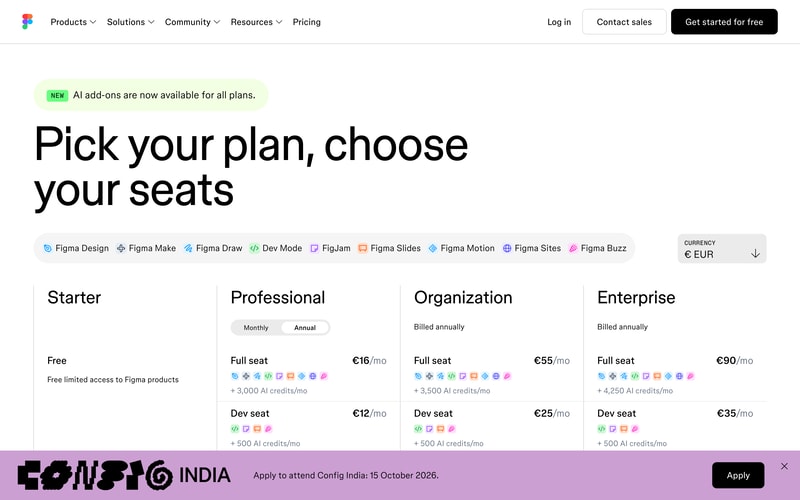
Captured from Figma’s pricing page in July 2026, in euros. Figma localizes currency by region, so check your own market. Organization and Enterprise bill annually only.
| Plan | Full seat | Dev seat | Collab seat | Billing |
|---|---|---|---|---|
| Starter | Free | — | — | Free, limited access |
| Professional | €16/mo | €12/mo | €3/mo | Monthly or annual |
| Organization | €55/mo | €25/mo | €5/mo | Annual only |
| Enterprise | €90/mo | €35/mo | €5/mo | Annual only |
The seat mix is where the money is:
- Audit who actually edits design files. In most organizations that is the designers and nobody else. Product managers, marketers, founders, and executives need to view and comment — which is a €3 Collab seat, not a €16 Full seat.
- Engineers usually want Dev, not Full. At €12 against €16 the saving is modest on Professional, but on Organization it is €25 against €55, which is substantial across an engineering team.
- The Organization jump is about governance, not design. €16 to €55 per Full seat is 3.4x, and it buys design system management, analytics, branching, and centralized administration. If you do not need those, Professional does the same design work.
- AI credits are now a differentiator between tiers. 3,000 monthly on a Professional Full seat against 4,250 on Enterprise. Heavy users of Figma Make and the AI features should check this allocation rather than assuming it is unlimited.
- The free Starter tier is genuinely useful. Unlimited drafts plus 150 AI credits a day, capped at 500 a month. For a solo designer or someone learning, it is a real product.
- Annual-only above Professional. Organization and Enterprise cannot be bought monthly, so evaluation has to happen on Professional.
Who Should Use Figma
- Product and design teams. The clearest case, and effectively the industry default. Hiring designers who do not know Figma is now the unusual scenario.
- Teams with designers and engineers collaborating. Dev Mode makes handoff structural rather than a document someone emails.
- Distributed teams. Browser-based multiplayer removes the file-sharing problem entirely.
- Organizations with design systems. The Organization tier’s library management is the reason to pay 3.4x, and for a real design system it is worth it.
It fits poorly for solo non-designers making simple graphics, where Canva is faster and cheaper; for print and photo work, which is Adobe Photoshop territory; and for teams wanting to ship a live site directly, where Framer or Webflow go from design to production.
Honest Pros and Cons
Strengths
- Genuine real-time collaboration. Still the best implementation in design software.
- Browser-based. No installation, no file versions, no platform arguments.
- A flexible seat model. Three tiers of access means you do not pay full price for viewers.
- Excellent dev handoff. Dev Mode is a real workflow improvement rather than a spec export.
- A usable free tier. Unlimited drafts, which is more than most competitors offer.
- The industry standard. Hiring, templates, plugins, and tutorials all assume Figma.
Limitations
- The Organization tier is a steep jump. 3.4x per Full seat for governance features many teams will not use.
- Seat sprawl is easy and expensive. The default assumption of Full seats for everyone is the most common overspend.
- Annual-only above Professional. No monthly option for Organization or Enterprise.
- AI credits are metered. A new constraint in 2026 that heavy AI users need to model.
- Performance on very large files. Complex documents can strain the browser.
- Product sprawl. Eight products under one brand makes working out what you are actually buying harder than it should be.
Figma Alternatives and How It Compares
- Canva is far simpler and cheaper for marketing and social design, and not a serious interface design tool.
- Framer designs and publishes a live site, which Figma does not do natively at the same level.
- Webflow is the production-web counterpart for design-led teams shipping real sites.
- Miro competes directly with FigJam for whiteboarding and workshops, with more depth in that specific area.
- Simplified targets fast marketing and ad creative rather than product design.
- Penpot is the open-source, self-hostable alternative, and Sketch remains the macOS-native option for teams who prefer a desktop application.
For related tools, browse our graphic design directory.
The Verdict
Figma is the correct default for interface design, and this is one of the least controversial recommendations in software. Real-time collaboration in the browser solved a genuine problem, Dev Mode made handoff structural rather than ceremonial, and the ecosystem effects — plugins, templates, and a hiring pool that already knows it — compound the advantage. There is no version of this evaluation where Figma is a mistake for a product team.
The decision that actually costs or saves you money is the seat mix, and it is the one most teams get wrong. The instinct is to buy everyone a Full seat, which for a twenty-person company on Professional is €320 a month. But Full seats are for people who edit design files, and in most organizations that is the designers alone. Put four designers on Full and sixteen stakeholders on Collab at €3 and the same team costs €112 — a 65% saving with nobody losing access to anything they were actually using. Audit your seats before you renew, and again after you grow.
The other judgement is when to move to Organization, and the honest framing is that the 3.4x jump per Full seat buys governance rather than design capability. Design system management, branching, analytics, and centralized administration are worth €55 a seat when you genuinely run a design system across multiple teams; they are worth nothing if you are five designers who just need to work together. Stay on Professional until a specific Organization feature is causing you a specific problem — and note that since Organization is annual-only, Professional is also the only tier where you can evaluate monthly.
FAQ
How much does Figma cost?
Captured in July 2026 in euros, Professional is €16 per month for a Full seat, €12 for a Dev seat, and €3 for a Collab seat. Organization is €55, €25, and €5 respectively, and Enterprise €90, €35, and €5, both billed annually only. A free Starter tier includes unlimited drafts and 150 AI credits per day up to 500 monthly. Figma localizes pricing by region, so check your own market.
What is the difference between Full, Dev, and Collab seats?
A Full seat gives complete access to all Figma products including editing design files. A Dev seat covers Dev Mode, FigJam, Slides, and Buzz, with view and comment access to design files — built for engineers implementing designs. A Collab seat covers FigJam, Slides, and Buzz with view, comment, and basic inspection on design files, intended for stakeholders who need visibility but never edit. Matching seats to actual behaviour is the single largest saving available.
Is Figma’s free plan good enough?
For an individual, often yes. The Starter tier includes unlimited drafts, UI kits, templates, and 150 AI credits a day capped at 500 monthly, which is enough for learning, personal projects, and solo freelance work. Team collaboration features, shared libraries, and unlimited version history require Professional, so it stops being sufficient as soon as more than one person needs to work in the same files regularly.
Should I upgrade to the Organization plan?
Only if a specific feature is solving a specific problem. Organization triples the Full seat price from €16 to €55, and what it buys is governance — design system and library management, branching, analytics, and centralized administration — rather than any additional design capability. Teams running a genuine design system across multiple product groups get value from it. Smaller teams generally do not, and should stay on Professional.
What is Figma best for?
Collaborative product and interface design at any team size, particularly where designers and engineers work together and handoff quality matters. It is the industry standard, so it also lowers hiring and onboarding friction. It is a weaker choice for marketing graphics, where Canva is faster, and for teams that want to publish a live website directly from their design, where Framer or Webflow are purpose-built.

If you are a designer or company working with any sort of product design, Figma is the tool to go. Compared with other similar tools it has a clear advantage in multiple areas as such prototyping and in design systems.
The newly introduced 'Tokens' feature is super valuable and appreciated but still a little bit difficult to understand in the beginning.
Design system management with Figma is bliss. The new "Tokens" features made it easy to create multiple variations for different themes or even different breakpoints.

Figma is very user friendly and it is free for some extent. Little knowledge of deisgning can use figma within a days or two. You can easily create complex user interface and prototype it. I basically use figma to design and prototype mobile and web applications. I use figma in my daily work.
There is no downside for figma. But creating a complex design you will need a knowledge about variables in figma that helps a lot.
Wireframing and prototyping is made easy by figma. Light wait and you can showcase your prototype and design anywhere anytime using your phone.
there are several things i like about Figma some of them includes :- 1. its plugin ( especially AI Based) 2. its intutive UI 3. Wireframing
What i dislike about Figma includes the Lack of phone/Laptop frames available in prototyping and the need to create Team if i want to share my files. Even the files take a lot of time to load at time.
I used figma For developing the Ui of websites and Apps. Apart from it I also used it for editing posts etc for my linkedin etc. Its best feature i like is no need to install and browser friendliness.
Once you get used to where things are, Figma is a great tool for laying out websites, emails, and social graphics. It's also great for collaboration as you can leave notes and respond to them when working on designs with an external team.
It's hard to get used to where things are (libraries, files, etc.).
It helps me layout emails, etc. so that the web team can translate my designs into great looking final assets.

New features. Flexibility. Prototyping functionality. Constant improvement on design efficiencies.
It's daunting at first. I was so used to using Adobe software and Axure when I started using Figma. Once I realized it functioned more like coding than designing, a lightbulb went off for me.
Arcticulating design decisions to business leaders and development teams

I love Figma's wireframing features and tools. Figjam is great for quick idea building and moodboards during meetings and the like. I definitely recommend Figma for professional teams.
Some of the features in Figma are a little hard to work with for beginners. Which is fine because I'm a designer with experience. However when we have to onboard someone to the team it takes a little adjustment time.
Prototyping, designing, and all stages of design research can be accomplished in the platform as a team, for instance. I do enjoy being able to work remotely in a creative capacity.
It is a very easy tool but it is also very powerful and efficient. Its community is really helpful for finding inspiration or useful materials for design. Its plug-ins are also very helpful.
I still struggle with versioning; I think they should find an easier way to do that. It is also a little bit harder to prototype HMIs that need to be used with physical commands such as encoders.
It helps in providing an easy way to design, share and collaborate between colleagues.

We can test and learn from many designs and prototypes thanks to Figma. I wouldn't be able to show prototypes to clients and get their comments without it. We exchange files all team members for ideas gathering and project updates, apply it for team discussion, and use it for supporting visuals during meetings.
Figma is tackling issues with its offline capabilities in order to address the fundamental causes of the problems rather than just dealing with the symptoms. Being unable to record and replay conversations in FigJam's audio chat makes it difficult to analyze and reflect on discussions.
As a Figma user for a year, I'm hooked! It solves so many design problems: real-time collaboration keeps my team in sync, prototyping lets me test ideas quickly, and the cloud-based platform makes access effortless. Now, I can design faster and more efficiently than ever before! Figma is essential to our company's UX design process as it helps us create the first frontend screens from scratch for our projects all the way up to the Minimum Viable Product.
I love how you can work with multiple users at the same time, live! I also enjoy that lots of UI elements are coded and that you can easily prototype your wireframes.
I think their billing needs to evolve a tad as it depends on number of users and number of projects
It is the main tool that we use to design wireframes and prototypes.
The best aspect of Figma is its intuitive interface and collaborative features, making it effortless to create designs and work seamlessly with teams in real-time.
An area for improvement could be strengthening its offline functionality to mitigate occasional connectivity issues that users might encounter.
Figma resolves the challanges of collaborative design and prototyping by offering a cloud-based platform accessible to multiple users in real-time. This benefits me by streamlining team collaboration, ensuring version control, and facilitating efficient design iterations, leading to faster project completion and improved design quality.

Prototype options for a wide variety of mobile and desktop sizes; sharing and commenting is available even to users without a Figma account; versatile grid and design options; free version is robust
Steep learning curve; advanced prototype features like creating dropdowns are not very intuitive
Creating SEO-friendly page designs; creating mobile-first web designs
Figma has become my daily driver. There are so many great free resources, plugins, features (especially auto-layout), collaboration capabilities, and web access anywhere to my files (since it's a cloud-based program).
Figma lacks in one key department. The one main feature i miss from Sketch is the way cropping and editing of photo is handled. You could use the selector tool and copy/cut a snippet of an image file destructively. Can't do that in Figma. Otherwise Figma is awesome and keeps getting better. I wish the free plan was more robust, too.
Collaborative design, dead-simple to use, AWESOME features like Auto-layout and Components that speed up the design process infinitely. I am a big fan of keyboard shortcuts to optimize workflow and Figma has good ones as well.
Very easy to use in real-time work and easy to learn for the beginners also. It gives us a very nice layout grid.
The main motive of this is it cannot be used without an active Internet connection.
We can test the design using this tool. As well as we can design the pages as given in the figma for various views such as desktop, tab and mobile.
I started using Figma in 2020 and there's no looking back. The most simplest tool ever built for designers. The best thing I like about Figma is how it focuses on the minutest problems of deisgners and provide a solution. Be it wireframing, collaborative brainstorming, hi-fidelity product design, prototype animation or developer hand-off, this tool truely stands out in the design toolbox. Figma is a revolution I must say. My day starts & ends with Figma and I use it every single day.
While i highly recommend Figma to any product designer out there, the only issue I face is - when dealing with files containing numerous artboards, the tool tends to become a bit choppy & laggy.
Figma has been solving even the tiniest problems of designers. But most importantly I would like to mention about figma excelling in collaboration and community features. Helps me collaborate with my design team easily. The community is flooded with millions of helpful design resources.
I used to be a product designer, but I am now a PM. I still use Figma for so many things such as whiteboarding, presentations, mock ups, etc. It's amazing!
The responsiveness of mockups aren't quite perfect.
We use Figma at Tixel for all things desing. We also use it for brainstorming in the design team, but the wider team still uses miro (even though its worse)

Figma is the best cloud based software, this helps me to start a work in 1 device and complete it in another, I like the simple interface of it.
Figma is great but I face lags and glitches when the file gets overloaded.
It is cloud based software and it allows me to work with multiple devices without losing the progress.

Best about Figma is there are multiple pluggins that you can use and do designing with ease and as compared to Adobe XD it is easy to use.
I dislike mainly Figma Community sometimes designers just copy content from there and paste it they do not show there own creativity.
Figma is solving my every problem as a UX UI Designer Figma is one of the best tool I suggest. It has ample number of pluggins and features to help the designer and design a better product with appealing User Interfaces.
Easy to use and super awesome tool that helps us to design creative visuals, landing pages, social media posts, prototypes, vector arts and many more. the collaborative feature of Figma is super awesome which allows multiple designers to work on a same design.
Figma don't have 3d rotation feature but I hope it will come soon
Figma helps us to design website protypes and social media posts for our clients. We also use Figma for designing logos and vector icons.
Figma help us a lot to work on UI design, live prototypes and to organize UX research process. Integration with Slack do nice job to be in touch with all comments and suggestions from the design team.
Figma takes a lot of hardware resources (CPU, RAM) to launch and work with UI design. This still can be improved.
UI Design, UI components, Live prototyping, brainstorming with colleagues

1. Browser AND App base - biggest advantage compared to Adobe 2. User friendly layout 3. Easy to share the link with the team 4. Viewable prototype for the mobile - a game-changer 5. Go to the tool for wireframing and prototyping daily 6. Lots of plugins to choose from
1. Sometimes it freezes while working on a lot of pages 2. Difficult to find the layers if locked 3. It doesnt zoom automatically when an icon/image is pasted on the figma file, becomes hard to locate on the screen
1. Ease to share files with clients and team members. 2. Advanced prototyping with multiple variations 3. Mobile viewable prototypes 4. Since browser-based, very quick mockup creation to pitch to clients 5. Free for everyone to use, explore and learn User eXperience 6. Ability to see current viewers on the file, helps in keeping check on the resource file 7. The auto layout feature is game-changing - responsiveness has become easier than ever

You don't need to spend years to work on it.
With libraryies were a little easy to find.
This tool allows me to design every high difintion idea boards, banners, posts, logos easily.
One of the best UI/UX designs I have ever come across. It is so smooth to use and creates flawless results. I've used it in multiple projects to create visually appealing graphics and designs. A must tool for designers and marketers- truly!
While once you have learned how to use it, its easy to use- the initial process of learning is pretty hard. Moreover, it is quite expensive as well to use if you want a subscription version I'd say
Helps create graphic designs to enhance business visuals
Figma is a versatile platform that helps me work with my team to design my brand. What makes it unique is how easy it is to use because although I don't have designing experience I'm still able to understand most of its feature and use them.
Not much that I dislike. Everything so far that I have used has been great. After using the app one thing I would ask for is greater accessibility when it comes team work
Its helping me use the platform to collaborate with team members and brainstorm UI/UX ideas. Its been great so far in terms of versatility and wouldn't trade for another app out here

One of the best design tools for an UIUX designer. Figma helps to quickly create design prototypes, wireframes and mockup designs to show the product work flow. Its simple to learn and easy to use. Best is best used to create information architecture, app wireframes, website layout design and app prototypes.
Well there is nothing to dislike about figma. Its one of the best tools we use for designing. Its an improved version of Sketch. Initially they were not accepting Indian credit cards which seems to be solved now.
I am using figma to create App Prototypes, WireFrames, Workflows, Information Architecture, Website Layout, Logos and Diagrams. Using figma we design the app layouts before its been sent to a developer to design. Figma provides Material 3 Design kit module as well which gives the rules and format on how every and every element in the app frame work needs to be. It gives us the guidelines which needs to be followed for a good interactive app prototype.

I like how I could apply my passion in designing to Figma. It lets me do certain designs that I want very easily. Creation of pages are fun. Personally, I used Figma even before it gets even more features. Before, the dark mode is not yet existing, but now it provides this feature for better care of eyes of users. I like how easy to nagivate through frames and even play them in slides. Implementing technical processes such as transitions from a click of a button to another frame is easy as well. I also like how it can be integrated with VS Code now, my favorite code editor, which is a large clincher. Since I learned how powerful it can be, I've used it for many of my academic projects before and got also some awards and compliments for doing a good work. I have used it for almost daily, especially when I was doing my capstone project in college. For me, a good tool can bring out the talent and passion of a user, and, certainly, Figma is one of them.
The only downside of Figma that I saw is that it can be a little hard to understand and learn at first, but of course, just like other tools, if you are willing to learn it, you will.
The easiness in designing, prototyping, and building wireframe. It was such a powerful tool that I can use it to do almost every one of my projects concerning designing and software. Plus, it can provide codes, too, and I happen to be a programmer so it really helps me in that manner.
Figma is the best design software I have ever used, It's soo beginner friendly and easy to use and has made my work a lot easier. I do a lot of stuff is Figma from designing websites to designing social media posts for my clients.
Missed offline features and occasional lag interfere with the smooth experience, negatively affecting the platform's overall accessibility and usability.
Figma offers a cloud-based platform that enables team members to collaborate in real-time that allows real-time collaboration among team members. Because of Figma's adaptability to different design projects, I can use it for a variety of tasks, which streamlines my productivity. Furthermore, Figma's dedication to frequent updates guarantees that I take advantage of the newest additions and enhancements, which elevates the whole design experience.
I like the variety of options available in Figma software that we can use to create different kinds of graphics not limited to only web and app designs. I used it for social media banners, posts, and other graphics. The interface is amicable even for a newbie who is starting from zero. I use it for almost every design.
In my opinion, there should be more free features available for beginners like team workplace and importing videos and animations in our designs.
I use it mainly to provide design solutions to my clients. Ease to use with less complexity and user-friendly interface with a variety of options.
The collab features are fantastic! We use it for all pf pur web design needs.
Took a bit of time for our team to adapt to it coming from Adobe products.
The main thing is being able to see the project in real time tather than sending files back and forth.
Figma is essencially the best software for UX/UI Designers. It has everything you need and if you cant't find a feature, well... there's a plugin for it. Fantastic.
Nothing. It is perfect for my way of using it.
Figma helps me realizing visuals for my projects in a really easy way. I like tghe fact that also prototyping is easy.