
( 277 )
Unclaimed: Are you working at Landingi?
Landingi Reviews: 4.5/5 — Highly Rated
“Turn more traffic into revenue” – this is what’s at the heart of Landingi’s unique proposition as a landing page builder. A number of leading brands and businesses, marketers, and agencies rely on Landingi’s drag-and-drop solution to quickly create, launch, test, and optimize marketing landing pages. It boasts of more than 400 landing page templates for a range of industries – from real estate, education, e-commerce, healthcare, and SaSS just to name a few. All designs are focused on conversions, customizable to your brand, and responsive across all screen sizes. On top of landing page templates, Landingi also offers several modules for light boxes, pop-ups, and forms to convert traffic into leads and leads into sales. Seamless integrations with other marketing tools such as Google Analytics, HubSpot, and ActiveCampaign are also available.

| Capabilities |
API
|
|---|---|
| Segment |
Small Business
Mid Market
|
| Deployment | Cloud / SaaS / Web-Based |
| Support | 24/7 (Live rep), Chat, Email/Help Desk, FAQs/Forum, Knowledge Base, Phone Support |
| Training | Documentation |
| Languages | English |
Landingi Pros and Cons
- Landingi has a simple design process
- It’s very affordable even for smaller companies
- It has over 300 landing page templates available
- There are limited customization options
- Lower-tier plans have limited features
- It needs to make its landing pages more mobile-friendly





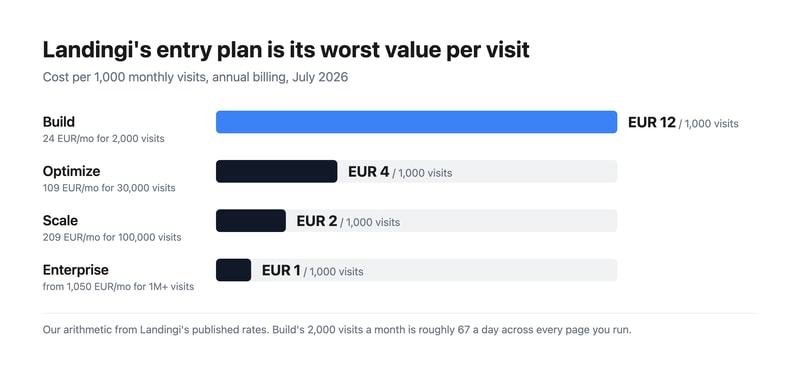
Landingi’s €24 plan allows 2,000 visits a month — about 67 a day across every page you run. For a landing page builder, whose entire job is receiving paid traffic, that is a very small number. Anyone spending meaningfully on ads will exhaust it in the first week, and the next tier is €109. The entry price is real, but it describes a plan for testing an idea rather than running a campaign.
- What it is: A landing page builder with A/B testing, analytics, and AI generation, sold for conversion rate optimization.
- Best for: Marketers and agencies running campaigns who need pages faster than a web team can ship them.
- Pricing: Build €24, Optimize €109, Scale €209, Enterprise from €1,050 per month on annual billing. Verified July 2026.
- The honest catch: A/B testing requires Optimize at €109, four and a half times the entry price.
What Is Landingi?
Landingi builds standalone landing pages outside your main website — the kind you point an ad campaign at, iterate on weekly, and retire when the campaign ends. That separation is the point: marketing gets to publish and test without going through whoever owns the website.
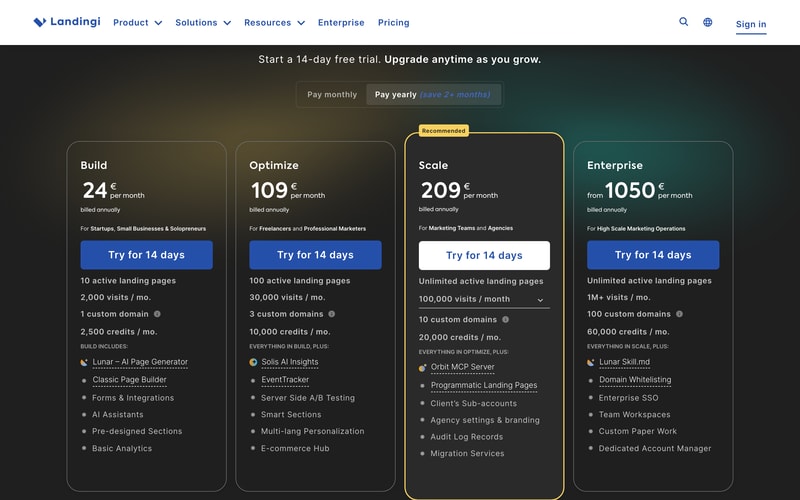
The 2026 lineup leans heavily on AI and, notably, on agent access. Build includes an AI page generator; Optimize adds AI insights; Scale ships an MCP server, and Enterprise adds a published skill file. Landingi is among the first tools in this category to treat AI agents as a first-class client rather than a marketing line, which is worth knowing if your team is building agent workflows.
Traffic is the meter. Every tier is defined by monthly visits before it is defined by features.
How Landingi Works
- Visits are the primary meter — 2,000, 30,000, 100,000, then 1M+ per month.
- Active landing pages ladder too — 10, 100, then unlimited.
- A/B testing starts at Optimize, not on the entry plan.
- Custom domains are limited — 1, 3, 10, then 100.
- Credits are a second meter — 2,500, 10,000, 20,000, 60,000 a month.
- Scale’s visit allowance is adjustable via a dropdown on the plan card.
Landingi Pricing
Captured from Landingi’s pricing page in July 2026 in euros, reading both billing toggles.
| Plan | Yearly (per mo) | Monthly | Visits/mo | Pages | Domains |
|---|---|---|---|---|---|
| Build | €24 | €29 | 2,000 | 10 | 1 |
| Optimize | €109 | €139 | 30,000 | 100 | 3 |
| Scale | €209 | €269 | 100,000 | Unlimited | 10 |
| Enterprise | From €1,050 | From €1,350 | 1M+ | Unlimited | 100 |
What actually decides your plan:
- Translate the visit allowance into a daily number before anything else. 2,000 a month is about 67 visits a day across all ten of your pages. A modest ad campaign at a €1 click cost spends €67 a day to exhaust it. Build is a plan for validating a page, not for running traffic to one.
- Per visit, Build is the worst value on the page. €12.00 per thousand visits against €3.63 on Optimize — Build costs 3.3 times more per visitor than the tier above it. That inversion is unusual and it means the cheap plan is only cheap in absolute terms.
- A/B testing is an Optimize feature. Server-side A/B testing, EventTracker, and smart sections all sit at €109. For a product sold under conversion rate optimization, testing being absent from the entry tier is the most consequential gate on the page — you can build pages on Build, but you cannot optimise them.
- One custom domain on Build. Agencies and anyone running pages for more than one brand need Optimize’s three, or Scale’s ten.
- Scale is where agencies start. Client sub-accounts, agency branding, audit logs, and migration services all arrive at €209 — that tier is built for people running pages on behalf of others.
- Annual billing saves more than advertised. The toggle says “save 2+ months”; it works out at 2.1 months on Build, 2.6 on Optimize, and 2.7 on Scale. Accurate, and understated at the top.
Who Should Use Landingi
- Performance marketers running paid campaigns. The clearest case, at Optimize or above where testing exists.
- Agencies managing client campaigns. Sub-accounts, branding, and ten domains at Scale are built for exactly this.
- Marketing teams blocked by a web queue. Publishing without engineering involvement is the core value.
- Teams experimenting with AI agents. The MCP server at Scale is genuinely ahead of the category.
It fits poorly for low-traffic or occasional pages, where the visit meter makes the entry plan poor value; for full websites, where Webflow or Wix are the right tools; and for teams already paying for a marketing platform, where HubSpot and GetResponse include landing pages.
Honest Pros and Cons
Strengths
- Unlimited pages from €209, with 100 already at €109.
- Server-side A/B testing, which is more reliable than client-side flicker.
- Genuine agency features — sub-accounts, branding, audit logs.
- An MCP server and skill file, unusually forward-looking for the category.
- An honest annual discount, slightly better than the 2+ months advertised.
- A 14-day trial on every tier.
Limitations
- 2,000 visits a month on Build — roughly 67 a day.
- Build costs 3.3× more per visit than the tier above it.
- A/B testing requires €109, on a conversion optimisation product.
- A 4.5× jump from Build to Optimize with nothing between.
- One custom domain on Build, which rules out multi-brand use.
- Two meters run at once — visits and credits.
Landingi Alternatives and How It Compares
- Unbounce is the best-known specialist, with strong testing and generally higher prices.
- Instapage targets enterprise advertisers with personalisation and post-click analytics.
- Leadpages is the cheaper small-business option with a simpler builder.
- GetResponse and HubSpot Marketing Hub bundle landing pages into wider marketing platforms.
- Webflow gives designers real control if you have someone who can use it.
For a broader survey, browse our conversion rate optimization directory.
The Verdict
Landingi does the core job well. Marketing teams that need to publish and iterate on campaign pages without waiting for a web queue get exactly that, server-side A/B testing is more trustworthy than the client-side kind, and the agency features at Scale — sub-accounts, client branding, audit logs — are real rather than nominal. Shipping an MCP server on a mid-tier plan also puts it ahead of most of the category on agent access, which will matter more over the next year than it does today.
Price it from the visit meter, not the plan price. Build’s 2,000 visits a month is about 67 a day, spread across all ten pages it allows. That is enough to validate a concept and nowhere near enough to run a campaign — if you are buying a landing page tool, you are buying it to receive paid traffic, and paid traffic exhausts 2,000 visits quickly. The arithmetic makes the point plainly: Build costs €12.00 per thousand visits against Optimize’s €3.63, so the cheapest plan is more than three times the most expensive per visitor.
The second gate matters just as much. A/B testing starts at Optimize at €109, four and a half times the entry price. On a product sold under conversion rate optimization, that means the entry plan builds pages but cannot optimise them, which is half the reason to use a specialist tool rather than your website builder. Treat €109 as the honest entry price for campaign work, take the annual billing — the saving is 2.6 months on that tier, better than the “2+” advertised — and reserve Build for testing whether the product suits you at all.
FAQ
How much does Landingi cost?
Captured in euros in July 2026: Build €24 per month on annual billing, Optimize €109, Scale €209, and Enterprise from €1,050. On monthly billing those become €29, €139, €269, and from €1,350. Monthly visit allowances are 2,000, 30,000, 100,000, and 1M+ respectively, with a 14-day free trial on every plan.
How many visits does Landingi’s cheapest plan include?
2,000 per month, which is roughly 67 visits a day across all ten landing pages the Build plan allows. For a tool whose purpose is receiving paid traffic, that is a small allowance — a modest ad campaign will use it within days. Optimize at €109 raises it to 30,000 visits a month, which is the first realistic allowance for running campaigns.
Which Landingi plan includes A/B testing?
Optimize at €109 per month on annual billing. The Build plan at €24 includes the page builder, AI page generation, forms, and basic analytics but not server-side A/B testing, which arrives with Optimize alongside EventTracker, smart sections, and multi-language personalisation. Since testing is the main reason to use a dedicated landing page tool, Optimize is the practical entry price for campaign work.
Is Landingi’s annual billing worth it?
Yes, and slightly more than advertised. The toggle promises “save 2+ months”, and by our arithmetic from the published rates it works out at 2.1 months on Build (€29 monthly against €24 annually), 2.6 months on Optimize, and 2.7 months on Scale. That makes annual billing worthwhile for anyone staying beyond roughly ten weeks.
What is Landingi’s MCP server?
It is an interface that lets AI agents interact with your Landingi account directly, included from the Scale plan at €209 per month, with a published skill file on Enterprise. Very few tools in this category ship agent access at all yet, so if your team is building AI workflows around campaign creation it is a genuine differentiator — though it sits two tiers above the entry price.

Compare Landingi with other popular tools in the same category.
For me, it was quite do set up and customize landing pages using Landingi. Also, the integration with MailChimp came quite in hand.
I really don't know what to write here, since I found my experience quite enjoyable, but maybe Landingi could come up with marketing automation features.
I use Landingi to create pages so I can gather leads and make content available, such as ebooks and newsletters.
It's really easy to use, even for someone with little experience
Sometimes not easy to change background
Ineffective website
Intuitive to use, good functionality for what you pay, impeccable customer support
I have experienced some slow load times for certain pages
Integrates well with my clients' business processes, giving me more control over campaigns I'm running for them to have them run more efficiently
The editor is simple to use and once you get the hang of where everything is it's quick and simple to create a landing page. The dynamic content option was one of the main draws for us.
The user interface is slightly dated now compared to competitors and the mobile editor does an ok job of creating the page for you automatically but i always found myself having to tweak it.
Landingi is allowing us to create conversion focused landing pages away from our main website which has more bloat and extra information that isn't required for a conversion focused page.

intuitive use graphic design customer service
slow operation on the extended site not enough guides on marketing and lead generation
creating landing pages lead generation
I love that it's really easy to get a landing page up and running quickly with Landingi. The starter templates are designed well and are easy to customize as needed. The level of customization you can do to each landing page is excellent. You can change anything to match your branding.
It's a clunky process to make changes to the mobile versions of your page. Style changes made to tablet or desktop don't automatically flow to mobile. You need to be mindful of which experience you're editing and make sure you check them all before publishing to make sure there aren't any unexpected changes.
I'm mainly using Landingi to capture leads from Instagram. This software helped me to quickly setup a simple landing page to collect leads and direct traffic to specific pages I'm promoting with ease.
The drag-and-drop feature for designing the landing page are very useful
The features of the Wordpress plugin are very poor
Creating landing page for my blog in order to collect email addresses of prospective customers.
I liked landingi because it was easy to customize.
I wish that it had more training teaching me that there are sections that look good in desktop but doesn't translate well to mobile.
Creating a landing page for myself
I like the fact that they have pre designed templates for me to choose from.
There is a huge lack of options when it comes to design templates. I'm very dissapointed with the quality of landingi. The UX is very hard, I don't have the ability to do as many things as with other website building software, and the quality of the finished product looks very old fashioned. Also, I don't know if the design template options were thought about by an expert (i.e. do they catch the eye? are the palettes matching, would this be something an in-house web designer would design, etc.)
Front facing website.
It's user-friendly and you are able to see results in real time.
Still too basic and there is always an upsell.
I am able to create pages on the fly for independents
It is very easy to begin and create a landing page. It makes the process a lot easier
It has some funny reformatting between devices. Also the logos aren't retina screen ready.
Quick implementation of basic landing pages.
What I like best is the simplicity of use
Its not as intuitive as I would like, you'll need to spend some time to figure things out
Create landing pages with have the web admins do it.
There are many templates and an easy page builder. Great for throwing together a quick landing page.
Pricing is similar to LeadPages which is more mature and is more feature rich. I got access through a promotion which made it worthwhile.
I wanted to create quick landing pages. Worked great for my use case.
Results I️ like the end results of the product
It intuitive at all. Difficult to use and manipulate
People like the look and have signed up
The ability to customize multiple pages. The instructions for setting them up is great as well. Love the functionality of receiving customer input too.
Wish there were more templates for legal professionals, and other business professionals.
The ability to quickly set up a landing page for any business venture is a huge asset. No waiting for designers, etc..
Landingi's user interface is so simple to use. I love that any kind of page can e created with just a few clicks.
The dashboard dark color scheme makes using the app a bit depressing at times. But I'm picky, the app itself os great!
Setting up landing pages is an essential part of my marketing efforts. I'm saving tons of time and money using Laningli (no more designer, no more coder!)
Easy to use, nice looking templates. Simple to get started.
adaptive pages are not always perfectly sized, sometimes difficult to adjust between phone and webpage view
landing pages for sales
Landingi is very easy to use compared to some of the other tools out there. The
When I used the product, it was not responsive. As a result, the landing pages had to be reformatted for various platforms. This was a major headache. Also, the company did not offer a pre-payment option, meaning that one had to wait until a specific date to be billed.
Easy-to-create and easy-to-modify landing pages lessened the need for multiple websites.
easy to use UI and got my domains connected flawlessly. Forms work flawlessly to collect the all important email.
I gave Landingi a 7 for two reasons, Landingi does not provide an SSL certificate for root domains, only subdomains. With the current SEO best business practices, SSL is extremely important to me with platforms such as Landingi. Another drag and drop saas company that I use provides SSL for all domains with one click. The second reason is the custom html box used for embedding media into your page needs work. The only way to see the how the code looks on your page is to preview it, which is very time consuming because the size of the media is not clear until you go into preview mode. You then need to go into editor mode and play around with the size and then preview again to see how it fits on your page. I was trying to embed a quiz into my landing page, but the results part of the quiz is a different size than the quiz itself so it would always spill over to another portion of the page. I pretty much gave up on it.
I use it to quickly create responsive landing pages for use as placeholders, promotions, or informational.
What I like about Landingi is that your landing pages look good and load fast. Plus it's super easy to use. Throw in the fact that you can do A/B testing and it makes it a great platform!
There really isn't much not to like. Like any new tool you have to spend some time learning how to use it properly.
Landingi offers a quick and easy way to get up a good looking landing page to collect leads. It saves me a lot of time to work on other aspects of my business.
Pre-built templates makes creating a new landing page easy, easily organized by goal. I also like it integrates with ActiveCampaign, seamless experience!
I don't have anything bad to say about the product.
Easily launch a landing page in a matter of minutes - great for ad campaigns. Integrates well into Wordpress sites.
the interface layout, the tips given when you hover over tools and text boxes
too many back and forth emails between Landingi and hosting company on how to direct/redirect our site/landingi page. It might be a good idea when user hits the "Publish" page that a window pops up saying, "Do you need to go back and check the mobile view of your Landingi page?"
While our site is undergoing a major redesign, I am redirecting all traffic to Amazon.
My favorite feature is the ability to quickly create A/B testing
I would like to see an easier way to implement modals for two-step form submissions.
I use Landingi to create quick authorized pages to link YouTube videos to.

The simplicity of creating the pages and tracking.
More frequent updates or news and updatess.
Marketing and creating multiple pages.
Strong focus on simply getting Landon pages up and running!
Stats management (utilization) can be confusing at first.
Distinguishing our brand in a market not typically rated as specialty (we are coffee growers in China). Benefit is Landingi allows us to drive traffic to broader info via specific interest pique
This is actually a well-done landing page builder. I wanted to give it a whirl after experiencing programs like instapage, leadpages, and clickfunnels. I can say as the system grows, it'll be a contender quickly. Keep up the great work guys! I'm happy to be an early adopter
There are a few things in the pipeline I'm looking forward to, so it's not a matter of disliking the product, its just future development that has to happen. So I'm currently waiting to use it a lot more than I do.
I'm looking to solve my landing page builder problems. Most of them are really good but really pricey when it comes to what they do. Otherwise, it's a great alternative I think.
I liked the pre-made templates, and that gives a breakdown of different campaign types
The UI of trying to make custom changes was difficult, but I found a decent rhythm after a while.
Creating better funnels, and the information gathering process.
Visual Builder is very nice. The feature set it very thorough for the price.
The templates are limited or out of date.
We use Landingi for rapid landing page creation. The speed from initial setup to actual implementation is really fast.
I like the capabilities on landingi compared to others like instapage - landingi has a great user friendly interface
I dislike how slow landingi is and I feel it’s a bit hard as a new user to learn how to use landingi
I’m creating website landing pages which helps my business all around.. higher conversions