
Unclaimed: Are you working at Miro?
Miro Reviews: 4.8/5 — Highly Rated
Miro is a whiteboarding platform online that facilitates collaboration in real-time. The platform allows teams to work together seamlessly and gives them access to customizable templates and supports integrations with tools such as Slack.

| Capabilities |
API
|
|---|---|
| Segment |
Small Business
Mid Market
Enterprise
|
| Deployment | Cloud / SaaS / Web-Based, Desktop Mac, Desktop Windows, Mobile Android, Mobile iPad, Mobile iPhone |
| Training | Documentation |
| Languages | English |
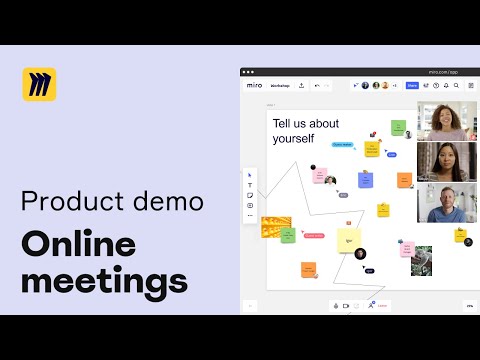


Live collaboration, remote, with features such as timer, sticker notes with tags identifying author, flows, and templates.
Not able to insert our music on sessions.
Our team works completely remotely and we need to collaborate in sessions.
I like that everyone can work in it at the same time. Its a live document and you do not have to wait for someone to save and sign out before you can go in and see live updates
Sometimes it takes a bit of time to load up. Also I find multiple post it notes confusing and easy to miss a note.
For me, it is acting as a catalog for all design history to be found in the same place. It is a one stop shop for all of my coworkers and I to view the same information with live updates that everyone can see at all times

As a Scrum Master deeply entrenched in the financial sector, I've found Miro to be a game-changer in fostering agile collaboration within my teams. This virtual whiteboarding platform seamlessly integrates with our workflow, offering a plethora of advantages tailored to the unique needs of financial professionals.
While Miro's interface is user-friendly, mastering its full potential requires time and effort. Some team members, particularly those less familiar with digital collaboration tools, may initially struggle to navigate its features effectively.
Miro's intuitive interface allows us to effortlessly map out complex financial strategies, visualize data, and brainstorm solutions in real-time. This visual approach enhances communication and fosters a deeper understanding among team members. Also, it offers a diverse range of templates, including SWOT analysis, Kanban boards, and user story mapping, tailored to agile methodologies like Scrum and Kanban. These customizable frameworks empower financial teams to adapt quickly to changing market conditions and regulatory requirements.

I love that it's simple to use. Upgrades don't impact on usability, they integrate seemlessly into the applications. The custom templates are useful and there are loads of them. And the help area is great too - with a community of users all sharing solutions and feedback. As a business user the customer support was excellent and I was often contacted about thoughts / updgrades.
Umm, if I was thinking real hard...it would be that it's missing some key functionality in some of the templates. But that's being really picky.
Its a place where everyone can come together in an online session and we can all be on the same page (or board rather :-)) I've scoped out technical projects, created strategies and scoped out detailed business processes in the tool - and then worked through them with colleagues. It's really easy to adapt the boards based on real time feedback.
I love how it offers the option of collaboration of projects simultaneously without hitches. Miro is readily available with a supportive and responsive customer support team. The interface is pretty much straightforward and attractive with makes the ability to create wireframes and prototypes a smooth process.
As a user who has interacted with Miro, I can honestly say that I have no dislikes at all concerning Miro. I highly recommend it to non-users.
Miro was the realible platform that was effective when I was creating a wireframe of a project app I was working on and is still reliable for projects that need collaboration.

I am using Miro for more than 2 years regularly. Miro is easy and has a good UI for planning and mind mapping. I recommended Miro for my organisation and our team is also using the same. the board are easy to create and share with the team. The sticky notes are my favorite which I mostly used for brainstroming. The recording feature is nice which helps to explain it. Also have engagement options like voting, reactions (( with funny emojis )))) and chat for teams. Had contacted couple of time with customer support and got instant replies. Miro can be used by integrating with zoom, gmeet and slack.
I am using this for a good time now and I am satisfied with the product and will recommend for others. Nothing to dislike
As we are a complete remote oragnisation. We need a something to imporve our productivity especially for brainstroming session . Started using miro and now people are more engaging to the brainstroming activity at our company. I have used it for myself and had experience with collaborating brainstroming with my team. For me I always use miro to prepare my marketing plan. Its easy and anyone can understand how it works. Recommended miro for my colleagues and they also have positive experience.
Living in the remote world, I haven't found an easier way to do whiteboarding the way that we used to do in the office but with Mirro it's super easy and intuitive
Honestly, I don't dislike anything about Miro
It's such a massive whiteboard that we can use it as a repository for data and notes and anyone can access it at any time
Ease of use, compared to previous similar tools I have used
So far, I did not face any misfunction or missing feature.
It allows for establishing model maps without using visual edition tools (which I am pretty bad at)
I really appreciate Miro's intuitive interface and the ease with which it allows for real-time collaboration. The ability to simultaneously work with team members on a shared canvas, regardless of our physical locations, is incredibly valuable. Additionally, the vast array of templates saves a lot of time, especially for brainstorming and project planning sessions.
One aspect that can be frustrating is the learning curve for new users, particularly those not familiar with digital whiteboard tools. While Miro is feature-rich, it can initially be overwhelming. Also, in situations with poor internet connectivity, the platform can become sluggish, which hampers the real-time collaboration experience.
When focusing on how Miro benefits developers specifically: Facilitates Agile and Scrum Processes: Miro supports agile methodologies, making it ideal for sprint planning, retrospectives, and stand-ups, which are crucial for software development workflows. Improves Technical Brainstorming: It's a powerful tool for visualizing complex software architectures, user flow diagrams, and database schemas, enhancing clarity and team understanding. Enhances Remote Development Collaboration: Miro offers a shared space where remote development teams can collaborate in real-time, discussing code, design, and project progress visually. Streamlines Project Management: The platform aids in organizing and tracking development tasks, milestones, and dependencies, crucial for keeping software projects on track. Integrates with Development Tools: Miro integrates with popular developer tools like Jira and GitHub, ensuring seamless workflow integration and enhancing productivity. In summary, Miro is particularly beneficial for developers by supporting agile development processes, facilitating complex technical discussions, enhancing remote collaboration, streamlining project management, and integrating seamlessly with other development tools.
Am always wowed by Miro's feature-set which i find absolutely inspiring! Its Virtual Whiteboard that allows me and everyone within its collaboration window to dream, brainstorm, create. Miro allows for idea exploration, visualization, conceptualization, execution and sharing superbly. In a user-friendly platform that's easy-to-navigate, with endless possibilities. We implemented the system to empower us, to enable better collaboration, creativity and engagement. Pleasantly got more than we bargained for!
Where there's been need to deliver better, Miro has been allowing very useful integration with relevant technology tools. Its also been backed by a user support system that helps us achieve what we want. Hardly nothing to complain or dislike this far.
In our Marketing undertaking, Miro allows our team to virtually collaborate, brainstorm, conceptualize, share ideas that help us achieve as a team. Making for productive campaign management, mind mapping and faster turn around.
What a hub for innovation, collaboration and presentation. I've come to absolutely love this virtual workspace for how its been enabling us converge, create, share and endeavour to concur! At implementation it was a bit intimidating with its exceptional features, but we soon found Miro very user-friendly with frequent use, with inspiring integration, brilliant iser support. An outstanding platform for meeting, strategizing, innovating and confronting the future with customer-centric solutions.
My one minor issue was initially being intimidated by its ability. But how is that a negative? Cant say enough good things about Miro already. I find it fantastic!
It is our virtual hub for productive engagement, collaboration, innovation and strategy, via tools that include diagramming, mind mapping and workshop facilitation. Which has benefitted us in streamlining our collective output and improving outcomes.
Now that i frequently engage it since implementation, I can't help acknowledge how user-friendly it is. Quite inspiring! Love how it's decked uo with unique features for brainstorming, collaboration and workflow coordination. Love it integrates and accomodates complimentary productivity tools that help with mind mapping, help with improving business outcomes.
The only drawback I've had is that it was initially overwhelming thanks to its dynamic feature-set. But I've got to say user support was absolutely responsive including on a technical level. Wih frequent use, its a platform that one soon gets pleasantly the hang of.
This Platform has been instrumental in strategic mind mapping, brainstorming, collaboration and project management. With it we create via sharing ideas the way forward, how to engage and reach our objectives creatively. The benefit of which is always collaborative approach, tangible customer journey mapping, target engagement.
Miro has become an indispensable tool for our team. It has not only simplified our collaborative processes but has also injected a new level of excitement into our creative endeavors. I wholeheartedly recommend Miro to any team looking to elevate their collaborative efforts.
I have nothing to dislike about Miro, I love to use it in my retros.
Remote collaboration and visual communication by providing an online collaborative whiteboard platform. It enables teams to work together in real-time, brainstorm, organize ideas, and visualize complex concepts, overcoming geographical barriers and fostering creativity and productivity.
I created an account to draw and easily present architecture diagrams for our Dapp. It's so easy to start using the platform and even to collaborate with team mates .
Exporting frames on the board on free plan is not very good quality. Also the limitation of boards one can have on free plan.
Miro is solving our diagramming needs and the need for our team to collaborate and present easily. Through miro we are able to easily collaborate, diagram and present.
What i like best about Miro is the fact that it has many features that help teams to work in a very collaborative environment. It is quick and easy to implement and configure the whiteboard with our meeting objective. I really like how intuitive and user friendly the tool is. It helps our team to collaborate remotely regardless of the location. I use it literally each and every day and it has been of great help.
I wish they improved and increased the options to create folders in the web-based version that would easily sync with computer.
I really love Miro as it facilitates real-time remote teamwork. It is very easy to use and easy to collaborate with remotely. I use it for brainstorming, timeline tracking and has lot of features and integration is nicely done.
Miro is the ideal software for creating models and prototypes together as a team because it offers the whiteboard collaboration tool feature. It is also easy to use with an interface that is attractive and pretty much straightforward.
I can't think of any because it works fantastic and provides immense and reliable results specifically when virtually collaborating on a project.
Miro has been my reliable software for building models and prototypes of our projects virtual in a fantastic collaborative way.
I like the user friendly interface and the idea of being able to follow the view of another participant making collaboration easy. Incase you choose to upgrade to starter, you will get unlimited boards within your single workspace with plenty of useful features like vedio chats and more control over who can see or share your work. It has a user experience design which is easy to use and easy to teach making collaboration easier as we are able to move towards the same direction without leaving anyone behind without understanding.
Since collaboration is easy, I don't see any dislike
Problem of passing a certain knowledge to my team
I highly recommend Miro since it's a brilliant and exceptional tool for collaboration. It's an excellent and outstanding tool since it supports multiple features that makes collaboration easier. I like the ability to quickly spin up a board for a team and also, it's fairly user friendly once you understand your way around it. I use it literally each and every day and it works pretty well. It also integrates well with other tools such as Clickup, Google Calendar etc thus making it an incredible and best option for collaboration.
Sometimes large boards can act a little bit slow and laggy when scrolling through them and this may consume much time.
To be sincere, Miro has completely changed the way i work. It's so intuitive to use even for new beginners. Miro has everything one needs in terms of tools from post-it notes to value stream mapping diagram shapes. It works efficiently in both mobile and laptop.

MIRO has changed the way I work, collaborate and engage with my work. Key call-outs for me include: - ability to collaborate effectively with others remotely - ability to brainstorm and progress thinking visually - abundance of ready to use templates and resources avalible which provides a solid start for any piece of work
Some of the features that I dislike about MIRO are: - the limited access for those without full licenses - with changes constantly happening the ability to stay on top of what these are and how they can effectively support me with my work
How might we work in a more transparent, collaborative way while keeping pace with the constant change of our industry
Easy to use and collaborate with remotely. I use it for knowledge sharing, timeline tracking, branstorming. Has a lot of features and integration is well done.
Sometimes it takes time to load, specifically when using zoom, which is a must integration when working remotely.
Project tracking, online brainstorming of product problems and solutions, workshops for decision making and knowledge sharing.

I particularly value Miro's ability to facilitate real-time remote teamwork.
I find Miro's initial learning curve and complexity a drawback. For novice users, an in depth learning session is helpful to provide users guidance on how to best apply certain features to their daily tasks.
Miro effectively addresses the challenge of enabling seamless real-time remote collaboration. When my team is having trouble visualizing what our Product Manager are trying to accomlish, Miro makes it easy to gather all kinds of media into one place. Organizing videos, diagrams, and PDFs in one spot help us truly focus on what value we want to produce.
What I love about Miro is its intuitive and user-friendly interface, simplifying the visualisation of complex concepts and tasks. Its range of tools and templates provides great versatility, suiting various creative and planning requirements. It has become an invaluable tool that I use most days to organise and present ideas.
One drawback of Miro is the lack of a feature that allows frames to be overlayed, specifically the ability to create a 'parent' frame over other frames for moving all items within the parent frame together.
Miro is solving the problem of remote collaboration and complex project visualisation, which benefits me greatly by enabling efficient teamwork across different locations and time zones. I strongly believe that Miro has led to more productive meetings, clearer communication of ideas, and a more cohesive workflows.
Imagine a huge white board, where you can fit all the research data, create mind flows and flow charts, allow collagues to participate in retrospective sessions, play games, make presentations - that is and much more is allowed by Miro board. Miro board also supports a few third party integrations and is a very helpful in project management, user experience and software engineering spheres. A lot of templates to choose from to make that initial set up easier for various members of the team. I am using it almost every day for work related purposes. It is very easy to get around and has a lot features that are intuitively simple and easy, that proves that this software was designed with ease of implementation in mind. Miro has an extensive Q&A section and if there are any issues raised while using the product, you can always reach out to Customer Support via a Questionmark button. Very straightforward!
I have been using Miro for a few years now and I haven't come across any features that would be annoying. One of the things that would be great is to allow integration with Spotify to make the music expenrience richer while waiting during collaborative sessions.
In my work we are having a lot of retrospective sessions and we usually use Miro board to highlight anything that has happened for the last month/fortnight/week. Miro board allows you to select from a wide range of templates to make sure that you can use a new theme every time you have a session. Love how user friendly it is! It allows the team from vairous parts of the country to connect and leave meaningful feedback/input.

Miro is a wonderful tool for all types of project tracking, product development, and abstract discussion. It allows us to be interactive and visual with our thoughts. I use it both for interaction with others and for planning out my own thoughts and plans, and I use it as frequently as I can. The add-on tools that others have added are great for giving it extra capabilities.
The thing I dislike most about Miro is that not enough people are comfortable with Miro. With all new technology, many people just turn off their brains to trying to learn how it can help them. I always need to reduce and simplify my Miro boards while including time for "navigation practice" so people can use it comfortably enough for that session. I would also like to know that 3rd party apps have been reviewed before connecting them to my boards with more sensitive information.
Making the abstract more tangible and concrete. Allowing a variety of tools and capabilities for many different situations. Facilitating discussions.
At the start of 2020, everything changed in one fell swoop. Employees working from home, the whiteboard in the office is gathering dust. So how can you quickly discuss a few ideas? Draw up the first project plan and change it flexibly? Miro! Within a few minutes, a well-structured board or simply a "green field" is created and ready to help the team. From brainstorming and entire project structures to support for special meeting formats in an agile environment, you are supported with good templates. The functionality is easy to understand and simply offers everything you need to work together really well. Parallel work on the board with many employees is also possible in real time. So we use Miro several times a day.
Organizing boards based on different hierarchies and teams is a little more complicated and could be made a little more intuitive and based on the structure of common tools.
Distributed working with employees with different levels of knowledge to use the tool is super easy because Miro is very intuitive. From the initial idea to the creation of project and product plans to release planning, the responsible employees can work together at any time and from anywhere - all in one product.
It has an interactive workshops and brainstorming sessions which helps in exchange of ideas which enhance project progress. It makes planning for events and activities within an organisation easy through creating of charts and PowerPoint presentation . It's useful for far distance and near hence easen project management making clarification better and faster.
I usually consider it my project hence have no dislike about it
Recording system through charts helps me seeing the progress of my organisation.
Miro is really easy to use and navigate. I it's features like Miroverse which gives you plenty of templates to work with for creating a workshop. I also like the way things are organized, just clean work. The customer support center are fast and reliable also. To implement Miro is also easy. Miro has a User-friendly interface also.
I use Miro for my day to day tasks and l haven't found any problem with the Software so l can't dislike it.
Through Miro for Visual meetings and project Management and Miro has helped me reach far cause l can communicate with my team and clients through video calls, with this l finish projects fast and l am to brain storm ideas for upcoming projects. I say with Miro ideas come to live and anything is possible too with Miro. I also get a lot of profits through Miro.
Miro allows you to set up a board in the way that works best for you and adjust based on changing circumstances. It allowed me to easily add in a table to organize some comparisons i needed to make while still keeping my high level idea at the top. I was also able to easily share the board for co-workers to view and provide feedback and validation.
There was some initial learning curve in how to operate the boards, but once i got that down, things felt very easy.
Helping me bring together two sides of my business and how we can bring them together and create better outcomes.
As a researcher who often has a lot of data to sort through and analyse, Miro has changed the way I work. I love how quick it is to do analysis using the sticky notes and create amazing research templates to showcase my insights. I use Miro literally every single day and I wouldn't want to use any other platform. I've gone on this year to start using Miro boards as galleries/museums to showcase large bodies of work and it's a perfect way to centralise all relevant information and data.
Sometimes features like tables can be a bit finnicky and large boards can act slow and laggy when scrolling through them.
I work in a global company and often have to do ideation sessions with colleagues across the globe. This would be impossible to do in person and Miro has completely solved that problem for us, creating a great digital collaboration environment that everyone finds easy to use.
As a user resercher very often in my role I found myself looking for the best way to work together in defriefing findings with my team and stakeholders; Miro has proven to be the best option for this on top of other research tools. The curve of learning is fast, with a brief explanation you can have everyone creating and moving posts its to collaborate. When you are creating a workshop, you don't need to start from scratch, as their area know as the Miroverse will give you plenty of templates to work with. My product team also likes that we can build Oppportunity solution trees and then move the prioritised opportunites to Jira. So Miro allows you to go through ideation, collaboration and then moving it to planning. I use Miro everyday and my peers as well, as proven my 12 Miro tabs opened at this time.
There are problems sometimes when managing tables and wanting to build a diagram inside the table, the arrows just go crazy and it can be really frustrating but my dislike it's more about functionality than lack of purpose from the tool
Storytelling effectively, debriefing research with coworkers who are not used repository tools, making sense of the chaos of information in a platform where I can see everything at the same time and move everything easily to find patters. In short, helps me to communicate effectively and also to allow ideas to spark by collaboration with the team.