

Unclaimed: Are you working at Riverside?
Riverside Reviews: 4.8/5 — Highly Rated
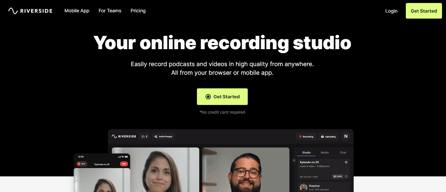
Riverside is an online audio and video recording platform that allows users to run and record webinars in 4K video quality, straight from their browser. It’s ideal for users who want to create studio-quality webinars and remote interviews, regardless of where they’re recording them from. Riverside also supports tools that let users separate audio and video trackers, Livestream Twitter, YouTube, and Facebook. Transcription is also available on higher tiers and collaboration is easier on the platform’s shared work environment.

| Capabilities |
AI
|
|---|---|
| Segment |
Small Business
Mid Market
Enterprise
|
| Deployment | Cloud / SaaS / Web-Based |
| Training | Documentation |
| Languages | English |
Riverside Pros and Cons
- Lets you record your webinar in full HD
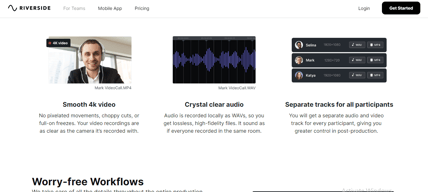
- Helps you save time by automatically recording each participant on individual tracks
- Provides a call-in feature that helps boost audience engagement
- Mobile app available only for iOS
- Uploading complaints have been reported, especially for progressive uploads.
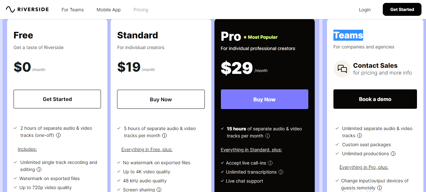
- It can be costly for heavy users as it follows hourly pricing


Compare Riverside with other popular tools in the same category.
The ease and sense of security with Riverside are second-to-none. I've been producing shows across platforms for years now (Zoom, Zencastr, etc etc etc) and none of them match Riverside's efficiency and reliability. I've had every kind of technical malfunction you can imagine and we still come out with spectacular audio -- and guests find it smooth sailing to boot.
I confess I do tire of the constant upgrades, constant revisions, constant changes -- the platform is so good, and does exactly what it needs to do, so why make it everything for everyone instead of something really good for the folks who really use it? That said, a minor quibble to be sure!
It's a one-stop-shop for recording across multiple shows and hosts. While we use a different transcription/editing software, the fact that we *can* use Riverside has also been a huge bonus. It's nice to have something that everyone uses together, and that works for pretty much everyone.

The best part about Riverside is excellent fast customer service that responds promptly through chat support and through email support. This compares to competitors in that you receive help faster. The editing software upload videos quickly, and it is easy to navigate when it comes to editing and clipping different Clips, using their smart clip software.
Sometimes using the software requires more ram and memory than my computer can't handle. My computer is a Samsung. It is very old. That is not really a fall of Riverside bit more father of my computer. And my need to get a new computer or MacBook.
Riverside solves problems by finding my Clips that I needed to find an recapture audio on. I unplug my headphones, and the audio split, and Riverside was able to recover & merge it.

I don't know what I'm doing at all when it comes to podcasts or video editing or any of that. I was able to easily get guests on my show, and I didn't have to worry about the internet connection, sound, or probably a dozen other details I don't even know exist.
Nothing really. I think the only real complain I have is that the transcript doesn't get all of the 'ums and ahhs that people say. I know I can probably do more fine editing, but it'd be nice for all of the pauses to show up in the transcript so I can remove them with the AI in one go.
I do not know how to do a podcast, how to record video, and how to coordinate interviews over the internet. And I don't need to. Riverside does all of it for me and handles the details. It's great.
Simple interface, it just works as it should without the problems other platforms have.
Nothing that I can see yet honestly, hopefully nothing emerges as I use it more!
Split local track recording uploaded to the cloud without audio or video errors
The video and audio quality is excellent. Ease of use is there, and customer service is great, too. I had some issues and still am learning my way around the platform, but I'm definitely pleased. I also like being able to render separate video and audio tracks for post production. I'm quickly getting comfortable with it and hope to launch my podcasts in a big way very soon.
I would prefer being able to monitor my voice thru my xlr connected microphone and audio interface. It works fine when I use a Shure NV7 with the mic going directly from it's USB output to my computer, but so far I cannot get the same result with the XLR connection.
I had no expertise in podcasting and was unsure the best way to proceed. Riverside's all in one solution is good for me, since I already have a studio, but it was geared towards music. Riverside's platform is easier to use with a lot of great features and great quality audio and video output.
I love that it is versatile and you can really edit the video with ease.
The new AI feature created weird shorts that didn't work for me.
It is helping me and my colleague create better content than normal.
Easy to use. High quality audio and video and cool editing features. They post training videos almost every week! Some of the best I have seen. Very up to date! Their video training has helped me launch and develop my new podcast called Healing America: Starting With You so much faster and with higher quaality than I expected. Highly recommended!!
I still have to downlaod the vidoes into an editor to add lower third texts and other added pictures. I could add the pictures in the orginal recording but it would mean more editing of the video to correct the pauses to add the pictures. I don't expect them to do everything. I am OK doing post produciton with a strong video editor that gives me stock photo's, stock videos, effects, traisnitions, etc. :)
Making high quality podcasts
I like how simple it is to use especially as someone who isn't that tech savvy, it makes the process less overwhelming and the audio always sounds so good without having to do much to the audio!
I would say the editor could use improvement. When I try to remove parts of the audio that has filler words, it sounds kinda choppy afterwards. I also do wish there was a way to add in design elements so it can be a one stop shop for many features similar to Descript. However, the audio and user experience is really awesome and still is the best out there in my opinion.
It is ensuring a great user experience and makes it less intimidating to use the platform. I also really love the magic clips feature!! I feel that because of the production quality from riverside, it's helped colleagues of mine get inspired to start using Riverside as well since I am always raving about it.
I'm new to podcasting and the interface and interaction with other software has been very easy to grasp. I love the fact that I can download each element separately — high def audio + video for each participant. Sharing the link with my podcast guests is a breeze and the fact that all our audio/video recordings are done at source, rather than over the internet, is an amazing benefit. Terrible connection? Who cares! The audio will be pristine as it's recorded on my guest's local hard drive.
I wish I could switch between split screen and full screen at different points in the recording.
It's enabling me to easily record podcasts.
Riverside is a natural extension of the easy and efficient Zoom or Google Meets call just with an elevated experience!
No negative feedback on the platform but the inability to do text overlays of the transcipted call.
Sharing 3-dimensional content surrounding myself and my business.
Ease of use. The platform makes it so the fear of technology is not a thing. The question of, "where do I even begin?" is easily answered with this platform. I also love the brand new beta Magic features for social media clips!
Being nit picky here, but I would love the ability to add users who can log in and create the clips, post processing etc without the single main studio login. Essentially give the producer access post processing access.
Removing more complicated programs such as adobe audition. The voice balance, and background noise remover was even better then I expected. Once I saw this in action in multiple different environments to record (large studio, small studio, echo-y location), and the results were all similar, I was sold.

I recently had the opportunity to use Riverside.fm for recording podcasts and remote interviews, and I must say that I was thoroughly impressed with the platform. Riverside.fm is a game-changer when it comes to recording high-quality audio and video content online. One of the standout features of Riverside.fm is its outstanding audio and video quality. The platform records audio and video locally on each participant's computer, which ensures minimal lag and crystal-clear sound. This is especially crucial for podcasters and content creators who require professional-grade recordings, as it significantly improves the overall production value of the content. One of the features that I found particularly valuable is the ability to record each participant's audio and video separately. This feature ensures that even if there are connectivity issues or technical glitches during the recording, the content remains salvageable and can be edited easily in post-production. Moreover, Riverside.fm offers automatic backups during the recording session, providing an extra layer of security for valuable content. This feature is a great reassurance, especially when recording long interviews or discussions that you wouldn't want to risk losing due to unforeseen circumstances.
Riverside.fm supported only the Chrome and Edge web browsers for recording sessions. This limitation could be a concern for users who prefer to use other browsers, such as Firefox or Safari, as their primary web browser. t appears that there might still be accessibility issues with Riverside.fm that need to be addressed and fixed. Accessibility is crucial to ensure that all users, including those with disabilities, can use the platform without facing barriers.
Riverside.fm, known for its excellent audio and video quality, ease of use, and various features to enhance the recording process. However, it is essential to recognize that while Riverside.fm offers many advantages, it may still fall short in terms of providing full accessibility for disabled users. Accessibility is a critical aspect of any online service, as it ensures that all users, regardless of their abilities, can fully engage with the platform and its functionalities without encountering barriers or limitations.
It's a intuitive platform that is easy for both producers and guests to navigate
Video quality can sometimes be a bit low, but that's not Riverside's fault - overall great platform!
Recording podcasts in a simple and user friendly way
I love that it automatically defines audio. For a novice like me, it is extremely useful. I like the magic clips as well so I can make content on social media quicker. I also like that it emails you when your clips are ready and I can share them from my phone.
Sometimes the functionality of editing the entire episode is difficult when you attempt to manually put in a time within the clip you want to jump to. Sometimes it won't let you and "times out".
Better AV quality. Also the content I am able to produce on social media for outreach purposes has gotten significantly better. Additionally, I enjoy the functionality it has with being able to upload from my phone. I do wish the app had more features.
User friendly interface and easy to host and interact with guests.
No negative feedback so far. Super helpful and easy to use.
Podcasting and hosting guests.

It's user-friendly and easy to use as a beginner which I am. The quality of the video is much better than other options when you're doing virtual Zoom-like podcasts.
Nothing serious, you just have to tell your guest to wait to exit their browser to make sure their video uploads correctly.
High quality video production, low stress to use.
- Ease of use. - Embedded features. - Quality of the Audio.
- Price for monthly subscriptions. - Design of the pages (could be better).
Podcasting and audio quality

Product-wise, it's easy to use, navigate and learn the ropes of updates.
I had a small bump one time during the recording but I feel it was my PC memory to blame the glitches.
I am able to create content for SMM without having to deal with outside video editors (almost)
It records audio and video separately for each person so the quality is always good
Nothing much. It's been good so far for me
Helps me record my podcast easily and keep the quality high

It's ability to let me record high quality interviews and still run webinar-like events. This will make my dream of doing live call-ins possible.
What's there to dislike? I'm yet to see anything that bothers me.
Recording high quality interviews and webinars.

* The recording will never fail. * Even guests unfamiliar with podcast recording can start immediately as long as the hardware preparation is complete.
* The accuracy of transcriptions from Japanese audio is still lacking. * The concept of the 'studio' is slightly confusing, making it difficult to understand which URL should be sent to the guest.
Riverside.fm simplifies my weekly podcast recordings. Before using Riverside.fm, I used to record Discord calls in each member's local environment, which always carries the risk of recording failure. With Riverside.fm, recording failures are almost non-existent.
I use riversidefm for recording podcast and virtual filming with clients. The quality that you get out of a virtual recording is the best I have seen on the market and even some less tech savy clients can use it. I really like their backup feature too as it makes it very user friendly in not losing recording data.
I haven't found anything on the riverside platform that I have disliked yet
I needed to use it to interview clients and guests and it is serving that purpose well. It's made the ease of recording a podcast quite easy.
How multiple people can join a session and everything syncs up perfectly
I wish producer/host didn't have to be logged and either one can be used
Having my clients set up and record on there own save me so much time
Extremely simple, intuitive controls with very little training/instruction required.
I'd like to be able to add a photo/logo for each studio to personalize it further and differentiate each a glance.
Our non-profit membership association wants to easily and simply create a podcast for our members. Because we live in a bilingual province, that means French and English; Riverside.fm facilitates this easily.
An ideal tool to record content in a professional and intuitive way, with very fast technical support and backup recordings in the cloud
Actually, I would recommend it to all types of users, I don't see any errors in the platform.
Ease of use, very stable connection, possibility of different capture modes

The simplicity and the help that you get when you have questions about the site.
I wish there was a little bit more to editing clips or maybe a training to help edit the clip / pay to edit section.
I don't have many problems at all currently, riverside is one of the best for first time content creators in my opinion.

I love that it records in high qualty no matter how the internet connection is. High quality audio and video is very important to me. I also LOVE the new magic clips feature
Nothing. I am careful to inform my guests about the platform which eliminates most issues.
Being able to record high quality audio and video remotely.
I like that the software is easy to use, that you can separate the audios and videos. It makes it so much easier to process the content. I also like that you can change the display when exporting the videos.
Not a lot of things, but one is that it's not possible to go into the call with full screen, and it might be disturbing for some people. Another thing is that I always have to select "I'm using headphones". It could keep the information from preivous calls.
It's solving the problem of having to edit long videos. I love the feature that you can export the videos once the call is over, and that you can even choose the display.

I have been using Riverside for over 3 years now and it has been solid for me. I use it to record shows for my clients as well as for myself. The audio and video quality are vastly superior to Zoom. It's nice having the option to record at 44.1 or 48k since my system is set to operate at 48. The video quality is only limited by the camera in use. The user interface is easy to navigate and takes care of configuring the echo-cancellation setting for each person, based on their answer to a question when entering the studio. Riverside makes it easy when I'm engineering a session to see which mic and headphones each participant is using, eliminating some of the testing I've had to do on other platforms. I have only lost 2 recordings out of hundreds while using Riverside, and both of these were traced down to the settings on the guest's computer.
Riverside's chat tech support can be slow at times to respond, though they have improved upon this recently. There have been a few situations where the audio and video were out of sync, but tech support was able to solve the problem by re-processing the files.
Riverside allows me to offer remote engineering services to my clients while delivering significantly better audio and video quality than Zoom.
Riverside is very easy to use for me as a host as well as for my guests. The platform also provides a very professional studio look and feel for all of the interviews I record for my podcast. I am a huge fan!
To be honest, I have not had any issues with any of the aspects of the platform. I have no intention of looking for another place to host my podcast interviews!
It serves as the studio for my guests as they appear on my podcast. It looks and feels professional which always impresses my guests! And its really easy for a novice like me to use it!