

Unclaimed: Are you working at Swit?





Swit Reviews: 4.7/5 — Highly Rated
Swit is a powerful project management tool designed to help teams easily manage their projects, tasks, and communication. It features a user-friendly interface and a range of powerful features including task management, team collaboration, time tracking, and file sharing. With Swit, you can streamline your workflows, improve communication, and increase productivity by ensuring everyone is on the same page and working towards the same goals.





| Capabilities |
API
|
|---|---|
| Segment |
Small Business
Mid Market
Enterprise
|
| Deployment | Cloud / SaaS / Web-Based, Mobile Android, Mobile iPad, Mobile iPhone |
| Support | 24/7 (Live rep), Chat, Email/Help Desk, FAQs/Forum, Knowledge Base, Phone Support |
| Training | Documentation |
| Languages | English |

Compare Swit with other popular tools in the same category.
멘션과 알람 기능 등의 디테일 한 부분이 좋은 것 같습니다. 그리고 구글 문서들과 자연스럽게 연동되고, 관련 하위업무들을 쉽게 확인할 수 있습니다. 해당 업무의 담당자, 참여자들의 목록은 도움이 되었습니다. 프로젝트와 테스크를 분리하여 효율적인 소통이 가능한 것 같습니다. 경쟁사와 비교해 접근성이 좋은 것 같습니다.
이것은 sns와 관련되어 swit과는 관련이 없을 수 있지만, 위화감을 줄 수 있는 이모티콘을 좋아하지 않습니다. OKR 목표 순서를 변경하면, 내부 핵심결과가 모두 사라집니다. 목표에 들어가면 핵심결과가 있지만, UI 목록에서는 모두 사라집니다.
지나간 프로젝트를 정리하고, 기억하는데 좋은 이점이 있습니다.
After using Sweet, goal-oriented work has become possible. The intuitive interface also enables efficient operations. Even if an issue occurs during the progress, we talked through the messenger on the same platform, so we could understand the context of our work more clearly, increasing our work efficiency.
The most uncomfortable thing about switching is that there are too many updates. When I go to work, turn on my computer, and enter Sweet, I always get an update notification once a week, so I felt very uncomfortable. And the inconvenience of using it on mobile was that the notification was not cleared even when I read the notification.
With the use of Sweet, team-oriented communication and work have become more possible than before. In addition, the organization's productivity has increased, and by introducing and managing the OKR work system as a sweet, we can see at a glance what goals each team member's work has connected to.
회사 업무 특성상 다양한 업무를 진행하고 있는데 동시에 진행함에 있어 헷갈리지 않을 만큼 업무별로 워크스페이스를 나눌 수 있다는 부분과 각 워크스페이스 내에 자유롭게 대시보드와 프로젝트를 설정할 수 있다는 것이 좋았다. 그 프로젝트에서에서 개별 to do를 편하게 시작할 수 있고 편집기능도 간단하고 편리하다는 부분이 큰장점이다.
나만의 업무 리스트 기능이 없다는 것이다. 또한 별표를 붙인다 하더라도 첫페이지에서 별표가 붙은 프로젝트만 따로 모아서 보고싶은데 그게 안되서 답답하다. 하나하나 클릭해서 들어가 업무를 확인해야하는 부분이 피로감을 증가시키고 또 한 업무에 코멘트가 많을경으 로딩시간이 하염없이 길어지는 것 또한 불편하다.
다양한 업무를 방향별로 워크스페이스를 나눌 수 있고 그 워크스페이스중에서 프로젝트를 나누고 하나의 프로젝트 안에 다양한 업무를 할당할 수 있다는 부분이 체계적이고 혼란을 줄여준다고 느낀다. 특히 코멘트 영역에서 이모지만을 사용해 답변할 수 있는 부분이 꽤나 편리하다. 하나씩 텍스츠를 적어야하는 업무에서 해방시켜주었다는 느낌을 받는다.
You can efficiently manage the space that can be commonly used by related parties by classifying work. When an issue arises, you can designate separate targets by case to manage work overload.
In the case of PC apps, there are frequent instances of unstable connections. As all work is done through Swit, it can be difficult to proceed with work in such cases. We hope for a stable service.
Individual task management has become difficult to grasp individually. To solve this problem, a culture of solving problems by creating an environment where multiple people can identify issues and provide opinions together is changing.
기존에 여러가지 프로그램을 사용해서 번거로웠지만 swit이라는 프로그램을 사용함으로써 간소화가 된 점이 가장 좋습니다.
싫어하는 점이라기 보다는 아직 사용 툴을 완벽하게 익히지 못해서 활용하기 어렵습니다.
팀원들과 공지사항을 한번에 확인할수 있게 만들어줍니다.
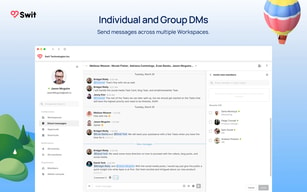
업무 메신저 기능도 같이 겸하고 있어 다른 메신저(카카오톡, 라인 등)로 연락오는 것이 없어 회사 생활과 개인생활의 분리가 잘 이루어지고 있고, 현제 진행되고 있는 업무들을 타이틀별로 확인 할 수 있어서 좋습니다.
진행되고 있는 업무가 많을경우 조금만 늦게 확인하면 언급되었던 키워드나 내용을 찾기 어렵습니다. 검색 기능이 있지만 제대로 검색 되지 않는 느낌입니다.
상호간의 소통방법에 대해 시간과 장소에 대한 제약을 줄여주었고, 소통시간 또한 절감되었습니다.
It's very nice the way swit is designed, it's very intuitive to most beginner users to start using it with almost no effort
I think integration with other apps needs to be improved and I found the messaging system a bit messy, besides its organization of the tasks and projects
I'm a project manager and swit allows my team to don't worry much about how a project manager software works, and still, use it in a proper way

In about 6 months of experience with Swit I will definitely say my work is now totally dependable on Swit platform.. From the day I have integrated Swit into my work my working durability, Exposure to work & efficiency has totally increased.. Swit provide me a single & most genuine platform where I integrated several project,handled my team, presentation, chats & records all at a single click..
Well mine 6 months experience with Swit hasn't been affected by any bugs/crash but Unnecessary advertisings in between work hours really sucks little..
Personally Swit provided me a single & most genuine platform where I integrated several project,handled my team, presentation, chats & records with on chain records of all just at a single click..
The design is very pretty while to software is easy to use and intuitive. I like that you can combine many functions in one software. I don't know how it compares to the competitors, but I like it.
There are not many things I dislike about it. I only wish more people were using it so that it would feel more useful on day to day basis. Getting too many emails (notifications) is annoying.
It helps me be better organised, by keeping all important information together and it is visually pleasing so I feel like with little effort I can create information that can be easily shared with others.
It is very easy to organize and to manage
It is always updating and because of that sometimes I can not acess it
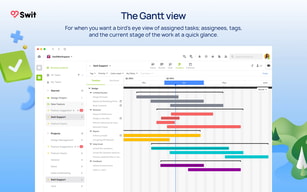
My project is organized with Swit, it is very useful to distribute work and have a nice view on all the deadlines
Integration with google drive makes setting tasks very easy and free!
It seemed difficult to do projects with a timeline and group assigned projects
Organizing and starting a non- profit.
Within the training of all types of work people who are assigned to create and manage tasks online Swit is a best tool because it allows administrators to view the duration of the project with a drag and drop interface of data files via text message providing your operating system compatible with web browser in an excellent way to see all projects working smoothly, quickly and safely along with a number of other communication applications in the workplace. It also combines messaging with a list of tasks and calendars of its functions in a single center for business customers in very large organizations of their current applications
The development within desktop computers as in mobile devices can not run through applications without losing the context in the major sources of customer satisfaction, integrations can mainly receive notifications based on very large text leaving high time yields in the work by departments where users must take greater risks. In our personal work besides several project management applications many employees do not trust Microsoft to talk to each other and it requires a more private communication with an interactive timeline functionality through diagrams and activity logging
It is used in all types of industry for different workflow in the teams in ours began to run in order to facilitate the exchange of files through chat making deployments based on web, cloud, Saas with Android Systems providing training to our customers online ensuring hours of work in real time, the platform allows us to track progress and organize data by seeing the duration of the project while using communication between members through text message ensuring the perfection of management without losing the context
I love the fact that you can have information stored there for a long time. The fact that you have a task planner in the same application is amazing.
The fact that I can't really share files between chats. I have to download and then upload again
Organization and now I don't need 5 or more apps to solve one problem.
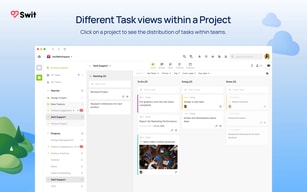
Timeline for all projects can be viewed in a single screen.
That there is only the option for a single manager for a task.
More transparent on what teammates are doing so you know when to intervene.

Having the channels and projects all in one workspace is very convenient. Easy to drag and drop between the two!
The gmail integration is nice, but the UX/UI is a bit too limiting at the moment to use to manage my inbox.
We were using asana and slack. Even though we had them integrated, it was not a seamless experience for collaborating.
메신저 안에서 다양한 이야기를 나눌 수 있는 채널, 일정부터 체크리스트 등 업무를 위한 프로젝트 카드로 나누어져 있어서 활용도가 좋았습니다. 또한 내가 담당인 업무, 내가 참여하는 업무 등 업무를 분류별로 나누어서 볼 수 있다는 점도 편했습니다. 마지막으로 별표 표시(=즐겨찾기) 기능도 아주 좋았습니다. 리마인드를 스스로 계속 할 수 있다는 점에서 굉장히 편리했습니다.
숨겨져 있는 기능이 매우 많은 거 같습니다. 다만 아직 파악하지 못하였고 지금 쓰고 있는 기능들을 사용하기까지 다소 시간이 걸렸습니다. 그리고 읽음 표시가 뜨지 않아서 아쉽습니다. 이모티콘으로 표시할 수 있다는 점이 있긴 하오나 한번 더 손이 가야하는 것이 불편합니다. 그러나 읽음 표시가 없는 게 장점이자 단점 같아서 나쁘지 않습니다.
업무를 효율적으로 할 수 있습니다.
Interfaces to manage OKR. It helps to care Objects.
Too complex. It's easy to lose my text. I need auto-saving feature.
Liking team working
통합시스템으로 사용하여 다양한 어드민을 사용 가능할수있다을거라고 생각함 업무분담 및 지시가 간편해보임 기존 업무시스템을
워크스페이스 알람이 통합으로 나와있어서 모든활동부분에서 한눈에 알아보기가 힘든부분이 있음
어드민 통합을 가능성을 보임
It is possible to increase the efficiency of work by maximizing the efficiency of work management. So it is convenient to manage the schedule of the work. I like this
I have used a tool related to the work process similar to a switch called slack. It was more difficult to find and use UI-related functions intuitively when using it for the first time than when using slack.
Project management and schedule management are convenient, so the efficiency of work in the company is good. I'm just satisfied with this much, so I haven't thought it through.
I love being able to create cards as tasks and move them throughout buckets to sort status. It's helpful to be able to see my co-workers status as they complete projects and tasks that are assigned to them. It's also helpful that anyone can add a project or to-do on another person's to-do list.
One huge downside is the inability to schedule tasks for a specific time. For example, if I want to complete "Call Nancy @ 3:00PM" I would have to name the task as what time it should be completed. The inability to schedule tasks is detrimental to my work as I can't be notified right at or before 3:00pm for a task that's due then. Currently, I can only schedule tasks based on they day they are due, not the time. Another issue is that creating a new task isn't exactly "quick." I have to title the task, then click into it to assign it to somebody, then after that I have to click to add a due date, and again to add tags or labels. It should be as easy as typing in: "Follow up with Jack tomorrow" and it should recognize that I wrote tomorrow and it should schedule it for me. The more difficult it is to add a task, the less likely I am to add simple tasks to the list and risk forgetting it. It should be much quicker and take no less than 5 seconds to create, schedule, and assign a task and currently it takes around 10 seconds. It doesn't seem like a big deal at first, but when you have a team of people using this, you don't want to have any difficulty annoyance in adding tasks.
I've been able to better manage my team and see the tasks they are completing remotely which is extremely beneficial. I can also give tasks to people more easily throughout the day without needing to speak to them personally.
카테고리가 잘 나눠져 있어서 업무 확인이나 공지나 일 등을 명확히 수행 할 수 있습니다.
처음에 회원가입과 로그인 과정이 조금 까다로워서 시작할 때 조금 애를 먹었습니다.
여러 공지사항을 잘 일목요연하게 확인 하게 끔 해주었습니다.
It's very comfortable.The UI design of Swit was clean and clear, which was great. The necessary functions are efficiently arranged, and the menus and buttons for work processing are appropriately organized, so even though I haven't been using Swit for long, I can learn it quickly.
I have never experienced any particular inconvenience using Swit, but it supports embedding these sites within the Swit messenger so that bookmarks can be accessed by opening the folder. It would be great if we could improve this by exposing it on the messenger home screen, making it easier for team members to access frequently opened pages during collaboration.
The UI design of Swit was clean and clear, which was great. The necessary functions are efficiently arranged, and the menus and buttons for work processing are appropriately organized, so even though I haven't been using Swit for long, I can learn it quickly.
We are able to easily and conveniently communicate with colleagues of our company. So, we can cooperate together with my team and other teams as well. It is easy to check the status of work and project.
It is hard to find where we talk about things in personal chat. It would be better to make the functions to find sections something like that. Furthermore, it can be more complicated if we make lots of groups and channels.
It is kind of channel to communicate with our collegue, even distance, so it is easy to solve the problems we may ask something with the people who can assist.
Fairly intuitive to use. good functions for general project management use
Project management system was not detailed enough for our intention of use. for example, allocating which person to take responsibility for certain tasks. the timeline doesn't show such details as an overview. having to click the boxes for extra info is not helpful. When categorizing tasks, we want to be able to put brief descriptions under each head and to be visible. Generally categorizing tasks, getting an overview were difficult. Can't combine project timelines together - also would be very helpful to see timeline snapshot of all projects.
project management
la synthèse entre Trello et Slack, vraiment très pratique
la messagerie est certainement perfectible
je gère l'organisation de mes taches, celles de mes collaborateurs et la comm entre nous.
Design is good. I like it's warm color and simple layout
It is not good for software engineer. There are no important features for software engineer, such as interlocking with configuration management software provided by other solutions.
Honestly, I don't know the difference between using a regular messenger.

I like the fact that I have most of my tools in one unified tool, keeping tabs on who is doing what and being able to manage projects from this tool is superb; the platform is fast and easy to use. I like the UX of the whole experience and that I can have multiple workspace under one account. It kind of reminds me to notion.
my teams still prefer slack with existing integrations, easier to understand where is what; it is difficult to migrate from slack and trello back to a new tool, a lot of migration and ease from existing users still happens. the more constant phrase I get from my team is: if is not broken don't break it One other challenge is the pricing scheme it is much easier to start on a small team with slack that it is with swit; I cannot take full advantage of the features unless I have a paid account and coming from a developing country, spending USD is more of a sacrifice than an experiment The SPAMing from the swit team is amazing sometimes I am this close to just block them all together
Keeping everything in one tool and easier to communicate and connect ideas/tasks with the convo.n It really helps when I want to run quick MVPs or POCs with dynamic teams working with kanban and getting things up and ready quickly.
Task 하위 업무로 작성하고 관리하는 부분과 뷰어 형태를 확인할 수 있는 부분
활동과 멘션에 확인된 내용을 워크스페이스에서 또 확인해 주어야 하는 부분
활동 이나 모든 멘션에서 확인하면 한번에 확이 되면 좋겠음 확인 된 내용을 워크스페이스 에서 또 확인해 주어야 하는 번거로움 생략