

Unclaimed: Are you working at Swit?






Swit Reviews: 4.7/5 — Highly Rated
Swit is a powerful project management tool designed to help teams easily manage their projects, tasks, and communication. It features a user-friendly interface and a range of powerful features including task management, team collaboration, time tracking, and file sharing. With Swit, you can streamline your workflows, improve communication, and increase productivity by ensuring everyone is on the same page and working towards the same goals.





| Capabilities |
API
|
|---|---|
| Segment |
Small Business
Mid Market
Enterprise
|
| Deployment | Cloud / SaaS / Web-Based, Mobile Android, Mobile iPad, Mobile iPhone |
| Support | 24/7 (Live rep), Chat, Email/Help Desk, FAQs/Forum, Knowledge Base, Phone Support |
| Training | Documentation |
| Languages | English |

Compare Swit with other popular tools in the same category.
I work from home along with the rest of my team, so communicating use to be fairly difficult. However since we've had Swit it has made it SO much easier. I love that we can not only chat, but also create projects and easily show the progress of those by the project categories. One of my other favorite features is that you can connect your emails to add onto projects for a quick overview of a task. I highly reccommend it to anyone who asks!
I don't dislike anything. No complaints here!
Being able to easily communicate with team members without having to message about every single thing, and instead tagging them in projects I need them to do. It makes work so much simpler.
Swit is an essential tool for any organization! Chat and task management are seamlessly integrated. You can do everything in one place!
I'd like to see more built-in integrations that can allow me to connect other enterprise tools that I use.
When I used Slack and other project management tools, I constantly went back and forth between different apps. I often lost context for the task I was assigned. However, Swit enabled us to connect chat and tasks smoothly and brought all information together intuitively.
My project progress and schedule management are helpful for sharing work status among team members. And it is easy to understand the flow of issues or events that occur throughout the company. This
When using OKR, if the project deadline is exceeded, the progress rate cannot be changed. I'm not sure if there is a special reason why it is impossible to change, but it would be nice if it could be marked as delayed completion even after the deadline has passed. This
My team and project management have become very easy. It is easy to manage the current progress and collaboration among team members at a glance. It has also become easier to understand issues or events that occur within the company. This
When utilizing Swit, I truly appreciated the seamless communication it offered among my fellow team members. In contrast to other messaging platforms that often struggle to send large files, Swit excelled in this regard. Even with substantial file sizes, the transmission remained swift and uninterrupted, which was an outstanding advantage. Another great aspect of using Swit is that it enhances the sense of belonging within the team.
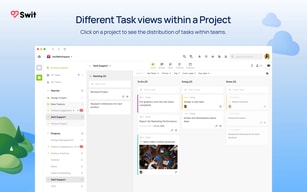
I found it inconvenient to use the Projects tab within SWIT. It felt cumbersome and not very user-friendly. While the ability to view schedules for different projects and teams was beneficial, the multiple formats provided (such as Bucket View, Status View, Team View, etc.) made it complex to determine which view to choose. Additionally, the inclusion of tags for sub-items added further complexity. From a UX perspective, it might be better to have a more streamlined environment for users to access their schedules, even if it means sacrificing some flexibility. It would be helpful to gradually familiarize users with the simplified interface.
Swit facilitates seamless communication among team members, promoting efficient collaboration and enhancing overall workflow effectiveness. I cannot think of any further insights at the moment.
You can communicate with others through multiple channels. Each channel has different purpose of communication (e.g.notification channel, project channel). In addition, users of this tool can promptly leave various types of emoticon on other users’ message. At the same time, users can have discussion about a certain topic through leaving comments on other users’ posts.
There is no particular downside of using this collaboration tool.
Successful business communication
There are lots of variety of tools that helps me co-op with others. I can generate channels for many purposes. Besides channels, there are project section that helps me plan things with calendar. DM, tag, notion, pin systems are very useful too.
I had difficulty uploading files via smartphone. I don't know what is the reason but sometimes swit doesnt let me upload in dm but only channel messages. I hope this gets fixed soon.
Swit is solving the problem that I had when I want to do projects with others. The main problem was communication and swit is helping a lot with this problem. I am benefiting from it because I have to do lots of projects with others.
The big advantage is that you can easily manage your channel, and the information seems organized due to the comment system, not just a chat system. It is also easy to attach images and convenient for scheduling. And the system to leave emojis is fun, and it's an easy and quick way to let others know if they've checked my notice.
I haven't felt much inconvenience yet. The only inconvenience is that sometimes large files are difficult to send. Other than that, I use it very conveniently. :)
I'm using swit for academic activities, which is easy to share the entire academic conference announcement or schedule, or to chat and share information for project progress. Instant interaction also allows you to move quickly.
Swit seems to have the advantage of being able to create multiple channels for communication. Different channels can be used for each task to increase the efficiency of the task. Another advantage is that you can upload files such as images and videos.
The disadvantage is that the file upload has a capacity limit. However, there is no problem in uploading a file of moderate size. The disadvantage of desktop version is that it cannot be checked when there are several people who left emojis in the article.
Through Swit, it helped several people perform various tasks independently. In addition, administrators can manage their own channels, which has helped them a lot in performing their tasks.
It helps business and scheduling for work. I worked some project in xreal.
It seems little uncomfortable because some alaram do not gettiing.
Swit solving connecting schedule and conversation needed for business.
Concurrent project and communication channels and interworking with a variety of SaaS tools
What is regrettable compared to the slack is that the UI lacks casualness. The most uncomfortable thing is that it is not possible to preview the channel conversation list. The search function is also significantly lower than that of Slack
The integration of projects and channels addresses the discontinuous flow of work. When using slack, business management was possible only when it was linked with a SaaS tool with a built-in database such as motion. However, SWIT's project tab enables practical work management and can be said to be a true work management tool.
- Multiple group formation capabilities - Allows sharing of different formats of work - Enables large file uploads - Empathy emoji of messages can be attached - Support for various platforms such as web and app - Provides notifications for mentions
- I wish I could use the same group emoji for personal DM between users of the same group. - I sometimes get a notification late - It's not a disadvantage, but it would be nice to have a roulette function that allows you to randomly pick some of the people you chose.
Even when sharing simple data with team members, it was inconvenient to pass through a web drive due to capacity limitations. It was good to be able to solve this problem by using Swit. In addition, it was very helpful to be able to ment and guide team members in the group if they had any guidance to remind or emphasize.
Big data save with title by project is helpful.
it is not supported sort by newest and new card sort(arrangement) by newest.
remind schedule and ongoing items by time table.so i can notice to assigned person.
Good for use in project work. 1. One-on-one chatting is possible. 2. You can use an emoji to see if other team members check it.
It is questionable whether Swit can be used properly if it is not a large group. I thought I wasn't fit for a small group.
I didn't feel much about this part.
Maintain context for task and conversation.
No matter how hard i find, there's nothing really dislike about it.
Swit helps me to manage various work tools. I used at least 8 work tools per day before using Swit. Through Swit, I can link all my work tooks into one platform, Swit.
As a group and head of an organization, I need to quickly find out the big flow of organization's communication and the blockage. What I felt while using various communication apps and services is that just sharing and storing everyone's conversation doesn't make the flow of the organization visible at a glance. But with Swit, it's very easy to see who's doing what, how much you've done, and how well you're communicating. Since we are working on various projects within one organization, these functions have been a great advantage for me and my group.
There's almost nothing I disliked about using Swit, but there are a few things I felt bothering using it. If you look at Swit's UI, you can view two channels or view DMs and channels in one window for multi-tasking. However, while I am looking at the photos and files on Swit, I couldn't see other channels or DM wtih other people. So I wished to see both the files and communicate with people at the same time.
Swit gathered the density of communication and improved work processing efficiency within the organization. When you work within an organization, there is often news that you need to talk 1:1 or that all team members of the project need to know. Each person has a personal SNS and communication application, and if they talk through such a personal messenger, it is too easy to lose or forget what they talked about their work. However, if personal messengers and the company's communication platform are integrated, like Swit, it is great to switch chats into Tasks or take notes of 1:1 conversations between team members. Swit has increased the ability of members to work and reduced human resources to communicate, making communication much more efficient.
Project management is convenient. Good for use with multiple people.
It's hard to find projects or content you've used before.
경영이 편리해졌고 작업률도 높아졌습니다.
An organized and simple UI/UX. Easy to use. Very helpful for management tasks and projects that i'm involved.
Nothing yet. Well, there were occasional bugs, but they were quickly fixed.
When participating in multiple projects, it's easy to forget the tasks I need to do for each project, but with Swit, I can list and manage tasks separately for each project.
프로젝트를 통해 타 부서의 업무 현황 진척율을 바로 확인할 수 있고, 업무 진행 시 오고갔던 파일을 프로젝트별로 바로 확인할 수 있어 좋습니다.
각 채팅 채널별 검색이 되지 않는다는 점이 다소 아쉽습니다. 이미지나 파일의 경우 미리보기가 되지않고 다운로드를 받아야만 확인이 가능한 점이 다소 아쉽습니다.
각 부서 간 진행하고 있는 업무 리스트와 진행 가능한 데드라인 등에 대해 빠르게 파악 가능하여 기존대비 업무효율 상승하였습니다.

Swit allows us to store tons of files that can be used for cooperation. There is no limitation on time or storage, so Swit should be a nice Archive.
I pefer to react with emoji when using Swit. It would be better to use emoji as well when using dm.
When quick communication is needed, Swit can be useful.
1) Using Swit, I can recognize what my colleagues concentrate on. 2) Swit helps me to manage deadlines of my tasks. 3) As a front-end work hub, Swit integrates my work tools.
It is hard to find bad aspects of Swit. This service is perfect.
Swit gets rid of communication barriers between collegues.
I can divide work into before and after stages. It's useful to collaborate with others during the process of completing work by sending notifications to team members. It's recommended to consult with other team members before starting work and share the results and exchange feedback after completing the task. Furthermore, when issues arise during the work or important information needs to be shared, it's possible to quickly notify other team members by mentioning them.
It's very inconvenient that buckets cannot be selected and moved to another project all at once, but have to be moved one by one. Also, it's regrettable that the status view and bucket view are not applied differently for each project, so it's necessary to check and change them separately.
I am pleased with 'Swit' as it has continuously addressed numerous bugs, making it easier for me to use. Furthermore, I believe that its consistent addition of new features has led to a more user-friendly experience.
We were able to reduce our work processing time by distributing the overwhelming workload among our employees. Additionally, it's easier to share and confirm integrated information about project tasks, making it easier to understand the context of the work and provide support.
Since there is a lot of information stored in the workspace, sometimes it takes a long time to load. It would be great if this part could be improved. It would be nice if you could select an image from the attached images and view it directly in the project content.
As the workload increased, the number of projects that require collaboration also increased. However, in the past, there were difficulties in understanding the content of collaborative work because it was not properly shared. After using Swit, all the contents and materials were shared from the beginning of the project, making it easier to manage the work. In addition, it was possible to confirm the communication related to the project, which increased the efficiency of the work.
It is easy to share information with team members and is also good for recording projects. It also helps to handle things efficiently because it helps you plan and process things by organizing them in a list.
There are inconveniences when using ordered list. For example, after using number 1, press the enter key twice for readability, and I want to start with number 2, but it doesn't go with number 2 and starts again with number 1. I think it would be more convenient to record it if you could correct this.
I often use the ability to record projects and share and tag team members when collaboration is needed. Thanks to these features, you can easily collaborate, and you can categorize what you've recorded, so it's easy to take it out and see it whenever you need it.
I think the advantage is that work can be carried out by combining Kanban and Scrum in an appropriate way. I think the advantage is that SWIT can be used in various ways depending on the characteristics of the project.
When you want to attach multiple files from Google Drive, there is a problem where you cannot upload them simultaneously. If this part is improved, it seems that work speed will be a little faster!
I felt that it was extremely beneficial to proceed with the project in a Kanban format, and it was also helpful for performing Scrum or Agile depending on how it was utilized.
It is useful in various situations in company business.
Sometimes a notification comes up and when you click it, you can't see the notification and go to the main screen.
It is good to be able to create a task, write the contents from the middle process to the end, and see it at once.
1. personal schedule management 2.Share schedule with team members 3.Able to understand the situation of common projects
1.Weak notification function 2.Weak calendar coloring function
Leading successful business projects. Schedule management (sub-schedule management) suitable for the project and what can be shared about the progress of the work
I think it is a very good platform that can be used as a business system in all fields. The best thing seems to be detailed settings for notification settings to users. Also, it is good to have a part that can be easily created and shared for all project schedule management.
There are a lot of notification settings, but sometimes it seems that there are parts that are missed. There are so many details, it's hard to know where it went wrong.
Work efficiency has increased as it is used for sharing with many people in complex projects and simple self-management.
Swit-based work organization and progress are convenient. Other people's work status can be shared and collaboration can be carried out online using comments. Checking messages through application alerts is also convenient.
I would like to have a section for completed projects. When managing projects by year, sometimes there is a need to look up previous year's projects, but if the administrator hides them by marking them as completed, they cannot be accessed. If they are kept in the current ongoing projects section, it becomes confusing and there are too many projects to keep track of.
Through Swit, it is convenient to carry out simultaneous tasks and handle administrative and research and development projects all in one space. Additionally, it prevents unnecessary comments with emojis and creates a positive atmosphere.
Quick updates and convenient user interface for users
There are minor bugs that sometimes occur, and other than that, it works well without any problems.
I am getting a lot of help with project checklist management and schedule management.
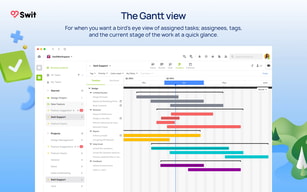
"It was very satisfying to be able to manage organizational tasks based on OKRs. The entire collaboration process is easy to track in terms of how well it aligns with the organization's goals, and the dashboard provided to view all notifications and data generated during the collaboration process is also very powerful. Swit provides various layouts for project management, including the Kanban board for managing progress, the list view for easily checking the contents of tasks, and the Gantt view for reviewing the overall progress of the project, which was also attractive.
_Check your messagDifficult to retrace after checking messages _I'm participating, but I'm getting unnecessary notifications about unrelated work
I was able to manage and organize various tasks. I was able to assign responsibilities by designating a person in charge of work and check the progress of the work. In addition, the biggest advantage of helping work progress was the ability to communicate in real time.