
Unclaimed: Are you working at WebinarJam?
WebinarJam Reviews: 3.7/5 — Good for the Price
WebinarJam helps businesses create and conduct webinar sessions, designed to extend a business’ reach through its comprehensive tools. The platform can host events, teach classes, broadcast to your team, and increase sales as well as event attendance using just a single webinar system. It boasts the most extensive set of features at the most cost-effective price and is trusted by thousands of professionals across different industries.

| Capabilities |
API
|
|---|---|
| Segment |
Small Business
Mid Market
Enterprise
|
| Deployment | Cloud / SaaS / Web-Based, Mobile Android, Mobile iPad, Mobile iPhone |
| Support | 24/7 (Live rep), Chat, Email/Help Desk, FAQs/Forum, Knowledge Base, Phone Support |
| Training | Documentation |
| Languages | English |
WebinarJam Pros and Cons
- Easy social media integrations
- Provides automatic recording
- Lets you add surveys and polls in webinars
- Compatible with numerous browsers and OS
- Offers only annual subscription
- Requires additional purchase of EverWebinar to get automated, on-demand webinars








With average attendance rates ranging from 35-45%, statistics and studies show that webinars offer potential for significant revenue gains and for building relationships that generate leads and conversions. In this WebinarJam review, we want to figure out if the WebinarJam software supports your efforts to increase conversions and make significant returns like those studies mentioned.

Around 36% of marketers state that webinars are effective in creating leads that eventually convert to sales.

Therefore, we’re interested in figuring out if WebinarJam lives up to that potential. Does it make it easy for marketers to capture leads and sell offerings within the webinar? Is it affordable enough so as not to minimize profits?
Keep reading as we explain who should consider WebinarJam and which features stand out the most.
Who Should Consider WebinarJam?
WebinarJam makes sense for those who crave high-resolution online video calls and webinars. It focuses on presenting your content, whether that’s a PowerPoint, images, or video, with perfect resolution, instead of having to worry about whether your viewers can read a statistic or see the expression on your face. It also works on all devices, and supports up to 5,000 attendees and 6 presenters. That makes it an excellent webinar tool for large online events, training seminars, and online courses where you know the users may end up on a mobile device.
Overall, WebinarJam looks like a winner for any organization that wants to expand its content creation outside of blog posts, infographics, and video content.
Webinars are often considered one of the most valuable content offerings by B2B buyers, so we like WebinarJam for those types of situations, especially to create uninterrupted webinars with flexible scheduling, replays, and intuitive communication tools.

The main restriction to smaller businesses may be the pricing. But overall, it should provide enough of a return on investment to make it worthwhile for the average business. Not to mention, the competition is often more expensive.
WebinarJam Review: The Features
Packed with communication tools and webinar design essentials, WebinarJam boasts an impressive set of features. Here’s a look into the top features we found during our WebinarJam review.
Paid Webinar Functionality and Active Offers
Not all webinars require monetization, but it’s nice to know that WebinarJam provides the elements needed to collect money and present offers. To begin, you get a paid webinars feature that links to a payment gateway. You can secure all webinar content with a password and only allow people in after they make the payment.
Furthermore, WebinarJam includes a way to display discounts and offers during your webinar with captivating live offerings. This way, it doesn’t distract too much from your presentation, yet you’re still able to make sales.

User Interaction Tools like Live Chat, Attendee Spotlight, and Polls
WebinarJam empowers creators with ways to interact with attendees through several features. The live chat box functions much like any other chat box you would see online, except it allows for both group and private chats. The presenter can see all chats that come in through the module and highlight comments. There’s even an option to make sticky announcements so the attendees always see important messages.

The attendee spotlight improves the overall interactivity of the video and chat box modules by choosing someone in the crowd who’s willing to speak. It switches to a person in the audience and zooms in on their screen. This way, it becomes more like a regular classroom or conference setting where the attendees see and hear their peers.

Finally, WebinarJam provides polls and surveys that you create prior to the webinar and send during the presentation. You can quiz people on what they’ve learned or simply use it as a way to get feedback.

Automated Recordings and Replays
WebinarJam provides a system that automatically records everything that appears on the screen during your webinar.
It’s not just the video or your PowerPoint presentation that gets recorded, but all chats, announcements, and polls that appear throughout. After that, you can send the recording to the Replica Replay feature to give attendees (and those who didn’t show up) a place to view the webinar.
An Automated Video Injection Tool
Another way to automate your webinar is by taking the “live” aspect out of the equation.
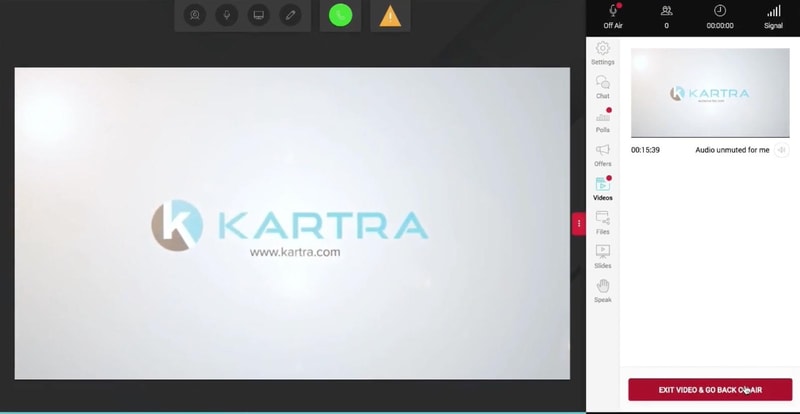
WebinarJam has an automated video injection feature that allows you to add a prerecorded video to your webinar. This way, you can plan the video and minimize pauses and technical difficulties.
Handouts and Drawing Boards
The handouts feature enables you to take a PDF, or any file, and share it with the attendees to supplement the information you talk about, or for them to complete homework on the topic.
This all happens during the live webinar. This way, you already have the files uploaded and ready on WebinarJam.

In addition, WebinarJam offers drawing boards for the presenters to dive deeper into a subject with drawings and hand-written notes. These notes get overlaid on top of your slides or media items, strengthening your points and helping out users with questions.

Email and Text Messaging
The messaging system focuses on private chats between individual attendees and presenters, as well as automated messages for reminders.

In short, you can send and receive emails and text messages to and from your webinar attendees. This empowers those unwilling to speak out in public, and opens up a line of communication for those who may have thought of a question after the webinar.
A Sleek Page Builder with Flexible Scheduling Tools
The website page builder forms the root of your design interface, meaning you don’t actually have to go out and find a different website host or content management system (CMS). Every design template that comes with WebinarJam is fully responsive for mobile devices. They’re professionally designed and optimized for conversions.

As a bonus, you can incorporate a calendar scheduler on your website, where users come to the site and see webinar times and dates.

Schedule a recurring series, set the webinar to run in the future, or start an immediate show.

Features Exclusive to the Professional and Enterprise Plans
The above features come with all WebinarJam pricing plans. However, a few advanced features are available when you upgrade to the Professional and Enterprise plans.
For instance, you receive a panic button and an “always-on room” when you sign up for the Professional pricing plan.

The panic button provides the following capabilities:
- A button to instantly save the meeting if you have technical difficulties.
- A way to automatically redirect all attendees to a new page.
- An instant booting feature to reset the page.
The always-on room includes:
- A webinar page that’s constantly ready for you to start a webinar, or to run a very long webinar.
- A never-changing link so your attendees find your page every time.
- Preset webinar settings.
- Options to name the room after your brand.

Along with an increase in attendees and presenters, the Enterprise plan offers a control center feature.
Here’s what to expect:
- A separate module for someone else (your staff) to moderate the webinar while you make the presentation.
- Options to control the chat and Q&A section.
- Tools to post offers, videos, links, and files.
- Full control of meeting attendees, with areas to manage payments and speakers.
- Real-time analytics.

What are the Main Benefits of WebinarJam?
During our testing we felt the following benefits stood out the most:
- WebinarJam’s low price.
- The interactivity tools.
- The automation tools.
- The mobile interface.
WebinarJam’s mobile focus makes sense, considering the growing number of connected devices per household. With smartphones and tablets in widespread use, people increasingly consume content across multiple screens.
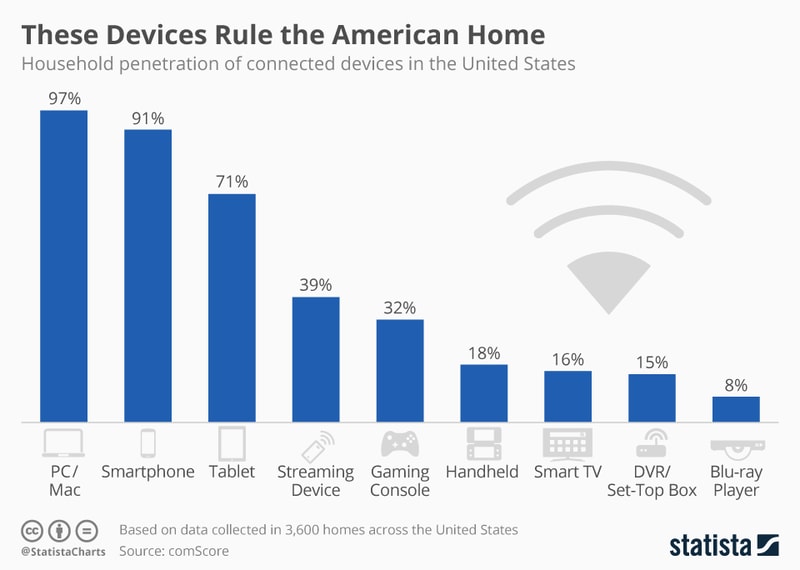
That opens up many options outside of the traditional PC or Mac when people view webinars. As a result, it’s highly beneficial that WebinarJam caters to mobile users with its 100% mobile-friendly interface.
You’ll also find that the WebinarJam pricing beats out many webinar competitors, undercutting the market’s average pricing by close to 50%, and sometimes more.
And of course, the automation brings about potential for speedy webinar creation and flawless presentations, seeing as how you can upload a pre-recorded video. They also include automated recordings and a Replica Replay feature.
WebinarJam Customer Support
We’ve yet to talk about the WebinarJam customer service as one of its benefits. That’s because it’s not quite as powerful as other webinar software options.
Having said that, WebinarJam does provide a Support module for contacting a member of the customer service team. This portal is inside your dashboard for easy access, but it lacks essentials like phone support or reliable live chat. A live chat section is available, but the hours are short, from Monday to Friday, 8AM to 1PM PST.

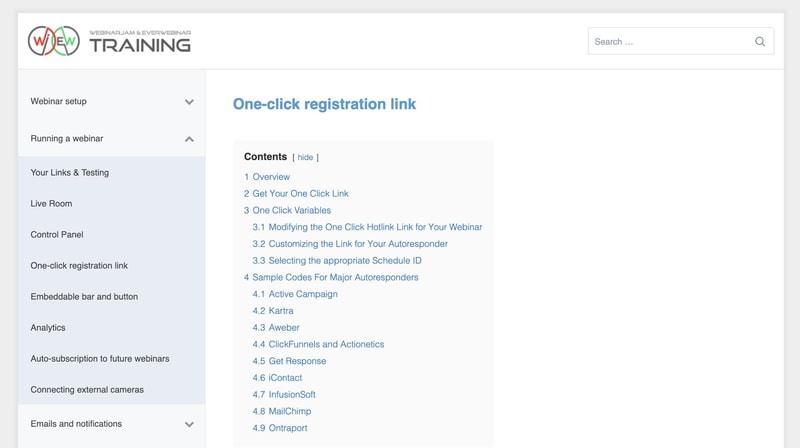
Therefore, the main way to get in contact with WebinarJam is through the email ticketing system. As an alternative, WebinarJam offers a decent documentation Wiki with articles on topics like integrations, running a webinar, and using the API.
Finally, all WebinarJam customers have the opportunity to join the WebinarJam Facebook Group to discuss strategies and marketing thoughts with other users.
WebinarJam Review: Pricing
WebinarJam is competitively priced compared to many webinar platforms, making it a cost-effective option for most businesses.
WebinarJam breaks up its pricing into four plans:
Starter
Best for single user needs
- 100 attendees
- 1 host
- 1-hour max duration
Basic
Added Automated Webinars
- 500 attendees
- 2 hosts
- 2-hour max duration
Professional
Added “Always-On” Live Room
- 2000 attendees
- 4 hosts
- 3-hour max duration
Enterprise
Added Control Panel for staff
- 5000 attendees
- 6 hosts
- 4-hour max duration
See WebinarJam pricing for current rates. All plans are billed annually.
Each plan includes a 30-day money-back guarantee, allowing you to test out the system and see if it’s right for your organization. Unfortunately, a free trial isn’t available. They also don’t have a free plan. However, the guarantee should suffice as a way to understand the platform’s offerings without any risk.
Keep in mind that all WebinarJam pricing packages require upfront, yearly payments. That’s definitely a way for them to keep costs low, but it may present a barrier for some companies.
WebinarJam Ease of Use
Webinars require significant planning and knowledge, so we like to see webinar software that minimizes the need for any extra work.
In terms of its user interface, WebinarJam has a fairly speedy process for creating your webinar website, launching webinars, and setting presenters.
The dashboard is clean and easily understandable, with a few buttons in the menu for the main dashboard, your webinars, analytics, and registrants.
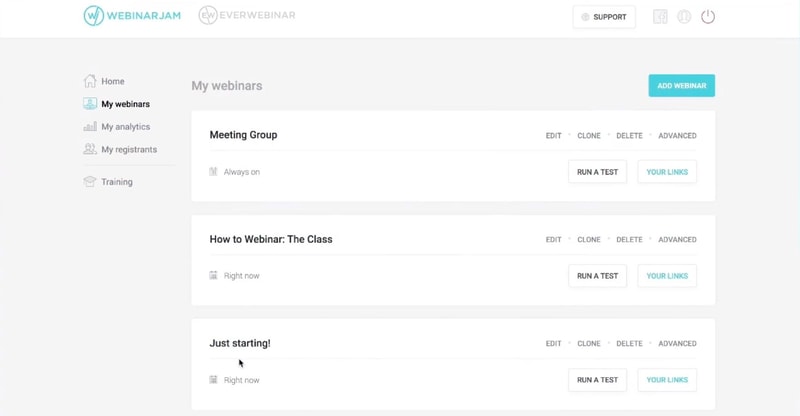
You can add a webinar with ease by adding presenters and other webinar essentials like the name and description.

You build the website with help from premade templates and builder modules, some of which help capture leads, manage your schedule, and explain the webinar.

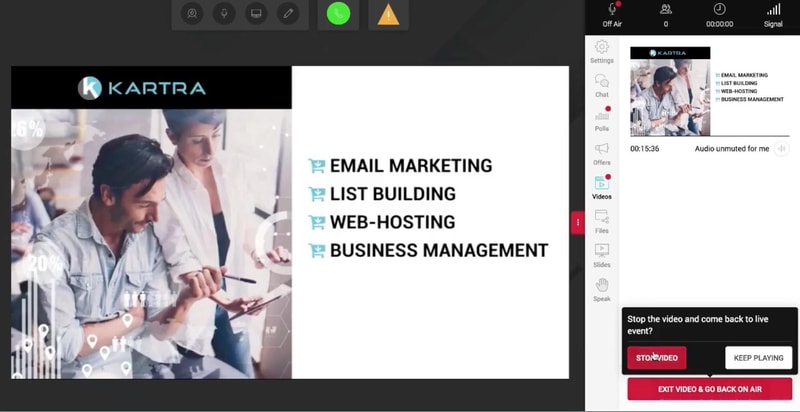
Overall, WebinarJam manages to consolidate its primary features into an intuitive dashboard that even a beginner can understand. And that simplicity extends into the area where you run your webinar, seeing as how you have immediate access to buttons for Offers, Files, and more.
Summary
The fairly low pricing, automation, interactivity tools, and the mobile interface all show that WebinarJam has the power to help out many webinar hosts. Although you can’t pay on a monthly basis, and the customer support lacks some essentials, we recommend WebinarJam to those who crave simplicity and high-powered communication features.

Compare WebinarJam with other popular tools in the same category.
Absolute ease of use for the atendees, very organised, makes life much easier
The camera processing can be made better. Also, need to be able to download detailed poll output per attendee and there should be ablility to download the registered participants customised individual links to be sent by whatsapp or other means
It makes enrolling people into the plan, product, or service very easy by using the presence of an offer button, etc. Also, I find that the attendees don't have to download an app a HUGE plus point. Moreover, the interface is very simple to use for the viewers, thus making their engagement much better

Ease of use when cloning a webinar. What often takes hours with other systems can be done with a couple of clicks in WebinarJam, and that includes the deep integrations between tools.
The setup process was time-consuming and frustrating. I also hate having to pay for two systems when it could easily just be one. Lastly, you do have to use a clean browser without any extensions or you may have issues.
It allows us to run both live and recorded webinars (EverWebinar) meaning I don't have to present and everything happens automatically. It allows us to scale our marketing efforts.
The best feature which I like was making a recorded video into a live broadcast, It is solving the biggest problems of most young entrepreneurs. The features like adding a chat, creating a Poll, showing the poll results, sending reminders before the webinar starts with customizable emails, a separate dashboard to reply live chat messages. what else there are a lot of features that are really making a lot of things automated to launch a webinar at a suitable time.
Only one thing, If we want to change the recorded video of the existing webinar we need to remove the existing chat file also. But WebinarJam won't allow us to remove all the chats at once, we need to remove the individual chats every time. If there is an option to remove that chat file at once then it is good to go!
Running a parallel webinar at the same time based on the users, Scheduling the webinar at our desired time even without any live from our end, Record a video as it was live and can broadcast as many times as we are online, creating a specific chat for each webinar, Hiding the live webinar in between the users, Giving a reply to each individual through separate dashboard etc.
WebinarJam can host webinars for the large number of attendees. Our maximum was around 4000 articipants on pick. Just perfect!
I dislike quality of the recording. It could be better. But I understand that it is impossible to receive better quality and still load all videos on your servers.
Screen sharing is just perfect, I like whiteboard regime to make notes online. Also, for it was important to manage the size of the video and screen. Just perfect!
WebinarJam offers a big variety of opportunities for me as webinar host. Registration page, one-click registation link, tracking goals, option to change design, great chat room, good statistics.
Connection quite often fails. You need to have a good internet and up-to-day laptop.
I integrated one-click registration link as a confirmation url after participants filled the web-form from zoho crm. I was heppy that it works so good.
I am fond of Live Chat,Automated Recordings and Flexible Scheduling. Ran webinars every week and need for this only one room!
Connection, connection, connection... Sometime it craches everything. But happens rarely
Th main benefits are the best support, discount offers. Ideal for live events, easy to watch on the smartphone.
Webinarjam is very easy to use and at the same moment gives a lot of tools and customizations. I was looking for a webinar tool that will save me a lot of time and effort when selling my product. I also like the ready-made templates they offer as well as the automatization of all processes.
I dream about templates adjusted for other countries e.g. Poland. As for now I think most of them are prepared for US market so you need to modify them. Fortunately it is very easy to do.
It helps me to build a great sales funnel
I like that my links are always easy to find!
Going from the old version to the new version I missed saving a few things, but that's not on WebinarJam, that's on me.
The main problem solved by WebinarJam is having a secure space to host. No fear of internet lurkers taking over my screen, even presenting live.

Easy and fast setup. Fast loading pages. Easy for the users. Easy integrated with 3rd party apps and tools. It's an awesome platform. I am recommending WebinarJam and Ever Webinar to everyone I know who wants to use webinars in their marketing mix.
Very limited design options for the Landing pages and for the thank you pages. Some them certainly lower the conversions.
Webinar leads are the 2nd highest quality leads after LIVE event leads. Which means more sales and more profits. Location freedom is an important plus, since these webinars can be run from anywhere.
Delighted to bring the experience of using Webinarjam. It is the platform par excellence to develop interviews and affiliate marketing. The use is easy and the generation of the webinar in both modalities is simple.
Things to improve: The webinar design should have more options, not just color changes. Example: That the presenter could reduce his image when interviewing another presenter or moderator. Possibility of establishing a horizontal position when there are two people, by this I mean one on top of the other. Greater interaction with social networks when publishing a webinar (fb, twitter, Instagram, Linkedin) Increase followers in the library to reach more people, with the possibility of sharing the library webinar with the networks so that more people sign up. These are some of the things that I think can contribute to improving, a program that is already very good.
The best platform for interviews and online marketing. In my case, later I pass the recorded by cable tv, promoting webinarjam
The entire process is so seamless! We love how you can set up all of the email notifications (pre-webinar reminder emails, replay emails, etc), plus integrate with our email marketing provider for a more robust communication strategy. The ability to pre-add offers, video injections, file sharing, and more is awesome and makes the live session run so smoothly. There's an express configuration if you're in a rush,, but we like using the full configuration to set up all the details.
The only thing we dislike is that replay viewers can't fast-forward through the webinar replays. While we totally understand why they have it set up like this as a default, we wish there were an option to change this, as several of our webinar attendees have requested it.
WebinarJam helps us generate leads and drive sales. We're able to offer free, value-packed online workshops to anyone in the world, and at the end we can pitch related products. Webinar conversion rates are much, much higher than conversions on social media.
WebinarJam allows you maximum control over the webinar experience. For anyone who sells products or services via webinar, you know the need to have things happen in a very precise fashion, such as videos rolling and/or showing PowerPoint slides. I can easily add those into my presentation and seamlessly transition back and forth between them.
I miss some of the old templates for the Thank You pages. I wish it was easier to make those nice and have more content on them. (Maybe something they'll fix soon!)
We needed a webinar platform to convert leads to new members of our program. This software integrated with Infusionsoft (one of our requirements) and was perfectly situated to lead up to a sale at the end of the webinar. You can display an offer at just the right moment. I was able to do the same webinar for over a year (live every time) with zero problems and got more program members from that webinar than just about anything else we did during that time!

It's so easy to use, it has unique features that help you sell- pop up offers with count downs that create urgency, sales notifications, evergreen webinars that sell for you while you sleep, it's cheap.
I can't think of anything I dislike and I've found other webinar tools like gotowebinar to be dated and clunky.
It's great for customer acquisition, sales, retention & loyalty
The tool is really complete and integrates perfectly within our existing marketing solutions ecosystem.
The back office of the tool could use some polishing. It's not intuitive enough to put together an advanced webinar session. Another thing is that you can upload powerpoint presentations to the platform, but the animations won't work (though you can solve the problem with screen sharing).
Well, we can create and present an unlimited number of webinars for our clients and prospects.
WebinarJam is a complete tool that has everything you need for a webinar tool.
I didn't like their pricing plans and the limitations on registrants under the tiers that they offered
The problem to host a webinar, promote it, have a landing page dedicated to it and then analytics after the event
Webinar Jam is easy to use but gives you all the options that you need to make the most of your webinar session.
Nothing, the platform is very good and we have had no issues with it
Webinar jam allows you to integrate a registration process or landing page, record webinars, and offer replays for attendees that couldn't make the live session in a simple and efficient way.
The ability to schedule and customize multiple webinars.
The tech support leaves a lot to be desired. Often it takes more than 24 hours to get a response, and multiple 24 hour volleys to resolve an issue.
Scheduling and recording webinars. Will plan to integrate with EverWebinar once we have enough recorded content.
The marketing tools, relatively easy to set up, audience interaction tools.
The ongoing lag between broadcast and the audience hearing you (This can be very frustrating but you can adapt to it when you have to), Lack of foreign language support, occasional weird behaviour in the UX.
Reaching an increased audience with our training content, up-selling to the audience to promote services, have delivered to an audience of over 500 flawlessly.

the continuity of the features improvement
getting a response on a submitted ticket sometimes takes unjustified period of time
problem is to deliver products digitally through conducted webinars. benefits by maintaining client's engagement

I love the ease of set up, the whiteboard in the room. The ability to engage and interact with people chat, bring them on screen, and multiple ways to get feed back.
I didn't know there was Mailchimp integration. Till today. I hesitate to bring multiple people on screen at once it seems to slow down a lot. So not my favorite for some aspects of my teaching style. Great for webinar style. I wish I could save my slides inside a window instead of setting that up each time I log into the webinar room. I also don't like that it doesn't automatically record my webinar. I did one and didn't realize I had to record. So I lost the whole of it.
Easy opt-ins.
I like the easy feature to answer questions live on calls. Also the speed of video load.
A little more expensive than competitors but overall a great product.
A great way to ensure solid communication with your clients
I really like the ease of use and professionalism there is to the platform of this website. I really like how I can use up to 6 co-presenters within my webinar. The quality of the video and audio is superb and I can say that my coworkers and colleagues enjoy it as much as I do. I also really enjoy having a live chat during my webinar as well with the people in my video chat. It makes this very advanced and high quality and a valuable resource tool.
I do not have any dislikes about WebinarJam currently.
The business problems we are solving with WebinarJam is the communication we need from different geographical points. People travel for business and it is a great tool we can use to keep means of communication when other staff is away.
I really like the fact that you can connect with multiple presenters in an interface that's engaging for the users.
Good connectivity with third party apps but I'd like to see an Outlook add-in that would automatically add an e-mail message with a link
We were looking to host webinars about our product to multiple law firms. The benefits were allowing multiple firms to join in on the call and interact via polls.
This is super easy to use, and best of all - it doesn't require my attendees to download any software like zoom does.
I can't get my live streams to stay private, I always have people who have not been given the private link attending the live event. I have contacted support about this several times, have followed all of their instructions, but there's still a loophole somewhere.
I was looking for a user friendly way to host live webinar office hours for my students...this was the perfect solution for my less tech-savvy customers. It doesn't require them to download any software. All they have to do is click the link I send by email and they can join right in.
What I like best is that I can screenshare, do video, have uploaded slides, play a video, run a poll - there are a lot of options for what to do during a webinar.
I dislike some of the design choices and limitations. I would like to choose some UI colors to match my brand, and I'd like more customization of the reminder emails.
We use webinarjam to do live webinars to inform our clients and potential customers about our area of expertise and invite them to use our products. It's a good service.
WebinarJam has a simple, clean interface users appreciate. The registration/email support is great and the presenter options easy to use. I especially like the RePlay option. I have found nothing like it with other programs.
WebinarJam seems to have unusually long latency between presenter and participant. Since the Chat and Offers options apparently run on different (more direct/faster) channels this puts the host/presenter out of sync with participants using these functions. I find this frustrating.
I am in education, not sales. However, a solid RePlay option lets my offering continue to be useful to others.
It is an excellent platform to carry out webinars in a very professional way, especially because it allows integration with Facebook and YouTube, so we can record lives through this same platform, and its ease of use is something that is worth it. Mention, because being honest not all applications can be used as easily as WebinarJam allows, which with a few settings is ready to use. Another thing that I really like about this application is its originality in terms of the development of functions, at least I LOVED the panic button, since when I see that something is not working as it should, I just press it and automatically the screen freezes and the audio remains muted, giving me time to solve the problems that arose so that I can resume my webinar without any major inconvenience. Their customer service team is quite quick when it comes to solving any problem that may arise while using the application, so you don't have to wait days for the support team's response. A fairly simple application, but at the same time powerful enough to carry out any activity
Really the only thing I could complain about is the lack of documentation in Spanish for this application, since I get information but in English and this leads me to waste time doing the translations to be able to interpret what it says and know what is what I should do in case of a problem.
For me this tool has become more than a simple application to make and record webinars, I must say that now it is my trusted comprehensive solution when wanting to record any type of content that I want to publish both on my social networks and didactic material to make my presentations due to all the functionalities that it has, in short it is a most complete tool to solve any type of problems framed in the creation and edition of webinar or lives.
It was smooth broadcasting. We didnt have any technical trouble.
Wish that we could split the screen as one side "presentation", the other side "presenter". This is the only negative thing I saw.
We really did could interact with our customers. That was nice.

I can have many participants, there are many features, you can replay the webinar
The delay when I do a webinar. I have to be logged in as a regular participant to see the chat log in real time. The participants can fast forward on the replay link. They have to see the whole webinar, although they may want to skip some parts
Teaching to a large group. It is convenient, fun and popular!