

Unclaimed: Are you working at Wondershare Filmora?
Wondershare Filmora Reviews: 4.5/5 — Highly Rated

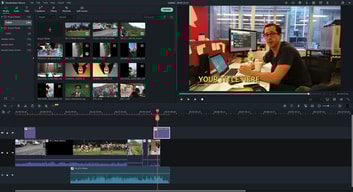
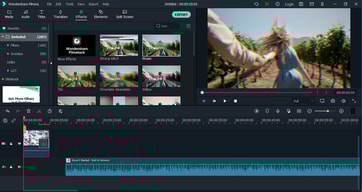
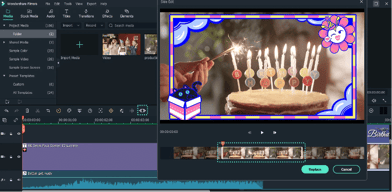
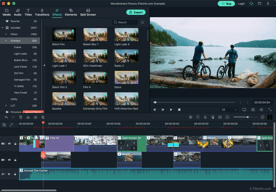






As a beginner in video editing, I was looking for a software that was easy to use and didn't require a lot of technical knowledge. That's when I stumbled upon Wondershare Filmora and I couldn't be happier. The interface is clean and user-friendly, making it easy to navigate and find the tools I need to create my videos.
While the built-in effects are great for beginners, they can be limiting for more advanced users who want more control over their edits. Additionally, the software can sometimes lag or crash, especially when working with larger files.
One of the standout features of Filmora is its built-in effects and templates. With just a few clicks, I can add stylish transitions, filters, and animations to my videos. Additionally, the software is very affordable compared to other video editing tools out there.
Filmora guides to through the step-by-step process of creating and editing publishable videos. It renders the videos quicker than other alternatives. The templates for effects look professional - and you can add one or multiple elements in your snippets and time them to add elegance and functionality to your videos. It also helps me create GIFs.
Filmora's paid version is a bit costly. Sometimes the software hangs, and I have to restart the whole system to make it work again.
Filmora helps me create GIFs and professional videos for my platforms. I create event videos using the same for my college fests. The software is easy to operate and install. Even if you are not a professional editor - you can still get spectacular results using the software.
Filmora focuses on common and trendy video effects and allows users to apply effects with tools that are easy to use. There aren't a ton of sliders, tabs and windows for beginners to get confused by. I'd say the general interface is similar to photo apps that only require a tap or two to apply dramatic visual effects.
The loading times when moving clips around or applying some effects can lag. It can often be hard to fine tune some of the visual effects. There aren't robust audio effects that we can use to improve sound quality to the extent of an standard audio editing software.
Our videos look much more crisp and professional by using Filmora. The tools in Filmora give us the ability to make outstanding changes with a small amount of actions. We don't need to involve any video editing professionals that can be expensive. We use the videos for almost every aspect of our business.

I like that: I can edit and export my videos quickly. I can crop my Zoom footage for video editing. I can use transitions, music and other aspects that I need to make my videos stand out. I can snip out the pieces of the videos I don't need and join them with smooth transitions. I can use music that Filmora has available! I can store my projects and revisit them whenever I like.
I dislike that I don't have simple openers where I can change colours easily. I dislike that I can only buy packs of elaborate and themed openers , lower thirds etc.
Without Filmora, I'd be editing videos for hours on end. It makes my life easy by quickly allowing me to edit and change my videos, and export them in under an hour. Now that is something special!
I really enjoyed this program because it allowed me to make beautiful videos of our vacation home for business. It is very simple and contains many paid and free plug-ins to improve the beauty and the spectacularity of the video! The software is very light at the beginning and therefore is good for many computers, even not very powerful.
I really like the Filmora plugins but when you install more than 10 the software starts to get so slow and heavy. It is a real problem because I am obliged to choose between the various possibilities that I have purchased.
I started making a SPOT video for our vacation home for business using free software and I didn't get the chance to create an interesting video. This program helped me quickly to create a convincing video.

The upsides of using Filmora include having compelling effects, transitions, and overlays to enhance one's video.
What I dislike about Filmora is that it takes time to get used to the interface. You need some video editing skills prior to using this software.
With Filmora, I created a stunning birthday video, as well as eye-catching demos and tutorials.
Screen Recording and video editing becomes much easy with this software.
its required 6gb ram for proper working else lagging.
very good video editing tool, used for youtube video making. its really helpful.

I use filmora since version 7, in principle because I didn't have a powerful computer and this was the only one that worked on my laptop, but after a while I was surprised by the amount of tools it has, one of them is the reduction of noise that works in a fantastic way also has the function of recording screen which is an extra that is appreciated
in the last update they removed the storyboard mode a bad decision in my opinion, and the weight in the videos is too much
It is very good to start in the edition and learn the most basic and then move on to a more complete or professional program if required, also that can be started with little money since it has an affordable price

The ability to spice videos with drag and drop effort. Layering and watermarks to add security to my videos is also a plus.
Suppose I buy a subscription and start splicing a video on my desktop. Then later I want to finish the video on my laptop.... You cant. You must either buy multiple subscriptions for each MAC address, or you need to de-register your device and re-log every time you need to use a different machine. At my office, I have 3 computes I trade between depending on processing usage. I do videos on the one that is not being abused. However, being unable to swap devices easily is rough.
My health coaches make videos, but sometimes after 15 mins they word vomit or get distracted. The ability to cut out these issues or have them break up the recordings into pieces is wonderful as some of my videos go ~45 minutes long.
As the longtime user of iMovie to edit home movies, Filmora is one of the best alternatives available today. It comes with tons of movie effects to spice up your results to look more professional.
It's safe to say that every movie editor takes a lot of system resources, and Filmora is no exception. It can slow down the computer, especially on the older generations.
Once in a while, a business needs to produce movies. Especially those who do YouTube campaign. Filmora smoothen the process and help me create better-looking videos.
Wide selection of design options for slides during the video.
I wish you could move text items as a group instead of individually.
I use Filmora to design instruction videos and cut a major amount of time off the process.
I was grateful for a free video editor to do just minimal edits for videos I post on YouTube. I was happy with the videos I was able to edit and post. It was nothing fancy by any means, but I was happy with the results. It helped me do edits and transitions so my videos are more interesting and not too long.
It is not intuitive at all and took some digging to figure out how to use even the basics at first. the "easy" video builder isn't really useful at all because it isn't an editor it just puts some things together in a pre-made video format. I gave up on it for a little while because I just couldn't figure out what to do and had trouble finding any tutorials or help.
It helped me solve my problem of editing YouTube videos with better quality and ease of use than the YouTube editor. Even with it's disadvantages you really cannot beat free as far as cost is concerned and it works well enough for the needs that I currently have.
The editing process is simple, mostly intuitive, and extremely precise. Super happy on this front.
I can't stand the options for adding titles and editing text. This feels incredibly clunky, difficult, and not at all intuitive. This needs to be totally overhauled to be a useful product for the casual to professional YouTube video editor.
Allows me to easily put together short natural history videos for our newsletter

The Transitions provided by Filmora are exceptional and are almost cinematic with proper blurriness and realistic results. Also, the Filmora Community provides various packs of titles, transitions which can be downloaded from their website if you are a subscribed partner or registered product holder of Filmora. These plugin come packs were really useful.
Worst part is the lack of Keyframing feature which even a basic video editing tool is providing in today's era. It was later updated in the Pro version but who so ever has already purchased a lifetime version of basic Filmora like in my organization, they are in grave loss. So if there is no keyframing, customization of transitions and even your creativity is restricted.
I was providing video solutions using Filmora for various ventures of our organization which benefited us with some tech blog videos and other tourism videos as well. The major benefit was the time that it took to edit a single video. It took less than 3 hours to complete an entire video edit which is huge.

Filmora offers a simplicity people who arent familiar with all the advanced techniques and only want to quickly edit video but dont want to be burdened with complicated features competitors like Adobe Premier and Apple's Final Cut Pro. The interface is pretty simple and offers the basics while staying inline with industry standards regarding the layout of the application which will make the move to more advanced products easier.
Depending on what you want done, this really is meant for the amateur who just wants to edit and go. So don't expect this software to look like Casey Neistat's videos using this tool. You will want to move up to more professional suites. The dark interface it starts you out on is ok but a tad darker than I'd like. The light interface is ok but the flat style of the UI brings along other issues like no depth in the controls.
Easily edit movies without shelling out a bunch of money. Good to get started and when you develop the skills you need, you can graduate past this software. It has a nice tutorial that will grant the user a quick lesson on the terms and what the tool does.
There are a lot of features. You can add video, audio, text, special effects etc fairly easily once you get the hang of it.
That I signed up for the free version to test it out, only to find out after spending 3 hours on my first video that it would have the company watermark prominently displayed throughout my video unless I paid for the $39.99 a year version.
I am just starting with it, but will be able to put up videos on youtube to illustrate folds, in-line finishing. It will make it easy to produce better videos than just the ones I have made with my phone.

- It is effortless to navigate and thus good enough for any beginner. At least the basics of uploading, editing and exporting videos are straighforward enough for anyone to create a basic good enough video for YouTube and any other platform.
- 14 day trial period is too short for a beginner to appreciate everything Filmora has to offer. While it is easy to learn the basic video editing features, the advanced features requiring learning and applying to projects are too many to appreciate in 14 days. - Filmora is too slow on less powerful PCs. To realize that Filmora is not efficient enough on my 64bit windows laptop is regrettable and a put off to a small upcoming YouTube creator. This is why I had to install an alternative video edititing software good enough for my 64 bit laptop.
- Quick production of short videos is achievable even when I must add transitions and a couple other video enhancement features (arising from the short learning curve).
Filmora contains user interface and files.
To remove the watermark in Filmora, you need to buy the paid version.
Each video I make by using Filmora I usually find a new tool or a new way to use the tools I'm already familiar with.
Filmora has only very few advantages over other editing software out there, like simple interface, some useful features, somewhat usable presets and smooth playback without rendering on the older mac machines
Almost everything else: lack of basic features, glitches, crashing during project saving, inability to customize editing presents (like changing color of the animated titles for example), extremely limited audio editing. Half of the claimed shortcuts don't work which significantly slows down your workflow and tech support never available.
Filmora helps with quick editing needs for marketing purposes and significantly cheaper than business license for software like Adobe. Only good for very simple tasks to quickly generate something for social media needs.
Easy of software use is great for new users, it does allow you to use the software before purchasing a package which is great if you are testing out the editing options
The software is super slow and has many glitches when making edits and changes, even when uploading files it seems very slow and often will make me restart it.
I enjoy being able to make edits or cut in video or audio files before publishing and posting
Used to like, now i feel scammed by them
The fact that they scammed me, they charged me for a cross platform license and now it turns out its only for Windows. They wont give me my money back and they just want me to buy a second license They will steal your money
They were solving a problem but now they just created a bigger problem and i got scammed

Nothing. It is just bad Nothing. It is just bad Nothing. It is just bad Nothing. It is just bad Nothing. It is just bad Nothing. It is just bad Nothing. It is just bad Nothing. It is just bad
It offers free download software and free features but once you have a single got editing to export it charges you. In other words it is a complete deception. Very sneeky marketing. I say good bye to your stupid software!!!
Nothing. It is just bad

Absolutely nothing! the program works half way well but the service is terrible!
I bought my license, and after 1 full day of installing and uninstalling the software, it could never be activated. I opened more than 10 support tickets and nobody helped me, the tickets were closed and I had to wait and queue again to talk to someone. This is the first time in my life that I have ever bought a software license and had to ask for a refund the same day because they are so inept that they don't have a well configured system to activate the software for their customers, simply unfortunate. I will never try to use this software again, a real disappointment
I just wanted to edit a video, and after buying a license I couldn't even export the video or do anything because they are not able to synchronize the licenses.
Unfortunately, I can't say anything good. My mistake was that I bought that software. When I've tried to contact support, I waited for a chat for more than an hour in 2021, and then my problem was ignored.
I've tried the soft, and it's very very veeeryyyy sloooow on my Macbook Pro 2019. When I've asked for a refund in 5 days, I wait an hour in chat support for a person, then The support guy asked about logfile. I've got the file, but the chat does not work. Then it was just ignored... Money down the drain. I do not recommend it to anyone.
I've tried to make a short video based on Filmora, but unfortunately, it's very slow soft.

Filmora has an intuitive GUI letting people with none-to-little knowledge on video editing to understand quickly and get fun while learning. It has a range of effects and assets that really help the production of the final product without looking cheesy. I bought 7 lifetime licenses because of this to be used with Filmora which is somewhat different of Filmora X.
The tech support is awful. I have 7 lifetime licenses: 2 single and 1 5-licenses pack. I cannot create sub-accounts or I cannot restrict the other licensees to access my account with admin rights directly from the Filmora X app. I have to put my accont at risk letting any of the 7 to change passwords or disable other licenced equipments just for fun. The Tech support gives you bad answers all the time like if they didn't care for the one who paid 7 lifetime licenses.
it's intuitive so I don't have to spend time explaining how to use it. It has great effect that let unexperienced people produce their own videos easily.

Easy, basic, out-of-the-package usability.
Trying to do anything other than basic editing quickly becomes time-consuming and frustrating. Just some of the issues include the interface is too small to do animation or accurate keyframing; the file size is always way more significant than what it says you will download (which means you often have to waste time reducing the size in order to have your video accepted by other software and platforms); the text options are horrible, lack editability, and look very amaturish; questionable business practices, including never refunding me for a feature I did not ask for but was charged for anyway.
For quick and dirty editing, it's reasonable to use; however, if anything requires more than basic editing, wide-birth.
Upside, quick and easy to use. Can add as many videos as you like and smoothly puts them together.
Happy to take and hold money for a membership I had for barely an hour. Despite immediately contacting them to ask for assistance, they refused to refund anything whilst also patronising me.
They are not offering any help with solving my membership problem. The ‘help’ offered was in a template email stating that they would be ‘happy to help’, but also stating that they refuse to help.
I would like it it Filmora would expect projects but it does not.
Days have been wasted editing projects that Filmora freezes when attempting to export.
Wondershare will not issue a refund. This creates a problem.

Nothing. There software lacked basic feature which immediately made me decide that I won't be using it.
They say they provide money back guarantee but it's all for show. I bought this software and immediately decided that I won't be using it. So, I asked for refund immediately. I was told that I'll receive it in few days but I did not. It has been 2 months and they have stopped replying my tickets. Even the old tickets where I asked for refund has been deleted from their server.
Video editing, but stay away.