Unclaimed: Are you working at 1Password?
1Password Reviews: 4.7/5 — Highly Rated
1Password brings together top-notch security with great design. It works as a desktop with browser extensions for Chrome, Firefox, Safari, Microsoft Edge, and Brave. It also offers an intuitive password sharing capability, which makes it perfect for families, with intuitive sharing options. For free users, 1Password also offers vaults that can be used for both personal and sharing purposes. The Watchtower feature crawls a website to make sure no existing passwords being used are compromised and it also comes with dark web monitoring. Data categorization also lets users store passwords in a very organized way.


| Capabilities |
API
CLI
|
|---|---|
| Segment |
Small Business
Mid Market
Enterprise
|
| Deployment | Cloud / SaaS / Web-Based, Desktop Linux, Desktop Mac, Desktop Windows, Mobile Android, Mobile iPad, Mobile iPhone |
| Support | 24/7 (Live rep), Chat, Email/Help Desk, FAQs/Forum, Knowledge Base, Phone Support |
| Training | Documentation |
| Languages | English |







1Password’s Teams Starter Pack is $24.95 a month for ten people — about $2.50 per user. The Business plan is $8.99 per user. That is a 3.6× difference in per-user cost, and for a ten-person team it is $299 a year against $1,079. What the extra buys is identity-provider integration, vault-level permissions, and Watchtower breach monitoring. If you need none of those, the flat-fee pack is one of the cheapest credible options in the category.
- What it is: A password manager for teams and businesses, widely regarded as the best-designed in its category.
- Best for: Small teams on the flat-fee pack, or businesses that need identity-provider integration on Business.
- Pricing: Teams Starter Pack $24.95/month for 10 members; Business $8.99 per user per month. Both paid annually. Verified July 2026.
- The honest catch: Watchtower breach monitoring is a Business feature, not on the Teams pack.
What Is 1Password?
1Password is the design benchmark for password managers. The apps are genuinely pleasant to use — which matters more than it sounds, because a password manager only works if people actually adopt it rather than reverting to a browser’s autofill. It covers macOS, iOS, watchOS, Windows, Android, and Linux, with browser extensions across Chrome, Safari, Edge, Firefox, and Brave.
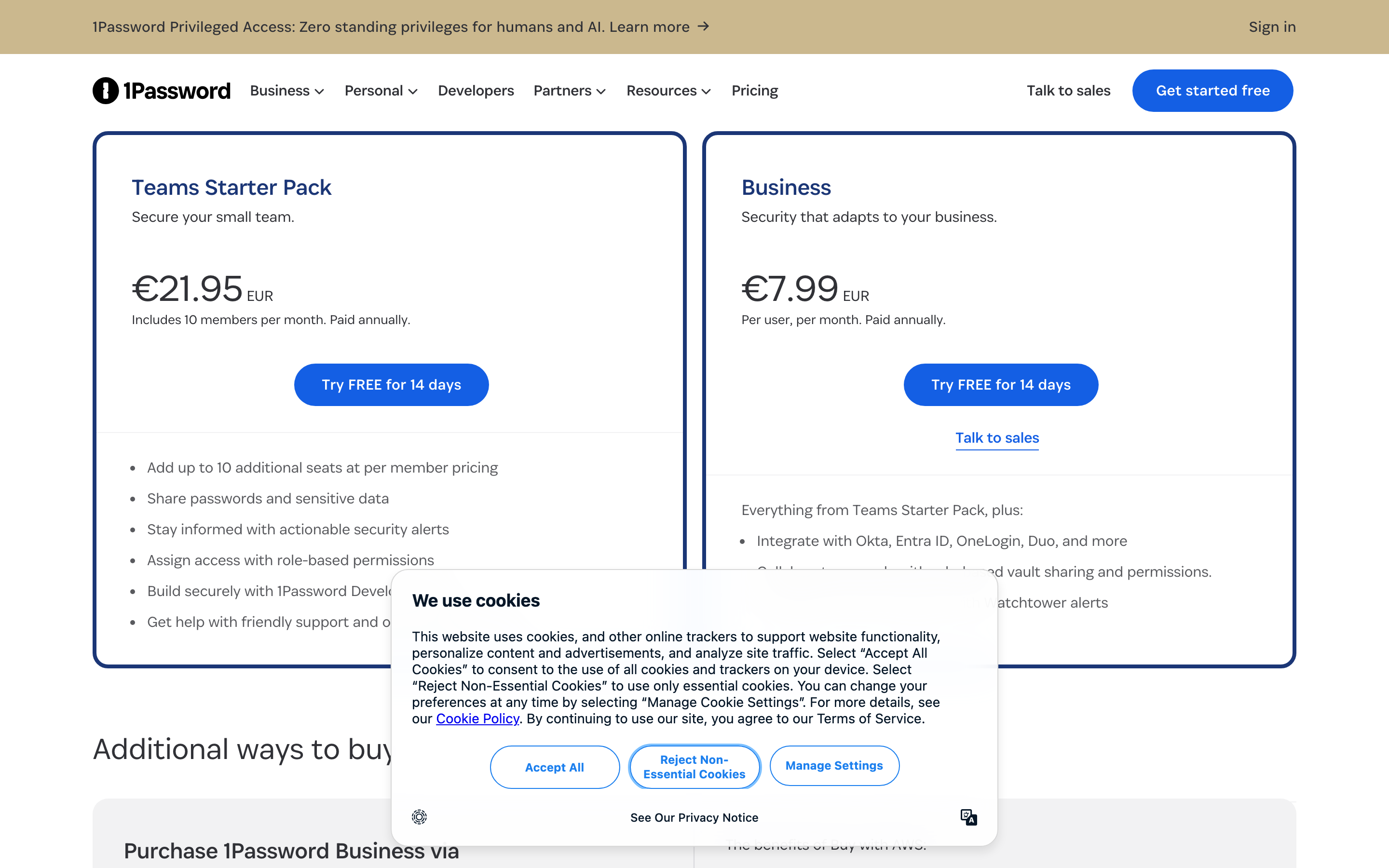
Two business plans are published. The Teams Starter Pack is a flat fee covering ten members, with up to ten additional seats available at per-member pricing — so it tops out around twenty people. Business is conventional per-user pricing with no ceiling.
1Password prices in local currency; our capture returned $24.95 and $8.99 in US dollars, and €21.95 and €7.99 on the euro list.
How 1Password Works
- Teams Starter Pack is a flat fee covering ten members, not a per-user rate.
- Up to ten additional seats can be added at per-member pricing.
- Business is per user with no published ceiling.
- Watchtower alerts arrive on Business, not on the Teams pack.
- Identity-provider integration is a Business feature — Okta, Entra ID, OneLogin, Duo.
- A 14-day free trial on both plans, with no sales call required.
1Password Pricing
Captured from 1Password’s business pricing page in July 2026. Figures below are in US dollars; the euro list showed €21.95 and €7.99 for the same plans.
| Plan | Price | Per user | Includes |
|---|---|---|---|
| Teams Starter Pack | $24.95/mo for 10 members | ~$2.50/mo | Sharing, security alerts, role-based permissions, developer tools |
| Business | $8.99/user/mo | $8.99/mo | Adds Okta/Entra ID/OneLogin/Duo, role-based vault sharing, Watchtower alerts |
| Enterprise Password Manager (MSP) | Consumption-based | — | Dedicated MSP console, no licence minimums |
What actually decides your plan:
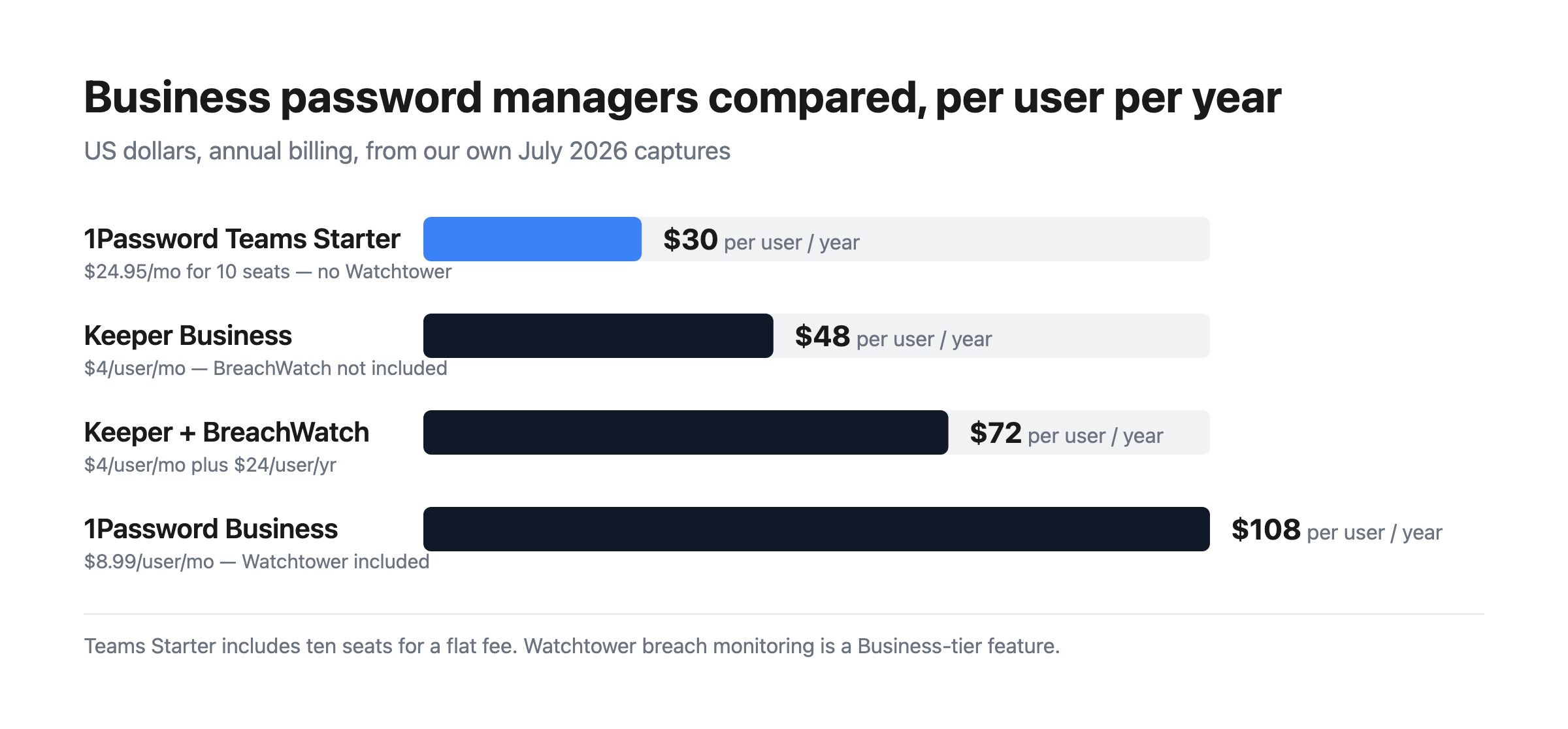
- The Teams pack is exceptional value if you fit inside it. $24.95 a month for ten people works out at roughly $30 per user per year — cheaper than Keeper’s $48 Business plan and a third of 1Password’s own Business rate. For a small team that simply needs shared credentials with role-based access, it is hard to beat.
- The pack tops out at about twenty seats. Ten included plus up to ten additional at per-member pricing. Past that you are on Business, and every seat reprices — so a growing team should model $8.99 before they get there.
- Watchtower is the reason to choose Business. Breach monitoring, weak and reused password detection, and security hygiene alerts sit on the Business plan. The Teams pack offers “actionable security alerts”, which is not the same thing. If dark-web credential monitoring is why you are buying, that decides the tier.
- Identity-provider integration is also Business-only. Okta, Entra ID, OneLogin, and Duo. For any company with an identity stack, that is the practical requirement rather than a nice-to-have.
- Compare total cost, not headline rate. Keeper’s Business plan plus BreachWatch is $72 per user per year against 1Password Business at $107.88 — so 1Password is more expensive even after accounting for Keeper’s add-on. What you are paying the difference for is design quality and the identity integrations.
- There is an AWS purchase route, which matters if you have committed AWS spend to draw down or want consolidated billing.
Who Should Use 1Password
- Small teams up to ten people. The clearest case — the flat-fee pack is genuinely cheap for what it is.
- Companies where adoption is the problem. 1Password’s design is the reason people actually use it rather than working around it.
- Businesses with an identity provider. Okta, Entra ID, OneLogin, and Duo integration on Business.
- Developer-heavy teams. 1Password Developer tools and SSH key handling are included from the Teams pack.
It fits poorly for large teams on a tight budget, where per-user pricing adds up faster than competitors; for buyers who need breach monitoring cheaply, since that requires Business; and for organisations wanting a self-hosted option, which 1Password does not offer.
Honest Pros and Cons
Strengths
- A flat-fee pack for ten users at roughly $2.50 each per month.
- The best-designed apps in the category, which drives real adoption.
- Watchtower included in Business, not sold as a separate add-on.
- Identity-provider integration with Okta, Entra ID, OneLogin, and Duo.
- Developer tooling included from the entry pack, including SSH key handling.
- A 14-day trial on both plans with no sales call.
Limitations
- Business is 3.6× the Teams pack’s per-user rate.
- Watchtower is not on the Teams pack, only Business.
- The Teams pack caps at around twenty seats.
- More expensive than Keeper even once Keeper’s BreachWatch add-on is included.
- No self-hosted option, unlike Bitwarden.
- No free tier for business use, only a trial.
1Password Alternatives and How It Compares
- Keeper is cheaper per user, with dark-web monitoring sold as a $24 per user per year add-on rather than included.
- LastPass is the long-established alternative, with a security history worth researching before committing.
- Bitwarden is open source, the cheapest credible option, and can be self-hosted.
- Dashlane bundles dark-web monitoring and a VPN into its business plans.
- NordPass prices aggressively and comes from the Nord Security family.
- Keeper and Dashlane are the closest like-for-like comparisons on features.
For a broader survey, browse our password manager directory.
The Verdict
1Password remains the best-designed password manager, and that is a substantive advantage rather than an aesthetic one. Credential managers fail when people find them annoying enough to work around, and 1Password is the one users tend to adopt willingly. Coverage across macOS, iOS, watchOS, Windows, Android, and Linux with extensions for every major browser means there is rarely a device where it does not work.
The pricing has an unusually good deal hiding in it. The Teams Starter Pack is a flat $24.95 a month for ten members — roughly $2.50 per person, or about $30 per user per year. That undercuts Keeper’s $48 Business plan and comes in at less than a third of 1Password’s own Business rate. For a small team that needs shared vaults and role-based access without an identity stack behind it, that is the cheapest sensible option in this comparison, and it deserves more attention than the per-user headline gets.
Know what moves you off it. Watchtower breach monitoring is a Business feature, and so is integration with Okta, Entra ID, OneLogin, and Duo. The Teams pack offers “actionable security alerts” but not Watchtower, so if knowing when an employee credential appears in a breach is a requirement — and for most security-conscious businesses it is — Business at $8.99 per user is your plan. At that point compare honestly: Keeper’s Business plan plus its BreachWatch add-on totals $72 per user per year against 1Password Business at $107.88. 1Password costs more, and what you are buying for the difference is design quality and identity integration. Both are real; whether they are worth 50% is a judgement about your own team.
FAQ
How much does 1Password cost for business?
Captured in July 2026: the Teams Starter Pack is $24.95 per month including ten members, paid annually, with up to ten additional seats available at per-member pricing. The Business plan is $8.99 per user per month, also paid annually. On the euro price list those figures were €21.95 and €7.99. Both plans include a 14-day free trial, and there is a consumption-priced MSP edition.
Is 1Password’s Teams Starter Pack good value?
Very, if you fit inside it. At $24.95 a month for ten people it works out at roughly $2.50 per user, or about $30 per user per year — cheaper than Keeper’s $48 Business plan and around a third of 1Password’s own Business rate. The limits are that it tops out at about twenty seats and does not include Watchtower breach monitoring or identity-provider integration.
Does 1Password include breach monitoring?
Watchtower alerts are listed as a Business plan feature, under “everything from Teams Starter Pack, plus”. The Teams Starter Pack includes “actionable security alerts” but not Watchtower specifically. Unlike Keeper, which sells its BreachWatch monitoring as a $24 per user per year add-on, 1Password includes Watchtower in the Business subscription rather than charging separately for it.
When should I move from Teams Starter Pack to Business?
When you pass roughly twenty seats, need identity-provider integration with Okta, Entra ID, OneLogin, or Duo, or need Watchtower breach monitoring. The seat ceiling is the hard limit — ten included plus up to ten additional — but for most companies the identity integration or Watchtower requirement arrives first. Budget $8.99 per user per month at that point, since every seat reprices.
1Password or Keeper?
Keeper is cheaper: $48 per user per year on its Business plan, or $72 with BreachWatch added, against 1Password Business at $107.88. 1Password has better-designed apps, which materially improves adoption, and includes Watchtower in the subscription. If you are under ten people, 1Password’s Teams Starter Pack at roughly $30 per user per year undercuts both — provided you do not need breach monitoring or identity integration.

Compare 1Password with other popular tools in the same category.
My favorite feature is autofill in Android. I've been a user of 1P since before the Android app was good.
Sometimes, I get issues where the 1Password autofill prompt does not appear for certain forms in Android but it could be the app or website having issues.
Company shared password vaults which allows our team to share passwords securely.

Using many different sites and software which we share within the organisation sometimes - This software helps me keep all the passwords safe in one place - And share with my teammates (Including 2FA and security codes)
I haven't found any issues with 1Password yet for the last few years. There have been a lot of updates most recently, after updates it requires chrome to reset. Which makes it difficult at times for people who has a lot of important tabs opened.
We were trying to secure all our organisational passwords with the help of a secure password manager. 1Password has allowed our whole organisation to have access to all the passwords as such as our Youtube channel, Salesforce, Hubspot (All main marketing or sales admins) without needing to ask each other in busy times. Surely this software has been one of the best.

autofill is a great tool to save time and have better expierience
multiple accounts and business accounts can all add together and get confusing
time
The customer UI is wonderful. Ease of use and powerful features make it easy to say this is the best password manager available today.
Administrative management is weak. I know it's tricky while keeping things secure, but it can still be improved. Some organizations require management that is not possible with 1Password.
We were required to implement a password manager. The ability to place credentials into others vaults is wonderful. Users have easy access to passwords in a secure way.
save all the passwords in the safest possible away. and don't need to remember all the passwords. I just know a master password, all all pf the others are random
to have a subscription instead of having one time payment like in the previous versions.
don't need to remember the passwords, and have stronger passwords for each site
Every device and platform I own can run 1Password, and the UX is consistent. The difference between the Windows and MacOS interface is hard to distinguish with v8. Moving to a common development framework I think will pay strong dividends for them. The developer community behind 1Password is top-notch and incredibly engaging.
Having to use a password manager, honestly. That obviously isn't their fault. Getting rid of passwords in this decade should be every vendor's primary mission. 1Password does a good job at reducing the complexity of it but I will live for the day when I can retire my use of it. I get why they did it, but I don't like having my 2FA seeds in my password manager. It is arguably irrational, but I want them separate for some reason. I don't use that feature for that reason.
Managing passwords, obviously :) Kidding aside, I take comfort in knowing all of my passwords are unique and protected behind high-grade encryption. Keeping a close relationship with the development team helps me tackle integration challenges.

How flexible it is, how easily I can create unique passwords, store addresses, credit cards, etc. I bought a family account because of how great the product was to make sure my family would also be protected
It's a bit annoying how often I have to sign in with my password for the chrome extension. If there was a way to allow access through an authenticator instead, that might be less obnoxious than constantly typing it in.
Solving just fundamental password inefficiencies and duplications across all platforms. Being able to quickly generate complex passwords not only gives me better peace of mind but also is quicker and easier than I could ever do on my own.
Is is convenient, allows to quick access any passowrd. Plus you always not forget your password....Also you can storay anything in 1Password — docs, files private notes etc. BuT! do not loose it! be careful, because if you do — you'll loose everything. Never say your pasword to anyone. Even your spouse!!!! (especially, ha-ha)
Well, the verion 8 is build in Electron, which is well known as flow web framework. So...expecting for 1Password 8 to be slower than 1Password 8. Although let's see how it goes.
Well, the main thing that previously I've alwys set all the password the same :D because it is impossible (?) to remember everything...excpet you are a very special in some way...of course....

The ability to customize the length and type of password that is automatically generated. That way, when a website says certain symbols aren't allowed or it has to be a certain length, it's not hard to accommodate that, while still maintaining a strong password.
There was a bit of a learning curve at first - getting it set up was intimidating, although it was worth it pretty quickly. Also, it hasn't been integrating very well with the browsers I use lately - but even then, it's simple to copy and paste. If I didn't have fingerprint or face ID though on my phone, it would be very annoying how quickly the app locks every time I go to a new window.
Oh my god! I don't have a knot of dread in my stomach everytime I have to log into a website or app! Considering how many times we do that every day, it must have cut my daily stress by at least a third. And having ADHD meant that if I forgot my password and had to do the whole reset, etc, half the time I forgot what I was doing to begin with. It was horrible. I also feel so satisfied knowing that I am using really strong, random passwords that would be very hard to hack.
The synch between the phone and the desktop version is perfect. Forgot your phone? Nothing to worry about since the OTP will be on the computer!
It would be nice to add a document to any saved password.
Sharing passwords safely between many parties.
