Unclaimed: Are you working at 1Password?
1Password Reviews: 4.7/5 — Highly Rated
1Password brings together top-notch security with great design. It works as a desktop with browser extensions for Chrome, Firefox, Safari, Microsoft Edge, and Brave. It also offers an intuitive password sharing capability, which makes it perfect for families, with intuitive sharing options. For free users, 1Password also offers vaults that can be used for both personal and sharing purposes. The Watchtower feature crawls a website to make sure no existing passwords being used are compromised and it also comes with dark web monitoring. Data categorization also lets users store passwords in a very organized way.


| Capabilities |
API
CLI
|
|---|---|
| Segment |
Small Business
Mid Market
Enterprise
|
| Deployment | Cloud / SaaS / Web-Based, Desktop Linux, Desktop Mac, Desktop Windows, Mobile Android, Mobile iPad, Mobile iPhone |
| Support | 24/7 (Live rep), Chat, Email/Help Desk, FAQs/Forum, Knowledge Base, Phone Support |
| Training | Documentation |
| Languages | English |







1Password’s Teams Starter Pack is $24.95 a month for ten people — about $2.50 per user. The Business plan is $8.99 per user. That is a 3.6× difference in per-user cost, and for a ten-person team it is $299 a year against $1,079. What the extra buys is identity-provider integration, vault-level permissions, and Watchtower breach monitoring. If you need none of those, the flat-fee pack is one of the cheapest credible options in the category.
- What it is: A password manager for teams and businesses, widely regarded as the best-designed in its category.
- Best for: Small teams on the flat-fee pack, or businesses that need identity-provider integration on Business.
- Pricing: Teams Starter Pack $24.95/month for 10 members; Business $8.99 per user per month. Both paid annually. Verified July 2026.
- The honest catch: Watchtower breach monitoring is a Business feature, not on the Teams pack.
What Is 1Password?
1Password is the design benchmark for password managers. The apps are genuinely pleasant to use — which matters more than it sounds, because a password manager only works if people actually adopt it rather than reverting to a browser’s autofill. It covers macOS, iOS, watchOS, Windows, Android, and Linux, with browser extensions across Chrome, Safari, Edge, Firefox, and Brave.
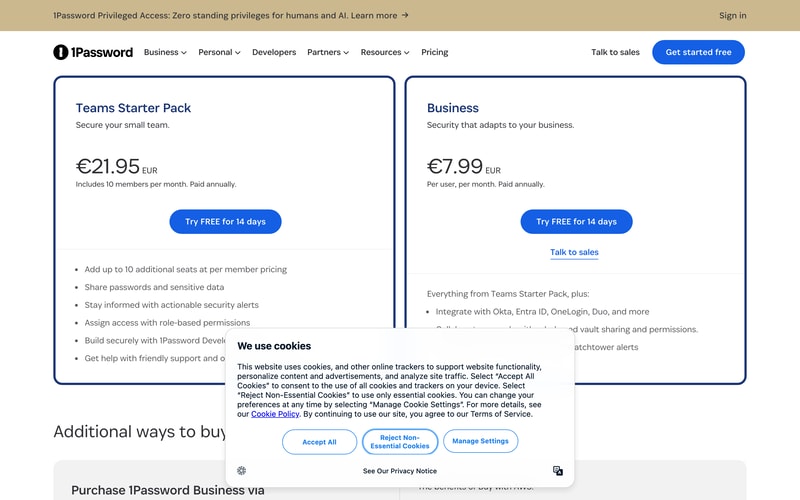
Two business plans are published. The Teams Starter Pack is a flat fee covering ten members, with up to ten additional seats available at per-member pricing — so it tops out around twenty people. Business is conventional per-user pricing with no ceiling.
1Password prices in local currency; our capture returned $24.95 and $8.99 in US dollars, and €21.95 and €7.99 on the euro list.
How 1Password Works
- Teams Starter Pack is a flat fee covering ten members, not a per-user rate.
- Up to ten additional seats can be added at per-member pricing.
- Business is per user with no published ceiling.
- Watchtower alerts arrive on Business, not on the Teams pack.
- Identity-provider integration is a Business feature — Okta, Entra ID, OneLogin, Duo.
- A 14-day free trial on both plans, with no sales call required.
1Password Pricing
Captured from 1Password’s business pricing page in July 2026. Figures below are in US dollars; the euro list showed €21.95 and €7.99 for the same plans.
| Plan | Price | Per user | Includes |
|---|---|---|---|
| Teams Starter Pack | $24.95/mo for 10 members | ~$2.50/mo | Sharing, security alerts, role-based permissions, developer tools |
| Business | $8.99/user/mo | $8.99/mo | Adds Okta/Entra ID/OneLogin/Duo, role-based vault sharing, Watchtower alerts |
| Enterprise Password Manager (MSP) | Consumption-based | — | Dedicated MSP console, no licence minimums |
What actually decides your plan:
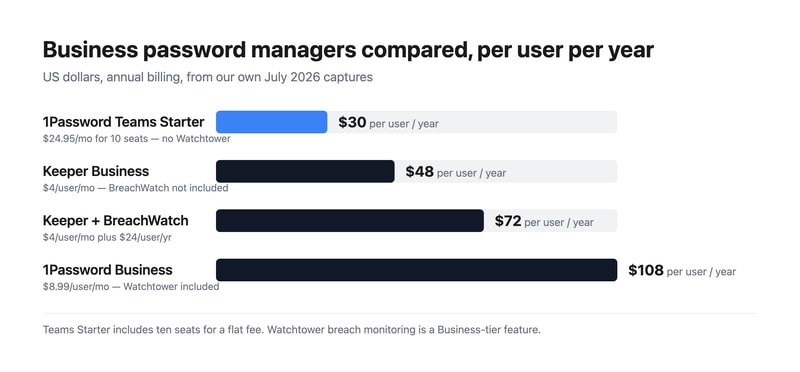
- The Teams pack is exceptional value if you fit inside it. $24.95 a month for ten people works out at roughly $30 per user per year — cheaper than Keeper’s $48 Business plan and a third of 1Password’s own Business rate. For a small team that simply needs shared credentials with role-based access, it is hard to beat.
- The pack tops out at about twenty seats. Ten included plus up to ten additional at per-member pricing. Past that you are on Business, and every seat reprices — so a growing team should model $8.99 before they get there.
- Watchtower is the reason to choose Business. Breach monitoring, weak and reused password detection, and security hygiene alerts sit on the Business plan. The Teams pack offers “actionable security alerts”, which is not the same thing. If dark-web credential monitoring is why you are buying, that decides the tier.
- Identity-provider integration is also Business-only. Okta, Entra ID, OneLogin, and Duo. For any company with an identity stack, that is the practical requirement rather than a nice-to-have.
- Compare total cost, not headline rate. Keeper’s Business plan plus BreachWatch is $72 per user per year against 1Password Business at $107.88 — so 1Password is more expensive even after accounting for Keeper’s add-on. What you are paying the difference for is design quality and the identity integrations.
- There is an AWS purchase route, which matters if you have committed AWS spend to draw down or want consolidated billing.
Who Should Use 1Password
- Small teams up to ten people. The clearest case — the flat-fee pack is genuinely cheap for what it is.
- Companies where adoption is the problem. 1Password’s design is the reason people actually use it rather than working around it.
- Businesses with an identity provider. Okta, Entra ID, OneLogin, and Duo integration on Business.
- Developer-heavy teams. 1Password Developer tools and SSH key handling are included from the Teams pack.
It fits poorly for large teams on a tight budget, where per-user pricing adds up faster than competitors; for buyers who need breach monitoring cheaply, since that requires Business; and for organisations wanting a self-hosted option, which 1Password does not offer.
Honest Pros and Cons
Strengths
- A flat-fee pack for ten users at roughly $2.50 each per month.
- The best-designed apps in the category, which drives real adoption.
- Watchtower included in Business, not sold as a separate add-on.
- Identity-provider integration with Okta, Entra ID, OneLogin, and Duo.
- Developer tooling included from the entry pack, including SSH key handling.
- A 14-day trial on both plans with no sales call.
Limitations
- Business is 3.6× the Teams pack’s per-user rate.
- Watchtower is not on the Teams pack, only Business.
- The Teams pack caps at around twenty seats.
- More expensive than Keeper even once Keeper’s BreachWatch add-on is included.
- No self-hosted option, unlike Bitwarden.
- No free tier for business use, only a trial.
1Password Alternatives and How It Compares
- Keeper is cheaper per user, with dark-web monitoring sold as a $24 per user per year add-on rather than included.
- LastPass is the long-established alternative, with a security history worth researching before committing.
- Bitwarden is open source, the cheapest credible option, and can be self-hosted.
- Dashlane bundles dark-web monitoring and a VPN into its business plans.
- NordPass prices aggressively and comes from the Nord Security family.
- Keeper and Dashlane are the closest like-for-like comparisons on features.
For a broader survey, browse our password manager directory.
The Verdict
1Password remains the best-designed password manager, and that is a substantive advantage rather than an aesthetic one. Credential managers fail when people find them annoying enough to work around, and 1Password is the one users tend to adopt willingly. Coverage across macOS, iOS, watchOS, Windows, Android, and Linux with extensions for every major browser means there is rarely a device where it does not work.
The pricing has an unusually good deal hiding in it. The Teams Starter Pack is a flat $24.95 a month for ten members — roughly $2.50 per person, or about $30 per user per year. That undercuts Keeper’s $48 Business plan and comes in at less than a third of 1Password’s own Business rate. For a small team that needs shared vaults and role-based access without an identity stack behind it, that is the cheapest sensible option in this comparison, and it deserves more attention than the per-user headline gets.
Know what moves you off it. Watchtower breach monitoring is a Business feature, and so is integration with Okta, Entra ID, OneLogin, and Duo. The Teams pack offers “actionable security alerts” but not Watchtower, so if knowing when an employee credential appears in a breach is a requirement — and for most security-conscious businesses it is — Business at $8.99 per user is your plan. At that point compare honestly: Keeper’s Business plan plus its BreachWatch add-on totals $72 per user per year against 1Password Business at $107.88. 1Password costs more, and what you are buying for the difference is design quality and identity integration. Both are real; whether they are worth 50% is a judgement about your own team.
FAQ
How much does 1Password cost for business?
Captured in July 2026: the Teams Starter Pack is $24.95 per month including ten members, paid annually, with up to ten additional seats available at per-member pricing. The Business plan is $8.99 per user per month, also paid annually. On the euro price list those figures were €21.95 and €7.99. Both plans include a 14-day free trial, and there is a consumption-priced MSP edition.
Is 1Password’s Teams Starter Pack good value?
Very, if you fit inside it. At $24.95 a month for ten people it works out at roughly $2.50 per user, or about $30 per user per year — cheaper than Keeper’s $48 Business plan and around a third of 1Password’s own Business rate. The limits are that it tops out at about twenty seats and does not include Watchtower breach monitoring or identity-provider integration.
Does 1Password include breach monitoring?
Watchtower alerts are listed as a Business plan feature, under “everything from Teams Starter Pack, plus”. The Teams Starter Pack includes “actionable security alerts” but not Watchtower specifically. Unlike Keeper, which sells its BreachWatch monitoring as a $24 per user per year add-on, 1Password includes Watchtower in the Business subscription rather than charging separately for it.
When should I move from Teams Starter Pack to Business?
When you pass roughly twenty seats, need identity-provider integration with Okta, Entra ID, OneLogin, or Duo, or need Watchtower breach monitoring. The seat ceiling is the hard limit — ten included plus up to ten additional — but for most companies the identity integration or Watchtower requirement arrives first. Budget $8.99 per user per month at that point, since every seat reprices.
1Password or Keeper?
Keeper is cheaper: $48 per user per year on its Business plan, or $72 with BreachWatch added, against 1Password Business at $107.88. 1Password has better-designed apps, which materially improves adoption, and includes Watchtower in the subscription. If you are under ten people, 1Password’s Teams Starter Pack at roughly $30 per user per year undercuts both — provided you do not need breach monitoring or identity integration.

Compare 1Password with other popular tools in the same category.
It lights up the best trifecta: security, ease-of-use, fantastic support.
The only downside here is the same downside of any service deployment: Getting my users comfortable with something new.
1Password is making the headache of managing user passwords securely much easier.
I've been using 1Password before password managers were a thing. I love that I only have to remember literally one password. The program was always easy to use but with each release it gets even better.
I can't think of anything I dislike about the program.
It helps ensure all of passwords are unique and not reused. It also now houses security questions and two factor authentications.
The functionality of the application, this has made my day more productive, and it takes the pain out of complex secure credentials across our organisation. Brilliant from start to finish.
Hard to pick a bad thing about this software, genuinely everything from the software to the customer service was amazing. I guess the cost might be high for some people but we thought it was worth it.
1 Password has allowed us to become more compliant with who has accessed our customers resources, we are an MSP managing a large volume of credentials and being able to segregate credentials with groups has been very useful for us.
1Password does what it should. It keeps passwords secret with 2FA. It enables sharing of secrets in multiple "vaults" of data. It generates good passwords easily. It enables flexible storing of multiple fields of information, not just ID/PW/URL. It protects your secrets by logging you out after a short time of non-use. And incredibly, it has instructions that are exactly correct! No guessing the new way to do things that changed since the instructions were written (unlike every piece of Microsoft "Help" on the MS website). I set up 2FA in a minute, because it said what to do and every click was correct.
I do find that 1Password minimizes itself every time I use it, and I wish that this behavior was optional for people who work at home. But it pops right back up with a click; it doesn't require another login (until it times out of course).
We need to share secrets securely and generate secure passwords.
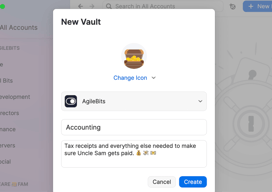
I love how 1Password separates the Vaults into private, shared and others, and also how easy to use it is
Probably just the customer support's availability is kind of limited
1Password helps in many ways, maintaining our accounts secured, plus giving us the chance to just forget about all passwords but just remember 1, like it's name says
Better security practices, less bugs, simple migration path from LastPass, native macOS app.
The search seems to only get the title, not the content within (i.e., secure notes, etc.).
Secure team based password management and secrets management.
The customer service is amazing and the polish and usability of their apps are top-notch. We migrated from LastPass due to the handling of their security breach but I can't underline what a better product 1Password is.
The features we're still waiting for are Google workspace SSO and automating their WatchTower reports.
We're an agency that needs to share a lot of client passwords between users and departments. With the family plan included it also encourages all our employees to be more security-minded.
Easy to use for our users. Secure. Users get personal accounts for their own use, reinforcing a pattern of behaviour. Integrates well with our HRIS to provision and de-provision accounts Chrome extension integrates well and can be automatically deployed to users. Conditional access on VPN/loctation/version.
The latest version is Electron based and a little slower than previous version, but I have found that it seems to be improving with each iteration, and I don't see the same performance penalty that I did with version 8.0.0
Keeping passwords complex and limiting reuse Keeping passwords stored in a company controlled repository and allowing sharing across teams that need access to the same password/secrets
You can save everything from passwords to addresses to credit card information
Not much to dislike. I wish i could easily delete old entries that are no longer needed
Saving all of my corporate passwords in one place, corporate cards, and company addresses
Transitioning to 1Password is crazy easy for technical folks, but our least technical users transitioned just as well. Enabling/sharing OTP MFA for accounts where each user cannot have an account has been an amazing help!
The change to version 8 is nice but also a little too opinionated at times. These are my only gripes with 1Password otherwise.
It is helping to ensure that our secrets stay secret, that our users are encouraged to use better security practices and that we have better visibility into the usage of our security tools.

Easy to use, update and add passwords. Browser plugin makes accessing passwords easy, mobile app works great. Multiple options for generating secure passwords for sites I use and other purposes.
Updating passwords is manual. With other managers, I can update a password on a site and the plugin will recognize that I'm updating so it will confirm and update my vault.
Storing passwords and secrets securely. I don't have to remember passwords or access an excel spreadsheet. We can share vaults and passwords through the system without emailing a password in an unsecure way.
Easy and safe password manager with intuitive UI
Nope. It fit my daily needs and is always at hand
Have all my passwords in one place
We absolutely love the shared vaults at our company. I can create a log-in with 2fa security and allow others to access that log-in safely and securely. Any changes made are instantly synced to everyone and users aren't dropping passwords into Slack chats.
I don't love the new 1Password 8. It's not awful but there are just little things that don't work or feel as seamless as they did in 1Password 7. The 1password mini is probably the most jarring change as it just requires more clicks in my workflow to see usernames and passwords and copy them. I also dislike that I can't edit them right there, I have to open the entire 1password app just to change a detail.
Allowing our users to store strong passwords and share them securely where necessary. Provisioning via Jumpcloud is super easy and we use it to store all of our AWS keys and accounts as well.

It encourages me to have much better habits around security. Its password-sharing capabilities are also excellent for sharing externally and within your team. I used Lastpass for a long time, but many security incidents made me look elsewhere around three years ago, and I never looked back. At the time, at my company, we also wanted to adopt a corporate password manager and looked into various options (1password, Dashlane, Roboform, Nordpass, Keeper, ...), but in the end, 1password was the perfect one for us, due to the ease of using shared password vaults and having a personal vault for each user
Though it works well with password automatic population in native apps, if you use a virtual machine (such as parallels), it doesn't allow entering passwords in the apps inside of the virtual machine; you have to rely on the copy/paste functionality. It's a minor gripe, but one I definitely would like to see improved. With the newest version, if we have images stored in the vaults and try to access them, it downloads a copy to your local machine before showing it to you, which doesn't seem to be the most secure way of doing things. In previous versions, there was a "preview" feature embedded into the app, which seemed more secure
At my company, we always needed to use shared passwords. Before using 1password, passwords were shared by mail, Microsoft Teams messages, etc. Some people were storing their passwords on Excel spreadsheets (some with and some without password protection), and others just used a txt unprotected document for that. Passwords were reused in many different environments, and overall, we were adopting very insecure habits from a password management point of view. 1password solved all of that. The adoption was a bit slow at first (mindset change is always hard), but everybody now realises that this is a much better practice and is not inconvenient at all. In fact, after you learn how to use it, it makes signing up for new services even quicker than before
I can add notes to each password. I can categorize my credit cards. I can manage my company's account easily, store whatever I like, and access it anytime and anywhere! Also the option to add 2FA as well is the best I've used.
Sometimes it's buggy when I want to use it on safari (Mac).
Reliable password manager that helps teams a lot. Instead of writing secret things on sticky notes, I write on 1password.
I love the easy to use UI of 1Password. It's definitely the best password manager on the market in that regard. As A canadian I also like that it is a growing tech company in the Canadian Tech Space.
Sometimes, their support team can take awhile to get back to you when you have an issue. But when they do, they resolve the issue effectively.
I'm able to have hashed military grade security passwords for all my passwords. I'm way more productive because I don't have to remember all my passwords, it just autofills it for me in a secure way.
1Password allows you to easily create usernames and logins for multiple websites, even your personal information. Knowing my information is secure with 1Password is very helpful when using several platforms.
The only thing I dislike about 1Password is having to dig to find my secret code to get into my 1Password account on the web. While I should keep this handy, it is not always available when I need it.
1Password helps our company ensure personal and professional information security and privacy. This is important throughout our day-to-day work as we use many different websites simultaneously.
Easy to use Simplicity and secured Robust browser plug ins Secure document repository
I have no dislike about it since it works best for me
Great to keep more than one password in one safe place

Easy to use Quality supports Provides great value Meets all our requirements
It's amazing I really love they good job
To keep all passwords in one safe place
It helps to collect all password in one place, apart from that you can share secrets with your colleagues.
It will be great to add more clear interface how to share specific set of credentials to specific groups
It helps me to collect all passwords and otps in one place.
It has quality support Easy to use They Meets our requirements
For the time I have worked with 1Password it have been best for me
Managing my passwords and sensitive information
Secure, easy to use and provides great value.
needs to improve the developer's tools. needs to improve search capacillity
Think and remember passwords save time and easy to use
That you can store all your passwords in one place.
I am not sure yet. Have yet to explore the product fully.
To store all passwords in one safe place.

beautiful graphic, simplicity and safety
nothing, i think it's a really useful app
i've got a tons of password and sensible text
Possibility to store multiple password and organize saved passwords
Sometimes interferes with browser password saving functionalities
One centralized and secure vault for all work-related passwords
Safe and good access to my passwords using only master password. Password strength check, expiration of the passwords.
So far nothing, maybe higher price comparing to other similar apps.
Managing my password and sensitive information.
It keeps the journalistic activity safer
A little tricky to get started, but maybe it was me being dummy
Very safe and easy way to manage hundreds of passwords and avoiding being exposed, doxxed or robbed

I love the Chrome extension. It took me some time to give it another try after trying the old version. I love it, saves so much time daily.
It is quite expensive for a micropayment and such limited tool to only passwords.
Securely save or share passwords
1 password is so easy to use, it got a chrome extention that make it possible to login to any website using 1 click, even if this website login procees is build from 2 factor. The windows shortcut also makes it so easy to login on any app/browser.
I don't realy think there are something to dislike. I'm using this app for 2 years now, and I didn't find anything to dislike. My team is also using the app for a month now and I never heard complains about it.
Personaly I found it very usfull to sign in with 1 password to anywhere. Another thing it gave the the oppotunity to make very strong password to all of the sites/services I'm using. It also solving my team shared credentials, which makes my business more effective.
It worked on all my devices. It is synchronizing with iCloud.
I wouldn´t say I like the abo-payment system.
Missing password.