
Unclaimed: Are you working at Adobe Creative Cloud?





Adobe Creative Cloud Reviews: 4.6/5 — Highly Rated
Adobe Learning Manager is a cloud-based learning management system (LMS) that creates personalized learning experiences at scale for customers, partners, and employees alike. It uses a headless learning platform that allows for integrations with Experience Manager Sites or any other CMS through open APIs.




| Capabilities |
AI
API
|
|---|---|
| Segment |
Small Business
Mid Market
Enterprise
|
| Deployment | Cloud / SaaS / Web-Based, Desktop Mac, Desktop Windows, Mobile Android, Mobile iPad, Mobile iPhone |
| Support | 24/7 (Live rep), Chat, Email/Help Desk, FAQs/Forum, Knowledge Base, Phone Support |
| Training | Documentation |
| Languages | English |

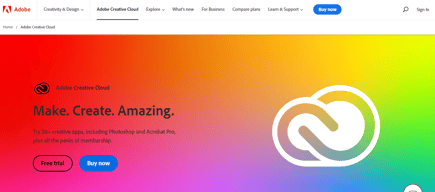
Compare Adobe Creative Cloud with other popular tools in the same category.
I used adobe illustrator to design vector graphics, logos and banners. It never felt laggy creating large size designs. Creating a vector graphics is one of the plus point for me. I can easily implement and create my ideas into vector designs. I frequently use this software to create logos and graphics, elements, icons and more.
It requires high specs PCs to run. It is expensive as well.
I don't need to use different softwares to create on design. All the necessary tools and features are available inside adobe illustrator. Creating logo is difficult task without right equipment but adobe illustrator is equiped with all necessary tools and features to create logo design.

Adobe Animate is known for its versatility, allowing users to create a wide range of animated content, from simple graphics to complex interactive animations and the user-friendly interface makes it accessible for both beginners and experienced animators. The layout and tools are designed to streamline the animation process.
I do not dislike anything about this product.
Versatile Animation Creation Problem: Creating animations with diverse styles and formats can be challenging. Benefit: Adobe Animate's versatility allows users to create animations ranging from traditional frame-by-frame animations to interactive content for web and mobile platforms.
Its intuitiveness, any adobe user can use it
The price, for someone who is starting up it is a little on the higher end
Its a great platform to learn how to animate digitally

It's easy to import and export files with a simple UI. Its user interface is easy to use and to the point, which grants various editing tools and options. Based on the work, there are multiple preset workstations so, you can have a full-on editing window or a simple audio-video window for audio tuning and syncing. It's easy to integrate it with the other Adobe products and vice-versa for a proper studio workaround feel.
It's not easy for beginners to learn about the software and implement the various plugins and effects until all the things are known properly. It can be hard to combine or use any newer version of files if you are running older versions.
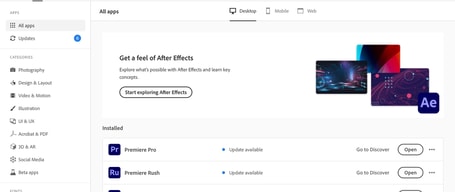
It's helping me with editing videos and adding touch-ups of VFX and animations with the Adobe After Effect integration. Can switch between Adobe Products, like After Effects, Photoshop, and Audition for an all-rounder working in audio, image editing and video animation, quality, and picture feel.

One of the standout features of Adobe Animate that I truly appreciate is its remarkable flexibility in catering to diverse creative endeavors. The tool offers a rich array of animation options, from traditional frame-by-frame animation to modern tweening techniques, empowering creators to bring their ideas to life in various styles.What I find most compelling is Animate's capacity for interactivity. The ability to infuse animations with JavaScript opens doors to crafting engaging games, interactive websites, and immersive educational content.
While Adobe Animate boasts a robust set of features, there are a few aspects that can pose challenges in the creative process. One notable point is that in certain scenarios involving heavy processing or complex animations, Animate might lag or encounter performance issues, impacting workflow efficiency
For me, personally, it addresses the need for a versatile and comprehensive toolset to bring my creative visions to life. It simplifies the process of crafting animations for various platforms, from web to mobile and beyond. Its integration with other Adobe software streamlines my workflow, allowing for seamless asset transfer and manipulation across programs.
It is lightweight, I've been using this product on my projects.
None so far, I cant think of any disklike in this application.
Lightweight designs, easy to load
Export multiple files at the same time. As a video editor and content creator, I have to use Adobe Premiere Pro continuously and also want to export files. Media Encoder is one of my favorite pieces of software where I can perform multiple exports while editing videos.
So far, everything is perfect. Adobe Media Encoder saved my time and Energy a lot.
Automatically Exporting Multiple Files: While exporting in Adobe Premiere Pro, I sometimes encounter errors, but Adobe Media Encoder resolves them automatically and offers faster export speeds.

Easy to use, User friendly UI, transitions, effect controls
Less text effects and default library. We can not manage this on 2 screens.
Video trimming, sound editing, video effects, video editing. Now I am able to do all the editing at one software.
its the most convient way to design and illustrate your imaginaztion on design tool it helps you to illustrate easliy
no dislike so far but the only thing is sometimes it got hanged
its benefiting in my career as i am getting uesd to it and for that my clients are icreasing and i am able to earn more
My haven for design is Adobe Illustrator because it provides an unmatched blank canvas for imagination. Its vector tools' accuracy guarantees that each stroke and curve fits perfectly with my vision, giving me an inspiring and powerful amount of control. Illustrator is the cornerstone of my design journey because of its robust features and intuitive interface, which can handle intricate details as well as expansive layouts.
While Adobe Illustrator is a powerful design tool, one drawback is its steep learning curve for beginners, which can be overwhelming. Additionally, the software's subscription-based pricing model may pose a challenge for those on a tight budget, especially compared to free or one-time purchase alternatives. Occasionally, the complexity of certain features can lead to slower performance on less powerful hardware, making it less accessible for users with older computers.
The issues I have to get resolved for my graphic design job are resolved by Adobe Illustrator. I can make vector-based artwork and logos with it, which is helpful for printed materials. It works well with Adobe InDesign and is a great addition to Adobe Photoshop. I use both programs interchangeably.

Integrating this tool into my workflow has also been great. Most features are easy to use. I love that you can connect your projects to After Effects. Premiere on Windows is rock solid and reliable. Integration with Photoshop, After Effects and Audition is helpful, and Adobe has a built-in video library. Clear and flexible user interface Many organization and collaboration tools Responsiveness and fast rendering Excellent stabilization tool Unlimited camera angles
Over time, I found it difficult to use. If your project gets a little heavy, either your computer will freeze or your software will crash. The only thing that's a little annoying about this software is the rendering time. Intimidating interface for non-experts Some techniques require additional applications, such as After Effects or Media Encoder Does not include sound effects samples
I'm video editor and I use adobe premiere every day

Adobe Photoshop offers the tools needed for editing images and the community support and user groups are resources that are almost endless.
I wish Adobe had a Perpetual license that you could buy once and not have to purchase reoccurring. I also wish there were a little more responsive to users input and feedback as they don't always appropriately acknowledge suggestions
Adobe Photoshop allows me to crop and resize images fairly easily for integration into many different mediums including making prints websites for slideshows print media and television. I'm also able to prep images for Publications and make pictures look their best.
At its core, Adobe XD serves as a canvas where imagination takes form. Its intuitive interface welcomes both novices and seasoned designers, providing a playground where ideas sprout and evolve. The software empowers creators to weave intricate designs through a combination of vector-based graphics, enabling the crafting of visually stunning and scalable elements. Be it crafting pixel-perfect icons or designing complex UI components, XD offers the precision and flexibility required to bring ideas to life.
XD offers basic animation features for prototyping, it might lack the advanced animation capabilities found in some other specialized animation software. For complex animations, designers might need to use supplementary tools.
It consolidates design and prototyping, fostering collaboration and enabling me to create interactive prototypes efficiently. By facilitating real-time sharing and feedback, XD promotes efficient communication among team members and stakeholders. Its focus on user-centric design empowers designers to identify and rectify usability issues early, ensuring more intuitive and user-friendly products.
I can't get enough of Adobe Photoshop Lightroom; it's like this magic wand for photo editing. The interface is so easy to navigate, and those editing tools? Powerful stuff. Plus, the seamless cloud integration? It's like having my creative studio in the palm of my hand. From enhancing colors to fine-tuning details, Lightroom takes my images to a whole new level.
Fair warning, if you're new to Lightroom, the learning curve might feel a bit steep. But It's a small hurdle for the endless creative possibilities it opens up.
The cloud integration is a game-changer, giving me a portable studio for professional-grade results on the go.

I have been using Adobe Illustrator for the past 2 years and it's just an Industry-standard vector graphics editor with seamless Adobe integration.
The software has a lot of features and tools, and it can be difficult to find the ones I need. The software can sometimes be glitchy and unresponsive.
Adobe Illustrator creates high-resolution, scalable vector graphics, ensuring that my designs remain crisp and sharp even when scaled to various sizes. This capability has been particularly beneficial for designing logos, icons, and illustrations that need to be adaptable to different mediums.
The best part about PS for me is its capability to dive deep into each element which is a handful of tools in Photo manipulation and creating cool graphics. I love its variety of options, the friendly user interface and the option to modify the workspace according to our preferences. It's my everyday use software.
Usage-wise, it's the best all-rounder software you can ever get but the only drawback is its expensive monthly subscription.
It solves design-related problems and comes in handy while creating marketing creatives, image retouching and print media graphics as well.

With its help, photos can be easily edited, it makes the photo even better, it is easy to use and it is a useful application which increases the quality of the photo.
I don't think there's anything to dislike about it.
By uploading the edited photo on social media, it gets more likes. With its help, the quality of the photo gets improved.
Picturing editing capabilities especially with dropping out backgrounds
That I can not work off the board like with Illustrator
I think that Photoshop is become more user friendly and easier to use
It provides a comprehensive set of tools for image manipulation, retouching, and graphic design. Users appreciate its intuitive interface, robust selection of filters, and support for various file formats.
some find it complex for beginners, and the subscription-based pricing model can be a drawback for some users.
Adobe Photoshop addresses a multitude of challenges for designers: Photo Editing: Photoshop excels in photo retouching, color correction, and enhancing images, allowing designers to achieve polished and professional results. Graphic Design: It's a powerful tool for creating graphics, banners, logos, and other visual elements, providing a wide range of design features and tools. Web Design: Designers use Photoshop to create web layouts, optimize images for the web, and design elements for websites, ensuring a visually appealing online presence.

As an avid user of Adobe Animate, I must say that this software has truly revolutionized the way I approach animation and interactive design. Adobe Animate seamlessly combines the power of traditional frame-by-frame animation with modern interactive capabilities, making it an essential tool for anyone involved in multimedia content creation.
This software has no drawbacks..........
It helps me animate my client's videos.

Adobe Premiere Pro stands out for its user friendly interface and powerful features. The seamless integration with other Adobe Creative Cloud apps, like After Effects and Photoshop, facilitates a smooth workflow. The timeline editing and advanced audio capabilities provide precision in creating professional videos. Its compatibility with various file formats and resolutions caters to diverse project needs. Regular updates reflect Adobe's commitment to staying ahead of industry trends. Then Overall, Premiere Pro's versatility, coupled with its place in the Creative Cloud ecosystem, makes it an essential tool for efficiently realizing creative visions in video editing.
Its occasional instability and resource-intensive nature can lead to crashes, particularly on less powerful hardware. The subscription-based pricing model of Adobe Creative Cloud may pose financial challenges for some users. The software's complex interface, though feature-rich, has a steeper learning curve, especially for beginners. Despite improvements in collaboration features, users sometimes find Adobe Premiere Pro's collaborative editing capabilities less seamless than those of competing platforms, with challenges in project sharing and version control. While these concerns exist, it's important to acknowledge that Premiere Pro remains widely used and appreciated for its extensive features and industry-standard status.
With Premiere pro, I solved complex problems that occurs in a production company. Basically, it's a tool to edit long videos, reels, short videos, remove green screen and do titling for videos. It's been quit helpful for video editors who start their career in video editing and branding.
Custom design, effects, converting shapes and easy to use. Always use it on design tasks daily. Customer support is superb and easy to install and integrate.
Might feel overwhelming at first but I feel everyone gets used to it.
Upside is I can design or illustrate any image on Adobe Illustrator and which can be high-quality content for my team and customers.
Best vector graphics tools that I used for creating vectors graphics and creating icons
Need to improve the colour picking fields
Helps me to create vectors like graphics and icons

The features if adobe acrobat is you can secure your file, edit and you can aslo add comments.
Costly,learning curved, editing features sometimes it is difficult to use, certain issues in text scanning.
It has benefited us in terms of file creation, e-signature, it increase the effeciency of the work that we have

Capabilities are limited by imagination only and it is not a marketing lie. I have no idea if I am using 3-5% of the potential of this software. For my daily work, it's perfect, the cost is acceptable, stability of app is great.
It's huge and it consumes a lot. Each version (I started to use v 2.51 in 90's) is getting bigger and more hungry for resources.
All the process is being done in one place. Cloud cooperation is also possible.

Adobe Premiere Pro offers a user-friendly interface that caters to both beginners and experienced editors. Premiere Pro is designed with features that make it a perfect video editing software. The layout is customizable, allowing users to arrange panels according to their workflow preferences. Moreover, effects and presets can be downloaded and used in Adobe Premiere Pro. This software can be used with very good frequency. In addition, Premiere Pro can work together with many Adobe software. and their customer support is very good.
This software sometimes overloads and crashes. And if you edit for a long time, it works a little slow. Besides, everything is fine.
This software sometimes overloads and crashes. Due to witch, the working project is destroyed. If the project is autosaved every one minute then the project will not be lost.

There's no such tool missing or any module that caused any issue. This designed software is just perfect and works phenomenal with supporting all operating system. We can create all we image and it help us giving our imagination a result
I dislike Nothing about this particular design software. Everything is on point.
Help creating visual graphic content in short turning it help turning imagination into reality. It's so easy to use and providing extreme zoom in quality that i can create pixel perfect illustration from it.
I am an Adobe Premiere Pro user from like 16 years, started when I worked in a local tv station. Great software and reliable. I worked with it to make commercials, short videos, reports and many other "tv channel" things, included the weather forecast. What makes the software different from the others is the versatility and stability, other than work on all the operating systems used in a normal tv station. The hardware integration (in my case with blackmagic design) always worked like a charm.
The random crash that sometimes still happen, even if a lot less respect to the past
Making video production faster.
A robust video editing program with an extensive feature set is Adobe Premiere Pro. With the many sophisticated editing tools and features this outstanding program provides, you can easily realize your creative vision for a wide range of projects. Its abundance of features, ease of integration, and regular use more than make up for its potential learning curve. Although Adobe's support could be more attentive, the tools that are available make up for it. Adobe Premiere Pro is a useful tool that can help any professional or amateur video editor take their work to the next level.
It should have more Video Transitions and LUTs
I use it sometimes for basic video editing work as a digital artist. Quick editing, quick exports, compatibility with other Adobe programs, excellent color grading, and a real help with sound mixing. Even without Adobe Audition, I was set.

I used this software for my web projects and designing projects like branding, image manipulation, Flyer creation and etc
None as of now. Tools and use of those tools are very vast and I am very far way from using it. May be AI would make this S/W easier in future.
I use it for creating assets for my website creation and in my work I use it for designing creatives.