

Unclaimed: Are you working at BlueJeans Meetings?
BlueJeans Meetings Reviews: 4.3/5 — Solid Choice
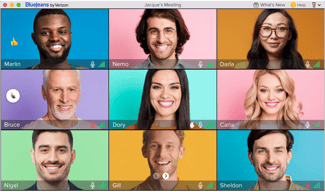
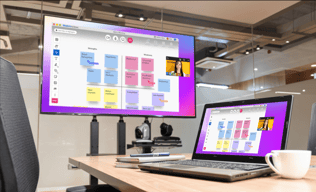
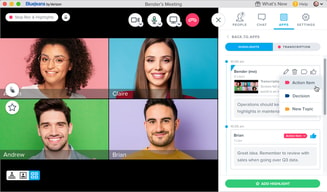
BlueJeans Meetings is a video conferencing software that lets teams connect remotely and collaborate through core features such as virtual whiteboarding, screen sharing, and recording capabilities. The platform is built to empower users to share information via a platform that lets them communicate and share data no matter where they are.

| Capabilities |
API
|
|---|---|
| Segment |
Small Business
Mid Market
Enterprise
|
| Deployment | Cloud / SaaS / Web-Based, Desktop Mac, Desktop Windows, Mobile Android, Mobile iPad, Mobile iPhone |
| Training | Documentation |
| Languages | English |








Compare BlueJeans Meetings with other popular tools in the same category.
That it allowed multiple users from all over and it didn't require the use of an app.
The inconsistency of how it worked and it seemed to always change
It was able to allow multiple companies to host events on many different platforms and it didn't have a cut off time which was nice for corporate offices. It didn't work a lot of the time for video which required dial in and missing content.
The ability to generate meeting IDs from Google Calendar and the invite attendees directly is the best feature. That's pretty much it.
We've had slow, choppy video and audio on every call done on Blue Jeans. It's not as intuitive as other options for video conferencing, and the usability for all clients isn't guaranteed.
It's vital to have a video meeting tool in 2021, so that's the problem solved by Blue Jeans -- I just think there are better tools to do the job.
I like that Blue Jeans offers more HIPPA compliant video conferencing options
It often lags and it's not as user friendly as zoom or google hangouts
With Blue Jeans our company was able to proceed with court hearings thanks to the hippa compliance and privacy aspects that blue jeans offers that many other platforms do not
quick connection and easy recording and list of attendees
no way to adjust volume and con fusing to speakers to share screen
administrative meetings and conferences

I like the ease of placing the invite in emails, etc. and I like that you can record the meeting.
I don't like that there is usually an error in the video chat, and how difficult it is for others to log on, without an acct etc. Other video services are easier for clients to join, etc.
With BlueJeans I've experience bad connection, delays, lag in sound and picture.
It feels more secure than other platforms. That is the only plus. Also if I’m consulting for Facebook they require it.
It is not as intuitive as zoom. I tend to have audio issues even if I’ve used it before, which is frustrating. There are no breakout rooms to my knowledge and people are not familiar with it so it’s hard to use with people who haven’t used it.
Working virtually is what we as a team use it for. The Benefit is it feels more secure.
Nothing at all. Its not great. I guess sound by dolby is good
Where do i start, not easy to connect , poor google calendar integration. Quality is so so
None
You can schedule meeting directly from Microsoft Outlook
Frequent technical issues. Sometimes I was unable to log into my own meeting or share my screen. Customers complain about not being able to hear or dial in successfully as well.
Online meetings with clients around the world. Makes it very convenient to communicate with internal and external customers anytime and anywhere.
Simple to use, great audio/video quality
Bad name, hard for enterprise clients to install with firewall
We use it to communicate with clients via phone/video presentations
Bluejeans is simple to use and administer for the most part. It's easy to just drop a link into meeting invites to start a video conference.
Audio stability is questionable at best. We usually have a practice of including a webex phone bridge line with Bluejeans meetings because of the frequency in which participants cannot be heard or establish an audio connection.
Virtual collaboration and meetings for any work initiatives.
It has the features I need, even if those features don't work regularly enough.
Video quality is variable, screen share is flaky, and it's a huge resource drain and kills my battery.
Remote meetings.
I like that you can have video meetings.
I dislike nearly everything about the service. I face constant technical issues. The user interface is difficult to use and not intuitive. The connection is spotty and inconsistent. And sometimes the meetings won’t work at all.
Conferencing with coworkers across the country.
easy to screen share...recording a meeting is easy
Can not do anything other than share screen. One can not give control of screen to another, no annotations, clipboard, pointer, etc. Also, when screen sharing, I have to close all other applications or they run slow after the meeting. The launch is affected by our domain policy....have to always use browser version. Also- slow to open. I don't like the 'rate your meeting' every time I leave a meeting. It already takes 2 actions to leave the meeting, I don't need another.
Remote attendees to meeting..................

video quality is very good compared to webex
audio controls and limited dial in numbers
conference call...
While it did finally work for what we needed, initially trying to establish the meeting connections for everyone was very difficult, frustrating, and caused us to lose precious time during the meeting
The system had issues connecting everyone together when we were using it with outside copmanies
The purpose was to have a central tool to share a screen and have a conference call. It wasn't as good as other solutions out there that we've used.
I like the ability to be able to video conference with colleagues
Terrible connection and a complicated setup. It's not as reliable as other options on the market.
The ability to teleconference and how integral communication is with people working from home more and more now.
Prefer the old Bluejeans as the desktop screen share is faster and real time
the updates made, desktop screen share is so slow and it has a lot of lag time
Calls, Video Conferencing, Sharing of Screen
It lets you collaborate with your co located team
It takes forever to load a sesssio. At times it would take more then 5 minutes.
Running the meetings and different people can share sceeen. At times to record a meeting session.
I guess the app is decent, and i like that i can make pick my meeting code myself. that's about it
The audio preferences are a pain to setup properly when you're sharing from the same room on your computer to a TV system. there's always some kind of echo situation. also sharing video never works properly
meeting with remote employees
Good connection, option for a video and screen sharing
Could never easily add blue jeans to my outlook meeting. Had to go to blujeans website, create a meeting there and then copy paste the link. Also very confusing to setup meetings in the website for different time zones
BJ was used for communication with colleagues overseas. Once I passed the issues of scheduling a meeting, the connection was easy
Allows for us to connect and meet with people who are not on site.
We experienced many technical difficulties and do not find it intuitive.
Allows us to have meetings with people not on site.
I like the email generated to those who are participating with the conferencing information. The information is clear and concise and I can cut and paste it if I need to send a reminder to my students. I also like the interface - i.e. when I am on a call it is easy to share my screen, see who is on the conference, interact via text and manage the call. i
I do not like the recording feature. It is a counter-intuitive radio button. Does red mean you are recording or not recording. Although the signal that you are recording is the voice prompt... sometimes your conference is not being recorded. Probably a glitch. I am not a fan of the invitation process. I cannot cut and paste my emails, or use my contacts to invite people to a conference. I am also not a fan of the connectivity issues in Dubai and Croatia. We have universities there and it seems SO hard to connect and keep connected. We get TERRIBLE feedback when people use the app internationally - we have to ask our students NOT to use their phones but to connect using a computer.
I record my classes using Bluejeans - it is as easy as using camtasia. Wish I could stop recording and then continue recording a session and keep the session as one - not multiple recordings.
The sound/ video quality is usually good on my end.
When I send clients my number and link they seem to always have to download the bluejeans app (which is ridiculous). My discovery calls usually end up being ~5 minutes late because they had to download the software.
I have been able to connect with my clients/ prospect via blue jeans for discovery calls, demo's, etc.
It is very easy to setup a meeting and to join a meeting. The desktop app is also very user friendly.
when creating a meeting individual invites are sent to host and attendees, this makes it hard to track who accepts or declines meeting recording player is still using flash
we are a global team so we regularly meet using blue jeans
For the most part, the service is reliable. It's simple, seems secure, and the screen sharing is great.
Occasionally, it won't work and it's hard to figure out why. I also was confused because the audio (via computer) wasn't working on a call to Geneva (it's failed a couple times). I called in using the Geneva number, because that's how I thought it worked on who I was trying to contact. I was scrambling because our deadline urgent and thought everything would have gone through my WiFi and not cost any money by using data. I was very, very wrong. That call cost me $165. I cried, when I found out a month later. The resources available for international calls are clunky. Everything else is good, when it works. Sometimes if multiple people are sitting nearby and using computer audio, it has a weird high pitched wamping noise, but I think that would be true with any technology, not just BlueJeans. I also can't currently log into my profile, because the password expired, but I can't remember the original password. What a catch 22! How do I escape this labyrinth? I'll have to call your help center.
Teams working internationally. Most external partners seem to have a baseline familiarity with BlueJeans, which is nice. It's also worked well on my mobile, so good for on the go. I appreciate how you can switch seamlessly between audio, video, screen sharing, etc.
The on/off switches for the audio and video are very clear. That's not easy UX, so bravo there.
Your compression algorithm squeezes all light grays to white, making subtle gray colors disappear. It makes sharing UI designs very difficult.
Sharing designs with large groups.
system inside our conference rooms, bluejeans has a seamless connection to the system and we never had any problems with.
lag. I can say I experienced lagging on %75, all of my calls for last 9 months. It never happens on room calls but it happens whenever I have a call on laptops. and this happened through several laptops
connecting to all offices, colleagues over the world
When the software actually functions, I like that we can have business meetings with our colleagues in the United Kingdom in a nice package and I'm able to share my screen. I do really like the outlook integration though.
Bugs and problems. There always seems to be a connectivity issue of some kind that takes up ten to fifteen minutes of our allotted meeting time.
virtual conference room and screen sharing around the world.
Easy for anyone to connect to the meeting by browser, room system or phone, even without an account.
Quality is habitually poor. Echo issues interrupt every meeting. Video playback, even when pre-uploaded to Blue Jeans, get sticky. (Working in media we need to stop and start shared video a lot). More meetings have tech issues than not.
Working on a bi-coastal team that needs to be connected every day. Benefits have not outweighed the cons -- we have actually started using Google Hangouts when possible instead.
Once connected, easy to share screen and collaborate. The chat feature is nice for when audio isn't working (which is pretty often). It is easy to see who is all on the call, provided they signed in. Otherwise it shows as a long list of unusable numbers.
Takes forever to connect and is very buggy. Crashes often in the middle of a meeting. Very timely to connect and always seems to have issues that require disconnecting and reconnecting during a meeting.
Collaboration and seamlessly working with off site people through video and phone conferencing.