

Unclaimed: Are you working at Coda?
Coda Reviews: 4.7/5 — Highly Rated
Coda is a document management solution for creating, editing, and viewing text documents and spreadsheets. , It also helps centralize all documents to ensure seamless efficiency between teams and comes with customizable templates that let organizations create personalized documents for meetings, brainstorming sessions, customer feedback, to-do lists, and market research. It features drag-and-drop functionality, which keeps functionality simple, and has numerous tools that offer role-based access.

| Capabilities |
API
|
|---|---|
| Segment |
Small Business
Mid Market
Enterprise
|
| Deployment | Cloud / SaaS / Web-Based, Mobile Android, Mobile iPad, Mobile iPhone |
| Support | 24/7 (Live rep), Chat, Email/Help Desk, FAQs/Forum, Knowledge Base, Phone Support |
| Training | Documentation |
| Languages | English |




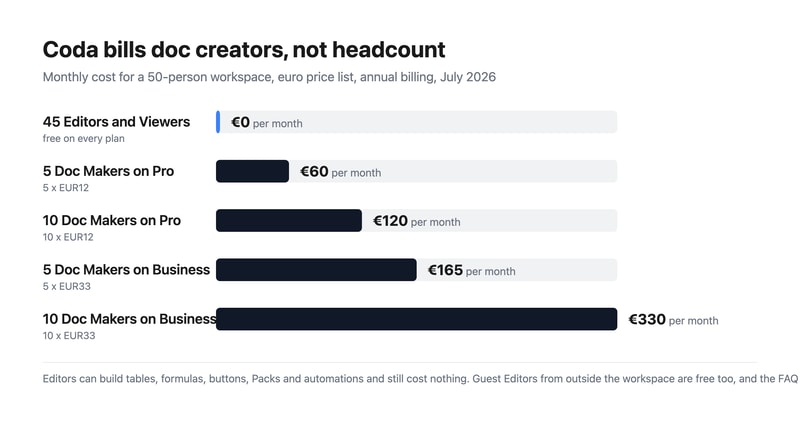
Coda bills you for Doc Makers only. Editors and Viewers are free — on every plan, including Enterprise. An Editor can edit content, add tables and views, build formulas and buttons, and configure Packs and automations, and still costs nothing. So a fifty-person workspace where five people create docs pays for five seats. In a category where almost everyone charges per head, that is the most buyer-friendly pricing model reviewed here this month.
- What it is: A document creation platform combining docs, tables, formulas and automations — now sold as Superhuman Docs.
- Best for: Teams where a few people build documents and many people use them.
- Pricing: Free; Pro €12, Business €33 per Doc Maker monthly on annual billing; Enterprise custom. Verified July 2026.
- The honest catch: The product has been rebranded — every button on the pricing page says “Get Superhuman”.
What Is Coda?
Coda merges documents, spreadsheets, databases and applications into one surface: pages that contain connected tables, views, forms, formulas, buttons and automations, extended by integrations it calls Packs. It cites 40 million-plus people and 50,000-plus organisations.
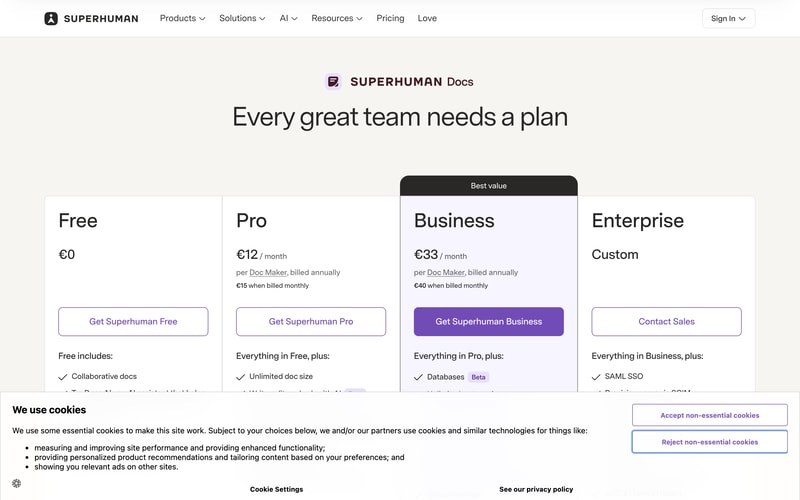
The name has changed. Every call to action on the pricing page reads “Get Superhuman Free”, “Get Superhuman Pro” or “Get Superhuman Business”, and the FAQ refers throughout to “Superhuman Docs”. Coda now sits inside the Superhuman family alongside Grammarly, and the plan cards list Grammarly and Go as included from Pro, with Mail added from Business.
Docs AI is marked Beta and is described as “available during Beta for Doc Makers”.
How Coda Works
- Doc Makers are the only billed role.
- Editors, Viewers and Guest Editors are always free.
- The model holds on Enterprise, per Coda’s own FAQ.
- Two paid tiers plus a free one, and a custom Enterprise.
- Grammarly, Go and Mail are bundled from Pro upward.
- Removals give account credit, not refunds.
Coda Pricing
Captured from Coda’s pricing page in July 2026 on the euro price list.
| Plan | Annual (per Doc Maker/mo) | Monthly | Saving | Key additions |
|---|---|---|---|---|
| Free | €0 | €0 | — | Collaborative docs, connected tables, formulas, automations |
| Pro | €12 | €15 | 20% | Unlimited doc size, 30-day version history, custom branding and domains |
| Business | €33 | €40 | 17.5% | Databases, unlimited automations and version history, private folders, doc locking |
| Enterprise | Custom | — | — | SAML SSO, SCIM, audit events, SOC 2 Type 2, HIPAA |
What actually decides your cost:
- Count your doc creators, not your team. Coda’s FAQ is explicit: “Editors and Viewers are always free”, and “at the end of each billing cycle, you will be billed for the workspace based on the number of Doc Makers in it.” A Doc Maker creates docs and templates and manages folders; an Editor does almost everything else — tables, views, formulas, buttons, Packs, automations — for nothing.
- The free roles are unusually capable. This is not a viewer-only tier dressed up. An Editor building a formula-driven tracker with automations is doing the substantive work of the platform and is not billed for it. Compare that with Notion or Airtable, where an editor is a paid seat.
- Outside collaborators are free too. Sharing a doc externally adds the recipient as a Guest Editor, who can edit content in that doc but cannot manage pages or browse the workspace. Guest Editors cost nothing, so client and contractor collaboration does not inflate the bill.
- Enterprise keeps the model. The FAQ states plainly: “Even on Enterprise, you pay only for Doc Makers.” Enterprise adds SAML SSO, SCIM provisioning, audit events, a SOC 2 Type 2 report and HIPAA compliance rather than changing how you are counted.
- Business is a 175% step up from Pro. €33 against €12 buys databases, unlimited automations and version history, private team folders, page locking and cross-doc actions. Pro’s automations are not stated as unlimited, so heavy automation users should establish the Pro limit before assuming they can stay there.
- Cancelling gives credit, not money back. Coda’s FAQ: “When you remove members or cancel your plan, we’ll apply a prorated credit onto your account you can use for future charges in your workspace.” That credit is usable inside the workspace, not refundable to your card.
Who Should Use Coda
- Teams with few builders and many readers. The clearest case — the pricing model is designed exactly for this shape.
- Operations and product teams. Connected tables, formulas and automations replace a spreadsheet-plus-doc sprawl.
- Agencies and consultancies. Guest Editors are free, so client collaboration costs nothing.
- Organisations needing compliance. SOC 2 Type 2 and HIPAA on Enterprise.
It fits poorly for teams where everyone creates docs, since every one of them is a billed seat; for buyers who need mature, non-beta AI, given Docs AI’s Beta labelling; and for anyone unsettled by an in-progress rebrand.
Honest Pros and Cons
Strengths
- Editors and Viewers are free on every plan, including Enterprise.
- Free Editors can build tables, formulas, buttons, Packs and automations.
- Guest Editors from outside the workspace are free.
- A genuinely capable free tier with connected tables and automations.
- Grammarly, Go and Mail bundled from Pro upward.
- A 20% annual discount on Pro.
Limitations
- The product has been rebranded to Superhuman Docs mid-flight.
- Business costs 175% more than Pro.
- Docs AI is still labelled Beta.
- Pro’s automation allowance is not stated as unlimited.
- Cancellations yield account credit, not refunds.
- SSO and compliance reporting require Enterprise.
Coda Alternatives and How It Compares
- Notion is the closest competitor, charging per member rather than per creator.
- Airtable is stronger as a database, with per-seat editor pricing.
- ClickUp and monday.com approach the same ground from project management.
- Smartsheet targets enterprise work management with a spreadsheet metaphor.
- Google Workspace covers documents far more cheaply without the database layer.
- Confluence, Slite and Nuclino compete on team wikis and documentation.
For a broader survey, browse our document creation directory.
The Verdict
Coda’s pricing model is the best thing about it, and after a month of reviews spent pointing out where headline rates mislead, it is a pleasure to report one that works the other way. You are billed for Doc Makers only. Editors and Viewers are free, and so are Guest Editors from outside your workspace — on every plan, with the FAQ confirming that “even on Enterprise, you pay only for Doc Makers.” Crucially, the free roles are not spectators: an Editor can build tables and views, write formulas, configure buttons, add Packs and set up automations. A fifty-person team where five people create documents pays for five seats.
Set against per-member competitors, the difference compounds quickly. That same fifty-person workspace costs €60 a month on Pro or €165 on Business, where a tool charging per member would bill all fifty. If your organisation has a handful of builders and a long tail of people who read, comment and edit within existing docs — which describes most operations, product and marketing teams — this is the cheapest serious option in the category by a wide margin.
Two things to note before committing. The product is being rebranded: every button on the pricing page now reads “Get Superhuman”, the FAQ calls it “Superhuman Docs”, and Grammarly, Go and Mail appear as bundled products from Pro upward. Anyone evaluating “Coda” should know they are buying into the Superhuman family, and that Docs AI is still labelled Beta. And on the commercial detail, removing members or cancelling produces a prorated account credit rather than a refund — usable for future charges in the workspace, not returned. Neither undermines the central point, which is that Coda charges for the people building and lets everyone else in free.
FAQ
How much does Coda cost?
On the euro price list captured July 2026: Free at €0, Pro at €12 per Doc Maker per month billed annually (€15 monthly), and Business at €33 billed annually (€40 monthly). Enterprise is a custom quote. Crucially, you are billed only for Doc Makers — Editors, Viewers and outside Guest Editors are free on every plan.
What is a Doc Maker in Coda?
The only billed role. Coda’s FAQ defines Doc Makers as members who “create new docs and templates, create and manage folders to organize the workspace”, plus doc administration such as adding pages, changing titles and icons, and configuring locking. Editors, by contrast, “can edit content and collaborate in existing docs and pages, including adding tables and views, constructing formulas and buttons, adding and configuring Packs and automations” — and are free.
Are Coda Editors and Viewers really free?
Yes. The FAQ states “Editors and Viewers are always free”, and billing is based purely on the number of Doc Makers in a workspace. External collaborators become Guest Editors, who can edit content in docs shared with them but cannot manage pages or browse the workspace, and they are free too. The model holds on Enterprise, which the FAQ confirms explicitly.
Is Coda now called Superhuman?
Effectively, yes. Every call to action on the pricing page reads “Get Superhuman Free”, “Get Superhuman Pro” or “Get Superhuman Business”, and the FAQ refers throughout to “Superhuman Docs”. The plans also list Grammarly and Go as included from the Pro tier, with Mail added at Business, so Coda now sits within the wider Superhuman product family.
Does Coda refund unused time if I cancel?
Not in cash. Coda’s FAQ states: “When you remove members or cancel your plan, we’ll apply a prorated credit onto your account you can use for future charges in your workspace.” So downgrading or removing Doc Makers produces workspace credit against future billing rather than money returned to your payment method.

Compare Coda with other popular tools in the same category.

- the database flexibility - the views - conditional formatting - doc maker subscription plan - the community
- customer service - 10 weeks for a 48 hrs issue and some other weeks for other issues that could be solved very easy - very buggy and unclear - some formulas work from the custom formula field, but don't from button settings. and vice versa - the import is hard and buggy, but the export is horrific - response time issues
For a small database with 100-200 rows works fine, then it's starting to glitch
integration with other products like dropbox
resource hog, doesn't have intuitive formulas
made a digital asset portal from a dropbox directory