

Unclaimed: Are you working at Coda?
Coda Reviews: 4.7/5 — Highly Rated
Coda is a document management solution for creating, editing, and viewing text documents and spreadsheets. , It also helps centralize all documents to ensure seamless efficiency between teams and comes with customizable templates that let organizations create personalized documents for meetings, brainstorming sessions, customer feedback, to-do lists, and market research. It features drag-and-drop functionality, which keeps functionality simple, and has numerous tools that offer role-based access.

| Capabilities |
API
|
|---|---|
| Segment |
Small Business
Mid Market
Enterprise
|
| Deployment | Cloud / SaaS / Web-Based, Mobile Android, Mobile iPad, Mobile iPhone |
| Support | 24/7 (Live rep), Chat, Email/Help Desk, FAQs/Forum, Knowledge Base, Phone Support |
| Training | Documentation |
| Languages | English |



Coda bills you for Doc Makers only. Editors and Viewers are free — on every plan, including Enterprise. An Editor can edit content, add tables and views, build formulas and buttons, and configure Packs and automations, and still costs nothing. So a fifty-person workspace where five people create docs pays for five seats. In a category where almost everyone charges per head, that is the most buyer-friendly pricing model reviewed here this month.
- What it is: A document creation platform combining docs, tables, formulas and automations — now sold as Superhuman Docs.
- Best for: Teams where a few people build documents and many people use them.
- Pricing: Free; Pro €12, Business €33 per Doc Maker monthly on annual billing; Enterprise custom. Verified July 2026.
- The honest catch: The product has been rebranded — every button on the pricing page says “Get Superhuman”.
What Is Coda?
Coda merges documents, spreadsheets, databases and applications into one surface: pages that contain connected tables, views, forms, formulas, buttons and automations, extended by integrations it calls Packs. It cites 40 million-plus people and 50,000-plus organisations.
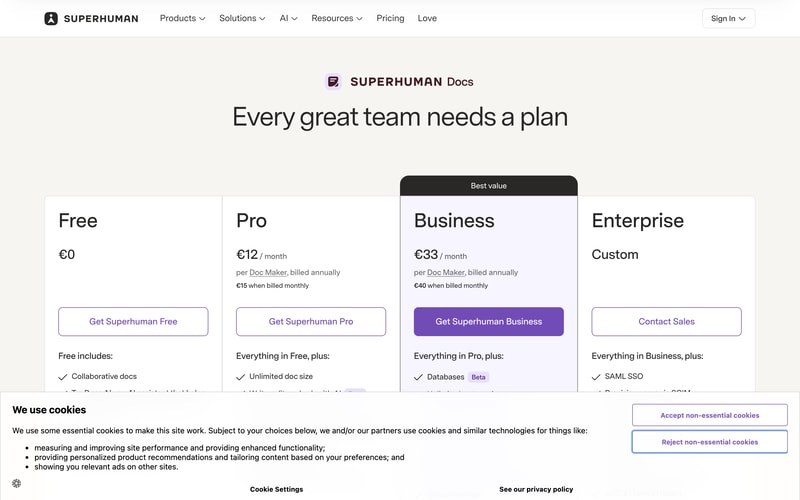
The name has changed. Every call to action on the pricing page reads “Get Superhuman Free”, “Get Superhuman Pro” or “Get Superhuman Business”, and the FAQ refers throughout to “Superhuman Docs”. Coda now sits inside the Superhuman family alongside Grammarly, and the plan cards list Grammarly and Go as included from Pro, with Mail added from Business.
Docs AI is marked Beta and is described as “available during Beta for Doc Makers”.
How Coda Works
- Doc Makers are the only billed role.
- Editors, Viewers and Guest Editors are always free.
- The model holds on Enterprise, per Coda’s own FAQ.
- Two paid tiers plus a free one, and a custom Enterprise.
- Grammarly, Go and Mail are bundled from Pro upward.
- Removals give account credit, not refunds.
Coda Pricing
Captured from Coda’s pricing page in July 2026 on the euro price list.
| Plan | Annual (per Doc Maker/mo) | Monthly | Saving | Key additions |
|---|---|---|---|---|
| Free | €0 | €0 | — | Collaborative docs, connected tables, formulas, automations |
| Pro | €12 | €15 | 20% | Unlimited doc size, 30-day version history, custom branding and domains |
| Business | €33 | €40 | 17.5% | Databases, unlimited automations and version history, private folders, doc locking |
| Enterprise | Custom | — | — | SAML SSO, SCIM, audit events, SOC 2 Type 2, HIPAA |
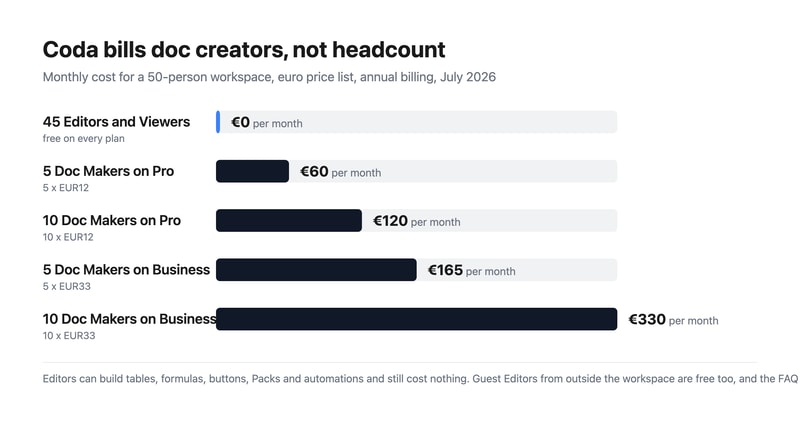
What actually decides your cost:
- Count your doc creators, not your team. Coda’s FAQ is explicit: “Editors and Viewers are always free”, and “at the end of each billing cycle, you will be billed for the workspace based on the number of Doc Makers in it.” A Doc Maker creates docs and templates and manages folders; an Editor does almost everything else — tables, views, formulas, buttons, Packs, automations — for nothing.
- The free roles are unusually capable. This is not a viewer-only tier dressed up. An Editor building a formula-driven tracker with automations is doing the substantive work of the platform and is not billed for it. Compare that with Notion or Airtable, where an editor is a paid seat.
- Outside collaborators are free too. Sharing a doc externally adds the recipient as a Guest Editor, who can edit content in that doc but cannot manage pages or browse the workspace. Guest Editors cost nothing, so client and contractor collaboration does not inflate the bill.
- Enterprise keeps the model. The FAQ states plainly: “Even on Enterprise, you pay only for Doc Makers.” Enterprise adds SAML SSO, SCIM provisioning, audit events, a SOC 2 Type 2 report and HIPAA compliance rather than changing how you are counted.
- Business is a 175% step up from Pro. €33 against €12 buys databases, unlimited automations and version history, private team folders, page locking and cross-doc actions. Pro’s automations are not stated as unlimited, so heavy automation users should establish the Pro limit before assuming they can stay there.
- Cancelling gives credit, not money back. Coda’s FAQ: “When you remove members or cancel your plan, we’ll apply a prorated credit onto your account you can use for future charges in your workspace.” That credit is usable inside the workspace, not refundable to your card.
Who Should Use Coda
- Teams with few builders and many readers. The clearest case — the pricing model is designed exactly for this shape.
- Operations and product teams. Connected tables, formulas and automations replace a spreadsheet-plus-doc sprawl.
- Agencies and consultancies. Guest Editors are free, so client collaboration costs nothing.
- Organisations needing compliance. SOC 2 Type 2 and HIPAA on Enterprise.
It fits poorly for teams where everyone creates docs, since every one of them is a billed seat; for buyers who need mature, non-beta AI, given Docs AI’s Beta labelling; and for anyone unsettled by an in-progress rebrand.
Honest Pros and Cons
Strengths
- Editors and Viewers are free on every plan, including Enterprise.
- Free Editors can build tables, formulas, buttons, Packs and automations.
- Guest Editors from outside the workspace are free.
- A genuinely capable free tier with connected tables and automations.
- Grammarly, Go and Mail bundled from Pro upward.
- A 20% annual discount on Pro.
Limitations
- The product has been rebranded to Superhuman Docs mid-flight.
- Business costs 175% more than Pro.
- Docs AI is still labelled Beta.
- Pro’s automation allowance is not stated as unlimited.
- Cancellations yield account credit, not refunds.
- SSO and compliance reporting require Enterprise.
Coda Alternatives and How It Compares
- Notion is the closest competitor, charging per member rather than per creator.
- Airtable is stronger as a database, with per-seat editor pricing.
- ClickUp and monday.com approach the same ground from project management.
- Smartsheet targets enterprise work management with a spreadsheet metaphor.
- Google Workspace covers documents far more cheaply without the database layer.
- Confluence, Slite and Nuclino compete on team wikis and documentation.
For a broader survey, browse our document creation directory.
The Verdict
Coda’s pricing model is the best thing about it, and after a month of reviews spent pointing out where headline rates mislead, it is a pleasure to report one that works the other way. You are billed for Doc Makers only. Editors and Viewers are free, and so are Guest Editors from outside your workspace — on every plan, with the FAQ confirming that “even on Enterprise, you pay only for Doc Makers.” Crucially, the free roles are not spectators: an Editor can build tables and views, write formulas, configure buttons, add Packs and set up automations. A fifty-person team where five people create documents pays for five seats.
Set against per-member competitors, the difference compounds quickly. That same fifty-person workspace costs €60 a month on Pro or €165 on Business, where a tool charging per member would bill all fifty. If your organisation has a handful of builders and a long tail of people who read, comment and edit within existing docs — which describes most operations, product and marketing teams — this is the cheapest serious option in the category by a wide margin.
Two things to note before committing. The product is being rebranded: every button on the pricing page now reads “Get Superhuman”, the FAQ calls it “Superhuman Docs”, and Grammarly, Go and Mail appear as bundled products from Pro upward. Anyone evaluating “Coda” should know they are buying into the Superhuman family, and that Docs AI is still labelled Beta. And on the commercial detail, removing members or cancelling produces a prorated account credit rather than a refund — usable for future charges in the workspace, not returned. Neither undermines the central point, which is that Coda charges for the people building and lets everyone else in free.
FAQ
How much does Coda cost?
On the euro price list captured July 2026: Free at €0, Pro at €12 per Doc Maker per month billed annually (€15 monthly), and Business at €33 billed annually (€40 monthly). Enterprise is a custom quote. Crucially, you are billed only for Doc Makers — Editors, Viewers and outside Guest Editors are free on every plan.
What is a Doc Maker in Coda?
The only billed role. Coda’s FAQ defines Doc Makers as members who “create new docs and templates, create and manage folders to organize the workspace”, plus doc administration such as adding pages, changing titles and icons, and configuring locking. Editors, by contrast, “can edit content and collaborate in existing docs and pages, including adding tables and views, constructing formulas and buttons, adding and configuring Packs and automations” — and are free.
Are Coda Editors and Viewers really free?
Yes. The FAQ states “Editors and Viewers are always free”, and billing is based purely on the number of Doc Makers in a workspace. External collaborators become Guest Editors, who can edit content in docs shared with them but cannot manage pages or browse the workspace, and they are free too. The model holds on Enterprise, which the FAQ confirms explicitly.
Is Coda now called Superhuman?
Effectively, yes. Every call to action on the pricing page reads “Get Superhuman Free”, “Get Superhuman Pro” or “Get Superhuman Business”, and the FAQ refers throughout to “Superhuman Docs”. The plans also list Grammarly and Go as included from the Pro tier, with Mail added at Business, so Coda now sits within the wider Superhuman product family.
Does Coda refund unused time if I cancel?
Not in cash. Coda’s FAQ states: “When you remove members or cancel your plan, we’ll apply a prorated credit onto your account you can use for future charges in your workspace.” So downgrading or removing Doc Makers produces workspace credit against future billing rather than money returned to your payment method.

Compare Coda with other popular tools in the same category.
Combines the best of tools like Airtable and Notion. If there isn't something that works out of the box in Coda, you can always find an acceptable workaround by asking the Coda community.
While they keep pushing ahead with new features, the scalability of the platform can definitely be improved so that it can deal with larger data sets.
Collaborative knowledge management is the main benefit of Coda and it has shown great value in centralizing ideas, insights, and general work within a company.
The ability to create workflows and connect/deliver information from/to multiple apps
page scrolling performance and minor UX buginess
Central store of information, ability to create simple databases
I am fairly new to Coda, so I appreciate the intuitive and user-friendly features. Coda makes it easy to work on team projects and have visibility into new developments. I would definitely recommend it to those looking for an out-of-box, collaborative solution.
Overall, Coda has worked well. Making documentation a little easier to find would be good.
Collaborative projects have been working well. I appreciate how easy it is to get started.
I like that it is like a more powerful spreadsheet and that a document created in Coda becomes a mobile app automatically. We used it to create a simple CRM that allowed us to create our own workflows and customer views and searches. Creating relationships between contacts, companies, and events on a calendar were super easy. We also liked that is naturally collaborative. You can work in a document at the same time and see what other people are contributing.
The formula syntax took some getting used. Pulling data from multiple tables into a single view is challenging. It has gotten better for creating improved layouts, but the earlier version was very limited in how you could arrange elements within a document.
I've been able to create templates that can be shared and used in various use cases.

The database functions mostly work well, I like that it looks nice and you can add different colours etc.
My biggest problem with coda is that to integrate it with other apps you have to use Zappier which is incredibly expensive. It would be much better if I could use a cheaper alternative such as automate.io or IFTTT
We use it to organize ideas for a series of books - and that's what I wish coda would focus on. There isn't a good ideas management app, coda is the best I've found but it doesn't focus on ideas
Upsides - coda is pretty easy to learn how to use. There are a ton of resources, and the more you learn the more you can do. The support team and community forums are also great resources.
The data visualization options could be built out more, and I hope to see more improvements there. Similarly, using Coda for the purpose of Roadmaps / Gantt charts still could use some improvement in the visuals and configurations.
It's a very flexible and scalable way to surface high-level project updates and timelines across teams and collect insights and resources connected to those projects.
Ability to make complex workflows and custom 'apps' or workflows
Some bugs and automations are very immature and need some work
Organization and planning. Great for project management

It is very easy to start using! You can start collecting info on the go and CODA will allow you to build countless ways to interact with that info as you need. In my opinion, it is quite like Filemaker pretends to be, only that you don't have to invest tons of effort planning prior creating your first record. In this case to me it is like the defunct Apple's Hypercard https://en.wikipedia.org/wiki/HyperCard, only supercharged with plenty of integrations for 3rd parties.
To me it is quite pricey. This is one of the services you want to have permanently. However USD 10/month for a usable version is quite expensive in the long term. And if you happen to share your work (as it is almost something that naturally happens) others are quite reluctant to create an account to prevent being charged for a service they don't expect to use as I do. It takes a while to convince others about the usefulness of this and they almost think it is quite complicated. Most of the times I just end copying and pasting info to share in other free services like Google Docs.
I have collections for both personal and work. The most important for me is the way CODA solves the "relational" link of different tables. Forget about the IDs and relations. The powerful formulas help you to build "queries" quite easy. You only need a browser and plenty of memory for it ;)
The idea of bring text documents to life with add ons and make it much more than just a document.
Speed of page loading, user interface seems sometimes difficult to navigate. Mobile app loads documents very slow.
Similar documents at work and home that were previously on Google Docs but now more powerful collaboration and added functionality
Coda enables monthly deliverables to be looked at within the platform
Coda does not play well with other apps or integrations.
Coda helps us to see monthly project deliverables with statuses of each one, and customizable views of each deliverable as it pertains to the month.
That the team can collaborate on ideas in real time and remotely
I dont dislike anything about Coda, its been able to fulfill all our needs so far.
we've been using coda to track our project development and to collaborate on developing our vision statement.
Ability to customize documents with tables and charts, as well as link outside documents and embed videos.
Using the desired features sometimes requires a lot of googling or contacting support.
Easy sharing of complex formatted documents
It's easy to start working in Coda. Ease of use in general is very high with Coda. You can easily create or remove pages & subpages, change text formatting, add tables, and import many of the most common types of documents. The ability to set an icon for the page and a cover image allows each page to stand out and makes it easier to know at a glance what kind of page you're on. It's also incredibly easy to collaborate within Coda, with multiple people able to seamlessly interact with and change items together.
The tables are probably my least favorite part of Coda. If you're using a template table, sometimes you can mess up your view by adding a new row and that formatting is just annoying. I also do not like how the calendar integrations & notifications work. It's really confusing to try to figure out how to do it in the first place and then just having it send out notifications at a certain time is also annoying to set up.
Probably the largest issue that Coda is solving is creating a one-stop-shop for our whole team to document, collaborate, and discuss, across all departments. Our developers are using Coda to track their technical initiatives, domain knowledge, and other important technical information. Design and Product are using Coda to document research, Discovery, and other artifacts as part of development. The ability to link to many kinds of documents means that we can have a single page on say a specific feature and FAQs, Murals, Google Meet recordings about that feature, etc. can all live on one page.
Coda is a very capable tool with powerful features like buttons and a variety of packs to integrate other systems. Thereby it can be used to even create some small business applications and offers everything to map out business processes and not only documenting things.
The rich feature set comes at some cost. The complexity leads to a steep learning curve at the beginning and defines an obstacle for the adoption among the team. For a single admin person, it's quite doable to get to know everything but if you implement in your organisation you are quickly far ahead the teammates who are not dealing with the tool in such depth. Furthermore, compared to other tools, the overall usability is a weakness.
Mainly the documentation of business processes and company knowledge. It helps us to put a semantic layer on top of all existing information and assets, so people have a one-stop-shop for all company information and do not need to search for things in drives and folders.
Very easy to build almost any kind of business application
Lack of ability to change page styles - could be more visually distinct
Coda is allowing me to efficiently manage data internally - all kinds of business data
Easy to use and find documents. Collaboration with multiple people is easy. Ability to have multiple editors even if they aren't doc makers. enjoy the ease of use more than notion
Change Tracking Ability to hide sections from publicly shared links Easier to move pages between documents or break documents into multiple documents Icons are hard to navigate for documents, would also be nice to add your own.
Documentation of SasS product, delivery practices, coding practices and meeting noticed Centralized document management very beneficial without needing software installed on people's machines
How easy it is to use, but the simplicity does not halter the number of features it offers. All the built-in templates also make it extremely easy to get started
The mobile app is unbearable and makes it hard to consume notes on the go. Using it in larger company organizations also makes it hard when using a lot of different tables
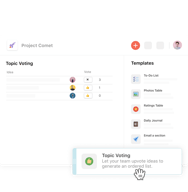
For me its having everything in one place, and how I can customize coda so it benefits my needs. This range everything from larger strategic documents to smaller team voting docs
We had a great experience with Coda simply as a document system, moving our scattered Google Docs to a few Coda docs organized in a tree structure with appropriate links between them. The next level is the ability to add widgets to the pages with functionalities such as voting on topics, assigning tasks, etc. These features are helpful in many contexts. The most advanced functionality tier is to build complex apps with Coda and integrate it with external applications such as ticketing systems. Here, the possibilities are endless. Coda provides a middle ground between something like Excel and full-fledged app development.
Coda still has some warts (although the development velocity is fast and noticeable). The most significant issues we face have to do with performance and ease of editing. On performance, there is much room for improvement. Coda is generally slower than a Google Doc, and it is noticeable when in a video call, especially sharing the screen. Typing delays can seriously hinder the experience. On ease of editing, I have noticed that the UI/UX can be confusing for some users, and they do not know where to find basic features such as text styling. Some recent changes (moving this from the top of the page to a dynamic location) have made the problem worse, in my opinion. For less technical users, the features are not as discoverable compared to the applications they are more familiar with.
We use Coda to: - organize our documentation in an easily navigable structure, - take meeting notes, - track assigned tasks, - propose and vote on activities and initiatives, - keep inventory, - automate data collection from some external tools, such as the number of issues closed per day in our issue tracking system (via Coda's API), - and track metrics such as KPIs.
The slash key is going to be your best friend.
Not as smooth as Notion. Could also do with a visual makeover.
Team documentation and using it as my singular source of truth.
The UI is slick and it just feels really easy to use
Sleep learning curve to start using it, it took me a while to understand how to use Coda
I use Coda largely for journaling and then also for Product Roadmapping. The Automation integrations are my favorite
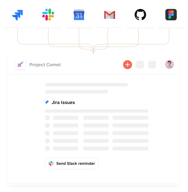
I like how my team can collaborate and link to slack and Jira from Coda. Making sharing our projects across teams seamless and dynamic.
The UX could be a LOT more intuitive. I don't want to have to watch a tutorial to understand how to use Jira. It should draw on the familiarity that users already have with Excel, Google Docs, Word. Difficult to onboard new members to the team on how to use this tool.
We are trying to track the status of projects. One simple collaborative doc that is the single source of truth.
Coda's design and inbuilt options are good, not that they are available in others. The dark mode is really good in coda compared to craft or notion. I didn't felt anything best from coda that's not there with others.
The exporting options are not well. The pagenation has serious problems. Sharing file directly from coda is very unreliable. It has very very limited performance or markdown importing is not possible.Its Plugin or Extensions ecosystem is not good.
We were looking for options for a centralised documentation system our team come and collaborate. We needed very versatile and openly integrated platform but have a very opiniated design. Although this has a opiniated design it lacks at other things.
Love that everything is built inside of a Notion-esque text editor. Packs were easy to install and use, and the software was pretty straightforward.
Docs inside Coda are siloed and segmented and difficult to provide guest access or client access to. It's difficult to understand access control inside Coda and to freely share data between Docs for proper access control.
Coda seems to be a good solution for organizations that are looking for a combination of app-like functionality and documentation.
The power they give us to use the data to code in many different ways
It's hard to centralize data and there's many segments or docs I think we don't need to split having notion as a model
I'm inviting people to have some tables to control assignments for our religious community
Coda is alone in its functionality. We have not been able to find a single other service that can bridge the gap in reporting left by Quickbooks.
Coda is not very intuitive and sometimes the CSRs assume I have a much higher understanding of Coda than I actually do. It can be frustrating.
We use Coda to let us know which of our accounts have not ordered recently, something that Quickbooks should but does not offer. We can customize one email and then send it to individuals in our account list one at a time with a click of one button.
Different thinking to find out solutions to the challanges by building pages and its releationships. In addition, the productivity gets better with using AI
The setting for eg. Headlins is ony to set by clicking on the mous, I miss something more efficient
Virtual co-working

Coda has nice UX and visually it looks good
I want to be able to send emails of am certain pages on a regular cadence
Being able to create metrics was very useful for me to be able do my everyday job. I appreciate that I am able to be more productive and give management visibility
It's a big improvement over Google Docs, which is what we were using previously. The tools to format and organize docs are nicer, especially the ability to sort and organize subpages within a doc. The tools around tables and data-driven workflows are powerful, and were a big selling point for us when we chose Coda over Notion. We also found the way text documents are edited to be a bit more natural in Coda than in Notion. I also feel like the product team seems to be moving at a good pace, and they're frequently sharing updates about new improvements.
Coda is not yet a great tool for sharing and maintaining written documentation. Things like guides, policies, and other prose-centric docs can be maintained in Coda, but we've found that as we built out these kinds of docs, there were missing features that made finding, using, and maintaining written docs kind of frustrating. Some examples: 1. A huge selling point of Coda or Notion over Google Docs is the ability to break a long doc into easily navigable and linkable titled pages. However, Coda's search function doesn't surface pages as results. So you end up in a circumstance where you have a doc like "Employee Handbook" with an important page titled "Reimbursements" but if you type reimbursements into search, it only returns the top-level handbook. This has led to a sense on the team that they can't find things in Coda, and useful and important pages don't get referenced as much as they should. This is on a 14-person team, and I suspect it would be worse on a larger team. 2. A minimal version history feature exists, but is not sufficiently featureful to answer questions like "When was the last time this page changed substantially?" or "I know Sarah made some updates on this page. What changed?" This has been frustrating and made collaborating on a doc harder since you can't easily say "Hey I made some improvements, can you review them" without re-reading the whole doc. 3. Something neither Coda nor Notion seems to have is any indication of the vitality of a document. How old is most of this doc? How often is it referenced? Who wrote most of it? Notion does have the ability to surface backlinks to a doc which is a bit of a hint about a doc's relevance, but overall this feels like an area of opportunity across all tools. 4. Often we end up wanting to embed a bit of a spreadsheet to do some noodling in an otherwise written doc, for example a little scratchpad for helping calculate some things or make a 2-column comparison. Coda really wants to treat tables not like chunks of spreadsheet, but more like views onto a database. This is interesting and potentially really powerful for building workflows, but on a 14 person team we're less often building data-heavy workflows and more often just making a quick little sheet to try and house some ad-hoc calculations. Some of us are getting a handle of how to make good use of Coda tables, but a lot of team members have moreso learned "Coda tables are weird, it's easier to just link a Google sheet" which has been disappointing. So a year in to using Coda, it's been an improvement over Google Docs, but I'm increasingly confident that for our writing-centric needs, Notion would have been a better move. We're holding out a bit longer to see how Coda's feature set evolves – they seem to have a smart and high-velocity product team, and the idea of migrating again a year later is not appealing – but we may end up moving to Notion at some point.
We store our team guidelines, policies, handbook, meeting notes, proposals, brainstorm results, and other written docs in Coda. This has been a lot better for us than Google Docs, since it's easier to organize a group of related pages into a single-destination doc (although the inability to search for pages somewhat mitigates this benefit). Overall we have a nicer and better maintained docs experience than we did with Google Docs. We've had some success with some of Coda's dynamic features, such as scripting docs and using templates to do things like collect feedback on a doc from readers.
Coda's pricing model allows you to add collaborators for free! (Paid accounts are additionally allowed to create new docs.) Coda has worse usability than Google Docs, and I've submitted requests to their support team. The editor is overall a little glitchy. 🤞Hope they'll improve it soon!
We've gone down the route of nesting everything into one giant doc (not sure what they're called). That makes it harder for me to find what I need from my browser history because it's all under one entry.
We are sharing status updates and notes while everyone is working remotely! My productivity is the same as ever, and Coda presents no substantial obstacles. Although it took a while to typeset some things that my team told me to transfer from Slack.
I do like it as a project management tool and often use it as a draft to get trainings up and running
Everything on the website is a bit choppy. Like I said, it is good if there is no alternative, but there are better project management websites out there
We are using it as a project management tool and it was helpful during remote work