

Unclaimed: Are you working at Dext?
Dext Reviews — Pricing, Features & The Honest Take
Dext is a bookkeeping / pre-accounting automation tool for businesses and accounting/bookkeeping practices. It automates capture of receipts, invoices and bank statements; extracts relevant data using intelligent/document-AI features (including line-item extraction); provides categorization, supplier rules and mapping; supports approvals and expense workflows; integrates with accounting systems; and offers practice-level insights, data health and productivity tools.

| Capabilities |
AI
API
|
|---|---|
| Segment |
Small Business
Mid Market
Freelancer
|
| Deployment | Cloud / SaaS / Web-Based, Mobile Android, Mobile iPhone |
| Support | Chat, Email/Help Desk, Knowledge Base |
| Training | Documentation |
| Languages | English |
Dext Pros and Cons
- Highly automated document capture and categorization, reducing manual work.
- Strong integration ecosystem with major accounting software and many banks.
- Practice-level management tools: multi-client, insights, workflows, teams & locations.
- Flexible plan structure with add-ons for extra needs.
- Advanced ML/AI capability with high advertised extraction accuracy.
- Pricing can scale up with number of clients or documents; practice pricing may be expensive for smaller firms.
- Some features (e.g., payments) are coming soon or limited to certain markets.
- Localization beyond the UK (tax/regulation) is not fully documented.
- No open-source option; proprietary and cloud-only.
- Ambiguity exists in published vs custom pricing for large client counts.
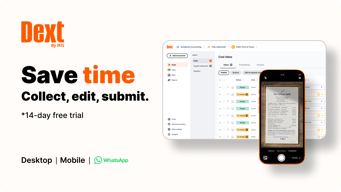
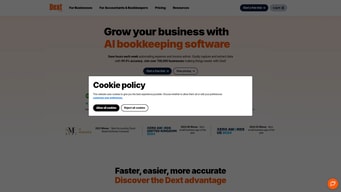



Dext shows $25.21 a month, and that is the cheapest position on a slider you are invited to drag. The figure covers 250 documents a month and 5 users — the minimum allowance, sitting at the far left of a long track labelled “drag slider to increase allowance.” Underneath it is a stack of add-ons priced like plans: Line Item Extraction at $20.50 a month and Supplier Statement Extraction at $20.50 are each 81% of the base subscription on their own. Take both plus AI Assist and you are at $76.71 a month, three times the headline. The free credits that come with the plan — 5 line-item documents and 5 supplier statements a month — are a taster, not an allowance.
- What it is: Receipt and invoice capture that extracts data and syncs it to your accounting software.
- Best for: Small businesses and bookkeepers drowning in paper receipts and supplier invoices.
- Pricing: From $25.21/month annually for 250 documents and 5 users, plus add-ons. Verified August 2026.
- The honest catch: The base plan is the floor of a slider, and the add-ons roughly triple it.
What Is Dext?
Dext — formerly Receipt Bank — is document capture for bookkeeping. You photograph a receipt or forward an invoice, Dext extracts the data, and it pushes the result into your accounting system. The pitch is the elimination of manual entry, and for a business that still keeps a shoebox of receipts it is a genuine one.
The product covers receipt and invoice capture, expense management, supplier statement reconciliation, bank statement extraction and integrations with the major accounting platforms. It is sold in two directions: for businesses and for accounting and bookkeeping practices, with separate pricing pages for each. This review covers the business side.
The company is now part of IRIS — the logo reads “Dext by IRIS” — and operates regional sites for the UK, USA, Canada, French Canada, France, APAC, South Africa and rest of world.
One practical note before anything else: the affiliate link geo-redirects. Clicking it from France landed on dext.com/fr; from the US it will land on the US site. Pricing, currency and even page structure differ by region, so check that you are reading your own country’s page — this review uses the US business pricing.
The Findstack listing carries no user reviews, so there is no independent signal here.
How Dext Works
Two things are metered, and both are set with the same slider:
- Documents per month — the count of receipts and invoices you process.
- Users — how many people have access.
The default and minimum position is 250 documents and 5 users.
Every plan includes a set of free credits, and their sizes are worth reading carefully:
| Free credit | Monthly allowance |
|---|---|
| Sheets of Bank Statement Extraction | 10 |
| Documents with Line Item Extraction | 5 |
| Supplier Statement Extraction | 5 |
Five line-item documents a month is enough to see whether the feature works, and nowhere near enough to run a business on. That is the design: the credits are a trial of the add-ons that follow.
Businesses needing more than 5 entities are directed to bespoke pricing.
Dext Pricing
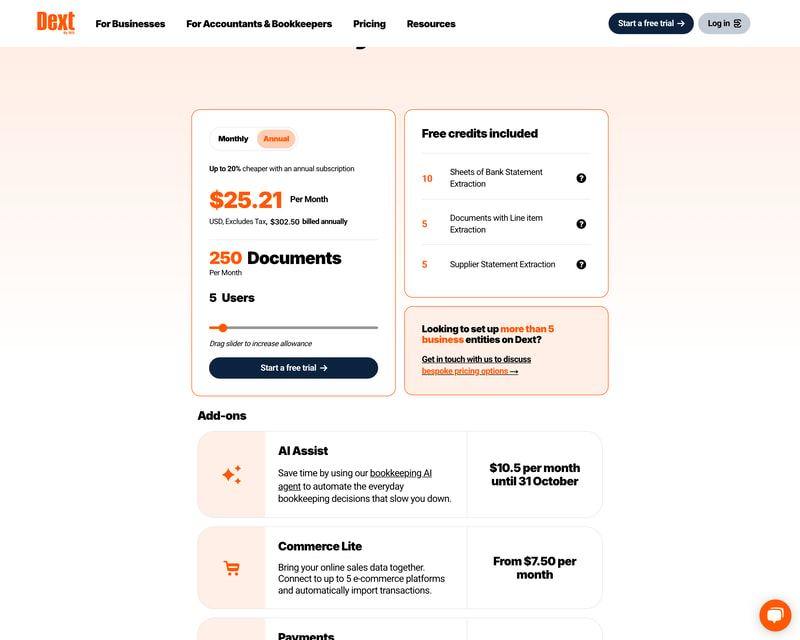
| Monthly billing | Annual billing | |
|---|---|---|
| Base plan (250 docs, 5 users) | $31.50/month | $25.21/month |
| Annual total | — | $302.50 |
The annual discount is exactly as advertised. The badge reads “Up to 20% cheaper with an annual subscription”, and $31.50 against $25.21 is a 19.97% saving — accurate to the rounding, with the annual total printed beside it so the arithmetic is checkable. The price line also states “USD, Excludes Tax”, which is the right way round: the number you see is the number before your own sales tax rather than after someone else’s.
The headline is the slider’s floor
The $25.21 sits at the far left of the allowance slider, covering the smallest configuration Dext sells. Drag it right and both the document count and the user count rise, and so does the price.
That is a legitimate way to price a metered product — you buy the capacity you need — but it does mean the number on the page describes a business processing about twelve documents a working day with five people looking at them. A bookkeeping-heavy company will be somewhere further along that track, and should read its own position rather than the default one before comparing Dext to anything.
Work out your monthly document count first, then set the slider, then note the price. It is the only way to get a figure that means anything.
The add-ons cost as much as the plan

Six add-ons sit below the plan, and several are priced like products in their own right:
| Add-on | Price |
|---|---|
| AI Assist — bookkeeping AI agent | $10.50/month until 31 October |
| Commerce Lite — up to 5 ecommerce platforms | from $7.50/month |
| Vault — document storage | Free to 100MB, then from $4/month |
| Line Item Extraction | from $20.50/month, or $0.50 per document |
| Supplier Statement Extraction | from $20.50/month |
| Payments | Coming soon |
Stack them onto the $25.21 base:
- Base — $25.21
- + AI Assist — $35.71
- + Line Item Extraction — $56.21
- + Supplier Statement Extraction — $76.71
- + Commerce Lite and Vault storage — $88.21
That is 3.5 times the advertised price, and none of it is unusual for a bookkeeping-heavy business — line-item detail and supplier statement reconciliation are exactly what an accounts payable process needs.
Two of those deserve particular attention.
Line Item Extraction has a pay-as-you-go option at $0.50 a document, which is the more sensible route below about 41 documents a month ($20.50 ÷ $0.50). Above that, the subscription wins. Dext publishing both and letting you choose is a genuinely fair piece of pricing, and it is the sort of thing most vendors force you into a plan for.
AI Assist is $10.50 a month “until 31 October” — a dated promotional price with no successor rate published. Whatever it becomes on 1 November is not on the page. If AI Assist is part of why you are buying, ask what it costs afterwards before you budget around $10.50.
What actually decides your cost
- Your monthly document volume, the primary meter and the slider’s main axis.
- User count, the second slider axis.
- Whether you need line-item detail, at $20.50 a month or $0.50 a document.
- Whether you reconcile supplier statements, another $20.50.
- Whether you want the AI agent, at a promotional $10.50 with an unstated future price.
- Ecommerce connections and document storage, from $7.50 and $4 respectively.
- Entity count, since more than five means bespoke pricing.
- Billing cadence, worth an accurately-stated 20%.
- Your country, since the affiliate link geo-redirects and pricing is regional.
Who Should Use Dext
Dext fits a small business or bookkeeping practice whose real cost is a person typing receipts into accounting software. The capture-and-extract loop is mature — this product has been doing it since it was Receipt Bank — and the integrations into the major accounting platforms are the point. At 250 documents a month for $25.21, it is inexpensive against even a few hours of someone’s time.
It fits especially well for construction, hospitality and professional services, the sectors Dext names, where paper receipts arrive in volume from people who are not at a desk.
It fits badly for a business that wants a single predictable invoice. Between a metered slider and six separately-priced add-ons, the bill has several moving parts, and the two most useful add-ons cost nearly as much as the plan. It also fits badly for anyone with more than five entities, where you leave published pricing behind entirely.
Honest Pros and Cons
What works well:
- The annual discount is exactly what it claims — 19.97% against a badge reading “up to 20%”, with the annual total printed.
- “USD, Excludes Tax” is stated plainly on the price line.
- Line Item Extraction offers pay-as-you-go at $0.50 a document, which beats the subscription below ~41 documents a month.
- Free credits are included on the base plan — 10 bank statement sheets, 5 line-item documents, 5 supplier statements.
- Vault storage is free to 100MB, so light document storage costs nothing.
- A slider rather than fixed tiers, so you buy the allowance you actually need.
- A long track record as Receipt Bank, now backed by IRIS.
- A free trial is offered on every route into the product.
- Separate business and practice pricing, rather than one page pretending to serve both.
What to watch:
- The $25.21 headline is the slider’s minimum — 250 documents and 5 users.
- Line Item Extraction and Supplier Statement Extraction are $20.50 each, 81% of the base plan apiece.
- A fully loaded configuration is $88.21, 3.5× the advertised price.
- AI Assist’s $10.50 is a promotional rate “until 31 October” with no successor price published.
- The free credits are small — 5 line-item documents and 5 supplier statements a month.
- More than 5 entities means bespoke pricing, off the published card.
- The affiliate link geo-redirects, so you may land on a different country’s site and currency.
- No Findstack user reviews.
Dext Alternatives and How It Compares
- Hubdoc is bundled free with several Xero plans and covers the core capture-and-publish job — the first thing to check if you already use Xero.
- QuickBooks Online includes receipt capture natively, which may make a separate subscription unnecessary.
- FreshBooks bundles receipt capture with invoicing and time tracking for smaller service businesses.
- Ramp and Brex attack the same problem from the card side — capture the receipt at the point of spend rather than afterwards.
- AutoEntry is the closest direct competitor on document extraction, priced per credit rather than per document band.
The honest comparison: check what your accounting software already does before buying Dext. Xero’s Hubdoc and QuickBooks’ built-in capture cover the basic case at no extra cost, and Dext’s advantage is depth — line-item extraction, supplier statement reconciliation, multi-entity handling — which is exactly the part that costs $20.50 a module.
The Verdict
Dext does the thing it has done for years, and does it well. The capture-and-extract loop is mature, the accounting integrations are the point, and the pricing page is honest about the two things vendors most often fudge — the annual discount is exactly 20% with the annual total shown, and the price is explicitly stated as excluding tax rather than quietly including someone else’s.
The complication is the shape of the bill. The $25.21 is a slider floor, not a plan, and the two add-ons a bookkeeping-heavy business will most want — line-item extraction and supplier statement reconciliation — cost $20.50 each, or 81% of the base subscription apiece. A realistic accounts-payable setup lands nearer $77 to $88 a month than $25.
So build your quote in the right order. Count your monthly documents, set the slider, then add only the modules you will actually use — and for line-item extraction, compare the $0.50 pay-as-you-go rate against the $20.50 subscription, because below about 41 documents a month paying per document is cheaper and Dext lets you.
Then check what you are already paying for. If you are on Xero, Hubdoc comes with several plans; if you are on QuickBooks, receipt capture is built in. Dext earns its money on depth rather than on capture alone — and depth is the part that is priced separately.
FAQ
How much does Dext cost?
The US business plan starts at $25.21 a month billed annually ($302.50 a year) or $31.50 billed monthly, and that covers 250 documents a month and 5 users — the minimum setting on an adjustable slider. Both the document allowance and the user count increase with the slider, and so does the price. Add-ons are separate: AI Assist $10.50/month (a promotional rate until 31 October), Commerce Lite from $7.50, Vault storage from $4 after a free 100MB, Line Item Extraction from $20.50 or $0.50 per document, and Supplier Statement Extraction from $20.50.
Is Dext’s advertised price the real price?
It is the real price for the smallest configuration. $25.21 covers 250 documents and 5 users, which is the far-left position of the allowance slider — roughly twelve documents a working day. A business processing more, or with more users, will pay more, and the add-ons compound it: a plan with AI Assist, line-item extraction, supplier statement extraction, ecommerce connections and extra storage comes to $88.21 a month, about 3.5 times the headline. Set the slider to your real volume before comparing Dext to anything else.
Should I buy Line Item Extraction monthly or pay-as-you-go?
Work out your monthly volume and divide. Dext offers Line Item Extraction from $20.50 a month or pay-as-you-go from $0.50 per document, so the break-even is about 41 documents a month. Below that, pay-as-you-go is cheaper; above it, take the subscription. Note that the base plan already includes 5 line-item documents a month free, so subtract those from your count first. Offering both options rather than forcing the subscription is one of the fairer pieces of Dext’s pricing.
Does Dext’s annual plan really save 20%?
Yes, essentially exactly. The badge reads “Up to 20% cheaper with an annual subscription”, and the figures are $31.50 a month billed monthly against $25.21 billed annually — a saving of 19.97%. The annual total of $302.50 is printed alongside so the arithmetic can be checked, and the price line states “USD, Excludes Tax”, so what you see is before your own sales tax rather than inclusive of another jurisdiction’s.
Do I need Dext if I already use Xero or QuickBooks?
Possibly not, for basic capture. Xero bundles Hubdoc with several of its plans and QuickBooks Online includes receipt capture natively — both cover photographing a receipt and publishing the data. Dext’s argument is depth: line-item extraction, supplier statement reconciliation, bank statement extraction and multi-entity support, which the built-in tools generally do not match. Since those are also the parts Dext prices separately at $20.50 a module, check what your accounting software already does before adding a subscription.

Compare Dext with other popular tools in the same category.
Sorry, no reviews are available for this product yet.
Be the first one to review Dext !