

Unclaimed: Are you working at dotCMS?






dotCMS Reviews: 4.1/5 — Solid Choice
DotCMS is a content management software that offers a user-friendly platform for creating and managing digital content. With multi-language support, customizable templates, content personalization, and a robust API for integrating with other systems, dotCMS allows for easy integration with other systems and a wide range of integrations and plugins, making it a versatile tool for businesses of all sizes. Furthermore, its responsive design and user-friendly interface make it easy for teams to work together and publish content quickly and efficiently.


| Capabilities |
API
CLI
OSS
|
|---|---|
| Segment |
Small Business
Mid Market
Enterprise
|
| Deployment | Cloud / SaaS / Web-Based, On-Premise Linux, On-Premise Windows |
| Support | 24/7 (Live rep), Chat, Email/Help Desk, FAQs/Forum, Knowledge Base, Phone Support |
| Training | Documentation |
| Languages | English |

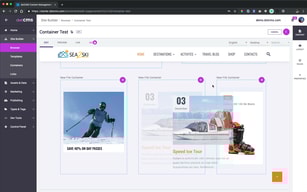
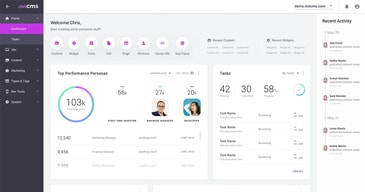
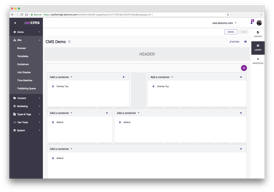
Compare dotCMS with other popular tools in the same category.
There are several things this platform is enabling us to perform, some being; 1; Creating and managing advanced contents. 2; Apart from our brand, I also manage content types across multiple languages. 3; Several content types across multiple languages are well enlightened while using this tool. 4; Editing features are great working with. Most importantly the platform feels more secure and scalable enhancing our workflow and tasks manipulation.
Personally I feel that something should be done to improve the customization features to be more appealing.
With the platform I easily manage large database and also enable strong backed settings. This has allowed ease content editing and probing. Adapting easily to audience has brought about distribution of significant information across multiple channels.
The architecture of dotCMS is very flexible. You can integrate other enterprise components such as LDAP, caching with Redis, a CDN etc.. to really create a robust deployment. Additionally, the fact that its open source makes it even that much better.
I think the development experience with VTL templating could be improved if they were to support additional templating languages.
dotCMS allows us to host a multi site content management platform that is part of a larger content management ecosystem.
The support was fantastic. Their training was top notch and whenever we had questions or needed guidance, knowledgeable staff was accessible and helpful. This allowed us to be super efficient which was important because of the tight deadline.
We needed to make use of its multi-site capability which we were able to do, but it took a little assistance from the dotCMS team to properly set up permissions and shared resources.
We were able to leverage an existing dotCMS installation to create a new, separate site without needing to train staff on a new system. This greatly accelerated the timeframe.
What i like best about DotCMS is flexibility, simplicity and usability. It one of the best online content management system i have ever used. Since we started using it, it has provided a permanent solution for our needs. I like its UI which anyone can use without coding knowledge. DotCMS has the best and very responsive customer support team.
Unto today, i haven't yet experienced any challenges while using DotCMS so i got nothing to dislike about it.
DotCMS has a very simple and straightforward user interface that makes it extremely easy to learn and understand. It makes it super easy to manage content, assets and images. Since we started using DotCMS, it has been so easy to build large websites and it saves us much time and effort.
When it comes to managing content, images and assets, dotCMS helps you do all that in one centralized location and deliver them to any channel with ease. Whether you are looking to build a network of global websites, an employee intranet, a customer portal or just a single page application, dotCMS got you covered. DotCMS is also cost efficiency and it's easy to maintain.
For CMS newbies, dotCMS may be a little overwhelming to use as it has a steep learning curve.
Web content creation has never been this fun. DotCMS has enabled us to build and manage content driven applications like websites and single page applications with so much ease.
I like the interface, it's unique design, usability, flexibility and simplicity. It allows content creators and designers to work efficiently on their systems without needing to know backend programming. DotCMS is able to handle massive amounts of content responsively.
At first, the documentation was a little confusing and difficult to understand.
DotCMS is an excellent and recommendable system for creating large websites. I like the ability to add plug-ins live without a restart thus allowing for fast testing and speeding up development time. It is super easy to use and very functional for what we need.
Robust integrations. dotCMS has allowed for seemless integrations with the best CRMs, e-commerce platforms, marketing automation systems and so much more. In a single platform, dotCMS has enabled us to manage assets, images and content without a problem. dotCMS is cost efficiency and easy to maintain and work with.
DotCMS has given us value for our money. It has helped us to quickly and convinient lye buid a multi channel content driven web applications. We have nothing to complain about.
Websites, mobile applications, single page applications etc. DotCMS has helped our organization to build, manage and deploy content enabled applications effectively.
dotCMS has incredible publishing controls, a powerful content editing and publishing tools and robust integrations. dotCMS enables business organizations to quickly build,manage and deploy a multi channel content. dotCMS exposes everything including content using Rest APIs that enables high performances and secure integrations.
I have no complains about this platform. Everything has been working just fine so far.
In a single platform, dotCMS helps us manage content, images and assets as well as deliver them to any channel without hiccups. We are also able to share content across different departments without having to re_create them.

dotCMS is continuously improving to provide its customers with a best-in-class website design and development experience. It is extremely convenient to take advantage of their cloud offering so all you have to concentrate on is your actual website - they do the maintenance, hosting, etc.
Occasionally response times to reported issues are slower than I like. In reality, they are probably fine, but we live in an instantaneous gratification world.
We are using dotCMS to host/serve our core institutional website. It doesn't box us into a predefined set of rules. We have the flexibility to do what we need to do in order to serve the needs of our customers.

The interface and the possibility of integration with all most everything.
I really can say that i found nothing that should i dislike since working with dotCMS and it's team
Fast content editing / administration of source of components