

Unclaimed: Are you working at Figma?
Figma Reviews: 4.7/5 — Highly Rated
Figma is a feature-loaded design tool with tools designed to help users mockup, edit and design websites. The platform takes a more collaborative, cloud-based approach to design, which means it allows team members to design simultaneously and give each other continuous feedback as they work. This makes collaboration simpler and more effective. A free plan is available on Figma, however, premium plans offer more extensive tools and robust capabilities for web design and development as well as collaboration.
Figma is also often used as Wireframing of choice in UI/UX Design and Product Management tech stacks.

| Capabilities |
API
|
|---|---|
| Segment |
Small Business
Mid Market
Enterprise
|
| Deployment | Cloud / SaaS / Web-Based, Desktop Mac, Desktop Windows, Mobile Android, Mobile iPad, Mobile iPhone |
| Training | Documentation |
| Languages | English |
Figma Pros and Cons
- A free plan is available.
- Premium plans are more affordable than the Creative Suite.
- Collaborative tools allow developers and designers to work together.
- Figma is a feature-rich platform with robust capabilities for mocking up websites.
- Figma only concerns itself with the design aspect; you’ll still need web developers to create and implement the necessary code using other software.


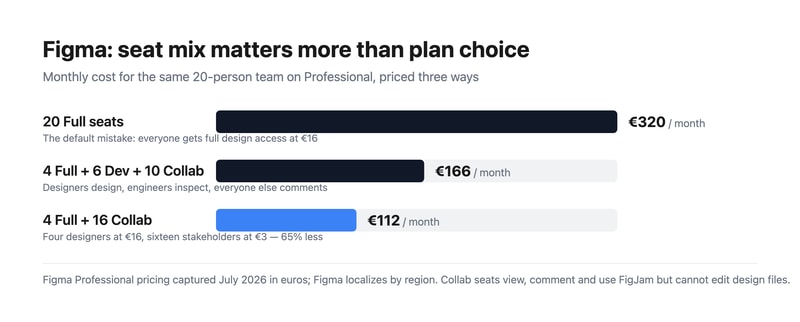
Most teams overpay for Figma by putting everybody on a Full seat. Figma sells three seat types, and the cheapest is a fifth of the price of the most expensive. A twenty-person team where four people actually design pays €320 a month doing it wrong and €112 doing it right — for identical access to the work that matters. Choosing your seat mix is a bigger decision than choosing your plan.
- What it is: The industry-standard collaborative interface design tool, now spanning design, whiteboarding, slides, dev handoff, sites, and motion.
- Best for: Any team doing product or interface design collaboratively, at essentially any size.
- Pricing: Free Starter tier. Professional from €3 to €16 per seat. Organization €5 to €55. Enterprise €5 to €90. Verified July 2026.
- The honest catch: Moving from Professional to Organization takes a Full seat from €16 to €55 — 3.4x — for governance rather than design capability.
What Is Figma?
Figma won interface design by being browser-based and genuinely multiplayer at a time when competitors were desktop applications with file handoff. Multiple designers in the same file simultaneously, a URL instead of an exported PDF, and no version confusion — that combination made it the default in a few years, and it remains the strongest argument for the product.
In 2026 it is considerably more than a design tool. The pricing page lists eight products: Figma Design, Make, Draw, Dev Mode, FigJam, Slides, Motion, Sites, and Buzz. That breadth is why the seat model exists — an engineer needs Dev Mode but not the drawing tools, and a product manager needs FigJam and comment access but not either.
Adobe’s proposed $20 billion acquisition was abandoned in late 2023 after regulatory opposition, and Figma has since gone public. For buyers, the practical consequence is that Figma remains independent rather than folded into Creative Cloud, which most of its users regarded as the better outcome.
How Figma Works
- Three seat types. Full (everything), Dev (Dev Mode, FigJam, Slides, Buzz, plus view and comment on design files), and Collab (FigJam, Slides, Buzz, view and comment with basic inspection).
- Browser-first and multiplayer. Real-time collaboration is the core mechanic, not a feature.
- Dev Mode. Structured handoff to engineers, with specs, measurements, and code snippets.
- FigJam. Whiteboarding for workshops and planning, included even on Collab seats.
- Design systems. Shared component libraries, which is where the Organization tier starts earning its cost.
- AI credits, metered per seat. 3,000 a month on a Professional Full seat, 500 on Dev and Collab, rising to 4,250 on Enterprise Full.
Figma Pricing
Captured from Figma’s pricing page in July 2026, in euros. Figma localizes currency by region, so check your own market. Organization and Enterprise bill annually only.
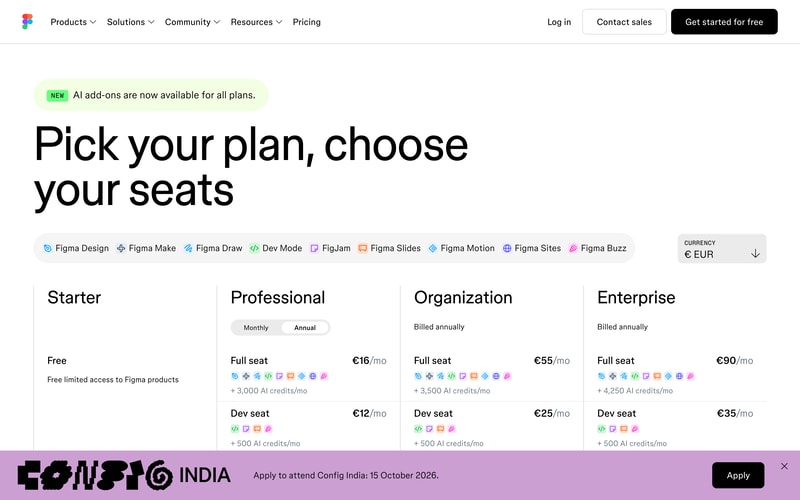
| Plan | Full seat | Dev seat | Collab seat | Billing |
|---|---|---|---|---|
| Starter | Free | — | — | Free, limited access |
| Professional | €16/mo | €12/mo | €3/mo | Monthly or annual |
| Organization | €55/mo | €25/mo | €5/mo | Annual only |
| Enterprise | €90/mo | €35/mo | €5/mo | Annual only |
The seat mix is where the money is:
- Audit who actually edits design files. In most organizations that is the designers and nobody else. Product managers, marketers, founders, and executives need to view and comment — which is a €3 Collab seat, not a €16 Full seat.
- Engineers usually want Dev, not Full. At €12 against €16 the saving is modest on Professional, but on Organization it is €25 against €55, which is substantial across an engineering team.
- The Organization jump is about governance, not design. €16 to €55 per Full seat is 3.4x, and it buys design system management, analytics, branching, and centralized administration. If you do not need those, Professional does the same design work.
- AI credits are now a differentiator between tiers. 3,000 monthly on a Professional Full seat against 4,250 on Enterprise. Heavy users of Figma Make and the AI features should check this allocation rather than assuming it is unlimited.
- The free Starter tier is genuinely useful. Unlimited drafts plus 150 AI credits a day, capped at 500 a month. For a solo designer or someone learning, it is a real product.
- Annual-only above Professional. Organization and Enterprise cannot be bought monthly, so evaluation has to happen on Professional.
Who Should Use Figma
- Product and design teams. The clearest case, and effectively the industry default. Hiring designers who do not know Figma is now the unusual scenario.
- Teams with designers and engineers collaborating. Dev Mode makes handoff structural rather than a document someone emails.
- Distributed teams. Browser-based multiplayer removes the file-sharing problem entirely.
- Organizations with design systems. The Organization tier’s library management is the reason to pay 3.4x, and for a real design system it is worth it.
It fits poorly for solo non-designers making simple graphics, where Canva is faster and cheaper; for print and photo work, which is Adobe Photoshop territory; and for teams wanting to ship a live site directly, where Framer or Webflow go from design to production.
Honest Pros and Cons
Strengths
- Genuine real-time collaboration. Still the best implementation in design software.
- Browser-based. No installation, no file versions, no platform arguments.
- A flexible seat model. Three tiers of access means you do not pay full price for viewers.
- Excellent dev handoff. Dev Mode is a real workflow improvement rather than a spec export.
- A usable free tier. Unlimited drafts, which is more than most competitors offer.
- The industry standard. Hiring, templates, plugins, and tutorials all assume Figma.
Limitations
- The Organization tier is a steep jump. 3.4x per Full seat for governance features many teams will not use.
- Seat sprawl is easy and expensive. The default assumption of Full seats for everyone is the most common overspend.
- Annual-only above Professional. No monthly option for Organization or Enterprise.
- AI credits are metered. A new constraint in 2026 that heavy AI users need to model.
- Performance on very large files. Complex documents can strain the browser.
- Product sprawl. Eight products under one brand makes working out what you are actually buying harder than it should be.
Figma Alternatives and How It Compares
- Canva is far simpler and cheaper for marketing and social design, and not a serious interface design tool.
- Framer designs and publishes a live site, which Figma does not do natively at the same level.
- Webflow is the production-web counterpart for design-led teams shipping real sites.
- Miro competes directly with FigJam for whiteboarding and workshops, with more depth in that specific area.
- Simplified targets fast marketing and ad creative rather than product design.
- Penpot is the open-source, self-hostable alternative, and Sketch remains the macOS-native option for teams who prefer a desktop application.
For related tools, browse our graphic design directory.
The Verdict
Figma is the correct default for interface design, and this is one of the least controversial recommendations in software. Real-time collaboration in the browser solved a genuine problem, Dev Mode made handoff structural rather than ceremonial, and the ecosystem effects — plugins, templates, and a hiring pool that already knows it — compound the advantage. There is no version of this evaluation where Figma is a mistake for a product team.
The decision that actually costs or saves you money is the seat mix, and it is the one most teams get wrong. The instinct is to buy everyone a Full seat, which for a twenty-person company on Professional is €320 a month. But Full seats are for people who edit design files, and in most organizations that is the designers alone. Put four designers on Full and sixteen stakeholders on Collab at €3 and the same team costs €112 — a 65% saving with nobody losing access to anything they were actually using. Audit your seats before you renew, and again after you grow.
The other judgement is when to move to Organization, and the honest framing is that the 3.4x jump per Full seat buys governance rather than design capability. Design system management, branching, analytics, and centralized administration are worth €55 a seat when you genuinely run a design system across multiple teams; they are worth nothing if you are five designers who just need to work together. Stay on Professional until a specific Organization feature is causing you a specific problem — and note that since Organization is annual-only, Professional is also the only tier where you can evaluate monthly.
FAQ
How much does Figma cost?
Captured in July 2026 in euros, Professional is €16 per month for a Full seat, €12 for a Dev seat, and €3 for a Collab seat. Organization is €55, €25, and €5 respectively, and Enterprise €90, €35, and €5, both billed annually only. A free Starter tier includes unlimited drafts and 150 AI credits per day up to 500 monthly. Figma localizes pricing by region, so check your own market.
What is the difference between Full, Dev, and Collab seats?
A Full seat gives complete access to all Figma products including editing design files. A Dev seat covers Dev Mode, FigJam, Slides, and Buzz, with view and comment access to design files — built for engineers implementing designs. A Collab seat covers FigJam, Slides, and Buzz with view, comment, and basic inspection on design files, intended for stakeholders who need visibility but never edit. Matching seats to actual behaviour is the single largest saving available.
Is Figma’s free plan good enough?
For an individual, often yes. The Starter tier includes unlimited drafts, UI kits, templates, and 150 AI credits a day capped at 500 monthly, which is enough for learning, personal projects, and solo freelance work. Team collaboration features, shared libraries, and unlimited version history require Professional, so it stops being sufficient as soon as more than one person needs to work in the same files regularly.
Should I upgrade to the Organization plan?
Only if a specific feature is solving a specific problem. Organization triples the Full seat price from €16 to €55, and what it buys is governance — design system and library management, branching, analytics, and centralized administration — rather than any additional design capability. Teams running a genuine design system across multiple product groups get value from it. Smaller teams generally do not, and should stay on Professional.
What is Figma best for?
Collaborative product and interface design at any team size, particularly where designers and engineers work together and handoff quality matters. It is the industry standard, so it also lowers hiring and onboarding friction. It is a weaker choice for marketing graphics, where Canva is faster, and for teams that want to publish a live website directly from their design, where Framer or Webflow are purpose-built.

This tool makes editing and doing basic graphic tasks so easy - says the girl that failed art in high school!!!
I love every single thing about this tool. No complaints.
Creating ads, covers, graphics, honestly everything we make - we do in figma!
I learned how to use it very quickly. It's intuitive, and you can pretty much achieve anything you want in terms of design. I also love its interactivity. I like that I can work on projects with professional designers on the same board without having to learn more complex design programs.
Some features just take a little to get used to, but It's not the end of the world. It's just practice.
Working on a project simultaneously with the designer, and leaving comments, suggestions or adding reference material in real time.

figma is a design tool that is collaborative and online. As it is a web application, there is no need to download, install and much less update. It is possible to download it to your computer, but it is not mandatory. Your work is automatically saved in the cloud and a link is generated for each project in a simple, light and fluid way.
I don't have a negative aspect to report on figma, the more I use it, the more reasons I find to recommend it to the world - to the point of writing an evaluation about it. There are hundreds of details that you end up discovering during the journey of use, and this is what helps to make the experience even more interesting
the fact of being collaborative, greatly reduces working time and avoids retail. I can edit the file and just wait for the team to evaluate and make comments on the file itself, without sending, without anything. It's an excellent experience

No lagging, very fast , great UX and awesome community
Nothing major, would like to have searching projects by typing
Designing a design system, or in general UI
I like the speed I can reach when designing and prototyping with this beast.
I don't like quite few edge cases that will probably will be solved one day. One of them is when you can't put frame in absolute position like you can do with CSS.
With Figma I cover all the design needs of our company and products. I benefit from Libraries feature that allows you to create single UI kit that can be updated and synced to all the files its connected in one click, so that I keep all the layouts up to date.

I love Figma's preloaded templates and guides that make designing for beginners super simple and straightforward. It also has great copy and paste functions and is a lot faster to use than adobe illustrator. It's workspace/interface is also handy, allowing you to have quite a lot of content in one place, rather than a ton of different files.
Figma takes some time to get your head around, particularly we often have to explain the exporting function. It would be good to also have a few more social media format templates available within the platform.
We're solving creative and digital strategies with Figma mostly. And web design/ UX.
When working as a team on digital products, Figma is a great cloud based software for you entire team to work from one place. Intuitive design tools and great in-software features has made this a great software to use.
As it is cloud based, sometimes there can be a lag. I have not experienced anything detrimental, but it is certainly something to know can be a hurdle.
Working with multiple teammates (10+) on creating one digital product with multiple pages & components. This has made our process so much more stream lined and efficient, and the worries with file versioning is non-existent.
As designs are entirely stored online, we can access them from anywhere. With Figma we can even upload files to dropbox which can be downloaded and shared easily. Figma has a feature to comment, now the developers and stakeholders can comment at a place without losing the context. Figma lets to work even without network connectivity, so we can work when internet is off and when the connection is back the work gets saved. Sketch to Figma import is also simple, so we need not worry about losing out the designs in Sketch when migrated to Figma. Figma is much cheaper when compared to any other design tools present in the market.
All the designs look cluttered at a place when many screens are present, so sometimes its hard to zoom and see where is the design you are looking for.
Figma provides more detailed version of the designs uploaded, by this developers gets all the details required at a place. Offline editing and offline reviewing for the designs which can be saved when we go online. On the fly working with the designs which avoids us in getting attached to a single computer. We need not use multiple extensions as we do in Sketch, all the features are present in Figma without any additional extensions.
Figma has become my favorite design tool. If you have any previous knowledge in any other design program onboarding is really easy. Creating, sharing and prototyping has become a collaborative work that I can do from anywhere thanks to its web modality.
I would like Figma to allow better organization of the files, despite having projects, these can grow and become a mess easily, if the files could be organized by status or subfolders would be great! Additionally, sometimes prototypes may have some glitches not showing all of the screens linked.
Collaborative work has undoubtedly become the first solution to Figma's solves. It has become very simple, to design and iterate with other designers and clients. Additionally, the fact that I do not depend on other third party applications for presentation and prototyping has made Figma my favorite.
Group collaboration, cloud files, prototyping built into the app without needing a separate program
Export options are not as convenient as Sketch. Miss the ability to drag and drop export as that's convenient.. copy as PNG is helpful as well, but the resolution export was also a very convenient feature with Sketch.
We create video games, so sharing files with game producers and engineers has been really helpful for our collaboration
Super collaborative. You can work with other designers on the same file at the same time. The comment feature makes it super convenient and easy to give/receive feedback. Other than that, super powerful tool with Master Components -- helps you tremendously in building an effective UI Library/Design System. Love!
Still fairly new compared to other programs (Sketch/XD), so still catching up on Plugins/ Integrations with other platforms/applications
Building a design system and making working with Developers easier. Figma is browser base (or you can download desktop app), so it's more convenient to share file. And commenting feature always helps.
Details that ux can provide and how intuitive it can be.
Need for external plugins to export android resources
Being able to find minute details on the ux designs and being able to collaborate with people at the same time.
A great tool for design, simple flow prototyping and collaboration between designers and stakeholders. I love the fact that we can work at the same file and still not create a mess. I also appreciate the opportunity to collect feedback and discuss the designs on file.
I would appreciate a bit more advanced prototyping abilities
We create designs and simple prototypes and collect feedback on Figma
Our entire team can effectively and efficiently collaborate on building wireframes for all of our mobile apps. The best part is that you don't need any graphic design skills to use Figma; anyone can use it!
There isn't anything we've found that we dislike so far, but we've only been using it fot a few months.
Previously, all wireframe work could only be done by our graphic designer within the Adobe Suite. Now, our entire team can work together to create wireframes, allowing for less changes in the end and for things to get done quicker.

I like usability of service and speed of work.
Well now they remove restriction with online work. Nothing dislike.
We are create mockups of UX/UI mobile apps and services for our clients.
The multiple members editing mode is very useful when you are working on interfaces and iterate live with your teammates to make decisions or proving new or multiple ideas, or even if you are only brainstorming trying to solve user problems through designing interfaces for the customers. The prototyping tools are very useful, before we were using invision with sketch but after trying Figma we really love that it has within this excellent tool, the scope you can get with the prototyping tool is very huge, from transitions, micro-interactions to adding gif animations is very helpful for me and my team members through the company. The whole tools that you are enhancement constantly are so awesome, because in most of the cases you are better than the other designing software. The Figma mirror tool and app is really useful too because you have the real context in which your interfaces will come to real life. The browser mode is also great because it doesn't matter if you don't have your computer, if you only get access to the internet, you can edit, iterate, and export your changes. The SVG export tool is awesome too and the zeplin plugin is very useful for the frontend developers.
The fusion mode is somethimes confusing because you get like a group or folder instead to create only one shape. The snap to pixels when you are trying to create icons is very annoying because is so hard to center or aligned more than 2 elements, or when you are trying to scale, most of the cases the shape is changing because of the snap to pixels.
User Experience, Product Design, User Interfaces, and Prototyping

Ability to collaborate with multiple users. Once you learn this platform the other design platforms are easier to use.
Nothing so far. Everything works great and ultimately that's what you want on the design workflow
The main problems that I am solving are that we can have multiple designers working on the same thing and I can also see engineers working on the specific parts of the design that we are pushing to the platform
What I like most about figma is that it's beginner friendly and they have lots of tips and tricks available on their Youtube channel itself. The other thing is the collaborative workflow that figma provides, I've been using figma for more than 1 year and I use it for all sorts of things.
I wish there was a mobile friendly version of figma so that I can make changes on the go.
Me and my team use figma to create event posters, website/app designs and other marketing material. The team feature helps us review the changes made by others simultaneously and thus simplifying the entire process. Also since its all stored on cloud, where ever we go we can just login and make changes as needed

Figma has a very generous free tier, which makes it accessible for a wide range of designers and developers. They allow exporting of CSS attributes for every element on an artboard, making it very easy to use for developers without any major design skills.
Not as intuitive as other design software at first, but easy enough to pick up quickly.
Wireframing of web applications and UI elements
Figma is a powerful tool yet easy to jump start with. It became very popular recently, and you can find mention of it in many design/UX related job requirements/nice to have lists. I was able to start putting together my first designs after watching and introductory one hour log class on LinkedIn.com. You can create your own icons or you can import design elements, icons and templates as starting points. Also, it is very easy to create and reuse components and make prototypes. Figma provides means for collaboration, for creating team projects, sharing, commenting, and real time tracking of your collaborators working on the projects. You can also keep and create versions, and organize your content in layers.
Some things are not that intuitive. I spent quite a time to find an answer to a simple how to swap images question. But I am just starting and that can be easily a part of learning curve (they have very good documentation and tutorials to refer to!).
I am learning how to create browser and mobile versions for my potential startup. Figma allows me to do it efficiently, and to have fun along the way. Also I have an ability to work in a team with my colleague, and because there are just two of us, we can use free plan. Figma gives me an easy way to create designs, and also to share them for my colleague's evaluation and feedback. In addition to launching start-up this will be the tool we will be using in class on UX Engineering. We choose it because we think our student will find it a very valuable foundation for starting their mastering of UX/UI design tools.

I liked the best part of Figma is, the simple UI of the Figma's dashboard and hundreds of free plugins which makes my life so easier.
There is nothing to dislike about Figma but if there is a builtin photo editor that will be great to work with. Otherwise, everything is perfect.
Whenever I need a new logo for my client and new web design ideas I just login to Figma and create that masterpiece in a few hours without hustle.

Figma is a real-time tool for designers, focusing on collaboration. Easy to use and really lightweight, allows our whole team to work on the same file, at the same time, editing or commenting. It runs 100% inside the cloud, web-based, so we don't have to share infinite files with infinite variations of our designs, or buy another solution just for this reason (like Abstract).
Prototype tool still has some bugs, and runs pretty slowly fore some of the clients we have to share our links.
Nowadays, design is collaboration. With Figma, our team doesn't need to share and upload/download multiple files with different versions several times a day, or use external tools like Invision or Zeplin to duscuss and comment like we used to do. Now, the majority of our design work is conceptualized, produced, shared, communicated and delivered to our development team and clients in one place.

Figma is brilliantly designed. They've really nailed so many of the pain points that exist in other platforms and fixed them in elegant ways. There's a hotkey for all the major repetitive functions that require several clicks or custom shortcuts on competitor programs. And AUTO LAYOUT. OMG. The best thing since sliced bread.
There's not a lot that I dislike, honestly. If I were to choose SOMETHING it would be the lack of a hotkey to switch from vertical to horizontal auto layout. Or maybe the way that cost adds up when you're working in multiple projects and want to do more than what the free level allows. But it's an understandable business model.
I'm building layouts for websites, apps, etc. I'm able to prototype quickly and test out hypotheses before taking the time to code. It's saved me a great deal of time and expense as a result.

Too many positives to list but I'll try: Fast web interface, pixel-perfect design (better than Sketch), SVG editing support, web preview & animations, team collaboration (with realtime edits, cursor and comments), app mockups, and more. We find ourselves using Figma instead of Photoshop, Sketch and Adobe XD. Figma also integrates with most modern tools such as Sketch, Zeplin, Slack and fulfills most of our design needs for a fraction of the price.
When a lot of screens are present in one project, the tool can be a little slow. Also it's hard to find content if nested in pages within a document.
App sketches and mockups are handled easily with Figma and we believe it's the best design collaboration tool out there.
Its versatility: i use it to design software, collect UIs from competition, create Instagram posts, heck, even my wedding invitation
Its meant to be a low-fidelity prototyping tool and doesn’t come as close to real apps like for example Framer. Plugins are a bit crowded
Use it for anything related to design
My favorite part of Figma is that it is cloud based so not matter where I am or what laptop I am using I can access my prototypes with ease and also its free to start using with a basic account.
The only big thing the I dislike with Figma is that there is no spell check built in. I need to make sure all copy is corrected before entering it. This adds time to my process, especially for small amount of copy that could be quickly corrected with basic spell check built in.
We are able to develop pixel perfect prototypes rapidly, share them with ease and visualize them on different devices. This save us tons of time!
Figma allowed real-time edits to occur as our designers can see and make changes accordingly. It was a simple to use platform that did not require a lot of learning to understand where all the buttons and tools existed. Point and Click moment
Cannot upload a PDF file directly, you must convert PDF to a JPEG, Sketch or PNG file first. Adding an extra step that can be lengthly.
Our executive team, who was not tech-savvy found it difficult to make edits, revisions and lengthly when using Adobe PDF. That caused projects to get delayed, since our executives were in a different timezone, which relied on close coordination between individuals to be around a laptop at a givens moment. Figma has eliminated the need for multiple emails and PDFs with edits and revisions. With real-time edits and revisions and suggestions allowed in Figma with the comment pins, which can be marked complete.
We can all work on the same art board (similar to working in google docs) rather than sending each other back and forth files and having version control issues. We can also have built in prototypes so we don't need additional tools to supplement for this. This is also web based if you share it with users that haven't installed the app
None really I think this is the most superior design tool for collaboration
Collaborating with different departments, adding feedback and iterating on the same design
Figma is being able to have a very powerful tool for UI / UX design, being able to make prototypes, layouts, digital products. but the real power is in how the collaborative design system manages, where you can have all your files in the cloud, you and your team can have them from any device without having the desktop app installed and being able to see the changes in real time without having to integrate figma with any other platform to view the screens or export resources for developers
I do not like that it does not have a dark mode in its interface, since almost all design programs offer the possibility of adapting its interface to darker colors that, above all, make it easier to work at night in front of the computer without affecting your eyesight. That would be the only thing I don't like about the Figma.
I currently work as a UX UI designer for a technology company and figma helps me to have all my work available for the design team and the members of the project team where I am working, it benefits me by being able to give developers access to my designs but without fear that they might change something, move the elements or something else, since I can assign or remove editing permissions to the file as appropriate
Allows team members of multiple disciplines to collaborate on the same project/file in real time.
Because it's web-based, you have to rely on an internet connection to collaborate. There is an offline version but it can mess up the flow with other collaborators.
version control and being able to collaborate simultaneously with other team members.