

Unclaimed: Are you working at Figma?
Figma Reviews: 4.7/5 — Highly Rated
Figma is a feature-loaded design tool with tools designed to help users mockup, edit and design websites. The platform takes a more collaborative, cloud-based approach to design, which means it allows team members to design simultaneously and give each other continuous feedback as they work. This makes collaboration simpler and more effective. A free plan is available on Figma, however, premium plans offer more extensive tools and robust capabilities for web design and development as well as collaboration.
Figma is also often used as Wireframing of choice in UI/UX Design and Product Management tech stacks.

| Capabilities |
API
|
|---|---|
| Segment |
Small Business
Mid Market
Enterprise
|
| Deployment | Cloud / SaaS / Web-Based, Desktop Mac, Desktop Windows, Mobile Android, Mobile iPad, Mobile iPhone |
| Training | Documentation |
| Languages | English |
Figma Pros and Cons
- A free plan is available.
- Premium plans are more affordable than the Creative Suite.
- Collaborative tools allow developers and designers to work together.
- Figma is a feature-rich platform with robust capabilities for mocking up websites.
- Figma only concerns itself with the design aspect; you’ll still need web developers to create and implement the necessary code using other software.


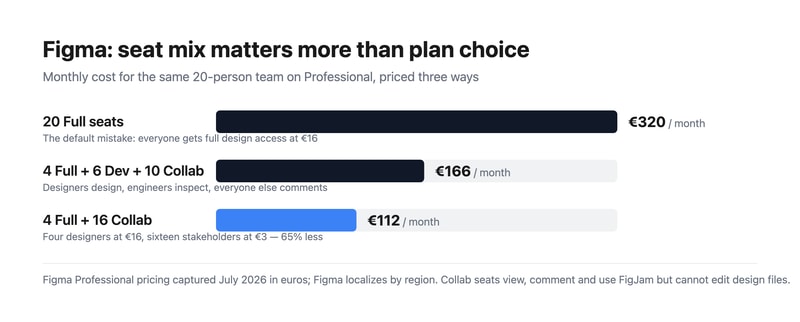
Most teams overpay for Figma by putting everybody on a Full seat. Figma sells three seat types, and the cheapest is a fifth of the price of the most expensive. A twenty-person team where four people actually design pays €320 a month doing it wrong and €112 doing it right — for identical access to the work that matters. Choosing your seat mix is a bigger decision than choosing your plan.
- What it is: The industry-standard collaborative interface design tool, now spanning design, whiteboarding, slides, dev handoff, sites, and motion.
- Best for: Any team doing product or interface design collaboratively, at essentially any size.
- Pricing: Free Starter tier. Professional from €3 to €16 per seat. Organization €5 to €55. Enterprise €5 to €90. Verified July 2026.
- The honest catch: Moving from Professional to Organization takes a Full seat from €16 to €55 — 3.4x — for governance rather than design capability.
What Is Figma?
Figma won interface design by being browser-based and genuinely multiplayer at a time when competitors were desktop applications with file handoff. Multiple designers in the same file simultaneously, a URL instead of an exported PDF, and no version confusion — that combination made it the default in a few years, and it remains the strongest argument for the product.
In 2026 it is considerably more than a design tool. The pricing page lists eight products: Figma Design, Make, Draw, Dev Mode, FigJam, Slides, Motion, Sites, and Buzz. That breadth is why the seat model exists — an engineer needs Dev Mode but not the drawing tools, and a product manager needs FigJam and comment access but not either.
Adobe’s proposed $20 billion acquisition was abandoned in late 2023 after regulatory opposition, and Figma has since gone public. For buyers, the practical consequence is that Figma remains independent rather than folded into Creative Cloud, which most of its users regarded as the better outcome.
How Figma Works
- Three seat types. Full (everything), Dev (Dev Mode, FigJam, Slides, Buzz, plus view and comment on design files), and Collab (FigJam, Slides, Buzz, view and comment with basic inspection).
- Browser-first and multiplayer. Real-time collaboration is the core mechanic, not a feature.
- Dev Mode. Structured handoff to engineers, with specs, measurements, and code snippets.
- FigJam. Whiteboarding for workshops and planning, included even on Collab seats.
- Design systems. Shared component libraries, which is where the Organization tier starts earning its cost.
- AI credits, metered per seat. 3,000 a month on a Professional Full seat, 500 on Dev and Collab, rising to 4,250 on Enterprise Full.
Figma Pricing
Captured from Figma’s pricing page in July 2026, in euros. Figma localizes currency by region, so check your own market. Organization and Enterprise bill annually only.
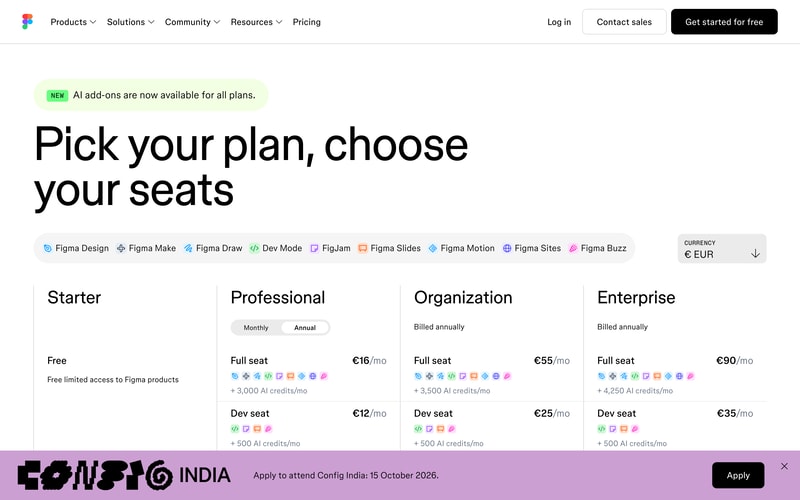
| Plan | Full seat | Dev seat | Collab seat | Billing |
|---|---|---|---|---|
| Starter | Free | — | — | Free, limited access |
| Professional | €16/mo | €12/mo | €3/mo | Monthly or annual |
| Organization | €55/mo | €25/mo | €5/mo | Annual only |
| Enterprise | €90/mo | €35/mo | €5/mo | Annual only |
The seat mix is where the money is:
- Audit who actually edits design files. In most organizations that is the designers and nobody else. Product managers, marketers, founders, and executives need to view and comment — which is a €3 Collab seat, not a €16 Full seat.
- Engineers usually want Dev, not Full. At €12 against €16 the saving is modest on Professional, but on Organization it is €25 against €55, which is substantial across an engineering team.
- The Organization jump is about governance, not design. €16 to €55 per Full seat is 3.4x, and it buys design system management, analytics, branching, and centralized administration. If you do not need those, Professional does the same design work.
- AI credits are now a differentiator between tiers. 3,000 monthly on a Professional Full seat against 4,250 on Enterprise. Heavy users of Figma Make and the AI features should check this allocation rather than assuming it is unlimited.
- The free Starter tier is genuinely useful. Unlimited drafts plus 150 AI credits a day, capped at 500 a month. For a solo designer or someone learning, it is a real product.
- Annual-only above Professional. Organization and Enterprise cannot be bought monthly, so evaluation has to happen on Professional.
Who Should Use Figma
- Product and design teams. The clearest case, and effectively the industry default. Hiring designers who do not know Figma is now the unusual scenario.
- Teams with designers and engineers collaborating. Dev Mode makes handoff structural rather than a document someone emails.
- Distributed teams. Browser-based multiplayer removes the file-sharing problem entirely.
- Organizations with design systems. The Organization tier’s library management is the reason to pay 3.4x, and for a real design system it is worth it.
It fits poorly for solo non-designers making simple graphics, where Canva is faster and cheaper; for print and photo work, which is Adobe Photoshop territory; and for teams wanting to ship a live site directly, where Framer or Webflow go from design to production.
Honest Pros and Cons
Strengths
- Genuine real-time collaboration. Still the best implementation in design software.
- Browser-based. No installation, no file versions, no platform arguments.
- A flexible seat model. Three tiers of access means you do not pay full price for viewers.
- Excellent dev handoff. Dev Mode is a real workflow improvement rather than a spec export.
- A usable free tier. Unlimited drafts, which is more than most competitors offer.
- The industry standard. Hiring, templates, plugins, and tutorials all assume Figma.
Limitations
- The Organization tier is a steep jump. 3.4x per Full seat for governance features many teams will not use.
- Seat sprawl is easy and expensive. The default assumption of Full seats for everyone is the most common overspend.
- Annual-only above Professional. No monthly option for Organization or Enterprise.
- AI credits are metered. A new constraint in 2026 that heavy AI users need to model.
- Performance on very large files. Complex documents can strain the browser.
- Product sprawl. Eight products under one brand makes working out what you are actually buying harder than it should be.
Figma Alternatives and How It Compares
- Canva is far simpler and cheaper for marketing and social design, and not a serious interface design tool.
- Framer designs and publishes a live site, which Figma does not do natively at the same level.
- Webflow is the production-web counterpart for design-led teams shipping real sites.
- Miro competes directly with FigJam for whiteboarding and workshops, with more depth in that specific area.
- Simplified targets fast marketing and ad creative rather than product design.
- Penpot is the open-source, self-hostable alternative, and Sketch remains the macOS-native option for teams who prefer a desktop application.
For related tools, browse our graphic design directory.
The Verdict
Figma is the correct default for interface design, and this is one of the least controversial recommendations in software. Real-time collaboration in the browser solved a genuine problem, Dev Mode made handoff structural rather than ceremonial, and the ecosystem effects — plugins, templates, and a hiring pool that already knows it — compound the advantage. There is no version of this evaluation where Figma is a mistake for a product team.
The decision that actually costs or saves you money is the seat mix, and it is the one most teams get wrong. The instinct is to buy everyone a Full seat, which for a twenty-person company on Professional is €320 a month. But Full seats are for people who edit design files, and in most organizations that is the designers alone. Put four designers on Full and sixteen stakeholders on Collab at €3 and the same team costs €112 — a 65% saving with nobody losing access to anything they were actually using. Audit your seats before you renew, and again after you grow.
The other judgement is when to move to Organization, and the honest framing is that the 3.4x jump per Full seat buys governance rather than design capability. Design system management, branching, analytics, and centralized administration are worth €55 a seat when you genuinely run a design system across multiple teams; they are worth nothing if you are five designers who just need to work together. Stay on Professional until a specific Organization feature is causing you a specific problem — and note that since Organization is annual-only, Professional is also the only tier where you can evaluate monthly.
FAQ
How much does Figma cost?
Captured in July 2026 in euros, Professional is €16 per month for a Full seat, €12 for a Dev seat, and €3 for a Collab seat. Organization is €55, €25, and €5 respectively, and Enterprise €90, €35, and €5, both billed annually only. A free Starter tier includes unlimited drafts and 150 AI credits per day up to 500 monthly. Figma localizes pricing by region, so check your own market.
What is the difference between Full, Dev, and Collab seats?
A Full seat gives complete access to all Figma products including editing design files. A Dev seat covers Dev Mode, FigJam, Slides, and Buzz, with view and comment access to design files — built for engineers implementing designs. A Collab seat covers FigJam, Slides, and Buzz with view, comment, and basic inspection on design files, intended for stakeholders who need visibility but never edit. Matching seats to actual behaviour is the single largest saving available.
Is Figma’s free plan good enough?
For an individual, often yes. The Starter tier includes unlimited drafts, UI kits, templates, and 150 AI credits a day capped at 500 monthly, which is enough for learning, personal projects, and solo freelance work. Team collaboration features, shared libraries, and unlimited version history require Professional, so it stops being sufficient as soon as more than one person needs to work in the same files regularly.
Should I upgrade to the Organization plan?
Only if a specific feature is solving a specific problem. Organization triples the Full seat price from €16 to €55, and what it buys is governance — design system and library management, branching, analytics, and centralized administration — rather than any additional design capability. Teams running a genuine design system across multiple product groups get value from it. Smaller teams generally do not, and should stay on Professional.
What is Figma best for?
Collaborative product and interface design at any team size, particularly where designers and engineers work together and handoff quality matters. It is the industry standard, so it also lowers hiring and onboarding friction. It is a weaker choice for marketing graphics, where Canva is faster, and for teams that want to publish a live website directly from their design, where Framer or Webflow are purpose-built.

Figma is very helpful tool for me as I develop mobile applications. Most of the UI designs are designed on figma. It is very easy to use and thus we use this for referring designs for our applications.The best part about Figma is that it has awesome collaborative features where we can add comments if we need any changes, and it notifies the designer.
The thing I dislike about Figma is that it does not provide support for 3D designs and layouts, where its peer's are capable of doing it. It also lacks the offline support because we can only work on it on a web browser or a desktop application. So, we need constant internet connection to use Figma.
Figma helps the designers to design components and visual arts. We use figma for referring designs while development. Many projects that I have worked on have designs developed on figma. Wireframes and screens look beautiful when designed on figma. It is very cost efficient for our organisation and also supports version control, which is very helpful for iterative designs. It is also very scalable and compatible as it runs on web browsers, so it becomes platform independent. A plus point of using figm is that it is collaborative tool which provides feature like commenting and feedbackks on the designs.
Collaboration from anywhere that works in a standard browser. With the recently release developer view, Figma skyrocketed our performance and efficiency. Previously, our team was using Sketch, and we struggled with getting pixel-perfect implementations, but now, Figma reduces the effort for any kind of things: styles, asset exports, customer presentations, and external secure sharing.
Sometimes it drains RAM when you work in browser.
Speed of implementation, a perfect fit in the resource-constrained environment, ease of use, incredibly efficient collaboration, all-in-one full-fledged tool that our designer loves!
You can create the mock-ups with easy drag and drop elements. For a beginner it's a easy tool to learn.
Creating components is little difficult in figma. A
For wireframes, and architectures
Figma is a sophisticated, free prototyping tool that makes it simple to develop online and app user interfaces with your team. Anyone may participate in the design process, thanks to an emphasis on online collaboration and a browser-based interface. The sole disadvantage is that the free version of the program has limitations. - Simple user interface and experience - Tools for online collaboration - Web-based and easily accessible
It works both online and on a desktop computer. It believes it should be able to operate both offline and on mobile devices. Projects are limited on the free plan. Allow copywriters to lock down design so they can't move your designs. Non-designers can alter text but not touch design thanks to the permissions option.
Open source software that can be designed. Figma makes it incredibly simple for me to learn design. I have created many Web/Email Designs templates and UI using Figma software.
It's collaborative and is super quick. Really fast for anyone to get started with and a really comprehensive tool
Figma app is not a significant jump over the web app. Would love if the Figma app is much more powerful than web app
Creating the entire UX flow of our digital products
I just love figma, one of the best pieces of software I have used ever. When I started using it for the first time for my first web design it never felt like first time. I got to intuitively find all the tools I needed. I like the UX of the tool so much that I have atared to use it for a smaller tasks like converting svg to png with the export feature. And I haven't even touched upon the factor thaf makes figma so great, a web app that is smoother than an native windows app... Mind Blowing...! And the ability to coloborate, which makes it a game changer.
Figma is one such rare app that I have no complaints with. I am not an expert, yet I felt like an expert web designer while using it.
I was comfortable using photoshop, hence I started designing my first web mockup in photoshop. However one of my friend suggested to use Figma, and mann and I just loved it, it was much much better experience. The first time I used it flet like I was using it for ever. I was as smooth and snappy as photoshop if not more, the basic features like guidelines, snapping, multiple screens were more easier to use as it was designed specifically for the web, I especially like these frames, and merging shapes tools. And the obvious benifit of just share the design previews over the web and ability to view real time changes (wewithout need for any software installation) is super super helpful for me.

I like the UI of both the app and the website. The website is very easy to use, especially for beginners in design and product owner
You cannot edit using smartphone and it is uncomfortable sometimes
It helps me to draw quick wireframe of my app.
I love the way you can easily create frames, flows, vectors, prototypes and more. It is very easy to use and learn. You can make animations that improve your design.
I don't like you can't export your animations in gif format or similar, and you have to download a pluggin to do that, what means you have to pay an extra for using those pluggins most of the time.
They improved the way designers comunicate with developers, making it easy to share prototypes with them. That accelerates the process and understanding in the team.

Very easy to use and friendly to beginners.
So far you can't use it offline, if that happens it's a blast!
It is much easier to use than Illustrator, you can widely design posters, etc.

Figma is the best tool for making UI and UX designs, Easy to use and has a lot of tutorial available.
None, Figma is always a top-tier design tool.
Figma is user-friendly compared to other design softwares. Plus figma has a lot of plug-ins to choose from.

Hands down, the effort spent on collaboration shows and it's been a boon for our entire UX team. Sharing and working on files, ideas, etc together has been fun and the learning curve was low. Overall, Figma feels designed by digital designers. I've long loved Adobe XD for sketching to high-fidelity UI work, so I was impressed with how quickly I fully switched to Figma. It's become habitual, which historically has been a challenge this old dog adopting new tools. When they added Figjam, it was all over for me. I practically live in the Figma desktop app on my Mac. I can plan, work asynchronously on designs with the team, share progress & specs with the dev team, send updates to executives, quickly mockup up ideas on the fly during video calls ... I've been able to drop other tools, do more work in one place, feel better connected with my team and have more confidence in my output.
Not a lot of big downsides ... a few picks and pans. The community area to find templates, plugins, etc could be easier to search and separate the wheat from the chaf. Hit or miss finding well-made plugins. The team organization area could use a bit of work, imo, but it's still far better than Adobe Cloud for organizing file and projects with others.
The big reason we switched to Figma was collaboration and sharing design work. The benefits have been clear and profound. We are a fully remote, distributed team. It was a challenge for everyone on the UX team, heck the entire product team, to feel confident in our design decisions. Figma consolidated our design system, works in progress, testable prototypes, etc in one place. And the one place just works in the browser for everyone ... made life easier for the individual, but on the team level, we all started collaborating more, getting more excited about the product designs, talking more with end users, evolving our design system. It really did help us grow out of the whole we felt we were in as a team.

How easy it is to use and to integrate with other products. Now with the developer mode it has becomed even more powerful.
When exporting multiple frames in a pdf format, it exports individual pdf pages and not a compiled document.
It allows me to quickly design screens and flows and make them work as a published website. Besides that, the collaboration is incredibly easy not only between designers but also with all the other teams in the company like marketing, product owners, developers, etc
I don't design with Figma, I mainly use it to see designs that the design team has made. I find it really easy to navigate and their are so many cool features that I learn every week. I feel I'm constantly finding something that makes my life easier.
I wish there was a guide on Figma for how to best use the platform. While I love the fact that I keep finding new features, it annoys me that I went so long without knowing them. There are a ton of features and it is not easy to master.
Figma helps my team create and share wireframes that can be reveiwed by multiple stakeholders. We use Jira as the source of truth for design elements on my team. Jira is a lifeline.
I love, love the collaborative aspect of Figma and the fact that working both internally and with clients is VERY easy. They update features regularly, provide for comments/review, and the sections update is my favorite.
I do wish that Figma had more robust prototyping functionality. It definitely has improved but it's not on par with other prototyping software. Some things that would be helpful: - individual element triggers - custom opactity, text, and size on trigger - ability to see prototyped actions in an isolated panel
Designing for clients means we need to handoff smoothly and have a universal tool that's easy for folks to jump into. Figma is incredibly easy for newer users to acclimate to, and it's excellent for collaborating with clients.
I can create interactive and adaptive prototypes, making easier to show the programming team both the flow of interaction of the apps and the look and feel, expecially when there's a brand guidelines
Sometimes there are too many features and you can get lost trying to understand how to make certain interactions, even though there are courses and tutorials but there's not always the time to do that.
I can make prototypes with my team and share them to collect feedbacks from other funcions or directly from the client, and quickly make changes and improvements

- multiuser editing mode - cloud storage - multitasking
- internet addiction - minor inconveniences in the operation of tools
Figma has an excellent presentation mode for project links, and it is beneficial in working with customers.
1. Extremely user friendly 2. If you have used any of the previous design tools this is simply a cakewalk. 3. Fremimum forever model 4. Live Collaboration 5. Agile and doesn't lag
If there is a tool in the world which can have no haters is FIGMA.
Extensive team collaboration on the go and creating mockup designs for our websites and presentations.
above all I like the possibility to easily interact and collaborate with developers: is a very useful tool for passionate of design ops like me: with branches & merges you have to opportunity to re-work on products and never worry
is very difficult to understand plans & permissions: sometimes I feel unsafe when I share the file to others because one time happened that the organization I was working for had to pay a lot of money more for my "mistake": unfortunately the error is not mine but an error induced by the platform which has this strange way of setting the sharing options. it's really the only negative point for me of the whole application
cooperate with other designers & developers
I like the most about Figma that it's unique, progressive, innovative and extremely easy to use. I also love the community and variety of plugins available. In short, it's my favourite design tool and I also absolutely love all new features.
Nothing I dislike in Figma, hovewer some points for improvements that cames to my mind are that last updates on ConFig were really cool and I loved them all while presented, but I think there is a small need in a bridge between designers current flow and how and where to integrate those new updates. I know they mentioned it, but still, it feels like I need to learn a lot new stuff and we all work so I postpone it and I think there should be a way to break that barrier. Also, I would really appreciate if we could have "scale strokes and corner's radius" checkbox in the settings:)
It helps us to visualize our potential ideas, test them, pitch to potential customers. It also help us develop new features in our existing Software Design Platform.
Figma took all the best parts of design software across the years and made a tool that you feel good using. My top features would have to be the cloud-based nature of the product, designing/prototyping/dev mode, real-time collaboration and the community!
Occasionally being web-based hurts when your internet is either down or spotty. Recently my internet situation has improved and this has made working in Figma no problem at all but there were times when I couldn't access or save changes to a file and it would crash.
As a product designer, Figma enables me to create basic designs, wireframes and prototypes to share product change requirements with teams like developers, product managers, or other stakeholders. Further though, Figma has sophisticated and wonderful features to create design libraries, animations and a community where designers can share files or concepts created with each other. There is also a robust plugin marketplace to add even more value to the product.
The ability to collaborate with internal and external teams while also having version control
There's room for improvement in the prototyping stage. It feels like the functions there are secondary to the rest of the software.
It allows our team to work collaboratively internally and also to share and collaborate with our clients.
Figma is the golden standard for UI Design, it has all the features needed to build a complex design system, but at the same time it's simple enough for designers to use.
Featurewise they're perfect but their billing system is a bit confusing, you can accidentally add another license if someone is requesting to access your files.
We needed to move from sketch and adobe xd, Figma is much faster and it's easier to build a design system with Figma. It also increases our productivity between designer and developers.
I love that Figma is browser based and I can pick up a design file from any internet connected device with a browser. The multiplayer feature has forever changed the landscape of design collaboration. I like that Figma is the first tool that I have used that allows me to design in a way that is similar to interfaces are built in code. Feautres Components, Variants, Variables, Auto Layout are ones that now that I've incorporated into my teams workflow I can not imagine working without them.
I think this is a double edged-sword. I LOVE that Figma is browser based. However, AFAIK, that also means that Figma is restricted to 2GB of memory per file/tab. I work on a large design with a robust system of shared libraries, and we consistently bump into the the file size warnings since notications start appearing around 50% memory usage or 1GB. The experience of using the tool also tends to start slowing down as your file consumes more memory. When I first started using Figma in 2016, its features were more bare bones but it was also really fast. As features have been added the experience has definitely slowed down. I trust that the INCREDIBLE team at Figma will continue to prioritize speed, perfermance, and the experience of desinging with their tool as they continue to add new features in the coming years.
Figma makes file management, version control, and remote collaboration painless. Figma is also starting to improve the designer and developer collaboration experience which is also a huge plus for me and the teams I work with.
Everything! 1. Easy to use 2. Learning Curve is minimal 3. Exciting features 4. Fremimum forever model 5. Live Collaboration 6. Very Fast and no lags unlike other tools
Nothing! No one can ever dislike Figma.
Online Collaboration with the team. Prototyping. Wireframing and designing screens

Figma is the best when it comes to UX design and userbility testing.
Price. The licencing costs are a bit pricey
We use Figma for Wireframes and designing ready to dev screens. We also use Figma for usability testing.
It's realy easy to use and have a lot of features
Some features are still missing. For example i'd realy like to have the ability to block some nested properties in a component
Figma is a realy powerful tool that allows all the designer to work together effectively

1. Real-time collaboration 2. Responsive Design 3. Prototyping 4. Easy creation and use of components and libraries 5. App has its own multiple plugins which are very helpful All this in one app is amazing and it makes your work easy. It also maintains the version history
I only feel that pricing may be an issue for a beginner designer or someone who is just looking to learn design. Also, since it's a cloud-based tool, it requires the internet to work. Hence offline editing may not be possible.
It helps build an online application for a logistics company and because of its collaborative feature, our entire design team can work efficiently. It seamlessly prototypes screens making it easy for a designer to demo an application to management.

First of all the pricing as the free version is suitable for most usecases and if you need more the professional package comes cheap. Second the functionality and the stability of the software. Easy to use and we never (even with +15 persons) had any issues with speed and quality of services.
Not much. Sometimes and especially when you use it with many details it´s a bit slow and it feels not so fluid. This is not a big issue so honestly not worth to mention.
Prototyping of apps is the main usecase. Due to the easy to use functionality we sometimes use it even as a whiteboard in remote enviroements when we need to work on one idea/brainstorm in a team.

Before Using figma we used to work with Photoshop which was always a guesswork regarding the font-size, border-radius, colors etc. and the Icons needed to be sent separately because they were Vector based. With Figma the guesswork is gone and all i need is to click the element and see all its attributes and download it as SVG if needed.
the UI is sometimes laggy but I guess it's because of all the data inside it.
I'm able to see the exact attribues of an element and download it as SVG if needed.
See the pixels, copy colors, and see paddings when we are coding new features. Also, the demos in preview mode when the designers are making usability test is really helpful before coding.
Lacks when the files have multiple layers. Sometimes, I need to search a specific screen that the designer provides me, but if I cannot see where I cannot search for it.
The functional prototype is developed before coding. And also, the communication between software engineers and UX designers is better if both have proper information in those files.