

( 191 )
Unclaimed: Are you working at Function Point?





Function Point Reviews: 3.9/5 — Good for the Price
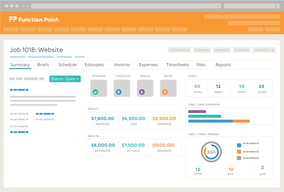
Function Point is a project management software that is built to manage the craziness of marketing teams and creative agencies through a platform specifically built for them. To date, the software is used by more than 9000 customers globally who appreciate the all-in-one solution and seamlessly manage every stage of project management in this field. With Function Point, productivity is more personable and engaging.





| Capabilities |
API
|
|---|---|
| Segment |
Small Business
Mid Market
Enterprise
|
| Deployment | Cloud / SaaS / Web-Based, Desktop Mac, Desktop Windows, Mobile iPad, Mobile iPhone |
| Support | 24/7 (Live rep), Chat, Email/Help Desk, FAQs/Forum, Knowledge Base, Phone Support |
| Training | Documentation |
| Languages | English |

Compare Function Point with other popular tools in the same category.
We love the use of task management for staff and that our leadership can keep track of their progress and time.
I wish there was social media management as part of the software. We have a different platform for that and it would be great to have it together.
Account management was a big issue
Easy to use, reports are easy to run and manageable, love the ability to export to Excel or csv
Some reports only available in pdf format -- can't easily convert to a spreadsheet
We started with Function Point 2-1/2 years ago, and previously did not have any formal project management software. Everything from cost to time had to be entered manually, and sometimes twice. Now I can enter costs into a job and integrate with QuickBooks. Invoicing is much better, especially for multiple job invoices.
As a small agency of 8 people, making the change to a new system was a daunting task. It seemed like it would fit the bill, but I was worried about the learning curve and the what if I didn’t like it after we got into the thick of it. I knew, however, that this should be a good move, we needed to do this before we grow and add more people. The system has everything I need and much I didn’t know I’d want. Setting up was challenging but Jim our FP expert here (and the guy who discovered you) was chomping at the bit to get this going took total control of setting us up. Between the two of us we really rocked set up which means the system is very Mac minded. This year was our first full year on the system and everyone here loves it for many different reasons and we are still only scratching the surface of what it can do. Time keeping and invoicing is now a breeze, for me I have started to check everyones weekly time just to be sure everything has been entered, I caught days of missing entries, I had assumed everyone was entering time on a regular basis. Its like finding money!
I have no dislikes, the program does more that we could imagine, meaning there is lots of room to grow.
Too many reasons to say why I love this system. I know more, save time, can access anywhere-anytime. My key people can access everything if I’m not here. I especially like attaching printing invoices to the job so anyone can access it instead of me going through my files to find it.
It provides the perfect tool to manage tasks and projects as per the requirement to achieve milestones. It proves a great team collaboration feature through which the team can work together. It provides a customization option to customize the thing as per project requirements.
For Me, it is awesome, No feature to dislike in it.
It helped my team member a lot in collocation in one project and working simultaneously on the same project. Its collaboration feature saves a lot of time for our team. Its feature mainly helped me in reducing my burden . It provides a customization feature to manage the tool according to the requirement.

It is used to track the undertaking and hold normal finances in control.Time monitoring one of the key tool of the software. It enables to pick out the productiveness of the worker time.There is predominant dashboard customization wherein consumer can do it primarily based totally on their interest
Some of the access withinside the platform takes a great deal of time.It is hard to download all of the documents at a single point. Ease of use is hard, and it time taking manner to teach the worker withinside the system
It is used to apply worker productivity to finish the challenge in the time. Productivity hours were recorded more excellent accurately. It is more transparency to everyone in the project.

Project management software with time tracking system. You can also create estimates and invoices, Intergrate with quickbooks. It can also manage tasks for team members.
some reports are hard to find and not easy to understand but overall the software is good
It become easy with the software to track the team performance and to manage their tasks.
Function Point is a one stop show for most things. We are able to manage a lot internally within this platform, and there are a lot of capabilities to it.
Tome entry within the platform can take some considerable amount of time.
Helps us organize internally
We use Function Point to organize all of our tasks, clients, vendors and billing at our company. I like that you can put the amount of time to each task that you complete, assign tasks that you can't do to other people and see a weekly view of the times. I also like that it is easy to enter client and vendor information and create expense reports and purchase orders.
I don't like that Function Point calculates time by the 15 minute mark. So if you've completed something in between, you either have to round up or down.
We are able to see how much time we put to different projects and tasks so we can appropriately bill specific clients.
The ability for me to interact with my team and keep track of project progress.
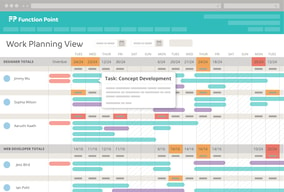
Not being able to see draft tasks on the work planning view.
Planning projects based on utilization, timesheet tracking, and tracking project progress are problems we have solved as well as benefits.
FunctionPoint is a really holistic approach to looking at your campaigns. It ties your revenue to employee productivity, allowing you to see where and why jobs go over/under budget.
There are a lot of facets to FunctionPoint to explore and learn, making it overwhelming if you don't have the time for proper training. However, FP's representatives are wonderful and they provide a library of resources for learning. It's important to schedule enough training time with your employees so they feel comfortable in the system.
Benefits: staying within a client's budget by utilizing tasks and schedules, predicting employee utilization over time for business development purposes, calculating job profitability, holding the whole team accountable for job performance
Function Point is fairly simple to learn how to use and works well once you are all set up. It did not take an extreme amount of time to get everyone set up and using the platform correctly, which was great. It really does help you stay organized when you have multiple tasks and projects to keep track of.
The only thing I would change about Function Point is that when you input time, it must be converted into tenths. We have charts that we use to convert, however it is just an additional step that would be nice to be deleted.
Project management, organization, time management, client organization, information regarding clients (such as logins for an account) all in centralized location.
I like how easy it is to communicate with my team members and keep track of projects.
It can be difficult to search for certain jobs, etc.
We are solving for process and efficiency.
I used FP for timekeeping. What I liked about Function Point was that the layout was more intuitive and user friendly than competitors. My company recently switched to another timekeeping software, which unfortunately I feel is more cluttered and came with a learning curve, which allows for much less mistakes than FP offered.
Function Point could have used a little more polishing in terms of extra features. I found navigating through search results was very cumbersome, often times only displaying half of the results without any way to reveal the other half.
Since my office switched to another time keeping solution, I realize that FP was very user friendly and gave me everything I needed, and for the most part nothing I didn't need.
Function Point is very easy to use. I am new to the agency world and I picked up this tool within a week for billing time and creating jobs per company.
There are a lot of dropdowns. I feel like this can be minimized and categorize under each job. Being new to the system, it's hard to remember what each drop down is used for per reporting for each client. I know this will get easier the more I use it but for now, there is a lot of going back to my notes.
Billing is the main function we use it for. The creative team uses the timeclock and can see how that can be very beneficial to them. I personally use the weekly view and makes it very clear to track my time per day.
Function Point is extremely easy to use. The interface is intuitive for any level user. It has what we need without a lot of extras that we don't use. It's also cost effective for a small agency.
There isn't a ton of customization so sometimes you have to be creative to work within the parameters on things like estimates.
We use the tool to track jobs and time. We are also able to easily create professional looking estimates. It helps keep our jobs organized and ensure we are profitable on every job.
I've used a lot of the project management tools on the market, but FunctionPoint has by far the best support team. They also release frequent updates that actually incorporate feedback from their users.
FunctionPoint offers very robust features, which can be overwhelming to some at first. The workflow is not always intuitive, but I also don't think it's prohibitive.
We use FunctionPoint for day-to-day project and schedule management, birds-eye-view resourcing, and project burn rates. At times, it has not always been the best tool, but recent updates have made resource management a breeze.
We love that we can see everything going on for that client and also how it ties into QB so easily. Invoicing was a nightmare as it used to be so manual. FP makes it more automated.
It's complex, you have to really dig in and learn what is best for your agency. I think when an agency signs up that they should get in-person training for at least a full day and then 6 months after they use the system. That is really when the agency starts to learn how it will work best for them.
Invoicing and see where everyone is really spending their time. No more manually invoicing, it makes it easy to see if we are using our time wisely and if clients are making too many change requests.
I love the notifications that let me know what is due today, along with the reports letting us know what's coming in the next week. This tool allowed us to get a better handle on the workload on each person's plate for any coming week.
I'd love to see more customizable notifications for each step of the task management process that we are using. If there could be some kind of checklist functionalities connected to a task, that would be super helpful as well. We turn to an external tool for this piece - a place to store all of the tiny details that are needed to communicate between team members.
Administrative efficiencies have been decreased since using this project. We also are better able to keep track of details of work done, and hours used across an entire project when multiple people are working on it.
I like the ease of use of FP and the clean UI. I love the way you can sort information by multiple columns at the same time which brings Excel-like functionality into the tool. I like the resource calendar so you can see availability at a glance. Overall, it brings several of our key needs into one, centralized place which is great.
I think the reporting in FP could use a little more love. I would like to see a bit more fluidity and flexibility in the reporting section of the tool. We have to export information and do reports in excel or pull data into SF for more comprehensive reporting which is time consuming.We would love an interactive project timeline that we can put notes on and share with clients without them having access to other parts of the project. We also do all of our billing out of FP and sync it with QB which is great. We would like to be able to close out a completed service as a phase of a project has been completed as that would make billing easier.
We manage live projects in FP and it works pretty well. We sync with QB for monthly billing which has been a huge time saver for us. I think there are still a few aspects of the tool that we need to start fulling using to realize the full benefits of the product.
FP is a one-stop for all program needs - we can be as granular in our tracking as we want to be.
The learning curve! With how busy we are, it has taken our team a little while to become fully integrated.
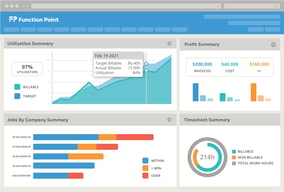
Tracking revenue and resource allocation - FP is giving us a clear view of our financials quarter over quarter, which is essentially helping us determine whether or not we need to go out and get more business.

Function Point has changed the way our agency manages projects, estimates, budgets, timesheets, and internal tasks. The dashboard feature is great for having all your info in one place. The tasking feature has streamlined our workflow and has made it easier for our designers to manage their workload and due dates. The estimate and budget system is great and has helped manage, track, and forecast financials. The support we received from FP experts when we first started using it was excellent. They were always willing to hop on the phone to answer any questions or to help us troubleshoot. Customer service is amazing. User experience is great as well. being able to drag and drop files, quickly export PDFs, integrate with Quickbooks is great. Coming from what we used in the past, Function Point is everything.
The on-boarding process was long and required one person on our team to be the expert in order to teach the rest of the team how to use. It took a while to learn how to use it and to change current processes to fit in with FP. And there are a lot of features that we don't use, but think may be beneficial if we had to time to review.
We had an issue with managing tasks for our design team and truly understanding what they had in their pipeline. We looked into a couple different project management softwares and found that FP offered what we needed and more. The ability to manage tasks, projects, budgets, timesheets, invoicing, etc all in once place was a huge benefit.
Ease of use. Easy to login and keep track of projects.
There is no way to go back and edit a project.
It is much simpler to submit graphic design jobs and for the entire team to see what has been submitted.
My favourite thing about Function Point is the task feature. A project manager is able to set the specific amount of hours I have to complete my job and I can see the exact specifics of where I've used my time.
I find the search options incredibly difficult. I wish there was an option to search a keyword within ALL sections, not just timesheets, projects, notes, etc.
Function Point allows me to make sure I am staying within the scope of my projects.
Very easy to search contacts, estimates, invoices, date range, etc.
I do not have many dislikes, but I think it writing notes was easier, and writing comments, etc. to view would be helpful!
Love that we can view ALL estimates within the company, not just our individual clients.
How easy it is to add hours/projects on a moments notice and the billing functionality is a piece of cake.
It would be nice if function point had a desktop application or a timer desktop app. I currently use toggl to track the time itself.
Billable Hours No Dead Space Happy Clients
Ease of use and the visual interface is really good. It's easy to interact with.
There isn't a search feature so that you can search your uploaded files or the rest of your account. You can in certain areas... by company, task, job, ...stuff that you add written text for within the system. But it doesn't do that for uploaded files.
We're able to save all our client info in one place. It's easy for our team to access all that info and it gives us a better way to organize it as well.
I like the tools in place for creating estimates, projects and jobs that help ensure my team can properly assess their time and subsequently allow our agency to determine how profitable we are.
I would really like it if there was a better CRM system / interface. Currently we use secondary tools and it would make sense to have it all under one roof.
Time management is the biggest problem we've solved. The team is more attentive to the time it takes to complete a project now.
The customer service is go amazing! They are open to feedback, incredibly available, and very prompt in responding!
Out reason for not using FP any longer was due to being required to use quickbooks for our accounting tracking. We went with an integrated software that tracked this info as well. This was pretty specific to our situation, though. I actually think the quickbooks link option is very handy!
We have been using FP to track time and projects costs for years. This has really helped with our reporting and data collection!
I love the fact that it keeps me organized. All the information and files related to each job are stored in one place and can be referenced in the future.
The only thing I don't like is pretty small... If you close a job before closing a related task, the task is stuck on the last status it was on when the job closed. To update and mark the task as completed, you have to reopen the job. Hoping they change this!
It has helped us to decrease the amount of paper we use because everything is in a digital file rather than in a paper ticket. it is some much easier to find information about a job in the future than having to dig through a file cabinet.
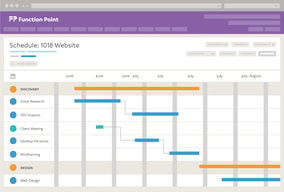
The scheduling aspects forecasting tools resource allocation
The inability to communicate dynamically. Ex: emojis, chat, "like" buttons
Our productivity has increased due to being able to schedule things enough in advance and being able to review that scheduling.