

Unclaimed: Are you working at Fusebox?
Fusebox Reviews — Pricing, Features & The Honest Take
Fusebox was co-founded by Pat Flynn of Smart Passive Income and was built to make it simple for listeners to choose which podcast episode to listen to while on the user’s website. Since it was introduced, it has since introduced more ways for podcasters to develop creative ways to present their episodes to audiences. The player features a great, single-track player with a site-wide sticky player. Users can generate transcripts automatically to help improve engagement and SEO. Listeners can access podcasts at different speeds and it has features that allow the hearing impaired to access and enjoy podcasts through accessible design and downloadable scripts.

| Segment |
Small Business
Mid Market
Enterprise
|
|---|---|
| Deployment | Cloud / SaaS / Web-Based |
| Support | 24/7 (Live rep), Chat, Email/Help Desk, FAQs/Forum, Knowledge Base, Phone Support |
| Training | Documentation |
| Languages | English |






Fusebox’s billing toggle reads “Pay annually (save 33%)”. Its own prices put that saving at 16.7%. Starter goes $9 → $7.50 and Pro $19 → $15.83 — a saving of $18 and $38 a year, or exactly two months free, not four. There is no “up to” hedge on the claim. That is a shame, because the rest of the pricing is unusually good: hosting is identical on both plans, with no cap on episodes, hours or listens.
- What it is: Podcast hosting bundled with embeddable web players.
- Best for: Podcasters who want uncapped hosting and a player that lives on their own site.
- Pricing: $7.50 or $15.83 a month billed annually; $9 or $19 monthly. Verified August 2026.
- The honest catch: The advertised 33% annual saving is 16.7%.
What Is Fusebox?
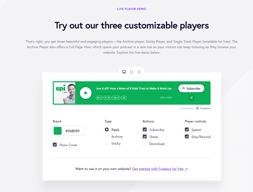
Fusebox is two products sold as one subscription: podcast hosting and a set of embeddable web players you place on your own site. The players are the part it is known for — a Single Track Player, Archive Player, Sticky Player and Full-Page Player, each customisable, with email capture built in so a listener on your website can join your list without leaving the page.
The hosting side is described as “the most affordable option in the industry with everything you need and nothing you don’t”, and includes unlimited episode uploads, listening analytics, episode transcripts and migration from an existing host. Setup is a copy-paste embed code, and Fusebox lists WordPress, Webflow, Squarespace and Wix among supported platforms — with the caveat that “some platforms require a paid plan to add custom code”, which is a real cost on Squarespace and Wix.
The structural fact that shapes the whole buying decision: the two plans have identical hosting. Unlimited episode uploads and listening analytics appear on both. Everything you pay extra for on Pro is players and API access.

How Fusebox Works
- Two plans: Starter and Pro.
- Hosting is the same on both — unlimited uploads, no download cap.
- Starter gets one player; Pro gets four.
- API access is Pro-only.
- 14-day free trial on both.
- Hosting is not sold separately from the players.
Fusebox Pricing
Captured from fusebox.fm/pricing in August 2026 in US dollars, operating the billing toggle in both directions and screenshotting each state.
| Plan | Billed annually | Billed monthly | Annual cost | Saving |
|---|---|---|---|---|
| Starter | $7.50/mo | $9/mo | $90 vs $108 | $18 — 16.7% |
| Pro | $15.83/mo | $19/mo | $190 vs $228 | $38 — 16.7% |
| “Save 33%” checked | ||
|---|---|---|
| Advertised on the toggle | 33% | |
| Starter, $9 → $7.50 | $18 saved | 16.7% |
| Pro, $19 → $15.83 | $38 saved | 16.7% |
| Expressed as free months | 2 months | (33% would be 4) |
| What each plan includes | Starter | Pro |
|---|---|---|
| Unlimited episode uploads | ✅ | ✅ |
| Listening analytics | ✅ | ✅ |
| Single Track Player | ✅ | ✅ |
| Archive Player | ❌ | ✅ |
| Sticky Player | ❌ | ✅ |
| Full-Page Player | ❌ | ✅ |
| Brand colour-matching | Single Track Player only | ✅ |
| Transcripts plugin | ✅ | ✅ |
| E-mail support | ✅ | ✅ |
| API access | ❌ | ✅ |

What actually decides your cost:
- The 33% claim does not survive its own pricing table. The toggle says “Pay annually (save 33%)” — flatly, with no “up to”. Starter falls from $9 to $7.50 and Pro from $19 to $15.83, which is 16.7% in both cases: $18 and $38 a year, or two months free. A 33% saving would mean four months free, or roughly $6.00 and $12.67 a month. This is a larger gap than anything else found in this review series — WebHostingPad’s “up to 60%” is really 58.7%, MeetGeek’s “up to 40%” is 37.5%. Those are near misses under an “up to” hedge; this one is unhedged and off by half.

- Hosting is genuinely uncapped, and that is the strongest thing here. Fusebox’s FAQ states: “Fusebox has no monthly cap or limit on the number of hours you can podcast or the number of listens in a month.” Both plans get unlimited episode uploads. Compare that to the metered model used across most of this category, and to Castos and Transistor reviewed elsewhere in this series — download or show limits are the normal way podcast hosting is priced. At $7.50 a month, uncapped hosting is a strong offer.
- The only thing metered is player listens. The same FAQ continues: “The only number our database monitors is the number of listens that occur via the Fusebox web players.” Fusebox does not publish a threshold or a consequence for that number, so what it is measured against is unclear. It is worth asking before you build a business on the free-and-unlimited framing.
- You are paying for players, not hosting. Both tiers list identical hosting. The $8.33 a month difference buys the Archive, Sticky and Full-Page players, full brand colour-matching across all players rather than the Single Track Player alone, and API access. If you only need one embedded player on your site, Starter is a complete podcast host and the upgrade buys you nothing on the hosting side.
- API access being Pro-only is the constraint most likely to force an upgrade. Anyone automating episode publishing, syncing to a CMS, or feeding analytics elsewhere needs Pro at $15.83 — regardless of how many players they use.
- Hosting cannot be bought on its own. Fusebox’s FAQ is explicit: “We do not currently offer Easy Hosting as a stand alone service.” If you want the hosting and already have players you like, there is no cheaper route — the bundle is the product.
- Some website platforms will charge you extra to use it. Fusebox notes that “some platforms require a paid plan to add custom code”. On Squarespace and Wix, custom code embedding sits on higher tiers, so the true cost of a Fusebox player on those platforms includes whatever upgrade they require. Budget for that before comparing against a host with its own hosted episode pages.
- The trial is 14 days on both plans, and since migration from an existing host is offered, that is enough to move a real feed across and see the analytics before paying.
-
The affiliate link resolves cleanly.
/go/fuseboxreturns 200 and lands onfusebox.fm/?lmref=PQba5gwith the referral parameter intact and no redirect chain.
Who Should Use Fusebox
- Podcasters embedding on their own site. The players are the product’s actual strength.
- Shows with growing audiences. No download cap means growth does not raise the bill.
- Course and membership creators. Players work inside courses and communities, with email capture.
- Anyone on WordPress or Webflow. Both support custom embeds without a plan upgrade.
It fits poorly for podcasters who want hosted episode pages rather than embeds; for Squarespace and Wix users on lower tiers, who may need a platform upgrade to embed at all; and for anyone budgeting from the advertised 33% annual saving, which is really 16.7%.
Honest Pros and Cons
Strengths
- No cap on episodes, hours or listens, on either plan.
- Identical hosting on both tiers — Starter is a complete host.
- $7.50 a month is genuinely cheap for uncapped hosting.
- Four player types with email capture built in.
- Transcripts and analytics on both plans.
- 14-day trial with migration from an existing host.
Limitations
- “Save 33%” is really 16.7%, unhedged.
- API access is Pro-only.
- Three of four players are Pro-only.
- Hosting cannot be bought separately from players.
- Player listens are monitored with no published threshold.
- Squarespace and Wix may require a paid upgrade to embed.
Fusebox Alternatives and How It Compares
- Castos is the WordPress-centric host, reviewed elsewhere in this series.
- Transistor targets multi-show publishers and private podcasts.
- Buzzsprout is the popular beginner option with hosted episode pages.
- Libsyn is the long-established incumbent with wide distribution.
- Podbean bundles monetisation and live streaming.
The Verdict
Fusebox has one clear strength and one clear problem, and they are easy to separate. The strength is that hosting is genuinely uncapped on both plans — Fusebox states there is “no monthly cap or limit on the number of hours you can podcast or the number of listens in a month”, with unlimited episode uploads on the $7.50 Starter tier as well as on Pro. In a category where download caps and show limits are the standard way of extracting more money as you grow, that matters. A show that triples its audience pays Fusebox the same.
It also means the plan choice is simpler than it looks. The hosting on Starter and Pro is identical. The $8.33 a month you pay to move up buys three additional player types, brand colour-matching beyond the Single Track Player, and API access. If one embedded player on your site is all you need, Starter is a complete podcast host and Pro adds nothing to it. If you need automation, API access is Pro-only and settles the matter regardless of players.
The problem is the discount claim. The toggle reads “Pay annually (save 33%)” with no qualifier, and the site’s own two price pairs make it 16.7% — $9 to $7.50 and $19 to $15.83, worth $18 and $38 a year. Put differently, annual billing gives you two months free where the claim implies four. Several products in this series advertise “up to” percentages they narrowly miss; this is a flat statement that is out by a factor of two, and it is the one thing on an otherwise clean pricing page that a buyer should not take at face value.
Two smaller cautions before signing up. Fusebox says the one figure it does monitor is “the number of listens that occur via the Fusebox web players” — without publishing a threshold or what happens if you exceed it, which is worth clarifying if your show is large. And if your site is on Squarespace or Wix, embedding custom code often requires a higher plan on those platforms, so the real cost of a Fusebox player there is more than $7.50. On WordPress or Webflow, none of that applies, and at $90 a year for uncapped hosting it is a straightforwardly good deal.
FAQ
How much does Fusebox cost?
In US dollars as captured August 2026. Starter is $7.50 a month billed annually, or $9 billed monthly — $90 or $108 a year. Pro is $15.83 billed annually, or $19 monthly — $190 or $228 a year. Both plans include a 14-day free trial, and business and enterprise pricing is available on request.
Is Fusebox’s “save 33%” annual discount accurate?
No. On Fusebox’s own displayed prices, paying annually saves 16.7%, not 33%. Starter falls from $9 to $7.50 (a $18 saving) and Pro from $19 to $15.83 (a $38 saving) — the equivalent of two months free, where 33% would mean four. The claim on the toggle carries no “up to” qualifier.
Does Fusebox limit podcast downloads?
No. Its FAQ states: “Fusebox has no monthly cap or limit on the number of hours you can podcast or the number of listens in a month.” Both plans include unlimited episode uploads. The one thing Fusebox says it does monitor is the number of listens through its own web players, though it does not publish a threshold or say what happens above one.
What is the difference between Fusebox Starter and Pro?
Players and API access — not hosting, which is identical on both. Starter includes the Single Track Player and brand colour-matching for that player only. Pro adds the Archive Player, Sticky Player and Full-Page Player, brand colour-matching across all of them, and API access. Unlimited uploads, listening analytics, transcripts and email support are on both.
Can I use Fusebox hosting without the players?
No. Fusebox’s FAQ states: “We do not currently offer Easy Hosting as a stand alone service.” Podcast hosting is included on both the Starter and Pro plans but is not sold separately, so the players are part of the purchase whether or not you embed them.

Compare Fusebox with other popular tools in the same category.
In a Fusebox web application, all requests are routed through a single point (usually index.cfm for CFML) and processed by the Fusebox core files
Fusebox does not enforce naming conventions although it encourages
Building large web applications and structuring the code.
Fusebox puts the night audit numbers in correct places for you
There is not much dislike but program could use an upgrade
Night audit is done quicker and easier to understand the numbers. The program is needed in any hotel company
I like the usability of fusebox software, it is helpful when working on team based web application projects. I also like that the use of programming is customizable.
While the programming options are optional it can cause issues when different members of the same group are at different levels of fluency.
We are creating applications for use in the assignment of staff to projects.