

Unclaimed: Are you working at GanttPRO?





GanttPRO Reviews: 4.8/5 — Highly Rated
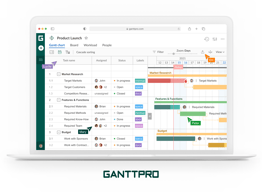
GanttPRO is a user-friendly, intuitive Gantt chart software known for its robust project management tools and features. The platform offers project, product, and portfolio management, making it an ideal software for individuals across numerous industries. From task and deadline tracking, to team collaboration tools, and time logging features, to advanced export and sharing features, GanttPRO has it all.





| Capabilities |
API
|
|---|---|
| Segment |
Small Business
Mid Market
Enterprise
|
| Deployment | Cloud / SaaS / Web-Based |
| Support | 24/7 (Live rep), Chat, Email/Help Desk, FAQs/Forum, Knowledge Base, Phone Support |
| Training | Documentation |
| Languages | English |

Compare GanttPRO with other popular tools in the same category.
Tasks and goals can be created in a fast and simple manner. Further, increasing the complexity of the project organization is up to the user. There are various settings and the possibility to add detailed information. However, it's very user-friendly and easy to operate. All in all, it's a highly customizable tool and fits my project management needs.
It's more a request than a dislike. It would be nice to select from predefined color settings.
I organize my Master's Thesis with it. With GanttPRO I can manage my time in the lab, with testing, research and writing.
He empleado esta herramienta como estudiante y quedo muy satisfecha por la similitud en funciones que posee respecto al Project para la gestion de proy ectos. Asimismo es una plataforna muy intuitiva que permite un facil uso.
Ajustar los dias no habiles para que no solo se descuenten del tiempo requerido sino que tambien no sean visibles como hoyos en la diagramación de las etapas e hitos del proyecto.
Poder orgamizar las etapas del pryecto que llevo en curso lo cual no solo permite definir las etapas y recursos sino tambien hacer uso eficiente del recurso tiempo.
Gantt pro., es una herramienta completa y de soporte para la gestión de Proyectos, su diferencia y practicidad frente a otra soluciones existentes en el mercado es su orden, simpleza y los diagrama que genera producto del ingreso de actividades que son de gran ayuda al Project manager. Cuenta con accesorios gráficos de diagramación que permite gestionar un proyecto de manera nativa e interactivamente. Otra ventaja es que permite la integración con otras soluciones de software, y ventaja para poder agregar a mas personas en participar en los proyectos on line, inclusive se pueden medir los tiempos estimados y los reales y sacar los costos de cada proyecto según las horas gestionadas.
Yo considero que podría mejorar la configuración de las barras para poder decidir si queremos que se muestre letras o no, y mejorar la configuración de calendario no tan general, dando la opción de nos permita decidir a qué hora tomar la colación o si hare más horas laborales.
Primero que nos permite gestionar de manera eficientemente los proyectos que podamos tener a cargo de manera fácil y navita. El beneficio otorgado va por el seguimiento de las actividades y la gestión de recursos de manera eficientemente logrando cumplir con las condiciones básicas de una proyecto (tiempo, costo y alcance)ticas

I am a Mac Owner, and the lack of MS Project on the platform hindered my professional work and academic studies. First of all GANTTPRO offers a cloud based solution accessible from anywhere and any device. Second it allows collaboration between myself and my proponents whether it is my colleague or my professor. Third it has all the features needed to effectively design, manage, monitor and control a project without all the clutter that other softwares have. Finally the tiered subscription model allows me to operate on a budget and acquire the features that I really need
User Interface can be made more friendly
Project Management for my Doctorate Thesis and allowing my professor to track my progress in real time
I have tired a number of Gantt Charts, as I need it for my PhD studies. GanttPro is seriously the easiest, least complicated Gantt Chart in the market.
I have not come across any downsides while working with this application.
As a Ph.D. student, I need to be organized for efficiency and budget my time. GanttPro is straightforward to use, follow, and revise.
Muy buena para proyectos orientado en forma profesional a equipos. Tantos pequeños como grandes. Es de facil utlización y de facil aprendizaje el cual permite concentrarce en el proyecto y no en los detalles.
Que la prueba solo dura 14 dias, ya que estamos haciendo un proyecto de fin de master el cual tiene como fecha por lo menos 3 meses, y hemos perdido parte del trabajo al no poder respaldar la información.
Me gustaria que pueda terner una versión free la cual tenga solo las herramientas basicas para familiarizarse con el uso de Porject y poder de esta forma aprovechar de mejor maneja el Software.
I used this tool for a course. This course, we had to undergo the whole process of how a project is handled in real life. As one of the steps, we had to create a Gnatt chart. During this time, our team came across this tool of GnattPro. Using it was easy and there was a seamless integration of our team members. We were also able to get the link through which our advisor was also able to track our progress. This tool gave us a feel of how Gnatt chart looked and how the variations in the chart occur due to the dependencies on the task. I would recommend it to my fellow students who are in need of an online tool to create Gnatt chart.
nothing is there as it is easy for first timers
we had to create the gnatt chart for the project and needed an online tool so that all of them can use it.
Gantt pro me encantó, la diferencia en lo fácil que es de usar, la diferencia es abismante comparado con otros que hay en el mercado, se ve mucho mas ordenado y porque no decirlo la gráfica es bella, tiene todas las herramientas necesarias para poder gestionar un proyectos, lo que destaco es que se puede integrar a varios software, y que puedes agregar a mas personas para participar en los proyectos on line, inclusive se pueden medir los tiempos estimados y los reales y sacar los costos de cada proyecto según las horas gestionadas.
solo agregaría 2 cosas, configuracion de las barras para pode decidir si quiero que aparezcan letras o no, y configuración de calendario no tan general, que permita decidir a que hora tomar la colación o si hare mas horas laborales. en todo lo demás ame Gantt pro,
Resuelve lo engorroso que es hacer cartas gantt por ejemplo en project, lo conozco hace años pero me demoro demasiado en intentar comprender como configurar y aún no puedo utilizarlo sin demorar mucho tiempo por no saber como agregar o actualizar si malograr lo que ya esta hecho al menos a mi me condfunde ver tanta información en la pantalla, en cambio Gantt pro es minimalista pero sin dejar de contener lo necesario para gestionar un proyecto
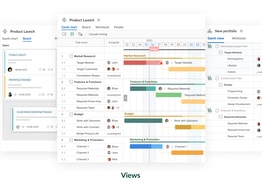
What I like the best about GanttPRO is how it makes it easier to track all the different tasks one might have and how you can see the progress in each of them. I specifically love the percentage feature it has both on subtasks and tasks. I am a very visual person, and this helps me visualize how long I am on each project. I also love the Board feature, which is very similar to other apps but having it next to my Gantt makes it easier for me to work. It has so many possibilities to work with and modifications that I am sure anyone can use it for any type of work.
I would say it is an easy-to-use app, but for someone who has never heard of Gantt, it is not so intuitive. The good thing is there are many videos to help you understand how it works
I have many projects open simultaneously, which helps me see how to progress with each one, how much work I have left and how to organize and give priority to every task.
It makes planning milestones, tasks, and resources very easy and convenient. It allows users to link milestones, schedule tasks and even generate notifications for tasks. One of the best features is the workload feature which will enable users to check and verify that workload for each resource is allocated efficiently. The hour allocation system is also effective; however, if some resources are added or removed on the fly, the hourly allocation for all others gets modified automatically, which is not so desirable. Even with some issues, it is still one of the best scheduling, planning and gantt charting tools in the market today. Very practical and very easy to use and set up.
There is a learning curve for linking milestones with dependencies and task dependencies. This is not very simple and easy to use. It usually messes up the schedule.
It makes planning milestones, tasks, and resources very easy and convenient. It allows me to link milestones, schedule tasks and even generate notifications for tasks. One of the best features is the workload feature which helps me to check and verify that workload for each resource is allocated efficiently. Even with some issues, it is still one of the best scheduling, planning and Gantt charting tools in the market today. Very practical and very easy to use and set up.
La forma en que se puede asignar a los responsables de cada actividad para un mayor control, así como la posibilidad de delimitar los tiempos de cada una de las actividades que facilitan la planeación. Otra particularidad que me gustó mucho, es la posibilidad de filtrar por cada responsable, lo cual facilita mucho el ver las cargas de trabajo y así poder vislumbrar una mejor administración del recurso humano con el que se cuenta. Esta simplicidad permite tener una visión global de todos los aspectos de la propuesta en marcha y, por supuesto, favorece la integración del equipo de trabajo que comprende, en conjunto, el flujo de las actividades.
Nada, es sencillamente bárbara, una herramienta de gran utilidad.
Ahorré mucho tiempo gracias a la sistematización que tiene, además de ser intuitiva.
Working with them is very intuitive. It is very user-friendly and helpful if you are planning to use it to plan your projects. The diagram visualization is excellent. It allows you to download the current version as a pdf which can be included in different reports or be printed out to make sure that you as well as entire team is on track. The ability to exclude unnecesay information allows the visulation to not get cloggd with unnecessary information. The abilitiy to assighn task to different memebers of a team will help the organisation of the project if it is required.
I like everything this is an excellent software.
As a student who is doing his thesis, I need to plan the project so that I am able to finsh it in 3 Months. It helps me plan my work packages uch that I adhere to the deadline.
The tool is easy to use and sharable with team mates.
There is very little to dislike. However, sometimes the zoom feature you cannot show the entire Gantt chart.
GanttPro puts project planning in one place. This helps me save time and easily communicate project timelines with teams.
It allows the user to edit all the tasks and manipulate the display very nicely. It also allows to set milestones, deadlines and switch tasks to in progress or done once appropriate.
I don't really like the fact that when you export your gantt chart the trademark is still on it. It makes the whole picture a bit weird and inappropriate for usage in academic environment.
It benefits me because it is fairly easy to use and adapt to any work schedule. the user experience while interacting with the platform is extremely pleasant and very straight forward.

I'm a master's student and therefore have a lot of deadlines and fees that I have to consider. GanttPRO helps me correctly observe my deadlines and estimate and plan the workload for the respective assignments and exams. I would definitely recommend GanttPRO to every student to bring an overview and structure to their studies.
I wish the amount of work could be better calculated in each case. For example, my workload is based on the international ECTS framework; here I would like to enter the respective effort in the overall task and distribute the hours over the individual tasks
Ganttpro helps me to better plan and pestimate and plan the time I spend on my assignments and exams.
I really like GanttPro for its simplicity and ease to use. If you come from Microsoft Project, it will be easy to adjust, and in no time, you will be using GanttPro as you used to do in MS. GanttPro is good for its flexibility and is perfect for a student. You can learn and apply it to your studies. I use it for my project assignment, managing the time as best as possible. Especially to coordinate with my colleagues and split the work. Great Software!
I am convinced, GanttPro should be free for Students! Since it is one of the best Software for Project Management. For example, an offline mode would be a great addition (as downloadable Software).
It solves the visualization of the magnitude and timeline of the Project. I benefit from GanttPro in having a well-organized timeline. Being easy to use lets me use my time more on the project.
I was using GanttPro for my project for university work. It is very user-friendly and has a lot of features that make it very helpful for project managers. I would recommend this tool for everyone who is doing any professional work and has to manage their project effectively. I am very pleased with the customer service as well. It is also very affordable, which makes it a great option for small businesses or individuals who need to manage their projects on a budget. Overall, I highly recommend Gantt software to anyone who needs a good project management tool.
Nothing at all. I had no problems with the tool. The customer service is incredibly good, which means if you dislike anything they get back to you very quickly and will help you resolve any problems.
It is beneficial because it helps you to stay organized and on track with your projects.
The easy and versatile interface. Easy to use copy-paste feature, Export to PDF (with huge page size) & Excel, Faster loading time, an excellent estimation way hourly/fixed. When we want to do a project, we can select demo projects from the template and use them to make projects faster. The templates are industry standard. I learned many things and completed a very complex project with one of the given templates. One interesting feature, we can create virtual assets and assign different rates for different assets. So, when it times to calculate project cost we can easily add assets and calculate hourly or fixed rate.
Single user price / Month No completely free tier ( May be a single or 3 projects could be free)
The combination of the project timeline & cost / Service charge in a single solution is stunning. Moreover, it can be used as a task manager efficiently. We can share the chat with the client. It saves a lot of time.
Ich habe lange nach einem Projektplanungs Tool gesucht, welches übersichtlich ist und in mehrere Projektabschnitte gliederbar ist. Mit Ganttpro habe ich das perfekte Tool endlich gefunden! Es eignet sich super um ein Projekt im Überblick zu behalten und ist intuitiv zu benutzen.
Bisher habe ich nichts zu bemängeln, das Tool übertrifft meine Erwartungen.
Es hilft, das Projekt im Überblick zu behalten und hilft mir, die Deadlines für meine Studienprojekte immer im Blick zu haben.
I find GanttPRO to be a fantastic help in managing my time in school/ and life. I couldn't find any of the unique features that they offer elsewhere. It has been a leading help in increasing my productivity tenfold.
I understand that the creators have to make money. But my only complaint about the software is that it requires payment. Even though it's not free, I've found the investment worthwhile.
GanttPRO is helping me schedule my time out better than any other software I have utilized in the past. This benefits me by increasing my productivity since I am decluttering my mind through organizing it on GanttPRO.

With the open Apis, you can integrate other options like Microsoft teams and Jira to get the tasks directly from them. The subtasks feature is so good
As far as I am using, I haven't felt anything bad
Visualizing work flow in a simple way anyone in the team can understand so you don't have to spend to much time on the emails about the work progress and milestones
Simple. Fast. Easy. Gantt Pro is an excellent tool for event planners like me. I can link my google files directly in the system. I can have an overview of the work that needs to be done. Very cool.
It is quite expensive. But I guess that it is okay like that. I still like it. Gantt Pro is convenient and valuable, but the fee to use it is expensive. I have not seen no buggs.
Gantt Pro is a platform for project management. You can enter all your tasks and put them on a timeline. When you are an event planner, you can easily get lost in the process.

GannttPRO is a very easy-to-use tool that allows you to manage the organization of your project or activity properly. In my experience using GannttPRO, I like the most that you can distribute your actions in different categories. The timeline that tracks your schedule is critical.
Although I have not explored some of GanntPRO's tools in depth, the software is quite useful, but I would like the trial time to be longer than 14 days. I consider it minimal; maybe 30 days would be prudent to explore it in detail.
I am currently working on a final university project, and I found the GannttPRO tool easy to use to carry out your activities in an orderly manner.
The GanttPro team has been great to work with so far. The software is easy to learn and use, allowing me to get the most from this tool. I could not be more pleased with my experience thus far!
So far so good , I have not encountered any specific problems while using or working with GanttPro. Maybe there should be clearer alerts when stretching a task name to indicate that the user is changing dates.
GanttPro helps teams work collaboratively and more efficiently which solves many problems such as sharing work in real-time and being able to keep up with edits and modifications made by team mates.
me encanta, es muy util ya que con ella puedo trabajar con mis compañeros de equipo y maestros para optimizar el trabajo de todos, a demas de tener ideas claras de lo que se debe realizar.
ciertamente todo me gusta, es algo que es realmente necesario, suelo usarla con regularidad para administrar mis tareas diarias y mis proyectos personales, es muy util.
en lo personal resuelve, la mala administracion y el desorden a la hora de realizar actividades y desaber que realizar diariamente, a demas de que me beneficia como usuario al realizar tareas mas rapido.
It's online so that anyone can access it from anywhere. With a significant and intuitive tool kit, it is easy to plan a project and see how tasks are connected and the approximate scale of those tasks
Currently, nothing I have not been using it that long, but it has already been more straightforward to use than the competition and more accessible. The only inconvenience is the fact that there is no free version for individuals or maybe a more extended trial period.
with my student account i could not get licence for the uni systems no matter how hard i tried in a quick enough manner this software has enabled me to join my team in working together to finish the Gantt chart for our project
The most helpful thing about using it is that one can direct their projects, setting action deadlines for various activities and thus deliver the work on time. As a student at the Universidad Iberoamericana de Puebla, it has become a fundamental tool for me to carry out my commitment and community organization (because it is a group project) and thus delivers high-class work. Some of its advantages are: you can work on various devices, your co-workers can access it under your restrictions, it has an easy-to-understand interface, and there are multiple tools in the same program that help you visualize the calendar as a Gantt chart, which is very useful to see how advanced or behind you are with your activities.
I don't think there are many complaints about the app. During the time I've been using it, the only thing I think I can add to the comments on the site is that its interface works a bit slow, which doesn't affect people with patience and tolerance. Another disadvantage I see of the app is its way of going back to the changes made; since it does not let me use commands like ctrl Z, it is always necessary to open a complementary window to go back to your steps in the calendar. Still, I repeat, it is just a matter that you do not see yourself involved or affected by the laziness of carrying out that action. What I see as less necessary is its entrance to the site, although it has an excellent design and captures the public's attention when they enter the schedules.
I am currently doing a project that will allow me to graduate with my professional degree. This great application appeared when I was looking for a platform or tool to carry out my planned activities well and on time. I told my responsible teacher that it was a perfect option for him to give us constant follow-up on the project feedback, and he agreed to be part of this tool. So far, there have been no problems using it, and I will use it on future occasions. If you are new to the app and have doubts about using it, don't worry; I guarantee that it works best to carry out your projects or investigations.
I am currently in the process of working on my final year project, and GanttPRO helps me organize my project, make beautiful charts, and stay on track. Out of all the tools, I have tried, it has the best user interface, works very smoothly without any errors and I can achieve exactly what I want. I am sure it will help me get great grades, and great feedback and make my student life enjoyable. Given that I am a computer science student, GantPRO helps me a lot, but I would recommend the tool for any student that strives for greatness and wants to be better organized and productive! Thank you GanttPRO team!
Nothing! It is all working very well! I have nothing to add.
I am a student so GanttPRO plays a crucial part in organizing my time!

What I like best about GanttPRO is its accessibility, ease of use, and clean user interface. This application allows me to complete my classwork with clarity and zero issues. I am able to easily log into the application, save and create multiple projects, and export my projects locally as needed. GanttPRO's interface is easy to understand with tips and hints for diagram creation. The intuitive system makes it easy to move between tasks and review my entries. GanttPRO makes it easy for students to collaborate on project assignments and review deadlines for meetings and deliverables. GanttPRO also offers payment tiers that compact user needs for simpler decision making.
GanttPRO should free to all students without incident. Providing a student ID number should qualify users for free access, not necessarily for a year but at least a semester.
I don't have any software for opening .mpp files from my project management class, so GanttPRO is solving that problem by being able to open such files.
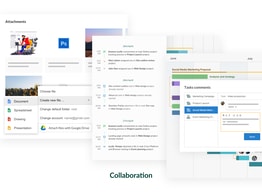
Gantt is easy to work on; it has different features that are very useful in my postgraduate degree and career. What I like about it is that it has attachments that I can attach all my important documents and see what I'm working on, it has this feature that shows done, in progress, closed and open to keep me on track with my schedules.
The only downside is it is not free at all
Gantt is very helpful in the way of solving scheduling matters