

Unclaimed: Are you working at Google Analytics?





Google Analytics Reviews: 4.5/5 — Highly Rated
Google Analytics is a platform that runs on the internet designed to give users in-depth insight into their website traffic as well as user behavior. Google Analytics is well known for its ability to track site visitors, monitor website performance, and review user engagement so users can improve their visitor’s site experience and boost conversions.
Google Analytics is also often used as Digital Analytics of choice in Indie Hacker and Marketing tech stacks.


| Capabilities |
AI
API
|
|---|---|
| Segment |
Small Business
Mid Market
Enterprise
|
| Deployment | Cloud / SaaS / Web-Based, Mobile Android, Mobile iPad, Mobile iPhone |
| Training | Documentation |
| Languages | English |


Compare Google Analytics with other popular tools in the same category.
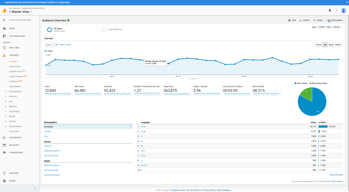
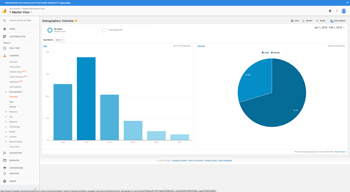
The age and gender tracker has allowed us to gear to the right clients
On the behavior section, I would like to see how often the top three pages were visited.
We use Google Analytics for our website to determine the population that we need to be targeting and how to best reach others.
Being able to gain insight for clients, performance metrics, and details about how customers and visitors are interacting with a digital property. It provides a well-rounded picture from the place of entry until they exit the website.
The interface is constantly changing and updating and some of the newer updates are not as intuitive as they have been in the past.
How to target customers and refine marketing and advertising dollars in order to get the most bang-for-your-buck. We are able to identify new and emerging markets, as well as customize advertising for our strongest fanbases.
You can dig into this platform and learn every little detail about your website, and it is FREE. :) There are many platforms out there can cost a pretty penny, but it pulls data from Google Analytics. If you spend the time to learn GA, the more you will learn.
There is not help option to call and get assistance, even for a cost. I'm sure many would pay for this option. It doesn't look at pretty. If would be nice if there was a paid version to get a better looking and robust dashboard, I know I would pay for it :)
Learning where traffic is coming from, if it is from a tablet, mobile device, desktop, what OS. The possibilities are endless, you can get just about any kind of data from with GA if you know where to look. There is a learning curve, but over time and with some learning you can master this platform.
Analytics now has the chat support in the dashboard that is very helpful.
The new dashboard is a little slower and it takes a moment to get use to it the new layout.
Disputes over user engagement on websites, in-depth reporting on website performance.
Google Analytics is extremely powerful and has hundreds of features.
It's gotten to be cumbersome and the interface isn't first class.
optimizing traffic and reporting
Google Analitics is a great way to get your business on the right track.
I wish it would give me more information but I understand privacy settings.
We can direct our business and ads forwards the right demografics
Turn key integrations with AdWords and google products are impressive
Even with the paid version, sampling continues to be a an issue because you will get a a specific number of tokens for unsampling with GA360
Year over year analytics reporting and reports on behavioral events
I love that I'm able to dig into audience paths & multichannel conversion
It can be a little complicated to learn at first, but after playing in it for a couple months and using real questions, it's a very effective tool.
We use it to determine best sources for traffic and effectiveness of advertising campaigns. We have been able to track traditional advertising by looking for traffic spikes that correlate to the schedule
I like that it works so well with my sites created by google sites. The accuracy of current views is almost spot on.
I am not the IT person for my company so when I am trying to find a piece of data, it sometimes takes a long time to find it.
I now know how many people are viewing my site, when, where and how. Then I also know what pages they visit most so I can update and those pages with new content

GA allows in-depth analysis of our website performance - we have three websites we manage and understanding the correlation from success and failure wouldn't exist without Google Analytics.
We love understanding the numbers but we don't necessarily know the "who" - what companies, individuals, job titles, etc. are visiting our site. We can utilize other applications to find this information but at the end of the day we would like to better understand our ROI.
Gathering an understanding of the companies that are visiting our site - and where they come from. GA has been an amazing way to understand and report on the organic and paid searches coming to our company's site.
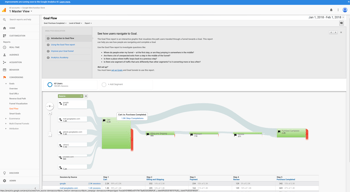
Google Analytics Is Great At The Following: - general user statistics - traffic times when your users are online and/or asleep - where geographically most of your traffic comes from - partner apps and data you can combine to make easy correlations/causations - live realtime views of who is online where and their activity - site map insite into web flow drop off cliffs
Things Google Analytics Could Improve On: - verification of users, it tough at times to verify google results, you want to trust them (and you do) but when unexplained user traffic crops up it's tempting to say "google is mistaken". Google needs to provide more traffic data verification metrics to ensure everyone is on the same page. We should be able to cross reference our results. - Google Analytics isn't very in depth on their personas. They are great on geolocation and all the individual metrics I shared as an aggregated view, but when it comes to tackling individual users, the interface and even the pricing isn't clear.
Google Analytics has been a great way to get a second opinion on our user personas and aggrigated overview, not on individual user breakdown patterns and conversion metrics per business plan.
Integrations with everything else in the Google marketing cloud
Sampling and high cost for premium nonsampled package
Website analytics - specifically analyzing marketing campaign impact
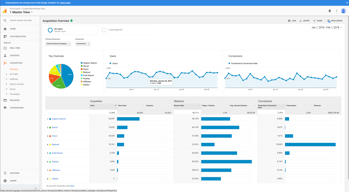
Very streamlined layout makes it easy to see exactly where my traffic is coming from and the quality of the traffic received.
As a sole proprietor, perhaps requires some degree of technical knowledge to effectively set up and interpret.
Mainly using Google Analytics to determine which advertising campaigns are producing the largest number of impressions and which ones are converting the most.
I love that it can be accessed from mobile, so that I'm not only limited to desktop. Being able to connect my adwords account is hugely helpful, as well as being able to collect data from various sources.
There is so much to learn, that it can be a bit overwhelming. It takes time to learn the ins and outs of the application.
Being able to create custom reports based on what we're trying to analyze is a huge benefit. You're not limited to a set dashboard whatsoever.

I enjoy using google to help keep it to date with my data and marketing plans.
I don’t really have any dislikes. I’m pretty happy to use it when I need it.
I use it to help with my clients and the marketing focus.
Over the years, the solution has improved a lot, and it offers multi-attribution and real time solutions. Can't live without it.
Sometimes it is hard to make the best use of it, as there are almost too many features
Tracking onsite conversion, among others
Google Analytics efficiently communicates data through clearly labeled charts and graphs. The interface is friendly and easy to use. Thanks to this service, we have been able to more quickly and easily track website traffic for both of our unique business web pages.
Google Analytics (as we currently use it) does not always provide specific information as to the demographics and locations of each individual that visits our websites, which makes it more difficult to know when we are reaching our target audience and converting them to customers.
We are using Google Analytics to monitor traffic to our two websites. We use the data to help us determine more effective ways of marketing ourselves and linking our webpages to our social media posts in order to increase traffic and ultimately increase new customers.
I primarily access Analytics to monitor the status of our email marketing campaigns. It provides an excellent way to see how much revenue our campaigns bring in, our conversion, and many other pieces of useful information.
At this point, I do not have any dislikes. In fact, I know that there are a large number of features that Analytics offers that we do not currently take advantage of. But, Google offers a free Google Analytics for Beginners that I plan to sign up for and see all that Analytics has to offer.
Google Analytics provides an easy way to monitor everything that is important to our e-commerce business. Revenue, conversion rates, and custom reports are just a handful of things we use on a daily basis.

GA is a must-have for almost any website and definitely every SaaS startup - for some of those website-only, for some others also on the product end. I love the ease of use and awesome channel and goal reports. GA has wide customization ability, great admin interface and integrates easily with GTM we widely use. Channel reports are easy to setup and use, they are very cool to track the efficiency of email and other campaigns (through source & medium field). Also, GA has lots of learning resources - via Google, Lynda, and other providers - that makes it super easy to learn and use.
Reports could be a bit more beautiful. Segments are limited to a certain amount of days - that's a bit upsetting. Goal setup could be easier and some of the things could be easier to integrate with GTM - say, by connecting the accounts, automatically pulling in triggers etc. Other than that - GA is awesome!
Key problems solved: tracking website traffic, conversions, and efficiency of different campaigns - referral/email etc. Benefits: it's free, easy to use, has awesome documentation and pretty good support. It's also widely used which makes it a good tool to have in one's tech stack.
Works good, good for advertising and getting organized.
Nothing really. I like it all and would tell my friends about it
Just getting organized and filing. The benefits are that it’s easy to file things and get analytics
Simple and fundamentally sound with most of the features needed for everyday website analysis
Could use a step by step tutorial within the site Itself for first time users
Efficient post click site traffic analysis for evaluating relevant traffic being driven
Ability to break down the data - demographics of the user - location, age, device, etc. ; type of device used and so on - it helps one design products/services according to majority of users.
GUI needs improvement - its not intuitive.
Trying to find the demographics of user for our services and also identify the location and time they use the services - I found that leveraging this information - I can target advertisement better.
the amount of options you have, you can track anything.
Theres not really anything I don't like at this time. The system is a but difficult to use. I didnt have have problmes but I could see how some users could.
Allows us to take a deeper look into who is visiting our website. This will then show us who to market to in the future.
How I can track traffic from source, country and other variables.
It seems a little complicated to make sense of the all the data.
Understanding volume and sources of traffic.
Google Analytics is highly customizable and provides the information I need to improve our donor and customer service. Best of all, it’s completely free.
Although it is mostly user friendly, it may not be the most intuitive to use. There are probably some great tutorials on YouTube and elsewhere but I don’t always have that kind of time to invest.
For us, it is more about flow from one page to the next. If someone is only spending 45 seconds on our site, chances are good that there may be navigation issues. Ultimately, it is helping guide our decision making process as we move toward our next generation website design and implementation.
I enjoy the raw power and sheer amount of data available. We use this information to share with our clients to help leverage their web content to reach more customers. The massive amounts of data can be overwhelming, but once you sort through and pick out the relevant pieces, it's very useful. Google Analytics is extremely simple to setup and activate.
I dislike how deep I have to dig to find simple metrics, along with having to sort through so many metrics to find what I’m looking for. I would love to see some prebuilt industry-specific dashboards, e.g. an e-commerce dashboard repopulated with useful data. An area with suggested data would also be appreciated. Perhaps some of Google's machine learning processes could analyze the data and select relevant metrics and build a smart dashboard based on the data received.
Google Analytics helps us demonstrate the advantages of our digital services and show the client the progress of their digital growth. We are able to build useful dashboards to provide our customers with measurable growth over time, as well as automating the sending of analytics via email. Our customers enjoy the feeling of being kept in the loop on what is working and what isn't working across their site.
What I like best about this product is it is kind of easy to use if you know what the basics are. I have used this product many times to tracks certain traffic for my blogs or websites.
What i dislike about this product is not to much. I never had no problems with this product it is free and easy to use.
I have solved numerous Social Expert Optimizing problems by using this product for my promo company.
Switching to new layout of analytics needed some learning curve, but once you make it then there you can find (filter) everything you need to provide data-driven base for your decisions of next steps
There is learning curve and understanding needed
User flows, keywords on which page is showing in search engine results and many others
Google Analytics just has so much to offer in terms of learning about your digital presence and who is visiting your site. From general stuff like pageviews and uniques to the completion of goals - GA does it all and is our business' standard when it comes to analytics for any program or product.
Sometimes it's hard to dive deep into GA, if you haven't done it before or you aren't aware of what you need to do to get to the final analysis. I think it's easy to draw the wrong conclusion, if you aren't 100% positive of what you're doing.
GA tells us what is and isn't performing and especially where we have potential improvement opportunities. I think the biggest thing we use GA for daily is to make sure our website is running well. Dip in traffic? Why? Dive into GA and find out what's going on - sometimes it's just a seasonal customer affect, other times there is something that needs to be fixed or isn't firing correctly.

Google analytics is the best app that we have found to get a really good idea of what is happening on the sites that we have. The integration to your sites is pretty straightforward with the code that you just need to copy and paste to your site html code. Wonderful integration, good graphics, pretty complete set of variables and information. I really love that the information could be seen in terms of countrys, this really helps to see where are your users located.....very helpful when you have a global product or service. Country traffic aggregator can give you the idea of where are your mkt efforts giving you more results and where do you need to put more effort
When you area a newbie to this application, finding information could be complicated. There are a lot of screens and features all over the site so finding the information that you need could get complicated.
We are using google analytics to get traffic metrics for several sites that we have being developing in the last 5 years We are also using this tool to get to know the location of possible customers....where are they, and after knowing where they are, we can make a mkt digital campaign to reach them. -Detecting increase in user traffic do to mkt efforts like social marketing, physical events or digital mkt strategies.