

Unclaimed: Are you working at Hubstaff?
Hubstaff Reviews: 4.3/5 — Solid Choice
Hubstaff is a project management software as well as a time tracking platform designed to oversee employee productivity and ensure transparency across team projects. Businesses are partial to Hubstaff’s time-tracking tools which are coupled with a budget and financial planning for projects while facilitating better team communication.


| Capabilities |
API
|
|---|---|
| Segment |
Small Business
Mid Market
Enterprise
|
| Deployment | Cloud / SaaS / Web-Based, Desktop Mac, Desktop Windows, Mobile Android, Mobile iPad, Mobile iPhone, On-Premise Linux |
| Training | Documentation |
| Languages | English |




Compare Hubstaff with other popular tools in the same category.
Hubstaff enables me to work remotely by tracking my hours and performance virtually, which is great! The hours tracking feature also allows me to be paid hourly as a freelancer, rather than project-based or another pay model, which is also great.
The way it tracks activity is a bit intense.
Again, enables remote work.
It's easy to use and it doesn't bog down my computer while running in the background.
I'm only an end-user, so my opinion is limited to how my employer has it set up, but really there's nothing I dislike about it.
I'm able to easily track my time against different projects.
I like the feature that it allows easy switch between organizations and projects. I work remotely for different organization that use Hubstaff. And, it helps me by saving my time and energy to maintain and report time logs for the work I do.
At times it hangs and stops recording the time worked. Although there is a manual editing option to fix it, but at times we loose track of time and hence have to manually fix the records.
Monitoring work done remotely.
Easy to use. Its allowed me to keep track of my work while i am working for my customer´s projects Keeps track of mouse moves, clicks and general working Takes print screen every 10 minutes
Sometime when i am watching a tutorial or reading something it down grade my active %... should consider this more, ´cause its part of the job
Tracking time of work. Prove of the work its been done
The automatic screen capture feature. This is important when all of your team is running remotely. It keeps them attentive to the task and they are then free to take their well-earned breaks. It is easy to run the team on the team management page. When you have a large team that exceeds the plan, you can easily turn off the inactive members, then you won't be billed for the extra users. The activity level indicator on the same page is also great. When you see it dropping, you can ping the staff and see whats causing the work slowing down. This sometimes sounds like a Big Brother type surveillance. But when working with a remote team, this is very handy. And you don't always need screenshots. The Chrome add-on can keep track of time without the screenshots just fine. So use it as you need it.
The report generation is not totally intuitive. Some of the things are actually covered by several different pages simultaneously. I think it would be better to have each of the pages for a different purpose.
Accurate time tracking, easy report preparation and easy billable and payable calculation. Made invoicing a lot easier for me. Clients can have viewer accounts and can stay updated in real time.
There are several things that I have noticed as positive in HubStaff's point of view, such as: 1.- Speed at the time of starting the software, the fact of opening quickly to its clients and administrators is quite progressive and efficient, since the vast majority take this into account to guide themselves if the program is worth the wait or not, together with all its characteristics, HubStaff has become a fast program that is firmly concerned with customers since the fact of offering the best speed is a factor to consider. 2.- Accessible test version, with the word "accessible" I mean that this program offers the facility that all the people can know the program firmly and give the positive or negative point about it, knowing each one of its corners and Seeing what makes this software so influential.
The negative things that I have noticed about HubStaff are the following: 1.- Very bad design, the design that it has is very bad and this although many people do not believe it, it influences a lot when choosing a software. I think that this program should improve this interface so that people are more encouraged to use it and can have a better concentration with the time they are taking. 2.- Prices, the prices that HubStaff has are very high, this company places these prices because they think that their functions or what they have implemented in their software are very expensive, and even if they are, they should think more about the client and offer accessible prices for all where each of the companies can afford the tariffs implemented.
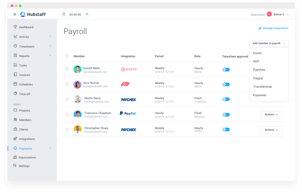
This program has benefited me a lot because easily each one of my employees and I as Administrator, we can remotely control the time that is being worked or in other words, the elapsed time of work, you can also take the extra time, within my company The Payments factor has benefited me more, because with this program we can configure its characteristics and place automatic payments every so often, this factor has saved us a lot of work since we do not have to spend long time to get a figure to pay for each person.
What I like the most about Hubstaff are the following factors: 1.- Taking of time of projects. The taking of time in Hubstaff is quite beneficial and I think that this is the factor that gives a strong point to this software since it shows the amount of time invested in each task performed by each worker for each of its responsible, this platform counts with multiple tools that facilitate access for each person to activate or deactivate the timer whenever you want, this to achieve a better work organization and the employee can enjoy different tasks or tasks, so that the administrator of them , can see the percentage worked for each one. 2.- Define payments automatically. This is the most beneficial thing that it has since thanks to the incorporation of PayPal in this platform, you can pay with a single click to all the employees measuring automatically the time they worked, this is quite innovative since it saves a lot of time to the administrator. 3.- Prices. The prices offered by HubStaff are extremely low and in this way it offers a platform that is quite efficient and beneficial to all those people at affordable prices where a large number of companies with low financial resources can fully access their functions.
I have not found any negative points in this software, since until today I have not had any problems and there has been no interruption, this software is completely designed to measure and with the best innovations in the market, thus providing a platform where the administrator can work efficiently with clients, and provide variable times and extra work times, measure that time to pay an adequate amount of time worked, and the best, automatically. I hope this software continues to offer the best to its customers and without any errors.
This program has benefited me a lot because I have managed to successfully control my staff and have led to a better organization within my company, since we make instant payments and in a conceited and automatic way, it is quite good that the program makes the Most of the work for you because you can dedicate yourself to other more important things while you save time with this software. I hope I continue to provide these benefits over time so that my company can follow the path it is currently going.
Fast and easy to use software. Can quickly get the drill down on information that i need to see performance on VA workers and then view billable hours within a few seconds. The tracker shows you breakdown of mouse and keyboard activity which is very useful for tracking time fraud and on the horizon is a feature where you will see URLs and apps in use at that time too. This is exactly what is needed for working with a remote team in across many different countries.
We have been gamed in the past by VAs and there could be more effort put into eliminating that, opening up more stats from their activity tracker or adding more screen shots at certain times would help.
More productivity and accountability. Works well.

What I like best is that the screenshots. I am able to see what my employees are doing and I am able to correct those things that I don't like. I feel at peace knowing that they aren't just spending their time doing something else and actually do their job. Hubstaff jumpstart my business, created teamwork and best of all, gave me a peace of mind.
I can't find anything I dislike at the moment.
The main problem I am solving for so many years now is productivity with my virtual employees. Hubstaff was able to solve that. I tried a few aside from Hubstaff but I was able to produce more using it. I realized that being able to view your employees screens even for just a second would make them more productive.
Can easyly track your working hours and helpful to manager who do payroll.
Not sending email or schedule of updates in system.
can easily monitor time of your assigned project.

I like its time tracking, Screenshots at regular time intervals, and ability to track URLs browsed.
All features aren't for free, Pricing is a bit high
It helped me in monitoring employee productivity.
Great hour tracker for online jobs. Control many projects, tracking time
Reports are sometimes confusing, especially when a person has the multi-project task
Track the workaround process of each worker

Its a great tool for tracking time and monitoring activity.
The UI on different screen resolutions is not optimised well.
its checking well what tasks staff are working on and when they switch to other tasks.

Its keyboard and mouse tracking. It has helped me see how much I use my keyboard and mouse in 10 minutes and in a weird way motivated me to write more
Probably its screenshot function which my company uses to monitor which page I visit. After 6 months of using it still feels a bit privacy-invasive though I understand the motivation
Hubstaff has helped me keep track of my time and let me see how much content I can produce within a certain timeframe.
It is available for all os platforms, it can easily detect ideal hours and track time for each task, and project and task management is good.
Only the cost seems to be high, other wise other services are good
It is very much helpful in time tracking, project and task management, and employee monitoring
Being a product-based company we have to track all our team members and Hubstaff is very useful in that to follow our employees and their work. Its integration with Jira helps us a lot to create a workflow for our tech team and management team.
The price range is slightly higher than the other employee tracking software. But the product and service team is good.
Hubstaff solve the problem of employee tracking working from home, especially after covid.
Ease of use, web app native app gives flexibility
location only enabled on mobile app and not on laptop
time tracking time logging and employee monitoring
Hubstaff has screenshots and monitoring for tasks and you even put the budget per project and per client. It is also easy to install and they have both webapp and a desktop app.
It doesn't have like software monitoring. What I mean is, as far as I knew when we were using hubstaff, we can't monitor what software the employees are opening and how much time they spend on it.
We solved quite a lot of problems. There's this one instance that the employee had a very bad performance and keep blaming the company for it. Then we recovered screenshots that showed proof of which softwares he is opening and gave us the proof for us to terminate him.
I love it when it accurately describes the work hours I render in the company I am currently working with. It allows me to focus while working and not to be idle.
I feel uncomfortable every time it takes clear screenshots. It would be awesome if the tool also allows the employees to auto-blur their screens as they work.
There are no big problems I encounter with Hubstaff. Yes, I benefit financially and become more productive while using this app. The business performance also increased.
Limited tracking capabilities :) .
1. PC client needs better grid layout (wide TO-DO column) 2. Activity indicator in PC client. Currently, to get my activity, I need to: flush Hubstaff data by stopping and starting it; refresh statistics page
Work time tracking on site page (with filters)

I Felt it was an excellent software.its work better with streamlined time tracking,team and project management.it has become easy to monitor employees time and productivity.
when i was using this software ,some time i felt notifications came littile bit of late.notifications for switching a tracking statues get sent out twice intead of once
it helps me to track my work time for my company so that i can easly calculate the cost of my projects. and also it helps me for improving my work
I love that it gently reminds me when idle and allows me to choose what to do with that idle time.
I hate that everything is automatically check as billable. Really annoying.
Tracking the exact time I'm working without downtime. Benefits are understanding how to charge only for activity.
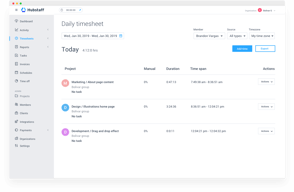
As a digital team, we've been using Hubstaff for time tracking and payroll management for all remote employees. It is a very comprehensive tool that allows adding multiple projects and tracking an employee's time on each project. It has a dashboard with online timesheets that have been useful and easy to use. It creates screenshots of employees' activities and allows adding notes to tracked time.
I feel some element of surveillance when the program takes screenshots of my screen. I need to work a certain number of hours, and sometimes, knowing that I can complete a project faster than planned, I have to simulate cursor activity. As an employee, always I don't particularly appreciate being watched. During the past year, I had several system crash issues during user timesheet logins.
We use Hubstaff as a time tracking, payment management, and employee monitoring tool for our small digital marketing agency, with all employees working remotely.

Hubstaff is an Amazing Workforce Management Tool for organizations. My organization used it for 2 years when the cvid19 pandemic happened. since 2020 I'm using it regularly in the office or working from home and I loved it due to the easy function of Hubstaff. if there is no internet but Hubstaff tracking is on, it tracked by Hubstaff your working time.
Hubstaff totally depends upon the mouse and keyword activity but they should also focus on the screen time. for content writers, always shows low activity due to their work. hubstaff doesn't work on every employee some employees more calls and meeti ng rather than working on a desktop.
Hubstaff manages your workforce activity and easily shows who is working or not. with Hubstaff I can check my activity and the screen time I spent, Hubstaff provides detailed data for the workforce with screenshots.

Hubstaff provides great time tracking possibilities for employees and flexible options for employers to access performance and delivery of the assigned tasks.
This is just my opinion, but dashboard UI is somewhat difficult to navigate.
Tracking time for someone who is switching between tasks, calls, and Slack chats with colleagues is difficult. Life is not linear how Hubstaff projects it to be.
Project time monitoring and recording in detail.
Billing clarity. Multiple emails and repetitive emails
Employee work effort and contribution to each project.
that I can see my PTO right there and don't need human resources to get the info
that it takes screenshots and I can't edit the time manually
my worked time is tracked for the company I work for
Compared to its competitors, HubStaff is the easiest for both our VAs and our HR managers. Easy tracking that isn't too invasive and facilitates compensation.
Currently, I have no complaints. it was at times disappeared with a few hours from some of our VAs but it was quick fix.
We run an e-commerce primarily working with online hirees and VAs. Once we got to 20+ remote workers, it became impossible to track everyone without HubStaff.

Timer is a really great idea because it helps us achieve our work goals
Iddle time is sometimes too quick and screenshots don't work everytime
Hubstaff really helps me achieve properly my time contract work

Hubstaff has enhanced the productivity of my organization as it provides the clear and transparent idea about the entire working due to which I am capable of making more intuitive plan. Whenever my team goes out for the field work this tool provides me the clear picture about their field location thus I can manage the work load by assign the task to the nearest team member to visit certain client.
The thing I like least is that while working on particular projects I have to face problem in dragging and dropping due to which discussing plans become really difficult. Furthermore there should be availability of live chat.
This tool has provided me time sheets and now I have got rid of the spread sheets thus I find it very easy to use software. Further it always equips me with the latest information about the workings of the team member on the basis of which I can easily make the pay rolls and send the invoices.