

Zoho Mail Reviews: 4.4/5 — Solid Choice
Zoho Mail is a component of the wider Zoho ecosystem–a popular choice among small to medium enterprises. It’s preferred for smaller organizations that are working with smaller budgets. The platform offers access to mobile applications and other productivity features, at very affordable rates. Zoho Mail is also secure. The simplicity of the control panel is certainly an advantage and it provides a big-picture overview of communications.
| Company | Zoho Corporation |
|---|---|
| Year founded | 2000 |
| Company size | 10,001+ employees |
| Headquarters | Chennai, Tamil Nadu |
| Social Media |

| Capabilities |
API
|
|---|---|
| Segment |
Small Business
Enterprise
|
| Deployment | Cloud / SaaS / Web-Based, Desktop Mac, Desktop Windows, Mobile Android, Mobile iPad, Mobile iPhone |
| Support | 24/7 (Live rep), Chat, Email/Help Desk, FAQs/Forum, Knowledge Base, Phone Support |
| Training | Documentation |
| Languages | English |
Zoho Mail Pros and Cons
- Great for email attachments
- Email hosting with your own domain
- Tasks and bookmarks included
- Lots of technical support for paid plans
- Affordable pricing
- Limited in terms of advanced features
- Not the best for cloud storage

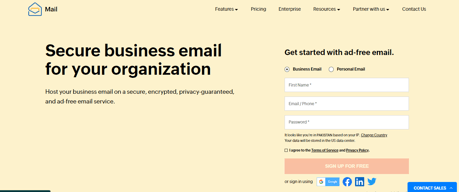
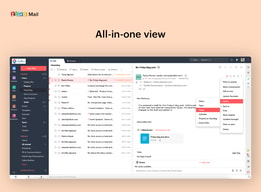
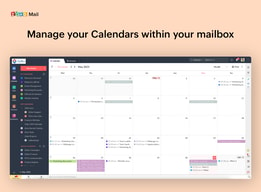
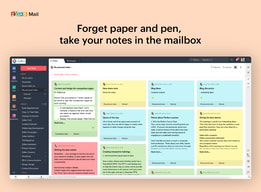



Compare Zoho Mail with other popular tools in the same category.
The user interface is very easy to use, We are able to integrate with the domain very quickly, without any problems, and without paying any single rupees - It's totally free for 2 users.
Although I am using its free email service so nothing to dislike because I am not paying any single rupees, but you can say that sometimes their email is found on spam folder.
If you are a startup and your requirement is to create business emails like you@yourdomain.com, for this Zoho is the only free email provider for a lifetime free plan.
Easy to create a business email account along with 2-factor authentication features.
The interface should be more interactive although it is as expected
I am using Zoho mail service for business email since 2013, I was looking for the lowest price business email provider, and I found them the cheapest by price in the industries and I am your fully satisfied customer of Zoho.

It is simple and straightforward to work with Zoho Mail. It notifies when any inbox emails are left to reply to. We can schedule our emails. It has a good spam protection feature. It also has Android and iOS applications.
Integrating third-party applications is difficult, so there is significant room for improvement. Its dark theme is not up to the mark, it catches eyes. Sometimes, mobile applications freeze.
It is very cost-effective and offers me what I need within my budget. Its email management system is quite good. It is easy to use and has no learning curve. It is secure and reliable as our sent email is never spam at the receiver's end.

I really like that I was given a totally free email service for my company and that is for free, I haven't got to bother with my outgoing email messages going to end users' junk e-mail folders. I additionally like that I'm able to read my email messages using their mobile application.
While using Zoho mail I did not find any negative about this application, it is one of the good applications that provides you with free domain-based business email addresses.
With the use of Zoho mail, we can successfully able to make domain-based business email addresses for our company, which gives a professional look for our business.
The best thing is their anti-spamming feature. Here, we can block the spam, and they do not revert in any condition. It integrates easily with other apps and syncs the data between them. At a budget-friendly price, it offers many mind-blowing features. The support team is very responsive.
Some features are not required at all. They make users confused somewhere, and the beginners face difficulty in using the tool. The UI needs some good improvements to complete the look more extensive and attractive.
It helps me to manage my other things in the same place by integrating and syncing data in between them. I am using this platform mainly to communicate with my team and clients. The calendar and spreadsheet shares data with the mailing tool. It is very secure and reliable to share my data over this platform without any worry. It is the best mailing platform.
Zoho email is incredibly versatile and simple to make use of. You can rapidly and simply point your domain name to zoho mail server and become ready to go in a few minutes. They provide five email users within the free edition, which is sufficient for a new startup.
Absolutely no dislikes for the Zoho mail service, as they provide free options to all the users. With this service, anyone can create five business-based domain-based email accounts.
With the Zoho mail service, we have successfully created our account and created a few domain-based emails for our company and not paying a single penny. It is a great help for us in terms of saving some bucking, which we have to invest in email-based services.
I like having a separate all over account for just business needs. I don't have to worry about mixing up my Gmail accounts. It's pretty user friendly too.
There's nothing unique about it. It's just another email platform. Kinda wish they would add something that is different.
It keeps everything sorted, in the sense that our personal and business are kept separate. Makes everything easier to manage.
Zoho mail is free for up to 5 emails for your organization which is a good thing for startups. With respect to basic functionalities, it provides more or less everything that you need. Even if your business grows and you want an economical option, you may go with this.
User interface is not that great and intuitive. When you compare it with Gmail or Outlook, the user interface is very dull and not at all customer friendly. That is one area which can be improved significantly. Tagging your team members to make them a part of the email chain is a good feature.
Setting up email service for the organization. Was able to set up the email service with Zoho Mail at affordable cost. Setting up meetings through Zoho Mail is not very easy - this could be improved further.
The fact it was free and I could choose a custom email address
Interface was convulted and confusing to use
Creating custom email address for my team for free instead of paying $15 a month via Google
They provide a free plan; this has helped my startup reduce cost and save money by providing a stable and reliable inbox for our mail communications, therefore, giving a hand to our economics. They have a lightweight app for Android that we use a lot. I'm grateful this solution exists.
I think the inbox layout is a bit confusing; there is a clutter of options or actions not essential that makes it look overwhelming. Default settings label messages under tags like Notifications or Newsletter, but new messages don't appear on the inbox tab. I think there is some space for tweaking things like this to make it easier to use, for starters.
Email for us is a must-have tool for communicating with the booking agencies because they don't tend to answer calls, so every artist we contact asked for emails to negotiating terms for gigs or legal matters. So it is an essential tool for our daily activities.
Zoho mail allows smooth, safe, and reliable business emailing. It comes loaded with a number of features aimed at making your business communication easy and organized. The inbox has it all - bookmarks, integrated calendars, contacts, notes, and tasks - in one place, making our job simple and fast. It is also very easy to manage users and their activities (or roles). One can also set up group email accounts for specific teams, which is an amazing feature for team collaborations. Another really nice feature is the option of adding email signatures and how they can be automated for every new mail and even replies and forwards. In a nutshell, Zoho is a really great emailing tool for businesses wanting to save time and be more productive while communicating!
I have been using Zoho mail for about a year now and it has always been extremely useful and helpful! There is nothing specific about it that I dislike and I'm very happy to be using it for business emailing.
I have to use Zoho Mail on a regular basis for communicating and reaching out to potential clients and customers. My favorite thing about this tool is how organized it is. There are separate sections for the calendar, notes, bookmarks, etc, and you also get to create your own categories. In addition to having a custom domain, Zoho is absolutely secure and reliable. This makes it a perfect business emailing tool!

I used Zoho Mail as my customer CRM for one of my websites. Zoho will remind me to do my task and will automate business management. I find it very useful and continuing used it till now
They have many features that is good for business but I don't use them. If I can customize the panel it will be great because I don't like to see functions that I not use.
Zoho Mail is helping me to manage my customer support and automate the relationship with my customers.
I have been using Zoho Mail since 2+ years which provides a platform for the organization to communicate within inbox. It is great for sending professional mails having wide range of features such as including tables, various font styles, customized signature, store notes, etc.
Sometimes its hard to select the receipients name from the droplist in Zoho Mail App. Apart from that, this is simple to use.
Free platform to manage custom domain emails, Mobile view supported, Customized font color and size, attractive interface.

Zoho gives a set of software packages that makes cloud computing a cutting edge experience. Zoho mail comes as a part of that package. This business email is secured and super fast. Unlike Outlook, the Zoho Mail doesn't take much of the PC performance. So even in a lowest configured PC we can get a good use of Zoho Mail software.
Nothing much to dislike with Zoho mail, it actually has got all the functionalities of leading mail services and that too with a low CPU usage
Zoho mail has a sophisticated page called Feeds where all Zoho mails are lined up as conversation where your comment are sent back as reply with your signature. Also Zoho cliq is configured in Zoho mail app too so whole drafting a mail we can use reply via Zoho cliq without even switching screen.
I have recently started using this Zoho mailing services, pervious I use to send my mails through Gmail, the thing I liked about Zoho is that you get your company's logo along with the signature in app as well, which is not the case with Gmail, I had to turn on the laptop more often than not, just to send some mail so that my company's logo is visible. However, with Zoho that is not the case so it is more convenient, don't have to wait to send a mail through laptop anymore. Secondly I got it free, since my brother is a developer he managed to get me the ID without paying anything, so a service which is free and works well is music to my ears..
Although they have made everything good, but not perfect. The application does not offers many features such as highlighting anything, like background colour or text color, it doesn't even have option of underlying, so you can imagine. It is a basic app, where in you can just send simple text emails. We raised this issue but it wasn't paid attention, our job to speak, sometime we are heard sometime we are not. Although I've kept notifications on for zoho, butit doesn't notifies when a mail is received, this make you wait and keep checking the app again and again
Zoho mail helps you look more professional, it leaves a different impact when your email id does nir ends with @gmail.com and it gives you more confidence as an entrepreneur and leaves a good impression on the other side. It's a professional world and here many times you are not seen, you are judged with the your words and your business profile. So having a good website and a professional email makes the top list. I'm into hospitality business, my guest feel as sense of security when a confirmation is sent to them with the ending part is of my company and not Gmail.
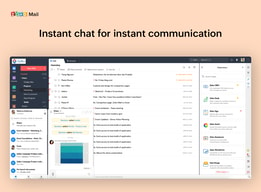
Zoho mail offers a free plan that can be used by five people who each get 5 GBs of storage. CRM feature is included in the free plan as well. It has every extra feature such as calendar, notes, task manager that you expect from a similar app. It also has a built-in chat system that is very easy to use.
It's not much of a problem for me but the storage space for the free version is limited to 5GB which I think is very small.
We now use Zoho to send and store our emails, CRM feature helps us to manage our customer engagement and the task manager lets us stay focused.
Ease of Use and functionality is great. Great interface makes it easy to use other functionalities of Zoho Mail. Free plan offers 5 user permit and enough storage which is great for small businesses. Spreadsheets, Crm, Forms are really useful. Besides due to this pandemic time they updated the zoho meeting that is a great alternative of zoom meetings. Overall it is all in one so I do not need to open a lot of different webpage tabs.
I do not have any problem with Zoho mail thanks to the developers but in paid plan they can give more storage. They just make it competitive with G suite but it would be much better if they can make the server irreplaceable for the users.
It helps to manage the daily work at job like emailing, communicating colleagues, videoconferencing, building reports with spreadsheets and etc.

I use Zoho CRM now it's still implementing, we are in the comparing mode with Gmail, still looking what's best feature in Zoho Mail
the UI is not really user friendly, Zoho mail really needs a new designer
still looking for more benefits most of the features are already covered by Gmail

Zoho allows you to have multiple email addresses for your domain and some of those can conveniently be set up to direct to a single inbox or to all inboxes so that if an email is sent to for example to your info email address it gets forwarded to other accounts to ensure someone sees it. It is designed to work with teams and you can synchronise calendar activities and events The support team are also very responsive and can be contacted via social media.
The initial setting up can take a bit of learning curve as you figure out how to configure your domain for Zoho mail. also when you are done there are some advanced settings you have to do to make sure that your emails are not treated as spam. The browser version takes a bit of time to load especially when you have low bandwidth internet and does not come with the convenience of being able to switch between accounts unlike when you use the desktop app or the mobile app
Having a professional email address for your brand makes you stand out than having a generic email address. On the go email access you your site's email
It is very useful if you want to implement or block calender invite quickly, also for a small sized organisation this is very wonderful tool that also comes with other CRM suite.
The look is very basic and you can't select any template to change the appearance, Hence the looks are very basic and I have also encountered that the notifications doesn't updates frequently and it slows down from there. It gets difficult to integrate zoho mail with other products.
The best thing that I have found well with Zoho is that we are able to have our own domain, and they charge a very less price for hosting these services and hence sending out mail and also blocking calender invites for interviews is easier.

for opening a business mail, Google charge a lot than Zoho,and now a days Zoho is expending their services.
sometimes its get slow for their internal server issues may be.but its really for small time.and ui have to be more attractive.
we use it as our business eMail for our company.it has also phone app.so easily use it and costs efficient.
1. It has a friendly interface. Colors can be customized. 2. It has an affordable cost. 3. Signatures can be automatically attached to the end of each email. 4. It is capable of filtering spam emails. 5. It has apps for Android and iOS. 6. Can be integrated with Zoho Meeting to schedule meetings with your calendar.
1. The maximum size limit for attaching a file is 25 MB. 2. Does not allow uploading .zip files
We are using Zoho Mail as a corporate email service as it is really affordable and very easy to use. Also, we can keep it on our mobile devices. Another benefit of using Zoho Mail is that we were able to integrate it with our Zoho Meeting account and we can schedule virtual meetings directly from your calendar.
Zoho mail integrates with a large amount of apps. You have up to 5 mails that are for free. The clients user interface is userfriendly and employees find it easy to navigate through. The signing up procedure is really easy, just follow the procedure.
The storage limit is a little bit low, sooner or later you will find yourself having to buy upgrades in order to continue using the software.
We did not wanted a Microsoft or Google mail client so we stumbled upon zoho mail. It has everything you need as a Mail provider. It is easy to handle and gives you a lot of features.
Zoho mail provides all features that anyone would need for an effective email client to have. Very popular integration with most 3rd party services. Mobile apps are available which means a real time saver. Easily integrates with domain and website SMTP.
I haven't found anything to dislike here, I am very much happy and satisfied with the way promorepublic works.
Biggest plus point of using Zoho Mail service is it's pricing model which is really very cheap. It provides all features a professional email solution needs to provide.

The most appealing feature of Zoho Mail as per my experience is that it shows a tick mark to the sent email that helps me ensure that it has been delivered.
Recovering user password must require consultation with an admin to recover the account back which is the aversion side of a Zoho Mail as per my experience.
Zoho Mail has become an affordable professional email management platform for our startup. Additionally, it is accessible through mobile, web, and desktop as well which makes it a versatile email management platform.

This software is very clean UI services easy to navigate and check emails. it is easily ability to integrate websites domains with zoho mails. it gives alternative system to common free emails and also offers many emails. it is continuously improving and adding new and best feature. it gives excellent email client. it gives best email services and allow to use my brand name.
In this software sometime behave badly in copy and paste services. it gives limited amount of storage space per email address before email account become locked. sometime it automatically reduces number of emails. it does not provide many plugin or connectors to external parties.
The best services of this software is the free services. it is very easy to access in mobile app. the spam filter is very high and excellent. it is easily allow to contact with new client and team member. now this time I am not using this software because it takes very long time to load files and email and also create some problem after upgrading the mail client.
I love the layout and the price is brilliant also has good features for your daily needs
The free storge is not good and you'll have to upgrade it fairly quicking
Looking to a new email provider on the cheaper side
Wow! I have to appreciate the fact that the app is so responsive. It is very easy to update and has a user friendly interface. The login process is swift which makes it cool. Why cant we then talk about the filtering ability! This mail has the night mode ability, Huh! my eyesight is saved. We have enjoyed the Zoho Docs feature in creating our work. Great one
I do not the fact that it takes a lot of data to use it. Most times i get myself in a position of stepping up my data plans or wait till i reach a WiFi connected area.The forward option does not work well, it turns back to the previous step when sharing. Then i have always got problems with zooming which i find a requirement you should handle.
Our company communication problems have been solved. We are able to share a lot within a single click. We are solving the communication delay challenges using ZohoMail. Our presentation quality has improved because we together contributed towards a group presentation at times of our convenience.
Zoho Mail is free for up to five people which could be enough for a smaller business to run their domain hosted email on. The Zoho Mail email client is pretty simple to set up and use as well. There are anti-spam features, just like those of the main email clients. You can use this mail on your phone with the Zoho app which is an added bonus for anyone who checks their email on the fly.
There is not much support for Zoho Mail, but it is not really needed given the resources online and the simplicity of this software as an email client which many people are familiar with. There are of course more features available in GSuite or Outlook, but this can be expected given that the software is free. When I first set up Zoho Mail, I had some issues receiving emails, but sending was always fine. The situation seemed to resolve itself on its own, so I am not quite sure what the issue was with this.
The use of an email client to send and receive emails for a business email connected to a domain.
I mainly love the calendar. We can add each other in multiple groups and see each others planning for the day on it. This way we can easily see who has time to pick up an issue on gitlab or plan around it. Being able to add emails to the calender also makes this a lot easier.
I haven't really had big dislikes yet, in the 2 years that I have used zoho. But I guess if I had to pick something, I'd say it is the fact that I sometimes have to 'search' for certain options.
Zoho helps us to check each other's planning for the week and adjust/assign gitlab issues based on that. It saves the trouble of asking around who has time. Of course the main reason we use it is for the mail, but this sure helps to make me love zoho