

Unclaimed: Are you working at Hubstaff?
Hubstaff Reviews: 4.3/5 — Solid Choice
Hubstaff is a project management software as well as a time tracking platform designed to oversee employee productivity and ensure transparency across team projects. Businesses are partial to Hubstaff’s time-tracking tools which are coupled with a budget and financial planning for projects while facilitating better team communication.

| Capabilities |
API
|
|---|---|
| Segment |
Small Business
Mid Market
Enterprise
|
| Deployment | Cloud / SaaS / Web-Based, Desktop Mac, Desktop Windows, Mobile Android, Mobile iPad, Mobile iPhone, On-Premise Linux |
| Training | Documentation |
| Languages | English |




Hubstaff charges $1.67 per seat for data retention and $2.50 per seat for additional screenshots — on all four plans, including the $25 Enterprise tier. Every other add-on eventually becomes “Included” as you climb; those two never do. So an Enterprise seat is $29.17 rather than $25, and a Starter seat with everything it can have runs to $16.66 against a $4.99 headline — more than three times the advertised price.
- What it is: A time tracking and workforce management platform with screenshots, GPS, payroll and scheduling.
- Best for: Distributed teams needing proof-of-work tracking alongside payments.
- Pricing: Starter $4.99, Grow $7.50, Team $10, Enterprise $25 per seat monthly on annual billing. Verified July 2026.
- The honest catch: A two-seat minimum on every published plan, and six separately priced add-ons.
What Is Hubstaff?
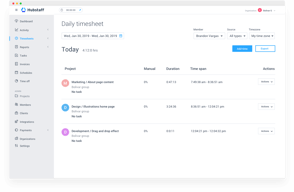
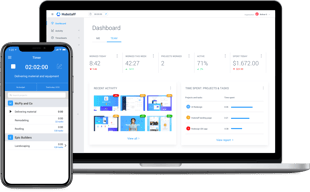
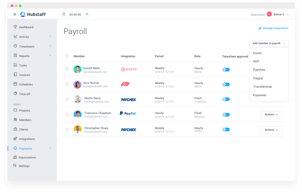
Hubstaff tracks time and activity for distributed teams: a multi-platform timer, timesheets and approvals, screenshots, idle-time detection, GPS locations, scheduling, and payroll. It holds G2 Leader status with more than 1,700 reviews.

The structure is four tiers plus a customisable add-on layer — Insights, Tasks, Data retention, More screenshots, Locations and Silent app — each priced per seat per month and each gated differently by tier.
A 14-day free trial runs with no credit card, backed by a 30-day money-back guarantee.
How Hubstaff Works
- Priced per seat, with a two-seat minimum on all published plans.
- Six add-ons, each priced per seat per month.
- Two add-ons are charged on every tier, Enterprise included.
- Locations is unavailable on the two cheapest plans at any price.
- Annual billing beats its own “2 months free” claim on Starter.
- Enterprise is annual-only.
Hubstaff Pricing
Captured from Hubstaff’s pricing page in July 2026 in US dollars, reading both billing toggles.
| Plan | Annual (per seat/mo) | Monthly | Saving | Minimum |
|---|---|---|---|---|
| Starter | $4.99 | $7 | 28.7% | 2 seats |
| Grow | $7.50 | $9 | 16.7% | 2 seats |
| Team | $10 | $12 | 16.7% | 2 seats |
| Enterprise | $25 | Annual only | — | — |
| Add-on | Starter | Grow | Team | Enterprise |
|---|---|---|---|---|
| Data retention | $1.67 | $1.67 | $1.67 | $1.67 |
| More screenshots | $2.50 | $2.50 | $2.50 | $2.50 |
| Insights | $2.50 | $2.50 | 3-month trial | Included |
| Tasks | $2.50 | Included | Included | Included |
| Silent app | $2.50 | $2.50 | $2.50 | Included |
| Locations | Not available | Not available | $3.33 | Included |

What actually decides your cost:
- Two add-ons never become included. Data retention at $1.67 and More screenshots at $2.50 are charged per seat on Starter, Grow, Team and Enterprise alike. Every other add-on resolves into the plan at some tier; these two do not, which means the $25 Enterprise plan is really $29.17 per seat if you want either.
- A fully-equipped Starter seat costs $16.66. Add Insights, Tasks, Data retention, More screenshots and Silent app to the $4.99 base and that is the total — 3.3 times the headline, and still without Locations, which Starter cannot buy at any price. Grow lands at almost exactly the same place, $16.67, because Tasks comes included there.
- Grow is the better buy once add-ons are in play. Starter at $4.99 plus five add-ons and Grow at $7.50 plus four cost within a cent of each other, and Grow brings advanced reporting and an integration. If you need more than the bare timer, the $2.51 gap closes itself.
- Locations is genuinely unavailable below Team. Not expensive, not gated behind a bundle — “Not available”. If GPS tracking is why you are evaluating Hubstaff, your entry price is the $10 Team plan plus $3.33, not $4.99.
- The annual discount beats its own advertising on Starter. The toggle says “2 months free”. On Grow and Team that is exactly right — $9 to $7.50 and $12 to $10, both precisely 16.7%. On Starter, $7 falls to $4.99, which is 28.7% — closer to three and a half months free than two. Hubstaff is under-claiming on its cheapest plan.
- Two seats is the floor. Every published plan states a two-seat minimum, so the real entry cost is $9.98 a month rather than $4.99. A sole trader cannot buy Hubstaff at the advertised rate.
Who Should Use Hubstaff
- Distributed teams needing proof of work. The clearest case — screenshots, activity levels and idle detection.
- Field teams. GPS locations from the Team plan, included on Enterprise.
- Agencies paying contractors. Payments and scheduling arrive at Team.
- Small teams on a budget. Starter at $4.99 is genuinely cheap if you need only the timer.
It fits poorly for sole traders, given the two-seat minimum; for anyone needing GPS on a budget, since Locations requires Team; and for buyers comparing headline rates, because the add-on layer changes the answer substantially.
Honest Pros and Cons
Strengths
- $4.99 per seat for capable time tracking.
- The Starter annual discount is 28.7%, better than the “2 months free” advertised.
- Every add-on price is published per seat and per tier.
- A 14-day trial with no card, plus a 30-day money-back guarantee.
- G2 Leader with 1,700-plus reviews.
- Tasks included from Grow, rather than sold at every tier.
Limitations
- Data retention and More screenshots are charged on every tier, Enterprise included.
- A fully-equipped Starter seat is $16.66, 3.3× the headline.
- Locations is unavailable on Starter and Grow at any price.
- A two-seat minimum on all published plans.
- Enterprise is annual-only with no monthly option.
- Six separate add-ons to price before comparing.
Hubstaff Alternatives and How It Compares
- Toggl Track and Clockify are the simpler time trackers, both with generous free tiers.
- Harvest pairs time tracking with invoicing for professional services.
- Connecteam targets deskless and field teams with scheduling and communication.
- TimeCamp and Everhour focus on project time and budget tracking.
- ActivTrak and Teramind are the dedicated employee monitoring platforms.
For a broader survey, browse our time tracking directory.
The Verdict
Hubstaff is a capable and well-reviewed workforce tracking platform, and at $4.99 per seat on annual billing the entry price is genuinely low for what the timer does. It also deserves credit for publishing every add-on price openly, per seat and per tier, rather than hiding the modular layer behind a sales call — and for an annual discount on Starter that is 28.7%, comfortably better than the “2 months free” it advertises. On Grow and Team the two-months claim is exactly right, at 16.7% each.
Where care is needed is the add-on layer, because it changes the comparison substantially. A Starter seat with everything Starter can have costs $16.66 — 3.3 times the headline — and even then cannot get GPS Locations, which is marked “Not available” below the Team plan. Grow with its four applicable add-ons lands at $16.67, within a cent, while including Tasks and adding reporting and an integration. So if you need more than a bare timer, the apparent $2.51 gap between Starter and Grow disappears entirely, and Grow is the better plan.
The detail worth knowing before any negotiation is at the top of the range. Data retention at $1.67 and More screenshots at $2.50 are charged per seat on every single tier, including Enterprise at $25. Insights, Tasks, Silent app and Locations all resolve into “Included” by the time you reach Enterprise; those two never do. A company paying $25 a seat and expecting a complete product will find its actual rate is $29.17. That is not a large sum per head, but it is an unusual thing to meter on a top tier, and it is worth raising explicitly when a quote is being drawn up.
FAQ
How much does Hubstaff cost?
Captured in July 2026 in US dollars. On annual billing: Starter $4.99 per seat per month, Grow $7.50, Team $10, and Enterprise $25. On monthly billing, Starter is $7, Grow $9 and Team $12; Enterprise is annual only. Every published plan carries a two-seat minimum, so the real entry cost is $9.98 a month. Six add-ons are priced separately per seat.
What does Hubstaff charge extra for?
Six add-ons, each per seat per month: Insights $2.50, Tasks $2.50, Data retention $1.67, More screenshots $2.50, Locations $3.33, and Silent app $2.50. Most become included at higher tiers, but Data retention and More screenshots are charged on all four plans including Enterprise. Locations is not available at all on Starter or Grow.
Is Hubstaff’s Starter plan enough?
Only for basic tracking. At $4.99 it covers the timer, timesheets and core reporting, but Tasks, Insights, Data retention, More screenshots and Silent app are all paid add-ons, and GPS Locations cannot be purchased at all. Adding everything available takes a Starter seat to $16.66 — at which point Grow, at $16.67 fully equipped, is the better plan because it includes Tasks and adds reporting.
Does Hubstaff really give two months free on annual billing?
On Grow and Team, exactly — $9 falls to $7.50 and $12 to $10, both 16.7%. On Starter the discount is better than advertised: $7 falls to $4.99, a saving of 28.7%, equivalent to roughly three and a half months free rather than two. Enterprise is billed annually only, with no monthly rate to compare against.
Does Hubstaff have a minimum number of users?
Yes, two seats on Starter, Grow and Team — stated on each plan card. That makes the cheapest possible subscription $9.98 per month on annual billing rather than $4.99, and means a sole trader cannot buy the product at the advertised per-seat rate. Enterprise pricing is quoted per seat with no stated minimum on the page.

Compare Hubstaff with other popular tools in the same category.
I like the fact that it details activity level, is easy to comprehend and set up, and it does not clutter the computer too much. It's easy for my company's HR team and payroll to process my payments efficiently.
I wish there were different layouts to choose from for you to customize your app.
It allows me to show my company I'm being productive and meeting my work hours goal. It benefits me to show productivity and since it stops @ 20 mins of inactivity, it shows my employer I'm always working since my tracker does not stop :)

It's very easy to use, implimentationw as also easy. I have to use it daily for my job.
The constant updates, feels like the send updates every week!
It's helpiung me track my time so I can report that time back to my employer
It lets me see how many hours i've worked daily and weekly. It also allows me to see my activity through screenshots .
Nothing at all! I enjoy using Hubstaff, it's the best time tracking app.
It solves the problem of attendance sheets and tracking your own time.
Time tracking is fool proof, excellent tool if you have remote teams working on your project. Screenshort feature is one of the best option, that is not avaiable in other tools
Indian payment gateways shall be integrated
We use hubstaff mainly to Managing remote employees, it helps us in, Managing efficiency of team members Assigning tasks Project Management Being Productive Invoicing to client based on employee worklogs
It is convenient for our team to time in and time out our daily progress in every thing we work on. This makes us more effecient in what we do.
There's not much thing i dislike about Hubstaff.
Hubstaff makes our life easy in tracking our progress that we are currently working on.
Establishes transparency encouraging productivity
Do not have a timer to show how much time on current session I am spending. Shows only the cumulative time. Also FIXED PRICING.
Employees like REMOTE WORK. But was a nightmare to track time and productivity. Also to trust them and make them more responsible.

Hubstaff is easy to use and navigate. You track your work hours very easily and you can see your work progress very easily too. It's great for employees as well as employers.
So far I can't point a thing that I definitely don't like.
It helps with tracking my work and that helps my employe.
Hubstaff is a time-tracking software that helps businesses manage their remote workforce. It allows employers to track the hours worked by employees, monitor their productivity, and generate detailed reports. Hubstaff also offers invoicing, project management, and GPS tracking features. It can be used on various platforms, including Windows, Mac, and mobile devices.
Additionally, the accuracy of the time tracking and productivity metrics may be impacted by technical issues or difficulties with implementation. Furthermore, relying solely on software to manage remote workers may not address other important factors that contribute to productivity and job satisfaction, such as effective communication, feedback, and support.
One of the main problems that Hubstaff aims to solve is the challenge of managing a remote workforce. With the rise of remote work, it can be challenging for businesses to track the time and productivity of employees who are not physically present in the office. Hubstaff offers a solution by providing a way to track the hours worked by remote employees, monitor their productivity, and generate detailed reports.
Filter tracking time by month. Tracking time( if I was missing turn off, Hubstaff helps me tracking those activities, and I can remove it). Thanks
I really like Hubstaff, so I don't dislike you! :D
not yet
Screenshots feature with activity level calculation for each shot Calculated payment figures given by them across week for the employees Excellent app for all of my needs
No noticeable drawback that bothers me while using HubStaff
My problem was to do time tracking with screenshots and activity levels. I tried several apps, but ultimately my search for an ideal app stopped with HubStaff
it helps us to track directly with Jira so no need to enter time manually in tickets
It doesn't show the last screenshot taken directly in the app. and remove like Upwork
N/A

Effective to track time and see hours report Easy to just assign task with details and see them marked done the next time. Helps to create pay rolls Easy track of projects and sub tasks assigned Weekly and monthly report to adminstrator Better allocate employees hours
It is difficult to copy sections among the boards
Easy to keep track on hours spent and allocation and quick to see the weekly and monthly reports that helps to better allocate and remove bugs in time investment strategies.
I like the convenience of keeping track of my hours weekly. Just wish we can track our hourly wage and hours throughout the week
The app on my MacBook air continues to crash
clocking in with a physical time card
I love the integration with the Wise/Payal. Extremely seemless.
I believe sometimes my employees indicate that Hubstaff turns off if it's not in plain view on their Desktop.
It's helping me monitor and track my employees. It also auto calculates their paycheck which I really love.

What I like the most about HS is that it's not immensely obstructive, like other time tracking software. It also doesn't really utilize a lot of PC resources, so if you are an employer that wants ppl with PCs that are not super powerful, you can have them use Hubstaff without any trouble.
I would say that the biggest downside of Hubstaff is of course like almost all other TT software out there: privacy. Which I guess ultimately is a sacrifice a lot of employees are willing to make for the benefit of W@Home etc. But yes, Hubstaff will track pretty much everything the user does, which might not be great from the persepective of the user, but then again, they are supposed to be working so it is ultimately somewhat of a moot point.
Well the main problem that Hubstaff solves is providing a software solution for the big question a lot of employers have had about remote work: how do I make sure my employees are actually working when they are supposed to be working, but I don't have a way to physically monitor them?
It is very quick and impressive software for time tracking and project management. The candidate can select the project and track the time and the admin can see it with a detailed report.
Sometime server issues there and not able to manage the tracker, many updates are there in weekly basis.
Employee monitoring and time tracking solved by Hubstaff
What I like the best is the time tracking feature
There is not much I dislike since as of now I haven't had any issues.
The time tracking problem Hubstaff has definitely been a great helper on that.
It is providing time tracking, task management and many more features so these are the points I liked most.
Pricing is a bit high otherwise it will be all fine.
Time tracking, task management and employee monitoring
I love that this software integrates seamlessly with Asana and allows me to track my time from anywhere. It's been a great help to me as an SEO consultant, helping me be mindful of how I spend time on growing/maintaining my business.
In Asana and the Chrome extension, sometimes it doesn't add a timer option to a new task that I've assigned. However, it's a minor thing since it automatically sinks within the website dashboard.
I'm solving time tracking for myself and the contractors I hire. This tool helps me be mindful of my time now AND it's giving me an idea of what my business' true capacity is. This is helpful for strategic planning.

Hubstaff is one of the excellent time tracking software for IT staff; we can easily track the time, take screenshots, manage projects etc.
Nothing is there which can consider as dislike.
Employee Monitoring, Project management, time tracking and many more
I love keeping track of exactly what I am doing during the day! I like how I can add notes to each project to be more detailed as well.
I don't dislike anything! Everything is very easy to use!
I am being more efficient during my work day, getting more done, and staying on track.
I have been using Hubstaff for two years, and it is an excellent product with time tracking management. Our entire organization has used it for a long and we highly recommend it.
Except for the pricing, everything is way perfect.
Many issues like time tracking, project assignment, and employee screen monitoring, and many other things were resolved by Hubstaff.

I love the time tracker and screen capture. It's amazing the fact the platform allows me to see the team overall performance
I don't like very much the time off request tool. Also, the integration with Zapier is really poor.
I can keep tracking of the projects the team members are working on
Hubstaff is a very useful tool for any company that has remote or even in-office employees. You are able to track employees hours in a detailed way, see random screenshots, and also get clairty on the quality of their work based on their activity. Depending on your payment structure it is easy to do payroll through Hubstaff to your employees.
Not much! Wish it linked with Payoneer which is our payment processor for our employees so we can do our payroll through there. But not much else is really wrong with it.
Benefits are easy to use, easy to track. Also their support is excellent. Shout out to Win! He is super helpful and always there to answer questions and help us when needed
Not only you can monitor and organize the work of the team, but they can track time spent on each activity and improve their dead time. it's amazing! the dashboard is filterable and you can select the period to view plus you have the % for activities. If you have 0% activity then it automatically discards that time and deletes the screenshots. And you
It is very annoying if you are in a zoom call it discards time if you did not click in the past 20 min. You are in a zoom call! You cannot click. And if you are other applications for meetings it's the same. if you are in a webinar and such the same deal. I would appreciate if this would be changed.
We make sure the team is analyzing the time dedicated per each project and that they manage the project accordingly. it also helps them improve as they can see what is dead time and what is productive time hence they can take better breaks and know when it's time to stop. We also can make sure no one is overworking, so if they have their 40 hours done, then it's time to go home.

the best thing with Hubstaff is you can track the project working hours indivisibly.
nothing \as such but the pricing is too high as compare to other software.
the main benefit is you can track project hours for different clients. and assign different tasks to all employees. and in additional you can prepare a work performance sheet from the track hours. And also it takes screenshots every 05 minutes so you can make sure that your employee is working properly.

I love that it's easy to use, I can track what my team is doing right away, and give powerful insights to calculate how many hours a project can be done
They should highlight the reminder feature for not forgetting to start tracking. Most of my employees forgot about activating even option to schedule the reminders
I can know my team is working on my projects, measuring their performance, and calculating the number of hours and rate they cost to my business
Best to use, and it is straightforward to use and light it also accurate and suitable. Very easy to use and also gives precise time tracking details along with the screenshots for better understanding.
neither it doesn't have any dislikes from me, but there has to be an option for the desktop app to switch among multiple users if they are using the same machine, i.e.
We have problem tracking the employee's task progress and management between them using the Hubstaff we all are streamlined the projects or tasks among team members and also tracked them eventually.
Onboarding users to our company project is literally 3 clicks and it's one of the easiest tools I've come across for time tracking and productivity tracking I've used to date. I also like the feature where Hubstaff shows your average productivity on a daily basis, the encouraging emails on days when your activity is high (above 50%) is also nice :)
Payroll integration is a bit messy when starting however the customer relations team is very understanding and knowledgeable.
It's a one-stop shop to monitor our employees. With a vast majority of our team working in different countries, Hubstaff has made it easy for us to monitor, review and pay our team members located in several regions.
customer support is great. as a team, we love to have someone to ask about the service, and is like having an expert on the team!
Not having a project where the activity is not evaluated, bc some of our creative processes, involve only traking time
Time tracking and activity monotoring. We've realized productivity is not always linked to activity but to other variable as well