

Unclaimed: Are you working at Kintone?





Kintone Reviews: 4.6/5 — Highly Rated
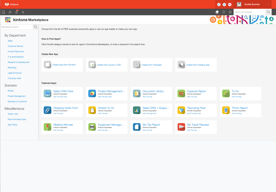
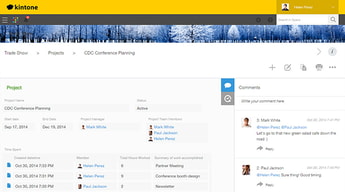
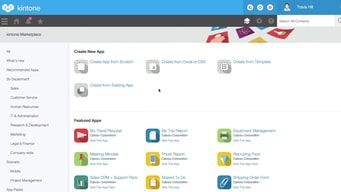
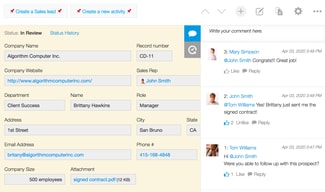
Kintone is a no-code platform that is perfect for non-technical users who want to create apps, workflows, and databases for their teams and organizations. Using clicks instead of code, Kintone can help you build apps that automate business processes, collaborate on tasks, and deliver comprehensive data. Kintone also has dozens of pre-built applications for a variety of use cases such as CRM, project management, inventory management, and much more.


| Capabilities |
API
|
|---|---|
| Segment |
Small Business
Mid Market
Enterprise
|
| Deployment | Cloud / SaaS / Web-Based, Mobile Android, Mobile iPad, Mobile iPhone |
| Support | 24/7 (Live rep), Chat, Email/Help Desk, FAQs/Forum, Knowledge Base, Phone Support |
| Training | Documentation |
| Languages | English |

Compare Kintone with other popular tools in the same category.
Kintone has built data visualization and data management apps for our sports performance department. It saves us time and energy to help make decisions with the data collected. They have fantastic customer service and are helpful through the entire process.
The visulaizations are simple and not as flashy as others.
When we collect GPS data on athletes, there are many equations and graphs that need to be calculated. Kintone allows us to upload 1 .csv file and the calculations and graphs are created in the app with the data.
The ability to simply drag and drop to create a database for our company
In the six months I've been using it, absolutely nothing.
Kintone has transformed our data. Previously, every department and account manager had their own spreadsheet with client information that was relevant to them. There were other spreadsheets for billing and/or annual projects. If a client’s address changed or they hired a new point person, not everyone was updating their data if it wasn’t pertinent to them. This created problems as no one knew which information was the most recent - or if we did, the most recent info was unfortunately saved in more than one spreadsheet. Kintone gives us one central place to store information and provides different views for each manager or project we are working on. Fields like billing can be hidden from certain users or departments. Process management allows users to keep track of projects that require multiple steps and users. A variety of field selections (multi-select, check box, text, date, etc) ensure that there are no typos or inconsistencies in our data. Automated notifications eliminate the step of emailing a team member when a step is completed. Reminders eliminate the need to separately enter info in a calendar and additionally provide a link to the exact task. The icing on the cake is the ability to create saved graphs that allow management to quickly see how the business is doing at any given moment in time. Understanding Kintone’s use of fields, apps, mappings, forms and views took a little patience but I could not be happier with their sales and support staff. I cannot say enough about Pavan and Charles. The two of them always made themselves available and always had a solution for what we needed. It’s no secret that they are technically superior to my marketing mind, yet they were always able to explain things to me so that I understood the reasoning. I highly recommend Kintone. The time dedicated to understanding, learning and using it, will be nothing compared to the time you save looking for information that’s scattered throughout your company. Let’s not forget the peace of mind you’ll have when you confidently export the information you need with the simple click of a button.

The customizations as well as the helpful staff
I do wish more automation features were built in
Overall client file managment
Easy to configure and maintain...even I can do it. I alos love to app!
Nothing..I LOVE it all. Super easy to use.
We now have a standardized collaboration tool that allows us to maintain students' registrations with instructor assignments. We deleted our clunky spreadsheets.
Tim Edingfield is Kintones saving grace. There are several products out there that are similar to Kintone and would have provided us with the same outcome that we were looking for, however, there is only 1 Tim and he is the reason that we ultimately chose Kintone. From the beginning all the way through implementation, Tim's patience and knowledge was a blessing.
The reporting can be a little tricky when trying to capture historical data.
Kintone is allowing us to have multiple functions of our business consolidated into one application.
We are a non-profit using Kintone to organize the products we make available to supporters of our project. We have been using Kintone for over 3 years. Kintone is so easy to set up and make changes as we grow. The training for our application is so quick since it's customized for our needs and not some standarized software. We give our suppliers access to our apps which makes eliminates duplication of effort and insures accurate and timely information. Kintone support is excellent.
Kintone has been able to handle all of our needs.
Organizing the ordering, shipping and management of our product
I've built a sales database for our brokerage, and its ability to track and compare all attributes of different sales has made it a great tool. I can pull up comparables in seconds, and generate graphs to show trends super easily. While I am quite computer-literate, I am by no means an IT guy, but I have still been able to successfully dive deep into the function of this app and get the results I am looking for. ALSO, the customer service team here has hands down been the best and most responsive of any business app we have ever signed up for. They answer your questions super quickly and with fantastic knowledge and detail.
There are a few things I'd love to see this app be able to do that it can't, but they are very very specific, and I haven't been able to find any competitor programs that have better solutions than Kintone. (Things like daily updates to track how long a product has been listed for sale, comparing today's date to the listed date. They found a very functional workaround for this, but total automation on that would be great for me.) Again, general database things work flawlessly, and even for outside the box items like that, they still worked hard and found a good workaround for me.
Helps us analyze the market trends in our industry, and rapidly produce comparables.
We are able to use Kintone in multiple ways to assist in various departments of our organization. The apps we have built get used every day to complete tasks that were previously tedious and disconnected.
The library of available plugins is expanding, but still not quite sufficient for all of our needs.
We have been able to replace several more specialized software options by building Kintone apps with similar functionality.
Very user friendly. Easy to use for those who aren't tech savvy, for example, you can create an Application very easily with an Excel/CSV file. They also have various methods of integration - from utilizing API to having plugins to directly connect your data. I also found that the customer support is very helpful and is helping our company realize our data/analysis needs into fruition. 10/10.
From my experience, though limited it is, I am having to rewire my brain around different ways of setting simple settings from other Database Applications like Primary Key & Foreign Keys. I'm sure it's the same but I'm still having to wrap my head around it.
Our problem was having data decentralize. Kintone is helping us centralize the one source of truth for analytics and reports.
One all-encompassing data entry and management platform that can be utilized and accessed by my team from anywhere they have access to their computer and internet. Easy to sort and track all data for programs, inventory, and volunteers.
The need to add additional add-ons or paid add-ons to complete basic tasks like invoicing, etc. Some difficulty when trying to cross-correlate some databases. Need more flexibility in creating and downloading tables.
Our organization has been using local file databases to track statewide data for educators and volunteers. Kintone has allowed multiple employees to access our databases and inventory from wherever they are. It has made it so much easier for our administration!
Kinton helps us track our program participants and our volunteers. We are able to easily pull reports, update data, and have mulitple users
The interface is a little clunky looking but does not effect the overall product.
As a nonprofit, we needed to track our program participants, the services received, the volunteers they interacted with, and survey responses. Kintone easily helped us accomplish these things. It is has been key for grant writing and reporting.
We have been able to develop a series of business tools without the need for dedicated developers.
The plugins are not always growing to meet the business needs. BUt its an opporutnity for developers to capatalize.
Kinton is enabling business flow and incident management.
It comes with pre-built applications that you can change and modify to fit your needs. Its really good at managing data.
The export function needs work. I would like to be able to export data into a formatted pdf. Similar to a merge from Excel to Word.
I use Kintone to manage incident records.
Kintone has allowed us to transform the way we think about our work into the way we share, present, and navigate our work — over the past year, we've been able to completely document the entire history of our nonprofit into a form that makes sense to all users and helps us do our work of empowering youth with serious illnesses more effectively. We use Kintone throughout the day every day, and it's been easy to integrate new members of the team and new roles in the organization into Kintone.
At times, because it's custom-built for our organization's needs, there can be extra steps construcuted to work around Kintone's internal features which can take some extra time. However, the Kintone team is extremely responsive to our needs and questions.
Kintone helps us keep track of all the youth participants and families that are currently working with us — or who have ever worked with us — as well as our entire volunteer community. Without Kintone, our processes would be, at this point, entirely unmanageable, and our growth depends upon reliable systems like these.
Customer service was excellent during the development process and remians excellent not.
Nothing yet. It does what they say it will do, how they say it will do it.
Data collection and reporting. We used to keep notes on post-its and stacks and stacks of sign-in sheets. Its nice to have everythign in one place and signifgicantly less clutter in the office.
Very user friendly and very easy to manage
I would like to see more automation such as email and text message.
It manages my pipeline very easily

The program is super user-friendly, easily adapts to our needs, the data can be updated without any hassle, and it's really easy for all staff to work with.
We haven't found any kinks or issues, and their support team is great when we need assistance figuring out a work around.
Our company has multiple assets in several different locations that need frequent adjusting and client invoicing. Tracking with Kintone significantly reduced errors.
Kintone is incredibly configurable and flexible when we need to alter or change our views on data. We've built several Apps with the product to log and manage our tasks. The ease of building is fantastic and the reporting feature makes data analysis easy.
There are some nuances when it comes to the integrations and APIs. Overall they work, we just need to make sure we pay close attention when building them.
We use this to log and manage issues our Quality Group identifies.
I like that we can keep al lof our projects and grants in one place. our employees can connect on projects and see where everyone is in the process real time.
It is hard for me to setup an app without the guidance of my account manager. Lots of things to link together.
Managin projects and getting everyone to collaborate in one space simultaneously.
As a former IT professional, I knew what was possible, and I spent three months searching over 40 database solutions providers. Kintone was the only one that measured up in terms of being extremely customizable, easy to interface with and affordable for a nonprofit.
It's hard to really say anything negative without nitpicking. I suppose there are a few features offered as third party addons that I wish were part of Kintone's primary offering, but the corollary to that is that Kintone allows third party development to improve everything for the whole community.
We use Kintone for literally everything records-related in our organization; from our accounting information through our client and HR databases to our knowledge base, our donor tracking and our quarterly report data to our state and federal government.
Building an app was very easy and straightforward, and I had access to a Kintone representative to help me along the way. The customer service we received was beyond what we expected.
Some of the formatting options are limited, and some of the options available require some direction. I would not have known a certain feature was available unless I let a Kintone representative know what I was looking for.
We were looking for a way to manage our workflow, and needed more versatility than the spreadsheet we had been using. We're now able to keep more detailed records that are better organized. We were able to customize the apps for each team member specific to their role, and developed an inventory management system that we linked to our customer database. All communication and records are stored within the apps, so we were able to consolidate everything into one place.
The program is incredibly user friendly for all levels of technical ability! The customer service and support is bar none the best in the game.
I haven't found a downside yet. Nothing to dislike.
We didn't have Supply Chain Management System in place- Kintone has allowed us to have a platform to provide visibility across all facets of our Supply Chain operation.
Kintone is incredibly easy to use and modify as we identify changes we want to make to our apps.
There are no cons that I can think of at this time.
Kintone has provided us with an easy solution to manage and analyze our data.
#1 - Tomo Watanabe has been incredible! He has helped me to map out and implement an incredibly complex database system. He has been there EVERY step of the way. Without his help this project would've never made it past concept for me. #2 - In general the system user interface is incredibly user-friendly. It's intuitive and easy to edit, modify, tweak, add, as you go. That said, where Kintone goes WAY above and beyond is how much their staff helps you to think through and implement complex aspects of the database(s). They've helped me to improve/streamline the way data is treated and managed. Their help with writing calculations has been invaluable! To a layperson, the help menu area can be a bit overwhelming when trying to figure out how to write calculations, import data efficiently, create merge templates, etc... So again. I go back to the PEOPLE. I can't stress how much I've loved working with Tomo and other Kintone team members. Every person has been responsive, friendly and super helpful. This is so uncommon in this day and age when dealing with software and technology. Keep this up and y'all will rule the world. :)
1. When mapping or building filters, reports the data points aren't sorted alphabetically. That has been my one grand pain point because it makes finding the fields you want really tough. I know the field I need but because things are sorted by when the field is added and not alphabetically, it makes locating fields for future reports/work much more difficult. 2. I'd love to be able to have tables in field groups instead of tabs. 3. I'd like to be able to stack and sort fields more tightly to save space on the display screen. 4. when in the list view, I'd like to have row data not expand past the setting I have on the view screen when I click on the edit button. 5. Maybe some pre-launch mapping tools would be useful to help users think through the structure of the databases/relational databases.
Our marketing information was spread all over the place. In network files, documents, desktops, spreadsheets, etc. Kintone is helping us to create a centralized and relational set of databases pertaining to opportunities, projects, staff, industry partners, clients, and more. When this project is launched and our data migrated into the system it will save hundreds of thousands of work hours. We'll be able to more efficiently generate accurate, up-to-date project and resume information. We'll be able to locate data point is a click. We'll be able to parse and visualize market sectors, win-loss, clients, geographies, staff licenses, and so much more. I'm thrilled at how well the database project is coming together. Plus, now that there's more "meat" in the system, ownership, c-suite and production staff are all getting excited because they can see just how much the system will help them in the day-to-day execution of work.
I like where we can capture all information in one spot. Mileage equipment and case notes for our clients. Very very easy to use and if you have Tim monitoring you he helps tremendously. Easy to use software and affordable.
There is nothing i dislike about Kintone.
It helps to keep with the people we service and gives a porcedures to follow.
What makes Kintone easy to use is being in control of your end result for use.
I can not think of a downside, the possibilities are endless for app designing, and even "old dogs" are learning and loving the navigation
We switched from a competitor and cut our operating costs by 66%, so our upcoming budget has improved tremendously. We can start with a clean slate and control our app design
Kintone offered great value for lots of customization and flexibility. There was no upselling, and we could set it up with little to no difficulty. Others charge an arm and a leg for a lot less than the features that were offered by kintone.
The administration panel needs to be a little more fluid, I think that if we werent so old we would have difficulties with the administation panel lack of transaparency.
The ability to log and share data, to finally be able to effectively communicate and keep track of customer issues, requests, details the system that we have designed is very similar to an ERP solution without the ERP Price.
I love that you can customize the fields, upload documents, and tag co-workers all within the app.
Haven't found any yet! So far, so good. Thanks!
Kintone is allowing us to be more efficient. Because of this, we will provide better service to our clients!
Our account rep has been so wonderful working through the process with us. The user-friendly setup and functionality makes kintone an easy tool to use.
It would be awesome if there was an app for kintone for mobile friendly.
\We have 10 different spreadsheets that required individual updating that has been consolidated into 1 with multiple views to show us the information we need.
Open-ended customization. Technical support (although it is so simple & easy to use that you will barely need it). System stability. Price. General overall rating.
Although it is not designed as an accounting application, it would be nice to have some more basic accounting features for totaling monthly & yearly quotations and sales.
We did not have any sort of CRM system to manage our quotes, estimates, client lists or ongoing projects. Kintone enables us to manage all these and more in one place.