

Unclaimed: Are you working at Glide?
Glide Reviews: 4.7/5 — Highly Rated
Build a powerful, data-driven app or website, without writing a line of code. Over 250,000 people & companies have made millions of apps with Glide. Reduce cost and time to market by using Glide.

| Segment |
Small Business
Mid Market
Enterprise
|
|---|---|
| Deployment | Cloud / SaaS / Web-Based, Mobile Android, Mobile iPad, Mobile iPhone |
| Support | 24/7 (Live rep), Chat, Email/Help Desk, FAQs/Forum, Knowledge Base, Phone Support |
| Training | Documentation |
| Languages | English |








Glide goes from free to $199 a month with nothing in between, and the paid plan is metered on something most buyers do not think about: updates. You get 5,000 a month, and every one after that costs $0.02. An update is any row Glide writes or changes, so an app that a team actually uses all day consumes them far faster than a headcount-based estimate would suggest.
- What it is: A no-code platform that turns spreadsheets and databases into working web and mobile apps.
- Best for: Teams turning an existing spreadsheet workflow into a real internal tool without hiring a developer.
- Pricing: Free tier. Business from $199/month billed yearly. Enterprise quoted. Verified July 2026.
- The honest catch: The gap between free and $199 is a cliff, and update overages can exceed the base price on a busy app.
What Is Glide?

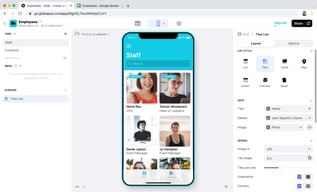
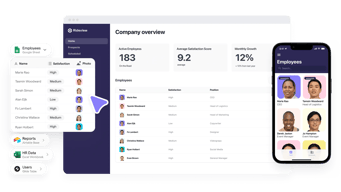
Glide’s proposition is narrow and well-executed: point it at a spreadsheet or database and it produces a functioning app with a real interface, permissions, and workflows. Its own tagline for the paid tier — “turn your spreadsheets into tools” — describes the job precisely.
The reason it matters is that most companies run meaningful operations on spreadsheets that everyone knows should be an application: inventory counts, field inspections, client onboarding, equipment checkouts. Building those properly means a developer and weeks of work. Glide gets to something usable in an afternoon, with 40-plus components, workflows, an API, and support for over 100 data sources at the Enterprise tier including HubSpot, Stripe, Salesforce, QuickBooks, and PostgreSQL.
The trade-off is that you are building inside Glide’s model. It is excellent for CRUD-style internal tools built on tabular data, and a poor fit for anything needing unusual interaction design or complex client-side logic.
How Glide Works
- Data first. Connect a spreadsheet or database; the app is generated from the table structure.
- Updates as the meter. Every row Glide writes or changes counts. 5,000 included on Business, then $0.02 each.
- Editors versus users. 1 editor on Free, 10 on Business; 30 app users included, then $5 each.
- Row limits. 25,000 on Free, 100,000 high-scale rows on Business.
- Workflows and APIs. Business adds workflows, Call API, and the Glide API.
- Custom domains and branding on Business, SSO and backups on Enterprise.
Glide Pricing
Captured from Glide’s pricing page in July 2026, in US dollars, with yearly billing selected. VAT is added at checkout.
| Plan | Price | Editors | Users | Updates/mo | Rows |
|---|---|---|---|---|---|
| Free | $0 | 1 | Unlimited personal | — | 25,000 |
| Business | from $199/mo yearly | 10 | 30, then $5 each | 5,000, then $0.02 each | 100,000 |
| Enterprise | Quoted | Custom | Custom | Custom | Custom |

What decides your real bill:
- Updates are the cost that surprises people. Five thousand a month sounds generous until you consider what generates one. A team of twenty logging a handful of records each per day reaches it inside a month, and at $0.02 each the overage compounds quietly: 10,000 updates is $299 a month, 25,000 is $599. Model your write volume, not your headcount.
- The free-to-paid gap is a cliff, not a step. There is nothing between $0 and $199. A solo builder with a working app and no budget has no intermediate option, which is the most common complaint about Glide’s pricing and the reason people compare it unfavourably against Softr or Airtable.
- The free tier is genuinely usable for building. One editor, unlimited personal users, and 25,000 rows is enough to build and validate an app properly before paying anything.
- Extra users are cheap; extra updates are not. $5 per user beyond 30 is reasonable. The metered updates are where an app’s success turns into a bill.
- “Starting at” is doing work in that $199. It is the floor for Business, not the price for a real deployment with users and usage.
- A 14-day free trial covers Business features, which is the right way to measure your actual update consumption before committing.
Who Should Use Glide
- Teams with a spreadsheet that should be an app. The clearest case, and what Glide is built for.
- Operations and field teams. Inventory, inspections, checklists, and dispatch are natural fits for its data model.
- Businesses without developers. A working internal tool without a hiring decision is a genuine saving.
- Companies validating an idea. Build free, prove the workflow, then decide whether $199 is justified.
It fits poorly for consumer-facing apps at scale, where update costs and the platform model work against you; for complex custom logic, where Bubble offers far more control; and for solo builders on a budget, given the absence of anything between free and $199.
Honest Pros and Cons
Strengths
- Genuinely fast. A working app from a spreadsheet in an afternoon is not marketing.
- A usable free tier. One editor and 25,000 rows is enough to build and validate.
- Good data source coverage. 100-plus sources at Enterprise including Salesforce, Stripe, and PostgreSQL.
- Cheap incremental users. $5 each beyond the 30 included.
- Workflows and API on Business. Real automation rather than static views.
- 14-day trial of paid features.
Limitations
- No tier between free and $199. The most-cited weakness.
- Update overages can exceed the base price. $0.02 each compounds on a busy app.
- Update consumption is hard to forecast before you have real usage data.
- Only 1 editor on free. Collaborative building requires Business.
- Constrained by the data model. Excellent for tabular CRUD, limited beyond it.
- VAT added at checkout, so the headline is not the invoice.
Glide Alternatives and How It Compares
- Softr is the closest competitor for turning Airtable and databases into apps, with a gentler pricing ladder.
- Airtable is the database layer many Glide apps sit on, and its own interfaces cover simpler cases without a second tool.
- Bubble offers far deeper control for genuinely custom applications, at the cost of a much steeper learning curve.
- Notion covers lightweight internal tools and documentation where an app is more than you need.
- Make handles the automation side if what you actually need is workflow rather than an interface.
- Zapier and AppSheet are the other names commonly shortlisted, the latter being Google’s equivalent for spreadsheet-driven apps.
For a broader survey, browse our no-code platforms directory.
The Verdict
Glide is very good at one job: taking a spreadsheet that has quietly become business-critical and turning it into an application with permissions, workflows, and an interface people can actually use on a phone. For an operations team running inventory or inspections out of a shared sheet, that is a real problem solved in an afternoon rather than a quarter, and the free tier lets you prove it works before spending anything.
The pricing is where care is needed, in two distinct ways. First, there is nothing between free and $199 a month — a cliff rather than a ladder — which makes Glide awkward for solo builders and small teams whose app works but cannot justify a four-figure annual commitment. Softr and Airtable both handle that middle ground better.
Second, and more importantly, updates are the meter and they are difficult to forecast. Five thousand a month is the Business allowance, every additional one costs $0.02, and an update is any row written or changed. That means your bill scales with how much your app is used rather than how many people can log in — so the more successful the tool becomes internally, the more it costs, in a way headcount-based budgeting will not predict. Ten thousand updates is $299 a month; twenty-five thousand is $599, or triple the advertised price.
The practical advice follows directly: build on the free tier, then use the 14-day Business trial with real users doing real work, and watch the update counter rather than the feature list. That number, not the $199, is what determines whether Glide is cheap or expensive for your particular workflow.
FAQ
How much does Glide cost?
Glide has a free tier, a Business plan starting at $199 per month billed yearly, and a custom-quoted Enterprise plan. Yearly billing saves 20% against monthly. Business includes 10 editors, 30 app users with additional users at $5 each, 5,000 monthly updates with additional updates at $0.02 each, and up to 100,000 rows. VAT is added at checkout, and a 14-day free trial of Business features is available.
What is an “update” in Glide?
An update is any row that Glide writes or changes — creating a record, editing a field, or a workflow modifying data. Business includes 5,000 per month and charges $0.02 for each one beyond that. Because updates track how much the app is used rather than how many people can access it, consumption is difficult to estimate in advance and is the most common source of unexpected cost.
Is Glide’s free plan good enough?
For building and validating, yes. It provides one editor, unlimited personal users, up to 25,000 rows, 40-plus components, and unlimited drafts, which is enough to construct a real app and confirm the workflow. It stops being sufficient the moment you need multiple editors, custom domains, workflows, or a team using it in production — and at that point the only step up is $199 a month.
Why is there nothing between free and $199?
That is Glide’s chosen structure, and it is the most frequent criticism of the product. There is no intermediate tier for a solo builder or small team whose app works but cannot justify roughly $2,400 a year. If you are in that position, Softr and Airtable’s own interfaces both offer gentler pricing ladders for comparable internal-tool use cases.
What is Glide best for?
Turning existing spreadsheet workflows into proper internal tools — inventory, inspections, checklists, dispatch, and similar operational data — for teams without developers. It is fastest where the data is genuinely tabular and the app is CRUD-shaped. It is a weaker choice for consumer-facing apps at scale, for anything needing unusual interaction design, and for budget-constrained solo builders.

Compare Glide with other popular tools in the same category.
Ease of creating functions and good looks
No option of push notifications on mobile devices.
It helps me in retrieving source data and keep things connected with other apps/functions of the phones also - email, phone, progress check, whatsapp, maps, etc.
Data management and good integration. Good features and works like a charm.
Complicated from the start but later on gradually understand.
Application for my company
It's easy to leard, implement and work with
There's absolutely nothing to describe any insatisfactions
Simplifying App Development: Glide addresses the complexity of traditional app development by enabling users to build functional mobile apps using a spreadsheet interface. This makes app creation more accessible to individuals without a strong coding background. Time and Cost Efficiency: Glide's approach reduces the time and resources required to develop an app from scratch. By utilizing existing data in Google Sheets, users can quickly create functional apps, potentially saving development costs. Rapid Prototyping: Glide allows for the rapid creation of app prototypes. This is especially valuable for testing ideas, user interfaces, and concepts before committing to full-scale development. Real-Time Data Sync: Apps built with Glide can be linked to Google Sheets, ensuring that the app's data is always up-to-date with changes made to the spreadsheet. This real-time data synchronization is valuable for apps that rely on dynamic information. Cross-Platform Compatibility: Glide-generated apps can be used on both Android and iOS devices, eliminating the need to develop separate apps for different platforms. No App Store Approval Process: Since Glide apps are web-based and can run in a browser, they don't always need to go through the rigorous app store approval process. This can result in quicker deployment and updates. Low Code/No Code Approach: Glide's platform adopts a low code/no code approach, allowing individuals with minimal coding experience to build functional apps. This democratizes app development and empowers a wider range of people to create digital solutions.
I was able to use a template to create a "house points" app for my school. The creator of the template was tremendously helpful with any questions I had. Our app is used daily to keep track of how many points each house has earned by exhibiting positive behaviors.
When I had some issues, I couldn't contact Glide directly. I had to post on the community page but luckily heard back from someone within a few days.
We are using it to help us keep track of "house points" with our new behavior plan for my school. It was easy to use when my principal asked me to create an app
How easy it is to learn and stat building
How difficult it is to customise the UI, there are no colours, fonts and different tempaltes.
Without any investment in hiring a tech team we were able to buit an app that we need for our business

Glide enables an almost instantaneous roll out of business process improving applications. With a bold and unique approach to AI.
Tuning the user interface is somewhat tedious, for a no code paltform there a way to many low level CMS code like tweeks that are not completely documented to be usefull.
From global sales reporting, shopfloor control, engineering portal, global customer monitoring to claims management

The ease of use of glide for accessibility as well as the integration options that have been included in paid subscriptions.
Lack of access to iOS or Google play stores as an option for those that want that. I also wish that SSO was an option not just for the enterprise plan.
Accessibility for participants and clients. Navigation of resources, case management, CRM, data collection.
Glide has made it really fast and easy to build software prototypes and iterate them in response to user feedback. There's no way we could have iterated this quickly if we were writing our own code.
The Glide interface can be a bit slow. Oftentimes, changes will take minutes to appear. Also the login process to get to your last used project takes multiple clicks
We are using Glide as the front end for a product we're building
I started with Glideapp in 2020 and it is a game changer for me. Basic, creating a simple application for my business. This has become a pillar of communication and organization. Used by +50 users every day. Very responsive customer service When I have time, I will upgrade to the higher version. I recommend !
Slight bug but nothing bad. Probably because I have to upgrade to the higher version. I've been using it for over 3 years
Communication Organization Follow up
The database centric experience is extremely valuable and makes development time extremely fast. Creating data models and testing them against requirements can be done quickly and the best part is how easy it is to action on that data directly within the database. Using advanced APIs is just a click and building UI is insanely easy.
Getting table relations down correctly can be a bit confusing at time. Certain column types may not be valid to be used for certain functions leading to tables with a very large number of columns.
Fast development of solutions for customers. We need to colve problems today, not in 6 months. Glide enables that with ease.
I was able to modify a template app and set up a purchasing app to track our orders. Glide is easy to use and development was quick. It is great to be able to tweak as required. Glide is easy to use, has a good selection of features and produces good clean interfaces. There is good documentation, forum support and videos to follow.
There are some limitations on what Glide can do, but this didn't stop me being able to achieve what I wanted to accomplish.
Needed an app to track our purchases. We can now track what is on order, who for and what division to invoice. Also we can look back at orders if needed.
I have explored a variety of platforms, and the one thing that I love is how intuitive it is to use. After seeing some videos on use cases, I was able to jump right in and start to use it. There are so many ways to use it, it is infintely adaptable to different uses, and I've only just begun to tap them.
I would like to see more examples of use cases in the documentation. The documentation is very good at describing what the element/component is, and what you can alter, but many of them lack examples of how you might use it. For example, I recently found the KanBan and it seems to solve the problem of dragging items and sorting them, and this could have many different uses other than just KanBan's. It is great to be inspired to try something in documentation when possible. I also would really like to see an ability to connect to the new GPT-4 API for creating and working with assistants. This is incredibly powerful and although I'm sure I can work it out with the API Call, it sure would be great if it was built into Glide. My guess is that you already are, but sure hope it comes soon, I have some great things I would like to try that use it.
I am looking at how to automate aspects of my custom eLearning development company with a blend of automation and AI enhanced automation.
1. Fast development 2. Spreadsheets as database 3. Hard to find a business scenario I was not able to cover with Glide framework
1. 25K records limitation 2. limited UX customisation options 3. speed of te first load of the deployed web application
1. Fast development 2. Affordable price
I love how easy Glideis to use. We use Glide for apps that serve 50-100 user weekend events to communicate event times, announcements, etc. I also love love love the community and how easy it is to post and receive answers to questions.
I don't love some of the UI (e.g. everything autosaves so it publishes to users right aways)
I run apps for events and it's easy to get information posted and updated.
It's very basic and easy to comprehend. Glide now has now uplifted integration numbers such as gmail, radar, push notifications, and etc.
It is not uploaded on Appstore and playstore.
Glide has just moved from classic apps to Glide app pages that i think is more fast and better in terms of design perspective too.
The easy way to understand how it works. The power of creating something functional in a short time
Some features are missing and the price is usually high if you are not an agency
Automate tasks
I really appreciate Glide for its user-friendly interface and the simplicity it offers in creating mobile apps without requiring extensive coding skills. It's a game-changer for many users! It is really useful to create indoors aplications for the company
Its limitations for creating more complex UI
Creating quick applications, modern UI interfaces for internal users
There are a lot of APIs and you don't have to do any coding to get a great app.
The CSS function doesn't work. There isn't a way for users to create a password, they have to use a code sent to their email every time. The navigation buttons at the bottom of your app can't be coded to change the current user step.
It allowed our company to create an app for our employees without having to hire an outside IT firm.
It's so intuitive that you can create an app to share information with many people without needing a manual. I was able to quickly set up a sign-in screen exclusive to specific domains. The domain specification feature is also useful for creating easy-to-remember URLs. I find it very exciting to think about what kind of app I'll release next.
The Starter plan is insufficient if you want to utilize extensive features like PDF creation. Upgrading to the Pro plan is necessary.
Glide solves the problem of needing to share information instantly and allows for quick editing and additions without the need to write code. There's no need to individually email or chat with each employee, significantly reducing work hours.
Great features and capabilities. I found it more capable than Softr. Advanced functions in Glide tables giving us the ability to not use AirTable as a backend. Realitively easy to learn compared to platforms like Bubble Excellent learning tools and communities
Do not like the login method. Would prefer the ability to use a username and password Not great for scaling a system that requires a large number of logged in users.
Glide is allowing me to build internal systems to replace expensive off the shelf software. In many cases the off the shelf software requrires work arounds but with glide we can build the solution around the processes. We use this often to simplify complex airtable solutions by building interfaces specific to a persons job, role or tasks. This has reduced a lot of confusion along with saving a huge amount of time.
I'm an airtable implementer and find glide to be the perfect front end for an airtable or google sheets database. It is far more intuitive, slick and fast than the other solutions on the market. The results are pleasing to the eye and super effective. Glide is also always adding features and improving the existing ones.
RTL support is only available via custom CSS, which, in turn, is only available at the most expensive pricing tiers. As most my projects are RTL, this eliminates the ability to use glide for many smaller scale projects.
Building a front end for raw databases, allowing users a modern wholesome experience.

The UI and the no-code platform is an excellent tool for me because I am a non-technical founder who likes to first validate ideas by creating quick prototypes to test. It also has the potential to ramp up to be complex and powerful with all the integration and tools that it possess
Not all the tools or logic are there and some functions require clever setting up multiple columns in tables to output the right result. There is limited options in terms of customization of the visual appearance of the app. Even if there is a paid plugin that enables me to do this - like a canva inside Glide, would be very useful and I would pay for this.
It helps me quickly put together a working prototype for my idea that helps me validate the idea with potential customers and also for me to review and refine the workflow of a potential process (buying, browsing, saving profile etc) Glide also helps me save alot of money on hiring engineers (who are unproven and may not be that efficient) in validating very early stage ideas. This also helps me provide a template to use to hire an engineer later to create an app.
I love how quick it is to make an app. It's easy to get an app up and running by starting from a template, and it's easy to make your app live for people to use it. I like how they have courses and lessons to make it easier to learn how to get started building.
I've noticed some friction with trying to log in to my account, and it can be a bit buggy at times.
Glide is solving the problem of how quickly it is to get an app up and running for people to use on your team. It does take having some prior knowledge of coding logic, but I like how it's easy to drag and drop components to design the app.

Extremely easy to use and learn. Fantastic educational resources with how-to videos and a great certification course. I took the course the first weekend after getting an account and deployed my first app by the Monday AM (the gent who does their training videos is so good, so easy to listen to - great cadence and tone, keeps my attention no matter how long the video). Insanely good user experience. Feature rich - especially around the interface, both in terms of building applications, but also deploying them in a mobile first way. The way they integrated AI into the platform is so smart - I haven't seen another team take nearly as logical an approach. It's a total game changer for things like voice to text, summarization of text and sentiment analysis (to name a few). Great team - I've reached out a few times and each Glider I've interacted with has been fantastic. Strong community of supporters and helpers who believe in the mission and support others around them - something I aspire to start doing soon, which is something I've never done for another tech platform before. Glide, and those around it, are really special.
Very little to be honest. There are a few features, that I expect will come over time - like multi choice sorting (sort by this, then that). Today you can only sort by 1 field. You can't re-sort data in the data editor, only in the layout UI. Same thing with grouping - would love multi-level grouping (group by this, then that). But these are such small nitpicks in terms of the product. I'd love to see a pricing level between business and enterprise - or a way to add things like SSO or 10M row tables to the business plan, for a fee of course. Or simply another value lever to use as a multiplier at the enterprise tier, so one can get the benefits of enterprise and have their costs grow as their use grows - better alignment of cost and value. This is not a dislike - it's more of a wish ... I wish there was an app (like Airtable has) for development, in addition to the web UI. And an ability to develop offline and sync changes when reconnected the way the applications do with data. Airtable doesn't have that ... and for those of us who fly a lot and like to use that time in the air productively, this would be amazing. My last 'wish' - again, not a dislike, just something Airtable did really well was field level permissions. Glide has this killer concept called 'row owner' where a row of data can be associated with a user and only made available to that user (like a filter) so you don't have to create a different apps or tables based on a user or customer who's data you want to keep separate. It's very smart. I wish it extended to the field level, which I realize can be a bit of overhead, but is incredibly powerful and I think somethign that would be really useful as Gliders deploy bigger and more complex enterprise applications.
All major flows in our business. We evaluated a number of ERP systems, large and small, and decided to go the no-code route and focus on the big flows that drive our business. Sales Orders, Work Orders and Purchase Orders (all integrated to our financial package) ... CRM and Sale Forecasting, Production and QA/QC, Warehousing, Inventory and Shipping ... Customer (Field) Service with Customer Dashboards and Portals. That's just the starter list ...
While we've only been using it for a few weeks at this point, Glide has already revolutionized the way we work and collaborate at my nonprofit. If the only thing it did was integrate with our disparate data sources and allow us to turn them into relational databases with intuitive, easy-to-use frontends, that would be enough (dayenu). But when you add to that Glide AI and the ability for us to convert unstructured data into structured data, and then to run AI-driven analysis on that data without jeopardizing the integrity of our data as a whole, it becomes a true G-d-send. Glide is going to allow us to replace many of the generic apps on which we relied, despite them not interfacing with our existing data, with custom apps, built in-house to natively integrate with our data and systems. I cannot overemphasize how much of a game changer Glide has already been and will continue to be for our organization. My team and I are already using it on a daily basis, and the ease of implementation has made it a breeze to onboard team members into creating their own custom apps.
There are very few things for me to complain about, though one is definitely customer support. As a Business-level member, I would expect there to be some degree of live support. The documentation is pretty good, and the community is one of the most robust I've encountered outside of the open source world, but having someone to answer questions about the platform in livetime would make the experience much smoother. There are also areas of the documentation that would benefit from being fleshed out a bit. Many times over the last few weeks I've looked for the answer to what felt like an obvious question about a built-in Glide feature only to find that it wasn't covered in the documentation, and it was only after scouring the Community and videos on Glide University that I was able to find the answers. A prime example of this was when I tried to understand why certain columns would not allow me to set them as Row Owners and was unable to find a suitable answer anywhere in the Documentation but ultimately found the answer in one of Bob Pettito's videos. And don't even get me started on the 3-day-long headache that was trying to get to the bottom of why the image upload component wouldn't recognize the multi-image column in a fully native Glide table. These are things I shouldn't have to turn to third-parties for answers to... My other complaints are considerably more minor. Things like: it would be hugely beneficial for Actions not to require direct user interaction (e.g. time-based actions); or why can't I set the target for non-Glide links? (I created my own workaround using conditional actions, but that shouldn't be necessary.)
Here is a non-exhaustive shortlist of apps Glide has allowed my team and I to build so far that are changing the way we work: - A dedicated website/app for our bi-monthly community newspaper - A custom-built project management platform that gets us off of Basecamp and allows us to better communicate with our internal and external clients - An AI-powered expense tracking system that eliminates hours of managerial labor reconciling receipts to expenses - Custom-built tracking systems for maintenance and IT requests - An AI-powered feedback system for our members to provide open-ended comments and complaints that are converted into structured, actionable data - A digital sign-in/sign-out system that replaces our existing pen and paper system, and will allow employees who are on-premises to mark themselves safe during an emergency - A volunteer platform that will enable us to act as a central clearinghouse for volunteer opportunities around the community while allowing the host organizations to vet and approve candidates on their own - An audio tour app for our in-house art gallery that will allow asynchronous, self-guided tours of our rotating exhibits The ways these solutions are benefitting us range from increasing in member satisfaction to decreasing time spent by employees on busy work to ensuring the safety of our employees at a time when we are unfortunately seeing an increase in threats.

We 've created app (pages) very fast and "all we can do with Glide". We are going to implement more apps with glide. Our VP of Technology is very happy with that. And many applications are going to build with Glide
Glide can improve in it plans. For example, the update are strong restrictions. also the number of rows. Must have more flexibility to use database platforms, for example connect to other databases. Ypu can improve in the number of rows and number of updates. FOr us, Its the main reason for nt build big application with Glide
We make a applciation for Intelectual Property, and a provider cost too much money. In Glide we ourself do that in only 2 months. Security is important and we make a complex roles. Also we make 5 applications PLMs. And Now we are building a Payroll interfaces. Glide must to improve with the number of rows and and especially with the updates, because is a limitation

The ease of use and how fast you can actually master it and build something useful. The only think you need basically is a bit of a background with Excel and watch a few video tutorials. The apps always look great no time required. Distribution of the apps is also great. The new AI integrations, API functionality and new databases make it very powerfull.
For very large projects at the moment I would not recommend it yet, however they recently added SQL tables so will need to check that out. Depending on the number of updates and functionality you want (e.g.: AI) it can get quite expensive, however you have saved a lot of money in development hours offcourse.
Quickly build internal applications powered with AI. Manage my team of key users and automate project management tasks. Set-up internal tools for the business and for myself.
The quick form and easy to connect to google sheets. You have all in the same place, not need to have an external database. I have tried Google's option and isnt that easy.
There's some tools that would be nice to try on the beta side, without the hustle of needing to pay up front and not knowing if it would be a perfect fit. But the tool by itself it great!
Theres a lot of different ideas of how to solve x and y. So Glide had help us to try them out, without the need of having all of them just in spreadsheets. The easy way to share them its also awesome.
Glide allowed us to very quickly do up a web app, the UI is very simple to understand and the end product looks professionally made. It's also very easy to integrate external apps into pages, and implement features that we need like in app buttons or video embeds. We also contacted the customer service often, who advised us the appropriate tiering that was best for our use case, and helpful for workarounds when the base app didn't have some fringe features we needed.
I think some feature sets can be improved - like notifications sent to users which is currently being worked on but not yet perfect. Needs to have the option to password protect pages as well. 2FA and Magic Link logins can be sped up (some users currently receiving login details after a few minutes)
We utilised Glide to build an event app relatively quickly for hundreds of users, as we needed a platform that didn't require our users to download an app. For this, Glide was perfect.
Man, what I like best about Glide is the ease of use and how quickly you can create mobile apps. It's like 'drag and drop,' and voilà, you have a working app! Plus, the integration with Google Sheets is fantastic. I don't have to deal with complex databases; I just use Sheets. Oh, and the fact that it's super accessible is a huge plus. You don't need to be a programming genius to do amazing things with Glide. In a nutshell, it's a lifesaver for those who want to create apps quickly and without a hassle.
Well, one thing that I find a bit limiting about Glide is the lack of customization options. It'd be great if they offered more freedom for personalization. Also, having submenus would be handy for organizing content and making apps even more user-friendly. Another thing I wish Glide had is the ability to easily copy and paste elements between different apps. That would save a ton of time when you're working on multiple projects. So, while Glide is fantastic for quick app development, a bit more flexibility in these areas would be awesome.
Glide is tackling several issues for us, check this out! First, I've ditched using those company management spreadsheets on Google Sheets. Now, I'm using Glide directly, which helps avoid a bunch of annoying errors. Plus, I'm able to manage who has access to stuff without getting all stressed out, which is awesome when working with other team members. And, to top it off, the app access makes my life so much easier. In a nutshell, Glide is saving me time, preventing errors, and making company management way smoother.