

Unclaimed: Are you working at Kissflow?




Kissflow Reviews: 4.3/5 — Solid Choice
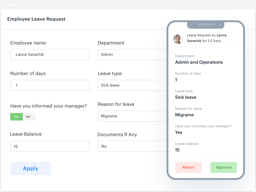
Kissflow is known for being the first Unified Digital Workplace Platform that allows you to manage all of your work in a single place. The platform is designed to help all business users discover, create, modify, and use business applications, with each app guaranteed to be easy to use, accessible, and user-friendly. The focus is to offer something for non-technical people, ensuring that no coding or complex mapping is required.

| Capabilities |
API
|
|---|---|
| Segment |
Small Business
Mid Market
Enterprise
|
| Deployment | Cloud / SaaS / Web-Based, Mobile Android, Mobile iPad, Mobile iPhone |
| Support | 24/7 (Live rep), Chat, Email/Help Desk, FAQs/Forum, Knowledge Base, Phone Support |
| Training | Documentation |
| Languages | English |

Compare Kissflow with other popular tools in the same category.
From the start to the finish of the order process we are now paperless. From Sales taking the order to Service carrying out their duties to Accounts billing, everything is now in one place accessible to all. The App allows mobile working from a mobile device.
Nothing, the software has revolutionised our processes.
A faster process that ultimately means a happier customer and better cash flow as from point of sale to order completion everything is streamlined.
speed, efficiency, response time from customer service
crashes that happen, sometimes i have to restart may times until it works properly
workflow, speed, efficiency, digital storage!
I really love KissFlow as it really helps on improving process into a paper less way of approval. Being one of the admin of KissFlow , it helps me on enhancing my skills on creativity and programming by designing forms and workflows of processes. Giving me the opportunity to collaborate with different teams and gives me better understanding on other processes. This is one of the best online tool that makes processes simple and smart. Online approval helps saves time, paperless and can be accessible anywhere. It can easily generate reports and helps on achieving timelines. Five stars for the KissFlow developer! Hoping for more improvements and updates on the program....
It's when I encountered a network error and wasn't be able to fixed some issues in my workflow. And sometimes the list that I am using in a form design gets changed because someone's modified it and the workflow of the process gets interrupted due to that changes. Is there a way that it couldn't be accessed by anyone except the one who created it?
Converting manual approval into online and paperless form. Saves time and money for the cost of paper. It helps on achieving timelines.
It is very simple to use and very reliable workflow tool.
sometimes as data increases, auto populating becomes slow.
Used it to manage orders and communication between teams.
kisflow one of the best workflow management software following items they are doing very well bpm'online. KiSSFLOW. Nintex. Zapier. Serena Business Manager. ProcessMaker. ProWorkflow. dapulse.
No I like all the modules in kissflow i don't have any concerns
Hr management, pretty cash , PO
The Process of KiSSFLOW is Excellent, Create Own Apps & design own forms, Workflow, Permissions, Approvals, & etc.
Nothing, Sometimes Prints will be not good, after refreshing it's printing good normal.
Approvals for Check / Cash request & Travel Funds, we finished paper work & enjoying KiSSFLOW Online Approval
Kissflow is very flexible in building processes and adapting
It would be nice if reports had more tools
We have been using the kissflow for many processes. Among them the most important are Travell Request, Expense Report and Overtime.
Easy to configure and easy to use any workflow in system
drag and drop table options and look and feel of user interface
auditing tools
Support staff is incredible. Always available to assist and they even follow up afterwards to make sure your workflow is as you intend it to work.
It would be helpful to first time users if they had a manual or video explaining the logic behind the software system so it would be easier to figure out how to best maximize your workflow.
We are solving product research and manufacturing processes.
Kissflow is one of the best apps that I ever used!
I think I didn’t find anything that I dislike about it.
Easy management of accounts and reaching goals.
Fast and very satisfactory experience in implementing my flows in this software
a few customizations were not possible, but
Some customizations were not possible but were easily circumvented
Workflows are incredibly easy to build and deploy and continued workflow maintenance and development is well thought out, as well. I think the card/flowchart design method works really well for this sort of development and is very approachable for the non-developer.
As a programmer I would have liked to have seen some more advanced options for actions but, honestly, I am reaching for something to criticize. The webbhooks and API probably give you all of the advanced functionality that is needed.
We used Kissflow to replace a workflow engine that was included as part of our ERP system but that was not very flexible or user friendly.
The UI experience is a useful tool for all in the company, The users can find and read all the information without problems. Another important aspect is the API that Kissflow has, It feature have permitted to our company integrate and automate some process using different tools as zapier and mailchimp. Now the company receives and admin all the admissions process using Kissflow. The interactions with different areas inside the company have been possible using Kissflow.
We are very happy with the product. I would like to integrate Kissflow with our customer manager Intercom. Have the entire information synchronize could be useful.
All the process automation inside the company. We are looking automate everything and Kissflow takes an important part in this goal
I like that no one else has to see everything that is going on, I can submit it directly to the person who it concerns.
Sometimes editing a submitted app can be finicky.
It gives us a good application to use for our expense reports and allows us to compile all reciepts, invoices, etc into one system.
I appreciate the ability to very easily configure my workflows. The user interface makes it easy.
I prefer the pricing model that was in effect when we first signed up, as opposed to the current model. The older model worked well for our small company.
We solved our travel request workflow problem. Travel requests need to go through a few people for approvals and each person has particular tasks to accomplish in order for a traveler to be prepared to go somewhere. Kissflow helps us to ensure that all tasks are accomplished in order and in a timely fashion.
Customization is our top feature, our company is able to use many different integrations, the automatic routing that we can setup by condition and obtain approvals in half the time as our former paper process.
I don't dislike anything, other than new fictions are added and I haven't learned them all to implement. Or I don't have the time to implement.
Process automation had been solved. Our company used to have 5 part requisition forms that had to be approved by 4 different people before an action was complete.
KissFlow is capable of simplifying complex processes to make them easier for follow ups and analysis. it has rich fields but above all I like email notifications and public forms.
I dislike the account administration system. how one account may have many super admins with the same access to the system and how you can separate users according to the process. also one more thing is how I can't forward one process to another account without losing any data.
- Taking disciplinary actions against an employee who have violated policies - Receiving claims from clients and staff from the field - Reconciling data - Requests -etc
I like how easy it is to actually build and manage the workflows. In addition, the ease of important documents and information being able to seamlessly move through our system of approvals electronically, has been a true game changer for our organization.
I'd like more control on the layout of the form, to include, not only how the form is laid out, but font sizes, being able to do more with styling of the form. So, I don't like that we can't do that currently. Not having a test environment is another dislike, but the workaround helps a lot.
Prior to KF, we were physically moving at least 50 forms for approvals. That meant, administrative assistants scanning the initial document and then the next admin scanning again after signatures and so forth. This so you could at least no when something was signed. Without that scan, you really had no idea where a form would be at any given time. Folks would have to call around, or walk to someone's office to find out the location and status of form, if needed. We have seen a tremendous reduction of the administrative assistants time, allowing them the ability to work on other tasks, and everyone can see where something is at any given time.
Ease of use. For a non-programmer, I was able to setup unique workflows with very little help. Also, when I needed assistance, KiSSFLOW support was very helpful and responded to my requests quickly. Training materials are very clear and concise. They are written from a user's perspective. The ability to track these requests and output into a spreadsheet is another valuable feature as we use the data for future process improvement.
Nothing. As an enhancement, it would be useful for our process improvement initiatives to be able to have time-stamp data at each step for each record available in an exported report.
As a University, we have many requests that are not available in the standard templates. These are some of the workflows I have created: 1. Course substitution requests - submitted by advisors and approved by department chairs 2. Course Cancellation requests - submitted by faculty leaders and then requests go through a series of operational processing steps 3. Transportation vehicle requests - submitted by coaches and approved by the Athletic and Transportation departments
The ease of use. Very user friendly. We started with a simple process flow and ended up doing the whole capture event through kissflow
The support hours is diffrent was hard to deal with because they are in a diffrent country everytime we need support we have to wait for the next day till they come online
Process flows have been a nightmare but with the easy customisable kissflow it makes it very easy
Extremely user-friendly. Prior to Kissflow, Requests were submitted via emails, Excel and Google sheets. It wasn't organized and confusing to end-users. Kissflow fixed that. Customer service is top notch. I've contacted Kissflow a dozen times and they had a solution to pretty much all of issues. And their primary support tool is chat so it's much more convenient than calling them as I can submit screenshots. Few months ago we mentioned Kissflow to our sister companies in UK and Germany on how much Kissflow made IT's lives less of a headache.
Sometimes system can be slow at responding. But not too often. It seems like Kissflow responds better with browsers other than chrome. I'm not a fan of contacting support regardless of company I'm dealing with. So I wish they had more support videos and extensive knowledge portals. They have a few videos but I couldn't find much on functions which is a must if you're trying to make your workflow perfect.
Company was using Excel/Google Sheets to keep track of expense reports, business trips, Sales requests, etc. With Kissflow I was able to simplify the workflow for all of them. Prior to Kissflow managers had to approve through email which wasn't proficient, and more often than not the request will get missed. Also, the ability to filter the requests and output the report was important as well. Now managers don't have to go into each excel sheet, set filters and save the settings each time.

Everything can be done within minutes, new apps creation are easily accessed & report generations are perfect as expected. Have created nearly 12 Apps most of it created within 1 days with setting up all the process flow management.
Clarifications are not reflecting in reports, hence some of the reports are misguided due to this. If the same is being recorded in Reports or the Business step changes to clarification member, Then it would be of much easy access.
Repairs, Return, Online & store process, supply chain process flows. Packing Material Request & region wise separate process.
Although you can create applications with little or no code, Kissflow allows you to enhance your fields and workflows with custom code. This makes the product a A+. Very few platform offered this feature. With Kissflow, you have the best of both worlds.
I wish the mobile app offers the ability to work on tasks offline.
We view Kissflow as a "hand holding" tool to ensure that our processes are followed by the entire team. As a small business owner managing multiple stores, KISSFLOW allowed me to have more productive meetings with my managers and focus my time and energy on the real issues at hand. Although our processes and tools were there before, we simply did not have a platform to "glue" things together. Best of all, the visibility offer via it's platform and reporting of all tasks at hand is second to none.
The availability of tech support is what makes this company so great in my eyes. They get back to you and schedule a screen share to fix your problem immediately. No waiting for meeting times and no back and forth! Techs are very pleasant and knowledgeable. They not only fix the problem, but make sure you understand it. The product has been a great tool for us in Human Resources.
The only issue I have had is some browser settings do not allow for smooth navigation. Support was able to help me with this, though.
No more paper forms! No more walking around the company and waiting days even weeks to get approvals. Executives are able to easily approve.
KISSFLOW its very easy to use it, help me to make my process BPM and my apps very easy and functional.
i dislike the intermitence when i build my app and have many changes, sometimes if i built it for more than 1hr the app dont take my changes and i have to reset and upload all the fields and sections than i make it.
make our process more efficently! My Purchasing area have some problems with the process to lift a purchase order, with kissflow we automatized the process and make the workflow very easy for our business users. With kissflow we automate the lift of data masters products and make our formats more fast and secure.
The usability of the platform and easyness of use. It has facilitated us the onboarding process with our merchants and we have automatized some of the internal process thanks to KissFlow.
Some times on the app i have found some bugs.
Affiliation process for our merchants with the sales ops teams.
Simple to create workflows. Easy to use. Gives a detailed idea of what needs to be done
Not too much there to be disliked. Maybe if we could integrate it with a project management software, that will be great
Setting up standard processes in the company
Kissflow has templates already build, so the company can ignite the transformation from day 1
Some software connectors not yet available
documental workflow authorization Employee's benefits processes Customer workflow processes
We have been using Kissflow for 3+ years now and have found the program excellent in controlling our workflow and scheduling the vacations for our staff. We love that the program is easily customized to suit our needs. Support has always been excellent!
I have found nothing to dislike - the program works well for us.
Workflow Process and Scheduling
The ability to create automation in process where on doesn’t exist in the company’s other software sets. Small learning curve.
There’s not much really. They are adding new capabilities all the time that I didn’t even think of.
Purchase management