

Unclaimed: Are you working at LiquidPlanner?





LiquidPlanner Reviews: 4.2/5 — Solid Choice
LiquidPlanner is a project management solution built for teams who want to prioritize planning and intend to anticipate user needs to ensure seamless operations. With the platform, you can align your people, projects, and priorities to ensure the right team is able to work seamlessly. Predictive scheduling dynamically adapts to change and manages uncertainty, so you always know in real time when work will be done. LiquidPlanner is backed by the power of planning intelligence, ensuring that teams deliver and optimize their work in the best way possible.





| Capabilities |
API
|
|---|---|
| Segment |
Small Business
Mid Market
Enterprise
|
| Deployment | Cloud / SaaS / Web-Based, Mobile Android, Mobile iPad, Mobile iPhone |
| Support | 24/7 (Live rep), Chat, Email/Help Desk, FAQs/Forum, Knowledge Base, Phone Support |
| Training | Documentation |
| Languages | English |

Compare LiquidPlanner with other popular tools in the same category.

Liquid Planner offers a way to plan your resources in a "liquid", always changing way. The alternative products out there only let you set hard dates, and are difficult to maintain and modify. This product fluctuates properly with our ever-changing priorities and needs.
The pricing could be a little better, though in our case we feel like we are getting a return for our investment. I wish there was a better "Calendar view" to see who is where when, but they are continuously adding updates, so that may be an up-and-coming feature.
Before LiquidPlanner, we were never sure how many resources we would have available for an upcoming project. We simply managed our projects on a day-to-day, or at best, weekly basis. With LiquidPlanner we can plan our projects months in advance, and have a great understanding of which projects are getting out when.
It employees priority based scheduling. It allows users to estimate task duration as ranges rather than fixed values. It offers robust resources management capabilities.
It allows use to resources availability, track workloads, and allocate resources across multiple projects. It a great tool.
It has a built-in time tracking functionality, making it easier for teams to monitor how much time is being spent on tasks and project. It's well suited for managing complex projects with many dependencies and uncertainties.
All project management tasks have one true element - their estimates are always wrong. It could take less time, or it could take more. LP is the only tool that lets you add a range of time for the estimate. This creates a cumulative (but not additive) range for the project to complete - a project buffer - that allows the manager to decide the risks and rewards of choosing a promise date. If you want to use the average date using a typical tool? That's a 50-50 chance in that software. That's why users manipulate that data because they already know the answer will be wrong. LP allows you to use a confidence range to understand planning completion better. The ability to easily add dependencies between tasks, set priorities by order, and not overburden resources are great features. Determining Constrained resources by their utilization over a period of time allows for decisions on timing and subordination. The analysis can be performed quickly, allowing for multiple "what if" analyses that keep team members focused, on track (especially at the beginning of a project), and informed.
There are currently two versions being used, with the Classic version having some of the Critical Path (and, by extension, the Theory of Constraints Critical Chain) methods necessary for Continuous Improvement and Planning Improvement. Critical Path should be coming to the new version, but it's a conflict between the features and clean appearance of the latest version with the powerful analysis methods of the past for the time being.
The most fundamental problems in business have to do with lead time, throughput, and inventory. Project management software may only be about product development time, and LP does a fine job. But in my work, LP is an Engineering To Order tool, allowing my clients to schedule many short projects, usually from a template. This often requires giving quick, reliable delivery dates. I have also used it as a production scheduling tool - small projects that may only last several days but are highly repeatable and highly variable. Having production LP schedules means I can leverage MRP systems to create supplier orders based on the demand of what goes into production.
I love that LiquidPlanner is so flexible in its applications. We're able to share files, communicate with clients, and keep track of both open and closed jobs.
I do wish the experience of clients (portal guests, in the technical terminology) was more in tune with that of administrators so that we could more easily instruct clients in navigation - and so they have more flexibility in navigation.
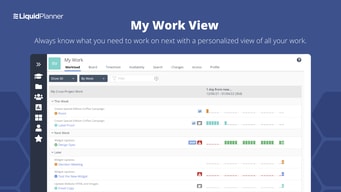
LiquidPlanner gives everyone in our office a centralized repository to see what jobs are in the queue, what's coming up, and what everyone is working on. It's invaluable especially when someone is out of town or sick and someone else needs to pick up a task or two.

1. Easy of deployment and usability. 2. Intrusive interface. 3. Prioritising projects. 4. Agile online projects managing. 5. Team collaboration via instant live messaging. 6. Project budgeting. 7. Adding assignees and tasks scheduling. 8. Project analysing and reporting.
Nothing to dislike since it has all we expected.
It provides single source of information for all projects. Reduces cost and saves time. Improve team productivity on the go.
Having worked with the Classic version of LP for several years, I recently transitioned to the new version - the application is well structured, extremely robust, and contains all the key elements of LP
I would love to be able to forward tasks directly into the new version of LP - especially from either email or MS Teams
LP is brilliant at ensuring that resources are properly engaged - in addition, the ability to ASAP prioritise a task at project, package or workspace is genius. LP provides Project Managers with confidence that delivery dates are realistic
This product tracks the scheduling of project resources for multiple projects in real-time. It keeps you informed of how things are likely to run, no matter what else is happening. Say I have a team of people who work on different aspects of a development project, and I have 4 projects that are running with different priorities, but some need to run parallel, as best as possible. What happens if one project gets a scope change that adds a lot of new features? What if one project gets put on hold? What if one project needs to be at a certain stage by a set date (trade show for instance?) What if a key worker gets covid and can't do anything for a week? This app deals with all these kinds of situations. While always giving you the tools to have the best understanding of how things will go in the future, given the progress to date and the other constraints on people's time.
It's a relatively new product, still. The basic must-have features are here already, and all work well together. But things are still a little light at the moment. There have always been workarounds for the one or two things I felt have been missing, but I'll be happier when these things get dealt with more directly. And at the current rate of adding features, I expect this will be soon.
It takes regular project planning, and solves the problem you have when somebody asks the big question - "when do you think you can have this work completed?" as well as it can be answered at any stage in a project. It means that you can quote lead times for delivery of work based on real, complex interactions of work and resources rather than just mental estimations and fudge factors. No matter what has been changing.

How do you set your team up for success in a complex LiquidPlanner project? Simply have them organize tasks by priority and make best-/worst-case estimates. Restacking priorities instantly recalcs the schedule even for highly interdependent projects. And the team's track record on prediction--say, they're consistently beating best case estimates--adjusts the schedule to limit slack and moves up expected finish. Also the opposite, of course, when completion trends towards worst case.
I dislike having to record daily progress for everyone if I don't have enough sway (or seats) to let team members do it themselves, but LiquidPlanner enforces constant vigilance, which is a good thing. If something slips (or progress made is not recorded), LiquidPlanner scares you into action by lighting up the display to highlight all the impacted tasks and newly distanced end dates.
I can keep an accurate schedule even as an independent contractor on projects with shifting priorities and erratic estimates. My job is easier and teams are more productive because their input matters and the impact of their performance is transparently reflected by LiquidPlanner.
I love being able to edit task assignments and change task/project priority with only a few mouse clicks as this allows our organization to answer the question "what if..." quickly and easily. The snapshot workload view is also great for quickly seeing who is overloaded and who has available time to help share the load.
So far I can't complain about much. It would be good to see workload beyond the 90day timeframe (180days would be great). Also having the ability to create dashboards for individuals outside the organization would be helpful (not critical though).
Being able to effectively plan our engineering design team workload into the future so we can make appropriate staffing decisions is critical to our success. LiquidPlanner allows us to predict when our design team will be either overloaded or slow and we can make proactive decisions months ahead of time rather than being purely reactionary.

Project folders vs work packages to schedule tasks.
Lack of analysis tool for custom fields.
Needing to schedule tasks from different projects into one single work package. This is something not a lot of tools do (well).
The automatic scheduling engine helps me manage the constraints of the same resources used across multiple projects with varying availability.
The mobile app isn't very user-friendly and needs a lot of work.
LiquidPlanner solves the problem of just managing tasks, and reframes my plans to first consider that the people doing the tasks are working on other things.
The algorithm that plots the timeline for each task/project shows the team where to spend their time. The ASAP packages can be used to prioritize tasks further as well.
The fact that one project does need to be beneath another is difficult. For teams with multiple projects simultaneously needing attention throughout a year, it becomes difficult to accurately represent how many tasks from different projects should fall in priority
Liquid planner does allow teams to know what their work should be and to remember deadlines that are upcoming. It allows management to view burn rates and improve their ability to estimate task lengths at the beginning of a project.
Liquid Planner has given insight into project execution. Resources management is very critical, LP gives detailed reports on how long projects take versus guesswork.
Hard to update projects schedule and resource allocation after the project is defined and scheduled.
Gaps in resources. To justify more resources, LP provides a detailed analysis of each project, its resource allocation and the expected time to complete. It highlights limitations and gaps for each project and thus one could move around resources or justify getting more.
I like that LP can be adjusted and made into what we need. It has a ton of capabilities we don't even use, and still we keep finding more things we can do with it.
I don't use the calendar feature, but I can see the benefits. I wish the calendar was a little easier to get to.
We haven't had many issues with it at this point.
The ability to place items in "packages" and then adjust them based on priority.
Would like to be able to override certain calendar settings.
Customer service is prompt to answer questions
The various options and tools available to customize the project workspace and organization work really help to customize the backend to our workflow. It is well-structured and easier to use than other products I have worked with.
It would be helpful to have the ability to send automated reports to external email addresses. This functionality would be greatly appreciated, or the ability to email shareholders with reminders about upcoming milestones.
LiquidPlanner has helped to organize hundreds of projects for us, and provides many methods for us to analyze the workload afterward. It has scalability, and has helped us to manage year over year increases in project count.
Very easy to enter, and pull reports for forcasting.
Would like to see more robust reporting options without having to do coding. Would like the ability to add more "virtual" users as we use this for proposal developments and need to put lots of "placeholder" people in without disrupting the actual, live projects. The limit of 25 is often a challenge.
Daily logging and tracking of project progress. We use this every day to track multiple projects
It's simple to use and straightforward, and it saves time when dropping and dragging or renaming and modifying tasks, projects, workspaces, and folders, among other things. It's tremendously useful to be able to view all of the tasks involved with a project in one spot, as well as the schedule for completing them. The mobile app is ideal for anybody who wishes to keep track of teams and projects.
It costs a little more than some of the other rivals we've examined. We need to code our time into LiquidPlanner and a payroll clock for my organization, which feels like double responsibility. It would be fantastic if LiquidPlanner could interact with payroll programs to fix this issue. However, when it comes to expression, you typically get what you pay for, thus the value stays high. Liquid Planner is an excellent product.
Keeping track of large-scale data and technological initiatives involving various teams. Some areas of my profession have become lot more efficient, such as running analytical reports and quickly budgeting and extracting hours for my project teams. The search tool makes it exceedingly simple to find jobs, projects, notes, or documents, even after decades of use. It is really simple to securely share documents and information, and with so many people working remotely these days, it is critical. LiquidPlanner really helps me keep on schedule and notifies me when I'm not on track to complete a job on time. The project timeline will be determined by the information you give to LiquidPlanner.
LiquidPlanner is very easy to use and easy to pick up and get moving with overall. It's not lacking in organizational hierarchy methods, so nearly any way that your projects make sense to you can help inform that structure you employ for folders, subfolders, etc. The creation of projects and assigning of tasks is really intuitive and easy to follow and navigate through. And finally, being able to customize tags and data for reporting purposes is very helpful for analyzing key data points for project delivery and resource allocation.
There are definitely some opportunities for improvement from a design/UI perspective. It can feel a little clunky when drilling down into projects and trying to utilize a more familiar Gantt chart visually, but it's not an impediment as much as it is just something that takes some time to get to as a user.
The main benefit is being able to sort and organize an entire portfolio of work and use LiquidPlanner as a main resource or point of consideration for all of our company's active projects. Everyone, at any time, knows where to get the most up-to-date info on a project and keeps all members of a project team speaking the same language in terms of our deliverable goals. Taking an idea from early concept phase to post-Go Live analysis and every station in between and only needing to use LiquidPlanner is a tremendous credit to its overall usability.
Easy to use. Very fluid product. Ability to email directly to tasks
There are no downsides to using Liquid Planner.
Easy project management for Infrastructure projects. Required minimal training to get started.
Tracking project details from everyone that has piece of the project to complete and where things stand. Time tracking on projects so if you have familiar project in the future, you'll have a good timeline of how long project may take.
So much information in Liquid Planner to track details of project.
Tracking of project details and time to complete projects. How everyone involved in the project works together as a team to complete the project.
I truly appreciate the customer service and the ability to generate analytics and reporting on the projects.
There are so many features that it's a little hard to get started, but the customer service definitely helped in that aspect.
Time management and project planning
We have been using LP for several years now. It's very convenient to track time, assign tasks for specific sprints for self or others, and plan a workweek effectively.
The software is not intuitive and requires training for most employees.
It helps me track time used on individual tasks and plan my time better.
It's very flexible and user friendly . Also with it one can easily work on various project plans.
It's the best when it comes to project planning and management so I have no dislike towards it.
With it I have been able to control projects and set them with the help of it.
I like how team members are enabled to handle duties depending their priorities. No assignment hangs or drags the progress of projects as members are notified before time expires . Project calender is always updated and event and duties planned as well as approvals and modifications.
Nothing at all,so far we have not noted any negativity about this software and is promising to work even better according to the progress they are taking .
Duties allocation and assigning according to their priorities. Project list updates and forwarding as well as approving depending on agency. Team comment as well as discussion . Project planing and updates . Easy to use,cheap and available across the globe . Distance working is effective and no time barrier . Projects are prioritized according to their agency .
The transparency and ability to accurately work on projects and deadlines
Time keeping doesn't always seem to be the easiest tool.
Really able to see how to better management clients and a timeline. We can see how many clients we can bring on board, and how easily it is for the team to manage within their schedules.
Our company like the ability to change the priority of jobs on a daily meeting schedule. We've grown to rely on this system as the backbone of our weekly schedule.
When we work with LP, we find that our ability track our work doesn't get to the level we want to reach, as well as having to create a false person to hold the hours and dull them from is a pain.
We can deliver accurate reports to our clients on where time was spent on a projected how much is left to do. Our morning meetings have dropped from an hour and a half to fifteen minutes. Why? We all enter in our notes at night on what we did that day so our PM knows what is happening and where the project is headed. The morning meeting is now focused on what are we doing that day, rather then what as been done and where are we headed.
How easy the click/ drag scheduling works and allows for an easy real time impact.
I wish there were more options for creating dependencies. Specifically I tend to need to assign dependencies to a LARGE number of smaller projects to a larger one, and this is cumbersome and time consuming currently having to click each one, one at a time.
We are using LP for future work forecasting as well as assessing current workload capacity.
I like the fact that is easier to get a sense of the time a project will take especially with large cross-functional teams. It helps to get a sense id the deadline will be meat or not and how long will the delay be. It is specially useful when choosing suppliers for a certain project.
I don't like that the system allows you to log more than 24 hrs a day even though it is probably a mistake. Also, it is easy to have user assign themselves to tasks without previous approval. The projects time line should be more readily available. I would like to see the overall project timeline more easily as it is puts in perspective the impact of what I am working on. Aside from motivating it helps with some positive reward when you see it and how much you contributed to the success of said project. It could also help the team keep motivated.
Assigning resources to a task. I like that I am able to understand how free or how busy an employee is in order to make sure everyone is being used equally and have the best collaboration for a project. Also, it allows to understand how many resources said project needs and an understanding of the initial assumption needed at the start of the project and what happened at the end. With this information it is easy to plan future projects.
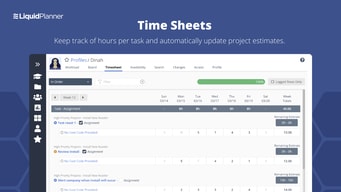
The configurability of this product is amazing. It allows us to view all of the updates we need and filter out the projects we are not involved in.The timesheet is very valuable as well.
There is not much I don't like. As with anything, when one has administrator abilities you have to be careful not to remove files that other things are dependent upon.
We have been able to project our people's capacity much more accurately and that allows us to provide our clients with accurate timelines for the completion of their projects. It also helps us manage the timelines internally so that we keep all aspects of the project moving forward. Finally, we are able to accurately bill hours to clients using the timesheets.