
Unclaimed: Are you working at LiquidPlanner?

LiquidPlanner Reviews: 4.2/5 — Solid Choice
LiquidPlanner is a project management solution built for teams who want to prioritize planning and intend to anticipate user needs to ensure seamless operations. With the platform, you can align your people, projects, and priorities to ensure the right team is able to work seamlessly. Predictive scheduling dynamically adapts to change and manages uncertainty, so you always know in real time when work will be done. LiquidPlanner is backed by the power of planning intelligence, ensuring that teams deliver and optimize their work in the best way possible.

| Capabilities |
API
|
|---|---|
| Segment |
Small Business
Mid Market
Enterprise
|
| Deployment | Cloud / SaaS / Web-Based, Mobile Android, Mobile iPad, Mobile iPhone |
| Support | 24/7 (Live rep), Chat, Email/Help Desk, FAQs/Forum, Knowledge Base, Phone Support |
| Training | Documentation |
| Languages | English |
Compare LiquidPlanner with other popular tools in the same category.
I like how easy to use the software is. It is very user friendly and easy to navigate. There are so many features for customizing and molding the data into specialized reports. The dashboards are great and extremely beneficial. I like that you can set certain permissions for different people as well.
There are times when the database can run a little slow because it is a cloud-based solution. Although this isn’t horrible for the day to day activities, I remember it being a bit challenging when I first designed our database structure. This is going back 9 years ago and LiquidPlanner has made many improvements to their servers and system since then.
We use LP on a day-to-day basis. We are using it to log our time, track progress on projects and plan our future work and needed resources. We know it is a great tool for automatic resource leveling and we found it to be the only tool to do this across multiple projects with multiple resources. We have been able to develop monthly and weekly reports out of LiquidPlanner. We have also been able to integrate it into our timesheet management system for ease of use and transfer of timesheet data.
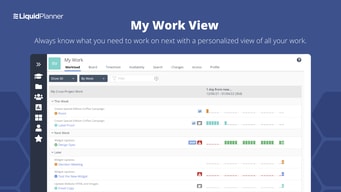
I like being able to log time against specific tasks, which then play into the overall time to complete the other tasks moving forward.
The time increments should be more clear.
Finding out what tasks are taking longer than initially planned, and being able to factor that into the next task.
Liquid Planner helps me and all of my co-workers on track with all of our projects. With the ability to log our daily hours per project, it is easy to see how many hours are being put into different tasks. With the ability to have several people work on the same project, it allows us to se who did what work, and what still needs to be complete. Overall it has made logging hours a much easier and streamlined task.
While using liquid planner, the software does everything that I personally need it to do. When it comes to assigning new tasks for projects or logging hours that I have worked on said projects, it preforms all of these task with ease running into not one problem. If anything I would suggest making the UI of the software a but more streamline as at some points it can be hard to navigate to specific things, such as check boxes and different menus. But this has not been an issue when it comes to actively using the software.
Before liquid planner, we had to submit out hours into projects individually in our system. This did not allow us to see what hours were contributed to which task. The benefits I have found using liquid planner include but aren't limited to hour management, project management, task assignment, and project time logging. All of this has helped us to keep track of each projects tasks individually, allowing us to pin point what can be improved or changed in the future, allowing for more efficiency.
I love being able to communicate with other team members when working on multiple tasks as a team. Adding links to work or google sheets is a breeze and makes our working lives much easier!
I would like to be able to use font and highlighting on texts as I am writing instead of posting a comment or note then having to edit after.
We are able to hit target goals and actually complete more work because of Liquid Planner. We realize this type of organization and planning tool was what we really needed.
It allows you add large files, link out to other URLS, projects. You can keep everything needed for a specific project all within 1 place. Its organized and efficent.
I would like to be able to color cold certain tasks, deadlines, etas, myself.
We run multiple projects, with large enterprise customers at once and being able to keep every project organized and separated is a massive help. We are solving scheduling, project management, content allocation and distribution and management.
Intuitive - most features are straight-forward and the ability to drag and drop or change and rename tasks, projects, folders and workspaces etc on the fly is a big time-saver. Customer support has always been very responsive and helpful and they listen to feedback from users. Although I don't use it nearly as much any more working remote, the mobile app is nice for those on the go who want to stay current on the projects and teams status. My team has also taken advantage of the occasional live webinars and online tutorials to get the most of Liquid Planner which we find to be very helpful.
There isn't much to dislike in my opinion but it is a bit higher priced than some of the other competitors we have tried out. However as the saying goes, you often get what you pay for and Liquid Planner is a top notch product so the value is still there.
Tracking large-scale data and technology projects across multiple teams within the organization. The ability to run various analytics reports and easily extract my teams hours and budgeting by projects/tasks has made certain aspects of my job much more efficient. The search functionality makes it very easy to locate tasks, projects, documents or notes even from years ago which can be a big help. Sharing files and information securely is very easy which has never been more necessary with most working remote these days.
I love being able to track my daily, weekly, and monthly tasks. The addition of milestones to monitor project success has been vital it helping us to track key project elements during and after project completion.
It’s not super colorful or creative in design. I’d love for there to be other elements to draw my attention or have items stand out differently.
We’re able to figure out where the hangups or issues arise with client projects through task and milestone completion. It’s great to be able to see a visual representation of how to improve the process or explain the timeline to clients throughout the process. Looking at the timeline of projects and hangups allows us to look at the overall cost of the project to determine if we’re on track for pricing, etc.
Liquidplanner is a real project and tasks management tool that allow us o plan,schedule and organise all of our projects on the go. It fully eases monitoring and tracking he progress of our projects and tasks on the go. It collaborates our teams hence maximise their perfomance.
Liquidplanner has been meeting all of our projects management needs and solve them once, so no complain this far.
-Collaborating our teams and maximising their productivity. - It eases accessing of our projects folders. - Organise,plan and schedule our projects according to priority of needs. - Classifies our projects. - It is very easy to implement it and flexible across various devices so its availability is guaranteed. - We use it to prepare projects' budget and invoices. It has a lot of benefits.
The Task Distribution and best that we can create different folder for different tasks.
I dont think I dislike anything about Liquid Planner till now.
Project Management and we can monitor all the tasks. Best thing is we can create different tasks checklist inside the task as well as create a notes, share links, and documents.
The ability to determine an individual person's capacity and availability to get a task done. Our ability to easily see our labor costs on a project. The ability to manage resources overall projects, adjust project timelines and adjust priorities of tasks.
It takes time for team members to learn how to use the tool. Project managers have want to still use spreadsheets to create a plan before putting it into LiquidPlanner.
Grouping of efforts by the client and able to see billable hours by department and team. The dashboards by the client and my team assist us to identify successes and potential problems.
In LiquidPlanner I like having multiple tagging and filing systems for tasks. I like being able to have maximum effort and daily limits to tasks.
The overall style of the software seems outdated. I do appreciate that it's not overtly flashy. But I do believe that the style could be improved while maintaining the simplicity of the design and functionality.
This is how our company tracks our time devoted to client and internal projects. It helps keep everything organized in one place and provides visibility to the whole company on what we're working on. There are so many benefits to using LiquidPlanner from a time management perspective.
It organizes projects and data in one place. Easy search feature and easy uploading of documents. Perfect team tagging and great in time keeping as well as recording.
There is one thing that makes it odd ,when it comes to navigating UI it becomes a bit hectic.
For all project management and resource planning .It has been the most reliable.
The ability to have discussions, updates, and share information easily across different teams, and keep the history. To be able to see the entire history of a project, any issues that came up, and things that impact timing. How employees can talk to multiple people at once, with the same message, is critical.
Least helpful is simply the reporting feature, as it's very generic for all uses. While each company is different, it takes a little bit of time to learn how to pull the information you want, and sometimes it's a lot of work depending on the format which you want.
Miscommunication and lack of communication has greatly been prevented, and our lead times have been adjusted and we've meet all of our delivery targets for the entire year. It's been extremely helpful!
All of the organization's project data is in one place where all of management can view it and get the same picture. Stagnant schedule files no longer exist; project managers are given accurate, dynamic status based on project priority as set by senior leadership and task progress as reported by individual contributors. Great reports, dashboards, analytics automate much of the tedious work required of project managers when providing project status.
Setting predecessors and successors not possible by task ID as it is in project There is only one dependency type (finish to start) , others (start to start, finish to finish), not allowed Needs a "work in parallel" function in addition to work in order, work independently, to allow all of the resources to get assigned to start at the same time on the task when everyone is available to start
We can see the impacts of shifting priorities quickly and easily. We can manage a larger number of projects with fewer project managers. Our individual contributors don't need to report their status many times to many different people; it's all in the same place. Our resource managers can easily see who is working on what through the course of a day, week, month, etc. We can use the collaboration functions to encourage note taking related to time spent on individual tasks, showing us areas for improvement, sources of waste, etc.
LiquidPlanner provides a comprehensive breakdown of projects and tasks, analysis, time tracking, and many features that make our daily needs for all people my team easy to stay organized. It's a great all-in-one tool.
The UI is a little tough to navigate sometimes. I hope that LP moves towards a more colorful and visually stimulating look. There are other tools out there that have nice "looks". It would also be great if there were options to customize the interface by using different colors, or fonts, or even layout. Not major customization, just a few options...specifically the colors. Another place where Liquid Planner could improve would be allowing a "Virtual User" login, for Virtual Users to be able to track hours without using a complete license. We occasionally need to bring in other folks and having this option would be a benefit.
Teams are staying on track, we can better predict available resources, estimated levels of effort, timelines, and communicating within tasks. We've seen an increase in productivity and efficiency since using the tool in the last few years.
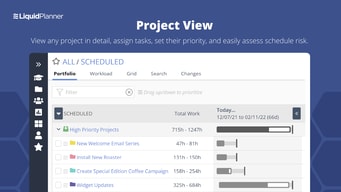
I can see all my projects at a glance. My employees and I all track our individual time on individual tasks. I can assign multiple people to anything. The folder/sub-folder structure is intuitive and allows me to manage micro projects within larger projects. I can easily reorder and prioritize tasks simply clicking and dragging. And I think the best part for our company is the ability to forward emails and messages from my inbox directly to LiquidPlanner either as a new task or to an existing task. It's truly an amazing platform for any project manager who has to juggle multiple projects and make sure that communications from their clients get routed quickly the right place and people.
Honestly, the only feature that I've ever requested that hasn't been implemented is the ability to color-code folders. The initial setup and learning curve was the only thing that may have been a deterrent in the beginning. But once I realized that I didn't HAVE to use every single feature and just focused on the stuff I need for my company -- it was pretty easy. And all my employees over the years were able to use it just fine. I was afraid they would balk, but it's no different than learning the basics of a new point-of-sale program at any retail store.
I run a fast-pased print shop and web development company. Each customer order would have so many moving parts, that I as project manager, was completely losing my mind trying to stay on top of all the orders, where they were in the process, and all the communications with each client. Also, trying to collect timesheets on projects from each client and account for all the labor, supplies, etc. was the most time-consuming thing I had to do each week. Billing would sometimes be held up for days because I would get so backlogged. LiquidPlanner let me and my staff keep everything together in one place. Everyone knows exactly where to look to get answers and can also answer client's questions without running around the shop asking individual people, "Do you know where this job is?" "Is that job done?" "Have these supplies been ordered?" Etc. etc.
Unlike other tools, it schedules your tasks based on your availability per hours in the week. It does not allow you to overschedule yourself or your team. This is HUGE for planning. Also it allows to create priorities across multiple projects without you having to remove tasks from their folders in order to create a hierarchy. This feature is also HUGE. I have tried about 20 different PM tools and honestly, nothing comes even close to Liquid Planner. Plus their customer support is incredible. I have been a customer for 5 years and I HIGHLY recommend it.
The user interface is a little confusing and it's not as pretty as Trello ...but the immense value of all of its tools far outweighs this downside.
No longer overpromising on projects and underestimating the time it takes to complete tasks and milestones. The prioritization features have enabled us to focus on what is truly important instead of just using high / low / medium which dont have that much meaning in reality. The reporting features have enabled us to constantly stay on track and identify areas of key importance that have been neglected.
I like the configurability of the users and I also really likehow Projects can be broken down all the way to checklists for tasks. The dependencies for tasks is super useful as well.
The notification options are not as configurable as I would like.
Liquid Planner really helps us see our team's availability and helps us realize the time spent on specific projects. This has allowed us to assign work more effectively and also allows us to provide our customers with more accurate timelines for project completion.
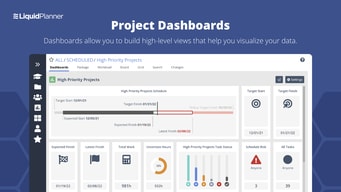
My favorite function of liquid planner is the dashboard tool. To be able to view all my upcoming tasks, milestones and meetings prioritized in one place is super helpful!
I wish I could view the job costing easier. I would like to know how to view how a job is financially doing after putting in the contract amount, and have the ability to view the tasks time allotments interacting with the overall all contract amount.
Liquid planner helps me solve the problem of juggling multiple jobs and tracking all the tasks, milestones and deadlines associated.
It's got a very robust feature set with simple prioritizing options. Love the time tracking features, easy to drag and drop tasks into place. I love the different view options. I use a pretty basic set of features, but it's not overwhelming or too complex to be simple to use.
There is nothing that I dislike. It works great for me.
Time tracking, billing reports, project planning, resource planning, project management, keeping track of all todos.
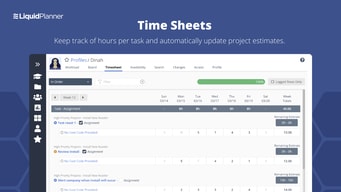
The multiple tasks for a log activity time and easy tracking. The display per week of the hours logged in the system
Delay when I change the week to log a new activity. The User Experience can improve as also a display of the week. Also, a display per user log time will be a good experience for Project Management
Time Tracking for multiple team members. Verification for a new task or another
Liquid Planner gives a clear picture of what needs to be done, who need to do it, and when. Team members no longer need to spend time figuring out their daily agenda, and everyone's schedule is visible. The automatic scheduler keeps estimated completion dates continually accurate. Project managers don't have to manually move large chunks of tasks/milestones/etc when the project inevitably experiences delays or scope changes.
The interface design is a bit dated, and could probably use a refresh. Because it's so customizable and data-heavy, it can seem daunting at first use. Also, the mobile app seems to have been ignored for years.
Our team is able to track the progress of projects better, and is gaining much more insight into what causes delays/overages. Individuals feel much more comfortable with their clearly defined expectations, based in the reality of actual available hours. It's much more difficult to over-promise/under-deliver when the scheduling system warns of conflicts ahead of time.
I think it's very easily navigable, and an easy place to be able to house all internal communication and even documents that pertain to particular projects.
The overall layout can be very intimidating at first practice. It get's much more frendly the more you're in it however.
Id' say definitely solving overall internal communication, especially during the quarantine and remote working.
My top favorite feature is how the workspace is incorporates resource leveling. This is critical in determining completion dates and identifying critical paths. The status report is also an invaluable resource that I reference often. The dashboards enable a level of collaboration that is unlike any other program/project management tool I've tried. It is also pretty configurable. I do wish there were more options to create custom filters. That would assist with making dashboards and workspace views more specific to a purpose.
The only downsides are there are some analytics reports that do not allow you to easily see all columns. There are also key fields that I wish were able to be customized. I also have a very large workspace so I wished there was an easier way to move tasks within the workspace. Many times the workspace "resets" because I'm moving a task so far up or down my plan. This can be very frustrating when I am grooming my sprint backlog. These are very minor inconveniences in the big picture though.
Shared ownership over our projects is probably #1. That is because we are able to increase and optimize communication amongst the group which is even more critical given we are all remote. I have used LP to streamline our Enterprise Intake process and have created greater visibility into project financials (margin and burn rate to date).
Liquid Planner has been a HUGE help in organizing and planning for my team. I manage a team of designers that work on a lot of different projects, that all have different needs and timetables. While there will always be a lot up in the air when it comes to planning for our projects, we have a much better understanding than we used to of how much we are managing and when we will be able to get projects turned around. It has also helped us track our time and understand how we are spending it better....given us so much accountability and helped us make solid business decisions.
There is a lot of know, and it can sometimes be hard to get the team to enter in their information as they should without a lot of micromanagement. If they don't enter in the information correctly, the data is wrong.
I'm able to put concrete metrics on the work my team is doing, which helps us make business decisions. It also helps me forecast workload, so I can give an estimate of when work will be turned around.
Quick response time from customer service
no reports on projects/tasks that are done
We are able to see all projects at once. We can keep track of each project/task that each individaul is working on. We can make deadlines and make sure everyone is sticking to them.
It is simple for entering time logged. Not Complicated.
There is not much to dislike. I use it very simply for logging time.
The company I work for use it to log time. It shows what projects we work on and what hours went to it. It make billing clients easy.
Liquid planner makes it easy to coordinate large projects being worked on by multiple teams. I love that you can tag colleagues when your section of the work is completed. It's also nice that you can attach and upload files.
Sometimes its hard to find things using the menu system, but this could be due to the manner which my company organizes things.
When you have multiple teams coordinating on a large project it can be difficult to ascertain what stage the work is at. Likewise, passing files between teams via dropbox/email/teams is clunky and can result in delays. Liquid planner makes it easy to conceptualize the status and exchange the project between teams.
How easy it is to specify your week hours
If I add hours incorrectly, then it's gone
Project management, keep track of my progress. Insert comments, checkboxes, the whole package comes as benefits to the company.
The way it shows the routine tasks in the calendar.
It's a little bit confusing on the tasks above the page. It changes a lot the meaning of the task dependending on what you need.
Im solving the problem of having mistakes on how many hours per day I spend on each task. There's a lot of benefits, but the main one certainly is the organizing method of the website.