







SpatialChat Reviews: 4.7/5 — Highly Rated





| Segment |
Small Business
Mid Market
Enterprise
|
|---|---|
| Deployment | Cloud / SaaS / Web-Based |
| Support | 24/7 (Live rep), Chat, Email/Help Desk, FAQs/Forum, Knowledge Base, Phone Support |
| Training | Documentation |
| Languages | English |

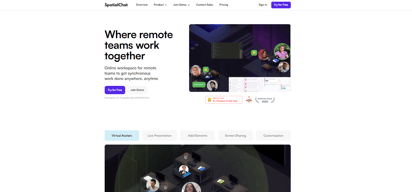
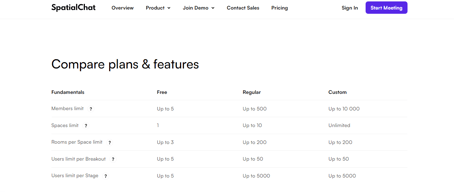
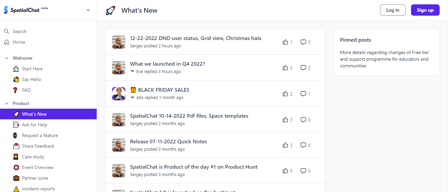
Compare SpatialChat with other popular tools in the same category.


We moved to Spatial at the beginning of the pandemic and started using it for 3 purposes: 1. virtual office; 2. showroom for our projects; and 3. training room. It was an amazing way to keep the team connected and bring clients to meet us. And now, with the new Grid functionality, the solution has become amazing because it allows informal get-togethers and more formal meetings with clients.
Hummm... The communication radius between people could be a little smaller, allowing a little more privacy in conversations. Some management features are missing, such as user view control and tool usage report
1. The inclusion of information about the range of the conversation; 2. The option of meeting in a Grid format.
I like to see how people get amazed by the experience. For me it was transformative: an before and an after. I don't want to use "zoom" or "meet" or please not "teams" not ever never again. Participation is the key word: I love the way you can interact with other people. It looks like you are organizing an event so similar to the real life but online. I don't want to get back to the other platforms , it became dull. Spatialchat the innovative my company NETI is an innovation consultancy firms its suit us, goes with our way of doing things. Rebel, fun , colorfull !!!
People with a fixed mindset have trouble adapting to the platform. If your participants don't have a playful and joyful personalities, you will find that it is hard to get things done. Advice: prepare your team with some tricks to smooth the adaptation to the platform for grumpy people.
I'm running innovation session and makethones

I love how Spatialchat makes everything so real. Virtual events are as warm as in-person events with this platform. I love it.
I would love it to be for free. Anyway, I understand the decision.
During the pandemic, we wanted to create virtual events but it was kind of boring. When we met SpatialChat everything changed.
Spatial chat is amazing, I teach 1-1 sessions and it means that all of my students are able to use the same link and sit at different areas while I am with other students and then when it is there time they can come over. Perfect for this and makes my work a lot easier
There is nothing about spatial chat that I dislike
Spatial chat is saving me time by allowing all of my students to use the same link.

Very fluid, welcoming and user-friendly environment.
No dislikes. Very satisfied with the way it is
Meeting my learners remotely. helps in managing space and time with an engaging atmosphere
It looks like real life. People meet and listen to others if they are closer. I share presentations, and I do like to have a music point.
That people forget to put micro OFF if they were at zoom. I dislike not having money for using more rooms with the possibility of sharing audio; but it is not a problem from Spatial Chat.
Create trust, to make decisions happen in a good environment. I am not benefiting financially; but I would like to. It is a good way to make people feel happy and to go from one site to another.
Easy to use without specific application. And I like an additional room function.
There are no functions in Spatial Chat I dislike.
Having weekly virtual breakfast meetings among my community.
I loved that we were able to set up so many different rooms and make it feel like an in-person workshop.
It was a bit challenging for our participants to use on their phones for those who don't have access to computers.
We planned to have an in-person workshop and wanted to achieve the goals of that in an online setting.This platform really made it feel like they were at a workshop.

Spatial Chat offers a much more organic "happy hour" experience than a typical video chat software. I like that you can change the backgrounds of the breakout rooms. While it takes a minute to learn and a lifetime to master, the user learning curve is far less than Gather. There is a bit of a time difference between the account team and folks in the US, but our new account manager Anna was superb!
While the platform works, the user experience is not good on web browsers other than Google Chrome, and mobile/tablet users seemed hopeless.
Happy hours can be much more about networking again, rather than an awkward panel of speakers.

that you can have a conversation with people near you without disturbing others, also possibility to have multiple youtube channels as that you can see when you want
mobile experience isnt very good, and in some cases camera stop working or dont start if you connect it with zoom
online meeting that previously was physical, is the near best way to see a group of people and talk with them like when you go to a conference
the incredible flexibility of customizing your space. It creates a really warm environment to foster connection,
Nothing yet. 8-). Thank you for listening to your users and adjusting features at a fast pace.
it helps me create a warm environment for my coaching and facilitation projects.
O spatial chat é uma plataforma excelente para dar aulas de forma interativa, rápida e usando muitos recursos visuais. Acredito que a maior vantagem é a de ser gratuito e ter a possibilidade de se afastar e diminuir o som de forma rápida e funcional.
O spatial chat é uma plataforma muito intuitiva e fácil acesso. entretanto, passei por problemas para ligar minha câmera do celular e em algumas reuniões, as pessoas não conseguiam ligar os microfones.
O spatial chat me ajudou muito na didática de aulas, onde nas outras plataformas não era possivel gratuitamente e de forma funcional trabalhar em duplas com os estudantes.

It is such a different platform to the typical zoom conferences, meet, etc. that participants enter with a different attitude and good disposition. The onboarding is so easy that anyone can participate and enjoy it for the first moment. It's an incredible experience and makes people feel closer in this virtuality living. We have used it to dance, to play games, to chat as if you were in a bar.
I would like to have some ideas or examples for interactions. Sometimes I think I'm not taking advantage of the full potential the platform has. Maybe something i don´t like its that to share a screen its a bit complicated. Another thing can be the prize, that for some countries and in our case it's expensive to afford it if you are planning to do something for a large amount of people.
The main problem it solves is the lack of face-to-face experiences and networking or after-party due to the pandemic. Other problem that Spatial solves, its when you need to facilitate dynamics with more than one team at the same time.

SpatialChat brings back some lost spontaneity in online meetings. It's also very easy to use !!!
The max not of 50 persons could hypothetically cause problems
We used SpatialChat to complement the classic online meeting tools in the frame of an online conference - It really felt like being in the lobby of conference - approaching people - and e - meeting colleagues in a secure but informal way as well
What all you get without making us pay is astonishing
It takes a minute to get down navigating. It's simple for the tech savvy and may be a challenge for the dinosaurs out there
Designing the layout skillfully will prevent hiccups and practicing with other teachers before executing to assess user friendliness and minimize lesson plan flaws
Very interactive, looking cool, super user friendly and great functionalities to create your own look and feel.
As a speaker, it is a 'must' to have double screens in order to see both presentation as well as the responses in the (break out) room. Not all speakers have these facilities.
.

My clients and attendees love that they're able to skip to download headache that comes along with other platforms. Onboarding is SO easy. Another highlight is the multiple ways to share content - design assets, videos, gifs, etc. is becoming increasingly important to brands and we're happy to offer SpatialChat as a resolution. Lastly - SpatialChat is always adding new features, making it one of my agency's most dynamic platforms to offer.
We haven't experienced many glitches, especially since attendees check their audio + video before entering the platform, but there is a concern of live support if any issues do arise. A lot of our events are international with off times, so that's something we'll need to explore a resolution for. Additionally, more onboarding notes within the platform throughout the experience would help the event team with questions along the way such as "how do we move around again?" "why can't I hear this attendee?" etc. Not a dislike, but would love to see this platform grow to offer microsite capabilities, registration and more.
Web-based AND face-to-face networking is a major win for our team and clients. We want to make the attendee experience totally effortless, and SpatialChat truly focuses on getting attendees into the platform and engaging as fast as possible. SpatialChat also helps us offer a holistic experience - we have control over design, music, speaker management, etc.
Exactly the same experience as an actual event. Easy to use, very intuitive look and feel.
Asian language support could be a bit better but it's good enough already.
To host hybrid event during C-19.

The variety and flexibility of meeting rooms and interactions.
During conversations the profile bubbles are a bit too small.
People new to tech like to use something fun and innovative.
Stable video and audio, works on all major browsers, even mobile is supported.
Slows down when to many things get pinned in a room. More granular permission would help here.
Networking at virtual conferences and even scientific poster displays.

That it solves the problem of online networking events in a clean, easy-to-use manner. The fact that it is browser-based and requires almost zero setup is a big benefit.
As it is browser-based, it can be very heavy on CPU, so draining battery-based devices.
As each attendee controls where they are, it is as close to an in-person networking event as I have found. Once attendees realise they can control the movement, it really improves the event experience.
I LOVE the proximity feature! Students can only hear other students speaking when they are close to one another.
It isn't easy to end the session; I've found a workaround by setting a timer. Since our class is on Zoom, students cannot hear me speaking on Zoom if I'm in SpatialChat. It would be a cool feature to have if passwords were set for various rooms within Spatial chat. It would prevent students from eavesdropping on other groups.
I am solving the problem that Zoom has with its breakout rooms. Students are unable to switch breakout rooms once they are assigned. With SpatialChat, students can wander from group to group. It feels like an actual classroom in a virtual setting.
The rooms and the practicality of it, the options to use cameras and microphones at the same time, and how you can easily change rooms whenever you want. It's also a very good fact you don't have to create accounts to use it.
Sometimes when we are close to the rooms we can listen to the others from there, but when we stay in the middle of the room it doesn't happen. Sometimes My students had to close the other sites that were using their microphones to use it.
I had many difficulties with communication, because of the pandemic I'm teaching using the computer, and it's horrible to find good platforms to students communicate
Thanks to the user-friendly interface, the event participants could easily switch between the rooms. The ability to change the background and customize the chat rooms are very successful in getting the user into the game.
Nothing actually. It was a great experience to meet new people in these days when we are afraid to meet face to face.
Networking, branding, a real summit experience...

As others here have said, it's fun watching people "settle in" and learn how to use the space: they are usually delighted! It does take a few minutes though, so you'll want to plan a suitable opening activity. Personally, I enjoy carefully choosing the background to be ideal for what I'm planning. For example, in a recent event we used a background with six tables, each with a different coloured carpet underneath. That meant we could say, "To discuss Topic A, move to the blue table," and so on. As the event continued, we noticed a pattern of people moving their avatars to "sit at tables" when they intended to engage in conversation, and to leave them in-between the tables when they were looking around for activity partners, or just mingling. It was delightful, though not surprising, to see the impact of the background metaphor. And then, we changed the background image on the fly. Suddenly, the group felt whisked into space, with no tables or fixed points to orientate around. What a difference!
"Share screen" is a bit awkward, especially when several groups are working in parallel in different parts of the space
Events where it's important for the participants to be able to move under their own steam, to choose their own small conversation groups etc, such as collaborative innovation workshops, "soft skills" training, informal meetups, social events Once benefit for organisers, especially trainers, is to be able to gently listen in to the breakout conversations without disrupting them - for example, to check whether people are doing the prescribed activity or just chatting

It is an excellent platform for virtual education or meeting environment. It's like being together in a real space. People can talk to each other just if they are close together, and that is fantastic for doing exercises and small meetings in the same place.
It could get a bit chaotic since people can talk to each other, and it is challenging to make sure everybody is on the same page at the same time. The administrator can't summon people or notice if someone is talking and not paying attention.
We are a corporate training company and for some of our programs, Spatial Chat is just perfect. We can split the group, ask them to discuss something, and then continue with the full audience, all in the same place.
Easy to use and more casual interaction friendly than zoom. The customization options are also very helpful.
Can't think of anything; very good product.
Used it for a cohort training initiative that lasted 10 months and it worked great.
The background and the many possibilities to interact with others.
Nothing specially. But I would like to see 3D backgrounds in which you could interact, for example, a virtual street market with booths.
Networking during online events. The benefit is accurate for this purpose, but always can be improved.
The spatial chat is excellent for a lot of group dynamics. They work hard to make a great tool, with new significant improvements at a really fast pace. I regularly use it for university classes, informal gatherings, and networking for peers. I recommend it every time I can, and a great tool to experiment with new ways of interaction and facilitation.
The tool is excellent and intuitive; I only dislike you don't have a way to make the radius of volume decay smaller and select how much you want to hear. Also, a great addition will be the use of spatial binaural audio. I have already talked with the team, and they are very receptive to my concerns.
I solved the problem of group working and informal chit-chat that is lost from the physical classes.

SpatialChat is a beautiful experiment of how an online class can happen. You can't compare to other alternatives. SpatiolChat allows students to talk among themselves in the class. Another feature that I like is multiple share screens. No other conference software allowed me to do so. For coding courses, it's an invaluable feature. I would say that SpatialChat is the first tool that enhanced my classes better than my real world classroom teaching. I felt a better teacher using SpatialChat than in some classrooms.
The only feature that I miss in SpatialChat is a dedicated app for mobile devices. The website works on mobile devices, but it could do better if it had a specific app to work with multiple Android and Apple devices.
SpatialChat allowed my students to express themselves with the multimedia assets. I can have an actual interactive class without being the only speaker in real-time.