

Unclaimed: Are you working at LiveChat?
LiveChat Reviews: 4.5/5 — Highly Rated
LiveChat is a premium live chat and help desk software for business. The platform is designed and built specifically for amazing customer service and is used in over 150 countries by over 31,000 organizations, including small, medium and enterprise organizations who want to improve customer satisfaction and boost online sales results.

| Capabilities |
AI
API
|
|---|---|
| Segment |
Small Business
Mid Market
Enterprise
|
| Deployment | Cloud / SaaS / Web-Based, Desktop Mac, Desktop Windows, Mobile Android, Mobile iPad, Mobile iPhone |
| Support | 24/7 (Live rep), Chat, Email/Help Desk, FAQs/Forum, Knowledge Base, Phone Support |
| Training | Documentation |
| Languages | English |

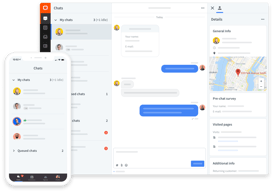
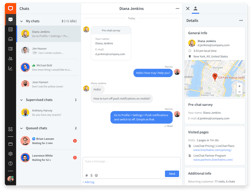






LiveChat prices by agent, but the limit you hit first is visitors. Starter tracks 100, Team 400, and Business 1,000 — and that is site visitors, not conversations. A modestly busy website exceeds the entry allowance without a single person clicking the chat widget. Work out your traffic before your headcount, because that is the number that picks your tier.
- What it is: A live chat platform for websites, with proactive messaging, routing, reporting, and an AI layer.
- Best for: Established support teams on sites with real traffic, where chat is a staffed channel rather than an experiment.
- Pricing: Starter $19, Team $49, Business $79 per person billed annually. Monthly is $25, $59, $89. Enterprise quoted. Verified July 2026.
- The honest catch: Starter is a single-user plan despite being priced per person, so any actual team starts at $49 each.
What Is LiveChat?
LiveChat is one of the longest-established dedicated live chat products, now sold alongside a broader family that includes ChatBot and HelpDesk under the Text brand. It is chat-first rather than a support suite with chat attached, and that focus shows in the depth of the agent experience: canned responses, routing, transfers, visitor context, and real-time typing previews are all mature.
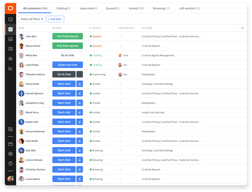
The 2026 positioning leans on AI, with the site advertising “LiveChat 2.0” as an inbox with a revenue counter spanning human and AI agents. Underneath, the differentiator remains proactive engagement — tracking who is on your site, what they are looking at, and triggering targeted invitations rather than waiting for someone to open the widget.
That proactive capability is exactly why visitor tracking is metered, and why the limits deserve more attention than the per-agent headline.
How LiveChat Works
- Priced per agent, gated by visitors. Two separate dimensions, and the second is the one most buyers overlook.
- Proactive chat invitations. Trigger messages based on behaviour, which is the core of the product’s value.
- Routing and transfers. Mature queueing, assignment, and escalation between agents.
- Chat history retention. 60 days on Starter, unlimited from Team.
- Reporting. Basic on Team, with agent performance metrics and staffing prediction on Business.
- Multi-channel. SMS and Apple Messages for Business arrive at the Business tier.
LiveChat Pricing
Captured from LiveChat’s pricing page in July 2026. A 14-day free trial requires no credit card.

| Plan | Annual | Monthly | Users | Visitors tracked | Chat history |
|---|---|---|---|---|---|
| Starter | $19/person | $25 | 1 | 100 | 60 days |
| Team | $49/person | $59 | Unlimited | 400 | Unlimited |
| Business | $79/person | $89 | Unlimited | 1,000 | Unlimited |
| Enterprise | Quoted | — | Unlimited | Custom | Unlimited |

What actually decides your bill:
- Visitor tracking is the constraint that arrives first. 100 visitors on Starter is a very small allowance for any site doing real traffic, and it governs how many people LiveChat can see and proactively engage. Since proactive invitation is the main reason to choose this product over a basic widget, hitting the ceiling undermines what you bought.
- Starter is a one-person plan. It is quoted per person, which implies you could add people, but the plan supports a single user. Any genuine support team starts at Team, meaning the real entry price is $49 per agent — 2.6 times the advertised figure.
- Per-agent pricing compounds quickly. Five agents on Team is $245 a month; on Business, $395. Ten agents on Business is $790. This is a significant line item, and it scales linearly with the team.
- Annual billing saves 17% to 24%. $19 against $25 on Starter, $49 against $59 on Team, $79 against $89 on Business.
- 60-day chat history on Starter is a real limitation. Transcripts matter for quality review, disputes, and training, and two months is short if you ever need to look back.
- Business is where workforce management lives. Work scheduler, staffing prediction, and agent performance metrics only appear at $79, which is the practical reason larger teams upgrade.
Who Should Use LiveChat
- Established support teams. The clearest case. If chat is staffed during business hours by people whose job it is, the agent experience justifies the price.
- Sites using proactive engagement. Behaviour-triggered invitations are genuinely good here, and it is the strongest differentiator.
- Ecommerce with sales-oriented chat. The revenue tracking angle fits stores where chat converts rather than just deflects tickets.
- Teams needing shift management. Business’s scheduler and staffing prediction are real workforce tooling that lighter competitors lack.
It fits poorly for small businesses testing chat, where Tidio offers a free tier and far lower entry cost; for teams wanting an integrated help desk, where HubSpot Service Hub or Zendesk bundle chat into ticketing; and for very high-traffic sites, where visitor limits push you toward an Enterprise quote quickly.
Honest Pros and Cons
Strengths
- Excellent agent experience. Canned responses, routing, transfers, and visitor context are all mature and fast.
- Strong proactive engagement. Behaviour-triggered invitations are the product’s best feature.
- Reliable and well established. Many years of refinement show in the details.
- Good reporting at Business. Agent metrics and staffing prediction are genuine workforce tools.
- A real free trial. Fourteen days without a credit card.
- Broad integrations. Connects to most major ecommerce and CRM platforms.
Limitations
- Visitor tracking limits are restrictive. 100 on Starter and 400 on Team constrain sites with real traffic.
- Starter supports one user. Despite per-person pricing, so teams start at $49 each.
- Expensive at scale. Ten agents on Business is $790 a month before any add-ons.
- 60-day history on Starter. Short for quality review or disputes.
- No free tier. Competitors offer one, which makes low-commitment evaluation harder.
- Chat only. Ticketing and help desk are separate products in the Text family, at separate cost.
LiveChat Alternatives and How It Compares
- Tidio is the obvious lower-cost comparison, with a free tier and chatbot automation aimed at smaller businesses.
- Freshchat offers similar capability inside the wider Freshworks suite, often at lower cost.
- HubSpot Service Hub bundles chat with ticketing and CRM, which is better value if you need more than chat.
- Zendesk Support Suite is the enterprise support platform where chat is one channel among several.
- Intercom is the closest premium competitor, stronger on product-led and in-app messaging. Crisp is the budget all-in-one option.
For related tools, browse our live chat, help desk, and chatbots directories.
The Verdict
LiveChat is a good product that knows exactly what it is. It does not try to be a help desk, a CRM, or a marketing suite — it is chat, done properly, with an agent experience refined over many years and proactive engagement that genuinely outperforms a passive widget. For a team where someone is staffing chat during business hours and conversions or resolutions are being measured, that focus is worth paying for.
Price it on traffic, not headcount. The per-agent figures are what everyone compares, but visitor tracking is the limit most sites reach first: 100 on Starter, 400 on Team, 1,000 on Business. Those are visitors on your site, not conversations, and since proactive invitation is the main reason to buy LiveChat rather than something cheaper, running into the ceiling degrades the specific thing you paid for. Check your monthly sessions against those numbers before choosing.
Then be clear-eyed about the entry point. Starter’s $19 is a single-user plan, so it is a solo-operator price rather than a small-team one, and any real support function starts at Team’s $49 per agent. Five agents is $245 a month, ten on Business is $790 — meaningful money that scales linearly. If chat is a core, staffed channel, that is defensible and the tooling supports it. If you are testing whether chat works for your business at all, Tidio’s free tier answers that question for nothing, and you can move here once the answer is yes.
FAQ
How much does LiveChat cost?
Billed annually, Starter is $19 per person per month, Team $49, and Business $79, with Enterprise quoted. Monthly billing raises these to $25, $59, and $89, so annual saves between 17% and 24%. A 14-day free trial is available with no credit card required. Note that Starter supports only one user, so teams effectively start at $49 per agent.
What is the visitor tracking limit?
Each plan caps how many site visitors LiveChat can track: 100 on Starter, 400 on Team, and 1,000 on Business, with custom limits on Enterprise. This counts visitors on your website rather than conversations, and it governs how many people the system can monitor and proactively invite to chat. Because proactive engagement is LiveChat’s main differentiator, this limit often matters more than the per-agent price.
Does LiveChat have a free plan?
No. There is a 14-day free trial requiring no credit card, but no permanent free tier. Competitors including Tidio and Crisp do offer free plans, which makes them a cheaper way to test whether live chat suits your business before committing to a paid platform.
Is LiveChat worth it compared to Tidio?
It depends on whether chat is staffed. LiveChat’s agent experience, routing, and workforce management at the Business tier are stronger, and it suits teams where people work chat as a job. Tidio is markedly cheaper, has a free tier, and leans harder on chatbot automation, which fits smaller businesses that cannot staff chat continuously. For a support department, LiveChat; for a small business testing the channel, Tidio.
What is LiveChat best for?
Established support and sales teams on websites with meaningful traffic, particularly those using proactive chat invitations to engage visitors rather than waiting for inbound questions. Its scheduler and staffing prediction at the Business tier suit teams managing shifts. It is a weaker fit for businesses testing chat casually, and for anyone wanting ticketing bundled in.

Compare LiveChat with other popular tools in the same category.
professional, clean look and great interface
There is occasional downtime, but very little
none
Informative and precise. Best part about the articles is that they are easy to understand and implement. Kudos to all those who are making it happen and well I guess I'll be eternally grateful to you if you could publish articles more on the support end of things as well.
I do not dislike anything! I'm perfectly happy with livechat and their services.
Customer support.
Ease and usability of managing and accepting chats.
The limitation of how the live chat looks on our website.
Customers and prospects can ask us questions while browsing our website. It makes it easier for us to Solve their problems without them having to email or phone us.

It isn't fast moving and easy to use, no delays!
Takes a few minutes to open and get started. But once it is open, it's great
Easy to connect with clients and associates.
I use this for working at home, and I have to say that they are ALWAYS ready. The system is very smart. I have actually never had any problems from this. I always get the support I need.
I dislike the reminder , simply because there is a beep in my headphones when the reminder kicks on.
I am able to help customers with subjects I don't know about quicker with this. This is a great way for me to be more efficient when using this.
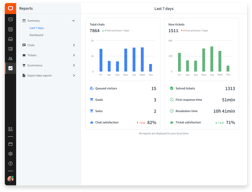
LiveChat is a through system that allows our pre-qualification team to effectively correspond with our prospects and hand raisers who venture to our site seeking help. This system also provides a rating system for our chatters along with graphs that report numbers of chats, peak times, and length of chats.
The only thing I kind of dislike is the interface, it could use a face lift to appear more leak and up to date.
We are solving the ability of our hand raisers to be able to easily ask questions and chat with a live person. Our customers are also able to utilize live chat to access our support agents. This is incredibly helpful for our team and customers who need access to each other 24/7/365.
How easy it is for customers to initiate and complete chats with our staff. Also we like how easy it is to implement into our website. Our customers are able to quickly and easily visit our site and connect to our LiveChat services immediately. They are then able to easily access the department that they are seeking to establish contact with through the skill implementation that LiveChat provides. We have also found that the server is quite stable and we rarely have to visit it or call into tech support for help. However, when we do call into tech support for issues, they are quick to resolve our issues and get the root of our problems right away.
There are some quirks to the software here and there but nothing we can'f work through and solve. For instance there are times when we need to modify a user account, we have to completely delete and re-add the account for the changes to take effect. I do need to mention that we are on an older self-hosted version, we have been guaranteed by LiveChat that if we go to the vendor hosted version that this issue has been resolved.
An electronic instant communication method other than telephone to answer questions for our customers. We have a large customer base that doesn't want to wait for an email or wait on the phone. This applications tailors to that customer set and gives them the information they need with the path of technology that they desire as well.
Live Chat is very easy to use. Visitors start a chat rather than to pick up the phone. Our business is a website where consumers can compare complex products with subscriptions. When I am talking to someone at the Live Chat I can search through the website and assist them quickly with their request for help. Thanks through live chat we know the way people think, we understand their needs and we learn to know them better. And also very nice: we can see what the visitor is typing, so we can reply quickly. So people get the feeling that we really understand what they are dealing with and know that they can rely on us for help.
We would be quite happy when voice can be added on Live Chat. At this moment we are using other programs for call options and WhatsApp. As everything can be assembled that would be nice.
Our business is a website and we compare complex products with subscriptions, we don't sell products ourselves. We don't meet our visitors in real live, and we don't have a database with information about the visitors. In fact, we don't have any information about them but what they tell us in the chat and on the phone. We learn to know our visitors better thanks to Live Chat.
Ease of use and ability to reach my customers.
i wish I could customize my live chat page.
Able to reach more customers.
Communication power contact be effectively and accurately.
Sometimes it takes a while to answer and complicated.
Problems when buying page has the facility for you to solve them as soon as possible.
The ability to provide options and a fast reply to our customers. The reporting features are great allowing us to monitor performance, customer needs, and customer satisfaction.
The occasional lag. When LiveChat has issues it seems to slow down all other applications I have open on my computer,
Increased customer satisfaction as the demand for online interaction and fast responses increases. Offers an alternative to phone and email, especially during times of high call volume. Communication is visible and easy to monitor, problems and potential can easily be recognized. Chats can be tagged for specific purpose and used in customer development and growth. Great for evaluation, focus, and training staff.
Usability, is easy to use, the installation process, the layout, the customization.
Reseller program, the benefits are not great, and the program should has something to keep the client with us for long time, something like the client prefer to stay with us and not to buy it directly to you, or if the client decide to leave us as a partner, get more expensives prices. Tools that help us keep clients. .
client Service and Leads
User friendly and strong tool to get new business... I'm using the app as well and this gives you a lot of info.
When booting up my system I get an error message, I have worked with live chat tech people to solve this but no result.
We are expanding our webshop to different countries and this is helping us to get interaction. There is a low barrier for potential customers to reach out to us.
Our company has used this application for about a year now. It is really intuitive, simple and requires very little attention. Comparing to other apps on the market, this is the biggest bang for the money, really good value.
It is hard to find negatives, but perhaps a translation module could be helpful. Other than that, the rest is a one positive experience.
Needed to chat with clients and users visiting our corporate webpage. We used it daily, it gives you an immediate location of the person typing. Like this app a lot.
Ease of use and customizability of the popup
Not Much! I'm very happy with the service and have not considered any others
Customer care and support. Better engagement with Customers.
canned response flexibilty, and inter-device operation
not being able to force a vistior to re-engage with a closed chat, to re-start the chat, as a user leaving a page seems to shut it down. People are invariably rude or impolite, and shut down chats while I'm typiing answers, which is ineffective.
we use it to articulate special offers, and it works very well for this
Toda conversación se archiva, a todo se le puede poner un tag y los reportes son excelente
Solo aceptan Paypal con mínimo de 5 asientos
Comunicación con clientes externos, cualquier dia y hora
1) It is easy to use 2) Canned responses 3) I can see where the person is located, the web browser they are using and the OS of their computer/smart phone (It is kind of creepy I will admit) 4) Chats are archived so I can go back for info if needed
I have not ran into anything I did not like. A useful feature that could be included to make things better would be the ability to let the customer screen share so I am able to trouble shoot their issue easier. We have some customers who have trouble with checkout (a lot of time it is due to people who are not tech savvy) and if I was able to screen share with them there would be a lot of benefit for both me and the customer.
We sell point of sale supplies, mainly the paper rolls so a lot of customers like to verify that they are making the correct purchase due to the wide variety of sizes. It can get overwhelming if you are not familiar with this industry. We are also able to educate the customer on the types of paper (thermal, bond, 2-ply) which results in less problems down the road.
The system give you the info on what customer's are looking at the page on real time with which countries they belong to with time zone I think that's astonishing!
Dislike as such I didn't came across as such
It basically providing customers with product info what they required to go ahead on their purchase as this a new feature on the site which will help customer to get their queries solved then and there
Live Chat is an excellent software that allows your website to convert more. We are using Live Chat on our website as Sales and Support to our customers.
I don't like the mobile version of Live Chat, that's the reason we disabled it. On mobile Live Chat becomes a second layer of the website, which is not a good practice.
Live Chat solves boosts our Sales and provides Support to customers that can't call in. It's a great substitute of the phone and email flows.
I can see what part of my website that they are on. By using that I can invite to a chat and personalize it to what they may need.
Its not that easy to use on a phone. A lot of customers use phone these days or tablets.
We are pulling in people that are just window shopping. They are curious and then our Livechat agents are very personable and a delight to chat with. This leads to sales.
✔ Simple and few-steps registration ✔ Wide options of customization including eye-catchers ✔ Settings of tickets, pre- and post-chat surveys ✔ Visitors on the web and option to proactively contact them
✗ Little bit confusing dashboard Interface wasn't very intuitive for me but after some hours of exploring it, I got used to it and now I know where to look for certain things. It is a bit confusing that all settings is accessible via icon in top right corner as well as personal settings, notification and status of an agent, and then all chat-related things are in top left bar and it took me some time to get familiar with it. ✗ No files library ✗ Evaluation only good vs. bad ✗ Expensive
Communicating with website's visitors, Live chat testing
Live Chat is easy to use and ease to teach people how to use. I like the available data, but would love to know more about visitors to our website.
I do not know who (name, company name, and/or email) is on my website. I'd like to know in detail whose visiting.
It's really about customer service and being available to our customers for quick answers by a knowledgeable agent. I can't exactly attribute sales to having the service, but I do know that we get more comments about our excellent customer service. Also, I believe it allows customers to approach us with general questions which my agents can turn into sales conversations that hopefully lead to larger sales.
The ease of use, it's pretty intuitive to use and I love being able to send/receive files through it.
Sometimes we do miss chats or chat requests and haven't figured out how or why
We have increased our sales by being able to help more clients at a faster rate, answer questions very quickly, guide clients in the right direction without having to take up their time with a phone call.
its simple to use, installation was extremely easy. The fact that i can see what my clients are typing:D
there is nothing much that i can write here. The product is pretty much flawless.
Direct Communications with clients, this has helped us in solving simple live support issues without overwhelming our phones with small issues that are easily solvable through chat. It has helped greatly in generating leads and making sales.
Easy to communicate, especially with those that have a different first language to ours.
Would like to see more eye catchers etc. The word CHAT in New Zealand has negative connotations so it would be good to see eye catchers without this word.
Communicating to those that don't like to talk aver the phone.
Simplicity, Interface, flexibility (mobile app, website browser app, windows installed software app), reliable for the most part, good amount of features in lower priced tiers. Fairly easy to deploy.
Fairly pricey compared to other options, if you have many staff this may be a very expensive option.
My team is able to connect with prospects who are thinking of buying from us but are stuck in the stage prior to making a commitment or communicating with us. We are also able to connect with regular clients who come back and have a quick question but do not want to spend time emailing. Ability to offer clients a quick fire round of answers to their many queries.
I really like the real-time conversation. The layout is simple and clear. There is also a record of the chats in case you need to refer back to them.
Occasionally, there are connectivity bumps but they are so rare as to be barely noticeable.
We are able to connect with our clients via the web when the telephone lines are busy. We are also able to connect with clients when they are not available to a telephone, at work, or traveling.
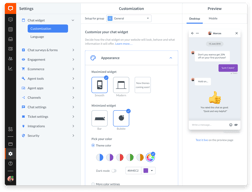
Configuration options -- we were able to completely customise the colours / style of the popup to suit our product. Ease of inclusion in our website -- very simple to get up and running.
Nothing, really. It does a great job during the day and also after hours by keeping messages. I seem to recall some minor issues with JavaScript in an update but I'm fairly sure that was rectified quickly.
We are a software company so utilising the most modern methods of communication are essential -- we moved from telephone / email only to also include live chat and it has paid dividends.
The predictive text, the real time communication and engagement it allows with my customers and community.
Sometimes there are log in problems which stop my team from being able to log in for hours at a time. This makes the tool frustrating to use at times.
Customer communication, real time chat archiving and logging, team communication, and zendesk ticket migration and syncing.