

Unclaimed: Are you working at Zoho Desk?
Zoho Desk Reviews: 4.4/5 — Solid Choice
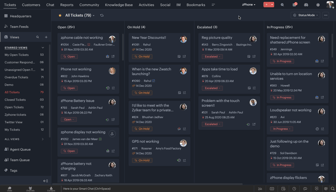
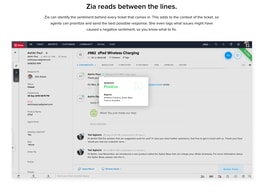
Zoho Desk is a longstanding name in its category that offers feature rich automation tools that help make your agents job easier and more efficient. One of their most lauded features includes an AI assistant that can identity repeated keywords and opinions in customers’ text to analyze customer mood and sentiment. Such smart solutions are coupled with auto-tags for tickets. You can also send automated notifications concerning ticket progress, assign tickets to specific agents, and update records via the platform.
| Company | Zoho Corporation |
|---|---|
| Year founded | 2000 |
| Company size | 10,001+ employees |
| Headquarters | Chennai, Tamil Nadu |
| Social Media |

| Capabilities |
AI
API
|
|---|---|
| Segment |
Small Business
Mid Market
Enterprise
|
| Deployment | Cloud / SaaS / Web-Based, Mobile Android, Mobile iPad, Mobile iPhone |
| Support | 24/7 (Live rep), Chat, Email/Help Desk, FAQs/Forum, Knowledge Base, Phone Support |
| Training | Documentation |
| Languages | English |
Zoho Desk Pros and Cons
- There are plenty of reporting features that provide customer insights and agent performance data
- A range of templates are available to help you respond to customers quickly and effectively
- You get real-time insights into support operations
- There’s a good free plan for new users
- The wealth of features on offer can make it harder for beginners to pick up the software.







Compare Zoho Desk with other popular tools in the same category.
The functionality is almost endless, there wasn't a feature that we checked and looked for and knew it was what we were looking for and suited our needs and we didn't find it, and whatever we didn't find, the support team patiently helped us and took control of the computer to explain and assist us
The system is a bit complicated because of its multiple functionalities and it is also connected and interfaces with other ZOHO systems so that sometimes it is confusing
Improve and optimize our customer service in the company
La facilidad de poder trabajar en plataformas simultáneas
Que no se puede integrar directamente con el sistema de correos de Google Work Space
Poder monitorear con mayor atención los requerimientos de mis usuarios.
All the features needed for a customer service helpdesk are included and the system is intutave to use.
Since there are so many features, at first, it can be daunting but there are ample self help articles and tutorials from Zoho to guide you.
The ability to quickly and efficiently address donor issues and track progress of the issue through the organizational ecosphere.
I've been impressed by how easy it is to configure Zoho Desk initially, integrate it with the necessary features, and get a new IT Consultancy and Systems Integration company up and running. My customers have loved the new addition to my company.
So far, I don't have anything negative to say.
As the sole owner and employee, with support from college interns, it's easy to turn support agents on/off. My customers love having their knowledge base to access pertinent setup information.
The reporting feature and categorization is very good and well organized.It was also very easy to implement. the customer support is excellent . the intergration was very easy to intergrate, also we use it frequently
Nothing for now everything work very well
It is solving our customer reporting problem.previously it was hard to get a report for all customer complaint but now with zoho desk we have been able to resolve that
Zoho Desk allows our teams to house all client information, needs, questions and tickets in one place. It will be easy to implement and train users since Zoho in-house training materials and user friendly and supportive. Our teams will use Zoho Desk every day and it will be an integral part of their roles. Zoho One will allow us to use all features offered by Zoho. We can't wait to get this going!
We haven't found anything yet that we don't like.
Zoho Desk is solving the problem of having multiple systems to house our CRM, client communications, call desk features and records. Now we will have a one-stop shop!
We tested many solutions and Zoho is the one we will be choosing. It fits all our needs and at a price we can afford.
Having to learn a new system and let our employees adapt to it will be the biggest challenge.
Centralizing all customer support requests under one system.
the integrations with others services and other platforms
so far I haven't found anything I dislike.
helps me to channel the requests of my clients and to be able to keep the requests organized.
Zoho desk is very intuitive and very easy to use, i love it, the dashboard, customer support, everything
Well nothing really but I wish it had AI features in the portal design, it would be very good.
Zoho desk greatly reduces the stress and pressure on my customer support operators in different ways, especially the multi channel chat routing and knowledgebase
it makes the work very easy the multiple module system also helps to keeps data in different verticals at ease
the filter side is complex sometime, I think that can be made easy using different UI UX
is helping us to keep a track of every client and reach out to them at right time, segmentation is also really great
Zoho Desk provides unified customer support through its streamlined ticketing system, empowers users with self-service options like a comprehensive knowledge base, and enhances team collaboration with insightful analytics and versatile integration capabilities.
There are no features within Zoho Desk that are disliked.It was very ease to use and have a great customer support
Zoho Desk empowers users by providing a user-friendly platform that centralizes communication channels, simplifies issue resolution through efficient ticketing, and enhances overall satisfaction with self-service options. It ensures a smooth and positive customer experience by offering tools that make it easy for support teams to address and resolve user concerns promptly and effectively.
It easy and very much user friendly and good customer support
All good so far so will use it for more time
So i can manage all the tickets from this portal
Nous aprecions le suivie de nos clients grace au suivie des e-mails
La mise en place est assez delicate, malgré cela, nous sommes fier de faire confiance a cette societe
Actuellement nous n'avons pas de probleme avec cette société
I allows developing apps to extend functionality and to connect our internal systems. It is also easy to use and to implement in our organization.
Nothing yet, seems pretty useful and a better option than Zendesk
Allows me to develop applications to custom integrate my own systems.
The ability to tailor it to your own business processes
Would like to create an auto interface with Power Bi rather than using the Zoho Analytics
It simplifies the process of managing emails coming into a shared mailbox ensuring all emails and tickets are dealt with ensuring the customer is constantly kept updated
It's such a great help to keep track of everything related to emailing within my business. Their mobile app is fantastic, and using "snippets" makes my life so much easier. The snippets and keeping track of emails is well worth using the site and eventually paying for it.
I have not found anything that I dislike about Zoho Desk so far.
Helps me keep track of all my emails that are coming in, and lets me easily use canned responses via their Snippets option. Saves me a lot of time and mental capacity.
The Departments Feature and the way the mail system works.
At the moment the limited Whatsapp Guided Conversation features.
Digitalize all issues within the Technical Department of Assuria
Etant donné que j'utilisé zoho sprint, je vois que je peux lié mon desk avec zoho desk
je n'ai pas trouvé de solution pour le rendre plus fun, customisable.
connecter mon board projet et desk
The portal has produced a significant competitive advantage thanks to ZOHO Books with well-thought-out options for maintaining our books. They shouldered the burden of constantly updating our expenses and reporting to the management.
Not much can be said. Does take a some time get used the features
We have been using ZOHO to manage our customer and supplier relationships.
The automations and reporting allow for a single manager to review more content at once. Also, most of the best features are pre-built out. Zoho has built in integrations that communicate with many different phone systems. The online support is very helpful.
There is a lot involved in the set up of the accounts. I wish some of it was organized more logically.
Allows us to keep the client issues organized by location and person handling them. Creates increased visibility into resolution for the team.
User interface and the ease of customizing every aspect of the portal. Easy to implement and integrate with Office 365.
Custom reports have a slight learning curve when creating your own.
Reporting, ticket flow, and customization.

Semplicity in use and customization. Seems to be really fantastic when integrated to 3CX Phone System.
Small differences between Zoho.eu and Zoho.com.
I have been been usign Zoho Desk integrated to Zoho CRM in my company (CONESYS.IT) for 2 years. It mean't a big upgrade in the way we work in the technical helpdesk, with the possibility of integrations to 3CX Phone System , email etc.

Zoho a sido la solucion para llevar mas facil el control de incidentes de mi negocio, es intuitiva, facil de usar y tiene muchas herramientas que nos ha ayudado a ser los servicios de TI mas eficazes y rapidos.
No hay alguna razon por la cual diria que no me gusta
Reportes de usuarios, control de equipos, ampliacion de cobertura
Depth of features. We were able to handle all he channels of customer support interaction in one product. It was up and running in 10 days.
Setting up the system needs expertise which can be had from their support team.
It is becoming the central repository of customer support documentation and interactions. The support and operations team would be using it in cohesion without the fear of dropping the ball.

Easy to use interface Customizable Reports Can easily integrate with all the other tools we have through simple API documentation Easy tutorials
No downsides. Zoho Desk is great for all our business needs.
We were doing all support operations manually on google sheets. Zoho Desk has automated our processes and workflows and also improved efficiency by 45% and provided us with reporting that we did not have.
Me encanta que puedo configurar departamentos y diferentes usuarios que gestionan los tickets de una forma personalizada al área del negocio para ejecutar las tareas con tiempos adecuados
En algunos casos la falta de documentación
Que varios usuarios pueden registrar casos sin necesidad de esperar que el canal se libere, esto agiliza la gestión de casos y además me permite configurar ciertas opciones para la carga laboral de los agentes
It is easy to use and easy to manage user and ticket.
Nothing, everything is super and easy to use. Only desing can be better and that can be done in feature.
Customer support
Very easy to use Easy to implement Features provided are awesome
Nothing to dislike yet. Just need to familiarise myself with the software
Keeping track of our support queries via email and having no analytics at this point in time
Customer support is good and helped a lot to integrate
Documentation for integration can be improved
Easy ticketing, and customer support
The ease and centraliziation of the program! It is compatible with our microsoft teams and is user friendly! We use this program every day so its been great so far!
Nothing to dislike as of right now! We are still in the beginning stages but so far so good.
Centralizing all of our customer communications and tickets in one simple platform