

Unclaimed: Are are working at Swit ?






Swit Reviews: 4.7/5 — Highly Rated
Swit is a powerful project management tool designed to help teams easily manage their projects, tasks, and communication. It features a user-friendly interface and a range of powerful features including task management, team collaboration, time tracking, and file sharing. With Swit, you can streamline your workflows, improve communication, and increase productivity by ensuring everyone is on the same page and working towards the same goals.




| Capabilities |
API
|
|---|---|
| Segment |
Small Business
Mid Market
Enterprise
|
| Deployment | Cloud / SaaS / Web-Based, Mobile Android, Mobile iPad, Mobile iPhone |
| Support | 24/7 (Live rep), Chat, Email/Help Desk, FAQs/Forum, Knowledge Base, Phone Support |
| Training | Documentation |
| Languages | English |

Compare Swit with other popular tools in the same category.
The chat function is good The work sharing function is good.
I don't hate that much It is a pity that there is no chat alarm function.
We are sharing the progress of the project.
I think it is very useful to classify company work according to project and work content, and to share work and communicate in real time.
SWIT feels a little complicated because I am not skilled to me yet. I need to familiarize myself with how to use this program.
It is very helpful in business because it can manage project management, business contact, and important business for carrying out company business and It is convenient to be able to do efficient work and systematic management with this program, and it is necessary to study SWIT to know more functions.
Not only project management, but also in-house communicator tools were installed. No need to separately use and manage communication tools and project management tools
It is a bit expensive to use. In conclusion, the price is the same as Asana's first paid tier, but not only Asana, but also communication tools (slack, Monday) It can be considered relatively inexpensive because it is equipped with features of.
It is easy to check the business due to the business caIt seems you know what users value most. I think it's like not having a lot of information. The most necessary functions are highlighted, and the rest of the functions have a UI that can be used if necessary.rd.
Work efficiency has bThe use time is short, so I do not know what is lacking yet.een improved by sharing the project progress in real time.
The use time is short, so I do not know what is lacking yet.
Real-time sharing of data and information necessary for business progress
1. Intuitive Intuitiveness comes first in order to perform tasks efficiently because it can reduce time, save time, and efficiently process tasks by quickly finding the documents or projects that you need. Sweet is a work tool that takes into account the user service aspects of the project tab, task tab, and other teams and personalized workspaces and easy visualization of the calendar form first. 2. Work-sharing and collaboration with other teams Companies that collaborate more with other departments will need items to manage data sharing and projects. Managing so many projects and finding documents requires an intuitive workspace, but the most important thing is a mention. Although the ments tied up between departments are shared among unnecessary people, the sweet has the advantage of being able to talk to individuals, making it easy to share and proceed with the work among those who need it. 3. It is possible to change an individual's work list to the task performance tab. In other words, when you have to share your work plan with others and then collaborate with others, I think it's best to transform your work plan into a project. 4. Contact verification When chatting, it has the advantage of being able to check if you are connected to the suite with green light.As a result, I like it most that it is possible to check and send the chat in advance.
1. Translation I think it's the best disadvantage. First of all, it is an English process-based work tool, so there are many errors when translated into Korean, and sometimes it is not understood when sharing work through chat.
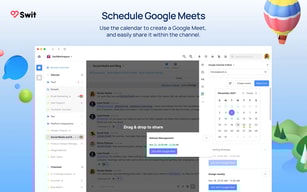
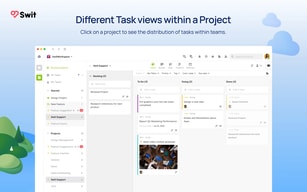
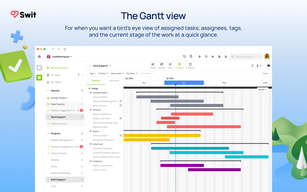
When you work, you can intuitively check the schedule and the details of the work, so you can intuitively check who is applying for many support projects, and you can plan well because you can see who is applying for them at a glance.
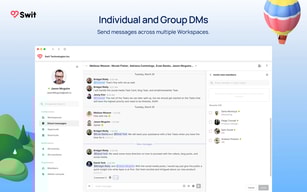
It is best to create a channel to chat in real time and to be easy to check. In the past, I had to turn on the chat app with work program. In order not to miss the notification, I periodically clicked on the app to check it. It wasn't much, but it was stress. In addition, the chat app is also used for personal purposes, so if I have a private conversation with other employees, the work content has disappeared. But in Swit, I can manage my chats and projects all at once! Now, I don't have to press (alt+tab) anymore.
Projects can be easily created and grouped, but creating subtasks is still difficult. The function that can create subtasks is most needed.
Even with the same team, I couldn't figure out exactly what kind of job the person was doing. But now, I can easily see the work situation with a Swit! So my understanding of team member's work has improved.
The user interface is written to match the current trend. Detailed checklist can be created for business progress and can be added/deleted as needed
Features for business management are not outstanding. The detailed category classification, management, and sharing with participants for task management are not smooth, and the progress of the work can be monitored, but the function to support feedback on the progress is insufficient.
The company recommended the use of the suite to improve the limitations of verbally reported work. As a result of using the suite, it is expected that it will be able to accurately check the status and feedback of the work progress and manage the checklist for problem resolution to increase the efficiency of the work. However, it is impossible to check the feedback results in quantitative terms, so if this part is improved further, it will be able to be used in the work.
What I like most is easy to make a project. When I use other application, I feel it difficult and heavy so it's hard to use it. Also, complicated layout design make my eyes get tired soon. But, Swit is easy to make a project and move project here and there by drag. And I love simple design. I think most people will get used to swit quickly.
It is both an advantage and disadvantage. Project boxes are so easy to move that need some protect method to prevent human error.
Before use Swit, it is hard to management my works because there are so many different things and different kind. But now, with Swit, I can make my work list in a one(1) application and management use only Swit.
Fast, easy communication is impossible! Work management such as to do list and schedule has become simplified! Communication, business sharing, and announcements are possible in one space! also, UI/UX is very simple!
Notification of App is very slightly slow.
Despite being far away from the team members, work sharing and data transmission were made in real time and confirmed.
It is easy to handle from beginning to end. Also, the good point is that the team manager or other coworkers can know what I finished. Another good point is that is horizontal communication by chat system.
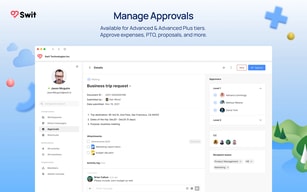
I hope the it will be linked to other applications or programs as soon as possible like e-mail(outlook), getting approval system etc .
I could conveniently upload the ideas of the team members when I needed them.


