

Unclaimed: Are you working at Wrike?
Wrike Reviews: 4.2/5 — Solid Choice
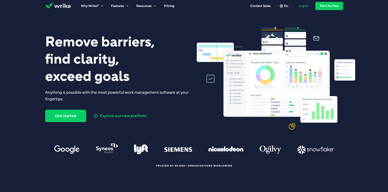
Harping on its versatility, Wrike is a project management software that features highly customizable dashboards and workflows and team-specific automation to give businesses a project platform that adapts to their current ways of working and not the other way around. Wrike’s functionalities involving over 400 tools revolve around giving a 360-degree view of projects, true interdepartmental collaboration, approvals acceleration, smarter data use, efficient workload management, and enterprise-grade security. Wrike has more than 30 well-documented use cases involving more than 15 departments and teams. Wrike also has a proprietary AI-powered capability called Work Intelligence that catalyzes results through smart automation and project risk prediction.

| Capabilities |
API
|
|---|---|
| Segment |
Small Business
Mid Market
Enterprise
|
| Deployment | Cloud / SaaS / Web-Based, Desktop Mac, Desktop Windows, Mobile Android, Mobile iPad, Mobile iPhone |
| Support | 24/7 (Live rep), Chat, Email/Help Desk, FAQs/Forum, Knowledge Base, Phone Support |
| Training | Documentation |
| Languages | English |
Wrike Pros and Cons
- Easy to use Gantt charts
- Customizable dashboard and schedule
- Comprehensive reports and insights
- Time-tracking tools included
- Excellent customer service
- A little pricey
- Can be difficult to get used to at first
- Frequent reports of unresponsive support
- Recorded incidents of unreliable software functionality


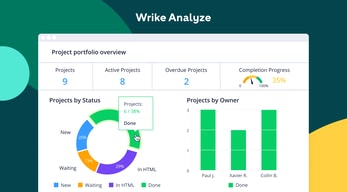
Wrike Review: Is It the Right Project Management Tool for Your Business?
Wrike has been empowering professionals and teams to better manage their work since its launch in 2006. It’s a comprehensive solution for professional service providers, marketing teams, and agencies. But all this versatility comes with a high price tag.
Is it worth it? In this Findstack review, we’re going to find out.
What is Wrike: A Quick Overview
Wrike has introduced Work Intelligence, an AI engine that powers risk prediction, task automation, and smart recommendations.
Wrike is an all-in-one work management platform that helps teams collaborate, plan projects, delegate tasks, and track progress. The platform offers a range of plans designed to meet the needs of almost any kind of business. Whether you’re a solopreneur or a department head at a Fortune 500 company, Wrike has a plan for you.
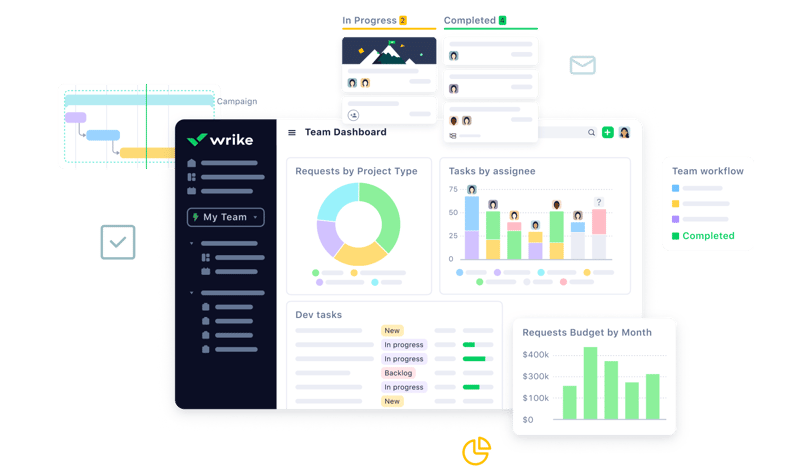
Wrike’s power lies in its ability to support both project management and collaborative work, which explains its appeal to a wide range of industries. The tool boasts a user-friendly dashboard that’s pretty simple to set up. It’s also very easy to create tasks, assign them to team members, set due dates, and track their progress.
Getting Started With Wrike
Wrike is one of the more intuitive project management tools for a new user to get started with—especially compared to competitors like ClickUp.
Wrike is available to users via web browser, desktop application, and mobile application for both Android and iOS devices.
To get started with Wrike, new users have the option to register for a free account using their business email. Once the email address is verified, users will be redirected to Wrike’s homepage to complete the initial registration process—which involves a guided walkthrough.
How Wrike Works: Key Features
Dashboards
If you’ve ever used a project management tool, Wrike’s Dashboards will feel very familiar.

For every project you create in Wrike, you can create Dashboards to display, manipulate, and analyze the project data that you’ve collected within it. They essentially give you an overview of project KPIs, metrics, due dates, and progress at a glance—saving you the hassle of seeking out each piece of data at the source.
When you create a Dashboard, you can start with a template or build one from scratch. If you go the latter route, you have quite a bit of flexibility thanks to a modular design and a wide selection of interactive widgets, including:
- Assigned tasks
- Overdue tasks assigned to you
- Overdue tasks that you assigned
- Tasks you’re following
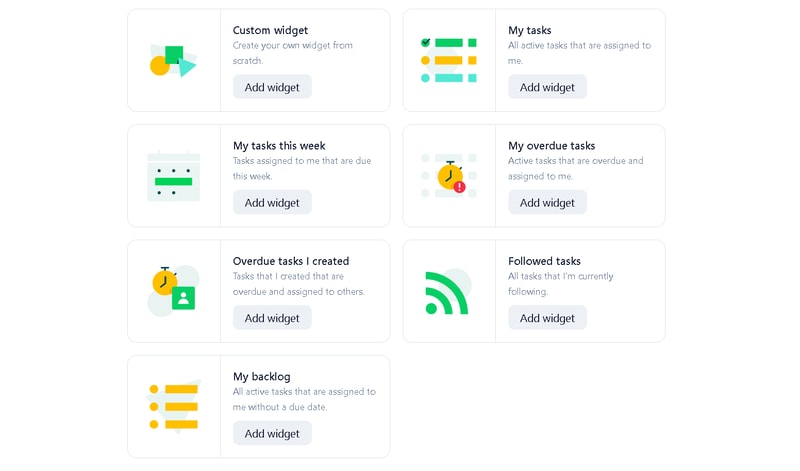
Wrike is unlike a lot of project management tools because everything you need is right at your fingertips. You don’t need to navigate to another window to see it all.
Automation
Like most modern project management tools, Wrike features an automation engine that works in the background to synch related tasks, assign workloads, and ensure tasks are completed on time with botted @mentions and comments.
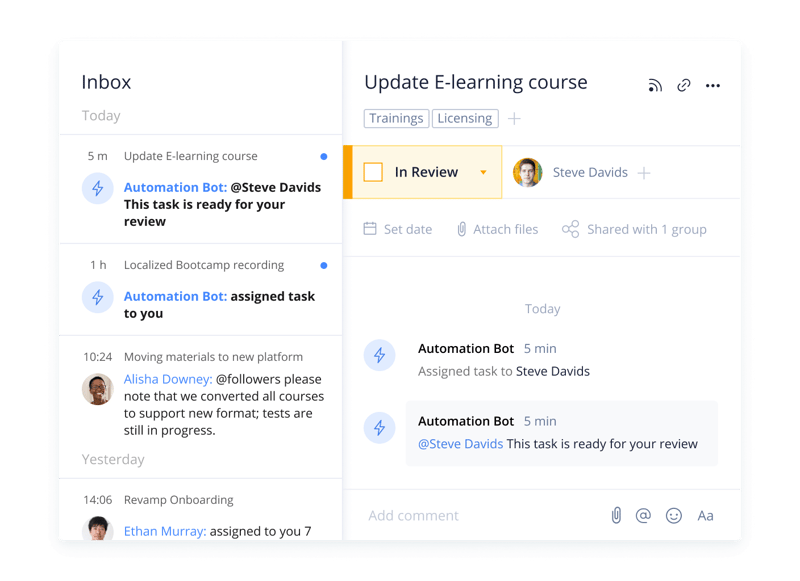
Wrike’s automation engine may not be the most complex or versatile on the market, but it’s intuitive and practical. There’s no feature bloat here—every feature is sure to get some use.
Integrations
On a related note, Wrike’s automation capabilities are supported by 400+ integrations with third-party tools. Pretty much every tool category is covered, including:
- CRM
- Communication
- BI
- Calendar
- CMS
- Storage
- Accounting
- Reporting
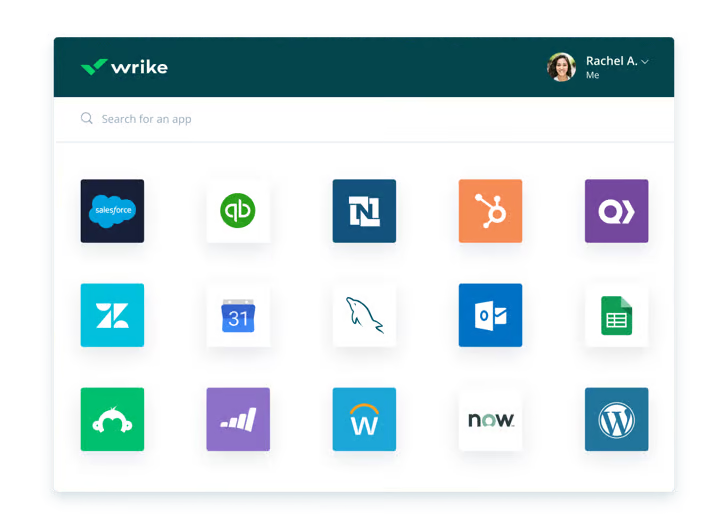
Integrating Wrike with other tools in your stack is a great way to cut out some busy work from daily workstreams and improve productivity. It’s also a surefire way to minimize human error.
Live Analytics
Wrike automatically updates every report, chart, and dashboard every 15 minutes, so you never miss a thing. 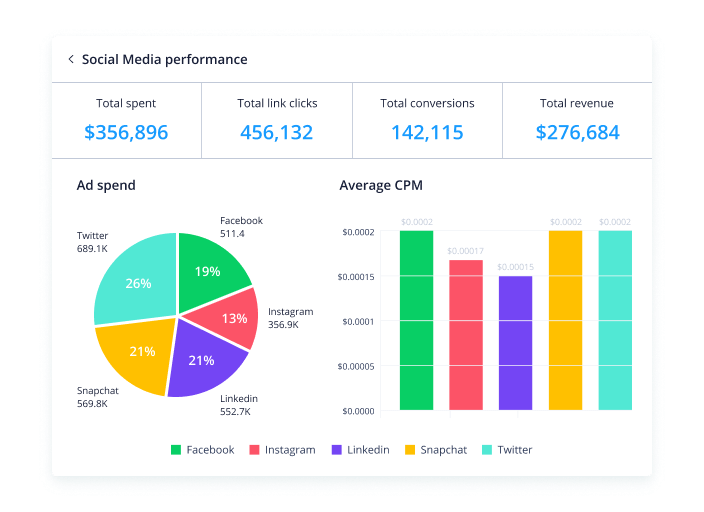
That’s a huge benefit—it means project managers don’t need to manually collect and input data from multiple sources to draw meaningful insight. Less time on busy work means more time analyzing the data for patterns, trends, and inefficiencies.
This feature is also great for project managers who are juggling multiple projects. They get a real-time overview of project statuses, team workloads, pending approvals, and tasks waiting to be assigned, so they can easily prioritize work and make meaningful progress.
Customizable Forms
Wrike has a custom form builder that you can use to create almost any kind of form—from simple team surveys to content request forms.
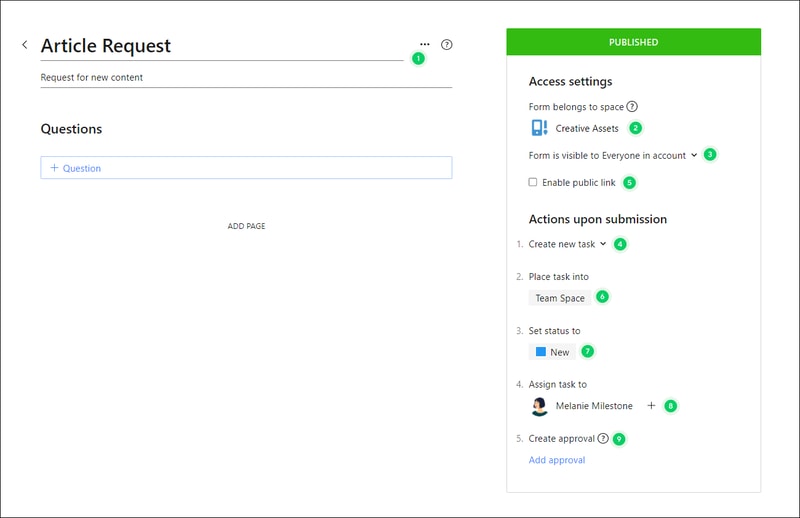
Wrike’s forms are fully customizable, and you can take advantage of role-based access controls to grant or deny access to certain pages or sections. Plus, when you create a new form, it can automatically assign tasks, set due dates based on the submission date, and populate subtasks.
Enterprise-level project management tools
Wrike offers advanced project management tools that you can access on your Home workspace to help you measure key performance indicators.
These tools include time tracking to assist in managing billable hours, visualizing cost and budget calculations, and business intelligence to assess project risk. While these tools are particularly useful for large enterprises with complex needs and a variety of teams, they can also be beneficial for small businesses that plan to scale.
In addition, the platform allows you to share files and publish assets with enterprise-grade security. The sheer number of features may be overwhelming for teams new to project managers, but Wrike provides great walkthroughs and tutorials. You may even discover features by accident that end up accelerating your workflows.
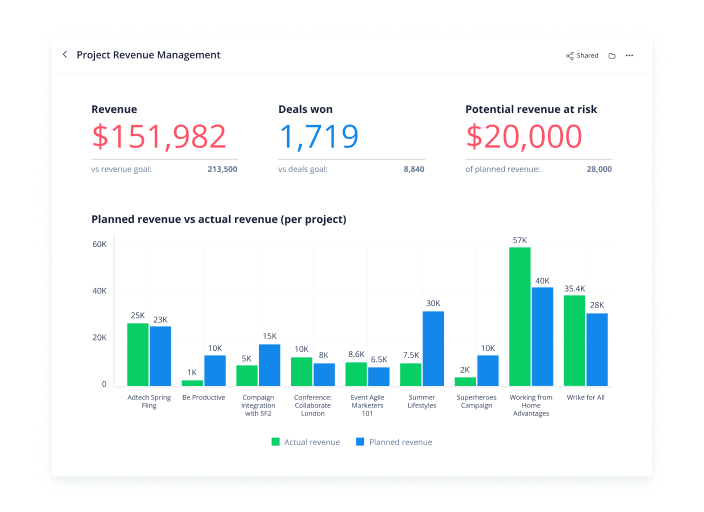
Wrike offers pre-built templates based on team roles to simplify task creation. Some of these templates include:
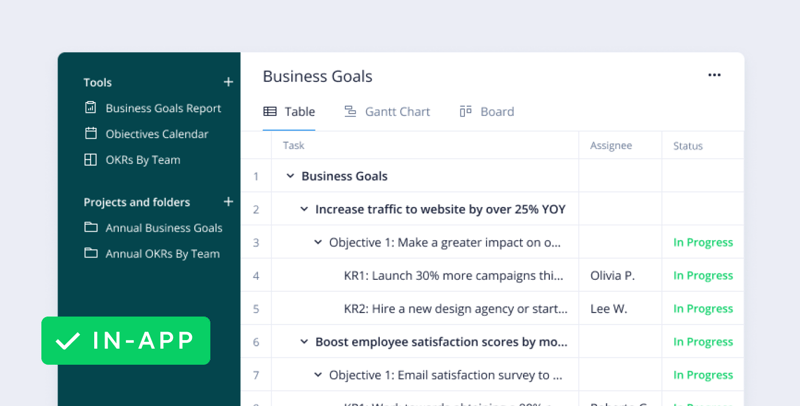
- Project performance templates
- OKR templates
- Weekly to-do list templates
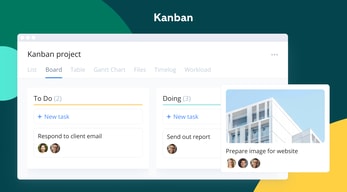
- Kanban board project templates
- Agile and IT templates
- Content operations templates
- Quarterly business review templates
- Ticketing and help desk templates
Collaboration Tools
Wrike—like most project management tools—is designed to make it easier to collaborate with your teams.
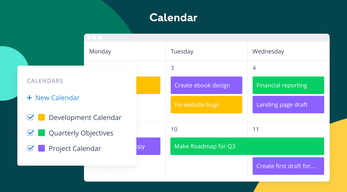
All team members have access to a global or project-based live stream of task activity, so nobody is left behind. Team members can easily communicate on specific tasks via comments and notes so that conversations are kept organized. Shared team calendars can be added to the dashboard to help with awareness of progress and submission dates. 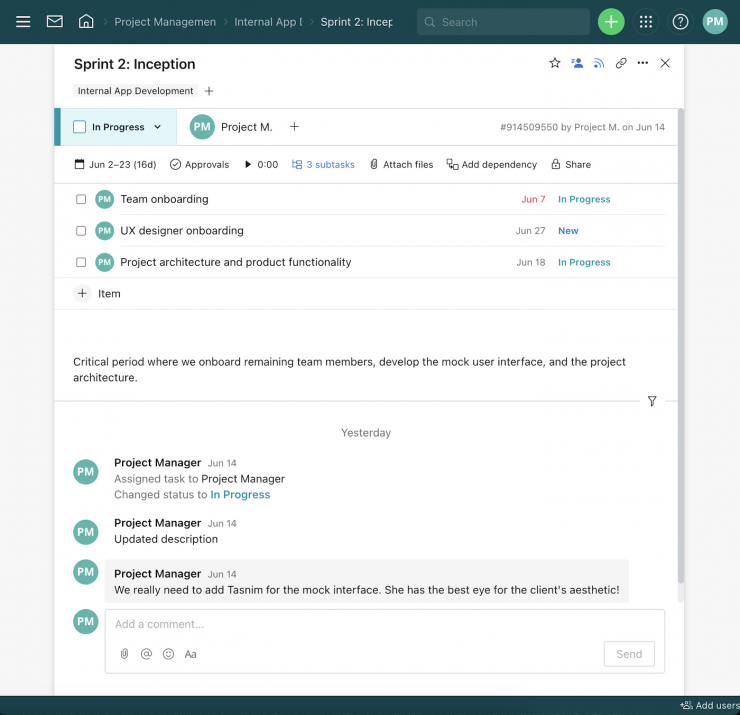
You can also invite third parties such as clients, vendors, or contractors, at no extra cost, to view the status of their projects and provide input that goes towards successful project completion.
Wrike Use Cases
Wrike’s use cases are quite impressive. Over 20,000 companies in over 140 countries have relied on Wrike to streamline their planning processes. These are companies that span a range of industries, including:
- SaaS
- Technology
- Healthcare
- Education
- financial services
- Construction
- Manufacturing
- Retail
What makes Wrike stand out from other project management platforms?
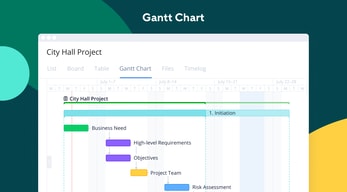
Wrike’s easy-to-create (and even easier-to-understand) Gantt chart view sets it apart from many other popular project management platforms. Plus, Wrike offers a range of other views, such as List, Board, Table, File, and Timelog. While this isn’t unique to Wrike, it isn’t super common to have that much flexibility,
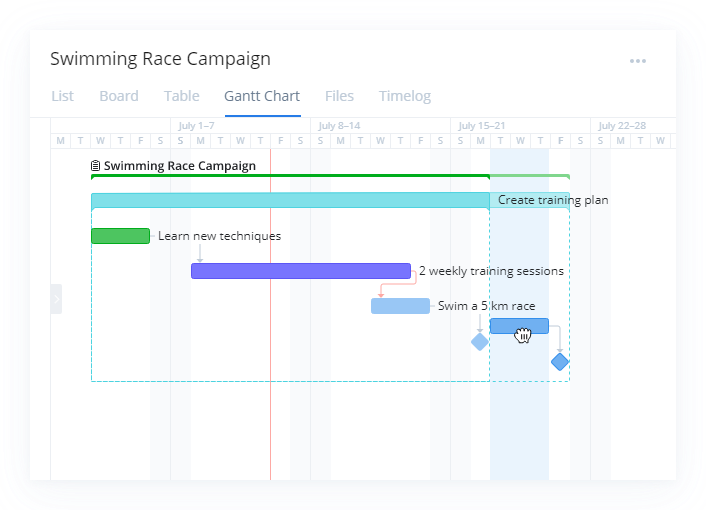
Overall, Wrike’s differentiating factor is the ease with which you can use it to manipulate project data to gain new perspectives and insights.
Wrike Pricing
Wrike offers a total of five plans, starting from a basic Free option, all the way up to an advanced Pinnacle option for large enterprises with complex needs.
Here’s a breakdown of the plans: 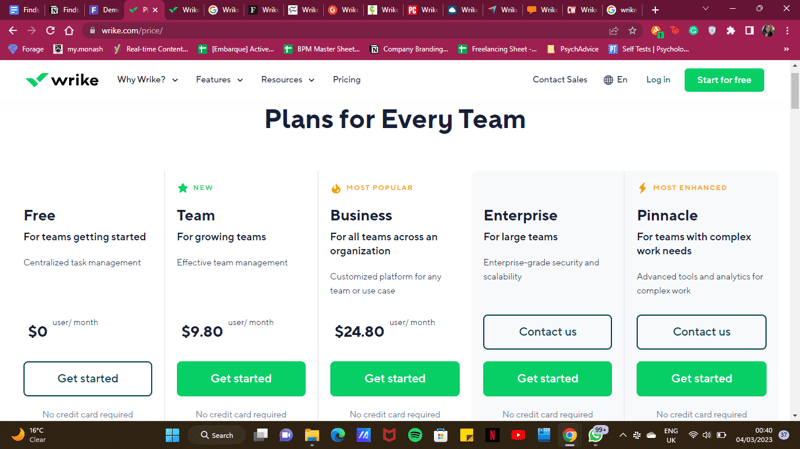
- Free : Wrike’s free plan is suitable for small teams that are just starting with project management software. However, it has limited feature options, including limited storage space, and excludes Gantt charts, time-tracking, and many customization tools.
- Team : Tailored for small teams that want to plan and collaborate on projects. This plan includes the Gantt chart view and the option to integrate with a wide range of services.
- Business : Provides access to advanced project management tools. The Business plan has everything you may need for project management for a large team.
- Enterprise : The Enterprise plan has custom pricing because Wrike will draw up a plan depending on your business needs. It is a plan to consider for large businesses that require more security controls.
- Pinnacle : This plan is for large businesses with complex work needs, including billable hours tools, job roles, and tools for planning and tracking effort put into different projects.
See Wrike pricing for current rates and plan details.
Pros and Cons of Wrike
Pros:
- Wrike offers plans for everyone, from small teams to large corporations.
- Real-time analytics are updated every 15 minutes.
- Wrike offers department-specific solutions which help different departments across your business align and communicate projects on one platform.
- Special customization is available for professional services and marketing and creative teams.
- Wrike offers training resources to help you get started on the platform.
- The free plan offers up to 2 GB of storage.
- It supports eight languages.
Cons:
- Although the project dashboards are user-friendly, those new to project management software may find Wrike overwhelming due to the wide array of features.
- Wrike’s costs can be a burden for mid-sized teams – there are cheaper project management tools with roughly equivalent features.
- Many of Wrike’s useful advanced features are offered as add-ons that can effectively double the price of the tool.
- The mobile app is not as user-friendly as other project management apps (e.g., Click Up). Managing tasks from the mobile app is not as smooth as using a desktop, and you may find that you’re unable to move and edit tasks.
- The interactive Gantt chart view is only available in the paid plans.
- The time-tracking in-app timer is only available on the Business plan and higher, and even small collaborative teams should be able to benefit from this feature.
Is Wrike right for your business?
Wrike is a comprehensive project management platform that also functions as a collaborative work management tool, making it ideal for businesses of all sizes. If you offer professional services or are part of a marketing or creative team, you can certainly benefit from Wrike’s highly customizable features.
It’s important to note that Wrike can be a bit pricey—especially with add-ons. Plus, it may be a bit overpowered for small teams who are looking for simple project management capabilities. That said, it’s a solid tool for managing multiple departments and complex projects.
If you want more insight and information into other project management software, Findstack has more helpful reviews you can take a look at.

I like that it integrates with other software
Poorly laid out for art users. Pages are sometimes unresponsive or do not save information. Needs an alias for project names.
Helps integration between accounting and project management.
I like that you are able to put images in the ticket body.
My team found it hard to keep track of projects with Wrike. The project structure was not straightforward for our needs. My team just abandoned it, in favour of tracking analog.
It can act as one source of truth. That is the biggest benefit of this tool.
We have a centralized place for projects.
The organization /navigation within Wrike is a bit chaotic.
Project managment. The benefit is accounting for completed projects.

The overall structure and tools offered are great for team and project management. The design is not bad to look at either. I also love that they added a free plan for people to try out the platform before committing. But what I love the most is the new templates feature. It does a well job at saving your time when you're setting up a project. And it can take a lot of time considering how customizable and flexible the platform is, which is a great plus for many I'm sure. It was for my team and that's exactly the reason it was chosen.
It's very messy. I remember that me and my colleagues had a very hard time to adjust to the platforms because it's features were all over the place. Even though the design has been improved a lot, still some UI choices aren't as intuitive as I'd want them to be. The price is also not the cheapest. I wouldn't call it the most expensive either, but you can, for sure, find something cheaper.
Project management, team communication, and even time management. The benefit of having all in one place is a great promise. And helps a lot that the entire team is using one single place for all organizational stuff. The commenting and messaging is great as well and saves time compared to using an email to talk about a certain task.
to tell you the truth, I find this platform confusing and not at all user friendly. I've compared this with other similar platforms like Monday or basecamp and it falls short.
just about everything. I find the interface confusing and the threads are even more so. I dislike how projects are grouped into threads making it more cumbersome to work in that not.
project management. there are no clear benefits.
Wrike is good for making checklists and for organizing things into folders. I also like the request forms feature.
The system is far too robust for our use case and setup was very confusing. Our team was never able to make it work and the cost is very high for what the system provides, plus the contract is very rigid.
Not many.
Being able to assign and report on task completion
It always felt like I had to build everything from scratch as opposed to intelligently building or templates
Cross department release tracking
I used wrike more than a year ago. I like simplicity, but not very design for me. Generally a good product.
This platform has good potential. I used it at the beginning. I’m using another program now, but I’m sure that I will see the changes that have appeared in this program.
This program solves the standard tasks of the CRM. Communication with employees, setting goals and monitoring their implementation.
It is great that everyone in my organization can be on Wrike and that it can be used to so many different processes.
It is not great for software projects in my opinion. The organization of keeping things in folders is confusing and having subtasks within tickets hides all of the work that needs to be done.
Wrike allows for all of the tasks various people across the organization have to accomplish rather than having separate systems for each department. This provides increased efficiencies because everyone can see all the tickets in one place.
I think that Wrike is a good project management tool to track team and project progress
It is ok, but I think that the user interface is a bit cluttered and distracting
We are helping to ensure that projects stay on track in their stages using Wrike
Easily to learn and simple interface format
Reduntant product to several others on the market
Multiple stakeholders on projects and multiple systems that each uses to connect to one platform
I can see all of the main tasks my team and I need to complete as part of a project.
Subtasks are difficult to navigate, so small details get overlooked. As a marketing team, it's essential to understand every detail of a project, so I'd rather be able to see everything I have to do in one place.
We plan product launches for marketing in Wrike.
You can do SO much with Wrike. You can make things simple of complicated depending on your needs.
Because you can do so much, it makes it hard to use sometimes. It can easily get over complicated.
The problem of missing tasks that were promised to clients has been solved.
Analytics on projects and tasks and audit trails.
Everything else. Even the UI is clunky from a user's perspective. Impossible to adjust to different workflows without a dedicated PM from marketing ops involved.
Cross functional team collaboration.
I enjoy that Wrike allows for real-time collaboration with team fellow members on projects and tasks via commenting, attaching files, and requesting status updates. I also like the outlook connector that allows all replies to wrike emails to be added to the appropriate Wrike task without having to login to the system.
NO CALENDAR VIEW!!! Despite having its infamous timeline view, which links individual tasks in a project and allows for automatic-adjustment of subsequent tasks and entire projects when a related task is modified, there is still no calendar view. Especially when working with hard deadlines, the ability to have a calendar month view, possibly one that is exportable/printable is invaluable and is severely needed within the Wrike system.
Not provided

A very comprehensive set of features. Powerful tool.
Very steep learning curve, dated user interface, most users don't like it. Annual contracts only is risky. Monthly option would be much better during deployment.
Wrike did not solve any problem for us. We could not find a way to roll it out to the entire team.
Not much really. I like the consistent updates and it's easy to log in.
The way everything is organized is hard to navigate. I tried doing several hours of training, but the trainings don't help much.
We are utilizing it for customer project onboarding.
None, it was average, it wasn't horrible. Customer service is horrible and they scammed me.
They literally charged me 588 dollars without my consent for my free account. DO NOT PUT YOUR CARD INFO WITH THESE PEOPLE.
None
It's quite stable. I don't remember Wrike going down during those two years I've been using it.
The user experience is not great. It's very hard to find the information I'm looking for. Also, tickets can get lost if labels are inadvertently removed - the only way to recover them I think is to look at the last modified ones. The fact that I cannot add a code block to a ticket description is crazy.
Backlogging and project management. We can quite easily see who is working on what, but getting people to update Wrike promptly is another story.
Collaboration with colleagues, but this is not unique to Wrike. This is the industry standard for PM tools in 2022.
Unfortunately, I dislike nearly everything about the Wrike platform. Sorry, I wish I had nicer things to say. The desktop interface is SLOW and clunky. It takes HOURS to update and edit items with a project. You cannot easily integrate with any other platform (namely Excel). You cannot easily copy/paste anything. The Gannt chart is useless. It doesn't offer any helpful information based on the activities.
My company was looking for a standard PM tool across the business. So perhaps it is solving that problem. But unfortunately I do not personally think it is solving PM issues at a project level.
I like that it has a both a browser version, and App version as well as mobile App. I like how I can customize my dashboard.
Where to start. Wrike interface is confusing. Stakeholders have a hard time finding things when commenting. I think it is crazy when you upload a file and comment it would show up over and over again in the same task window. Email preferences doesn't offer enough options - either it's all or nothing. There should be at least 1 more option that is a consolidated notice on a project (Example my Project Manager just added me to 10+ tasks in a Project and I get an email on EVERYONE. So 10+ emails in my inbox.. but if I turn OFF notices then I don't even know if something new is assigned to me.)
It is my business unit's choice project management tool. So it is where I see a list of the projects I'm working on.
I like UI more when commenting on tasks and bugs compared to the major players.
The UI overall is not as good as JIRA or Confluence. It seems a little out of date when compared to the others
Its helping with minor bugs here and there but I just find it much easier to find previous tasks via Jira
it's an all in one solution which is kinda nice
it is slow, hard to find things and overall cumbersome to use
It tries to be a all in one solution to feedback, schedules and timesheets but is just ok at it
The ability to collaborate across departments
Not aesthetically pleasing or that self-explanatory on how to use it
It is allowing me to track projects and work across departments
Works well for a large team. Best for a collaborative effort.
The workflow is not self-explanatory. It is more difficult than needed to find what job I need to attend to.
Wrike is solving the problem of creating a platform to allow for a large collaborative effort.
The best thing about Wrike is the customizability of it. Being able to create fields and layouts and quickly create subtasks is made quick and easy once you're viewing a task.
It is a slow, clunky application. The UI is not intuitive for navigation. You're bouncing around everywhere to find relevant tasks. Which again, isn't helped by the fact that it is slow. Neither the site nor the desktop application are any good.
It is helping us deal with project management. It is not the best tool, but we can write up our projects and share and discuss them. We can group them and have them separated into sprints or any other categories we want.
Nothing. there is nothing that I find helpful. I do not appreciate any qualities of WRIKE. There is not one thing that I can think of that is good about WRIKE. The most aggravating thing is logging in and it will not remember your log in.
Everything. Impossible to tag people to tasks, instructions are none existent, and if they are they are so poorly worked it is not helpful. Make it appear more like Excel.
Required by the company that I work for; it is supposed to track progress in training programs. If I had a choice, I would manually track it in Excel. It takes away from business performance
Honestly, I really *dislike* Wrike. I only use it because one of my teams relies on it and loves it. I'm not a digital native, but I can eventually figure out an app/platform. I couldn't make heads or tails out of Wrike. I found it to be extremely opaque, confusing, and as my review title notes, frustrating.
Everything. It's confusing and nothing makes sense to me.
My team likes it, and I have to use it because they like it when editing multiple items with many people. If not for that, I'd drop Wrike in a hot minute.
Unfortunatly, nothing. We decided to never use Wrike due to their dishonest and deceptive business practices. There are so many better solutions that are less expensive. Read below.
We had equested an extended trial as we weren't able to fully evaluate. We were told our trial would be extended, which was a lie. We were enrolled in a subscription which we had not agreed to. Seemingly this was miscommunication by Wrike refused to address their oversight. We had no usage of the product and did not use. Wrike sent our account to collections. Has this happened to you??
Wrike isn't solving problems -- they only created problems because of their dishonest and deceiving business practices. Avoid at all costs. Don't reward companies that lie and deceive.
It's a solid tool to do project planning not less and not more.
* It's way too expensive. You get rarely new features. You pay a crazy amount of money for basically one single feature "project planning". * The user management API is very bad and basically non existent. You can only send an invitation to a user. It is not possible to create or delete a user with the API.
It solves project planning.