

Unclaimed: Are you working at Wrike?
Wrike Reviews: 4.2/5 — Solid Choice
Harping on its versatility, Wrike is a project management software that features highly customizable dashboards and workflows and team-specific automation to give businesses a project platform that adapts to their current ways of working and not the other way around. Wrike’s functionalities involving over 400 tools revolve around giving a 360-degree view of projects, true interdepartmental collaboration, approvals acceleration, smarter data use, efficient workload management, and enterprise-grade security. Wrike has more than 30 well-documented use cases involving more than 15 departments and teams. Wrike also has a proprietary AI-powered capability called Work Intelligence that catalyzes results through smart automation and project risk prediction.

| Capabilities |
API
|
|---|---|
| Segment |
Small Business
Mid Market
Enterprise
|
| Deployment | Cloud / SaaS / Web-Based, Desktop Mac, Desktop Windows, Mobile Android, Mobile iPad, Mobile iPhone |
| Support | 24/7 (Live rep), Chat, Email/Help Desk, FAQs/Forum, Knowledge Base, Phone Support |
| Training | Documentation |
| Languages | English |
Wrike Pros and Cons
- Easy to use Gantt charts
- Customizable dashboard and schedule
- Comprehensive reports and insights
- Time-tracking tools included
- Excellent customer service
- A little pricey
- Can be difficult to get used to at first
- Frequent reports of unresponsive support
- Recorded incidents of unreliable software functionality


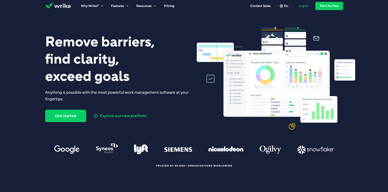
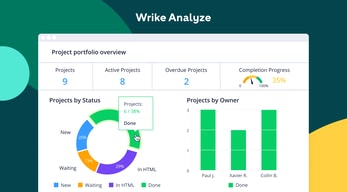
Wrike Review: Is It the Right Project Management Tool for Your Business?
Wrike has been empowering professionals and teams to better manage their work since its launch in 2006. It’s a comprehensive solution for professional service providers, marketing teams, and agencies. But all this versatility comes with a high price tag.
Is it worth it? In this Findstack review, we’re going to find out.
What is Wrike: A Quick Overview
Wrike has introduced Work Intelligence, an AI engine that powers risk prediction, task automation, and smart recommendations.
Wrike is an all-in-one work management platform that helps teams collaborate, plan projects, delegate tasks, and track progress. The platform offers a range of plans designed to meet the needs of almost any kind of business. Whether you’re a solopreneur or a department head at a Fortune 500 company, Wrike has a plan for you.
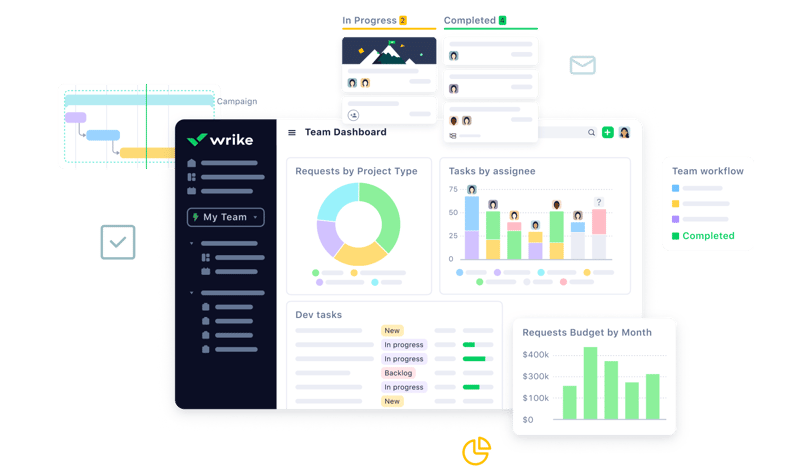
Wrike’s power lies in its ability to support both project management and collaborative work, which explains its appeal to a wide range of industries. The tool boasts a user-friendly dashboard that’s pretty simple to set up. It’s also very easy to create tasks, assign them to team members, set due dates, and track their progress.
Getting Started With Wrike
Wrike is one of the more intuitive project management tools for a new user to get started with—especially compared to competitors like ClickUp.
Wrike is available to users via web browser, desktop application, and mobile application for both Android and iOS devices.
To get started with Wrike, new users have the option to register for a free account using their business email. Once the email address is verified, users will be redirected to Wrike’s homepage to complete the initial registration process—which involves a guided walkthrough.
How Wrike Works: Key Features
Dashboards
If you’ve ever used a project management tool, Wrike’s Dashboards will feel very familiar.

For every project you create in Wrike, you can create Dashboards to display, manipulate, and analyze the project data that you’ve collected within it. They essentially give you an overview of project KPIs, metrics, due dates, and progress at a glance—saving you the hassle of seeking out each piece of data at the source.
When you create a Dashboard, you can start with a template or build one from scratch. If you go the latter route, you have quite a bit of flexibility thanks to a modular design and a wide selection of interactive widgets, including:
- Assigned tasks
- Overdue tasks assigned to you
- Overdue tasks that you assigned
- Tasks you’re following
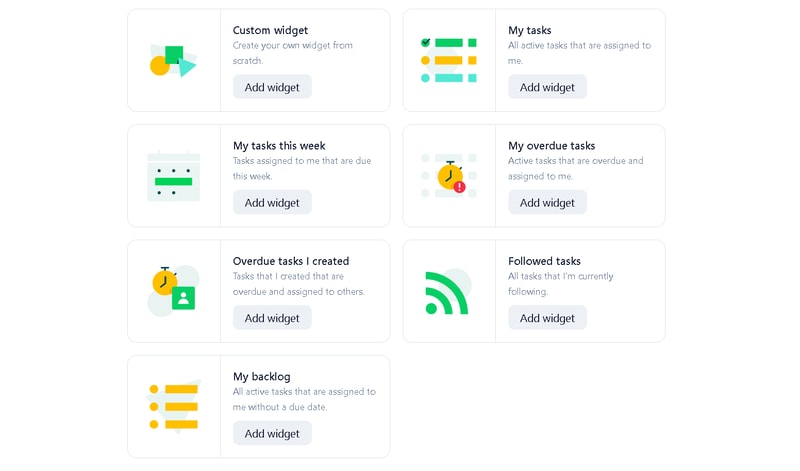
Wrike is unlike a lot of project management tools because everything you need is right at your fingertips. You don’t need to navigate to another window to see it all.
Automation
Like most modern project management tools, Wrike features an automation engine that works in the background to synch related tasks, assign workloads, and ensure tasks are completed on time with botted @mentions and comments.
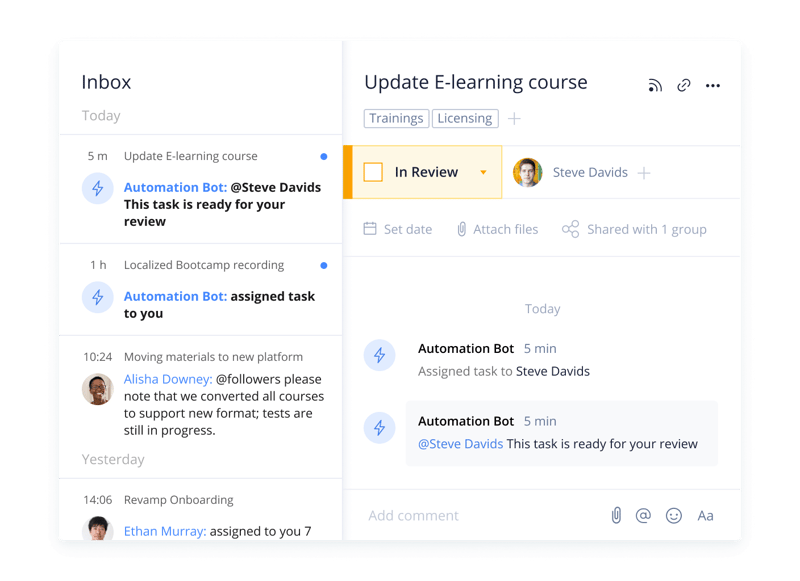
Wrike’s automation engine may not be the most complex or versatile on the market, but it’s intuitive and practical. There’s no feature bloat here—every feature is sure to get some use.
Integrations
On a related note, Wrike’s automation capabilities are supported by 400+ integrations with third-party tools. Pretty much every tool category is covered, including:
- CRM
- Communication
- BI
- Calendar
- CMS
- Storage
- Accounting
- Reporting
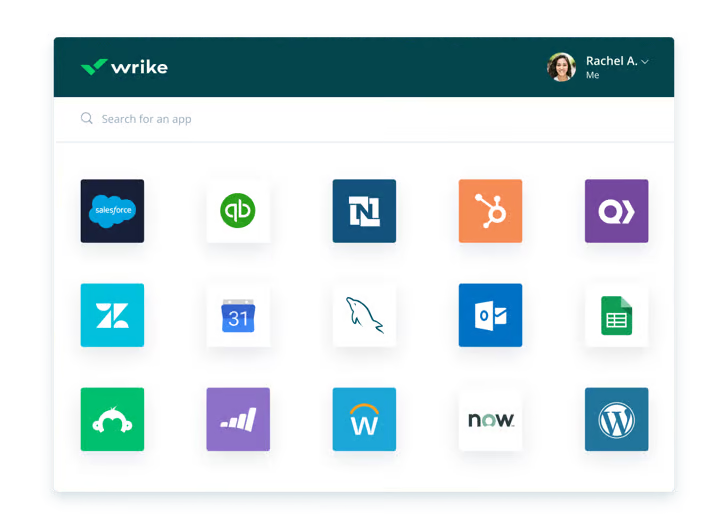
Integrating Wrike with other tools in your stack is a great way to cut out some busy work from daily workstreams and improve productivity. It’s also a surefire way to minimize human error.
Live Analytics
Wrike automatically updates every report, chart, and dashboard every 15 minutes, so you never miss a thing. 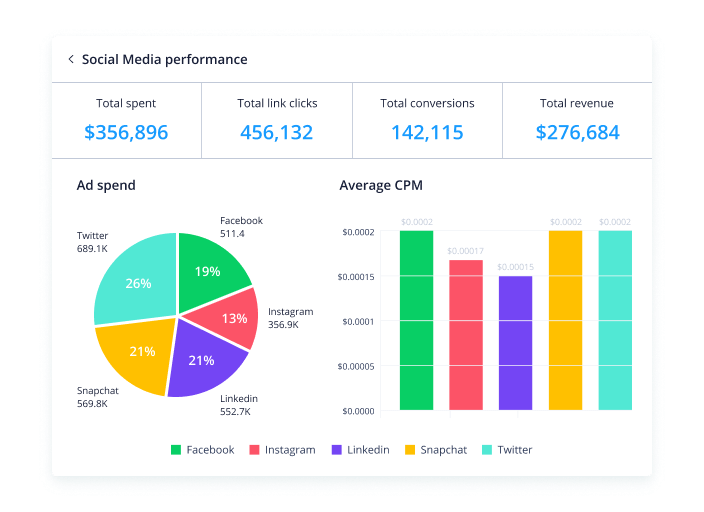
That’s a huge benefit—it means project managers don’t need to manually collect and input data from multiple sources to draw meaningful insight. Less time on busy work means more time analyzing the data for patterns, trends, and inefficiencies.
This feature is also great for project managers who are juggling multiple projects. They get a real-time overview of project statuses, team workloads, pending approvals, and tasks waiting to be assigned, so they can easily prioritize work and make meaningful progress.
Customizable Forms
Wrike has a custom form builder that you can use to create almost any kind of form—from simple team surveys to content request forms.
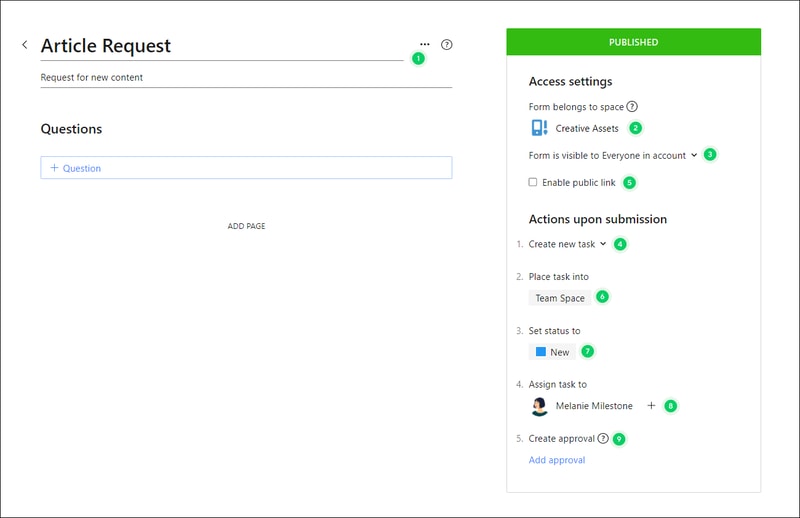
Wrike’s forms are fully customizable, and you can take advantage of role-based access controls to grant or deny access to certain pages or sections. Plus, when you create a new form, it can automatically assign tasks, set due dates based on the submission date, and populate subtasks.
Enterprise-level project management tools
Wrike offers advanced project management tools that you can access on your Home workspace to help you measure key performance indicators.
These tools include time tracking to assist in managing billable hours, visualizing cost and budget calculations, and business intelligence to assess project risk. While these tools are particularly useful for large enterprises with complex needs and a variety of teams, they can also be beneficial for small businesses that plan to scale.
In addition, the platform allows you to share files and publish assets with enterprise-grade security. The sheer number of features may be overwhelming for teams new to project managers, but Wrike provides great walkthroughs and tutorials. You may even discover features by accident that end up accelerating your workflows.
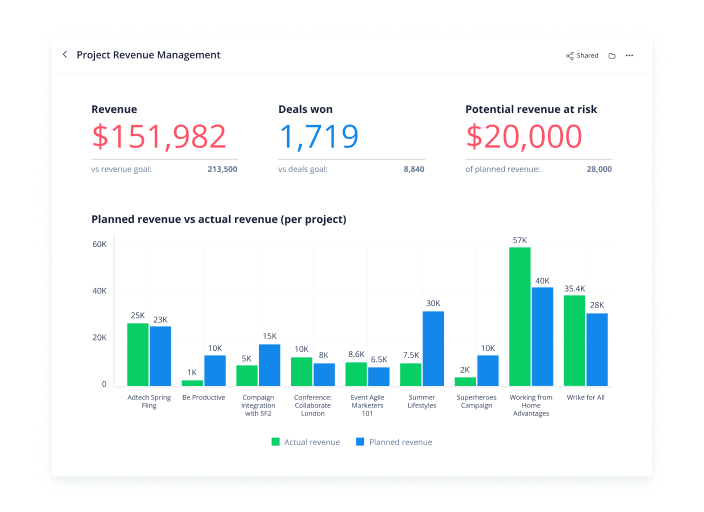
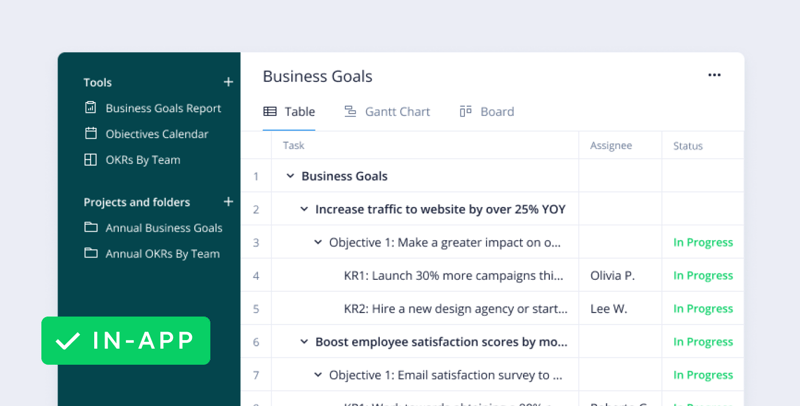
Wrike offers pre-built templates based on team roles to simplify task creation. Some of these templates include:
- Project performance templates
- OKR templates
- Weekly to-do list templates
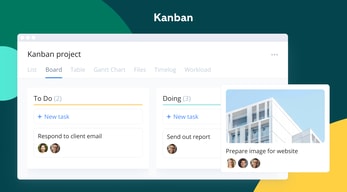
- Kanban board project templates
- Agile and IT templates
- Content operations templates
- Quarterly business review templates
- Ticketing and help desk templates
Collaboration Tools
Wrike—like most project management tools—is designed to make it easier to collaborate with your teams.
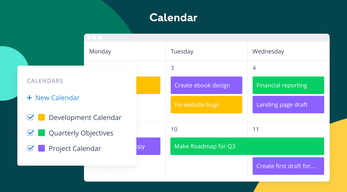
All team members have access to a global or project-based live stream of task activity, so nobody is left behind. Team members can easily communicate on specific tasks via comments and notes so that conversations are kept organized. Shared team calendars can be added to the dashboard to help with awareness of progress and submission dates. 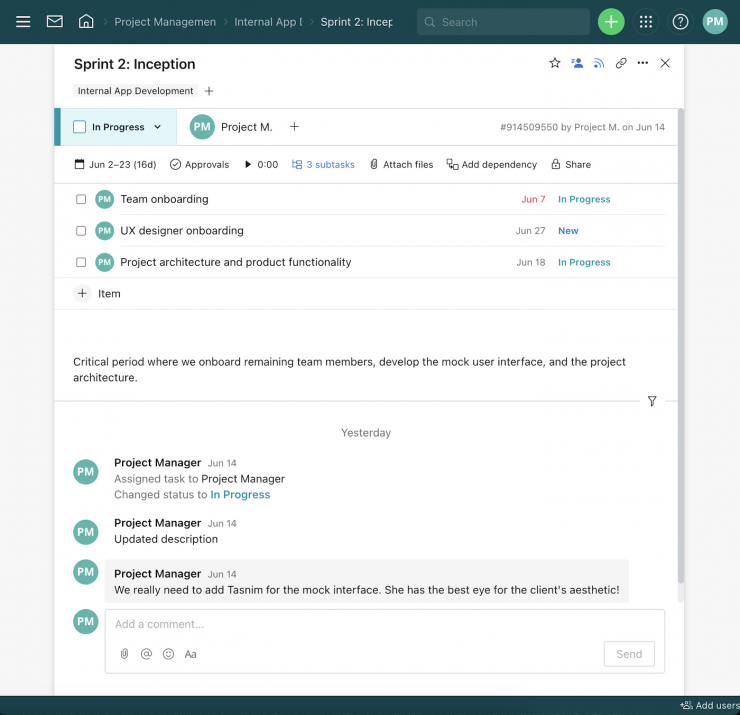
You can also invite third parties such as clients, vendors, or contractors, at no extra cost, to view the status of their projects and provide input that goes towards successful project completion.
Wrike Use Cases
Wrike’s use cases are quite impressive. Over 20,000 companies in over 140 countries have relied on Wrike to streamline their planning processes. These are companies that span a range of industries, including:
- SaaS
- Technology
- Healthcare
- Education
- financial services
- Construction
- Manufacturing
- Retail
What makes Wrike stand out from other project management platforms?
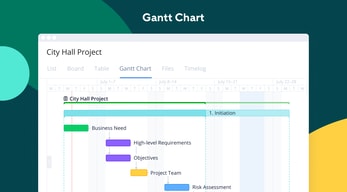
Wrike’s easy-to-create (and even easier-to-understand) Gantt chart view sets it apart from many other popular project management platforms. Plus, Wrike offers a range of other views, such as List, Board, Table, File, and Timelog. While this isn’t unique to Wrike, it isn’t super common to have that much flexibility,
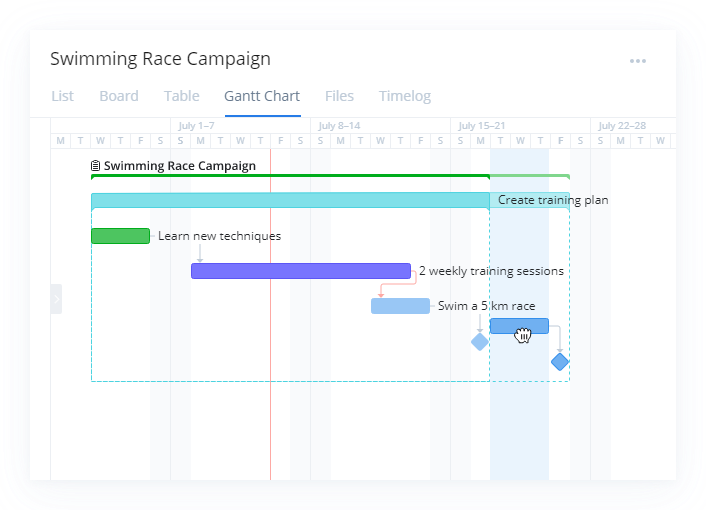
Overall, Wrike’s differentiating factor is the ease with which you can use it to manipulate project data to gain new perspectives and insights.
Wrike Pricing
Wrike offers a total of five plans, starting from a basic Free option, all the way up to an advanced Pinnacle option for large enterprises with complex needs.
Here’s a breakdown of the plans: 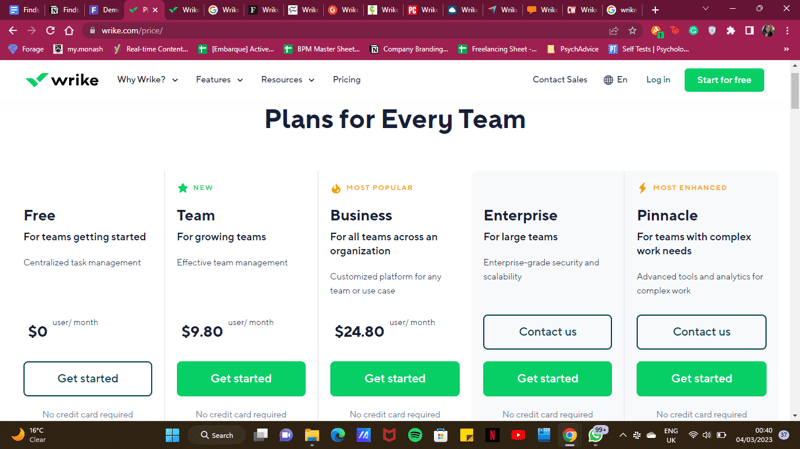
- Free : Wrike’s free plan is suitable for small teams that are just starting with project management software. However, it has limited feature options, including limited storage space, and excludes Gantt charts, time-tracking, and many customization tools.
- Team : Tailored for small teams that want to plan and collaborate on projects. This plan includes the Gantt chart view and the option to integrate with a wide range of services.
- Business : Provides access to advanced project management tools. The Business plan has everything you may need for project management for a large team.
- Enterprise : The Enterprise plan has custom pricing because Wrike will draw up a plan depending on your business needs. It is a plan to consider for large businesses that require more security controls.
- Pinnacle : This plan is for large businesses with complex work needs, including billable hours tools, job roles, and tools for planning and tracking effort put into different projects.
See Wrike pricing for current rates and plan details.
Pros and Cons of Wrike
Pros:
- Wrike offers plans for everyone, from small teams to large corporations.
- Real-time analytics are updated every 15 minutes.
- Wrike offers department-specific solutions which help different departments across your business align and communicate projects on one platform.
- Special customization is available for professional services and marketing and creative teams.
- Wrike offers training resources to help you get started on the platform.
- The free plan offers up to 2 GB of storage.
- It supports eight languages.
Cons:
- Although the project dashboards are user-friendly, those new to project management software may find Wrike overwhelming due to the wide array of features.
- Wrike’s costs can be a burden for mid-sized teams – there are cheaper project management tools with roughly equivalent features.
- Many of Wrike’s useful advanced features are offered as add-ons that can effectively double the price of the tool.
- The mobile app is not as user-friendly as other project management apps (e.g., Click Up). Managing tasks from the mobile app is not as smooth as using a desktop, and you may find that you’re unable to move and edit tasks.
- The interactive Gantt chart view is only available in the paid plans.
- The time-tracking in-app timer is only available on the Business plan and higher, and even small collaborative teams should be able to benefit from this feature.
Is Wrike right for your business?
Wrike is a comprehensive project management platform that also functions as a collaborative work management tool, making it ideal for businesses of all sizes. If you offer professional services or are part of a marketing or creative team, you can certainly benefit from Wrike’s highly customizable features.
It’s important to note that Wrike can be a bit pricey—especially with add-ons. Plus, it may be a bit overpowered for small teams who are looking for simple project management capabilities. That said, it’s a solid tool for managing multiple departments and complex projects.
If you want more insight and information into other project management software, Findstack has more helpful reviews you can take a look at.

Wrike has blown me away with how customizable it is. The ability to mold this tool to fit your team's needs is great! And the diversity of use is amazing. This tool can be tweaked to suit any kind of team. Personally, I work in Marketing, and this tool has made collaboration seamless. The automation rules are the cherry on the sundae and make my projects so easy!
Sometimes I get too many automated notifications; if you set an automatic rule, it does not negate any notification that Wrike automatically generates, so you can get multiple notifications about the same task under certain circumstances. Overall, any negative issues I have had have been addressed quickly and efficiently by the Wrike Team.
Wrike has helped us finish more projects. As many people in the corporate world know, it's easy to pivot to something new and forget whatever was being worked on. With Wrike, we have seen the vast majority of our projects to completion, and any projects that are being canceled have a notation as to why. Its helped out with our overall organization and made sharing information and content much easier.
Wrike it has been a great tool for project management Collaboration is the best It has also been helpful tool in tracking all online transaction and emails We appreciate for the good service they offer to us
It has been helpful tool and therefore I have no issues concerned to dislike
Wrike is an application for documents management
For me it has been a great platform for project management and tracking progress Very easy to understand and support team is always active and helpful Great tool for collaboration
It's cost sometimes is not much better for a person trying to implement It's used in large company
Great tool for event planning, marketing calendar etc
I recently changed fields and my new role uses Wrike, I have been learning the in's and out's. I love how you can @ someone. I like how each area you maybe assigned to can be looked at by sections. This is a program that is used every day by me and my co workers to stay on track. I was not here for the Integration / implementation of WRIKE so i can not comment. I have used customer support in getting into Wrike stars, they were friendly fast and very helpful.
I do not like when someone add's me with a @ and the person replys not @ me and i dont see it when it involves me. I am not on the original assignment due to being new and training. It makes it hard to go back and check when there are so many projects going on.
Everything is in one place. I am new to the marketing world so i cannot compare to other ways. But i find what i have seen and learned very useful and efficient.

As a professional who is constantly on the move, the first part of Wrike that appeals to me is that I am able to use it from both my Computer and from my mobile devices. Regarding usability, I love that Wrike is built around automating workflow. My team has leveraged this to automate specific tasks, especially repetitive ones like reminders and work structures. This has assisted my team as a whole to save up on time and align our workflows together.
Wrike's user interface can be better simplified to be more intuitive for first time users. Also, there is no way to modify any major settings on the mobile app , except I do it from my desktop computer. Basics such as muting notifications can only be done from the desktop.
We've been utilizing Wrike to streamline workflow processes across my department by alligning collaboration efforts between all of the different teams within my department. I think Wrike has made our internal processes more automated, faster and more efficient as well.
With wrike, there is so much we can do. ist it makes IT MANAGEMENT easy, it comes with help desk features, it makes scheduling and time tracking easy, project and tasks management is easy too
It's powerful, resourceful and flawless .......
Tasks management Time tracking Project management Project Collaboration
It is easy to use and implement. It helps us manage business in a simple way. It is also flexible and has multiple features like cross-tagging which is the main selling point.
For me it is just the best platform which has a lot of benefits.
Wrike helps us to be able to manage our daily tasks by organizing them in fashionable way.
Wrike has been a crucial tool for our team as we merge three legacy institutions to a new, singular one. It has allowed for our geographically-dispersed team to have clear line-of-sight on project, requests, and more. It integrates beautifully with all of our most important solutions, and the customer support team is fantastic.
Due to the robustness of the system, it can sometimes be challenging to get full adoption across a department as folks can feel intimidated by it at first. The Wrike training team and having an internal SME can help mitigate this.
Wrike has been essential in solving for bottlenecks in our marketing/communications team. We're able to intake requests, map requests directly to staff, and pull data rich reports and analytics about projects. We've increased oversight on projects, and decreased the amount of information that gets lost in email inboxes.
Wrike has transformed our projects management process dramatically furthermore it's efficency is up,visibility on pending work is greater. Wrike is a perfect project management software for one who is buying a product one can get.
Few minor gripes about design desicion and a few basic features of the product nothing less than that.
Problem involving chaos caused by the explosion of workflows and blueprints which will give us access to more pre-made templates
What strikes me most about Wrike is its infinite capacity for customization. When you work with a large team, with different demands, different workflows and needs, it's very complicated to unify and make the teams talk to each other, but with Wrike I've been able to maintain the conversations between the teams and integrate them with all the teams, it's like a big translator.
Absolutely nothing. Everything about Wrike is great
Understanding the work of the teams Defining workflows Mapping and building internal processes Measuring work Collecting and analyzing KPIs Improving briefing processes Planning, monitoring, controlling and analyzing the work of planners, event teams and marketing campaigns And more
Wrike's best feature is its different views, which are similar to a spreadsheet, the only difference being that it's online. Project management is much easier and tracking progress is even easier. The key element is the ability to assign tasks to assigned users and monitor status through a single software. Wrike simply speeds up the work process and provides accurate, high-quality data in return. Very easy to understand and the online support team is great and always helpful.
Honestly, there's nothing I don't like about Wrike.
Supervisors receive notifications of work that needs to be completed and manage business operations. Other authorised employees often receive notification of work completion when requested by an external client. Ability to mention internal users' names and send updates about real projects instead of sending time-consuming individual emails. Track employee absences and monitor attendance and absent hours. Monitor the progress of performed work.
O wrike é completo naquilo que se trata de organização, criação, visualização e integração de tarefas conseguindo tornar o ambiente de trabalho muito mais produtivo.
Não possúi muitas alternativas de temas e customização e os horários de trabalho não pode ser alterados de forma geral.
O wirke me ajuda a organizar minhas tarefas, participar de outras entre os setores da empresa e visualizar meu progresso através de dashboards

With the project management platform we used previously, it was challenging to gain visibility to projects that other team members didn't share directly. The option to create a departmental space is an absolute gamer changer—now, all our team members can see projects currently in progress without wondering if they have been shared in or not. The option to view projects and tasks in a kanban board or as a Gantt chart has helped us communicate as a team while moving projects forward, especially with the instant notifications that the next step is ready to be made in the process. Plus, having the capability to @-mention team members has eased our use of Slack and reduced our time spent managing Slack messages overall. Not to mention Wrike's excellent online, at-your-own-pace learning tracks—these helped get our team up to speed quickly!
Honestly, there is very little that I have found to dislike about Wrike. Once you've learned how folders, projects, and tasks work with dashboards and kanban views, it makes project establishment easy. We have had some challenges in customizing widgets in dashboards and creating dashboards for visibility outside of our development, but Wrike's onboarding team has been so helpful in answering our many questions. There are so many ways for project managers to establish projects in Wrike. Our team created an onboarding subcommittee to identify how our department will use the team space and our best practices to create, share, and communicate. Our licensure includes collaborators, which make it easy to add external members who do not have a license for visibility. I strongly suggest creating an onboarding committee to set your team up for success during the onboarding process.
We needed one tool for managing our projects—our team had been working partially in Basecamp, partially in Smartsheets, and using Slack and email to fill in space where needed. It didn't prove easy to figure out where projects were in progress, and communication was often not documented or spread widely throughout multiple tools. Wrike answered all of our needs and provided a space to streamline and capture all our communication in one tool.
What I like best about Wrike is how easy it is to manage our internal processes in a simple and effective way. The wide diversity that we have in including our processes in the system helps us a lot on a daily basis.
Not that it's a negative point, but it would be interesting for Wrike to allow us new customizations within the system. Giving this opportunity to further customize our processes, in addition to what already helps us a lot, would help even more
What Wrike helps me the most is creating my tasks. Here we work with another system, so what constantly happens is that I manage to take my process from the other system and create a task inside Wrike, and there I manage it myself.
Dos espaços bem distribuídos. Na automoção com os outros sistemas que utilizamos.
Nao existe um painel explicativo de como utilizar o wrike.
O wrike auxilia no controle das demandas dos clientes, assim nosso relacionamento com o cliente está cada vez melhor.
I like that you can have various dashboards for various project groups. That helps to keep things organized and it's a screenshot of what is out there, what needs to be completed and what has been completed.
I would say that the least helpful thing about wrike is that anyone, even people who have no interest in a certain project can see what is going on. Sometimes this creates confusion where it doesn't need to be created.
It has kept our tasks on track for completion and keeps everything organized with each individual customer. It has made us more productive while at the same time holds every accountable which has help production as well.
It helps us complete our work more efficiently and share information easily.
Some limitations in terms of navigability.
It helps our team share information, complete tasks, and manage projects more efficiently. It also aids us in keeping clients updated.
Wrike makes it so easy to collaborate and get work done. Although we did an accelerated implementation, our team was able to get up-to-speed fairly quickly and work without issues through the busiest time of the year. Our entire marketing organization works in Wrike daily, in sharp contrast to previously working in 4 separate systems. From project requests to scheduling to actual collaborating and accomplishing work, we have really hit our stride and have been able to reduce total cycle time
I haven't seen any downsides to using Wrike. We had some issues during the implementation of Wrike, but we realized that most of the issues were related to processes that had been put in place before we moved to Wrike. Once we made process and policy changes, the problems went away.
Having our entire marketing department in Wrike has greatly increased collaboration and reduced time to market with our campaigns.
Wrike's open platform is a game changer. Their use of Custom Item Types helps us tailor the tool to our needs. Anything that needs tracking on is in here: tasks, milestones, projects, portfolios, vendor bookings/contracts, talent bookings/contracts, filming locations/bookings, account credentials, workstation availability, hardware availability, project roadmaps, strategic roadmaps, proofs/reviews/approvals, tactical workload charts, strategic capacity plans, budgets, estimates, time sheets, job numbers, knowledge bases, vacations, sprints, graphics lists, content plans, shoot schedules and master schedules (to name a few). And all of this at company, department, team/subteam levels!
The ONLY downside I can think of is - viewing all files from across the entire network (right now you can only view files in a dashboard from one location. Albeit, the team at Wrike is already underway on making this happen - so net net - no downsides!
Wrike allows us to *easily* scale as the business grows.
Wrike stood out from the rest by being a robust and flexible project management tool. We were able to customize Wrike to our workflow and to meet our needs rather than change to conform to how it worked. Customer service has been outstanding since day one. The support staff is knowledgable and quick to respond and provide assistance.
There are a few functions that I think could be improved upon, most notable the proofing/approval feature and the timeline view. The proofing/approval feature is a great tool but we have experienced a few glitches and it seems a little clunky at times. The timeline view is a great view to have, but without an undo feature you have to be really careful when looking at rescheduling different tasks.
Project management, task management, collaboration and transparency. With Wrike we are able to keep better track of where we are with our projects and our workload, thus helping us meet deadlines and keep everyone informed.
Customization options as well as Wrike Integrate.
Tasks that live in multiple places can feel "lost" to certain team members who aren't power users
Wrike is now our source of truth for all project tasks and processes. Also using Workato to handle business automations. Consolidated multiple tools (JIRA, done-done, Zapier, etc)
Wrike is an easy to use software and can be tailored for any size/ type of teams and has so many features and funtions.
Though we can comment/ @mentions users, we sometime have to rely on other communication platforms such as Slack. Realtime chat feature is missing.
Managing workflow. Handling day to day tasks. Managing new projects.
I liked that it has helped manage all my events and marketing projects. My favorite features are dashboards! I like the dashboards because I can see all my work and my colleague's work in one organized place.
There aren't many things I dislike about Wrike.. Sometimes I feel like it easy to get lost within tasks, but other than that the only there I wish I could do is copy and paste events easily.
Wrike has solved a ton of problems for my team (Marketing). Before Wrike we would have a ton of calls and meetings to collaborate on projects, but we have been able to cut those out and just collaborate in Wrike!
reporting, dashboards, analytics, tagging folders, los of sharing and also importing and exporting; we like blueprinting and standardising processing a lot; this allows us to automate manual tasks; automation tools are super; wokato integration tools; on-line document review and editing, collaborative writing; approvals;
collaboration with external stakeholders is a bit tricky
Automation of business processes; monitoring; reporting; analytics
Wrike solves for so many of the common pain points felt by the MarrComm team that I coordinate for. From request forms, workload balance, hollistic project undertanding, reports, templates, and beyond it seems as though there is nothing that Wrike can't do. We've experienced a major transformation of organization, and Wrike has been essential to our geographically disperesed team being able to work and collaborate with clear line-of-site on what everyone is doing.
Unfortunately, Wrike can be somewhat overwhelming for team members that have limited technological literacy, who have been used to doing things one way. This isn't necesarilly a unique problem to Wrike, but to a team that was already burdned by change fatigue, getting folks to buy in to the value of Wrike certainly posed some challenges.
Wrike is solving so many problems for us, including: requests getting lost in e-mails, unclear or convoluted timelines, at-risk projects not being caught with time to adjust plans, and the inherent challenges of being a geographically dispered team. We benefit massively from Wrike in all these areas - request forms ensure the most tactical information is being captured from stakeholders and not getting lost in e-mail chains, gannt charts help with timeline visualization, RAID template ensure that risk is being assessed and managed, and our whole team has one "home" in Wrike where we can collaborate easily and effectively with members of our team, and others.
It was extremely helpful having someone to walk my entire team through the onboarding process. It has been easy to manage and we are able to use some of the request forms for our entire internal team. Each department within our Marketing organization has been happy with Wrike. Also, love that I can add my personal tasks to my dashboard that only I can see so I can have everything organized.
Of course, the most difficult part about changing platforms is getting everyone on board with learning something new and different. During the onboarding process, there were a lot of hiccups with time because our Marketing organization has our plates pretty full. The time allotted for homework and teamwork wasn't ideal however, once we got through it everything has been much better with us all under one platform rather than multiples like we were before.
Having the entire Marketing Organization using one platform instead of many. Building out Blueprints and Request forms for our internal team so that it goes to the right people and helps us create projects more efficiently .

A lot :)) Clear Interface. Never down-time, very regular updates (almost weekly, surely twice a month) It just works very very well, it does/can handle all needs. A lot of powerful features that make the platform very very complete. Among our favorites : custom workflows and columns, request forms and Stream. Ad-hoc support when needed, always complete answers even on 'difficult' matters. Even if the iOS app has less possibilities/functions than the Android app, it still is very complete and powerful.
no macOS Touch Bar support (!!) a lot of repetitive handlings could be programmed here and would save A LOT of time over a whole day. the New Experience was launched too soon .. on the good way but a lot of improvements needed to really have it stand out to the 'old' interface. Too limited amount of Dashboards (only 14 in Business version) Lack of a "summarized/general" user-rights distribution-view over all structure/folders/projects. Wrike Meeting (conf. call) feature that's has gone out over last year, it is a pain (takes a lot of concentration and extra energy) having to use a third party for conference/group calls and take nots inside Wrike on another screen :/
Too much too mention ;-) It fitted in seamlessly resolving long time frustrations. Perfect real-time and certainly scalable project-management and resource handling. Automated reporting and analytics. Even if a general window for is still missing IMHO, yet, user-rights are easier/better handled.
Its very easy to use and keep track of all the tasks and assignees
Nothing..best software for project management
Tracking of the projects and deadlines for everyone involved. Plenty of benefits. Easy to use and track the progress of each task and the stage of each project.
Easy to organize your projects and I like that you can create sub folders as well. Easy to tag colleagues and add dates to keep your projects on track. Wrike is more robust than the Teams suite and Wrike was easy to learn!
For some reason I don't get notifications when due dates come up or like reminders of due dates in advance. Maybe I have this setting turned off but I would like an advanced notifcation. The dashboard when you are in a project can be a little busy as well.
It provides us with a central location to manage our projects, assign tasks and keep everyone in the loop. Because we all use the tool it is easy to cross collborate.
the best way to manage projects and integrate teams. working with the new automations simplifies daily work allowing you to focus on important actions and bottlenecks
Field formula programming is conflicting. it takes a bit to organize the folders and connect them. integration with outlook and iOS widgets needs to be improved.
I work with remote teams and Wrike helps me manage multiple projects at the same time by organizing schedules and measuring the implications of each person on the team