
Zoho Assist Reviews: 4.6/5 — Highly Rated
Zoho Assist is a cloud-based remote support and remote access software designed for businesses to provide seamless customer and employee support. It enables secure, on-demand connections with remote devices, including PCs, laptops, and mobile phones. With features like multi-platform support, unattended access, real-time collaboration, and customizable branding, Zoho Assist ensures efficiency and user convenience. Its advanced security measures, flexible pricing, and quick deployment make it an ideal solution for businesses of all sizes.
| Company | Zoho Corporation |
|---|---|
| Year founded | 2000 |
| Company size | 10,001+ employees |
| Headquarters | Chennai, Tamil Nadu |
| Social Media |

| Capabilities |
AI
API
CLI
|
|---|---|
| Segment |
Small Business
Mid Market
Freelancer
Enterprise
|
| Ease of use |
Beginner
Intermediate
Advanced
|
| Deployment | Browser Extension, Cloud / SaaS / Web-Based, Desktop Chromebook, Desktop Linux, Desktop Mac, Desktop Windows, Mobile Android, Mobile iPad, Mobile iPhone |
| Support | 24/7 (Live rep), Chat, Email/Help Desk, FAQs/Forum, Knowledge Base, Phone Support |
| Training | Documentation, In Person, Live Online, Videos, Webinars |
| Languages | Bulgarian, Chinese, Dutch, English, French, German, Italian, Japanese, Korean, Portuguese, Spanish, Swedish |

Compare Zoho Assist with other popular tools in the same category.
You manage to meet the requirements of your organization through the programming proposed by its presentation format, elaborate creation, its integrated programmatic performance, elaborated to manage reduced time manipulations, technical synchronization of publishing solutions, its efficiency testing algorithms, the schematic location of its resources configurations, a personalized planning of dates and notifications, visual data assimilated under theoretical foundations and simplified information conditioning preparations prove the quality of the tools provided by this commercial writing software of achievements in social networks.
Its operations are sometimes inconclusive, due to a failure that projects in a wrong way its content management, handling wrongly the capacity of guided attention of accounts operation, content programming, secured data report, platform integration and a product demonstration in low resolution, preventing that the advertising systems achieved in social zoho to sell and know compound sales margins are fully visualized.
The particular amount of use that has been ordered with zoho social has focused on the viability of business processes, customer relations, data understanding function, for its shortening of url, its fast loading of images, the ease of multi-platform that dominates, custom publications with mobile application, a simple and fast interface, a fresh design, clean and enveloping, able to provide direct automatic responses, profitability of reliable economic packages, serving to recover and synchronize the opening of defective sectors, interrupted resolutions and loss of activity reports, collaborating greatly for the conformation of control utilities of communication web applications.
One of the features that I like the most about this software is that it maintains an incredible user interface, totally fast and interactive, which allows a faster flow, specifically for beginners who are starting to use this platform for the first time, with magnificent graphics and illustrations in its design, which cause a visual satisfaction, every time you access these digital facilities, including that one of the qualities that I like the most about this server, is its incredible tools that encourage secure and fast file transfers.
The technical support that this system acquires, is terrible, because it does not present functionalities in this branch, that are effective in their totality, since they take immense managements of time, in responding to a request of help, with failures in this software, in the heat of operation of some work in particular, or certain doubts that usually are pronounced frequently, because this program is something confused in its basic functions that it contributes to the virtual public, as long as they are subscribed to this channel.
This is a software that we use frequently in our departments dedicated mainly to the client, since Zoho Assist allows us to access the remote operating machines of each one of the users that conform us, to make our collaborative processes from different geographic points, also we established this program in our platform to install different systematic instances, for the diverse functionalities that offer certain technological promulgations to us, for a better advance in the development that we exert, acceding to implement them of a much easier and fast form.

I love this program since it's anything but difficult to download and utilize. Zoho Assist has an extremely simple arrangement process and had gadgets prepared to sign in minutes. They additionally have a visit highlight that enables you to converse with specialized help in minutes and I truly love this since it causes me stay in contact with my specialized group. It's incredible that you compose various PCs by office with custom names so you know which PC you're getting to. Zoho Assist exploits bi-directional document sharing, which isn't so regular in the realm of remote emotionally supportive networks. Offers an assortment of valuing plans and programming to suit private ventures.
The speed of the program operator isn't as quick as different projects I've attempted. Remote Restarting has not generally worked for me, I needed to reset the session to proceed after a reboot. It can part records, yet any archive that is bigger than 2GB, preferably under 1.5GB, will most likely have an impressive deferral. It's muddled, contingent upon which screen you're on. I like the expert intend to have more PCs unattended.
I use Zoho Assist to address increasingly suggest issues without talking verbally to a customer actually. I utilized the test for a couple of days, at that point chose to proceed with the program. It is as of now utilized by my specialized group for remote help. More often than not I'm utilizing unattended help to have the option to get to the servers nightfall to address any product issues.

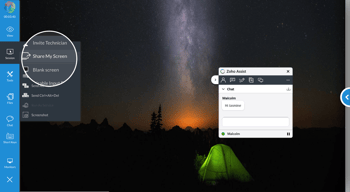
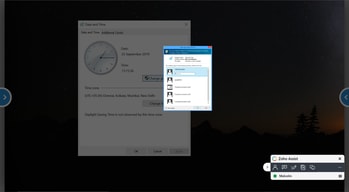
Just like most remote support applications, Zoho Assist connects your support consultant's computer to your client's computer through a screen-sharing tool. The support computer can see the remote client’s screen and control their mouse and keyboard, allowing them to effectively assist your client remotely through show-and-tell. Not only does Zoho Assist come with a very affordable price tag ( even Free ), Zoho Assist provides a toolset comparable to the competition On the simple end, a support consultant can view a client’s screen to better understand the issue they’re experiencing or to more precisely guide an inexperienced user through a fix. On the most complex end, users can completely control and administer a number of remote devices simultaneously. What I like best about Zoho Assist is how easily it integrates with the Zoho Suite of tools.
The limit on concurrent connections can prove slightly frustrating on lower plans and at rare occasions, the 2GB file-limit has, to a small degree, been somewhat bothersome. The browser-agent speed could be improved as well as it feels slightly slower than the competition. Another gripe I have is the need to register each non-Zoho Assist computer, but once that's done, features like Unattended Remote Access allow for access without client interaction.
Due to the complexity of our school administration and management software, our clients often require the assistance of our skilled Support Consultants when setting up compound curriculum structures and report formulae. Since switching to Zoho Assist from Teamviewer and integrating it with Zoho CRM, Zoho Desk and Zoho Projects, remote assistance has become a true pleasure.

Unattended remote support and ease of using the program
It does not update in real-time we always have to refresh also there is no time mention if our customer is active from a particular time.
Datacenter

It is very simple to implement and easy to use, in general it presents a stable interface and with a wide and correct level of functionality, I am pleased that it is complemented with other Zoho resources to be an assistant between computers and devices with a direct connection and stable, its quality is very well achieved in the visual aspect during connection
I believe that its deficiencies are focused on the area of complementary service to improve the quality of the remote connection, the platform does not have options to make the connection more dynamic and flexible where it is possible to interact between devices with alternative chat or other means of communication which are sometimes necessary.
I mainly use it during my days outside the office to connect to the device of other colleagues for technical and remote assistance in some professional software that our work team uses, so I can collaborate directly without being present in front of the connected device or device .
The ability to offer remote support is awesome! Whether a small or large business, Zoho should be looked at. This is cetainly the most economical option that we have seen so far.
Nothing at this time. It has been great for what we have tried to do with it so far.
Remote assist of office workstations. Remote assist with Point of Sale workstations. Office and clerical work.
Easy to use, professional representation of my company, a good suite of products.
Remote desktop control is a touch laggy, but still very useable.
Unattended access, easy connection, good remote control options. Android support is also excellent.
The price of the solution for my needs is better then the competition.
the feel of the interface is sometimes bulky and out of date. I believe that the competition has a faster performing solution (Team Viewer) their communication channels perform better.
remote support and install. usually easy to use for the client

Includes remote support option for on the go
have to pay more for branding. I wish I can just add my URL and logo to the remote support site with professional site I paid
Always better to see then have users to talk about what they are experiencing

ease of use, general ease of connecting with clients
you can only download 40 files at a time, easy enough to get around by zipping them up and then downloading the zipped file.
Software support of my customers

Zoho Assist me permite conectarme sin problemas al escritorio de mi cliente, con herramientas muy útiles, que minimizan mis tareas, y las hacen más sencillas.
Al momento de conectarse como administrador, demora mucho o no aparece la ventana que pide las credenciales del administrador.
He solucionado problemas básicos que tiene mi cliente con las herramientas de Office, también he solucionado problemas de red y como tal del funcionamiento del software de las máquinas.

The method of connection, and the ability to do certain things, like elevate privileges through UAC work extremely well this time around. The installation of the client is very simple, which makes it great for users who may not be too computer savvy. Computer reboots, file transfers all work very well also.
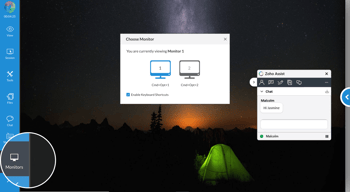
A couple of things that are still missing: - When assisting clients with multiple monitors. You can only view one monitor at a time, but not both. This causes us to have to request from the client to move a window from one monitor to another, or otherwise doesn't allow us to see the full picture. Zoho Assist is working on this feature, but no ETA on availability. - Chat logs are not available from within the interface for auditing purposes. So, you have to make sure to keep track of them offline in the email box where you would send the chat transcript. - Overall, Assist is still not as feature-rich compared to some others we've used. (i.e: Connectwise Screenconnect, LogMeIn, TeamViewer). However, it is priced way below all the competition, and given that the main functionality works well. we're willing to rid those issue through until resolution. (hopefully soon)
Assist helps us with screen sharing, and remote control to support our users. It has also provided a nice integration point with all the other Zoho Products (Desk/SalesIQ) and helped unify these systems a bit more.
Like the unattended access service, it makes it easy to login when a client calls for help. Like that I can send alt-tab and control alt delete commands.
Didn't realize that the unattended access account only works for one person. The "unlimited techs" is a little deceiving, many techs can access my list of unattended clients but they can't connect to anyone not on that list. Also, I tried to add techs but no emails are received. I'll try that again.
Troubleshooting clients POS computers. For example I receive called about a receipt printer not working and I can login and troubleshoot that. Or help them with a POS menu setup or other POS questions.

Its just enough what we need to serve our customers with the best price
Copy/Paste function is unstable. We need frequently to use the chat to replace the copy/paste but we lost details as fonts, etc.
It's our tool to deliver remote DBA services. It's easy to use for both, our customers and we as providers.
Very easy unattended install, product works great
Nothing so far. It's easy to use and cross-platform.
Remote support. It works and my users can set it up by themselves.
Ease of use and login, much more efficient than Gotomypc
I wish the full screen was truly full screen
Access to remote systems and support

Everything seems very simple and easy to use - pretty clear
have not found anything yet that I would point out
as I support primarily accounting software etc. Zoho Assist allows me to help my clients by seeing what they see - so far the basic Free version has sufficed but looking at Professional for a few added features. Compared to a lot of offerings it is very cost effective.
The pricing model is flexible and affordable but also appears sustainable.
Nothing so far but only used the product a short while.
Isolated remote access scenarios where VPN/RDP is overkill and VNC is awkward.
Recording and Screen Sharing. Remote troubleshooting.
Recording and Screen Sharing in top tiers
Development team and support team spends many hours asking customer to share screen through Skype for deploying and troubleshooting sessions. This is a better way to do the same and increases productivity.
It is highly efficient and cost effective and user-friendly both for the technician and the end user.The response time on the remote session is also good features like file transfer is really helpful.
The tools doesn't have the feature to get the Enduser connected to the remote technician if they want any type of support from the technician.
We use to access End user systems to install software troubleshoot system related issues Updating the system software anti -viruses and other applications for proper functioning of the machine.
I liked the unattended access and customer widget feature
There is enough room to improve User Interface
First and most important is Tech Support to our clients remotely by saving time to go client locations.
Zoho Assist is easy to setup and use. Zoho Assist is also part of a fantastic group of Zoho apps that they offer as part of the Zoho One suite, which has a low cost and great selection of apps and options available.
Because it is solely web browser-based, the customers must be able to go through downloading and installing a plug-in for support to work.
Zoho Assist helps with Customer Support and Customer Relations. Our product is technical in nature, so it is very useful to be able to remotely view the customer's computer and help troubleshoot any issues directly.
The price point is great compared to other offerings. The ease of install for unattended access is incredible. Supporting all the major platforms is a bonus as well. Most of my clients are windows users, but my personal preference is OSX or Linux. This product works great for us. Zoho reduces our truck rolls by 75%!!
I would like to see support for process viewing and remote command prompt for windows based clients in the future.
Remote support for high end clients without rolling a truck for everyday tasks and issues.
The cost of the subscription is very budget friendly. The ability to have unattended access and technician initiated sessions is great. File transfer, chat, session recording and technician feedback is important. All of the features you want in an easy-to-use package.
It is all browser-based. I would like a desktop client for technicians in a call center. I would like the remote user give feedback for review at the end of the session. In full screen - actual size mode the pointer moves the screen too quickly. It was very difficult to navigate the screen. The fit to screen mode was almost to small to work with but I managed to complete the task.
Standard remote user assistance. System updates, software installation. Saves on drive time and return visits.
I work remotely and my Marketing Director has the ability to log right into my computer and control my screen. I love how easy it is to just let someone take over and drive. I have only used this software as a user, not an administrator, but I can not speak highly enough about it!
The ONLY thing that is a little challenging is when you first receive the e-mail with the link to share your screen, you have to download the software and install it. Other than that, once it is set up for the first time, you are good to go!
The benefits are huge with Zoho Assist. I have 2 monitors and my administrator can switch between them very easily. As someone who works remotely, this is a must-have for any business!
Minimal and clean interface, nice functionality and acceptable connection speed
so far none, all the feature is the good, some of the feature i have not yet use
Help customer.
It integrates with spiceworks online free helpdesk. Also it is clearly marked as free for commercial use and the paid version allows remote support of android and iOS phones.
It would be great if you could test the android and iOS remote support on the Free account.
Assisting employees with their computer devices
Zoho Assist does exactly what it says on the tin. It is a nice support tool to connect to our customers.
Would have preferred to get some features only available at higher cost plans for a small company like ours
Remote assistance and support for our customers. Faster response time and greater satisfaction levels from our clients are the key benefits we've got using Zoho Assist.
It's integrated with our ManageEngine apps, and email invitation template it really touchy
sometimes the remote session slow, and when someone invites to download Zoho agent. the process installation and session connection slow.
Quick helpdesk delivery solution, benefit make my internal user feel happy and honored.