
Zoho Assist Reviews: 4.6/5 — Highly Rated
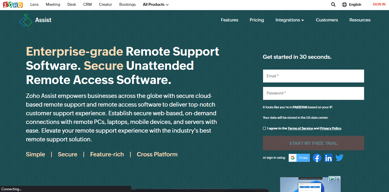
Zoho Assist is a cloud-based remote support and remote access software designed for businesses to provide seamless customer and employee support. It enables secure, on-demand connections with remote devices, including PCs, laptops, and mobile phones. With features like multi-platform support, unattended access, real-time collaboration, and customizable branding, Zoho Assist ensures efficiency and user convenience. Its advanced security measures, flexible pricing, and quick deployment make it an ideal solution for businesses of all sizes.
| Company | Zoho Corporation |
|---|---|
| Year founded | 2000 |
| Company size | 10,001+ employees |
| Headquarters | Chennai, Tamil Nadu |
| Social Media |

| Capabilities |
AI
API
CLI
|
|---|---|
| Segment |
Small Business
Mid Market
Freelancer
Enterprise
|
| Ease of use |
Beginner
Intermediate
Advanced
|
| Deployment | Browser Extension, Cloud / SaaS / Web-Based, Desktop Chromebook, Desktop Linux, Desktop Mac, Desktop Windows, Mobile Android, Mobile iPad, Mobile iPhone |
| Support | 24/7 (Live rep), Chat, Email/Help Desk, FAQs/Forum, Knowledge Base, Phone Support |
| Training | Documentation, In Person, Live Online, Videos, Webinars |
| Languages | Bulgarian, Chinese, Dutch, English, French, German, Italian, Japanese, Korean, Portuguese, Spanish, Swedish |

Compare Zoho Assist with other popular tools in the same category.
Unattended Access Clients. I manage, as a volunteer, church computers and being able to access during evenings and off hours without needing someone there is priceless.
That more people don't use and that I need to use Firefox because Edge is at time glitchy.
Any and All user issues needing assistance within their session. Also Patching without the need for a user to be present.
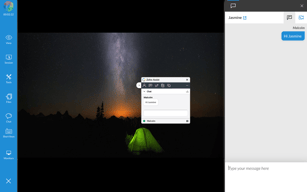
My experience with Zoho Assist has been nothing short of excellent. This remote support and access tool has proven to be incredibly user-friendly, making it accessible even for those who aren't tech-savvy. One of the most significant advantages of Zoho Assist is its ability to save many hours of work. The seamless connectivity it offers, regardless of geographical locations, makes it easy to provide or receive support without any time-consuming setups. The interface is intuitive, allowing quick navigation and control, which is essential in a remote access tool. The features like file transfers, voice and video chat, and multi-monitor support have enhanced the overall user experience. These functionalities ensure that you can carry out complex tasks as efficiently as if you were physically present at the remote location. Another remarkable aspect of Zoho Assist is its cost-effectiveness. It is economical to run, offering various pricing plans that cater to different needs, making it a viable option for both small businesses and large enterprises. The affordability does not compromise the quality of service, as it maintains high security standards to ensure safe and reliable remote sessions. In summary, Zoho Assist is a robust, efficient, and budget-friendly tool that simplifies the complexities of remote assistance. Its ease of use, coupled with a wide range of features, makes it an excellent choice for anyone looking for a reliable remote support solution.
It works and I have had any issue with it over 5 years of use.
Any issue that arises in an office scenario from loading new programs through to instructing client on using programs through to fixing or adjusting documents and general troubleshooting.
Im using this software for several years akready as a un-attended access (25 comp) and also on demand option. easy to launch session, simple interface. very reliable.
Whould be nice to have also voice communication added (soond/microphone)
remote support. I do not have to visit my clients in 90% of issues.
I was an early adopter. I have a grandfathered rate that is very favorable. Zoho has been light on the resources of the end user devices. It has been very dependably available. It has less functionality on Macintosh computers but I am pleased to be able to be able to remotely assist Mac users from the same platform with PC users. It is very helpful that it has an option to remotely view the screens of IOS and Android users too. I like that Zoho has continued to add more features such as remote audio and printing. After reading my dislikes you might think that I dislike Zoho Assist. This is not the case. Overall, I must say that I have been pleased with Zoho Assist and plan on keeping it for many years to come.
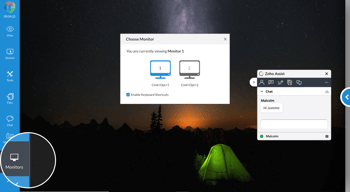
I have 4 monitors and I dislike that I am unable to move the remote session screen to the monitor of my choosing. When I have multiple remote sessions operating simultaneously, I dislike that the machine name is not visible on each screen session - so I can locate it quickly. I dislike the way the "Choose Monitor" function has to be re-opened in a separate pop up each time I need to jump between monitors. A dropdown showing pictures of all remote monitors simultaneously would be much easier. I believe their Customer Support hours are too short. I feel that Zoho Assist Support should be available 24/7/365 since the service is frequently in use by IT techs during off business hours.
Of course, in our current era, most IT support is accomplished remotely. This is an imperative tool for my IT operations.
My personal favorite feature is the Unattended Access. The ability to remotely control any of my client's workstations without the need for them to do anything is fantastic.
I wish there was a "monitor" feature, something that would allow us to be notified if a workstation goes offline for a specified period of time.
I have several clients that have users who need quite a bit of help, and the remote unattended access feature allows us to help those users without needing to go onsite, or walk them through other types of remote connection.
Pricing, ease of use, lots of features. It is very easy to deploy on computers.
So far haven't seen anything to dislike, it's been working for us great.
We have been using Teamviewer before we switched to ZohoAssist. Teamviewer stopped providing a non-profit rate, and that is when I found ZohoAssist. Customer service has been great to get us started and since then we really didn't need to contact them any more. It fits our needs perfectly and it is very affordable.
The best feature of Zoho Assist is: it just works! No hassle, no install problems, no hard work with users... it just works. We needed a Remote Support platform for Windows, Mac and Linux, and Zoho Assist fit like a glove. The price is reasonable too, and the support team great as well. When you are selecting a global corporate tool, you know it's not easy most of the times. That's not true with Zoho Assist, we're glad we chose it.
The only downside I see is the lack of a detailed graph of concurrent support sessions active during a time period. There is a report about total sessions, but as our licensing model is based around concurrent support sessions, I believe the tool should make that information easy to query for clients. We had to implement some email alerts around Zoho Flows which seems a bit harder than it should be. Apart from that, the rest is fantastic.
Zoho Assist solved our need regarding Remote Support to our thousands of employees, working from anywhere and with different operating systems. It also allowed us to block a lot of "informal" (and sometimes unsafe) remote support tools.
It works very well and makes it incredibly to use unattended access. The product has all of the functionality of much more expensive products and is extremely easy to use. I am pleased that it is complemented with other Zoho resources to be an assistant between computers and devices with a direct connection and stable. The unattended assist the ability to transfer files and remote print are big advantages.
There isn't anything that we have found to this point that we dislike about the tool.
We are solving the ability to scale across the number of techs we have since grown. Zoho makes it easy to remotely install software and updates, and run various diagnostic tests. It allows most issues to be resolved off-site saving on travel and technician time.
Best price in the market Easy to deploy to clients You can do untattended access to the clients Easy to manage all clients.
In Mac sometimes the copy and paste doesn't work well.
Before tech support had to go physically to the computer or we used Logmein. But Zoho Assist is much easier to manage all the computers in central dashboard. And much faster compared to Logmein.
I have used other remote support software to be able to login and assist my team with computer issues or to see real time what is going on with an issue my team is working on. Zoho Assist is simple and straight forward and has the tools needed for me to assist and resolve issues that have come up. from pricing to support Zoho has been a favorite of the company for many years.
Not much about Zoho assist that we do not like. Sometimes the login can be a hassle because of user error but otherwise it works as advertised.
Zoho Assist allows me to work remotely and still have access to my office desktop when needed as well as help my staff when I am working remotely.
