

Unclaimed: Are you working at Adobe Dreamweaver?
Adobe Dreamweaver Reviews: 4.1/5 — Solid Choice
Adobe Dreamweaver is part of the Adobe Creative Cloud which also includes Photoshop and Indesign. The platform lets you create and design websites, with a combination of visual and HTML editing tools. With Dreamweaver, web designers have the option to build fully responsive sites and bring their ideas to life, especially in terms of design and functionality. The solution also offers multimonitor support for Windows and is most suitable for developers with extensive coding knowledge.

| Segment |
Small Business
Mid Market
Enterprise
|
|---|---|
| Deployment | Cloud / SaaS / Web-Based, Desktop Mac, Desktop Windows |
| Support | 24/7 (Live rep), Chat, Email/Help Desk, FAQs/Forum, Knowledge Base, Phone Support |
| Training | Documentation |
| Languages | English |
Adobe Dreamweaver Pros and Cons
- Adobe Dreamweaver ties in seamlessly with other tools in the Creative Cloud
- It’s ideal for developers with coding knowledge.
- You’ll benefit from complete customizability and control over your web design and responsiveness.
- Adobe Dreamweaver supports HTML5.
- If you don’t know how to code, Adobe Dreamweaver presents a steep learning curve.
- Adobe Dreamweaver isn’t very affordable. In addition to the software, you’ll still need to secure your own web hosting and domain name before your website can go live.






Compare Adobe Dreamweaver with other popular tools in the same category.
Like most Adobe products, it's absolutely incredible what it can do and how it can make programming much better. It's the best of the all the web designing software out there by far.
With the existence of Wordpress and themes, it makes it so that you no longer need to be an HTML coder and thus no longer need things like Dreamweaver in order to create legitimate, good-looking websites. Wordpress is much easier to understand and things like wix make it so that you can click, drag and begin.
Well, I used to have Dreamweaver as the only way to create my websites for my online business'. But now, I no longer need it. I still have a program and still upload my email to it and design HTML emails that are great but that's about it. Back to the email though, designing an HTML email through Dreamweaver has actually lowered my spam score and thus increased my open rate, than using the templates that my Email Service Provider creates.
Dreamweaver Pros: 1. Support for advanced HTML5 and CSS websites, with almost all features accessible through GUI interface. 2. Tight integration with other Adobe apps. Unique, built-in support for designing for multiple platforms simultaneously. Works for Windows & OSX.
Dreamweaver CONS: 1. Not good for modern web development like building wordpress website. 2. Even the newly-simplified interface can be difficult to navigate. Sluggish performance with complex pages.
Advanced offline website editor.
I really love that you can go into a website in real time and make updates. It makes me feel like I am coding information.
I dislike the fact that it does not seem to work like it once used to.
I do not use it as much as I used it before, but in the past, I was using it to make updates to my companies website.
Syntax highlighting; search/replace and css support; server interactions
dated - not great for current web frameworks (react/angular)
mostly simple web and PHP development; less than in the past
Interface is well designed and text fields are organized well.
Software is a bit buggy and will sometimes lag and crash.
Rapid prototyping for landing pages and responsive web design. Benefits are the organized features such as media query display.
The viewablility of the programs is nice.
Program not as user friendly as it could be.
None so far
It integrates with Business Catalyst websites for easier site development. You can upload, edit and keep a local copy of your website for backup, security, and continuity.
There are better text editors and IDEs but when working with Adobe products you have very few 3rd party options. When in Rome be a Roman.
Update and manage Business Catalyst websites. I have been able to successfully update them for over 5 years.

I like that I can use Dreamweaver to edit java script, text, .csv, html, and other coding files that can correct or show if a string is broken due to some error in the coding. It is also great for training and learning your coding skills.
Dreamweaver is almost irrelevant for non-beginner marketing professionals and website designers like myself. There are so many quality templates out there. Also, when using a Wordpress site, the widget add-ons work well in customizing websites quickly, again making Dreamweaver useless.
If I need to edit java script, .csv, text, html, or other coding files, I can do so quickly with Dreamweaver.
While dreamweaver has pioneered many features like function/variable recognition/auto completion or version control, or ftp file management, most are pretty commonplace today, and I don't use a lot of the other features it may provide.
In an effort to serve a lot of different verticals (and horizontals), dreamweaver is perhaps overly complex. It also really pushes the use of all other adobe features. Is seems like about 50% of the buttons I might click are trying to open some other adobe program.
We began using it to manage code but no longer use it.
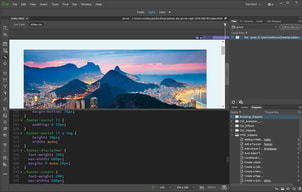
Dreamweaver has some good tools: -Clean code: Tame your mark up, by making it all nearly formatted. -Balance tags: the status bar at the bottom makes it very easy to see when a tag is unbalanced. -Live preview: You can see your code as you edit it (although other packages such as Sublime have browser plugins that let you do that in a real browser).
Slowness: Dreamweaver isn't very snappy. It's not bad, but it doesn't feel very fluid to use.
I used to use Dreamweaver for writing code as it came free with Adobe Creative Suite. I have since moved on to Sublime. It does everything Dreamweaver does but is match faster. It has a wider selection of plug-ins, which can automate a lot of tedious tasks. The plugins are made by the community, so cover anything you can imagine.
The Highlighting, Code suggestions/Autocomplete, Design and code view, Modern UI, Realtime browser preview , Support of most famous Content management systems .
What i dislike if there's actually a lot of Features less useful and most of them are just making the developer is more lazy , beside that i dislike the high price .
Building Modern websites for magazines and also dynamic web sites with beautiful designs.
Allows for maximum customization of web design
Its complex in comparison to websites such as wix, squarespace, etc that allow users to create websites more simply
I can make unique websites, but they are more complicated to update than other services
Dreamweaver is Adobe's answer to web design -- it's intended to be geared towards graphic designers, but it's terribly clumsy and buggy. It's more visual than other methods, which is a plus, but you'd be better off spending your money on a web design/coding class than by buying Adobe Dreamweaver.
Constantly buggy, doesn't translate well to an actual website, clumsy. Tries valiantly to bridge the gap between visual and coding, but isn't user-friendly enough to fit the market that would require that particular asset.
Business problems solved would be web design. Our website helps us to connect with our clients and disseminate information to them about our business and events, as well as keeping them in the loop with our current work and portfolio.
The functions are easy to manage. There is a time to use it and a time to not use it an I really like to use it when the time is right.
I don't like having to wait for the functions to upload. There is a time to use it and a time to not use it an I really like to use it when the time is right.
I have solved many business problems. My business is private. I have realized that there is no place like home for my office. There is a time to use it and a time to not use it an I really like to use it when the time is right.
Dreamweaver CC 2015 added better support for SCSS; in CS6, you had to edit the config files to use SASS or LESS. Being able to collapse nested functions/style declarations is nice. I like the file manager better than Coda; when I tried Coda a few years ago, it didn't preserve the folder structure very well on upload.
It's not always stable; I've had days where it crashes continuously until I restart the computer. Some other editors handle CSS preprocessors better.
We mainly use Dreamweaver for building custom WordPress themes and plugins. Since we have a site license for Adobe Creative Cloud, this is the cheapest and easiest option for us.

Be able to see code, files and design simultanously
Adobe support and the bad compalability with different os
At the moment no one is able to tell me why the software does not work. Right now no benefits
Dreamweaver's WYSIWYG editor makes quick work of coding
Although the work can be quickly created, the code behind it is not efficient. Output is larger than coding by hand, and changes are hard to implement due to the rigid code.
We have been able to put together rough demos of our products, which is helpful for internal and small team review. There are better tools out there for this type of work though. It is simply part of Adobe's package, so we use it.

The version syncing between your local version and what's on the server is great. Intelligent uploading of linked or embedded files also cuts mistakes down. The language support is top notch.
If you don't have a proper testing server, it can get finicky. The sync functions that I praised above can also flake out causing a complete overwrite and lengthy upload to occur. This can make version control frustrating, particularly when working with one or many other developers.
DW was by go to for all things web related. I've since found free tools like Sublime Text to be much lighter and flexible. Server side coding in C#.net, C++.net or VB.net are a dream for tools such as Visual Studio. Don't forget that Adobe has changed their licensing to more of a subscription model which is so pricey while tools like Sublime text are completely free and Visual Studio's free versions are completely adequate for most applications.
Not much, it was to take the best of Go Live and incorporate it into the application but it fell short.
It not very stable and the WYSIWYG is not good at all. You need to view everything in the browser to see the true view of the site and pages.
It allows me to continue to use the Adobe CC applications with the tool.
For those still wanting to program with traditional CSS and HTML, this is still a great choice. It gets the job done, is pretty customizable, and is fairly easy to use almost right away.
While a great product, I see this program being quickly replaced by Adobe's own Muse or other online editors. Dreamweaver's lack of a graphical interface still sets it behind others and seems to be a bit stuck in the mid 2000's. While there has been some sort of graphical interface implemented recently, it does not work nearly as efficiently as other programs such as Wix. While still the standard for those who want complete control over their websites and many options to customize, Dreamweaver has become impractical for most projects I take on, as most clients do not require a website this customized, nor do they have the budgets to support it.
Dreamweaver no longer solves the same types of problems I had years ago when working on websites. I no longer use it on a regular basis, and have replaced its usage with Adobe Muse and other platforms .
Dreamweaver does integrate its visual side and its coding side well, and its Adobe so it connects well with other Adobe apps
Way too much glitching and unexpected crashing. No matter what computer I've used over multiple years I still face weird and random glitching and the dreaded crashing. When using Dreamweaver save absolutely all the time! Overall I feel Dreamweaver is one of the only, if not the only, Adobe product that is overshadowed by its competitors, nearly all of which are either free or much less expensive.
For simple webpage design and coding we will use Dreamweaver, but not for much more than that.
You can do most types of web development in Dreamweaver. They have improved their interface substantially over the years.
They removed support for working on classic ASP. I don't need to do it much, but when I do need to I keep wishing they did not remove the support. I also dislike have to buy the subscription license. I prefer owning a piece of software.
I use Dreamweaver for basic HTML mockups, but not really much more than that anymore. I prefer to use Visual Studio these days.
It is easy to set up and start using. Looks good.
Some it is is really tedious to use and unneedly complex
Web design. Use it to through up quick temporary sites.
It was easy to set up pages and auto fill syntax
It was clunky and added needed metadata.
used for quick HTML prototypes and build a few PHP sites on it.
Dreamweaver is a long-time member of the Adobe suite of programs, and as such has an established place as a program which has gotten consistent support and updates for many years.
Dreamweaver, though its debugging and web code-writing tools are nice, is quickly becoming irrelevant. Web professionals rarely, if ever, going to be utilizing Dreamweaver as the primary web development application in the future, as the concept of a stand-alone program for development apart from an integrated CMS is becoming more and more antiquated.
For a long time, we benefited from Dreamweaver's editing environment, but it is rapidly declining in our use.
I like the color differentiation and the standard vs. developer views.
I don't like how it automates certain things that I don't want it to automate, i.e. every time you open a tag it automatically creates the closing tag for you immediately after, which you have to manually correct every time.
I am using Adobe Dreamweaver to code HTML and CSS for our email program
Dream weaver is a quick way to create finished looking rough designs.
Not as much control as real coding. And is sometimes buggy.
It contributes to the process of realizing s completed design. Works well as a rough designer.
Easily import photos and graphics from Photoshop and Illustrator.
Not easy to use. Need coding background if you want to use this program.
Needed to edit website in-house.

I love the Adobe Brand and the ability to have them all work together.
This is difficult to use, hasn't had a relevant update in many years and is basically unappealing based on what else is available.
When I used this, it was used to help us design our basic website. It was very tedious and difficult to use.
It's relatively simple and has some basic what-you-see-is-what-you-get editing
IT seems that no one really uses this tool anymore. There are more efficient and effective coding tools out there.
None, really.