

Unclaimed: Are you working at Adobe Dreamweaver?
Adobe Dreamweaver Reviews: 4.1/5 — Solid Choice
Adobe Dreamweaver is part of the Adobe Creative Cloud which also includes Photoshop and Indesign. The platform lets you create and design websites, with a combination of visual and HTML editing tools. With Dreamweaver, web designers have the option to build fully responsive sites and bring their ideas to life, especially in terms of design and functionality. The solution also offers multimonitor support for Windows and is most suitable for developers with extensive coding knowledge.

| Segment |
Small Business
Mid Market
Enterprise
|
|---|---|
| Deployment | Cloud / SaaS / Web-Based, Desktop Mac, Desktop Windows |
| Support | 24/7 (Live rep), Chat, Email/Help Desk, FAQs/Forum, Knowledge Base, Phone Support |
| Training | Documentation |
| Languages | English |
Adobe Dreamweaver Pros and Cons
- Adobe Dreamweaver ties in seamlessly with other tools in the Creative Cloud
- It’s ideal for developers with coding knowledge.
- You’ll benefit from complete customizability and control over your web design and responsiveness.
- Adobe Dreamweaver supports HTML5.
- If you don’t know how to code, Adobe Dreamweaver presents a steep learning curve.
- Adobe Dreamweaver isn’t very affordable. In addition to the software, you’ll still need to secure your own web hosting and domain name before your website can go live.






Compare Adobe Dreamweaver with other popular tools in the same category.
The ability to preview so you can make adjustments.
It is not user friendly for the novice and with other easy to web design tools out there, I no longer need to use Dreamweaver.
None, at this time.
WYSIWYG (What you see is what you get) environment so it is easy to use without any programming.
Difficult to modify the website and use external technologies. Creating a responsive webpage is difficult. Hard to do SEO.
I use Dreamweaver in class and show clients the application so that they are able to make changes to any website that I create for them.
For learning HTML and CSS, Dreamweaver is a great tool to get an eager student started.
At some point, if you wish to keep growing in the field of web development, Dreamweaver doesn't fit this need and you eventually grow out of it. Dreamweaver is meant for novice and people who only want to make simple HTML and CSS changes. When a user's skills grown beyond those needs, they will feel confined by Dreamweaver.
Dreamweaver was good for making simple HTML and CSS changes and sending them to a server via FTP. These simple tasks are no longer the norm for me and Dreamweaver no longer fits into any workflow processes.
Certain drag and drop features, side by side view
Clunky vague interface, buttons with no description.
We initially used it as a code writer, that backfired, obviously

Dreamweaver is not for me. There is a plethora of better alternative site builders and I highly recommend utilizing one of those.
Pretty much everything. The WYSIWYG is pretty terrible. As a designer, I much prefer another program made by Adobe called Adobe Muse. If you're not the strongest coder, but a decent designer, than Adobe Muse is for you.
Occasionally need to use it to alter old websites I've done back when I was still using Dreamweaver.
Code hinting is good. Dreamweaver is a solid text editor.
Adobe is more concerned about enmeshing you into their app infrastructure than they are in building a solid IDE.
I first used Dreamweaver to build a website to host my blog and portfolio. I actually didn't see a lot of benefits as I switched to Aptana.
The simplicity, it's a great place to start learning!
There is only so much you can do. Once you learn basics, I would rather use another platform for creating something more elaborate.
It's great for training new people in code without overloading them with additional softwares before they've fully understood the basics.
I don't like much about Dreamweaver. Once the 2017 CC update came out, I didn't have any use for Dreamweaver anymore.
The 2017 CC update eliminated the support for .asp webpages. This rendered Dreamweaver completely useless for me.
At one point, it offered an avenue to update a small extranet for distributors.
Actually not much, I believe is an outdated program that needs an update right now.
Almost everything. The menus are not user friendly, is to limited, I prefer to use Squarespace.
None, I use right now Squarespace because Dreamweaver is to complicated.
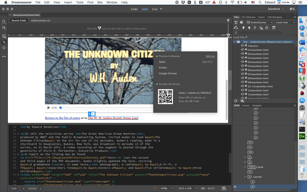
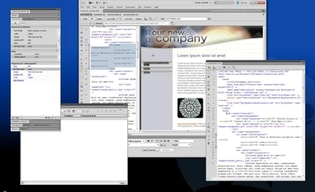
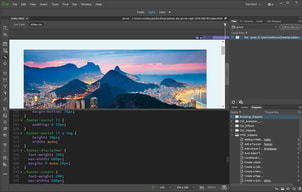
Dreamweaver is a program from the 2000s Web Design era. If you had some design skills, and some developing skills, you could create a few static web pages and have yourself a small website. There wouldn't be too much function to the website, no real blog system, and no real content management system. Just a small website. The best feature is probably the side by side code and design interface. You can see what you're coding as it happens. It also integrates well with Photoshop and I could see a dual designer and developer needing that workflow. It does have its own FTP software and would make it easy to back up a static, non SQL website (so no forms, no database) and can track multiple users and changes to prevent one user overwriting changes from another user.
Dreamweaver is just too outdated in terms of the way websites are built today. It has plenty of bells and whistles that no one should use, because it would result in a clunky website. It doesn't have a way of leveraging a MySQL table or plugging in a CMS. Certainly, you can bring CMS template code into Dreamweaver and make changes, but then the Side by Side Design feature is useless because you'll never be able to see the actual web content. Dreamweaver is an all-in-one solution that doesn't excel at part of web design/development and actually could hold users back.
Now, none. When we had our very old website, we were able to track who was editing what page and prevent overwriting changes.
The option of using a WYSIWYG editor is nice and helpful at the base level but when diving deep into the code side it is a horrible product to use. Also <Span> tags are used which is just sloppy when adding items.
Horrible for deep coding and styling a custom website. Does not teach someone how to understand HTML and CSS from a base level. Destroys your code structure when trying to use code and wysiwyg options.
Educational, Marketing, Web Production, Web Development. I do not see any real benefits from a professional level except templates.
At this point, there is very little I like.
It's an incredibly time consuming process. It also requires that I'm at my desk at the office to do any updates which is highly inconvenient.
Benefits- It has gotten the job done for the last 10 years or so. Problems- Time consuming, not intuitively mobile friendly, limited in what you can do without paying for add-ons.
I didnt like much about dreamweaver , maybe its because of my experience level with web design but everything felt cumbersome and clunky
just about everything in Dreamweaver is pretty annoying
Its a solution to controlling, maintaining and designing websites.
Dreamweaver makes it simple to start working in web design quick and easy. The visual editor allows you the choice to learn markup or simple start working with the WYSIWYG tools. Even for more advanced users that are forced to build tables for e-mail templates, Dreamweaver helps produce clean, validated markup, where otherwise it would be more time consuming.
Dreamweaver is almost too easy to use, which means you will rely on it more and more. Any web designer will tell you the only true way to evolve in the industry is to 100% write your own code and markup. You have to think as a developer to succeed, and Dreamweaver keeps you in their sandbox and away from true growth.
Dreamweaver helps us create simple websites and e-mail templates. Any person can get started with the tool immediately and produce something useful. It's extra helpful for teaching someone the basics of markup in a visual way using their split screen view tool.
I like that it provides a springboard for people interested in making websites, by giving a space for them to immediately see their changes.
I don't like that it adds in its own auto-generated code for no particular reason.
I am not currently solving any, but in the past I have used it to quickly prototype out websites to share with stakeholders.
It's an Adobe product so it gets frequent updates.
It tries to do too much. It needs to simply the entire application.
I needed a text editor and this was first one I tried.
LOTS of features, everything you could possibly need and more.
Too many features, slow and clunky. I don't need this many features.
code web pages.
The customization was nice. To be able to work in html and CSS and see the outcome immediately before uploading your code to your website was a good feature.
I don't like working in code. I like a drag and drop web design. It is a lot of work building a website. It can be cumbersome.
Customization utilizing html and CSS.