

Unclaimed: Are you working at Adobe Lightroom?
Adobe Lightroom Reviews: 4.5/5 — Highly Rated
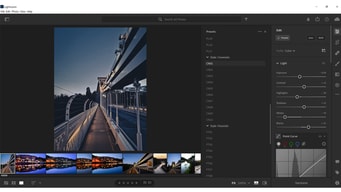
Designed specifically for photo editing, Adobe Lighting is one of the most popular tools in the market used by professional photographers. Similar to photoshop, it’s considered a gold standard in editing, with a host of pre-sets available to help transform images in minutes. The platform is straightforward, and easy to use and makes it very easy to edit images using sliders, gradient, and brush adjustment tools. The platform is customizable and comes with numerous intelligence features such as facial detection that helps organize images easily.

| Capabilities |
AI
API
|
|---|---|
| Segment |
Small Business
Mid Market
Enterprise
|
| Deployment | Cloud / SaaS / Web-Based, Desktop Mac, Desktop Windows, Mobile Android, Mobile iPad, Mobile iPhone |
| Support | 24/7 (Live rep), Chat, Email/Help Desk, FAQs/Forum, Knowledge Base, Phone Support |
| Training | Documentation |
| Languages | English |
Adobe Lightroom Pros and Cons
- Convenient, customizable, and easy to use environment
- Blurring and fixing tools
- Pre-sets and filters available
- Camera and lens-based corrections
- Brush and gradient adjustments
- Fewer options than Photoshop
- No layers and blending modes







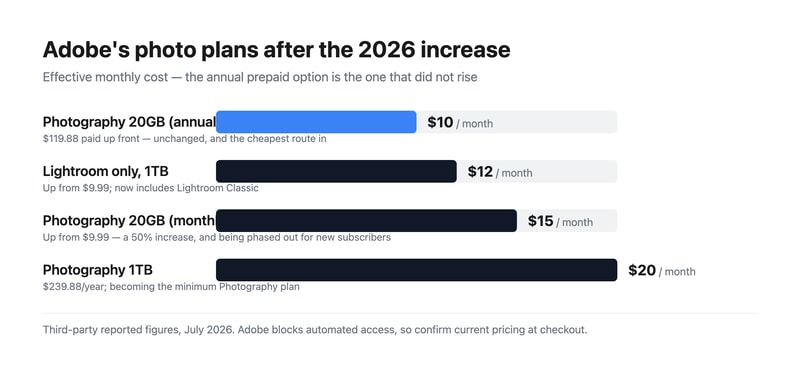
Adobe Lightroom remains the standard for photo editing and cataloguing, and Adobe just raised the monthly Photography Plan from $9.99 to $14.99 — a 50% increase. The annual prepaid option at $119.88 was not raised, which means the same plan now costs either $9.99 or $14.99 a month depending purely on how you choose to pay. That single detail is worth more to most readers than any feature comparison.
- What it is: Professional photo editing and cataloguing software built around non-destructive edits, presets, and library management.
- Best for: Photographers processing volume, where cataloguing and batch editing matter as much as the edits themselves.
- Pricing: Photography 20GB reported at $14.99/mo monthly or $119.88/year prepaid. Lightroom-only 1TB $11.99/mo. Photography 1TB $19.99/mo. Verified via third parties in July 2026.
- The honest catch: The cheap 20GB plan is being phased out for new subscribers, making the $19.99 1TB plan the effective entry point going forward.
What Is Adobe Lightroom?
Lightroom is two products sharing a name, and the distinction matters when you buy. Lightroom Classic is the desktop-first application built around a local catalogue, and it remains what most working photographers use. Lightroom (sometimes called Lightroom CC) is the cloud-native version that syncs across desktop, mobile, and web. Recent plan changes have blurred this: the Lightroom-only subscription now includes Lightroom Classic, which it previously did not.
The core proposition has not changed in years, because it does not need to. Lightroom handles non-destructive raw processing, meaning your original files are never altered and every adjustment is revocable indefinitely. Around that sits the catalogue — keywording, ratings, collections, and search across a library of hundreds of thousands of images — which is the part photographers find hardest to leave.
Its enduring advantage is batch work. Editing one photograph well is something many applications do. Applying a consistent treatment across four hundred photographs from a wedding, then finding a specific frame two years later, is where Lightroom’s design pays off and where the cheaper alternatives are still meaningfully behind.
How Lightroom Works
- Non-destructive editing. Adjustments are stored as instructions, leaving the original raw file untouched.
- Catalogue and keywording. The organizational layer, and the main reason long-term users stay.
- Presets and batch processing. Apply a look across hundreds of images, then refine individually.
- Masking and AI selection. Subject, sky, and object selection have improved substantially in recent releases.
- Cloud sync. Available on the cloud-native version, with storage as the metered dimension.
- Photoshop pairing. The Photography Plan bundles both, and round-tripping between them is seamless.
Adobe Lightroom Pricing
Adobe blocks automated access from our infrastructure, so figures are third-party reported for July 2026.
| Plan | Reported price | Storage | Includes |
|---|---|---|---|
| Photography (annual prepaid) | $119.88/year (~$9.99/mo) | 20 GB | Lightroom, Lightroom Classic, Photoshop |
| Lightroom single app | $11.99/mo (was $9.99) | 1 TB | Lightroom and Lightroom Classic |
| Photography (monthly) | $14.99/mo (was $9.99) | 20 GB | Lightroom, Lightroom Classic, Photoshop |
| Photography 1TB | $19.99/mo ($239.88/year) | 1 TB | Lightroom, Lightroom Classic, Photoshop |
What actually decides your cost:
- The billing term now matters more than the plan. The monthly Photography Plan rose 50% to $14.99 while the annual prepaid stayed at $119.88. Paying up front is roughly $60 a year cheaper for identical software. If you are going to use Lightroom for a year, prepaying is close to a free $60.
- The 20GB plan is being retired for new subscribers. The 1TB Photography Plan at $19.99 is becoming the minimum available. Existing subscribers on 20GB should think carefully before cancelling, because coming back may cost double.
- The Lightroom-only plan got better and more expensive. Up to $11.99 from $9.99, but it now includes Lightroom Classic and 1TB of storage. For a photographer who genuinely does not use Photoshop, this is a reasonable deal.
- Storage is the real upgrade trigger. 20GB is very little for raw files. Anyone shooting regularly and syncing to the cloud will exhaust it, which is precisely why the 1TB tiers exist.
- There is no perpetual licence. Stop paying and you lose editing access, though your original files and exported images remain yours. This remains the most-cited objection to the whole model.
Who Should Use Lightroom
- Photographers processing volume. The clearest case. Batch editing and cataloguing across thousands of images is what this software is uniquely good at.
- Anyone shooting raw. Raw processing quality and the non-destructive workflow are genuinely excellent.
- Photographers who also need Photoshop. The Photography Plan bundles both, which is far cheaper than the single-app Photoshop subscription alone.
- People with large existing catalogues. The switching cost is real, and the catalogue is usually why staying is the rational choice.
It fits poorly for casual photo editing, where free tools and phone applications are entirely sufficient; for anyone who objects to subscriptions on principle, since no perpetual licence exists; and for photographers wanting to own their software outright, where Skylum Luminar Neo and Corel PaintShop Pro offer one-off purchases.
Honest Pros and Cons
Strengths
- Best-in-class cataloguing. Nothing else manages a large photo library as well, and this is the real moat.
- Excellent raw processing. Consistently strong across camera systems.
- Genuinely powerful batch editing. Where the time savings actually come from.
- Photoshop included on the Photography Plan. Very good value if you need both.
- Strong AI masking. Subject and sky selection have improved markedly.
- Industry standard. Presets, tutorials, and workflows are built around it, which lowers the cost of learning.
Limitations
- A 50% increase on the monthly plan. From $9.99 to $14.99, which is a substantial rise for existing users caught on monthly billing.
- The cheap 20GB plan is being phased out. Pushing new subscribers toward $19.99.
- No perpetual licence. Access ends when payment does.
- 20GB is impractical for raw workflows. The entry storage tier is small enough to feel like a funnel.
- The Lightroom versus Lightroom Classic split confuses buyers. Two products, one name, different workflows.
- Lightroom Classic is resource-hungry. Large catalogues demand real hardware.
Adobe Lightroom Alternatives and How It Compares
- Skylum Luminar Neo is the leading subscription-free alternative, with strong AI editing and a one-off purchase option, though its cataloguing is weaker.
- Adobe Photoshop is the companion rather than the competitor — pixel-level work against Lightroom’s catalogue and raw processing.
- Adobe Photoshop Elements is Adobe’s buy-once option, though since the 2025 version it is a three-year term licence rather than a perpetual one.
- Corel PaintShop Pro and CorelDRAW Graphics Suite offer perpetual licences for editing and design respectively.
- Canva covers quick social and marketing edits, and is not a raw workflow tool at all.
- Capture One is the serious professional alternative, particularly favoured for tethered studio work and colour handling.
For a broader survey, browse our photo editing directory.
The Verdict
Lightroom is still the right answer for most photographers, and the reason is the catalogue rather than the editing. Plenty of applications process a raw file beautifully. Very few let you apply a consistent look to four hundred images, then locate one specific frame from three years ago by keyword in seconds. That capability compounds with library size, which is exactly why photographers who have used it for years rarely leave.
The pricing deserves clear-eyed attention this year. A 50% rise on the monthly Photography Plan, from $9.99 to $14.99, is a significant increase for a mature product. But the annual prepaid option held at $119.88, so the practical advice is simple and worth acting on: if you intend to use Lightroom for a year, prepay and save roughly $60 for identical software. Paying monthly is now the expensive choice for no benefit other than flexibility.
The strategic change is the retirement of the 20GB plan for new subscribers, which makes $19.99 the effective entry price going forward. If you are currently on a 20GB plan, that is a reason to keep it rather than cancel and return later. And if the subscription model itself is the objection, this is a good moment to look seriously at Luminar Neo — the gap in editing quality has narrowed considerably, even if the gap in cataloguing has not. Note that Adobe’s own Photoshop Elements is no longer a true escape from time-limited licensing: since the 2025 version it expires three years after activation.
FAQ
How much does Adobe Lightroom cost in 2026?
Reported figures put the Photography Plan with 20GB at $14.99 per month billed monthly, or $119.88 per year prepaid — an effective $9.99 a month. The Lightroom-only plan with 1TB is $11.99 monthly, and the Photography Plan with 1TB is $19.99 monthly or $239.88 annually. Adobe blocks automated access from our infrastructure, so confirm current pricing at checkout.
Did Adobe raise Lightroom’s price?
Yes. The monthly Photography Plan rose from $9.99 to $14.99, a 50% increase, and the Lightroom single-app plan rose from $9.99 to $11.99 while gaining Lightroom Classic and 1TB of storage. Notably, the annual prepaid Photography Plan stayed at $119.88, so prepaying for the year avoids the increase entirely and saves roughly $60 against monthly billing.
What is the difference between Lightroom and Lightroom Classic?
Lightroom Classic is the desktop-first application built around a local catalogue, and it is what most professional photographers use. Lightroom is the cloud-native version that syncs across desktop, mobile, and web. They share editing capabilities but differ substantially in workflow and file management. Recent plan changes mean the Lightroom-only subscription now includes Classic as well, which removes what used to be a common purchasing mistake.
Can I buy Lightroom outright instead of subscribing?
No. Adobe sells Lightroom only by subscription, and editing access ends when payment stops, although your original files and any exported images remain yours. If a perpetual licence matters, Skylum Luminar Neo and Corel PaintShop Pro are the leading alternatives. Adobe Photoshop Elements is a one-off purchase but no longer perpetual — since the 2025 version its licence expires three years after activation.
What is Lightroom best for?
Photographers working at volume who need cataloguing and batch editing as much as image adjustment — weddings, events, commercial shoots, and any workflow involving hundreds of raw files at a time. It is more than most casual users need, and its subscription-only model makes it a poor fit for anyone who edits occasionally or wants to own their software.

Compare Adobe Lightroom with other popular tools in the same category.
Picture management, names, presets and archiving. The develop tool can pretty much cover most of the things you would do in photoshop and it is not unlikely that I will have a rady for markey picture just after a lightroom pass, without photoshop. Auto save your session. This is great
If it would have some more photoshop style command it would be the all around photo editing tool
I can turn a picture into money
I like the album-level pre-processing options, camera lens profile correction tool and the file management and export options.
I would like to see a bit more integration with Photoshop, similar to the dynamic link connection between After Effects and Premiere. I'd also like to see better video integration.
I utilize Lightroom for all my initial processing and importing of still photography. It is essential to my current workflow when processing photos.

Lightroom is by far, the best software for color correction, and many other things when talking about editing images.
I don't like the way it works as exporting files, instead of "just" saving as any other software.
I am not a photographer, I create my images on 3D Max, and after finishing my composition on Photoshop, the Lightroom gives the final touch.
With an easy to use interface and integrated editing tools, Lightroom makes mass picture editing EASY! I have used Lightroom since its inception, and have not looked back. It has made my photo editing workflow so much easier and much less time consuming. I love the tools they keep adding and making this a real photo editing powerhouse!
Picture management is the downfall for me. I end up losing pictures, or wading through an endless catalog of images to find the correct one.
Not provided
I love the quick, non-destructive editing Lightroom provides. I know everyone has their own system for editing photos, but for most things that don't need extensive tough-up work done, Lightroom is the only thing I'll use. I can create multiple collections of photos to work on only things from say, a specific time period during an event, or only my top choices, etc etc. And then only export those photos. And without having to open up multiple files. And while being able to jump between collections. Everything is right there, and edits are quick and in real time. I can quickly see how my temperature change is affecting the photo, and without having a dialogue box in front of it while I make adjustments. And even with the advancements in their brushes, being able to do a lot of the touchup work right in Lightroom makes it incredibly easy, but even for bigger jobs, being able to send right to Photoshop and back again is helpful. There are so many awesome features of Lightroom, you just have to use it to see. But it just speeds up my whole process so much, I actually enjoy editing photos.
There are not a whole lot of things that I dislike, but I'm often looking to A/B test different options for edits, and having a couple of options for that to switch between would be great. If it already exists, I haven't found it quickly. I would also like it it was able to work off a network drive, so other users in a department/organization could have access to easily browse and make adjustments to photos as needed, without having to edit the original file. Adobe Bridge may be a workaround for most users though.
Speeding up photo editing, especially for events, where a only a general edit and selection of the best photos is needed, and no extensive touchups. Being able to tag and organize photos on import and during the editing process is also incredibly valuable for saving time down the road.

Lightroom is by far the best piece of software that I have used as both a primary editor and as a clean, efficient, and organized cataloging system. Lightroom is the first step in my workflow as a professional photographer. I spend 35+ hours a week inside of this software and It is the best type of software in its class that I have personal experience with. Collections are an absolutely wonderful way to keep track of everything. The ability to sort by any number of different functions, such as lens choice, camera body, date, keywords, and many others are invaluable.
With the introduction of using Lightroom as a part of Adobe Creative Cloud the more regular update cycle, while an efficient means of getting regular feature updates, has also increased the number of bugs in the software. While Adobe has been up front and honest about them, I would be lying if I hadn't been frustrated by the spike in crashes and broken features.
The use of Lightroom is my primary means of managing a catalog over over 50,000 images. It allows me to search for images by file name, or SKU every day dating back to over 10 years ago. With it I would be unable to function in my day to day work.
I like it because you have more options than photoshop, I take many shoots of one image, it allows me to have an overview and select the best image to work and to keep all my images stored as raw files which is great!
When I first started to use this program I used it viewing my raw files, I wasn't aware that links can brake if you move the files so all got a bit messed up, it took me a bit of time to understand how to catalogue my images correctly.
I am a visual artist, I use Lightroom to catalogue all my images as I take many images of my processes and finished work, selected images get published on my website, catalogues and so on

The simplicity of the workspace layout and the 3rd party integration with templates and presets. The ability to customize the workspace/workflow to streamline the process of doing batch photo editing for clients is critical. The quality of the tools relating to image correction is also tantamount.
Simplicity comes with a disadvantage. Namely, it isn't Photoshop so not having a full featured image manipulation limits what you can do with it to basic color correction and basic cropping. For serious techniques, I still need to use the big brother of this software.
Batch editing for photos that come in regularly from our various site locations in order to use for marketing, social media, and for training purposes. We use this software at all points of media interaction at the local level as well as regional and corporate levels. Most all staff have this installed on our corporate computers so that any of us can jump in and ensure great looking photos for use within our organization.
Ease of downloading and organizing all the images by variety of categories. All common image manipulations available. No need to go to full photoshop on 90% of cases.
Sometimes file compatibility as new RAW formats appear.
Speed and ease of managing images made very easy.
It is very quick to edit large number of photographs and get them to good form very quickly
The most used tweaks should be naturally grouped together on the top, like lens correction and setting the type of picture, landscape/portrait etc.
I'm a photographer as hobby.
for me his is the best when i compare with Photoshop .. the features are trend and user friendly. it allows me to create a good value to the pictures i click .
thee is no point for me to dislike this
well business problems i never solved but i just do a bit editing and produce the pictures to m clients
The interface is very intuitive and easy to use
Missing HDR, Ambiance, and other sought after editing tools.
Providing advertising and media content for businesses
Non destructive editing: your original raw files are always maintained and you can move forward/backward through your edits forever, including after application close and restart. Ease of use: far easier to use than other photo editing applications, particularly Photoshop and DxO Value for money: priced low, so suitable for the amateur photographer as well as the pro. Stability: I've never lost work ever, and I've been using it since Lightroom 3, which came out in 2009, so 5_ years of continuous use
No layers. Recent versions (LR6) seem to guide the user toward subscribing to the mobile application, and if you don't elect to do so, an expiration message is always on-screen. Hardware support: better in DxO.
Photo editing. Photo organisation/archiving.

I use Lightroom to batch-edit photos, whether from events or photo campaigns. You can use pre-built presets, create your own, and share them!
Lightroom is perfect for when I need to batch edit, and I don't have any issues.
Quickly batch editing images
Adobe Photoshop Lightroom has powerful photo editing and organization capabilities. The interface makes it easy to enhance and retouch images, along with the non-destructive editing allows the users to play with the edits without compromising the original picture.
There is a steep learning curve for new users. The advanced features are overwhelming especially at first, and takes time to master the tools. The subscription pricing is a bit high for users who are on a budget.
Photoshop Lightroom has a non-destructive editing feature where you can adjust the photo without compromising the original image. Its organization tools help streamline workflow, so it's easy to locate photos and manage them. Users can integrate it with Creative Cloud so they can access the photos across other devices they may have. This makes it easy to collaborate with others with projects.

It is easy to use, Very user friendly and we use it frequently because of it accessibility and also it has a huge number of features.
Sometimes it contains ads that become a hinder to really enjoy the app while doing your editing.
It helps me in our online church engagement in social medias. It solves lot of problems in terms of how can we edit and execute the ideas we made.

I love the fact that if you edit one picture, you can save the filters and everything you do to it and then add that to all other pictures you want those same filters on! It's so time saving.
I dislike how it sometimes randomly quits or shuts down on you while you're in the middle of editing. So make sure that you always save throughout your work process!
I'm solving time limitation problems, because since you can save and add filters to all photos you want, it helps all the tedious little things. This is also considered a benefit for me as well!
I love the clean and straightforward ux and overall ease of use.
It would be nice if there were a few more hotkeys on the main menu.
Saves me a lot of time of editing and helping me be more productive in batch jobs.
1. Filter copy and paste option makeit so easy for me to do bulk editing. it saves lot of time. 2. Other feature I like, save specific changes and use them as a presets. 3. Easy to edit and adjust photos during workflow.
It requires more space in my computer to run it properly. And another one is recurring cost of the software, it is some time headache for me.
My photos are available in one place, easy to find, and edit. Another beneficial thing is seamless integration with other Adobe ecosystem like with Photoshop.
Lightroom provide us very cool features that helps in the photo editing. In addition, the AI feature is great in the Lightroom.
The best features are available only in the premium version of the Lightroom. Please try to add little more features in the normal version as well.
It automatically suggests us great photo editing ideas through AI and helps in enhancing the colours of the picture. It also helps in different ways of editing a pic.
Adobe Photoshop Lightroom is a fantastic and widely used software for editing and organizing photos. One of the great features of Lightroom is its cataloging and tagging system, which makes it super easy to organize and manage a large collection of photos. You can quickly locate and sort your images based on keywords, ratings, and various other criteria. Lightroom also provides a wide range of editing tools, such as exposure, contrast, clarity, color correction, and lens correction. Moreover, Lightroom offers a library of presets and profiles that can greatly speed up your editing workflow. These pre-defined settings provide different artistic styles and moods, saving you valuable time and effort.
One of the main downsides is its subscription-based pricing model. With Lightroom, you have to pay a monthly fee, which can be a financial burden for occasional users or those on a tight budget. While Lightroom offers many features, it might feel overwhelming for beginners. It takes time to get familiar with the interface and understand the different modules and tools. For very advanced editing and pixel-level manipulation, you might still need to switch to Adobe Photoshop, as Lightroom's capabilities in this area are somewhat limited. Lightroom has received criticism for its performance, particularly when handling large catalogs with high-resolution images. It can be a bit slow at times, which can be frustrating for users.
I simply use this software to enhance my own and family photos.
Adobe Photoshop Lightroom is best for its intuitive interface and powerful editing tools
Issues regarding the subscription-based pricing structure
Adobe Photoshop Lightroom address issues associated with the complexity of photo editing and the necessity for non-destructive editing.
Adobe has really done a wonderful job with Lightroom with so many good features. Amongst which, presets is one of the features I enjoy a lot. The way you can apply all your desired changes at the click of a button is great!!
Even though Lightroom is one of the best editing tool, it still has its drawbacks. One of which is that it has limited graphic design elements in it
The problem it is solving for me is bringing my imagination to life and also enhancing my thoughts and the way I want to portray the picture I click
The thing I like the most about Adobe Photoshop Lightroom is the range of features that it is offering..
The thing I dislike about Adobe Photoshop Lightroom is that I need to buy premium to use majority of the best features.
The quality of photo that I am able to generate from this tool is really amazing. I have been able to quickly edit photos.
Simple UI which makes it very easy to use and you can access your account from anywhere.
Subscription for different apps is different hence every app upgraded has different price.
It has very simple UI and at the same time, it is also one of the most powerful app in today's date.
Adobe Photoshop Lightroom stands out as one of the most powerful tools in the industry for photo editing and management. Despite its professional-grade capabilities, I appreciate its intuitive design which allowed me, even as a non-professional user, to quickly grasp its functionalities and use them effectively. The software's robust set of features ensures that users have all the tools they need to produce high-quality edits and manage their photo libraries efficiently.
While Lightroom offers a comprehensive desktop experience, its mobile version falls short of expectations, lacking some of the advanced features and capabilities of its desktop counterpart. Additionally, when working with high-resolution files, the software tends to strain in performance, which can slow down the editing process and affect overall user experience.
Adobe Photoshop Lightroom provides an all-in-one solution for photo editing and management, eliminating the need for multiple tools. Its comprehensive feature set allows for both basic and advanced edits, catering to users of varying expertise levels. For me, it has streamlined the photo editing process, enabling me to produce professional-quality edits without a steep learning curve. This efficiency not only saves time but also ensures consistent and high-quality results in my photography projects.

Easy to use and process with many features that are helpful to enhance images and edit them.
There should be more friendly use buttons to make it easier to apply different filters at the same time.
Images processing and enhancements.
Can do batch processing, powerful tools for image organization
Limited pixel editing and limited offline functionality
Photo editing and organization
The light features. Lighting and how the backgrounds can be improved! The conversion to other types of files. Lightroom makes a regular picture look professional!
I dislike that Photoshop Lightroom is not very straightforward as to how to get to the tools quickly and easily. The UI experience is not the best, but it keeps improving. The lack of AI-powered tools.
Lightroom solves the problem of getting the lighting and position of the picture just right faster than Photoshop. If that is all I need. It speeds the process of making my good quality pictures, even better when there is something off, or when I want to give the same picture a different feel!
The clarity that it gives the pictures that I take!
I'm unsure I can use it on my phone so that would be great if I could. I have to use my ipad or computer and i don't always have them with me.
Clarity and lighting in dark settings and it makes my pictures awesome!