

Unclaimed: Are you working at Adobe Premiere Pro?
Adobe Premiere Pro Reviews: 4.6/5 — Highly Rated
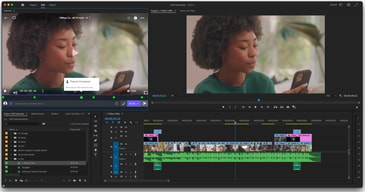
Adobe Premiere Pro is the industry standard for video editing software and offers a huge selection of features to choose from. It can be purchased as a standalone product or as part of the Adobe Creative Cloud. Regardless, Premiere Pro offers a feature-rich selection of tools used for the creation of short films, TV shows, and YouTube videos. Access to a host of smart tools in an ever-evolving portfolio means Premiere Pro users can easily design and edit 4K, 8K, and even VR videos to suit different needs. It also offers access to other Creative Cloud apps, so you can easily access photos, effects, and other tools.

| Capabilities |
AI
|
|---|---|
| Segment |
Small Business
Mid Market
Enterprise
|
| Deployment | Desktop Mac, Desktop Windows, On-Premise Linux |
| Support | 24/7 (Live rep), Chat, Email/Help Desk, FAQs/Forum, Knowledge Base, Phone Support |
| Training | Documentation |
| Languages | English |
Adobe Premiere Pro Pros and Cons
- Extensive professional features for photo editing
- Create and edit your photos in various file formats
- Access all the features of the Creative Cloud for touch-ups
- Frequently updated feature set
- Filters, adjustments, and fixes
- Takes a while to learn





Compare Adobe Premiere Pro with other popular tools in the same category.
it is really innovative and has great features to help your work look fantastic. I also get it for free with my college discount so thats a plus.
It is somewhat hard to figure out to use. I had to take a class to help me figure it out.
I have made videos with this in my classes at university. It really helps my projects look phenomenal
Once you get the hang of it it's easy. I like that it has filters built in and is compatible with other software, editing software.
At first it can be intimidating but once you get the hang of it it's easy to use.
I use this product for editing news content stories. I've used it for about 4 years now and I really like it.
Premier is easy to use, yet provides the tools and features to do advanced video editing. Our newsroom switched over from Avid to Premier and it was not only great day to day video editing, but especially for after effects + longer, more complex video editing projects.
The rendering speeds aren't the fastest.
It takes less time to train someone on Premier than on other editing platforms. It's pretty hands on.
This is the best product for windows and adapts to other programs shortcuts if you have used them in the past. Even if you have only learned one program before this one, Premiere shortcut setting can be changed to ones certain video editors prefer.
How you have to use the sweets to have high quality videos. Pretty much NEED AfterEffects if you would like to have text. Once you get the hang of it (which is still taking me time after 2 years of using it) that you have to learn both programs to have them work great together.
Business's buy the suite package to cover all areas of their business photo, video, web, and print in media. Which is a great benefit in the marketing/media world.
Another great Adobe product that integrates well with other Adobe products and is easy to transition to after using other video editing software.
Sometimes end up with too many tools on the desktop.
Quickly setting up videos in proper form to distribute quickly.
I really like the convenience and accessibility when it comes to editing videos on Premiere Pro. I like the fact that the video can transcode at a faster rate than other video editing and processing softwares. It's very unique in its own entity and it has helped me countless time when ever I needed to finish a video on time.
I'm not a big fan of the Adobe Premiere Pro interface. It would be a lot bette if there was a much simpler way to import files into the library instead of dragging and dropping the files onto the timeline. I also think there should be more effects -- Adobe Premiere Pro might be lacking the amount of effects compared to other video editing softwares.
Well whenever I use Adobe Premiere Pro, I use it for my work to edit videos and produce and documentaries. It's definitely made my life easier in a sense where I don't have to do as much work as I used to do before I started using this program.
Adobe Premiere Pro is an industry-standard software used by professionals in the film, advertising, and marketing industry. It comes packed with a number of exciting features that make video editing so easy and fun! It offers a range of motion graphic templates, effects, transitions, and text fonts. It is also very easy to create or import your own templates, effects, fonts, and transitions. It also supports multiple formats and video types. The best feature, however, is the ability to work on multiple projects simultaneously. It tops all the other features and is truly the one that makes using Adobe Premiere Pro a wonderful experience!
Adobe Premiere Pro is loved by professionals from a number of fields. However, the software can be a little difficult to handle for a beginner. I remember when I first started using this, I often felt intimidated by it. Moreover, I always worried that the software might crash anytime leaving me helpless, and in trouble. Additionally, being a heavy software, it requires a system with a very strong processor and lighter systems can't really handle the pressure, making the overall usage of the software a bit expensive.
There is a reason why Adobe Premiere Pro is an industry-standard. It is durable, reliable and allows its users to be as creative as they can get while working with the raw footage. In addition to offering a great deal of tools and aids, it also makes team collaboration very easy, which is a very important aspect of filmmaking. As a freelance filmmaker, and now a marketer, I use Premiere Pro for editing big or small videos on a regular basis. The best thing about this software - no other competitor can match its quality!

Premiere Pro 2021's version has improved on a lot of areas that users have been asking for. Better support for graphics, faster warp stabilizer, and faster syncing in media bays. These moves has solidified my choice to use PP21 as my go to for video editing. The timeline is iconic, the tools are as accessible as they are in other Adobe products and the Windows layout allows workflows to be simplified and effective. I did lean towards Davinci Resolve for color correcting and color grading but PP21 has rolled out Lumetri a few versions back and has only made it better in PP21. I love the hue vs. hue and other gamma sliders that helps me color correct and color grade my footage to my liking. I'm not a professional colorist and barely know the basics of coloring, but with PP21, I feel empowered to make bold decisions and work my way to a good-looking video. By far, I see more and more that PP21 is the video editor's standard tool in post-production.
As much as I love PP21, there's some real dislikes, too. For instance, I do not like how PP21/Adobe forces users to have specific graphics cards for editing, otherwise, performance or product export is completely altered or hinderd. What I mean by that is Adobe works better with specific graphics cards, so if you don't have an update card, you're going to be hurting with export time, and sometimes, lack of export completely. Adobe's method for this is to roll out their new updates and about halfway through their "season," they will make some revisions and updates that will work with older graphics cards. I cannot confirm this, however, I've been using Premiere for years and this has been a trend I noticed. Also, if you have your media files on an external hard drive. Good luck, that file is not exporting. everything performs better on Local drives - which sucks because it adds more time to my editing time.
Honestly, I needed a video edited and Premiere has been the one that works for me. Since I became so efficient at it, I am able to be blazingly fast.

The program interface is as convenient and intuitive as possible. The trimming function is quite well thought out. The trimming feature can simply be performed solely with the mouse, or you can use the keyboard for dynamic trimming. Almost all operations in the program can be performed using hotkeys. If necessary, everyone can customize the layout individually. There is also synchronization of Adobe Premiere Pro settings through the Creative Cloud service. So, your personal settings for hotkeys are saved and can be used on any computer. Working with audio is extremely convenient with the help of Audio Clip Mixer. You can even use the automatic recording of cue points directly in the mixer.
It freezes or crashes from time to time because of my computer video card but it would be nice if they optimized it a bit more. I also think that the pricing is a bit high.
I have taken a look at the videos I created before using Premiere and they all have a very cheesy look. But Premiere makes everything I create look as professional as possible even though I still haven't fully mastered the program.
Adobe Premiere Pro is extremely feature rich and takes a long time of constant repetitive use, producing a lot of content, to really grasp the advance functionality.
Special effects is left out, as it is another application of Adobe.
- editing video - concatenating - chopping mainstream video - syncing video with sound - merging photos into video - creating basic flow effects (as mentioned After Effects will be needed for advanced expert effects) - re-colouring video - re-shaping - slow mo effects - time-lapse effects
As the rest of the Adobe Suite, you will not get lost : everything is functionning the same way in every Adobe Software, you will find easily what you search and achieve what you want to do
Maybe the fact that it is too "sharp", too basic ?
Not solving problems, but creating videos, it is a great editing software
Super easy to learn the basics if you have any understanding of other apps in the adobe ecosystem. built-in tutorials upon launch make understanding elements of program super easy. no need to search through tons of YouTube videos to find the best way to accomplish a specific task
workflow is quite different from other programs like Final Cut Pro X and switching from one to another will take some time to adjust
way better workflow overall due to the ability to seamlessly use the adobe ecosystem. Plus, FX controls, keyframes etc make way more sense and have ease of use over FCPX
The UI on premiere cannot be beaten, it is simply the best video editing UI out of all the softwares ive used, final cut x, davinci and sony vegas, The connectivity between adobe softwares is also a massive selling point, to go from premiere to a precomp project inside of after effects and have them change in real time as you work amongst softwares is an extremely big clutch point for the software and the creative cloud experience as a whole.
The barrage of bugs that have been present since 2015 is stupidly high, this spans from render bugs that are on the softwares part, constant crashes, a issue when using two keyboards, one as macros the other as a standard keyboard, premiere will decide when it wants to work and when it doesnt, these bugs plague the software, some crashing bugs got so bad that I turned auto save to 5 minutes rather than 15 minutes, which is a pretty annoying thing to do after it has to stop you working for a good 5-10 seconds depending on the size of the footage your using.
Premiere does solve the issue of having to render out of after effects and then use that pre render in your edit, with premiere you can simple pre comp and create a dynamic link between the two softwares, saving time and drive space.
The best thing about premier is that you can create very high quality videos with a little training and practice, adding music pictures and more to videos is a cinch. The result can be beautiful video used for websites or YouTube or advertising
Sometimes adobe premier is a little more than we needed, it’s a heavy weight program and sometimes we just needed something light weight just a personal preference not a bad thing about the program because the program is great.
Video material for web and advertising

The many, many layers to Adobe Premiere Pro make it easy to do anything you want when creating and editing videos. From audio editing to hundreds of visual adjustments, you can time each edit precisely and bring your video to exactly what you want it to be.
Sometimes it may be hard to find legacy items if you download a new version.
As a fledgling marketing and communications professional, I was able to develop high-quality videos in Premiere Pro, using online tutorials and some basic video creation skills. Anything I wanted to bring in to the video, I could do in Premiere Pro.
I love the simplicity of this product. As an amateur video editor, it is something easy for me to learn.
It takes some time to remember the shortcuts needed for the program.
This has been a great tool for me to make anything from small videos on social media to videos played on the big screen.

I really enjoy the interface of the Adobe's softwares, and Premiere doesn't go behind. We can do several stuffs with it and this is very handy if you want to do everything in just one app.
With this software we can do a lot of things, but just for that, somethings are hard to find and hard to get done. Could be more user friendly
With the right choices, it's possible to deliver excellent materials and really professional stuff. It's great to see that the software can be used by a lot of people.
Premiere pro is a great editing software that can handle all type of video formats. It runs smoothly with the right hardware and can tackle a project from beginning to end. It also works seamlessly with all of Adobes’ other programs.
I dislike that at times the software can crash without any explanation so it might become an annoying task to figure out what’s making the software crash. Good thing is that there is a lot of info regarding crashes on the web.
Premiere has impacted my work by giving me a tool that does not need to transcode raw footage to behind editing. This saves me a lot of time and hard drive space.

Adobe Premiere Pro's main use is to make audio and video editing. With Premiere Pro you can make edits, additions works on any audio and video formats you can think of. I would like to give you some more detailed information about the function of the program by giving a few examples of the work that can be done with Premiere Pro. For example; separating audio from video, adding different audio files to different videos, cropping video and audio files, adding effects, changing video and audio formats, adding scrolling to video, making slideshows with pictures, adjusting audio levels, playing video in video
If you’re a beginner editor, this program might be a little hard at first, There are lots of elements, functions to this software and you need to know what you’re looking for in order to find it. I think this is a disadvantage.
In short, Premier is an excellent program in every aspect and it is very successful in editing movies. Even though it requires some professionalism, it is unique software that amateur employees can benefit from in every aspect.
Library/Sequences within the program s very helpful for easy access to the shortlisted videos without having to waste time searching for videos to sequence.
Switching external audio while editing from headphones to the computer's speaker have to be done manually. Further, the option for multiple people working on the same project is not very user friendly.
I am able to make documentaries to explain my story during my design class. Sequencing videos to tell a story have a powerful impact while pitching a project to the client.
Lots of tools for professional filmmaking. Once you understand the adobe creative suite it is a very nice workflow.
Lots of errors and bugs. The adobe team doesn't seem to fix these issues fast.
One of the best solutions for professional filmmaking. Especcialy in combo with the other creative cloud applications.
What I love about this program is how easily you can craft a custom workflow. Want your preview monitor on the middle screen of your three monitor setup? You can do that. Want to copy over the key frames and associated motion effects that will make a clip art image of a horse gallop from one side of the video to another? You can do that too. You can even export video and audio to AfterEffects or Audition to do things Premiere can’t really do.
The subscription fee is a big one. I also get frustrated with switching speakers - sometimes the program gets locked to one, so I have to close it and open it back up.
Well, it’s sped my editing up to a quarter of the time I was spending using other NLEs.
Able to do advanced edits and optimize in tools.provides small 20 minute courses to learn basics
Not too easy to navigate. A little confusing at first
Reducing background noise and compiling video short videos
Although I stopped using premiere almost a year ago, it has been a great application for editing 4k, 2k, and HD video. It runs smooth most of the time and it's very easy to organize footage and to cut in the timeline.
Bugs and crashes. Adobe is notorious for their software crashing, especially premiere pro.
Editing fast, easy to export, etc. Although I switched to DaVinci Resolve for editing because the workflow is a lot more streamlined and integrated, adobe premiere pro was great when I used it.

I can build videos with multiple layers, sequences and nested sequences with absolute ease. In contrast with other Adobe software like Photoshop and Indesign, I believe you can become fully adept at using Premiere Pro by completing a number of online tutorials and just using the software.
It's not the most stable platform and you can expect it to crash every now and then. The worst of all is when your working file becomes corrupted and you have to find the backup hidden in some obscure folder somewhere. The stability is slightly better on a Mac compared to a PC, but it's definitely far from perfect.
We create training videos for Anaesthesiologists and other medical practitioners to use our devices and also to teach Neural Surface Anatomy or how to find nerves superficially. These videos have to be shot, edited and published in rapid succession and Adobe Premiere Pro is an integral part of this process.
The editor has many tools and possibilities for a beginner to advanced users to jump into.
Application constantly crashes and slows down. Hardly any options to help create short and straight to the point clips, (templates, etc) may have you work a little harder for it. Constantly have to adjust preview settings to optimize for use on my computer.
Premiere Pro has allowed me to create video content for the use of our company, simple to complex videos.
There are a lot of things I love about Adobe Premiere. This software gave me my career. I am able to produce minor video edits all the way up to featured productions. It took a little bit of time to learn all about the software but now that I understand how it works I have no complaints. The most recent updates have added new workflows that help at your different stages of editing. I often use the Audio and Graphics tab after I finished my first round of editing. The imports are also very smooth. the bins and folders are placed in an easy to use workflow.
It does not yet support some file format, which include both audio and video as well. its kind of expensive to buy, in order to get the complete benefit of some templates. to enjoy it totally, you have to use it with othe complementary software like after effect.
Adobe Premiere Pro allows me to edit the videos that I shoot as part of my professional career. As an Adobe power user I enjoy staying within the ecosystem of design and creative apps and Premiere Pro has not disappointing me with it's sheer robust functionality.
Love the user interface, overall layout customization, keyboard shortcuts, dynamic link capabilities, upgrades that have been made to Lumetri Color.
The response to program bugs is generally way too long. Once an update is released that contains a myriad of bugs (both 2017 and 2018 were awful) it takes months before any incredibly common bug gets addressed with a new update. Premiere is the best there is on the market. But the customer support is not.
Generally speed, overall collaboration between team members in post-production and uniformity of project setup is all easily managed with Premiere
I use Adobe Premiere Pro to create marketing videos for our company. The program creates great videos! They have good quality, and transitions.
Requires some training to tap into all features. Not easy for beginners. I had to get help from other members on our team to learn to use the product.
Marketing videos for internal and external use. I used to use Camtasia but this is 100% more useful. This software is more flexible with editing and special effects.
New features and updates are introduced yearly (at least). That helps to maintain compatibility with new formats, codecs and filters. Workflow is smooth and fast. Flexible options for customizing the editing experience. Easy to retain and update old versions of software through the cloud.
Often buggy especially with new updates. Daily unexplained crashes, even when operating on a new iMac Pro. Doesn't always take advantage of latest processing tools on powerful computers.
Great to be able to share one cloud license on two computers so I can edit in multiple locations. The update tools notify you when there is a new version out there and you don't have to work about paying for it. But, essentially, it's a great tool for editing spots quickly with lots of built-in perks to make them look good.