

Unclaimed: Are you working at Celoxis?






Celoxis Reviews: 4.4/5 — Solid Choice
Celoxis offers a full-featured platform that helps manage projects across organizations and functions. It is the best to know for its tools that aid with its planning, delegation, collaboration, tracking, and reporting with great agility and user-friendliness. Celoxis helps users plan and manage real-world, diverse project portfolios. It is highly customizable to suit a variety of business needs.





| Capabilities |
API
|
|---|---|
| Segment |
Small Business
Mid Market
Enterprise
|
| Deployment | Cloud / SaaS / Web-Based, Desktop Mac, Desktop Windows, Mobile Android, Mobile iPhone, On-Premise Linux, On-Premise Windows |
| Support | 24/7 (Live rep), Chat, Email/Help Desk, FAQs/Forum, Knowledge Base, Phone Support |
| Training | Documentation |
| Languages | English |
Compare Celoxis with other popular tools in the same category.
As a first customer in Russia, we must notice that uncluttered, intuitive, completely customisable interface and fast responding support makes Celoxis demandable. Support has russified interface rapidly to make the software even more user-friendly for our company and future customers.
Nothing of the kind. The Celoxis's team has been opened to all our ideas and proposals.
We have improved collaboration and made analytics simple by the various customisable reports. All the information always at our fingertips now. It is the Celoxis what we were looking for!!!
Celoxis is built through collaboration with the users, incorporating the features that are needed most. As a result it provides unchallenged hosts of features and user friendliness is beyond measure. The most sustainable and relevant web based PM Tool company. Proactive release cycles that ensures that the user feedback is always incorporated in the next major release otherwise patches are readily available should there be a problem prior to the release date. Unparalleled user friendliness / outstanding readily available support / Custom Apps / easy Integration with other systems / fully customisable. Celoxis is built with the user in mind. It is relevant for our project office setup.
Due to the fact they have embraced continuous improvement in their customer experience. Glitches and bugs are resolved speedily. The one thing I feel can be improved is the video snippets on training on new releases, archive older videos. The training in videos will reduce the number of tickets or support queries.
We have optimised our project office. Planning,reviews and reporting are integrated in both resource capacity and financial measures. In this third year of using Celoxis we have successfully managed to see our project performance improvement year on year. Our various business unit with their varying models have finally adopted Celoxis.
Celoxis is the most promising and industry leading one stop online project management solutions for businesses and professionals to drive complex project portfolios in simplified and comprehensive manner. The software enables professionals to manage multiple projects in one go and can track the project updates real time with dashboard feature. The tool has numerous functionalities for optimised workflow and resource planning and allocation. It helps businesses to stay organized and manage project tasks. resource management and timeline at a single place
No issues seen in the operational aspect. Also, the project management features are cusstomisable and is well integrated with other dashboards and softwares as per client expectation without any hassle. The customer support service should be made more accessible and reachable for faster turn around time. The implementation methodology and approach should be standardized for seamless implementation.
Celoxis is leading the project management path in positive way. We had the privilege of working with Celoxis team in close collaboration for customisation of our then existing project management tool and it was an absoloute delight to work and collaborate with professional excellence.The interactive project management modules have helped us immensely in curating the customised modules and drive the project profitably as per client expectations. Project collaboration , Resource management, Timeline adherence and reporting integration done efficiently through Celoxis. It is available in cost affordable pricing quote for wider acceptability amongst all sized enterprises.
Celoxis is one of the most preferred PPM software globally. It is widely used by project managers for project creation and project planning and implementation in most effective and simplified manner possible. The project portfolios are managed in real time with most optimised workflows for business workflow optimisation. It is most reliable as it is rated as one of the best project management softwares globally and is available from small size to large sized businesses.
The project managers have not reported any flaw in functioning of the tool till date. It is working absoloutely fine with us with efficient functioning parameters and project tracking and progress updates in real time manner. The integration issue often pose some problems but get resolved in timely manner.
Celoxis is the leading PPM software for driving businesses with optimised workflows. It helps in fetching data driven business insights from project management processes. Now with Celoxis , we are able to manage our multiple projects with better functionalities and integrations for seamless project management. Multiple teams collaborate seamlessly through this tool and it has great positive impact on our project management. It has lead to improved productivity with better resource management and asset management.
Celoxis is one stop project management tool which enables the efficient and effective programme and project management in one go. It helps in making accurate and quick decision making process with optimized project management workflows and activities. Data driven insights are captured in dashboard and progress updates are tracked real time . It works and operates in speedy manner and there are no tech glitches faced as such.
No issues seen as such so far. Though, we firmly beleive that Celoxis should come in upgraded version soon with extended trial period and better features. The integration issues and compaibility issues are still troublesome
Celoxis helps in project and program management solution at one portal with real time upgrades and updated project management features. Managing projects tasks and activities are easily tracked and updated by Celoxis. With Celoxis, we were able to manage projects in better collaborative manner without any operational hurdles. Also, the working on the tool is extremely easy and comprehensible.

Celoxis is one of the most important project and portfolio management tool which enables efficicnt handling and proper management of complicated and difficult porjects in most easy yet organized manner. It helps in doing the project planning, budegting, forecasting and project implementation in seamless and timely manner. Also, the project updates are continuously monitored and tracked by this software in most efficient manner. Operational implementation of project components are executed seamlessly and no technical difficulties is faced in managing the same.
No issues seen so far in working. Not encountered any technical bug or issue while operating the software. Its going good for us currently. The customer support helpdesk is quite responsive and enables better connect and earliest resolution
Celoxis is proven to be saviour for project and program managers in any small, mid sized and large business firms as it helps in managing the projects in seamless manner and it constructively automates the strat to en doperational processes of any projects in most easiest manner possible without any lapse. It helps in doing business forecasting and enables manager to take accurate and timely business decisions.
The working on this software is quite easy and it is easy to make the tool working understandable to other team members. Project planning,creation, resource planning and allocation, project fund management, budgeting and forecasting end to end can be efficiently done by Celoxis . The tool never hangs and we never face any technical glitches in tersm of its operation. The tool works in all kinds of business environments - On premise, Hybrid and cloud. Managing projects end to end is done in simplified and easiest manner through Celoxis
No issues seen till date. It is highly recommended that reporting features and dashboard management should be discussed throughly and checeked for any technical bug before deploying in the ground. Customer support service helpdesk should be further fine tuned and polished to handle the matter with great sensitivity and proactiveness
Most amazing project and portfolio management software for businesses and business users. It helps in bringing project efficiency and ensures that projects are managed excellently with optimised workflows and management. It is an all in one PPM tool which provides advanced management of project portfolios and provides data driven business insights critical to clients.
The interface and working on the application is wonderful and effortless. Also, the softwrae is one of the leading PPM software for managing business and software in one place. It increases the process efficicny and ensure the project related requirements and timelines are met. It is equipped with advanced AI/ML features for opetimization of project related activities with optimized work flows in most cost effective manner. It is affordable to all sized businesses. The working on software is easy and effortless.
No issues have been reported by ground team till now. The customisation and integration aspect should be further promoted for effortless project management without any hassle.
Celoxis is the leading project and portfolio management software for businesses with advanced AI/ML integrated features for managing the project activities and seamless workflows for better visibility and management. Celoxis helps us in managing the projects deliverables and timelines properly. It helps to gather data driven insights which helps us in taking accurate decision making and ensure resource management and portfolio management in effective manner.
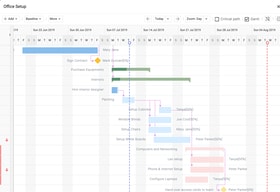
From project planning to tracking of tasks and issues to filling up timesheets, Celoxis has become a single destination for our projects. It has made our project management so much easier. Gantt Charts are phenomenal, they allow us to quickly create tasks and dependencies, allocate multiple resources to tasks, and provide an overall visual representation of our projects that aids in decision making.
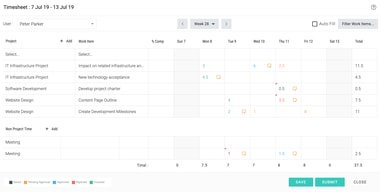
There are two things I wish they could improve about Celoxis. One, the filtering system in timesheets is quite time consuming and involves a fair amount of learning curve. Two, given the nature of our dynamic projects, we need to swap out resources very often. Changing the resources in an active project often changes the project plan creating unwanted changes. Fixing it can be a mess.
Our entire staff of about 50 employees actively uses Celoxis. Being in the life sciences space, our projects are as innovative and creative as they are time and cost bound. Celoxis helps us to plan our projects and keep them on track quite efficiently.
The software provides relevant information about your finances and puts your priorities on the table. It provides you with real-time information and maximizes teamwork by managing the tasks to be placed for each of them. The project portfolio management is very diverse, it contains a project planning according to our needs, along with a very complete resource management. Celoxis can be used from the web and in mobile devices such as Android or Mac.
Because the platform contains more functions, the process to learn how to use the software can take longer than expected, there are advanced functions that are not yet mastered by our team, fortunately the software gives you great material to learn faster. Celoxis is sometimes heavy and uncomfortable to use at those times
We have used various tasks and timesheets that have served us to have a better performance, the Kanban board has the same characteristics that are found in other software and that made us know how to take advantage of it. The delivery time of our projects no longer has to be changed, Celoxis provides us with a lot of order to manage the time of work as our team provides more ideas

The best about the Celoxis tool are the capabilities and flexibility. It is not only providing a PM tool with all the usual features which you would expect from such a tool but also full blown capabilities for collaboration with client users. Furthermore it offers a app concept which makes it possible to integrate other workflows into the tool.
it is great as a online tool but the printout capabilities are not yet on a hig level quality which can be used in presentations.
We are providing transparency for planning, budgeting and collaboration for internal and external projects. The tool supports us to work together on projects in decentralized teams and gives us the option to have a way to fully cover all aspects of implementation projects.
I didn't get the chance to use Celoxis aka Celo that much because I'm rather new to the agency and I guess project management software in general. The best part is that even though it's complex it's really easy to learn and I was able to adapt in no time. Great for time tracking and the reports were fantastic! Looking forward to working with Celo in the future.
Celoxis is great, but it can be pretty complicated. I'm happy that I'm not really responsible for inputting all of the projects and tasks because I'm positive that there would be something I'd miss. Also, I thought the dashboard was going to be super useful, but there were way too many things that you can add and all of the data is clustered together so it's a bit overwhelming when you first log in. Overall, I wish it was more user friendly.
Not provided
This tool gives me everything I need to manage the scope (timeline, budget, etc) of my projects. It's strong but still efficient.
The tool isn't quite as intuitive as I'd like it to be, and the UI could use some updating to make more simple and have fewer clicks.
Managing the schedules more closely gets our projects to the finish-line more quickly with the same budget and quality our clients have grown to expect from us.
Ease of use is top notch, as is the ease of training team members to provide updates. I love that there are multiple ways for contributors to perform the tasks we ask of them which tells me that user input is a key consideration. Everyone has their own style of learning, work, and managing their day, and to be able to customize the interface to meet one's own needs is stellar. Allowing external customers access to their own projects has increased our customer satisfaction as well. Finally, being able to import/export between multiple formats helps us to on-board new types of projects and customers quickly. Our internal owner for the Celoxis implementation company-wide has had great experience working with the Support and Developers at the company to ensure that we are maximizing our efficiency. Well done Celoxis!!
I've gotten bit a couple of times by the lack of an UNDO function, but now that we know that a change is a CHANGE, its not a big deal.
managing multiple customer projects, many of which are not repeatable. This is much better than using Excel to manage projects. As mentioned above, we are also able to give team members and external customers access to their projects, so the management task for the project management team is eased.
Celoxis is great for lining up project timetables and reviewing across clients to gain a full picture of the resource load each team member is experiencing now and is likely to see in the future.
Celoxis lacks an auto save function, meaning if you Hit Ok after entering time, but don't also Select the Save for Later button, and you leave the page, you lose not only the time entered but any supporting descriptions as well. Celoxis should take a page from google docs, and save as new data is entered for the time sheet.
The business problem we are solving is managing the overall availability of a team of remote professionals to contribute to a large number of concurrent projects. By using Celoxis, I can see peers who may be seeking additional work, and offer help to peers who are experiencing higher than normal demands. Celoxis keeps your team sane.
It is so nice to be able to put my hours in, and I can get paid straight from that, rather than having to send a separate invoice to our accountant. I can see how long I spent each day in each project.
Sometimes it is a little too specific, and can be diffiicult to navigate. I have trouble finding the intricate, deep in projects. I did finally learn to use the Calendar feature to put hours on the correct dates. That took me months to figure out.
Our company has been able to track hours and profitablility so much better than before. I am not actually in the role that tracks that, but our company has been very happy with the information they have been able to glean from everyone, including contractors keeping really good track of hours in projects.
Keeps our task together, easy to use. HTML5 based, no ActiveX/other issues like we had with sharepoint
I would like to see it worth with single sign-on. This may be a limitation on our end though.
Project Organization and gant chart
I love the ease of use. It's painless and easy. I could use ti all day
Some automated functions leave things to be desired
We are working on some farming. We've left out quite a lot of steps in our pre-planning...
We have used Celoxis in our office now for several years and it has been great for time tracking, reporting, and giving each staff member a unique dashboard to view their projects.
I do wish there was more documentation around how to use Celoxis, we have found the most tricks and tips by stumbling upon them in the system.
We now have more accurate time entry, reporting, and our invoicing goes much smoother.
I like best Celoxis's clean interface. This is an application I use very often and managing my workflow has to look good. At the same level as its aesthetics, Celoxis does a good job at keeping information and its related multimedia materials organized for quick reference.
The notification rules can use a bit of enhancement. It works fine as it is designed, but I have ideas on intelligent alerts that cater to the way I do my work. With more control and sophisticated rules, I can make this application do the work for me - almost :)
It is very important that we keep our departments well informed. In a rushed environment, we are constantly solving problems of staying on top of the latest changes. I've realized that utilizing Celoxis's existing features helps us do just that.
Celoxis is a great tool for project collaboration across teams and even geographies. We use it for project tasks, large and small, and find it to be a great resource for sharing files and tracking the exchange of ideas, conversations and decisions.
There are times when Celo will freeze and you lose any data that you haven't saved. The rule of thumb is save often.
In a highly collaborative, fast-paced environment, it's important to have a central place where all conversations and important decisions can be documented and referenced. We find Celo to be a helpful tool in this regard.
Time entry, Configuration flexibility, Flexibility on reporting
workflow engine could be better. after migration to version 9.5 navigation become less intuitive, but should be ok for new users. Custom reporting fro SAAS users requires custom coding
Time entry and reporting
Celoxis helped us get all our projects and portfolios onto one platform, so there was no more hunting through emails for info & files. It helped us get real-time, exceptional visibility into our portfolios, budget verification and resource pools.
At this point, none that I can think of. It had helped us streamline all our projects and get up to-date visibility in terms of both costs and status, which was our main reason going in for a cloud-based tool.
We used Celoxis in our BFS vertical to manage IT projects in one of my earlier companies. We had many projects often running neck and neck, competing for our resources times and budgets. Microsoft Project and Excel had its own set of challenges for us managing larger projects.
Being a web based system, Celoxis is naturally collaborative allowing the different users located in different locations to collaborate seamlessly in setting up and managing projects the incredibly flexible reporting system allows for all sorts of information to be generated and best of all, Celoxis is backed up by a super responsive support team providing creative and helpful answers to all sorts of enquirers we managed to throw at them
no major aspects that we dislike the interface could use some more eye candy no ability to rollback your changes - or at least didn't discover it yet even though the reports are very flexible, they require some effort to get them the way we want
collaborative project management and progress tracking across geographically distributed teams very powerful reporting tools for more transparent communications across teams and with the management
Celexis give a full project portfolio and dashboard for current projects. Easy to use Gantt (task, duration, scheduling, ressources) Forms that allow to add customs informations like our intervention sheets number Celoxis allow full data export compatible with Excel (external analysis) Celoxis allow to copy and paste content in comments (texts, pictures...)
the need to have an account for each ressources to update task information do not allow to manage task in hour the lack of dedicated mobile application
Easy to use Gantt (export picture) Ressources availiability Shared information Tack notification
I have used many online project management tools, however I found Celoxis to be the most comprehensive, easy to use, visually outstanding and packed with features with affordable price. Other tools were either too limited with features to make it simple (which may work for some) or very complicated (which was specific to some usages). Celoxis provides almost all features like Microsoft Project, however with the online collaboration capabilities. I have recommended this to many people, in my network or at the University that I studied and it was praised by some.
Nothing that I can think of. There have been many improvements recently which have fixed the bugs or added features. The support is also pretty good. I would like to see more integration with other applications such as JIRA etc.
Collaboration! Reporting on collective recorded times has been great.
Fast reply to tickets, fast escalation of the issue if needed
Not addressing exact issue or not having solution for extensive customization of the onpremise product
Modern UI, complex workflow scenarious, great charts
All in one: all the same powerful functions as MS Project with the Project WBS & Gantt Chart, Agile task board with drag & drop, collaboration with the clients on issue register, colour-coded workload directly populated from the scheduling, simplicity yet sophisticated ways of entering time entries, cater for both fixed price and T&M, on the same project!
Notifications are a bit messy, with duplicates and gaps at the same time. Not being able to paste from clipboard the image, i.e. you have to save it before, limitation with setting up client as follower on issues
The new PPM has dramatically transformed the project delivery, making 4 tools redundant, bringing new visibility on the project portfolio, significantly improving the internal collaboration across 5 departments and accelerating the end-to-end delivery.
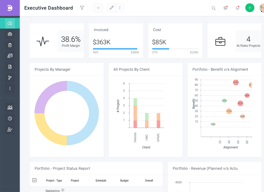
The thing I love about Celoxis is task management. You assign tasks to resources and they magically show up on their dashboards. There is no miscommunication or ambiguity as everyone knows exactly what’s on their plate. Managers can easily track their projects’ progress, request update on certain critical activities from the team members, and manage project timelines and risks all from the same interface. Reports and dashboards are highly customizable.
Using custom variables has a bit of learning curve and every time you expect a certain outcome, you can’t always get the data you need because the custom fields are tied to specific objects.
Managing multiple projects can be a nightmare, but not with Celoxis. Celoxis helps us improve our compliance and risk management, and enhance project tracking and reporting.