

Unclaimed: Are are working at ClickMeeting ?
ClickMeeting Reviews & Product Details
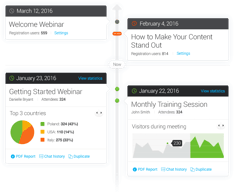
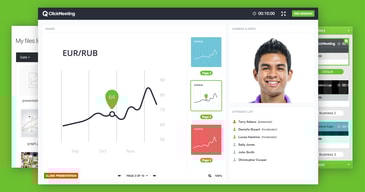
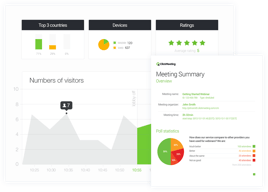
ClickMeeting is an efficient webinar management platform for businesses who want to boost their digital reach through professionally hosted and branded webinars. The platform’s tools and features are notably intuitive and user-friendly, making it one of the simplest options available today, especially for internationally hosted events. ClickMeeting is also customizable, with users able to tailor everything from the webinar room as well as other key elements needed to establish effective branding for any event. Types of content that can be hosted on ClickMeeting include Facebook and YouTube Live, presentations, surveys, and polls, just to name a few. It also comes with accurate analytics that can provide deeper audience insight for future events.

| Capabilities |
|
|---|---|
| Segment |
|
| Deployment | Cloud / SaaS / Web-Based, Mobile Android, Mobile iPad, Mobile iPhone |
| Support | 24/7 (Live rep), Chat, Email/Help Desk, FAQs/Forum, Knowledge Base, Phone Support |
| Training | Documentation |
| Languages | English |
ClickMeeting Pros and Cons
- Supports full audio and video recording of live sessions
- Offers chatfunctionality and interactive sessions
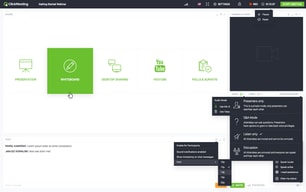
- Integration with Facebook Live and YouTube for added engagement
- Supports HD video presentation for multiple presenters
- System delays caused by larger number of guests
- Lacks automatic transcription
- Relatively expensive






Compare ClickMeeting with other popular tools in the same category.

The platform is a really nice way of doing webinars internally and externally, with ease of use. No training was required, just shadowed someone using it once and was able to go ahead by myself. You can host events for multiple people too easily join from a click of link.
Sometimes we would have connection issues and the feed would not be of the highest quality, this could cause problems if we was doing a webinar to customers. Also sometimes the links can be blocked by spam filters.
We use it to get a better understanding what we do as a business with internal webinars, then we can give product training to our customers externally. It is easy to set up and you can easily set up a instant webinar if required.
ClickMeeting has proven to adapt to the needs of this organization. Whether it be live webinars, on-demand learning or training opportunities, this webinar software works for everyone! The recent redesign offers a much more user friendly experience which is also visually appealing. The past few years we were not utilizing ClickMeeting as best as we could; now that we have expanded into utilizing recording, different presentation styles, embedding recordings, etc., ClickMeeting has been at the forefront of our member education.
Depending on the presentation software used, the formatting may get adjusted between platforms to fit ClickMeeting's software. Custom fonts don't always translate, but instead change to a closely-related font. Sometimes picture formatting gets slightly adjusted, making graphics overlap with text.
We are solving problems with insufficient education. The benefits are allowing members to tune into topics of their interest in their own time, especially with online learning. It's also allowed us to solve a major problem with volunteer training. Many volunteers are dispersed across the country, so ClickMeeting provides us with one space to connect and collaborate as a team.

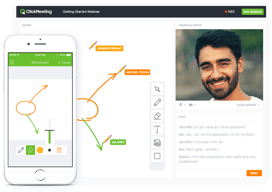
I love clickmeeting especially to monetize my webinars on the study of the french and Spanish language, being able to integrate these webinars with the Paypal platform makes it a very useful software to earn extra money through online webinars, the option to automate my webinars so that they are transmitted at different times they make clickmeeting really a platform made to impart knowledge this program also has a chat room called waiting room where the participants of the video conference can see the agenda to deliver in the current webinar while preparing the whole presentation is really a great tool and the most interactive is that it offers a blackboard where i can convey my points of view great skill to the participants.
Perhaps the price is one of its weaknesses, the 30$ Live plan remains a bit expansive compared to its direct competitors such as zoom or skype, PowerPoint presentations are correctly but there is a problem but the animations configured PPT format do not work, if the internet connection is no solid you will have problems when setting up your seminars, the audio often fails but they are problems that have been resolved.
I use clickmeeting to carry out webinars dedicated to people who are interested in learning the Spanish and French language, I also use it as a video conference tool to teach oral exams, long distance tests with my graduate and undergraduate students, with this program I can give knowledge and receive incentives in return.
It allows us to reach out to offices via email to remind them of their scheduled webinar, it has a chat field that enables us to answer questions while the webinar is playing and we can store our training videos to quickly get everything started.
We have had to contact support a few times when the number or pin is invalid and that is super inconvenient when we are on a tight schedule for running trainings.
Before having ClickMeeting, we had to manually run our webinars and essentially talk the entire time to get the same content to our customers.
Clickmeeting is easy to setup to use and to administrate. With the freezing option of the account one can save money without loosing all data, which happens with canceling the account.
Frequently technical problems on the user side. I't would be nice to have a 24/7 webinar for testing, so participants can test their systems in advance.
We want to use the webinars to draw attention to our onsite training offer
Very simple, fast, it's easy to customize and use
I want to be able to alter the reminder email that gets sent out (in case we made mistakes on the original invite) or to alter the original invite without re-sending.
Easy to connect with clients
Easy to setup. The ability for video, chat and presentation all at once. Reasonable cost.
Can’t use personal Logitech camera (instead of laptop camera). Would like to try personal mic instead of laptop mic. Need to looking skin layouts (looks old and outdated). Very few options. Would like to show animation in presentation (instead of showing a static document). Need easier way to toggle to internet to pull up my website at the end of the webinar so attendees can see my website with me. Or toggle screen to screenshare so participants can see my screen while I go to my website.
Provide a free webinar with the goal to get participants to sign up for my offering.
Easy to join and manage (email reminders, time zones), great polls, quality of voice and video, option to play youtube, intuitive interface.
No option to do text/sms reminders (would be great to increase attendance rate!) and easily manage cancellations. No option to do video to video Q&As or chats (side by side video). That would be great, as using chat only or limited voice capabilities is not great. Improve Polls (easier to categorize / find questions), more poll option (like on a survey). Easier to access / display "free text" polls. Auto detect time zone (show my + local time zone at the same time).
Convenience & location independent.
I like how simple it is to record the webinar, and adjust the presenter modes.
We have had a little trouble with creating/ using specific presenter profiles. We often use the same profile for multiple people and have to verbally tell our attendees who's actually presenting.
We have found this to be a great way to present information about our organization's various programs. It's much easier than trying to do a conference call or get multiple people in one location.

It supports most of the features I need.
Issues with multiple languages and series of webinars.
The usual for webinar tools.