

Unclaimed: Are you working at Contentstack?





Contentstack Reviews: 4.5/5 — Highly Rated
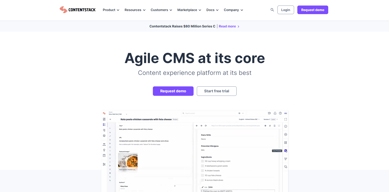
Contentstack is a company based in San Francisco that’s built to offer API-first headless CMS. The platform is built to empower marketers and developers to collaborate around content to create customer journeys and deliver dynamic digital experiences across channels, audiences, brands, and regions. It is Microservices-based, API-first, Cloud-native SaaS, and Headless.

| Capabilities |
API
CLI
|
|---|---|
| Segment |
Small Business
Mid Market
Enterprise
|
| Deployment | Cloud / SaaS / Web-Based, Desktop Mac, Desktop Windows, Mobile Android, Mobile iPhone, On-Premise Linux |
| Support | 24/7 (Live rep), Chat, Email/Help Desk, FAQs/Forum, Knowledge Base, Phone Support |
| Training | Documentation |
| Languages | English |

Compare Contentstack with other popular tools in the same category.
The possibility to schedule changes allows the workflow to be smoother. As a user-friendly platform, I can quickly create content that can be used in a lot of pages. I can easily find any doubt in the contenstack articles or through the customer support. It's very easy to integrate and implement new features comparing with our previous tool, for example payment methods, review system, external partners. I use it very frequently everyday and am glad to have a platform that doesn't break all the time or slow-CS has been a great improvement in my daily work.
Contentstack doesn't allow you to select unlimited entries to add to a release, it doesn't have several type of accesses (just content editor and admin). At the moment we cannot use images from other scopes, which increases the amount of images in our assets. The search bar of ContentStack is also a bit weird-we cannot save our searches and when solving errors it's hard sometimes to know which is the issue in CS (doesn't tell you exactly which part is wrong)
ContentStack is reducing the time I spend on executional tasks and allows me to be more efficient in my decisions, since I don't have to worry about feasibility of implementing a new feature/tool. Also, we can improve conversion of our website through the possibility to speed up integrations with external tools-payment methods,review systems.
ContentStack is a great CMS for customizing our front end, and it permits us to create fast development and optimized components through all the tech stacks used. Further, the ways that Contenstack handles optimizes, and publishes the content are really good; its documentation is so well done, and its well-created backend permits the use and integration to be easy to implement. We have created a lot of customized components using REST API and GraphQL, and the experience with both has been really great. It has permitted us to get the content with a really high frequency. Finally, we have not had issues with Contentstack, but there are no doubts that the Customer Support and all the rest of the services are good.
There are no certifications, that could be very helpful. But it's very easy to integrate that maybe is not necesary.
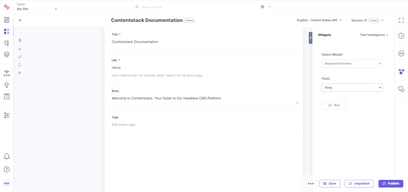
The dashboard is straightforward to use for the content editors, which permits the developers to create models and it is easy to use and create entries by the content editors, which is very helpful.
Easy to use and app friendly. Frequency of use.
I can't do Bulk upload. Can't do more than 200 at time
ease of using
Contentstack facilitates the easy upload of documents. I am able to upload the documents and stack them with fast publishing to the website.Contentstack facilitates the easy upload of documents. I am able to upload the documents and stack them with fast publishing to the website.
The fact that I cannot drop the documents and upload them at the same time. I have to add the documents one at a time.
The easy ability to publish and un publish documents
Everything related to Content Stack is good, and simple to make and organize. Also found a bug withing a plugin we needed on Content Stack and the ticketing system and live chat is perfect 10/10 if you ask me for the Customer Support.
Only thing I kinda disliked are the crazy types that come with GraphQL/Typescript usage on a project.
Content manement of components withing a project. Easy to use for Content Managers
It is user-friendly, the order in which you work is logical and simple. uploading images is easy, and even takes care of inclusivity, with giving images a correct title for screenreader users.
it creates big white spaces between the different features are not very esthetically pleasing.
Our previous program was always very slow, so contentstack is saving me a lot of time! Also, the modern products that are made with contentstack are pleasing my suppliers and brands, which evolves into an even better business relation.
Wery well written documentation about all the SDKs,APIs and tools. Very editor-friendly platform, which has a bright future. The best support section in my opinion on all platforms. Easy integrating tools.
Haven't encountered to any problem yet..
Editors of our client's company are regulating the content very easily
There is thorough documentation and easy access to understad everything. Moreover, customer support is always ready to help with calls and opening cases.
Sometimes, some parts of the application freeze and there is a need to refresh it a couple of times, which can be uncomfortable at times.
Creating blog article pages very quickly.
When we started the procurement process for our new CMS/DXP solution there was several key goals we had, one of which was to empower our business users to create new pages and content without the involvement of our tech teams and limited involvement from our ecomm ops team. Several weeks ago we noticed that one of our regions had published a brand new landing page with new elements and layout without any support from tech/ecomm ops! As part of the consumer advisory board, we are really excited to see what upcoming features will be available for our tech team and content creators to use! The visual editor will allow us to move forward quickly on creating new marketing content directly in Contentstack.
Nothing! There have been a few hiccups with some of the more advanced things that we'd like to do (e.g. future publication preview) but those all pale in comparison with the challenges we had with our old system.
It allows our business teams to create and publish new content and experiences on their schedules as opposed to waiting for when the tech and ecomm ops team have time. This has been a big win for us.

As we have embarked on a tricky migration journey, we chose Contentstack for it's ability to enable us to make a step up in achieving our content vision. We are not there yet but as we move forward on this journey we found a solution that was fit to the challenge and a partner that was both inspiring and highly supportive. The teams is caring about feedback and truly dedicated to customer success, putting words into action.
It is difficult to say at this stage, we have encountered difficulties but the people at Contentstack have been there to support in advice aswell as taking into account our needs on their roadmap.
Migration from 2 legacy CMS into 1. Reusability of content Personalization of content
- Excellent free training materials. Help instantly learning headless CMS best practives usage. - Intuitive content management and development process - Amazing documentation - Extremely usefull api - UI extensions with widgets maden easy and super powerful - Webhooks are enabling huge variety of integration scenarios out of the box - Permission concept allows very flexible and granulas access handling - Additional toolkit for JAM stack and content handling
- Few capability for assets image maintanance: no cropping, etc.
Contantstack is providing us an opportunity to create structured representation of our web properties data and orcestrate it. It took over an overhead of taking care about technical solution for data storage and freed our capacity for the improvement on the delivering of this content to end user. Content Editors have full power and focus over their tasks without being disturbed for CMS specific tasks.

Easy to use. Easy to customize. No performance related issues. Great support from Contentstack team whenever required.
There is nothing that i have disliked about contentstack.
Streamlining content management. Multi-channel content distribution. Collaboration and workflow optimization. Customization and scalability. Integration with third-party tools. Content reuse and versioning. Security and compliance.

Contentstack's CMS has given us the flexibility to revolutionize our digital approach with speed and agility. From UX to Go-Live we move fast and pivot quickly. The "blank slate" approach sllows us to fully customize our CMS, and the ability to reference components from one stack to another eliminates duplicate content. The Customer Support and Technical Support is fast to respond and genuinely care for your work and success.
I would like to see more video tutorials and education.
The team was previously using a monolithic CMS that had little customization and opposed a fast-to-production approach. The results once we shifted to Contentstack were immediate and dramatic. Our team can partner Contentstack with APIs in a way that the customer does not know which came from where. The team can make changes quickly and, as we learn and expand our needs, we can continuously update and upgrade without any downtime.
This platform offers a variety of beneficial features such as Headless Architecture, an API-First approach, Multi-channel and Multi-lingual support, Integrations, Extensibility, and top-notch Scalability and Performance. Setting up everything is quick and easy, and the process is self-explanatory. The Mission Control feature offers excellent monitoring capabilities.
Have to add some UI features (Folders, Smart folders) and revamp their app UI navigation to make navigating things more accessible in the Contentstack Interface. Have to address their Customization Complexity and Documentation.
Contentstack has successfully addressed the following issues: Headless CMS, Flexibility, Multi-lingual/Multi-Channel, Low code/No-code API, Developer friendliness, Scalability, and Performance.
The platform's automation tools save time and effort, and the headless CMS gives developers and marketers the ability to offer content experiences with speed and reliability.
When using Contentstack for the first time, it might be challenging to foresee potential architectural problems. To avoid such issues, it's essential to examine scalability at the outset thoroughly.
I can quickly distribute dynamic content across several platforms with Contentstack without the assistance of developers or QA engineers handling dynamic material well.
Sales process Onboarding checklist Integration specialist
Additional time with solution/integration specialist
Contentstack is our primary CMS provider. Helping us move our content modules over to Contentstack one component at a time vs an entire page. Byte-sized learning while we deploy and decide.
The collaboration and basic CMS features work really well and it is designed for teams (ie Mid Market to Enterprise) organisations. We love headless CMSs and this is the best we've used to date.
The initial cost compared to other CMSs is high. But within a few months we agreed it was more than worth the cost.
Multiple websites and Apps (Eventually) that share content.

I like the ease with which content can be created, the ability to have global fields to reuse within many templates, and the speed with which it works. So far I have not had a single drop in service in 3 months.
It is somewhat complicated to create a custom field, perhaps the documentation should improve a bit
We have been able to handle content thousands of times faster, now the end user can handle it without needing the development team
Customizability of the headless content management system.
Content modeling and structure can be a lot to train users on.
Main benefit from Contentstack is the customizability. The websites that are powered by Contentstack have extremely custom user interfaces due to the freedom that a headless cms provides.
Ease of use, and extremely helpful support when needed.
Difficulties in becoming familiar with the new interface. Only one level of references are included.
Managing all of our site content.
The team at Contentstack was very hands-on with our use case, which was a bit more complicated than others. They're very organized and helpful. Additionally, our team quickly picked up how to use it and the transition from our previous tools was seamless.
For our particular use case, we required the addition of several fields. This made the workflow somewhat bulky.
We are shortening the time it takes and the steps needed to create multi-language campaigns. We have condensed workflows and integrated multiple tools, including our homegrown system!
The easy management of complex process and its gatsby integration
The app marketplace doesn't have enough f out of the box features for experimentation
We had a lot of educators building lot of courses that were rich in content. From the ability to QA it to releasing it all quickly we were limited. Now creating new coures is simple!
The flexibility in adding content and being able to push this content live at the click of a button.
I have had no issues with content stack so far
Bringing our content directly to our customers
Facilidade de criar conteudos e multivariaveis atraves das quais torna-se possível trabalhar inclusive com testes a/b dos conteúdos.
A falta de uma forma de trabalhar nao logada para os times ainda em etapa de treinamento se aprimorarem.
reduçao do tempo de publicaçao de conteúdos e a independencia de lidar com os conteúdos sem que seja preciso um desenvolvedor para que tudo vá para produçao.

Easy-to-use tool for creating and distributing content, integrated with the generation of practically automatic API, that is, little technology effort and with technical support of excellence in service and quality.
I miss an interface that can be configurable, such as adjustments and color changes.
The time of implementation in my company, where the architecture is complex and robust. IT teams are impressed by the ease of integrating their applications with content api, and business and marketing teams are fascinated by the ease of editing and publishing content. In addition to allowing integration with our digital asset structure, maintaining our digital asset management objectives.
The CMS has the flexibility and functions to create anything you desire on a website. We haven't come across anything that we are unable to develop with Contentstack. Their support team is also the best in class with no scripted responses, and you are talking to a real knowledgeable team. The support team has been happy to jump on a call with me and go through the issues i have to help resolve them, which have always been our error (oops).
Their production UI is a little janky at times, but they will be releasing updates to fix these user experience issues. They are very adaptive to issues and the experience you have using their software and have been very adaptive when improving their product.
We are moving to a headless eCommerce website. They have integrations with the current eCommerce platform we use. We can pull in all the product data required directly into Contentstack, which enables us to reduce the number of API calls on the website. The integration allows us to maintain the high performance of the website and also improved the workflow of our staff and development team, which is fantastic.
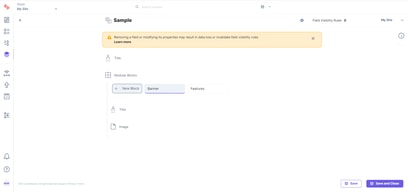
I like using modular blocks the best as they are a huge time saver for future content blocks.
I don't like that when I go into a content type builder and change an entry ID, it removes all content in that field. It's not a huge issue, just inconvenient at times that I need to update an entry ID but already have entries in that build.
The biggest problem we are solving is the process of making improvements and iterations of our copy. Contentstack is a game-changer when it comes to making quick copy improvements without relying on our development team and resources.
Ease of use and quickness for making changes
I dislike how this question is broken.....
Ability to change documentation as-needed without code deployments with various contributors.
Easy content creation and maintenance Small learning curve Fast content delivery Great localization support Well documented APIs Webhooks and Extensions are useful for all types of third-party integrations. Role-Based Access Control Superb Support
Contentstack does what it promises to do very well. The user interface is functional but can be better. Options to configure the interface for non-technical users would be great.
We could have a single source of truth for all our content. The content stack made it very easy for us to have this content localized. We could easily sync the content from different sources to Contentstack for delivery and share easily with other systems/services.