

Unclaimed: Are you working at Extensis?
Extensis Reviews: 4.0/5 — Solid Choice

| Capabilities |
API
|
|---|---|
| Segment |
Small Business
Mid Market
Enterprise
|
| Deployment | Cloud / SaaS / Web-Based, Desktop Mac, Desktop Windows, On-Premise Windows |
| Training | Documentation |
| Languages | English |






Compare Extensis with other popular tools in the same category.
I work in a small office but needed a better overall graphics asset management system than Apple photos could provide because I also need to manage documents and other things. Portfolio for that bill perfectly.
There is a bit of a learning curve, but not dissimilar to any other DAM out there. I think portfolio of one of the easiest to learn.
As I said, organizing and cataloging many different kinds of assets from photos and video clips to finished documents, logos and other graphics... It all makes my job earlier and easier to find files I need when a customer request them.
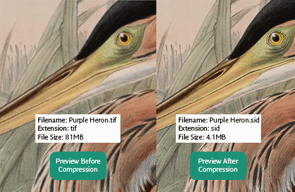
While the catalog of our repository is updated with library automation software, Portfolio provides a visual representation of our collection that is easily searchable and that can be shared with other departments in our building. I particularly appreciate having the capacity to make batch edits and develop PDF's with selected images. Being able to upload photos in a variety of formats (ex. tif, jpg) to the same space without having to convert the images to the same format increases our work efficiency.
I wish that uploading an image involved filling out a form with description and keywords during the asset add rather than doing these things after tracking the image down.
Extensis Portfolio makes it so much easier for the archive to share images/information with other departments in the building. With EP it is possible for my coworkers to interact with the archive while I am away and without submitting a specific request to me.
Portfolio's search tools are great. The automated tagging tool we added on has made the search tools even more useful by applying useful tags based on photo content without anyone on our team having to spend time manually tagging the images.
I wish it were easier/more affordable to access the Portfolio application and server via the cloud, and work remotely using the application and photos catalogued in it. Even when our VPN is working well for other purposes, it's very slow to use Portfolio over the VPN. Also, I wish we could dynamically resize image previews within the application interface. Lastly, occasionally when a search returns a large number of results, after I scroll through the first few dozen results, the result of the result set's preview images fail to load.
Our company gathers thousands of images annually, and we need an efficient way to index the images so we can retrieve them to use for marketing purposes at appropriate times. Portfolio cuts the time it takes to find the right image to a fraction of what it would be without the software.

What we liked best about the whole experience with Extensis, is the amazing support we have gotten through the whole process of getting everything set up. The documentation of the software is well written and easy to understand. Our main contact person Jeff has been phenomenal with answering any questions we have had.
It wasn't as easy to set up the catalog files, and get everything ported over. Though that could be just how we went about using the system. Since we always find a different way to use a software than most.
The business problem's we will be solving is the amount of time it takes to search for a single file in our old system. We can not search for images by file name, or add keywords to get those images to pop up. The other struggle we had were the issues with cross platform's Windows and Mac's have a different naming convention. Some files would end up looking very odd between the two. The benefits that we are realizing is the software is easy to use, we can control and manage user's and all around it will be easier to search for the files.
Easy to add assests and metadata. Customers can access files with simple searches.
Limited customization of NetPublish, (client website).
Customers are able to search, view and download images from our Photography Archives. Storing and organizing assets,
Portfolio is easy to integrate with/ It's Artificial Intelligence Auto-tagging saves huge time and resource for our clients, adds consistency and ensures that users find the images they need regardless of how they search. The Extensis staff are great, responsive adn supportive. They have a similar ethos to After Digital and are very customer focused whilst remaining attentive partners.
There is generally not much to dislike - this DAM does everything you need at a very good price. Not the cheapest but by no means the most expensive and for us the best value for your money.
We use Portfolio to offer our clients easy access to their digital assets. We use our own Connector to drive these assets into the front end CMS of the websites we build, creating beautifully designed, user-centered, mobile first sites but with the power of Portfolio to drive the content to the right page at the right time for the user to experience. Tye main issues our clients face is the accurate cataloguing and then retrieval of their digital assets.
The flexibility of Extensis Portfolio is really what works well for us. We can use existing workflows and pipelines that we have, existing servers and tools, and keep moving forward.
The web-based interface is nice, and has worked well for us, though there are times where we miss the client installs and the desktop applications that used to be available. It is a tradeoff, the web interface provides more flexibility and accessibility to more people, but the performance is sometimes diminished.
We use Portfolio to manage all aspects of our digital asset management strategy, and have seen large efficiencies gained through the use of the tool. It helps to streamline and simplify many of our logistics.
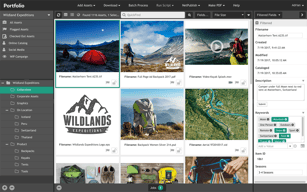
There are multiple things that I like, but Portfolio continues folder Autosync is one of the features we rely more in our environment. The other big plus for us is the graphic and visual interface of Portfolio.
Portfolio NetPublish is one of those tools that never quite worked for our environment. It doesn't necessarily mean the functionality is not there, it just never worked for our workflow.
We have a huge amount of files generated and maintain by our graphics department. Artists are not the best at managing files so Portfolio help us keep our digital assets organized and managed.
Easy to add files, easy to find. We can download full-size images immediatelly after we have find it in catalog. We use Portfolio during several years and we like it! Extensis support team helps us with all our questions. Watch folders are very helpful, just add it and forget about it! Application can recoginize multiple filetypes.
Desktop client was very convenient for users, we hope Extensis will return it in the future.
Now our creative studio catalogue all works we done and we can find any files in a seconds and use it again if we need.
i like the online publishing option, it saves me many hours of searching and sending assets.
user manual is huge and sometimes not very intuitive
I'm using the online publishing capabilities to allow employees from around the globe to have immediate access to our main product and marketing imagery.
It's ability to keyword, accept multiple filetypes (haven't found one yet that it doesn't accept), and see the metadata of images.
Kind of clunky, takes a while to load if you have a lot of images. Not intuitive to start, need a lot of experimentation and training. Wish there was a way to share specific folders with others without needing the desktop app. Also some photos do not show a thumbnail without syncing them again, an extra step that takes a long time.
We needed something to hold our 3Tb+ images and videos, and this is able to hold them and easily access them. If the images are keyworded, they're easily searchable, which becomes necessary on jobs that need to be done quickly.
The ability to set up and share catalogs over the Internet rather than using closed networks.
Not really much of anything. The software pretty well works as it should.
We have a small group of imaging professionals including graphic artists, photographers and videographers distributed across the country that provide our services to a large gov't agency. We are all able to upload imagery as it's created to allow each of us the ability to use that imagery in our own projects.
We have a wide variety of users that require specific uses for our digital assets and Portfolio Server delivers. We were able to integrate Portfolio within our Web-based Retailer Portal so that only approved clients with an approved sign-in could access selected assets. Internally, we use the Web-Client interface for entering, updating images and metadata.
We would like to see the availability of using vector clipping masks with our EPS images. As of this date, Portfolio does not support this needed feature.
Directed access to all our authorized assets for Internal staff use, external domestic use, and external international use, all using the same interface. Web-based and accessed so it's always available. Dramatic decrease in staff time sending assets by e-mail requests. Easily updatable with minimum amount of staff training.
Very useful for staff across our varied business to search and discover relevant imagery for their needs.
How the search engine behaves. It's a strange beast sometimes, just when you think you understand it... it returns un-related imagery.
Storage and quick effective access to almost 100,000 club archival images. Beneficial for our Marketing department to manage the use of imagery - ensuring copyright is covered. All staff can search the archive, then make a request to Marketing for any particular images, with information about intended use.
the interface is clean and east to use.
the loading and correction times. it can take awhile to load.
To create clean slates of portfolios and have them look presentable.
As a graphic designer, Extensis is a good portfolio for me. I can publish my portfolio online. I also like basic and customoziable interface.
Not so much things I don't dislike. Maybe it can be more tools. And it can slow at old devices. In generel Extensis is all right.
I organize my images and keep them together.
The user interface and multimedia abilities . it is great for r&d and organisation,
too much of infomation. the images sometimes are too flashy and standing out
Marketing and research. digital assets can be stored
Fast image search and collection. Image download and change. Image gallery sharing via NetPublish. Allows more than 1 catalog. Extensis It is very helpful in answering questions.
There is certainly generally not much to be able to dislike - this ABOUTIE does everything you want at a very very good price. Not the most affordable but don't ever typically the most expensive and regarding all of us the biggest benefit for your money.
The item worked real well for everyone (a small internal innovative group). It kept a record of our assets was easy to use from an conclusion customer perspective. It saved the great deal of period of time in finding assets each on disk and DVD AND BLU-RAY. Making utilization of the APIs we were capable to existing property with a key phrases and condition check package prior to the asset was accessible.
Modular, cost effective pricing for enterprise implementation
Loss of features between upgrades, no reporting available on usage metrics
Build sophisticated Image library, managing 1.65 Million assets
The user interface design makes for easy sorting and location of digital assets for primary users and secondary users.
Hot keys and keyboard shortcuts are not enabled.
Extensis Portfolio allows us to access our digital assets in a succinct and organized manner. It creates a synchronized visual language for an interdisciplinary organization.
Portfolio has an intuitive UI for non-technical users, but provides our team the ability to get very granular in how we administer our assets.
Automatic syncs aren't always reliable and there can be some discrepancies on what's on the server vs. what appears in Portfolio.
We needed a digital asset management system that integrated with MS active directory that would allow us to assign privileges to catalogs based on international regions. We've now moved off of using shared drives and Dropbox for storage and sharing.
Fast image search and retrieval. Image download and conversion. Image gallery sharing via NetPublish. Allows more than 1 catalog. Extensis IT is very helpful in answering questions. Onsite implementation IT are very proficient.
2016 version does not preserve transparency when converting format. 2016 runs in flash.
Image search-internal and external. push images to other areas of the enterprise. publish galleries for business partners. Business partners can change format and size for their needs.
We had 62,000-some digital assets when we installed Portfolio in 2013 - mostly photos. I'd been wrangling photos from multiple sources, and our users had been renaming files so they could record the details of an image. Extensis Portfolio made it easy to assign keywords, captions, and other details. I like being able to quickly create a gallery of images and generate a PDF. I also love the ability to batch rename files - or resize. We recently added the NetPublish feature to add the ability to share galleries with others within our network who don't have access to Portfolio.
We now have multiple catalogs (one for marketing photos, one for events, one for archive, one for confidential) and our users want to be able to search across the catalogs. Our users also seem to have problems with search requiring quotes around a name. (Otherwise, a search for John [space] Smith returns all photos tagged with John and all photos tagged with Smith.) I wish that if I chose to move a folder from one catalog to another, it would move the folder itself and not just the assets inside. The zoom is not as clear as the one on Adobe Bridge, so it can be hard to read peoples' name tags, for example, which would be handy for tagging. I have a bad habit of logging in and doing a search, and then closing the browser window and needing to start over, but I don't know how Extensis could fix that. I liked the product better when it had a desktop version - it was easier to link images in InDesign. The web-only option can be frustrating. Lastly, although this is great for photos, I expect there are better products for managing video.
We work with photos from across an entire academic health center. Extensis Portfolio helps us find, organize and tag files and is especially helpful when we need to remove a photo from our collection. It's helpful for tagging subjects so we know whether they are a patient, a model, a volunteer, etc. We purchased it to help manage patient photos and releases to make sure we weren't violating HIPAA law.
The keywording options are very well implemented.
The editing and uploading side is flash based so our users have trouble accessing it at times and weird glitches.
It helps us collect photos from a volunteer ministry at the church into one useable place.
What I like best is the way Portfolio makes it easy to catalog items, create web galleries, and manage metadata.
What I dislike is performance issues that you see when your catalogs get really big (1 million + assets). Make sure you ask the right questions to the right people at Extensis when you are planning your system. The posted requirements would work fine for a small deployment, but across an enterprise, you will need a consultation to assure you will have a setup to handle your needs.
Portfolio allows for our photographers to quickly catalog their images and provide the customer with their finished images quickly, through a Netpublish site. It allows our archivist to add important metadata to images and publish a library of images for use across the enterprise. It allows various groups to provide access to event photos. The best part of this is it eliminates the duplication of images by keeping all of the images centrally located while allowing the images to be used in multiple ways.
Extensis has done a lot of work to this product over the years. We started using the product over 15 years ago. Excellent at want it does. Worked really well at keeping the filesystem and the database in sync. It's ability to "archive" assets when removed from the file system was of great help to us.
It's ability to customize sites were a bit of a chore. If you wanted something that strayed from the templates you need you use their APIs. The API was pretty well documented. But it was not something the casual user could do.
This product worked real well for us (a small internal creative group). It kept track of our assets was easy to use from an end user perspective. It saved a great deal of time in finding assets both on disk and DVD. Using the APIs we were able to present assets with a terms and condition check box before the asset was available.
Ease of use / not cumbersome to use Great search capabilities Smart galleries based on search results NetPublish
Dependence on Flash (a huge drawback) No support for multi-page PDF documents Pretty costly iPhone app was last updated in 2015 No iPad support
We are a design school and due to the volume of digital content we are dealing with on a daily basis it is essential to have a reliable tool to manage all this data. We use Extensis internally in the Administration to archive, share assets and make them available for Programmes Office, PR, Marketing and Information Resources and soon plan to integrate Extensis in our curriculum as we appreciate the need for our students to be better prepared for their future workplace where effective digital asset management and teamwork is key.
Very useful to make one single media library from different ones. Easy to manage and to integrate with AD.
Galleries are only catalog specific. Should be better if they could be crossed on all catalogs. Few problems when we upgraded to newer version.
Assets centralization decreases search times and productivity. All marketing departments are now well connected to share medias and infos.
I like that I'm able to organize all photo and video assets into one central location and have the ability to distribute only selected items to clients. I also like the ease with which I can add/update metadata for the assets. And I love the new video playback in Portfolio 2016.
I have been using Portfolio since 2008. I became very accustomed to using the desktop client. What I loved about that (which is something that the current Porfolio doesn't offer) is that I was able to see ALL assets in a given catalog on ONE page. Now I am only able to see a maxium of 500 assets per page. Now that Portfolio is 100% net-based, it is way slower than the old desktop client. I also don't like that NetPublish does not offer the option for user to download smaller sizes (they way you can at Shutterstock.com, for example). We use large high-resolution photos for print marketing, but these huge files are not good for our sales team who insert JPEG files into Word documents. In the old version, they would copy/paste the image from the details page, which is no longer allowed. If they could download smaller files, the reporting function for which images have been downloaded would be a lot more accurate.
We use Portfolio NetPublish to distribute our photo/video assets to our 54 offices around the world and to travel agents, press, and media. We would have a much harder time doing this without Portfolio. The benefit of having all our assets in one central location from which they can be easily distributed is vital to our business.
Portfolio is a great search tool, I love the way it uses your keywords to intuitively search in the 'quick find' panel. Its also great that you can collect images and create PDFs quickly and easily. A pleasure to use.
The only problems I have are to do with inserting the description and punctuation. Portfolio seems to dislike paragraph/line breaks in the description and it takes ages to go back and add them in again - it takes two attempts - you cant just cut and paste a description which is annoying. We also had some problems with punctuation when transferring over our old catalogues but to be fair to extensis, they came in and took lots of time and effort to sort it out.
Portfolio has completely changed the way we search our databases and there is lots of scope to roll it out to other areas of the practice. I am developing new databases for the rest of the practice to use.