

Unclaimed: Are you working at Extensis?
Extensis Reviews: 4.0/5 — Solid Choice

| Capabilities |
API
|
|---|---|
| Segment |
Small Business
Mid Market
Enterprise
|
| Deployment | Cloud / SaaS / Web-Based, Desktop Mac, Desktop Windows, On-Premise Windows |
| Training | Documentation |
| Languages | English |







Compare Extensis with other popular tools in the same category.

Extensis was implemented prior to my arrival, and the account team was very good at providing resources to me and my team to learn how our integration worked and to manage the application on our own. It is also pretty intuitive once you understand the basics and we are able to allow departments to manage their assets on their own with little assistance from IT.
A few users have complained about search parameters, but we have seen that improve in the product over the last couple of upgrades
We had the same image stored hundreds of places on our network. With tens of thousands of images, it meant we were wasting 4-5 TB's of storage. With Extensis, we have improved workflow and accessibility for our web, ecomm and marketing teams.
The abilty to control access to images so that different groups of people can see what they need but not what they don't.
Gallerys and folders can confuse those uploading material.
I used to store my images all of over the place. This helped me sort out the mess but also put a system into place that assured future image finding happiness.
A easy way to organise your images that can be shared easily with your colleagues.
Can take a bit of time to set up if you don't know what you are doing.
Being able to share 250,000 images dating back to the 1990's with 100 staff quickly. Removing the need to have complex system of folders and making life easier for me.
The application is fast, has a clean interface and the staff have been extremely accessible during our research and implementation phases. The core functionality of the software is easy to learn and key features are never more than a click or two away. Also find the help menu relevant and useful.
Some elements of the application still use Flash but apparently that is being phased out in the next update to full HTML5. Not much else to dislike about the application.
We were using a clunky install of TRIM asset management that was slowly grinding to a halt. Our business is a mixture of PCs and Macs which all have access to the same 'asset management experience'. We create a lot of project specific assets that need usage, permissions and versions tracked; we now have that covered.
We really like the watch folder and auto ingest/keywording. Also the NetPublish feature is critical for our companies workflow. We also find the ability to add custom fields to really helpful when it comes to first organizing and cataloging our assets and second to the end user searching and finding what they are looking for.
This might seem silly but I don't like how you have to select a range of photos in order to preview them using the next/previous arrow keys. A more intuitive user experience would be if you preview a single photo in an album but then hit the next/previous arrows it would then show you the next or previous photo, without having to previously select them before previewing. This is how the Apple Operating System works when viewing a file/photo in the finder view.
Centralizing, standardizing and sharing thousands of assets with a company that is spread across the nation. We have benefited from great accuracy in image use and less time/hassle spent finding the appropriate image.
We have been so happy with Portfolio's ability to quickly create asset derivatives and to securely share our assets both internally and externally through the use of NetPublish. We are able to implement this tool across most of the departments in our institution to help to solve asset management, discovery, and access issues. Users are typically quick to learn allowing for easy adoption throughout the organization
We often would like to have a work space or gallery that could be access across all the catalogs, but currently galleries are catalog specific. I would also like there to be a more obvious copyright filter on the previews or in the metadata. If copyright notices could show up in red or if there could be some easy way for individuals to know at a quick glance which images were approved images for publication or reproduction, it would reduce a lot of confusion.
We are organizing, quality checking, and creating all of our derivative for our assets across the institution using this one tool. It has allowed multiple departments to jump on board with learning and using one tool to making it much easier and more streamlined process for employees searching for assets, or providing access for publication.
Integration of all EXIF, IPTC and Adobe metadata. Integration with LDAP server for password security.
Scrolling via a trackpad is too sensitive.
We have opened the vault on images across campus, this has freed up my time to make images not search for them for clients.
It's easy to use from both the librarian's perspective and the user's perspective. Administration is pretty easy and the GUI to do this is very nice.
Sometimes when the metadata import fails the error messages aren't enough information to figure out why it failed. Another frustration is that when we import metadata we no longer have the option to apply metadata only to items in an isolated location, it applies the imported metadata to the entire catalog by default. This can result in some unintentional metadata overwrites.
Centralization of assets in an easily accessible location. We no longer have to pull CDs off the shelf, or sort through poorly organized folders on multiple file shares to find our assets.
The ability to search specific folders, the keyword search and also file formats etc. It's awesome to find what you need on a large server.
Using the web version it is disappointing you can't open a file from there, but at least you can see the server path.
Our marketing requestors can find PDFs and artwork on their own without having to bother graphic designers. It saves a lot of time to do actual work and not waste time looking for a photo or file.
Portfolio is an easy to use, full featured application that has been around for many years. it is a very good, affordable workgroup solution, and a very good, budget-minded enterprise solution. It has all the basic features you would expect of a DAM without a lot of bells and whistles.
Portfolio recently changed from offering the option of connection to an external database like MySQL or Microsoft SQL Server for their top end solution to an internal only database, which they claim will be as robust and is better optimized. As this is still a new offering I cannot attest to these claims. I will say that the connection to the external database was always a bit of a kludge in my opinion though it worked. It remains to be seen if this new version is trouble-free. Portfolio is not as robust as other enterprise products when it comes to video or user profile settings.
Looking for a good quality, well-supported DAM solution for the workgroup and budget-minded enterprise customers. This does the job.
As the primary user loading data into the enterprise's Extensis Portfolio (primarily photos/media), I loved being able to search through the metadata to find exactly what I was looking for without having to manually scan through many different folder levels.
In the initial upload, I found that there was a lot of manual effort required on my part to get the needed metadata transfer. But I think that comes with the territory for any initial load into a new system.
There was no central digital media library. Having the files searchable by tags and metadata like date or file type saved time and also brought to light valuable historical files that had been essentially lost in the weeds.
The browser based UI is very user friendly and no additional software needs to be installed to access it.
The UI from the desktop top version is a little inconstant to the web version. Not sure if it is related to the software, our servers buckles down regularly when the organizing is accessing and downloading images.
Providing access to images and video content across the organizing in a central location with a search engine.
The ability to create and manage multiple Catalogues and associated user-access has been very useful in partitioning specific content within the University, allowing a broad user-base without worrying about incorrect or unauthorized use.
NETPublish is very underwhelming. Although it does simplify the task of creating web-galleries for stakeholder use it lacks the abilities I really need such as: • significant branding options or • an ability to self-build a theme such as say WordPress which would enable say a Brand platform; • allowing the download of vectors. Currently vectors download the Jpg preview Portfolio creates to show in the page • Allowing a choice in what sizes/options can be downloaded - a simple option to choose a size or variation allowed for download would be great. This might b a simple Catalogue batch resize to create variations and then choose that target path as the download, when a smaller verion might be used as the web-page thumbnails. In the Portfolio app itself: • differentiating file types, so when disallowing originals to be downloaded, items like PDFs can't be downloaded, currently if originals are not allowed the PDFs download the jpg preview. • A real issue has been that certain libraries within Portfolio need updating and present a security concern, so we can't give access to the app to outside stakeholders, so we can only give them access to web galleries which doesn't work very well. • Being flash-based is a concern.
Our University uses the DAM for the following: • Image gallery for the whole of University, with some users having access to the Portfolio image gallery Catalogue and some users just getting access to a NETPublished gallery. • Within the Marketing Department we store campaign assets for resourcing and referencing. This includes: images, video, copy, audio, pdf advertising. • As a subset of Marketing the Graphic design team have a Catalogue for design and brand assets. • Social now use a Catalogue for PSD templates and instructional videos.
I'm no longer spending hours to find the relevant digital assets i need. It has also become so much faster to share and deliver files. The usability is high enough that i trust my colleagues and the many volunteers at our festival to use the system with only very limited training.
My experience with the support has not been very good. This is however under elucidation by Extensis, and I trust that it will be sorted out.
File-sharing has been made much easier. Also, we spent much less time finding the assets we need. We have a gallery platform to show off our assets, which was very needed before.
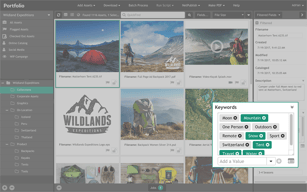
Love the ease of finding images at a glance. The fact that the platform looks the same on Windows as is does on a Mac. I like the keywords and PDF download option which makes things really easy.
I think it's very difficult to figure out at first. If you are unfamiiar with font administration and management, it can be a little overwhelming to use. You must have some understanding of font management in order to fully take advantage of their features.
I managing my digital assets . Extensis all me to access my digital assests in a succinct and organized manner.
You have as many fonts as you want and it won’t drag your computer down because you have to turn them on and off to use them.
It can be hard to find fonts. There are a lot of categories one font could be in.
This program helps to keep your computer running smoothly by not trying to load all your fonts at the same time.
That we can add fonts to it, and team members in other offices have access to the same fonts.
Sometimes it's glitchy when adding new fonts
Cross office collaboration
The new interface of the web client has gained much in aesthetics and relative ease of use.
I sorely miss the standalone Desktop client of earlier versions with infinite scrolling and drag and drop capabilities.
Collaboration is greatly improved in the current version, sharing assets across an internal team has greatly improved our overall workflow.
Easy to upload, download, move files and setting up users and catalogues a breeze. One point access for everything
Currently the media share websites are more work for me. I used to have one url our staff shared with clients. All they needed was a unique password to access their specific files. Leaving all other files hidden, now we have to set up individual sites for each branch. Not friendly for my type of use. The search is not as robust and at times people are telling me its not working... It is making it hard to find what you are looking for, even if images are well tagged.
This is a central location for all our media files across the corporation. This tool is to reduce duplication, help with expiry management and help to ensure we all have access to the best media files available.
the system has full active directory intergration to allow single sign in. it has many features allowing businesses to use it as a great asset server and allow customers to view products being created. for anyone looking for a asset management system with great features i would strongly recommend they try Portfolio
the system is complicated to get setup may features available that you may miss while setting up the system your self. but with assistance from extensis support you will have it up and running in no time.
with the portfolio is allowed us to catalog many thousands of customer images and allow them to get access to view them. it also allows for cross company access to be able to download stored images for use
We recently upgraded to the current version of Extensis and I really enjoy the new look on the user interface. The ability to download and send feedback to the rest of our admins is a helpful feature, especially since we have so many active users who need to access photos. I also enjoy the separation feature for photos, videos and audio clips. It is handy for us since we have a lot of different multimedia files to maintain.
One feature I miss from the old version is the ability to have the list of clickable categories on the left side of the home screen. This was very useful for our users, especially since sometimes the photos were not thoroughly tagged making images difficult to fine by search.
We are solving the problem of photo sharing and storage for our organization. Benefits of Extensis are the tagging efficiency and the ease of batch uploads.
I like overall storage capacity as we have several hundred thousand images that need to be stored. I also like the ability for end-users to create public galleries and the presets options for downloads. There are several other new features that make overall maintenance easier, but really too many to write out here.
The biggest issues that I have are: - Not being able to see more items in the grid view (thumbnails are too large) - Not being able to create presets that would work for both horizontal and vertical images (ie, I would like to be able to create one preset that downsizes to a fixed height but has the images maintain the aspect ratio for the width. Currently, a hard height and width must be provided).
We have been able to make images available to more groups based on security access. Presets allow the users to resize images without the assistance of media/IT.
The server portion installs easy enough, it was a bit of a resource hog in our VMware environment. The client portion works well enough. Our main issue was in getting the end users to be consistent about tagging photos. Our biggest problem was that it uploading images always falls to an intern.
Expensive, would have liked to see a better non profit discount.
DAM. It helped us organize our images in a way we can use other products if needed.

The simple interface with most desired uses already configured.
I would like if the platform was built using a more open system so we could do in-house development to add onto this already great platform.
Organizing hundreds of thousands of company media assets that get lost in folder trees on a shared server into a simple organized and hosted solution that we can access/organize and tag to make finding relevant assets very fast.
Extensis Portfolio allows users to upload files and documents and manage the accessibility using permissions for both internal teams and clients.
No dislikes, the product is really good.
We use Extensis Portfolio to upload and manage content data. The metadata functionality allows the users to understand the origination of the document and how/where it is used.
Simple user interface that isn't confusing
Sometimes a bit bulky and not as intuitive as I was hoping it would be
Reduction in time that we spend looking for specific users. This is an essential tool for us as we have multiple users adding assets to the database.
I have used the Extensis Portfolio for font management. Specifically Suitcase Fusion 7. It's a good software to share fonts within a network.
The software can be a bit glitchy sometimes. It has the tendency to stop working if there has been a Microsoft Automatic Update.
Using Extensis Portfolio has allowed my company to amalgamate fonts into a shared network folder and access the ones we want to use without installing an entire database of fonts. Makes it easier in terms of using fonts for design.
Ease of use, NetPublish portion that allows unlimited users
Extensis support and service, new versions are not sufficiently tested before release. Customers then become beta testers which is not good
managing marketing assets for global company
We particularly appreciate the ease of searching and previewing (primarily used for image searches) and ease of adding image files to layouts. Prior to creating this database of our royalty-free image assets, we realized we couldn't easily keep track of the images we already owned and found our designers would search online rather than explore our own assets and even repurchase images we had already invested in. We needed to make it as easy to search for RF images we already own as it is to search the entire world-wide web. We also like the feature to embed metadata out into the actual cataloged file. With the advent of other search mechanisms (Adobe Bridge, Spotlight, etc.), this gives us optional ways to search.
When adding metadata, especially keywords, various simple punctuation (such as quotation marks often used in keyword txt files) can cause the database to error out.
Full disclosure, we are not using Portfolio Server for all DAM. We are using Portfolio only for cataloging our royalty-free image library to make it as easy to search for RF images we already own as it is to search the entire world-wide web. It works well for this specific purpose. We were initially frustrated that database keywords are not automatically embedded in the actual image files but we have since used Portfolio's embed-properties function to do that. This has facilitated searching also with Bridge and Spotlight when necessary or convenient.
Metadata-based searching within catalogs and simplicity of the user interface are top of the list. The multiple catalog databases provides control over content, permitting allowed users the ability to view, download or contribute. Previewing and downloading are extremely easy.
With simplicity comes gaps. Within our workflow, we need more than just photo management but need the ability to apply asset-level securities. Our goal is to have a DAM that's the base for numerous business processes, whether they come with the DAM or integrate to other applications - and right now Portfolio is limited to extending or building out those processes.
Collaboration and approvals workflow and work order management are the big ones on my list. DAM needs to be central to initiating these processes.