

Unclaimed: Are you working at Figma?
Figma Reviews: 4.7/5 — Highly Rated
Figma is a feature-loaded design tool with tools designed to help users mockup, edit and design websites. The platform takes a more collaborative, cloud-based approach to design, which means it allows team members to design simultaneously and give each other continuous feedback as they work. This makes collaboration simpler and more effective. A free plan is available on Figma, however, premium plans offer more extensive tools and robust capabilities for web design and development as well as collaboration.
Figma is also often used as Wireframing of choice in UI/UX Design and Product Management tech stacks.


| Capabilities |
API
|
|---|---|
| Segment |
Small Business
Mid Market
Enterprise
|
| Deployment | Cloud / SaaS / Web-Based, Desktop Mac, Desktop Windows, Mobile Android, Mobile iPad, Mobile iPhone |
| Training | Documentation |
| Languages | English |
Figma Pros and Cons
- A free plan is available.
- Premium plans are more affordable than the Creative Suite.
- Collaborative tools allow developers and designers to work together.
- Figma is a feature-rich platform with robust capabilities for mocking up websites.
- Figma only concerns itself with the design aspect; you’ll still need web developers to create and implement the necessary code using other software.


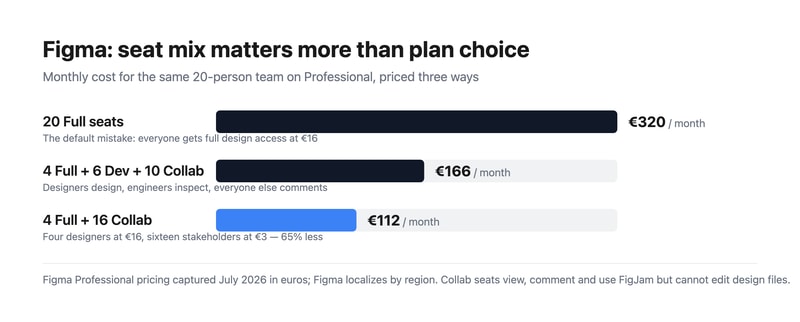
Most teams overpay for Figma by putting everybody on a Full seat. Figma sells three seat types, and the cheapest is a fifth of the price of the most expensive. A twenty-person team where four people actually design pays €320 a month doing it wrong and €112 doing it right — for identical access to the work that matters. Choosing your seat mix is a bigger decision than choosing your plan.
- What it is: The industry-standard collaborative interface design tool, now spanning design, whiteboarding, slides, dev handoff, sites, and motion.
- Best for: Any team doing product or interface design collaboratively, at essentially any size.
- Pricing: Free Starter tier. Professional from €3 to €16 per seat. Organization €5 to €55. Enterprise €5 to €90. Verified July 2026.
- The honest catch: Moving from Professional to Organization takes a Full seat from €16 to €55 — 3.4x — for governance rather than design capability.
What Is Figma?
Figma won interface design by being browser-based and genuinely multiplayer at a time when competitors were desktop applications with file handoff. Multiple designers in the same file simultaneously, a URL instead of an exported PDF, and no version confusion — that combination made it the default in a few years, and it remains the strongest argument for the product.
In 2026 it is considerably more than a design tool. The pricing page lists eight products: Figma Design, Make, Draw, Dev Mode, FigJam, Slides, Motion, Sites, and Buzz. That breadth is why the seat model exists — an engineer needs Dev Mode but not the drawing tools, and a product manager needs FigJam and comment access but not either.
Adobe’s proposed $20 billion acquisition was abandoned in late 2023 after regulatory opposition, and Figma has since gone public. For buyers, the practical consequence is that Figma remains independent rather than folded into Creative Cloud, which most of its users regarded as the better outcome.
How Figma Works
- Three seat types. Full (everything), Dev (Dev Mode, FigJam, Slides, Buzz, plus view and comment on design files), and Collab (FigJam, Slides, Buzz, view and comment with basic inspection).
- Browser-first and multiplayer. Real-time collaboration is the core mechanic, not a feature.
- Dev Mode. Structured handoff to engineers, with specs, measurements, and code snippets.
- FigJam. Whiteboarding for workshops and planning, included even on Collab seats.
- Design systems. Shared component libraries, which is where the Organization tier starts earning its cost.
- AI credits, metered per seat. 3,000 a month on a Professional Full seat, 500 on Dev and Collab, rising to 4,250 on Enterprise Full.
Figma Pricing
Captured from Figma’s pricing page in July 2026, in euros. Figma localizes currency by region, so check your own market. Organization and Enterprise bill annually only.
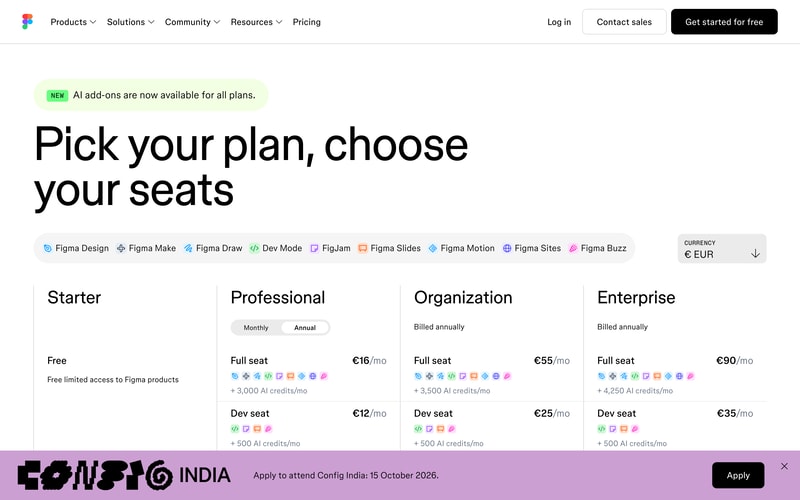
| Plan | Full seat | Dev seat | Collab seat | Billing |
|---|---|---|---|---|
| Starter | Free | — | — | Free, limited access |
| Professional | €16/mo | €12/mo | €3/mo | Monthly or annual |
| Organization | €55/mo | €25/mo | €5/mo | Annual only |
| Enterprise | €90/mo | €35/mo | €5/mo | Annual only |
The seat mix is where the money is:
- Audit who actually edits design files. In most organizations that is the designers and nobody else. Product managers, marketers, founders, and executives need to view and comment — which is a €3 Collab seat, not a €16 Full seat.
- Engineers usually want Dev, not Full. At €12 against €16 the saving is modest on Professional, but on Organization it is €25 against €55, which is substantial across an engineering team.
- The Organization jump is about governance, not design. €16 to €55 per Full seat is 3.4x, and it buys design system management, analytics, branching, and centralized administration. If you do not need those, Professional does the same design work.
- AI credits are now a differentiator between tiers. 3,000 monthly on a Professional Full seat against 4,250 on Enterprise. Heavy users of Figma Make and the AI features should check this allocation rather than assuming it is unlimited.
- The free Starter tier is genuinely useful. Unlimited drafts plus 150 AI credits a day, capped at 500 a month. For a solo designer or someone learning, it is a real product.
- Annual-only above Professional. Organization and Enterprise cannot be bought monthly, so evaluation has to happen on Professional.
Who Should Use Figma
- Product and design teams. The clearest case, and effectively the industry default. Hiring designers who do not know Figma is now the unusual scenario.
- Teams with designers and engineers collaborating. Dev Mode makes handoff structural rather than a document someone emails.
- Distributed teams. Browser-based multiplayer removes the file-sharing problem entirely.
- Organizations with design systems. The Organization tier’s library management is the reason to pay 3.4x, and for a real design system it is worth it.
It fits poorly for solo non-designers making simple graphics, where Canva is faster and cheaper; for print and photo work, which is Adobe Photoshop territory; and for teams wanting to ship a live site directly, where Framer or Webflow go from design to production.
Honest Pros and Cons
Strengths
- Genuine real-time collaboration. Still the best implementation in design software.
- Browser-based. No installation, no file versions, no platform arguments.
- A flexible seat model. Three tiers of access means you do not pay full price for viewers.
- Excellent dev handoff. Dev Mode is a real workflow improvement rather than a spec export.
- A usable free tier. Unlimited drafts, which is more than most competitors offer.
- The industry standard. Hiring, templates, plugins, and tutorials all assume Figma.
Limitations
- The Organization tier is a steep jump. 3.4x per Full seat for governance features many teams will not use.
- Seat sprawl is easy and expensive. The default assumption of Full seats for everyone is the most common overspend.
- Annual-only above Professional. No monthly option for Organization or Enterprise.
- AI credits are metered. A new constraint in 2026 that heavy AI users need to model.
- Performance on very large files. Complex documents can strain the browser.
- Product sprawl. Eight products under one brand makes working out what you are actually buying harder than it should be.
Figma Alternatives and How It Compares
- Canva is far simpler and cheaper for marketing and social design, and not a serious interface design tool.
- Framer designs and publishes a live site, which Figma does not do natively at the same level.
- Webflow is the production-web counterpart for design-led teams shipping real sites.
- Miro competes directly with FigJam for whiteboarding and workshops, with more depth in that specific area.
- Simplified targets fast marketing and ad creative rather than product design.
- Penpot is the open-source, self-hostable alternative, and Sketch remains the macOS-native option for teams who prefer a desktop application.
For related tools, browse our graphic design directory.
The Verdict
Figma is the correct default for interface design, and this is one of the least controversial recommendations in software. Real-time collaboration in the browser solved a genuine problem, Dev Mode made handoff structural rather than ceremonial, and the ecosystem effects — plugins, templates, and a hiring pool that already knows it — compound the advantage. There is no version of this evaluation where Figma is a mistake for a product team.
The decision that actually costs or saves you money is the seat mix, and it is the one most teams get wrong. The instinct is to buy everyone a Full seat, which for a twenty-person company on Professional is €320 a month. But Full seats are for people who edit design files, and in most organizations that is the designers alone. Put four designers on Full and sixteen stakeholders on Collab at €3 and the same team costs €112 — a 65% saving with nobody losing access to anything they were actually using. Audit your seats before you renew, and again after you grow.
The other judgement is when to move to Organization, and the honest framing is that the 3.4x jump per Full seat buys governance rather than design capability. Design system management, branching, analytics, and centralized administration are worth €55 a seat when you genuinely run a design system across multiple teams; they are worth nothing if you are five designers who just need to work together. Stay on Professional until a specific Organization feature is causing you a specific problem — and note that since Organization is annual-only, Professional is also the only tier where you can evaluate monthly.
FAQ
How much does Figma cost?
Captured in July 2026 in euros, Professional is €16 per month for a Full seat, €12 for a Dev seat, and €3 for a Collab seat. Organization is €55, €25, and €5 respectively, and Enterprise €90, €35, and €5, both billed annually only. A free Starter tier includes unlimited drafts and 150 AI credits per day up to 500 monthly. Figma localizes pricing by region, so check your own market.
What is the difference between Full, Dev, and Collab seats?
A Full seat gives complete access to all Figma products including editing design files. A Dev seat covers Dev Mode, FigJam, Slides, and Buzz, with view and comment access to design files — built for engineers implementing designs. A Collab seat covers FigJam, Slides, and Buzz with view, comment, and basic inspection on design files, intended for stakeholders who need visibility but never edit. Matching seats to actual behaviour is the single largest saving available.
Is Figma’s free plan good enough?
For an individual, often yes. The Starter tier includes unlimited drafts, UI kits, templates, and 150 AI credits a day capped at 500 monthly, which is enough for learning, personal projects, and solo freelance work. Team collaboration features, shared libraries, and unlimited version history require Professional, so it stops being sufficient as soon as more than one person needs to work in the same files regularly.
Should I upgrade to the Organization plan?
Only if a specific feature is solving a specific problem. Organization triples the Full seat price from €16 to €55, and what it buys is governance — design system and library management, branching, analytics, and centralized administration — rather than any additional design capability. Teams running a genuine design system across multiple product groups get value from it. Smaller teams generally do not, and should stay on Professional.
What is Figma best for?
Collaborative product and interface design at any team size, particularly where designers and engineers work together and handoff quality matters. It is the industry standard, so it also lowers hiring and onboarding friction. It is a weaker choice for marketing graphics, where Canva is faster, and for teams that want to publish a live website directly from their design, where Framer or Webflow are purpose-built.

The simplicity of using the tool rivals that of anything else I've ever used. I used to despise using things like MS Vizeo because it was so finicky. I started to watch my co-workers in different departments use figma and I decided to try it out. It's so easy that I picked it up without any instruction and I create workflow's and send them to my client's and subordinates frequently.
I don't think there is anything that I specifically dislike yet. While I haven't tried it in browsers beyond chrome I would hope that it is optimized for Safari and Edge.
It is helping me quickly visualize workflows and problems so that stakeholders can either confirm or respond with revisions. This has sped up the process of resolving certain issues tenfold.
Love the ability to view properties, shared components, and comment
A little difficult to navigate between projects or versions of designs
Designers being able to craft a design and successfully hand off to engineers. Figma allows for less unnecessary back and forth with design requirements while allowing an interface to have the back and forth dialogue when needed.

We love how figma makes it really easy for our team to create prototypes and pages and allows us all to collaborate on it and give immediate feedback.
We wish the settings for Figma were much easier to locate. It's hard to find the Billing page for example or the Profile section.
We can build high-fidelity designs in one-place instead of having it cluttered through different Drives or Dropboxes.

I think one of the most helpful part of Figma is the fact that it is web based and this often means that I can pickup any computer device and access my Figma design in a matter of seconds or even take part in collaborative product designs with team members spread around different locations. Being able to prototype and collect feedback from my colleagues in this way tops my list of things to love about this wonderful design software.
Because Figma is primarily web based, it often means that it is ineffective without internet connection. While I rarely have found myself needing to use Figma without internet connections , there have been situations where there was internet outages or I was in a location with poor internet connection and I basically couldn’t do much with Figam , despite its subtle offline capabilities.
Figma is the primary software that my team has relied upon for product designing and prototyping purposes. With Figma , our prototypes are closer to the main thing as possible. Once we get our designs right on Figma , we no longer need to worry about our designs not being compatible with specific screen sizes or reacting badly on mobile screens as Figma takes care of all of these potential hurdles.

Well, the most liked software by me till date is FIGMA. It is such a brilliant software every designer fall in love with. We can call it as a boon for design industry, figma built trust, guide new designers, easy to use, not a complex software, meet every requirements well. The team that built Figma software went above and beyond for every single need of a user to make it happen. Once if you start using figma you will not go for any other.
There is nothing that i dislike about figma, this is my favourite tool and i highly recommend to everyone who loves designing. Get figma, use it and grow. You are never gonna regret.
As a UI designer when i can came across figma, it doesn't took me too long to learn the software it is very easy to use and well built. No complexations. Now, after 2023 config it comes with more advanced options and get more relaxive for developers. You can create another level of prototyping and wireframing with it that blows everyones mind. Great tool till date.
Figma is great at enabling collaboration between designers and other team members. The new developer mode seems great for developer handoff at a first impression.
There is not much to dislike about Figma. According to some companies, using a cloud-based product might be a security risk. I also believe the recently introduced variabled are a bit overwhelming.
Figma is helping us collaborate among designers to design our digital product. It's great at organising visual mockups that represent our real life implementation.

The best thing about Figma is that it runs on any browser, you will never have any compatibility issue. You can use it on any platform. And it has all the necessary tools for designer, also have community, plugins, collaboration features. And the best is AutoLayout. Figma is a lifesaver me.
To be honest, I don't really see any downside on figma. It works just like charm. I think they can add some more photo editing features so that even photo editing can be done there so we don't need to use other.
Figma is solving all of my design problems. Starting from Responsive design to prototype with live prototyping feature. Micro interaction & animation. High quality export. Auto Layout & Plugins which makes life more easier than ever for designers.
figma has allmost everytoll to make templates and wesite design posture and i like the most about figma is the frames android,iphone,teblates and much more so i can see the website or our design in diffrent phones and laptops
figma is not much responsive i can not make a website or app the redirect directly on page , i have to make another templates for all redirections.They have to add ready mate button or some pages.
I have make multipal website threw diffrent softwares but the main issue is that when i run them the website ,i can't see the phone or laptop or page so if i make website for laptop it does not work properly in phone but in figma it easy to explore the diffrent tool for see my website in laptop or phone or many more
Best to create design and easy to use , You have every tool and features a deisgner needs to create a best results and now that they have Android version features that's more helpful to create a mobile responsive design
There is nothing to dislike about figma you have everything a deisgner needs to deisgn.
Tools we need we get it in Figma from background blend to color blend to strokes to ux we have all in one.
Figma allows us to design user interface collaboratively and because it is cloud based we need not download or upload files, rather use it directly in remote computers.
Figma requires a good internet connection. Also, we cannot see co-designers design changes right away; we will have to refresh the page to see the changes reflected.
We can watch our team-mate working on the screen live with the help of pointers. We can set up as much as two editors for free in at a time and also we can have unlimited viewers for free

O Figma possui tudo o que um designer de produto precisa para dar andamento para os seus projetos. Ele auxilia desde a concepção de um produto digital até o momento da entrega do projeto para equipes de desenvolvimento.
Infelizmenente, o Figma não fornece de forma adequada ferramentas focadas em modifição e criação de bitmaps, algo que o Photoshop nos fornece, por exemplo. Além disso, a parte de vectorização do Figma ainda pode melhorar muito.
Anteriormente, utilizavamos outros métodos para conceber produtos digitais. Agora, com o Figma, nosso processo de construção tem sido cada dia melhor. Resolvemos também a falta de comunicação contínua com os times de desenvolvimento e construímos uma fonte da verdade do design.

Easy to create wireframes & prototype. These are quite helpful for user research.
Not having a small over view section like Miro board. Unable to view what was edited and by whom.
Collaboration with cross functional team is easy. Retrospective meetings goes better.
Smoothly real-time collaboration. Online sharing Observe others
A little bit difficult to arrange auto-layout
Easy to use for both designers and devs. sharing easy. Good for both web and app design
Figma is great for prototyping with others or collaborating on designs.
I think the only thing I dislike is the small differences in hotkeys from illustrator.
Collaborating with others remotely
It is straightforward to use for people unfamiliar with designing tools. My design team leaves all their high-quality designs in a figma, where I can freely edit them to my needs. In addition, I love it to design lifecycle flows freely in real-time with my team worldwide.
Some features are still for designers only and are hard to comprehend.
It helps us have a lot of editable creatives in high quality, free to use in real-time for my team around the world. My design team loves it because it simplifies their life!
collaboration with team in real-time is really helpful
Wish it was a bit more cost effective to have others as creators, but overall that's a minor complaint
Design tool for our software; allows our team to use the same components, quickly wireframe and prototype; share out tests to get feedback from external folks, etc

Figma helps to fascinate prototyping and wireframing with excellent results (visuals, textures, and responsiveness). Integration with Jira helps us to collaborate flawlessly on important & complex projects. The free version supports lots of features & functionalities which are almost enough to get a project done. The user interface is super clean and organized with all features well-annotated. Either version support device responsiveness with lots of media query options available. It's really an amazing tool for prototyping, animation, and wireframing-regardless of project type.
I have no other issue with Figma except that it's not easy to learn and I think it's for advanced developers. But it's very effective.
It helps to quickly brush up on awesome web templates and creative designs which helps to save time and resources.
It's simple enough that everyone from the team can use it but powerful enough to meet the needs of advanced technical and creative projects.
It can quickly become overwhelming for non-designers with all of the tools and options at their disposal.
Figma gives our team a collaborative space to brainstorm, prototype, refine, and archive all of our design work and then some. It's helped streamline our workflow, removing redundant tools and making our work more efficient.
Ease of use, cloud saves, plugins, animations, and so much more.
Honestly, there's not much not to like about figma. The only potential downside I can see is with the billing structure, what's free vs what isn't?
Being able to design easily and communicate that to my clients, designer, and collaborators.
The best thing about Figma is that it is super easy to learn, understand and use. The designing tools and features, along with the plugins, help make designs easily and smoothly.
One thing which is not feasible is that we cannot resolve multiple comments together in figma, or that along with the designs the comments do not get transferred to another page in the design file.
Figma helps me design the User Experience of my product easily. The Figjam board, its templates and the Figma Design file are much easier to use and learn. It is very convenient for me to make user flow, research documentation, user journey maps, competitive analysis, wireframes, prototyping, and high-fidelity designs in Figma compared to the other design tools.

Figma's extensive feature set and adaptability are what I enjoy most about it. It is a one-stop shop for designers because it provides many different design and prototyping tools on a single platform. Figma's real-time collaboration function, which enables concurrent work on the same design file and improves communication while accelerating the design process, is its most useful feature. Figma's benefits include cross-platform compatibility, cloud-based storage for simple access and collaboration, integrated prototyping capabilities, version control, and support for design systems and component libraries.
Figma could potentially be improved in the following areas: Performance when working with big, complicated design files: Slower performance when dealing with big, complex design files. Beginning learners' learning curve For new users, the broad feature set could have a learning curve. Lack of offline access or restricted functioning when there is no internet connection. Costs associated with advanced features: For some advanced features, a paid subscription is necessary, which may be an issue for individuals or small teams on a tight budget.
Collaboration, cross-platform accessibility, design iteration, and design system administration are all issues that Figma addresses. This helps designers by improving communication, fostering uniformity in design, enabling effective teamwork, and enabling quick prototyping.

Te da la posibilidad de dividir tareas con tu equipo de diseño, centrandote unicamente en el diseño de como se veria la web y dejandoles al equipo de programacion que acaben con su implementacion en el servidor.
Quizas si no llevas mucho tiempo trabajando con ella hay algunas funciones que cuesta encontrarlas. Me costo un poco saber como ampliar un tablero de tamaño, y al hacerlo las cosas se trastocaron de sitio.
Me permite una comunicacion fluida cuando trabajo con equipos con separacion de tareas. Me permite modificar cosas en tiempo real y que el resto de departamentos tengan acceso y vista inmediata.

Figma connect everyone in team to design process so that a team can deliver faster and better product. It's great for design review feedback . It is easy and simple.
Figma can not be used without an active internet connection, thus it can creat trouble for workers who worked in isolated area . Try to make it more effective without internet connection also.
Figma better for team collaboration as you can edit projects as a team by looking who changed what. Figma helps to creat design more effective as it has given many efficient tools which helps to improve design productivity.
UI is simple enough for you to craft interfaces without being a UX Designer but complex enough to escalate and build incredible, animated prototypes with multiple workflows.
I can't think of anything I dislike about it, honestly. It's a well-crafted product with many features and plugins built by the community that you can use to improve your workflow.
Building pixel-perfect UI interfaces for my clients. I've been a software developer for the last 4.5 years and a key part of every great product is ensuring a great user experience with a great design, and Figma ensures that.

Its very user friendly and can collaborate with teams and it is free to use.
I cannot dislike but initially, as a beginner, it is a bit complex to use. sometimes it freezes the machine if it is of low old computing processor.
I can make custom icons and gif files as per my own requirement which benefits me from creating unique illustration or icons.

Without a doubt, Figma is the best UI/UX. Easy to use, develop and share designs. Supporting different device types and Prototype creation is really fantastic to use.
Nothing Major but sometimes I feel it is really slow on the browser, which might be due to a poor internet connection. Its a freemium model and need to upgrade when using with team
Ease of creation of UI/UX designs for different device sizes. Prototype sharing with the product owner to test and validate it. Figma community is a great place to start and create designs.
The vast variety of features, how similar it is to web development, the sheer number of useful plugins available, and ease of use. Collaborative features are great as well.
Nothing, really. I wish there were more prototyping features, but that's about it.
It helps solve the problem of creating neat wireframes and product designs. It benefits my business in the way that we can now present designs to stakeholders and developers in a much better way. It properly showcases the product that we are envisioning and helps with building a good MVP as well.
The posibility to work at the same with my peers over a project, the ease to use in a cross platform environment and the very user friendly interface, makes Figma my way to go whenever I need to sketch or create a prototype for a design.
One minor thing I'd like to be improved is how the folders and files are created/organized withing a project with some other people, I find it kinda weird to organize your own work. I'd also love to see a easy way to communicate with my peers while working on the same document, as a chat for example.
Figma allows me to start from sketches to full prototypes when working with my peers and create high fidelity mockups to be shared with customers. The performance and the work has been improved greatly.
With Figma's Auto Layout, I no longer waste time manually adjusting spacing and sizes after design revisions. Numerous easy keyboard shortcuts let me replace content in a flash (either via paste in place or paste to replace) and quickly copy images as PNGs to paste elsewhere (like messaging apps) without saving them to my computer. Viewing artboards and prototypes online also makes designs easy to share with teammates for review. They don't have to download another app; we can work together in real-time.
Sometimes, images get corrupted after pasting them into Figma, and the only way to fix them is to re-paste the image. It would also be nice if you could have more than one type of device prototype per page in a Figma file. I work on cross-platform experiences, and I like to keep the wireframes on the same page so it's easier for others to understand the flow/order.
When designing, I don't have to worry about traditionally tedious tasks like adjusting spacing and sizes, replacing content, and renaming layers. Figma's features and shortcuts streamline those for me. These save a lot of time and allow the team to focus on more ambitious designs/changes. It's also easy to share files with others and see updates or comments in real-time - no need to pass an offline file back and forth to get feedback.
I like that it has the right features for the designer and the developer to work collaboratively in the same space simultaneously. Commenting features are beneficial to both parties and saves time.
The tool does not have the interaction capabilities expected from a prototyping tool. I have been looking for a tool that can show multiple actions in one click, and FIgma doesn't have that.
It solves the problem of being able to collaborate while building a design without using multiple tools. It is benefiting me because it saves time and avoids context switching between different devices.